drive NISSAN QASHQAI 2019 Owner´s Manual
[x] Cancel search | Manufacturer: NISSAN, Model Year: 2019, Model line: QASHQAI, Model: NISSAN QASHQAI 2019Pages: 500, PDF Size: 2.38 MB
Page 154 of 500
2-74Instruments and controls
JVI0627X
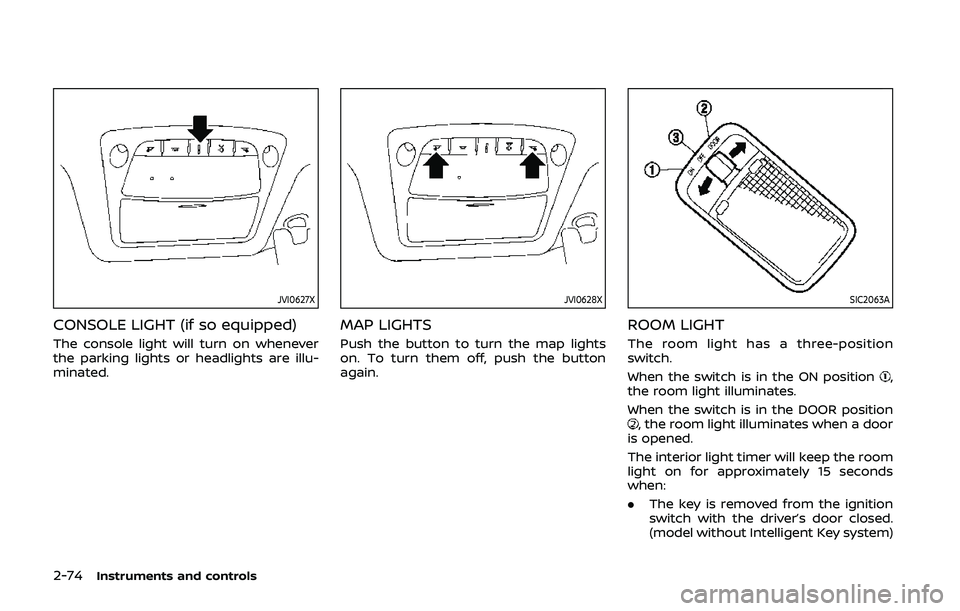
CONSOLE LIGHT (if so equipped)
The console light will turn on whenever
the parking lights or headlights are illu-
minated.
JVI0628X
MAP LIGHTS
Push the button to turn the map lights
on. To turn them off, push the button
again.
SIC2063A
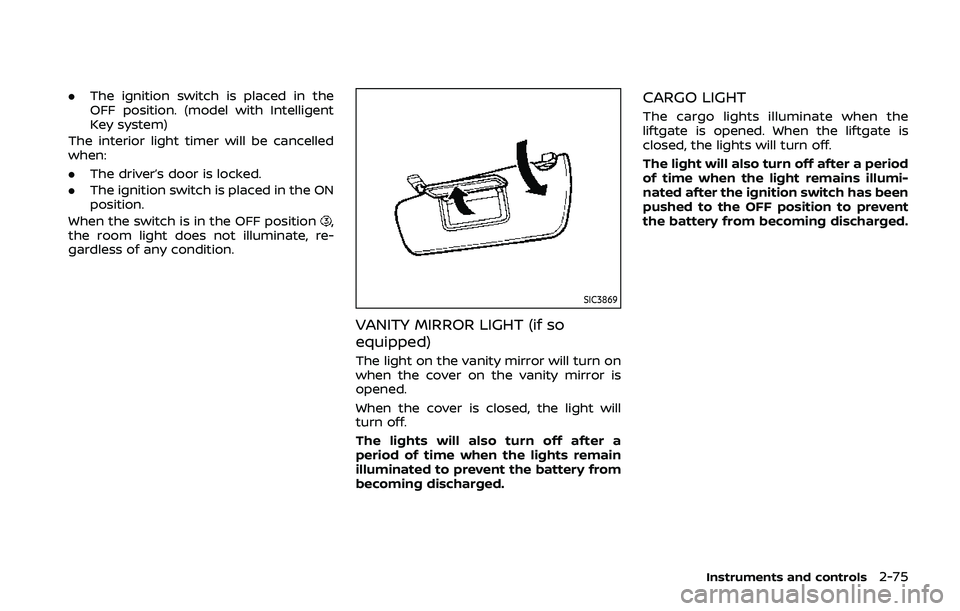
ROOM LIGHT
The room light has a three-position
switch.
When the switch is in the ON position
,
the room light illuminates.
When the switch is in the DOOR position
, the room light illuminates when a door
is opened.
The interior light timer will keep the room
light on for approximately 15 seconds
when:
. The key is removed from the ignition
switch with the driver’s door closed.
(model without Intelligent Key system)
Page 155 of 500
.The ignition switch is placed in the
OFF position. (model with Intelligent
Key system)
The interior light timer will be cancelled
when:
. The driver’s door is locked.
. The ignition switch is placed in the ON
position.
When the switch is in the OFF position
,
the room light does not illuminate, re-
gardless of any condition.
SIC3869
VANITY MIRROR LIGHT (if so
equipped)
The light on the vanity mirror will turn on
when the cover on the vanity mirror is
opened.
When the cover is closed, the light will
turn off.
The lights will also turn off after a
period of time when the lights remain
illuminated to prevent the battery from
becoming discharged.
CARGO LIGHT
The cargo lights illuminate when the
liftgate is opened. When the liftgate is
closed, the lights will turn off.
The light will also turn off after a period
of time when the light remains illumi-
nated after the ignition switch has been
pushed to the OFF position to prevent
the battery from becoming discharged.
Instruments and controls2-75
Page 162 of 500
3-2Pre-driving checks and adjustments
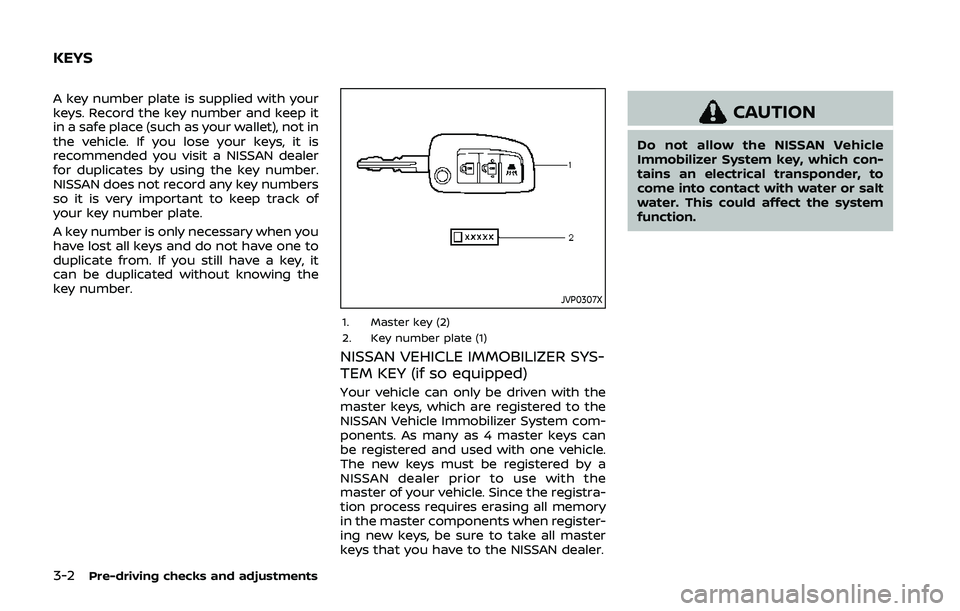
A key number plate is supplied with your
keys. Record the key number and keep it
in a safe place (such as your wallet), not in
the vehicle. If you lose your keys, it is
recommended you visit a NISSAN dealer
for duplicates by using the key number.
NISSAN does not record any key numbers
so it is very important to keep track of
your key number plate.
A key number is only necessary when you
have lost all keys and do not have one to
duplicate from. If you still have a key, it
can be duplicated without knowing the
key number.
JVP0307X
1. Master key (2)
2. Key number plate (1)
NISSAN VEHICLE IMMOBILIZER SYS-
TEM KEY (if so equipped)
Your vehicle can only be driven with the
master keys, which are registered to the
NISSAN Vehicle Immobilizer System com-
ponents. As many as 4 master keys can
be registered and used with one vehicle.
The new keys must be registered by a
NISSAN dealer prior to use with the
master of your vehicle. Since the registra-
tion process requires erasing all memory
in the master components when register-
ing new keys, be sure to take all master
keys that you have to the NISSAN dealer.
CAUTION
Do not allow the NISSAN Vehicle
Immobilizer System key, which con-
tains an electrical transponder, to
come into contact with water or salt
water. This could affect the system
function.
KEYS
Page 163 of 500
JVP0543X
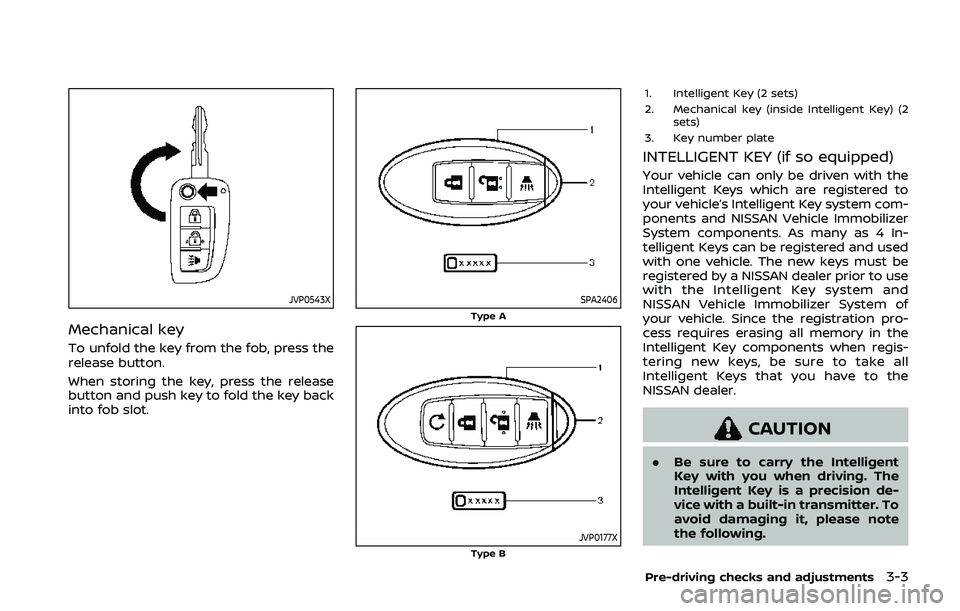
Mechanical key
To unfold the key from the fob, press the
release button.
When storing the key, press the release
button and push key to fold the key back
into fob slot.
SPA2406Type A
JVP0177XType B
1. Intelligent Key (2 sets)
2. Mechanical key (inside Intelligent Key) (2sets)
3. Key number plate
INTELLIGENT KEY (if so equipped)
Your vehicle can only be driven with the
Intelligent Keys which are registered to
your vehicle’s Intelligent Key system com-
ponents and NISSAN Vehicle Immobilizer
System components. As many as 4 In-
telligent Keys can be registered and used
with one vehicle. The new keys must be
registered by a NISSAN dealer prior to use
with the Intelligent Key system and
NISSAN Vehicle Immobilizer System of
your vehicle. Since the registration pro-
cess requires erasing all memory in the
Intelligent Key components when regis-
tering new keys, be sure to take all
Intelligent Keys that you have to the
NISSAN dealer.
CAUTION
. Be sure to carry the Intelligent
Key with you when driving. The
Intelligent Key is a precision de-
vice with a built-in transmitter. To
avoid damaging it, please note
the following.
Pre-driving checks and adjustments3-3
Page 165 of 500
CAUTION
Always carry the mechanical key
installed in the Intelligent Key.
WARNING
.Always have the doors locked
while driving. Along with the use
of seat belts, this provides great-
er safety in the event of an
accident by helping to prevent
persons from being thrown from
the vehicle. This also helps keep
children and others from unin-
tentionally opening the doors,
and will help keep out intruders.
. Before opening any door, always
look for and avoid oncoming
traffic.
. To help avoid risk of injury or
death through unintended opera-
tion of the vehicle and or its
systems, including entrapment
in windows or inadvertent door
lock activation, do not leave chil-
dren, people who require the
assistance of others or pets un-
attended in your vehicle. Addi-
tionally, the temperature inside a
closed vehicle on a warm day can
quickly become high enough to
cause a significant risk of injury
or death to people and pets.
SPA2457
LOCKING WITH KEY
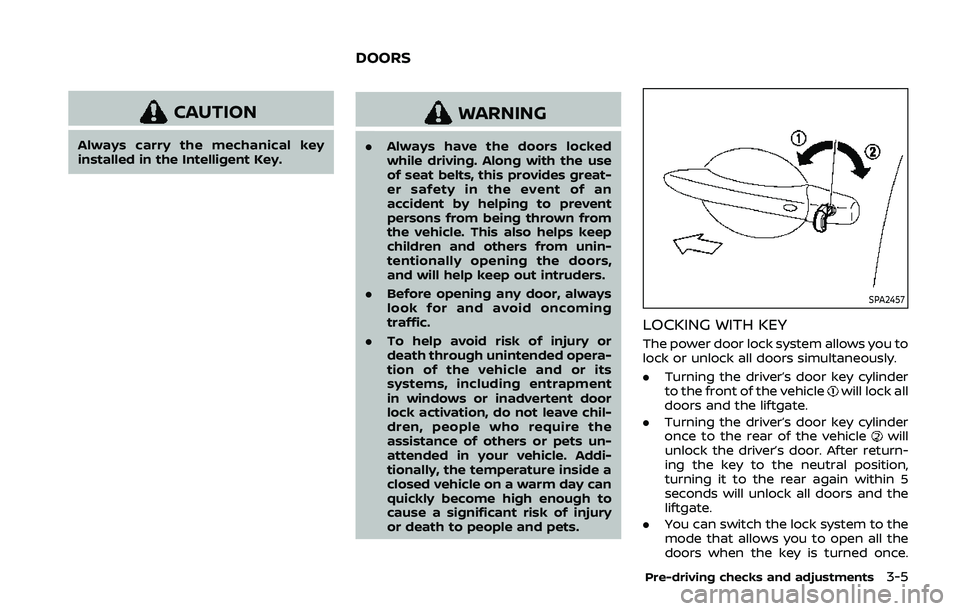
The power door lock system allows you to
lock or unlock all doors simultaneously.
.Turning the driver’s door key cylinder
to the front of the vehicle
will lock all
doors and the liftgate.
. Turning the driver’s door key cylinder
once to the rear of the vehicle
will
unlock the driver’s door. After return-
ing the key to the neutral position,
turning it to the rear again within 5
seconds will unlock all doors and the
liftgate.
. You can switch the lock system to the
mode that allows you to open all the
doors when the key is turned once.
Pre-driving checks and adjustments3-5
DOORS
Page 166 of 500
3-6Pre-driving checks and adjustments
(See “Vehicle Settings” (P.2-23).)
SPA2726
LOCKING WITH INSIDE LOCK KNOB
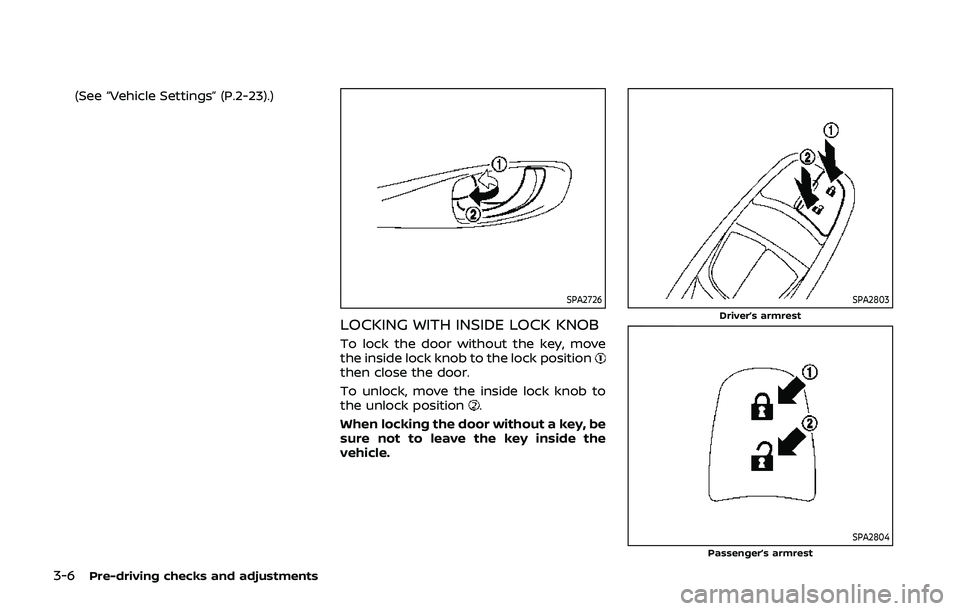
To lock the door without the key, move
the inside lock knob to the lock position
then close the door.
To unlock, move the inside lock knob to
the unlock position
.
When locking the door without a key, be
sure not to leave the key inside the
vehicle.
SPA2803Driver’s armrest
SPA2804Passenger’s armrest
Page 167 of 500
LOCKING WITH POWER DOOR LOCK
SWITCH
Operating the power door lock switch
(located on the driver’s and front passen-
ger’s doors) will lock or unlock all the
doors.
To lock the doors, push the power door
lock switch to the lock position
with the
driver’s and front passenger’s doors open,
then close the door.
When locking the door this way, be sure
not to leave the key inside the vehicle.
To unlock the doors, push the power door
lock switch to the unlock position
.
Lockout protection
Lockout protection function helps to
prevent the keys from being accidentally
locked inside the vehicle.
When the power door lock switch (driver’s
or front passenger’s side) is moved to the
lock position with the Intelligent Key left
in the vehicle (models with Intelligent Key
system) or the key left in the ignition
switch (models without Intelligent Key
system) and any door open, all doors will
unlock automatically and a chime will
sound after the door is closed.
AUTOMATIC DOOR LOCKS
. All doors lock automatically when the
vehicle speed reaches 15 MPH (24
km/h).
. All doors unlock automatically when
the ignition switch is placed in the OFF
position or when the shift lever is
moved to the P (Park) position, if
selected (CVT model).
SPA2801
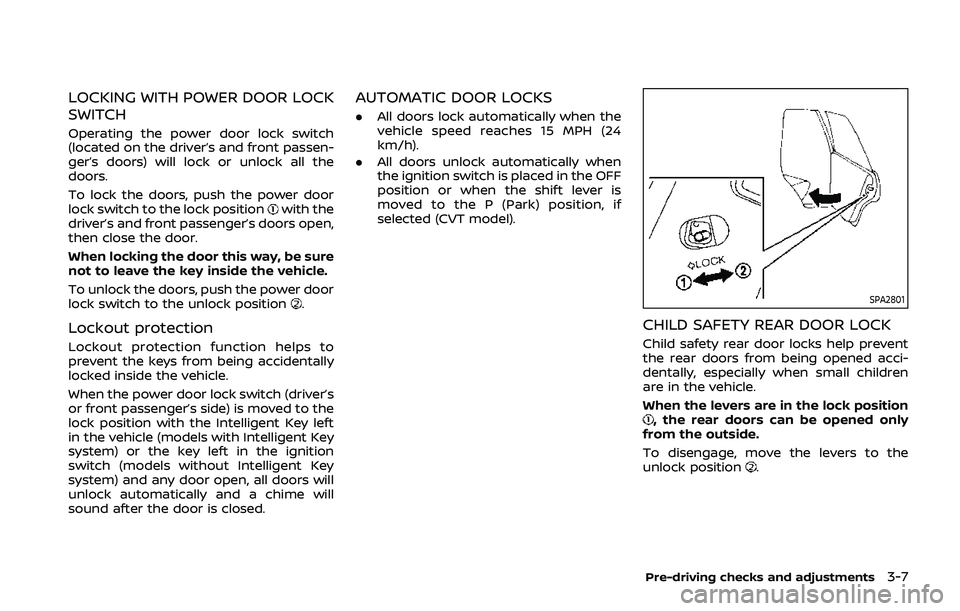
CHILD SAFETY REAR DOOR LOCK
Child safety rear door locks help prevent
the rear doors from being opened acci-
dentally, especially when small children
are in the vehicle.
When the levers are in the lock position
, the rear doors can be opened only
from the outside.
To disengage, move the levers to the
unlock position
.
Pre-driving checks and adjustments3-7
Page 169 of 500
JVP0308X
Jackknife type key release buttonLOCK buttonUNLOCK buttonPANIC buttonBattery indicator light
HOW TO USE REMOTE KEYLESS
ENTRY SYSTEM
Welcome light and farewell light
function
When you lock or unlock the doors or the
liftgate, the daytime running lights, park-
ing lights and the tail lights will illuminate
for a period of time. The welcome light
and farewell light function can be dis-
abled. For information about disablingthe welcome light and farewell light
function, see “Vehicle Settings” (P.2-23).
Locking doors
1. Remove the key from the ignition
switch.
2. Close all the doors.
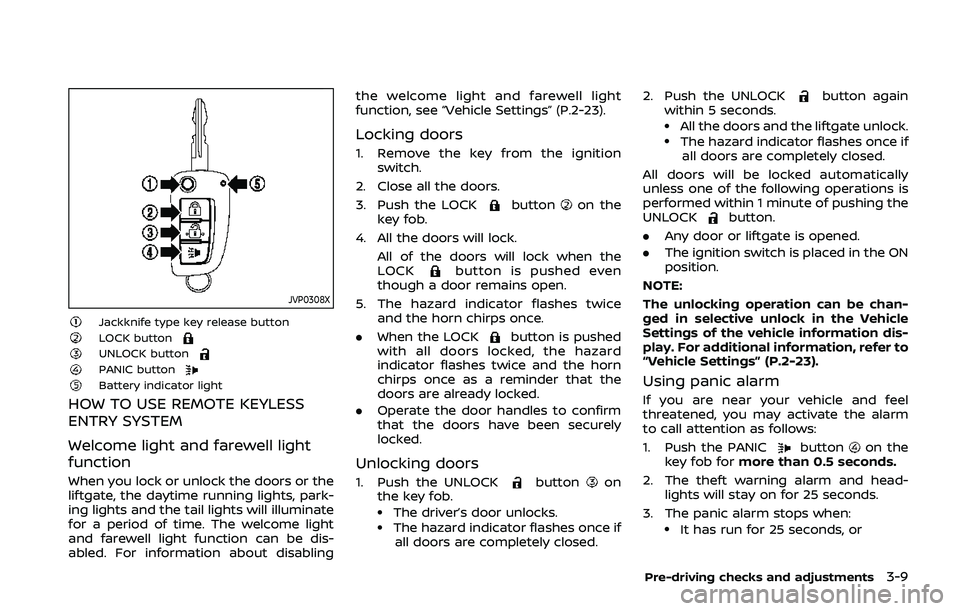
3. Push the LOCK
buttonon the
key fob.
4. All the doors will lock. All of the doors will lock when the
LOCK
button is pushed even
though a door remains open.
5. The hazard indicator flashes twice and the horn chirps once.
. When the LOCK
button is pushed
with all doors locked, the hazard
indicator flashes twice and the horn
chirps once as a reminder that the
doors are already locked.
. Operate the door handles to confirm
that the doors have been securely
locked.
Unlocking doors
1. Push the UNLOCKbuttonon
the key fob.
.The driver’s door unlocks..The hazard indicator flashes once if
all doors are completely closed. 2. Push the UNLOCK
button again
within 5 seconds.
.All the doors and the liftgate unlock..The hazard indicator flashes once if all doors are completely closed.
All doors will be locked automatically
unless one of the following operations is
performed within 1 minute of pushing the
UNLOCK
button.
. Any door or liftgate is opened.
. The ignition switch is placed in the ON
position.
NOTE:
The unlocking operation can be chan-
ged in selective unlock in the Vehicle
Settings of the vehicle information dis-
play. For additional information, refer to
“Vehicle Settings” (P.2-23).
Using panic alarm
If you are near your vehicle and feel
threatened, you may activate the alarm
to call attention as follows:
1. Push the PANIC
buttonon the
key fob for more than 0.5 seconds.
2. The theft warning alarm and head- lights will stay on for 25 seconds.
3. The panic alarm stops when:
.It has run for 25 seconds, or
Pre-driving checks and adjustments3-9
Page 174 of 500
3-14Pre-driving checks and adjustments
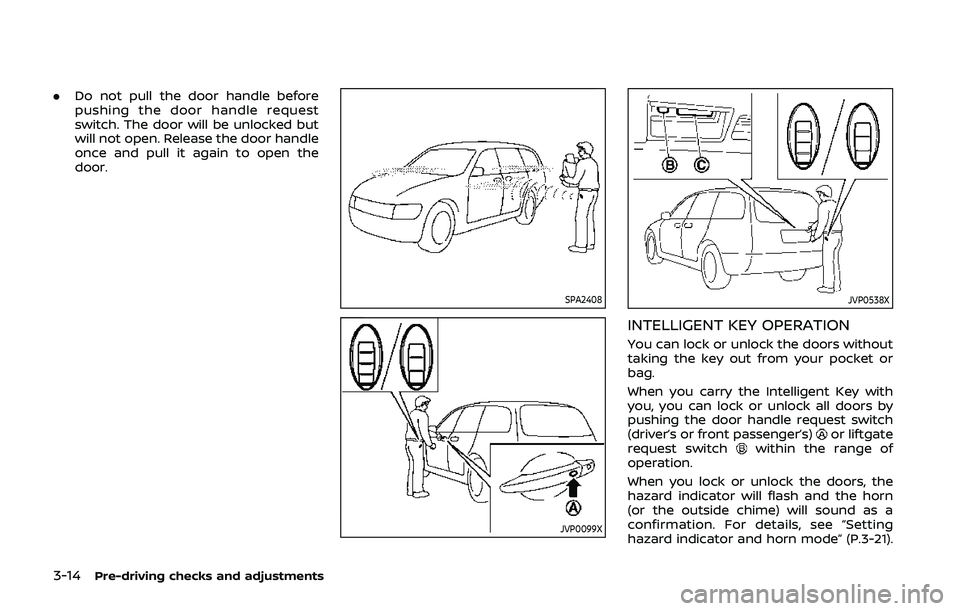
.Do not pull the door handle before
pushing the door handle request
switch. The door will be unlocked but
will not open. Release the door handle
once and pull it again to open the
door.
SPA2408
JVP0099X
JVP0538X
INTELLIGENT KEY OPERATION
You can lock or unlock the doors without
taking the key out from your pocket or
bag.
When you carry the Intelligent Key with
you, you can lock or unlock all doors by
pushing the door handle request switch
(driver’s or front passenger’s)
or liftgate
request switchwithin the range of
operation.
When you lock or unlock the doors, the
hazard indicator will flash and the horn
(or the outside chime) will sound as a
confirmation. For details, see “Setting
hazard indicator and horn mode” (P.3-21).
Page 177 of 500
TROUBLESHOOTING GUIDE
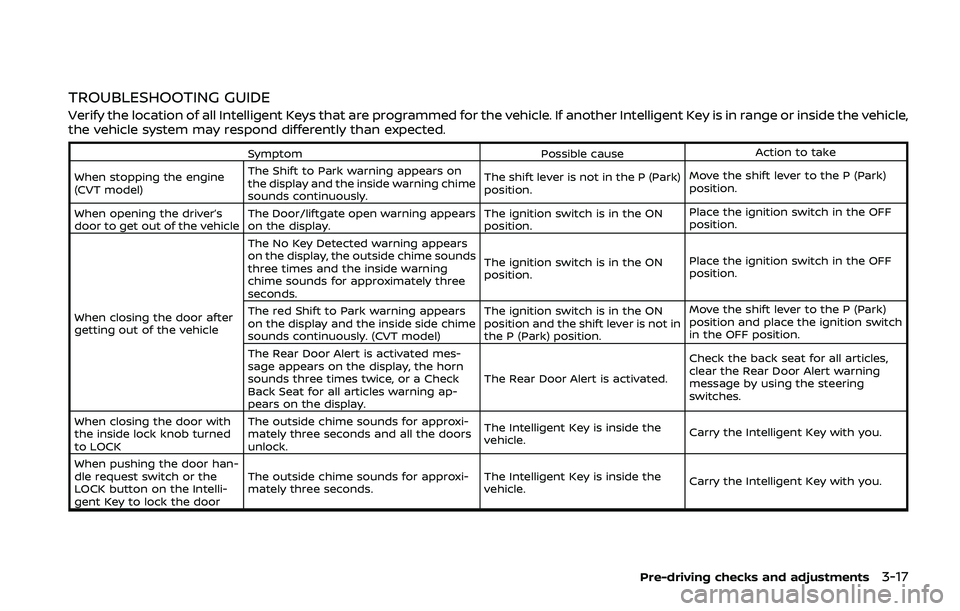
Verify the location of all Intelligent Keys that are programmed for the vehicle. If another Intelligent Key is in range or inside the vehicle,
the vehicle system may respond differently than expected.
SymptomPossible causeAction to take
When stopping the engine
(CVT model) The Shift to Park warning appears on
the display and the inside warning chime
sounds continuously. The shift lever is not in the P (Park)
position.
Move the shift lever to the P (Park)
position.
When opening the driver’s
door to get out of the vehicle The Door/liftgate open warning appears
on the display. The ignition switch is in the ON
position.Place the ignition switch in the OFF
position.
When closing the door after
getting out of the vehicle The No Key Detected warning appears
on the display, the outside chime sounds
three times and the inside warning
chime sounds for approximately three
seconds.
The ignition switch is in the ON
position.
Place the ignition switch in the OFF
position.
The red Shift to Park warning appears
on the display and the inside side chime
sounds continuously. (CVT model) The ignition switch is in the ON
position and the shift lever is not in
the P (Park) position.Move the shift lever to the P (Park)
position and place the ignition switch
in the OFF position.
The Rear Door Alert is activated mes-
sage appears on the display, the horn
sounds three times twice, or a Check
Back Seat for all articles warning ap-
pears on the display. The Rear Door Alert is activated.
Check the back seat for all articles,
clear the Rear Door Alert warning
message by using the steering
switches.
When closing the door with
the inside lock knob turned
to LOCK The outside chime sounds for approxi-
mately three seconds and all the doors
unlock.
The Intelligent Key is inside the
vehicle.
Carry the Intelligent Key with you.
When pushing the door han-
dle request switch or the
LOCK button on the Intelli-
gent Key to lock the door The outside chime sounds for approxi-
mately three seconds.
The Intelligent Key is inside the
vehicle.
Carry the Intelligent Key with you.
Pre-driving checks and adjustments3-17