audio NISSAN QUEST 2017 RE52 / 4.G Owners Manual
[x] Cancel search | Manufacturer: NISSAN, Model Year: 2017, Model line: QUEST, Model: NISSAN QUEST 2017 RE52 / 4.GPages: 520, PDF Size: 2.5 MB
Page 8 of 520
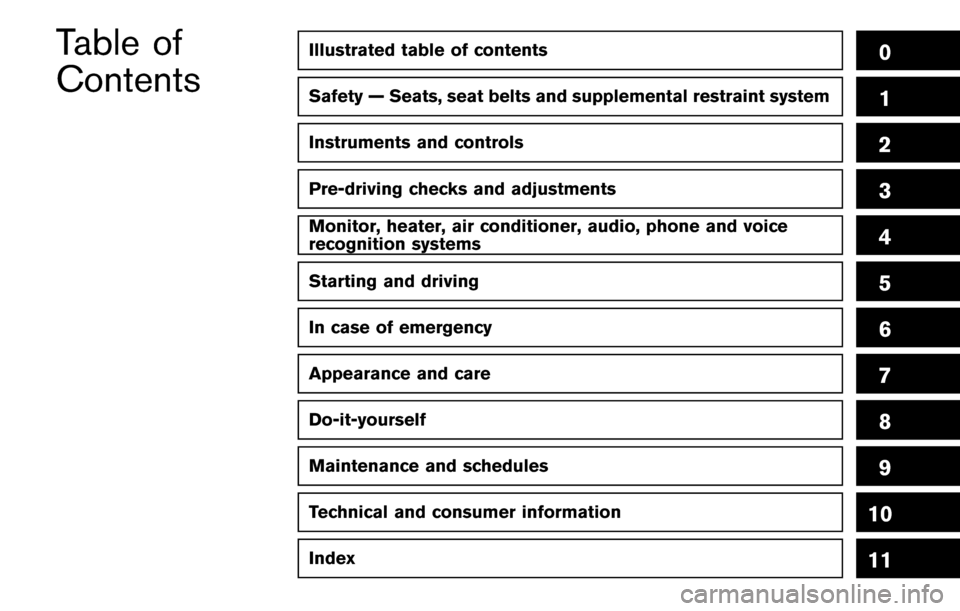
Illustrated table of contents0
Safety — Seats, seat belts and supplemental restraint system1
Instruments and controls
Pre-driving checks and adjustments
Monitor, heater, air conditioner, audio, phone and voice
recognition systems
Starting and driving
In case of emergency
Appearance and care
Do-it-yourself
Maintenance and schedules
Technical and consumer information
2
3
4
5
6
7
8
9
10
Table of
Contents
Index11
Page 15 of 520
0-6Illustrated table of contents
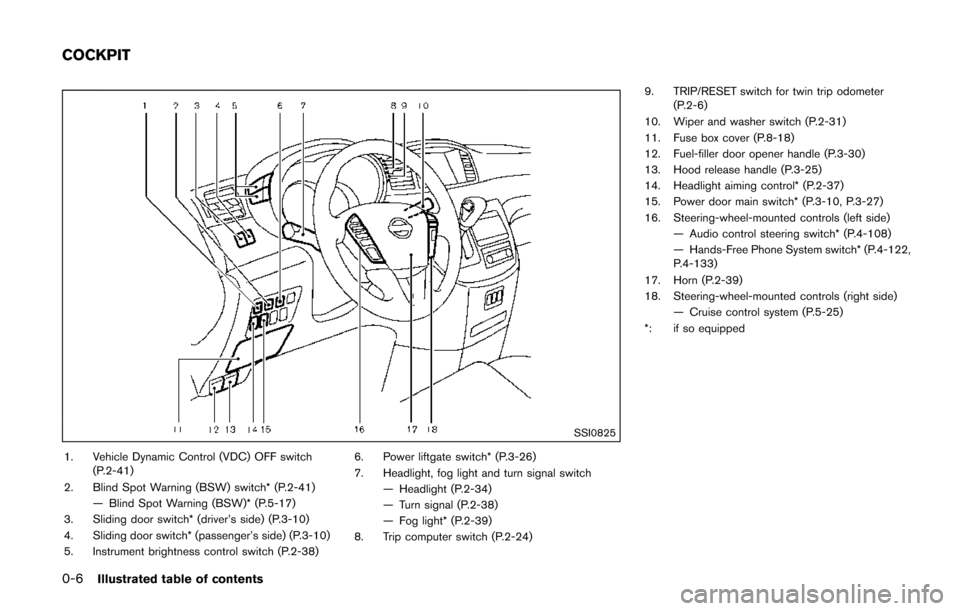
SSI0825
1. Vehicle Dynamic Control (VDC) OFF switch(P.2-41)
2. Blind Spot Warning (BSW) switch* (P.2-41) — Blind Spot Warning (BSW)* (P.5-17)
3. Sliding door switch* (driver’s side) (P.3-10)
4. Sliding door switch* (passenger’s side) (P.3-10)
5. Instrument brightness control switch (P.2-38) 6. Power liftgate switch* (P.3-26)
7. Headlight, fog light and turn signal switch
— Headlight (P.2-34)
— Turn signal (P.2-38)
— Fog light* (P.2-39)
8. Trip computer switch (P.2-24) 9. TRIP/RESET switch for twin trip odometer
(P.2-6)
10. Wiper and washer switch (P.2-31)
11. Fuse box cover (P.8-18)
12. Fuel-filler door opener handle (P.3-30)
13. Hood release handle (P.3-25)
14. Headlight aiming control* (P.2-37)
15. Power door main switch* (P.3-10, P.3-27)
16. Steering-wheel-mounted controls (left side) — Audio control steering switch* (P.4-108)
— Hands-Free Phone System switch* (P.4-122,
P.4-133)
17. Horn (P.2-39)
18. Steering-wheel-mounted controls (right side) — Cruise control system (P.5-25)
*: if so equipped
COCKPIT
Page 16 of 520
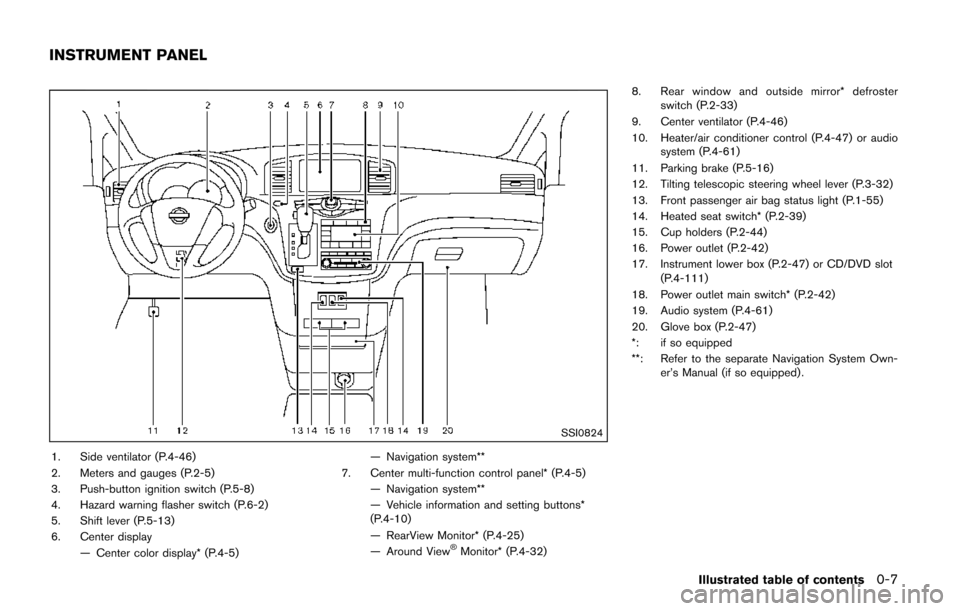
SSI0824
1. Side ventilator (P.4-46)
2. Meters and gauges (P.2-5)
3. Push-button ignition switch (P.5-8)
4. Hazard warning flasher switch (P.6-2)
5. Shift lever (P.5-13)
6. Center display— Center color display* (P.4-5) — Navigation system**
7. Center multi-function control panel* (P.4-5) — Navigation system**
— Vehicle information and setting buttons*
(P.4-10)
— RearView Monitor* (P.4-25)
— Around View
ŠMonitor* (P.4-32) 8. Rear window and outside mirror* defroster
switch (P.2-33)
9. Center ventilator (P.4-46)
10. Heater/air conditioner control (P.4-47) or audio system (P.4-61)
11. Parking brake (P.5-16)
12. Tilting telescopic steering wheel lever (P.3-32)
13. Front passenger air bag status light (P.1-55)
14. Heated seat switch* (P.2-39)
15. Cup holders (P.2-44)
16. Power outlet (P.2-42)
17. Instrument lower box (P.2-47) or CD/DVD slot (P.4-111)
18. Power outlet main switch* (P.2-42)
19. Audio system (P.4-61)
20. Glove box (P.2-47)
*: if so equipped
**: Refer to the separate Navigation System Own- er’s Manual (if so equipped) .
Illustrated table of contents0-7
INSTRUMENT PANEL
Page 90 of 520
SSI0825
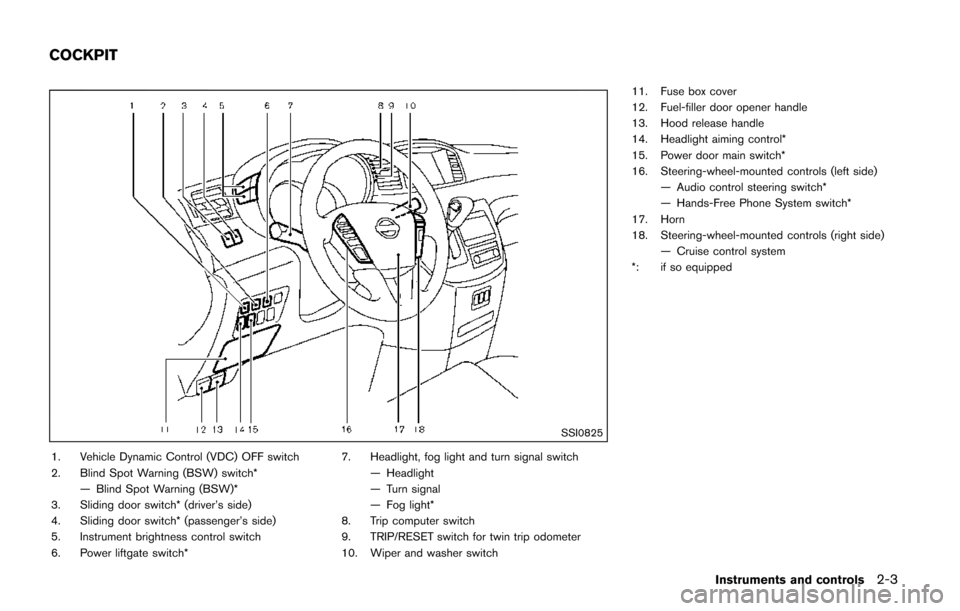
1. Vehicle Dynamic Control (VDC) OFF switch
2. Blind Spot Warning (BSW) switch*— Blind Spot Warning (BSW)*
3. Sliding door switch* (driver’s side)
4. Sliding door switch* (passenger’s side)
5. Instrument brightness control switch
6. Power liftgate switch* 7. Headlight, fog light and turn signal switch
— Headlight
— Turn signal
— Fog light*
8. Trip computer switch
9. TRIP/RESET switch for twin trip odometer
10. Wiper and washer switch 11. Fuse box cover
12. Fuel-filler door opener handle
13. Hood release handle
14. Headlight aiming control*
15. Power door main switch*
16. Steering-wheel-mounted controls (left side)
— Audio control steering switch*
— Hands-Free Phone System switch*
17. Horn
18. Steering-wheel-mounted controls (right side) — Cruise control system
*: if so equipped
Instruments and controls2-3
COCKPIT
Page 91 of 520
2-4Instruments and controls
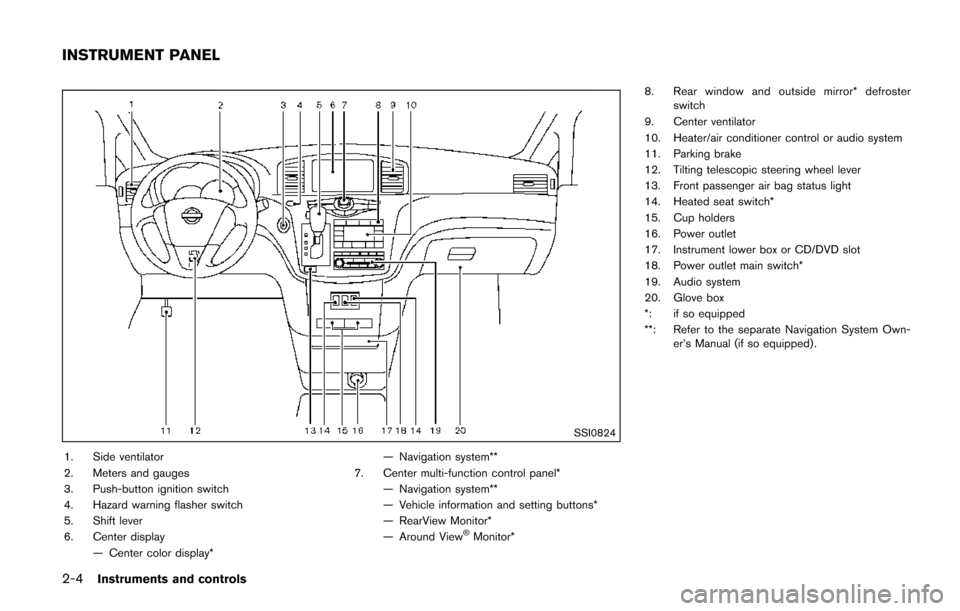
SSI0824
1. Side ventilator
2. Meters and gauges
3. Push-button ignition switch
4. Hazard warning flasher switch
5. Shift lever
6. Center display— Center color display* — Navigation system**
7. Center multi-function control panel* — Navigation system**
— Vehicle information and setting buttons*
— RearView Monitor*
— Around View
ŠMonitor* 8. Rear window and outside mirror* defroster
switch
9. Center ventilator
10. Heater/air conditioner control or audio system
11. Parking brake
12. Tilting telescopic steering wheel lever
13. Front passenger air bag status light
14. Heated seat switch*
15. Cup holders
16. Power outlet
17. Instrument lower box or CD/DVD slot
18. Power outlet main switch*
19. Audio system
20. Glove box
*: if so equipped
**: Refer to the separate Navigation System Own- er’s Manual (if so equipped) .
INSTRUMENT PANEL
Page 115 of 520
2-28Instruments and controls
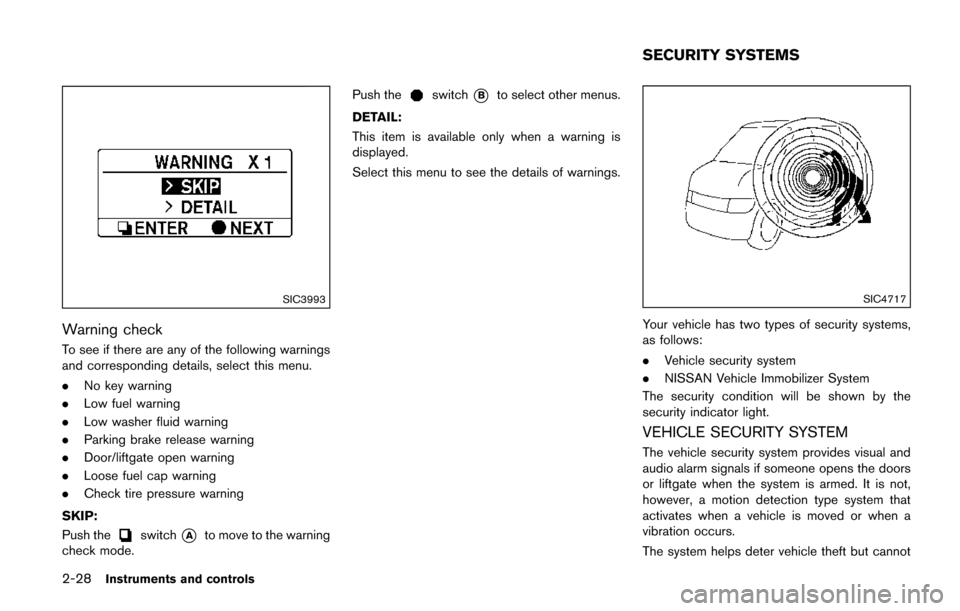
SIC3993
Warning check
To see if there are any of the following warnings
and corresponding details, select this menu.
.No key warning
. Low fuel warning
. Low washer fluid warning
. Parking brake release warning
. Door/liftgate open warning
. Loose fuel cap warning
. Check tire pressure warning
SKIP:
Push the
switch*Ato move to the warning
check mode. Push the
switch*Bto select other menus.
DETAIL:
This item is available only when a warning is
displayed.
Select this menu to see the details of warnings.
SIC4717
Your vehicle has two types of security systems,
as follows:
. Vehicle security system
. NISSAN Vehicle Immobilizer System
The security condition will be shown by the
security indicator light.
VEHICLE SECURITY SYSTEM
The vehicle security system provides visual and
audio alarm signals if someone opens the doors
or liftgate when the system is armed. It is not,
however, a motion detection type system that
activates when a vehicle is moved or when a
vibration occurs.
The system helps deter vehicle theft but cannot
SECURITY SYSTEMS
Page 165 of 520
3-14Pre-driving checks and adjustments
computer.
. When the vehicle is parked near a parking
meter.
In such cases, correct the operating conditions
before using the Intelligent Key function or use
the mechanical key.
Although the life of the battery varies depending
on the operating conditions, the battery’s life is
approximately 2 years. If the battery is dis-
charged, replace it with a new one.
Since the Intelligent Key is continuously receiv-
ing radio signals, if the key is left near equipment
which transmits strong radio signals such as
from a TV and personal computer, the battery life
may become shorter.
For information regarding replacement of a
battery, see “Intelligent Key battery replacement”
(P.8-20) .
As many as 4 Intelligent Keys can be registered
and used with one vehicle. For information about
the purchase and use of additional Intelligent
Keys, contact a NISSAN dealer.
CAUTION
. Do not allow the Intelligent Key,
which contains electrical compo-
nents, to come into contact with water or salt water. This could affect
the system function.
. Do not drop the Intelligent Key.
. Do not strike the Intelligent Key
sharply against another object.
. Do not change or modify the Intel-
ligent Key.
. Wetting may damage the Intelligent
Key. If the Intelligent Key gets wet,
immediately wipe until it is comple-
tely dry.
. If the outside temperature is below
148F( í108 C) , the battery of the
Intelligent Key may not function
properly.
. Do not place the Intelligent Key for
an extended period in an area where
temperatures exceed 1408F (608C) .
. Do not attach the Intelligent Key
with a key holder that contains a
magnet.
. Do not place the Intelligent Key near
equipment that produces a mag-
netic field, such as a TV, audio
equipment, personal computer or
cellular phone. If an Intelligent Key is lost or stolen, NISSAN
recommends erasing the ID code of that
Intelligent Key from the vehicle. This may prevent
the unauthorized use of the Intelligent Key to
operate the vehicle. For information regarding
the erasing procedure, it is recommended that
you contact a NISSAN dealer.
The Intelligent Key function can be disabled. For
information about disabling the Intelligent Key
function, it is recommended that you contact a
NISSAN dealer.
Page 190 of 520

4 Monitor, heater, air conditioner, audio, phoneand voice recognition systems
Safety note ........................................................................\
.......... 4-4
Center multi-function control panel (if so equipped) ...... 4-5
How to use multi-function controller .............................. 4-7
How to use touch screen (models with
navigation system) .............................................................. 4-7
Menu options (models with navigation system) .......... 4-9
How to select menus on the screen ........................... 4-10
Vehicle information and settings (models with center
multi-function control panel) ............................................... 4-10 How to use STATUS button .......................................... 4-10
How to use brightness control and display
ON/OFF button ................................................................ 4-10
How to use DISP button (models without
navigation system) ........................................................... 4-10
How to use ECON button (models without
navigation system) ........................................................... 4-11
How to use INFO button ............................................... 4-11
How to use SETTING button ....................................... 4-15
RearView Monitor (if so equipped) ................................... 4-25
RearView Monitor system operation .......................... 4-25
How to read the displayed lines .................................. 4-26
Difference between predictive and actual distances
(if so equipped) ................................................................ 4-26
How to park with predictive course lines
(models with center multi-function control panel) ..... 4-28
Adjusting the screen ....................................................... 4-29 Predictive course line settings (if so equipped) ..... 4-29
RearView Monitor system limitations ........................ 4-30
System maintenance ..................................................... 4-31
Around View
ŠMonitor (if so equipped) .......................... 4-32
Around ViewŠMonitor system operation ................. 4-33
How to adjust the screen view ................................... 4-39
Around View
ŠMonitor system limitations ................ 4-39
System maintenance ..................................................... 4-41
Moving Object Detection (MOD) (if so equipped) ...... 4-42 MOD system operation ................................................ 4-43
Turning on and off the MOD system ........................ 4-44
MOD system limitations ............................................... 4-44
System maintenance ..................................................... 4-45
Ventilators ........................................................................\
........ 4-46 Center ventilators ........................................................... 4-46
Side ventilators ............................................................... 4-46
Rear ventilators ............................................................... 4-47
Heater and air conditioner .................................................. 4-47 Operating tips (for automatic air conditioner) ........ 4-48
Manual air conditioner .................................................. 4-49
Automatic air conditioner ............................................. 4-54
Servicing air conditioner .............................................. 4-60
In-cabin microfilter ......................................................... 4-60
Audio system ........................................................................\
.. 4-61 Audio operation precautions ....................................... 4-61
Page 191 of 520
 player ......... 4-74
FM-AM-SAT radio with Compact Disc (CD) player
(Type A) ........................................................................\
...... 4-77
FM")
FM-AM radio with Compact Disc (CD) player ......... 4-74
FM-AM-SAT radio with Compact Disc (CD) player
(Type A) ........................................................................\
...... 4-77
FM-AM-SAT radio with Compact Disc (CD) player
(Type B) ........................................................................\
...... 4-87
DVD (Digital Versatile Disc) player operation (if
so equipped) ..................................................................... 4-91
USB (Universal Serial Bus) connection port
(models with center multi-function control panel) ..... 4-94
iPod
Šplayer operation (models with center
multi-function control panel) ......................................... 4-99
Bluetooth
Šstreaming audio (models with
navigation system) ........................................................ 4-101
Auxiliary input jacks (if so equipped) ....................... 4-106
CD/DVD/USB memory care and cleaning ............. 4-107
Steering-wheel-mounted controls for audio (if
so equipped) .................................................................. 4-108
Antenna ........................................................................\
.... 4-109
NISSAN Mobile Entertainment System (MES) (if
so equipped) ........................................................................\
4-110 Digital Versatile Disc (DVD)
system components ...................................................... 4-111
Before operating the DVD Mobile
Entertainment System .................................................. 4-116
Playing a DVD ................................................................ 4-117
Care and maintenance ................................................. 4-121
Car phone or CB radio ..................................................... 4-121
Bluetooth
Šhands-free phone system (Type A) (if
so equipped) ........................................................................\
4-122
Regulatory information ................................................. 4-123 Voice commands ......................................................... 4-124
Control buttons ............................................................ 4-124
Connecting procedure ............................................... 4-124
Phone selection ........................................................... 4-125
Quick Dial ..................................................................... 4-125
Making a call ................................................................ 4-128
Receiving a call ........................................................... 4-129
During a call ................................................................. 4-129
Phone setting ............................................................... 4-130
Troubleshooting guide ............................................... 4-132
Bluetooth
Šhands-free phone system (Type B) (if
so equipped) ....................................................................... 4-133
Regulatory information ............................................... 4-134
Using the system ........................................................ 4-135
Control buttons ............................................................ 4-137
Getting started ............................................................ 4-137
List of voice commands ............................................ 4-139
Speaker adaptation (SA) mode ............................... 4-142
Troubleshooting guide ............................................... 4-145
Bluetooth
Šhands-free phone system (Type C) (if
so equipped) ....................................................................... 4-146
Regulatory information ............................................... 4-147
Using the system ........................................................ 4-147
NISSAN Voice Recognition system (models with
navigation system) ............................................................. 4-154 NISSAN Voice Recognition standard mode ........ 4-155
Using the system ........................................................ 4-157
NISSAN Voice Recognition alternate
command mode ........................................................... 4-166
Page 193 of 520

4-4Monitor, heater, air conditioner, audio, phone and voice recognition systems
WARNING
.Do not disassemble or modify this
system. If you do, it may result in
accidents, fire, or electric shock.
. Do not use this system if you notice
any abnormality, such as a frozen
screen or lack of sound. Continued
use of the system may result in
accident, fire or electric shock.
. In case you notice any foreign
object in the system hardware, spill
liquid on it, or notice smoke or smell
coming from it, stop using the
system immediately. It is recom-
mended you visit a NISSAN dealer
for servicing. Ignoring such condi-
tions may lead to accidents, fire, or
electric shock.
. Park the vehicle in a safe location
and apply the parking brake to view
the images on the front center dis-
play screen.
Do not attempt to operate the system in
extreme temperature conditions [below
í 48F( í208 C) and above 1588 F (708C)].
Operating this system under these condi- tions may result in system malfunctions.
SAFETY NOTE