rear NISSAN ROGUE 2010 Owner´s Manual
[x] Cancel search | Manufacturer: NISSAN, Model Year: 2010, Model line: ROGUE, Model: NISSAN ROGUE 2010Pages: 328, PDF Size: 2.84 MB
Page 105 of 328
Black plate (101,1)
Model "S35-D" EDITED: 2009/ 9/ 4
The power outlet is located in the instrument
panel and the center console (if so equipped) .
CAUTION
.The outlet and plug may be hot
during or immediately after use.
. Do not use with accessories that
exceed a 12 volt, 120W (10A) power
draw. Do not use double adapters or
more than one electrical accessory.
. Use power outlet with the engine
running to avoid discharging the
vehicle battery.
. Avoid using power outlet when the
air conditioner, headlights or rear
window defroster is on.
. This power outlet is not designed
for use with a cigarette lighter unit.
. Push the plug in as far as it will go.
If good contact is not made, the plug
may overheat or the internal tem-
perature fuse may open.
. Before inserting or disconnecting a
plug, be sure the electrical acces-
sory being used is turned OFF.
. When not in use, be sure to close
the cap. Do not allow water to contact the outlet.
CUP HOLDERS
CAUTION
.
Avoid abrupt starting and braking
when the cup holder is being used
to prevent spilling the drink. If the
liquid is hot, it can scald you or your
passenger.
. Use only soft cups in the cup holder.
Hard objects can injure you in an
accident.STORAGE
Instruments and controls
2-33
Page 106 of 328
Black plate (102,1)
Model "S35-D" EDITED: 2009/ 9/ 4
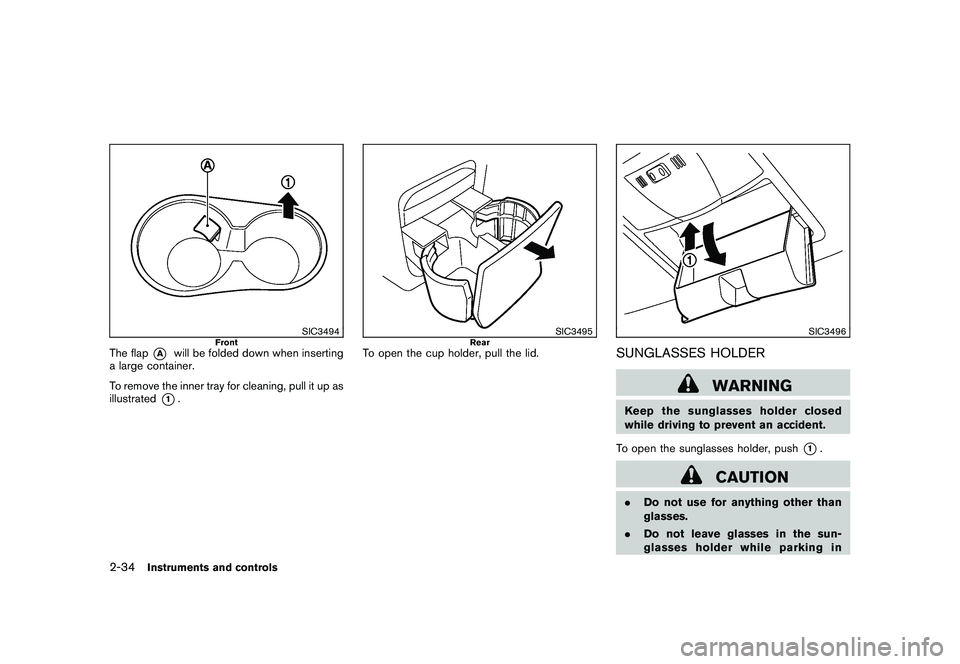
SIC3494
Front
The flap
*A
will be folded down when inserting
a large container.
To remove the inner tray for cleaning, pull it up as
illustrated
*1.
SIC3495
Rear
To open the cup holder, pull the lid.
SIC3496
SUNGLASSES HOLDER
WARNING
Keep the sunglasses holder closed
while driving to prevent an accident.
To open the sunglasses holder, push
*1.
CAUTION
. Do not use for anything other than
glasses.
. Do not leave glasses in the sun-
glasses holder while parking in
2-34
Instruments and controls
Page 109 of 328
Black plate (105,1)
Model "S35-D" EDITED: 2009/ 9/ 4
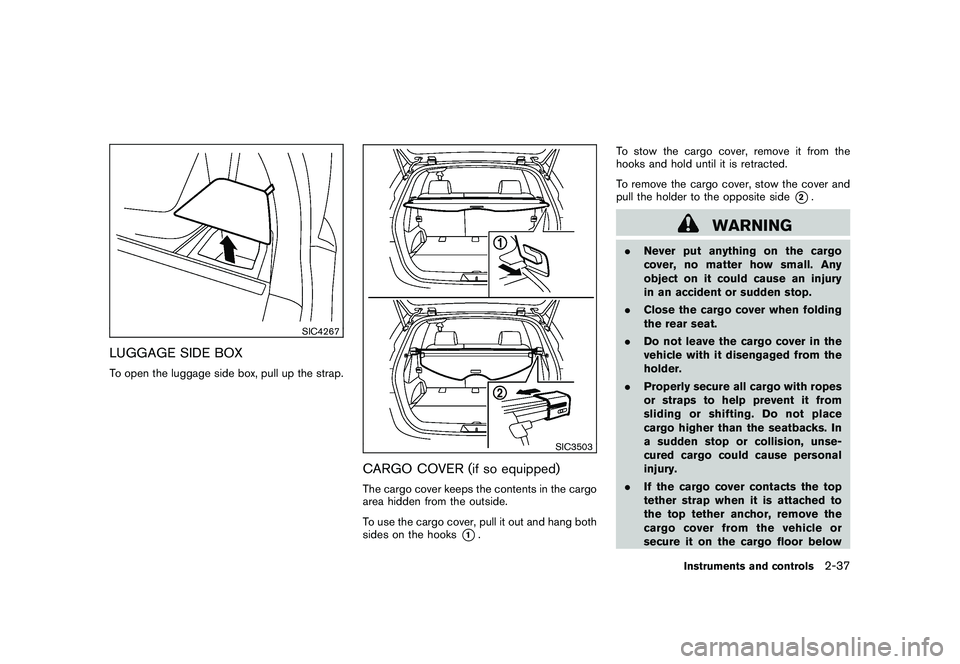
SIC4267
LUGGAGE SIDE BOXTo open the luggage side box, pull up the strap.
SIC3503
CARGO COVER (if so equipped)The cargo cover keeps the contents in the cargo
area hidden from the outside.
To use the cargo cover, pull it out and hang both
sides on the hooks
*1.To stow the cargo cover, remove it from the
hooks and hold until it is retracted.
To remove the cargo cover, stow the cover and
pull the holder to the opposite side
*2.
WARNING
.
Never put anything on the cargo
cover, no matter how small. Any
object on it could cause an injury
in an accident or sudden stop.
. Close the cargo cover when folding
the rear seat.
. Do not leave the cargo cover in the
vehicle with it disengaged from the
holder.
. Properly secure all cargo with ropes
or straps to help prevent it from
sliding or shifting. Do not place
cargo higher than the seatbacks. In
a sudden stop or collision, unse-
cured cargo could cause personal
injury.
. If the cargo cover contacts the top
tether strap when it is attached to
the top tether anchor, remove the
cargo cover from the vehicle or
secure it on the cargo floor below
Instruments and controls
2-37
Page 111 of 328
Black plate (107,1)
Model "S35-D" EDITED: 2009/ 9/ 4
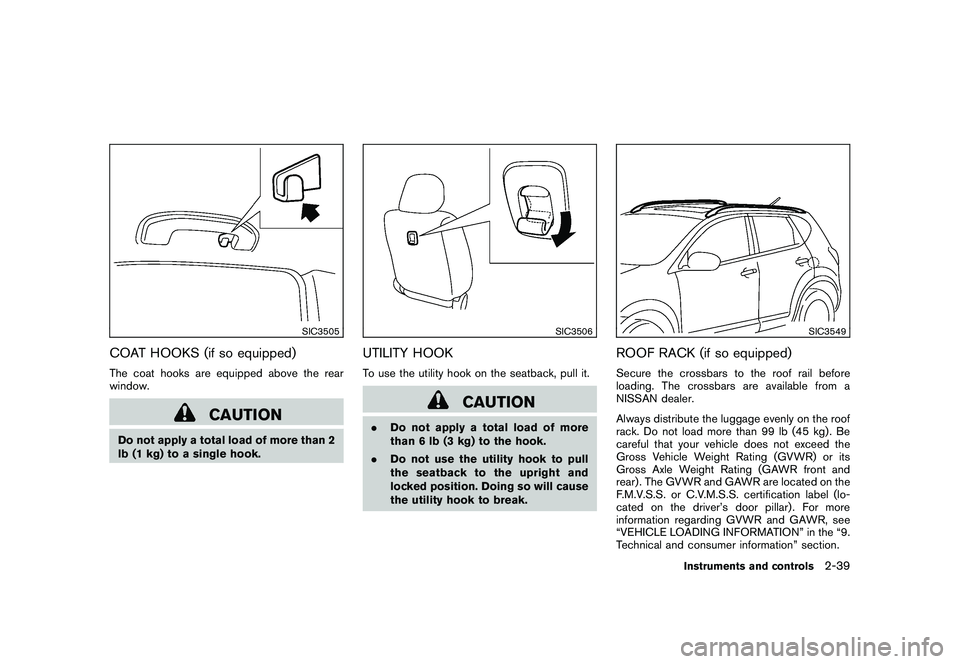
SIC3505
COAT HOOKS (if so equipped)The coat hooks are equipped above the rear
window.
CAUTION
Do not apply a total load of more than 2
lb (1 kg) to a single hook.
SIC3506
UTILITY HOOKTo use the utility hook on the seatback, pull it.
CAUTION
.Do not apply a total load of more
than 6 lb (3 kg) to the hook.
. Do not use the utility hook to pull
the seatback to the upright and
locked position. Doing so will cause
the utility hook to break.
SIC3549
ROOF RACK (if so equipped)Secure the crossbars to the roof rail before
loading. The crossbars are available from a
NISSAN dealer.
Always distribute the luggage evenly on the roof
rack. Do not load more than 99 lb (45 kg). Be
careful that your vehicle does not exceed the
Gross Vehicle Weight Rating (GVWR) or its
Gross Axle Weight Rating (GAWR front and
rear) . The GVWR and GAWR are located on the
F.M.V.S.S. or C.V.M.S.S. certification label (lo-
cated on the driver’s door pillar). For more
information regarding GVWR and GAWR, see
“VEHICLE LOADING INFORMATION” in the “9.
Technical and consumer information” section.
Instruments and controls
2-39
Page 113 of 328
Black plate (109,1)
Model "S35-D" EDITED: 2009/ 9/ 4
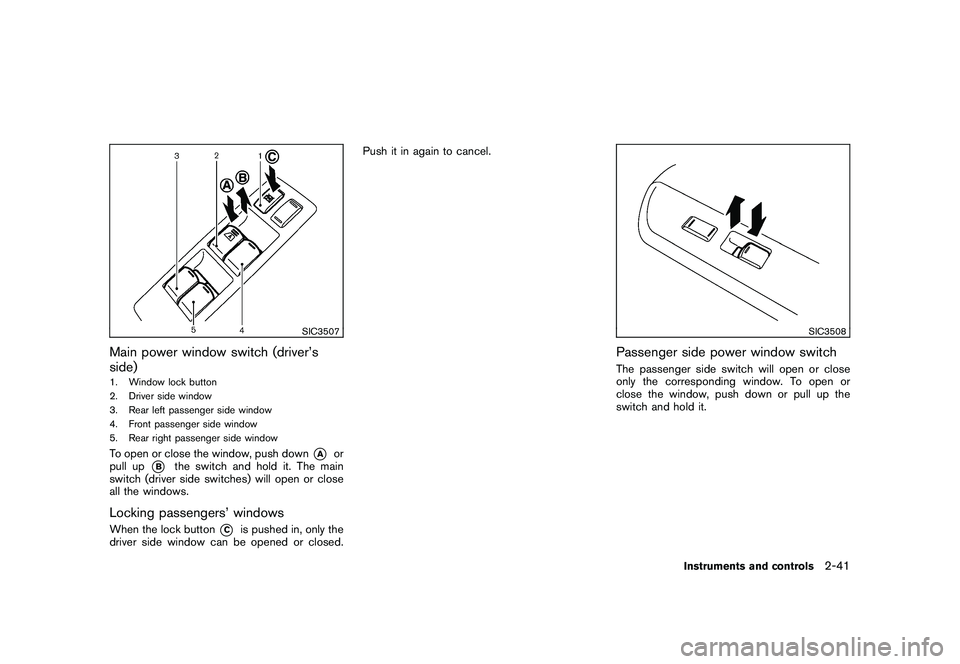
SIC3507
Main power window switch (driver’s
side)1. Window lock button
2. Driver side window
3. Rear left passenger side window
4. Front passenger side window
5. Rear right passenger side windowTo open or close the window, push down
*A
or
pull up
*B
the switch and hold it. The main
switch (driver side switches) will open or close
all the windows.
Locking passengers’ windowsWhen the lock button
*C
is pushed in, only the
driver side window can be opened or closed. Push it in again to cancel.
SIC3508
Passenger side power window switchThe passenger side switch will open or close
only the corresponding window. To open or
close the window, push down or pull up the
switch and hold it.
Instruments and controls
2-41
Page 123 of 328
Black plate (10,1)
3 Pre-driving checks and adjustments
Model "S35-D" EDITED: 2009/ 9/ 4
Keys ............................................................... 3-2NISSAN Vehicle Immobilizer System keys ............ 3-2
Intelligent Keys (if so equipped) ......................... 3-3
Doors .............................................................. 3-4
Locking with key ............................................ 3-4
Locking with inside lock knob ........................... 3-4
Locking with power door lock switch .................. 3-5
Automatic door locks ...................................... 3-5
Child safety rear door lock ............................... 3-6
Remote keyless entry system (if so equipped) ........... 3-6
How to use remote keyless entry system ............. 3-7
Intelligent Key system (if so equipped) .................. 3-10
Intelligent Key operating range ........................ 3-12
Door locks/unlocks precaution ........................ 3-12
Intelligent Key operation ................................. 3-13
Warning lights and audible reminders ............... 3-15Troubleshooting guide
................................... 3-16
How to use remote keyless entry function .......... 3-18
Hood ............................................................ 3-22
Lift gate ......................................................... 3-23
Lift gate release ........................................... 3-24
Bumpers and exhaust pipes (Kro ¯
m models) ............ 3-24
Fuel-filler door ................................................. 3-25
Opening the fuel-filler door ............................. 3-25
Fuel-filler cap .............................................. 3-25
Steering wheel ................................................ 3-27
Tilt operation ............................................... 3-27
Sun visors ...................................................... 3-27
Mirrors ........................................................... 3-28
Inside mirror ................................................ 3-28
Outside mirrors ............................................ 3-30
Page 126 of 328
Black plate (124,1)
Model "S35-D" EDITED: 2009/ 9/ 4
WARNING
.Always have the doors locked while
driving. Along with the use of seat
belts, this provides greater safety in
the event of an accident by helping
to prevent persons from being
thrown from the vehicle. This also
helps keep children and others from
unintentionally opening the doors,
and will help keep out intruders.
. Before opening any door, always
look for and avoid oncoming traffic.
. Do not leave children unattended
inside the vehicle. They could un-
knowingly activate switches or con-
trols. Unattended children could
become involved in serious acci-
dents.
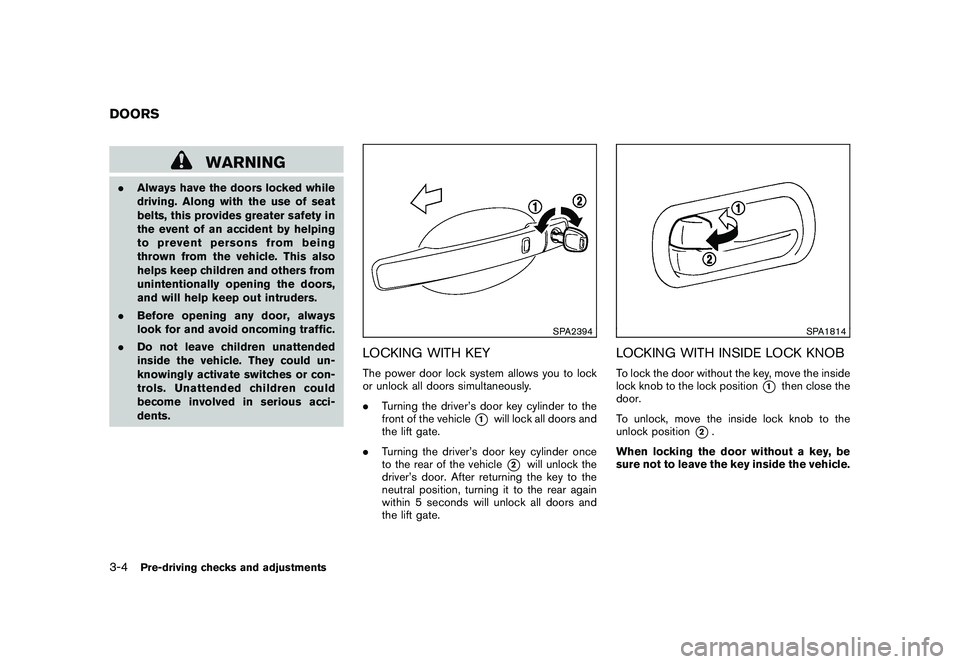
SPA2394
LOCKING WITH KEYThe power door lock system allows you to lock
or unlock all doors simultaneously.
.Turning the driver’s door key cylinder to the
front of the vehicle
*1
will lock all doors and
the lift gate.
. Turning the driver’s door key cylinder once
to the rear of the vehicle*2
will unlock the
driver’s door. After returning the key to the
neutral position, turning it to the rear again
within 5 seconds will unlock all doors and
the lift gate.
SPA1814
LOCKING WITH INSIDE LOCK KNOBTo lock the door without the key, move the inside
lock knob to the lock position
*1
then close the
door.
To unlock, move the inside lock knob to the
unlock position
*2.
When locking the door without a key, be
sure not to leave the key inside the vehicle.
DOORS3-4
Pre-driving checks and adjustments
Page 128 of 328
Black plate (126,1)
Model "S35-D" EDITED: 2009/ 9/ 4
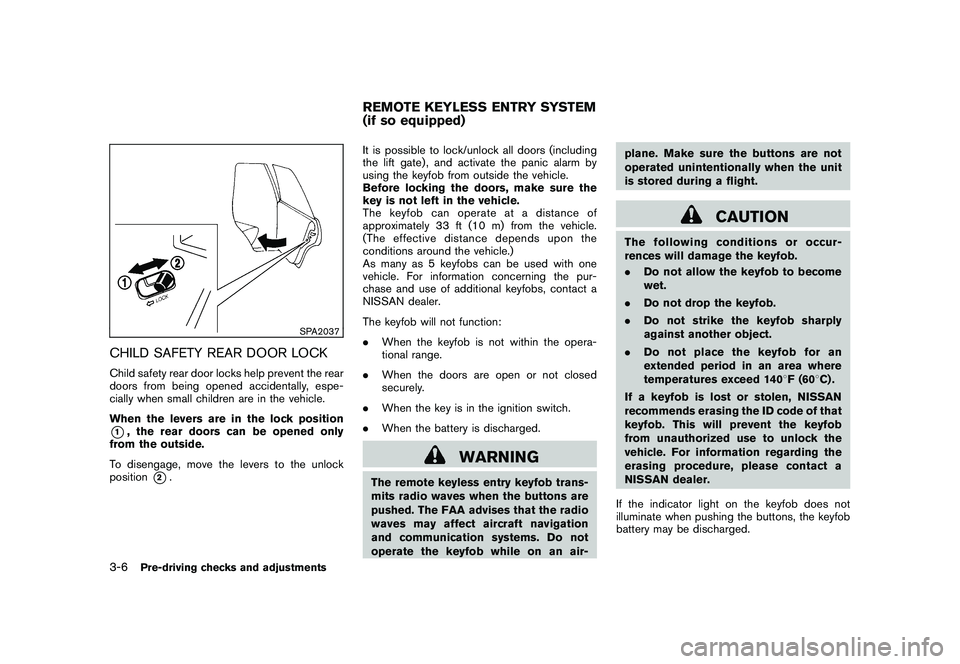
SPA2037
CHILD SAFETY REAR DOOR LOCKChild safety rear door locks help prevent the rear
doors from being opened accidentally, espe-
cially when small children are in the vehicle.
When the levers are in the lock position*1, the rear doors can be opened only
from the outside.
To disengage, move the levers to the unlock
position
*2. It is possible to lock/unlock all doors (including
the lift gate) , and activate the panic alarm by
using the keyfob from outside the vehicle.
Before locking the doors, make sure the
key is not left in the vehicle.
The keyfob can operate at a distance of
approximately 33 ft (10 m) from the vehicle.
(The effective distance depends upon the
conditions around the vehicle.)
As many as 5 keyfobs can be used with one
vehicle. For information concerning the pur-
chase and use of additional keyfobs, contact a
NISSAN dealer.
The keyfob will not function:
.
When the keyfob is not within the opera-
tional range.
. When the doors are open or not closed
securely.
. When the key is in the ignition switch.
. When the battery is discharged.
WARNING
The remote keyless entry keyfob trans-
mits radio waves when the buttons are
pushed. The FAA advises that the radio
waves may affect aircraft navigation
and communication systems. Do not
operate the keyfob while on an air- plane. Make sure the buttons are not
operated unintentionally when the unit
is stored during a flight.
CAUTION
The following conditions or occur-
rences will damage the keyfob.
.
Do not allow the keyfob to become
wet.
. Do not drop the keyfob.
. Do not strike the keyfob sharply
against another object.
. Do not place the keyfob for an
extended period in an area where
temperatures exceed 140 8F (60 8C) .
If a keyfob is lost or stolen, NISSAN
recommends erasing the ID code of that
keyfob. This will prevent the keyfob
from unauthorized use to unlock the
vehicle. For information regarding the
erasing procedure, please contact a
NISSAN dealer.
If the indicator light on the keyfob does not
illuminate when pushing the buttons, the keyfob
battery may be discharged.
REMOTE KEYLESS ENTRY SYSTEM
(if so equipped)
3-6
Pre-driving checks and adjustments
Page 134 of 328
Black plate (132,1)
Model "S35-D" EDITED: 2009/ 9/ 4
SPA2074
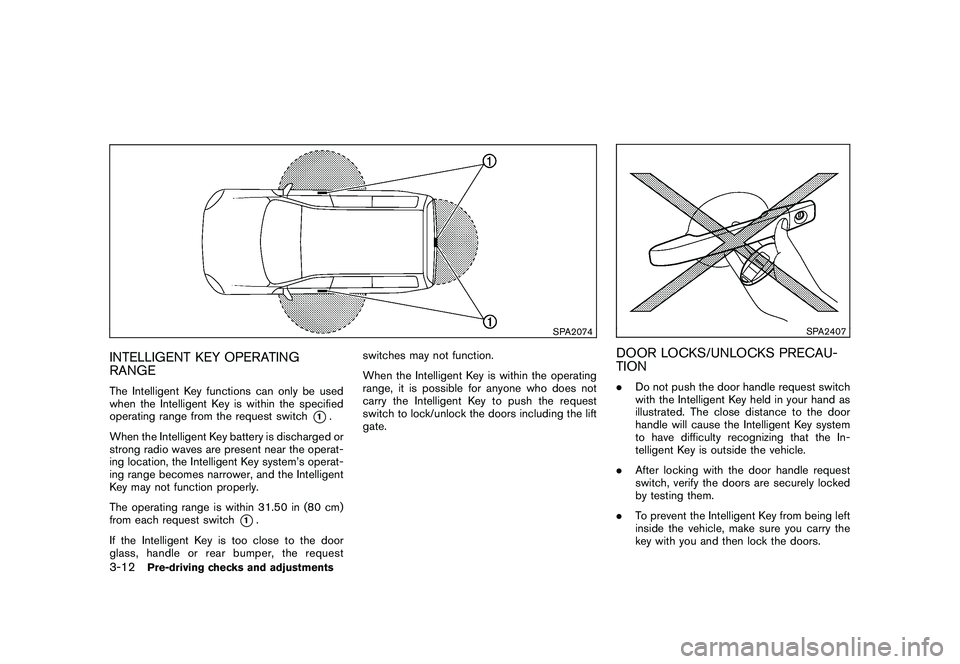
INTELLIGENT KEY OPERATING
RANGEThe Intelligent Key functions can only be used
when the Intelligent Key is within the specified
operating range from the request switch
*1.
When the Intelligent Key battery is discharged or
strong radio waves are present near the operat-
ing location, the Intelligent Key system’s operat-
ing range becomes narrower, and the Intelligent
Key may not function properly.
The operating range is within 31.50 in (80 cm)
from each request switch
*1.
If the Intelligent Key is too close to the door
glass, handle or rear bumper, the request switches may not function.
When the Intelligent Key is within the operating
range, it is possible for anyone who does not
carry the Intelligent Key to push the request
switch to lock/unlock the doors including the lift
gate.
SPA2407
DOOR LOCKS/UNLOCKS PRECAU-
TION.
Do not push the door handle request switch
with the Intelligent Key held in your hand as
illustrated. The close distance to the door
handle will cause the Intelligent Key system
to have difficulty recognizing that the In-
telligent Key is outside the vehicle.
. After locking with the door handle request
switch, verify the doors are securely locked
by testing them.
. To prevent the Intelligent Key from being left
inside the vehicle, make sure you carry the
key with you and then lock the doors.
3-12
Pre-driving checks and adjustments
Page 145 of 328
Black plate (143,1)
Model "S35-D" EDITED: 2009/ 9/ 4
WARNING
.Always be sure the lift gate has
been closed securely to prevent it
from opening while driving.
. Do not drive with the lift gate open.
This could allow dangerous exhaust
gases to be drawn into the vehicle.
See “EXHAUST GAS (carbon mon-
oxide)” in the “5. Starting and driv-
ing” section of this manual.
. Make sure that all passengers have
their hands, etc. inside the vehicle
before closing the lift gate.
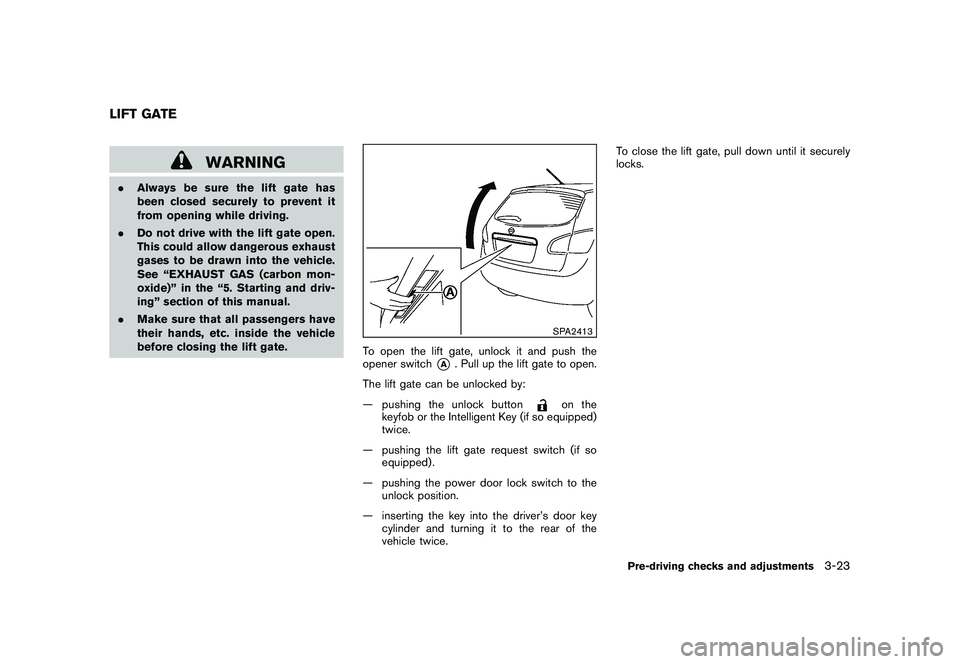
SPA2413
To open the lift gate, unlock it and push the
opener switch
*A
. Pull up the lift gate to open.
The lift gate can be unlocked by:
— pushing the unlock button
on the
keyfob or the Intelligent Key (if so equipped)
twice.
— pushing the lift gate request switch (if so equipped) .
— pushing the power door lock switch to the unlock position.
— inserting the key into the driver’s door key cylinder and turning it to the rear of the
vehicle twice. To close the lift gate, pull down until it securely
locks.
LIFT GATE
Pre-driving checks and adjustments
3-23