change wheel NISSAN ROGUE 2021 Owner´s Manual
[x] Cancel search | Manufacturer: NISSAN, Model Year: 2021, Model line: ROGUE, Model: NISSAN ROGUE 2021Pages: 556, PDF Size: 2.7 MB
Page 265 of 556
.If you decide that it is not safe toreturn the vehicle to the road sur-
face based on vehicle, road or
traffic conditions, gradually slow
the vehicle to a stop in a safe place
off the road.
RAPID AIR PRESSURE LOSS
Rapid air pressure loss or a “blow-out” can
occur if the tire is punctured or is
damaged due to hitting a curb or pothole.
Rapid air pressure loss can also be caused
by driving on under-inflated tires.
Rapid air pressure loss can affect the
handling and stability of the vehicle,
especially at highway speeds.
Help prevent rapid air pressure loss by
maintaining the correct air pressure and
visually inspect the tires for wear and
damage. See “Wheels and tires” (P.8-25) of
this manual.
If a tire rapidly loses air pressure or
“blows-out” while driving, maintain con-
trol of the vehicle by following the proce-
dure below. Please note that this
procedure is only a general guide. The
vehicle must be driven as appropriate
based on the conditions of the vehicle,
road and traffic.
WARNING
The following actions can increase
the chance of losing control of the
vehicle if there is a sudden loss of tire
air pressure. Losing control of the
vehicle may cause a collision and
result in personal injury.
. The vehicle generally moves or
pulls in the direction of the flat
tire.
. Do not rapidly apply the brakes.
. Do not rapidly release the accel-
erator pedal.
. Do not rapidly turn the steering
wheel.
1. Remain calm and do not overreact.
2. Maintain a firm grip on the steering wheel with both hands and try to hold
a straight course.
3. When appropriate, slowly release the accelerator pedal to gradually slow
the vehicle.
4. Gradually steer the vehicle to a safe location off the road and away from
traffic if possible. 5. Lightly apply the brake pedal to gra-
dually stop the vehicle.
6. Turn on the hazard warning flashers and either contact a roadside emer-
gency service to change the tire or see
“Changing a flat tire” (P.6-4) of this
Owner’s Manual.
DRINKING ALCOHOL/DRUGS AND
DRIVING
WARNING
Never drive under the influence of
alcohol or drugs. Alcohol in the
bloodstream reduces coordination,
delays reaction time and impairs
judgement. Driving after drinking
alcohol increases the likelihood of
being involved in an accident injuring
yourself and others. Additionally, if
you are injured in an accident, alco-
hol can increase the severity of the
injury.
NISSAN is committed to safe driving.
However, you must choose not to drive
under the influence of alcohol. Every year
thousands of people are injured or killed
in alcohol-related accidents. Although the
local laws vary on what is considered to
be legally intoxicated, the fact is that
Starting and driving5-11
Page 303 of 556
— When there is a lane closuredue to road repairs.
— When driving in a makeshift or temporary lane.
— When driving on roads where the lane width is too narrow.
— When driving without normal tire conditions (for example,
tire wear, low tire pressure,
installation of spare tire, tire
chains, non-standard wheels).
— When the vehicle is equipped with non-original brake parts
or suspension parts.
— When towing a trailer or other vehicle.
. The system may not function
properly under the following con-
ditions:
— On roads where there are
multiple parallel lane markers;
lane markers that are faded or
not painted clearly; yellow
painted lane markers; non-
standard lane markers; or
lane markers covered with
water, dirt, snow, etc.
— On roads where discontinued lane markers are still detect- able.
— On roads where there are sharp curves.
— On roads where there are sharply contrasting objects,
such as shadows, snow,
water, wheel ruts, seams or
lines remaining after road re-
pairs. (The LDW system could
detect these items as lane
markers.)
— On roads where the traveling lane merges or separates.
— When the vehicle’s traveling direction does not align with
the lane marker.
— When traveling close to the vehicle in front of you, which
obstructs the lane camera
unit detection range.
— When rain, snow, dirt or object adheres to the windshield in
front of the lane camera unit.
— When the headlights are not bright due to dirt on the lens
or if the aiming is not adjusted
properly.
— When strong light enters the lane camera unit. (For exam- ple, the light directly shines on
the front of the vehicle at
sunrise or sunset.)
— When a sudden change in brightness occurs. (For exam-
ple, when the vehicle enters or
exits a tunnel or under a
bridge.)
SYSTEM TEMPORARILY UNAVAIL-
ABLE
Condition A:
If the vehicle is parked in direct sunlight
under high temperature conditions (over
approximately 104°F (40°C)) and then
started, the LDW system may be deacti-
vated automatically, the LDW indicator
will flash and the following message will
appear in the vehicle information display.
. “Unavailable High Cabin Temperature”
When the interior temperature is reduced,
the LDW system will resume operating
automatically and the LDW indicator will
stop flashing.
Condition B:
The warning function of the LDW system
is not designed to work under the follow-
ing conditions:
Starting and driving5-49
Page 307 of 556
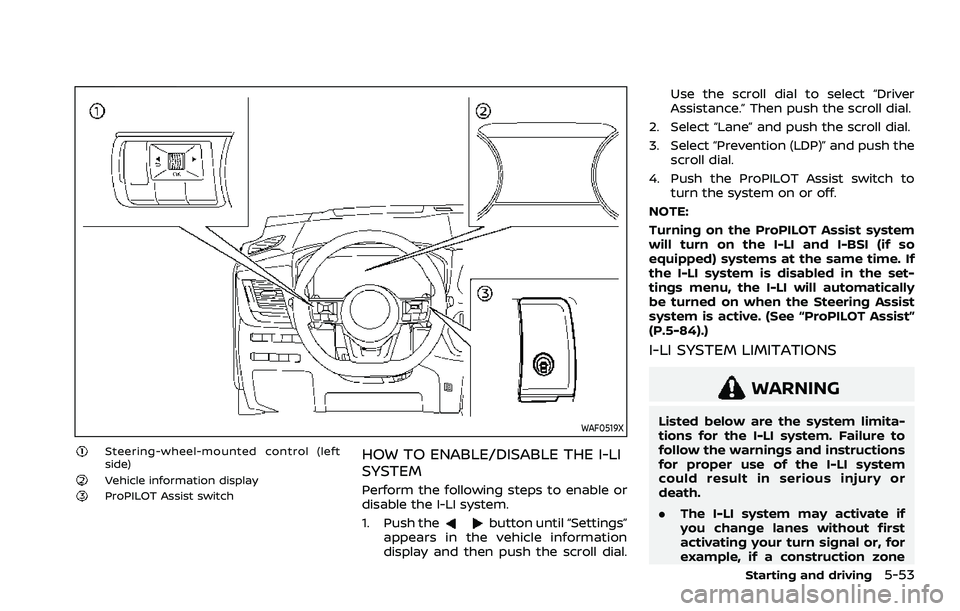
WAF0519X
Steering-wheel-mounted control (left
side)
Vehicle information displayProPILOT Assist switch
HOW TO ENABLE/DISABLE THE I-LI
SYSTEM
Perform the following steps to enable or
disable the I-LI system.
1. Push the
button until “Settings”
appears in the vehicle information
display and then push the scroll dial. Use the scroll dial to select “Driver
Assistance.” Then push the scroll dial.
2. Select “Lane” and push the scroll dial.
3. Select “Prevention (LDP)” and push the scroll dial.
4. Push the ProPILOT Assist switch to turn the system on or off.
NOTE:
Turning on the ProPILOT Assist system
will turn on the I-LI and I-BSI (if so
equipped) systems at the same time. If
the I-LI system is disabled in the set-
tings menu, the I-LI will automatically
be turned on when the Steering Assist
system is active. (See “ProPILOT Assist”
(P.5-84).)
I-LI SYSTEM LIMITATIONS
WARNING
Listed below are the system limita-
tions for the I-LI system. Failure to
follow the warnings and instructions
for proper use of the I-LI system
could result in serious injury or
death.
. The I-LI system may activate if
you change lanes without first
activating your turn signal or, for
example, if a construction zone
Starting and driving5-53
Page 308 of 556
5-54Starting and driving
directs traffic to cross an existing
lane marker. If this occurs you
may need to apply corrective
steering to complete your lane
change.
. Because the I-LI may not activate
under the road, weather, and lane
marker conditions described in
this section, it may not activate
every time your vehicle begins to
leave its lane and you will need to
apply corrective steering.
. The I-LI system will not operate at
speeds below approximately 37
MPH (60 km/h) or if it cannot
detect lane markers.
. When the I-LI system is operating,
avoid excessive or sudden steer-
ing maneuvers. Otherwise, you
could lose control of the vehicle.
. Do not use the I-LI system under
the following conditions as it may
not function properly:
— During bad weather (rain, fog,
snow, etc.).
— When driving on slippery roads, such as on ice or snow.
— When driving on winding or uneven roads. — When there is a lane closure
due to road repairs.
— When driving in a makeshift or temporary lane.
— When driving on roads where the lane width is too narrow.
— When driving without normal tire conditions (for example,
tire wear, low tire pressure,
installation of spare tire, tire
chains, non-standard wheels).
— When the vehicle is equipped with non-original brake parts
or suspension parts.
— When towing a trailer or other vehicle.
— On roads where there are multiple parallel lane markers;
lane markers that are faded or
not painted clearly; yellow
painted lane markers; non-
standard lane markers; or
lane markers covered with
water, dirt, snow, etc.
— On roads where discontinued lane markers are still detect-
able.
— On roads where there are sharp curves. — On roads where there are
sharply contrasting objects,
such as shadows, snow,
water, wheel ruts, seams or
lines remaining after road re-
pairs. (The I-LI system could
detect these items as lane
markers.)
— On roads where the traveling lane merges or separates.
— When the vehicle’s traveling direction does not align with
the lane marker.
— When traveling close to the vehicle in front of you, which
obstructs the lane camera
unit detection range.
— When rain, snow or dirt ad- heres to the windshield in
front of the lane camera unit.
— When the headlights are not bright due to dirt on the lens
or if the aiming is not adjusted
properly.
— When strong light enters the lane camera unit. (For exam-
ple, the light directly shines on
the front of the vehicle at
sunrise or sunset.)
Page 309 of 556

— When a sudden change inbrightness occurs. (For exam-
ple, when the vehicle enters or
exits a tunnel or under a
bridge.)
While the I-LI system is operating, you
may hear a sound of brake operation.
This is normal and indicates that the I-LI
system is operating properly.
SYSTEM TEMPORARILY UNAVAIL-
ABLE
Condition A:
The warning and assist functions of the I-
LI system are not designed to work under
the following conditions:
. When you operate the lane change
signal and change the traveling lanes
in the direction of the signal. (The I-LI
system will be deactivated for ap-
proximately 2 seconds after the lane
change signal is turned off.)
. When the vehicle speed lowers to less
than approximately 37 MPH (60 km/h).
Action to take:
After the above conditions have finished
and the necessary operating conditions
are satisfied, the warning and assist
functions will resume. Condition B:
The assist function of the I-LI system is
not designed to work under the following
conditions (warning is still functional):
.
When the brake pedal is depressed.
. When the steering wheel is turned as
far as necessary for the vehicle to
change lanes.
. When the vehicle is accelerated during
the I-LI system operation.
. When the Intelligent Cruise Control
(ICC) approach warning occurs (if so
equipped).
. When the hazard warning flashers are
operated.
. When driving on a curve at high speed.
Action to take:
After the above conditions have finished
and the necessary operating conditions
are satisfied, the I-LI system application of
the brakes will resume.
Condition C:
If the following message appears in the
vehicle information display, a chime will
sound and the I-LI system will be turned
off automatically.
. "Currently not available":
— When the Vehicle Dynamic Control
(VDC) system is turned off. — When the SNOW mode and the
OFF-ROAD mode is selected (AWD
models).
Action to take:
When the above conditions no longer
exist, turn off the I-LI system. Push the
ProPILOT Assist switch again to turn the I-
LI system back on.
Temporary disabled status at high tem-
perature:
If the vehicle is parked in direct sunlight
under high temperature conditions (over
approximately 104°F (40°C)) and then the
I-LI system is turned on, the I-LI system
may be deactivated automatically and
the following message will appear on
the vehicle information display:
. “Unavailable High Cabin Temperature”
When the interior temperature is reduced,
the system will resume operating auto-
matically.
SYSTEM MALFUNCTION
If the I-LI system malfunctions, it will
cancel automatically. The I-LI indicator
(orange) will illuminates and the “Not
Available System Malfunction” warning
message will appear in the vehicle infor-
mation display.
If the I-LI indicator (orange) illuminates,
pull off the road to a safe location. Turn
Starting and driving5-55
Page 324 of 556
5-70Starting and driving
properly.
— When strong light enters a lane camera unit. (For exam-
ple: light directly shines on the
front of the vehicle at sunrise
or sunset.)
— When a sudden change in brightness occurs. (For exam-
ple: when the vehicle enters or
exits a tunnel or under a
bridge.)
. Do not use the I-BSI system under
the following conditions because
the system may not function
properly.
— During bad weather. (For ex-
ample: rain, fog, snow, etc.)
— When driving on slippery roads, such as on ice or snow,
etc.
— When driving on winding or uneven roads.
— When there is a lane closure due to road repairs.
— When driving in a makeshift or temporary lane.
— When driving on roads where the lane width is too narrow. — When driving with a tire that is
not within normal tire condi-
tions (for example, tire wear,
low tire pressure, installation
of spare tire, tire chains, non-
standard wheels).
— When the vehicle is equipped with non-original steering
parts or suspension parts.
— When towing a trailer or other vehicle.
. Excessive noise (for example,
audio system volume, open vehi-
cle window) will interfere with the
chime sound, and it may not be
heard.I-BSI DRIVING SITUATIONS
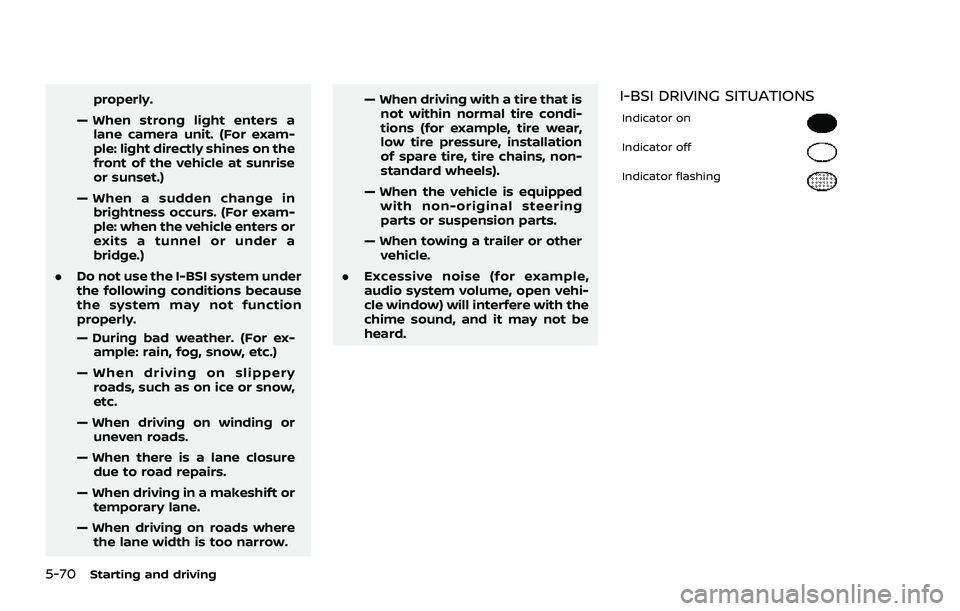
Indicator on
Indicator off
Indicator flashing
Page 350 of 556
5-96Starting and driving
WAF0425X
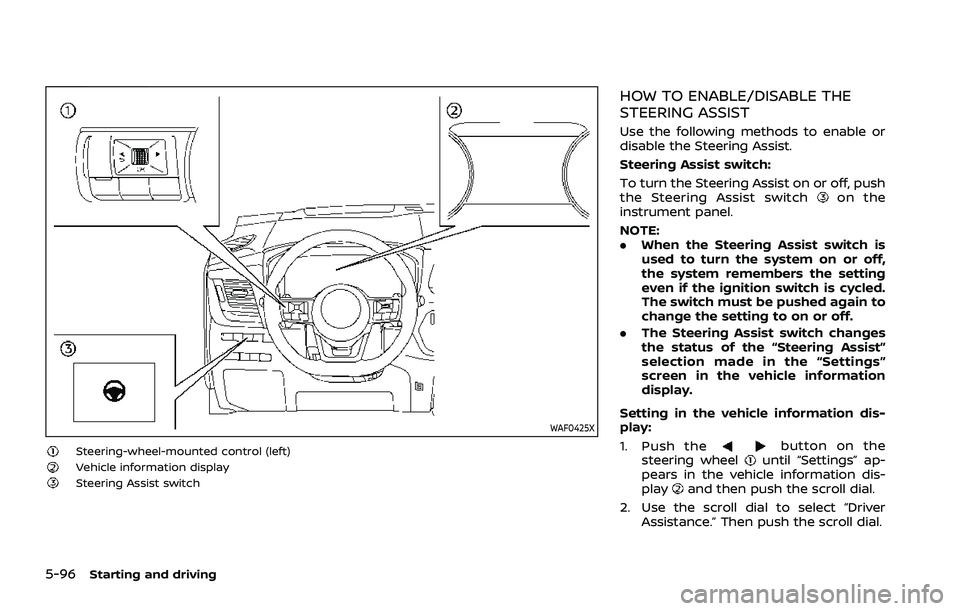
Steering-wheel-mounted control (left)Vehicle information displaySteering Assist switch
HOW TO ENABLE/DISABLE THE
STEERING ASSIST
Use the following methods to enable or
disable the Steering Assist.
Steering Assist switch:
To turn the Steering Assist on or off, push
the Steering Assist switch
on the
instrument panel.
NOTE:
. When the Steering Assist switch is
used to turn the system on or off,
the system remembers the setting
even if the ignition switch is cycled.
The switch must be pushed again to
change the setting to on or off.
. The Steering Assist switch changes
the status of the “Steering Assist”
selection made in the “Settings”
screen in the vehicle information
display.
Setting in the vehicle information dis-
play:
1. Push the
button on the
steering wheeluntil “Settings” ap-
pears in the vehicle information dis-
play
and then push the scroll dial.
2. Use the scroll dial to select “Driver Assistance.” Then push the scroll dial.
Page 356 of 556
5-102Starting and driving
The warning chime will not sound when:
.Your vehicle approaches other vehi-
cles that are parked or moving slowly.
. The accelerator pedal is depressed,
overriding the system.
NOTE:
The approach warning chime may
sound and the system display may
flash when the radar sensor detects
objects on the side of the vehicle or on
the side of the road. This may cause the
ICC system to decelerate or accelerate
the vehicle. The radar sensor may de-
tect these objects when the vehicle is
driven on winding, narrow, or hilly roads
or when the vehicle is entering or
exiting a curve. In these cases, you will
have to manually control the proper
distance ahead of your vehicle.
Also, the sensor sensitivity can be af-
fected by vehicle operation (steering
maneuver or driving position in the
lane) or traffic or vehicle conditions
(for example, if a vehicle is being driven
with some damage).Acceleration when passing
When the ICC system is engaged above
44 MPH (70 km/h) and following a slower
vehicle (below the vehicle set speed), and
the turn signal is activated to the left, the
ICC system will automatically start to
accelerate the vehicle to help initiate
passing on the left and will begin to
reduce the distance to vehicle directly
ahead. Only the left side turn signal
operates this feature. As the driver steers
the vehicle and moves into the passing
lane, if no vehicle is detected ahead the
ICC system will continue to accelerate to
the vehicle set speed. If another vehicle is
detected ahead, then the vehicle will
accelerate up to the following speed of
that vehicle. If the vehicle is not steered
into the left lane to pass, the acceleration
will stop after a short time and regain the
set following distance. Acceleration can
be stopped at any point by depressing
the brake pedal or the CANCEL switch on
the steering wheel.
WARNING
In order to reduce the risk of a
collision that may result in serious
injury or death, please be aware of
the following: .
This function is only activated
with the left turn signal and will
briefly accelerate the vehicle even
if a lane change is not initiated.
This can include non-passing si-
tuations such as left side exits.
. Ensure that when passing an-
other vehicle, the adjacent lane
is clear before initiating the pass.
Sudden changes in traffic may
occur while passing. Always
manually steer or brake as
needed. Never solely rely on the
system.
Speed Limit Assist - a feature of
ProPILOT Assist with Navi-link (if so
equipped)
WARNING
Listed below are the system limita-
tions for the Speed Limit Assist. Fail-
ure to operate the vehicle in
accordance with these system lim-
itations could result in serious injury
or death:
.It is the driver’s responsibility to
select the proper speed, follow all
traffic regulations and observe
Page 358 of 556
5-104Starting and driving
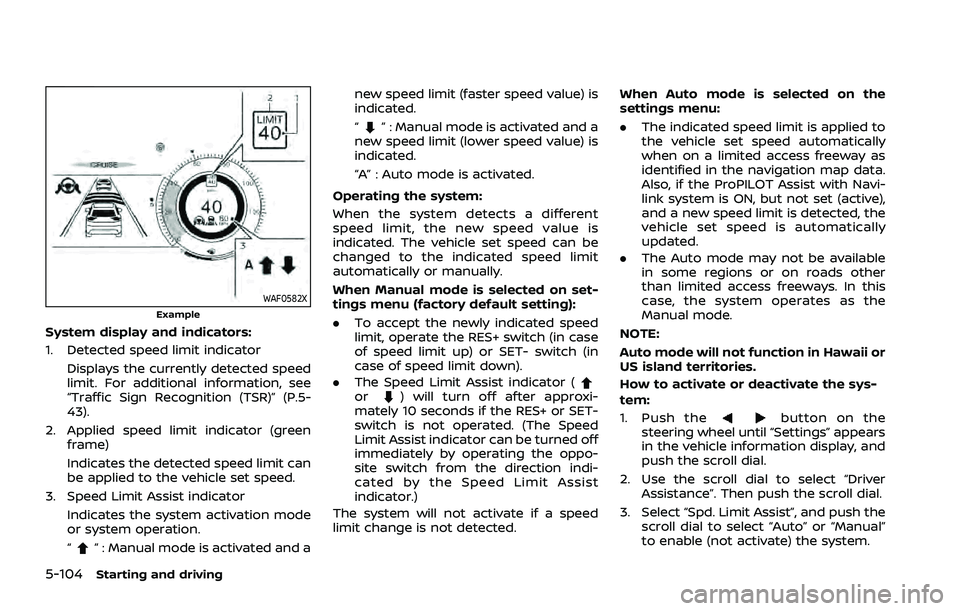
WAF0582XExample
System display and indicators:
1. Detected speed limit indicatorDisplays the currently detected speed
limit. For additional information, see
“Traffic Sign Recognition (TSR)” (P.5-
43).
2. Applied speed limit indicator (green frame)
Indicates the detected speed limit can
be applied to the vehicle set speed.
3. Speed Limit Assist indicator Indicates the system activation mode
or system operation.
“
” : Manual mode is activated and a new speed limit (faster speed value) is
indicated.
“
” : Manual mode is activated and a
new speed limit (lower speed value) is
indicated.
“A” : Auto mode is activated.
Operating the system:
When the system detects a different
speed limit, the new speed value is
indicated. The vehicle set speed can be
changed to the indicated speed limit
automatically or manually.
When Manual mode is selected on set-
tings menu (factory default setting):
. To accept the newly indicated speed
limit, operate the RES+ switch (in case
of speed limit up) or SET- switch (in
case of speed limit down).
. The Speed Limit Assist indicator (
or) will turn off after approxi-
mately 10 seconds if the RES+ or SET-
switch is not operated. (The Speed
Limit Assist indicator can be turned off
immediately by operating the oppo-
site switch from the direction indi-
cated by the Speed Limit Assist
indicator.)
The system will not activate if a speed
limit change is not detected. When Auto mode is selected on the
settings menu:
.
The indicated speed limit is applied to
the vehicle set speed automatically
when on a limited access freeway as
identified in the navigation map data.
Also, if the ProPILOT Assist with Navi-
link system is ON, but not set (active),
and a new speed limit is detected, the
vehicle set speed is automatically
updated.
. The Auto mode may not be available
in some regions or on roads other
than limited access freeways. In this
case, the system operates as the
Manual mode.
NOTE:
Auto mode will not function in Hawaii or
US island territories.
How to activate or deactivate the sys-
tem:
1. Push thebutton on the
steering wheel until “Settings” appears
in the vehicle information display, and
push the scroll dial.
2. Use the scroll dial to select “Driver Assistance”. Then push the scroll dial.
3. Select “Spd. Limit Assist”, and push the scroll dial to select “Auto” or “Manual”
to enable (not activate) the system.
Page 370 of 556
5-116Starting and driving
Steering Assist limitations
WARNING
.In the following situations, the
camera may not detect lane mar-
kers correctly or may detect lane
markers incorrectly and the
Steering Assist may not operate
properly:
— When driving on roads where
there are multiple parallel
lane markers, lane markers
that are faded or not painted
clearly, non-standard lane
markers, or lane markers cov-
ered with water, dirt, snow,
etc.
— When driving on roads with discontinued lane markers
— When driving on roads with a widening or narrowing lane
width
— When driving on roads where there are multiple lanes or
unclear lane markers due to
road construction
— When driving on roads where there are sharply contrasting
objects, such as shadows, snow, water, wheel ruts,
seams, or lines remaining
after road repairs (the Steer-
ing Assist could detect these
items as lane markers)
— When driving on roads where the traveling lane merges or
separates
. Do not use the Steering Assist
under the following conditions
because the system may not
properly detect lane markers.
Doing so could cause a loss of
vehicle control and result in an
accident.
— During bad weather (rain, fog,
snow, dust, etc.)
— When rain, snow, sand, etc., is thrown up by the wheels of
other vehicles
— When dirt, oil, ice, snow, water, or another object adheres to
the camera unit
— When the lens of the camera unit is foggy
— When strong light (for exam- ple, sunlight or high beams
from oncoming vehicles)
shines on the camera — When the headlights are not
bright due to dirt on the lens
or the headlights are off in
tunnels or darkness
— When a sudden change in brightness occurs (for exam-
ple, when the vehicle enters or
exits a tunnel or is under a
bridge)
— When driving on roads where the traveling lane merges or
separates or where there are
temporary lane markers be-
cause of road construction
— When there is a lane closure due to road repairs
— When driving on a bumpy road surface, such as an uneven
dirt road
— When driving on sharp curves or winding roads
— When driving on repeated up- hill and downhill roads
. Do not use the Steering Assist
under the following conditions
because the system will not op-
erate properly:
— When driving with a tire that is
not within normal tire condi-