change wheel NISSAN ROGUE 2021 Owner´s Manual
[x] Cancel search | Manufacturer: NISSAN, Model Year: 2021, Model line: ROGUE, Model: NISSAN ROGUE 2021Pages: 556, PDF Size: 2.7 MB
Page 378 of 556
5-124Starting and driving
erly.
NOTE:
The vehicle’s stop lights come on when
braking is performed by the AEB with
pedestrian detection system.
Depending on vehicle speed and distance
to the vehicle, pedestrian or cyclists
ahead, as well as driving and roadway
conditions, the system may help the
driver avoid a forward collision or may
help mitigate the consequences of a
collision should one be unavoidable.
If the driver is handling the steering
wheel, accelerating or braking, the AEB
with pedestrian detection system will
function later or will not function.
The automatic braking will cease under
the following conditions:
.When the steering wheel is turned as
far as necessary to avoid a collision.
. When the accelerator pedal is de-
pressed.
. When there is no longer a vehicle,
pedestrian detected ahead.
If the AEB with pedestrian detection
system has stopped the vehicle, the
vehicle will remain at a standstill for
approximately 2 seconds before the
brakes are released.
When the brake pedal is depressed while the brake is applied by the system, you
may feel the pedal effort is changed and
may hear a sound and vibration noise.
This is normal and does not indicate a
malfunction. In addition, the braking force
can be increased by adding the pedal
effort.
Page 380 of 556
5-126Starting and driving
AEB WITH PEDESTRIAN DETECTION
SYSTEM LIMITATIONS
WARNING
Listed below are the system limita-
tions for the AEB with pedestrian
detection system. Failure to operate
the vehicle in accordance with these
system limitations could result in
serious injury or death.
.The AEB with pedestrian detec-
tion system cannot detect all
vehicles, pedestrians or cyclists
under all conditions.
. The AEB with pedestrian detec-
tion system does not detect the
following:
— Pedestrians that are small (for
example, children), in a sitting
position, operating toys/ska-
teboards, on scooters or in
wheelchairs, or not in an up-
right standing or walking po-
sition.
— Animals of any size.
— Obstacles (for example, cargo or debris) on the roadway or
roadside. — Oncoming or crossing vehi-
cles.
— Vehicles where the tires are difficult to see or the shape of
the rear of the vehicle is un-
clear or obstructed.
— Parked vehicles.
. The AEB with pedestrian detec-
tion system has some perfor-
mance limitations.
— If a stationary vehicle is in the
vehicle’s path, the system will
not function when the vehicle
approaches the stationary ve-
hicle at speeds over approxi-
mately 50 MPH (80 km/h).
— Pedestrian and cyclist detec- tion will not function when the
vehicle is driven at speeds
over approximately 37 MPH
(60 km/h) or below approxi-
mately 6 MPH (10 km/h).
. For pedestrians, the AEB with
pedestrian detection system will
not issue the first warning.
. The AEB with pedestrian detec-
tion system may not function
properly or detect a vehicle, pe-
destrian or cyclist ahead in the
following conditions: — In poor visibility conditions
(such as rain, snow, fog, dust
storms, sand storms, smoke,
and road spray from other
vehicles).
— If dirt, ice, snow, fog or other material is covering the radar
sensor area or camera area of
the windshield.
— If strong light (for example, sunlight or high beams) en-
ters the front camera or a
sudden change in brightness
occurs (for example, entering
a tunnel or driving in light-
ning).
— In dark or dimly lit conditions, such as at night or in tunnels,
including cases where your
vehicle’s headlights are off or
dim, or the tail lights of the
vehicle ahead are off.
— When the direction of the camera is misaligned.
— When driving on a steep downhill slope, on roads with
sharp curves, and/or bumpy
or dirt roads.
Page 396 of 556
5-142Starting and driving
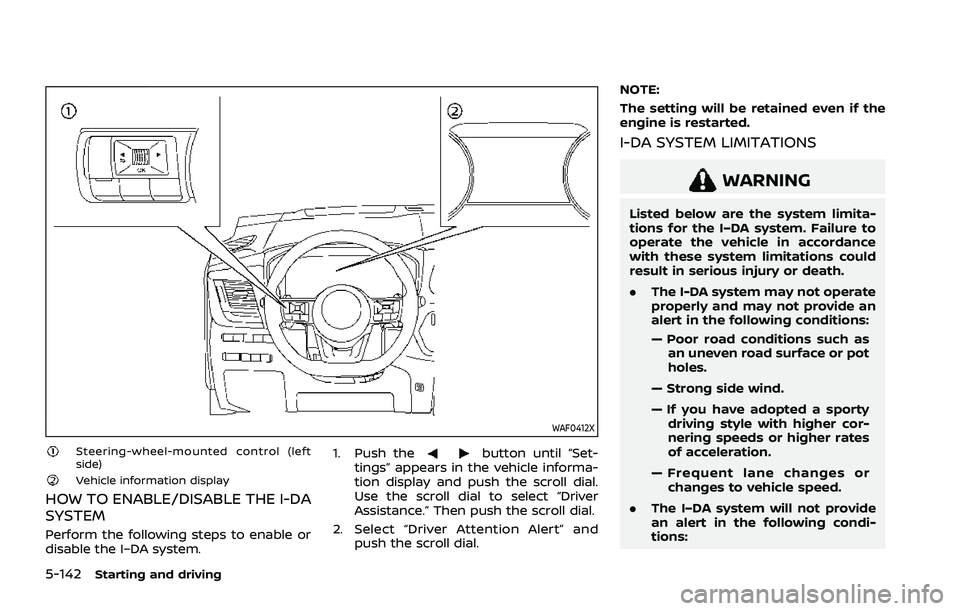
WAF0412X
Steering-wheel-mounted control (left
side)
Vehicle information display
HOW TO ENABLE/DISABLE THE I-DA
SYSTEM
Perform the following steps to enable or
disable the I–DA system.1. Push the
button until “Set-
tings” appears in the vehicle informa-
tion display and push the scroll dial.
Use the scroll dial to select “Driver
Assistance.” Then push the scroll dial.
2. Select “Driver Attention Alert” and push the scroll dial. NOTE:
The setting will be retained even if the
engine is restarted.
I-DA SYSTEM LIMITATIONS
WARNING
Listed below are the system limita-
tions for the I–DA system. Failure to
operate the vehicle in accordance
with these system limitations could
result in serious injury or death.
.
The I-DA system may not operate
properly and may not provide an
alert in the following conditions:
— Poor road conditions such as
an uneven road surface or pot
holes.
— Strong side wind.
— If you have adopted a sporty driving style with higher cor-
nering speeds or higher rates
of acceleration.
— Frequent lane changes or changes to vehicle speed.
. The I–DA system will not provide
an alert in the following condi-
tions:
Page 401 of 556
narrow tunnel, a parking lot
gate) near the side of the
vehicle.
— There are bumps, protrusions, or manhole covers on the
road surface.
— The vehicle is driving through a draped flag or a curtain.
— The vehicle is driving on a steep hill.
— There is an accumulation of snow or ice behind the vehi-
cle.
— An ultrasonic wave source, such as another vehicle’s so-
nar, is near the vehicle.
. Once the automatic brake control
operates, it does not operate
again if the vehicle approaches
the same obstacle.
. The automatic brake control can
only operate for a short period of
time. Therefore, the driver must
depress the brake pedal.
. In the following situations, the
RAB system may not operate
properly or may not function
sufficiently: — The vehicle is driven in bad
weather (rain, fog, snow, etc.).
— The vehicle is driven on a steep hill.
— The vehicle’s posture is chan- ged (e.g., when driving over a
bump).
— The vehicle is driven on a slippery road.
— The vehicle is turned sharply by turning the steering wheel
fully.
— Snow chains are used.
— Wheels or tires other than NISSAN recommended are
used.
— The brakes are cold at low ambient temperatures or im-
mediately after driving has
started.
— The braking force becomes poor due to wet brakes after
driving through a puddle or
washing the vehicle.
. Turn the RAB system off in the
following conditions to prevent
the occurrence of an unexpected
accident resulting from sudden
system operation: — The vehicle is towed.
— The vehicle is carried on a
flatbed truck.
— The vehicle is on the chassis dynamometer.
— The vehicle drives on an un- even road surface.
— Suspension parts other than those designated as genuine
parts are used. (If the vehicle
height or the vehicle body
inclination is changed, the
system may not detect an
obstacle correctly.)
. Excessive noise (e.g., audio sys-
tem volume, an open vehicle win-
dow) will interfere with the chime
sound, and it may not be heard.
SYSTEM MALFUNCTION
If the RAB system malfunctions, it will be
turned off automatically, the RAB system
OFF warning light will illuminate, and the
“Malfunction See Owner’s Manual” warn-
ing message will appear in the vehicle
information display.
Starting and driving5-147
Page 404 of 556
5-150Starting and driving
.Recirculating the cool air in thecabin when the A/C is on reduces
cooling load.
4. Drive at economical speeds and dis- tances.
.Observing the speed limit and notexceeding 60 MPH (97 km/h)
(where legally allowed) can improve
fuel efficiency due to reduced aero-
dynamic drag.
.Maintaining a safe following dis-tance behind other vehicles re-
duces unnecessary braking.
.Safely monitoring traffic to antici- pate changes in speed permits
reduced braking and smooth accel-
eration changes.
.Select a gear range suitable to roadconditions.
5. Use cruise control.
.Using cruise control during highway driving helps maintain a steady
speed.
.Cruise control is particularly effec-tive in providing fuel savings when
driving on flat terrains.
6. Plan for the shortest route.
.Utilize a map or navigation system to determine the best route to save
time. 7. Avoid idling.
.Shutting off your engine when safe
for stops exceeding 30-60 seconds
saves fuel and reduces emissions.
8. Buy an automated pass for toll roads.
.Automated passes permit drivers to use special lanes to maintain cruis-
ing speed through the toll and
avoid stopping and starting.
9. Winter warm up.
.Limit idling time to minimize impact to fuel economy.
.Vehicles typically need no morethan 30 seconds of idling at start-
up to effectively circulate the en-
gine oil before driving.
.Your vehicle will reach its ideal
operating temperature more
quickly while driving versus idling.
10. Keeping your vehicle cool.
.Park your vehicle in a covered parking area or in the shade when-
ever possible.
.When entering a hot vehicle, open- ing the windows will help to reduce
the inside temperature faster, re-
sulting in reduced demand on your
A/C system. .
Keep your engine tuned up.
. Follow the recommended scheduled
maintenance.
. Keep the tires inflated to the correct
pressure. Low tire pressure increases
tire wear and lowers fuel economy.
. Keep the wheels in correct alignment.
Improper alignment increases tire
wear and lowers fuel economy.
. Use the recommended viscosity en-
gine oil. (See “Engine oil and oil filter
recommendation” (P.10-6).)
INCREASING FUEL ECONOMY
Page 405 of 556
If any malfunction occurs in the Intelligent
4x4 system while the engine is running,
warning messages appear in the vehicle
information display.
WAF0642X
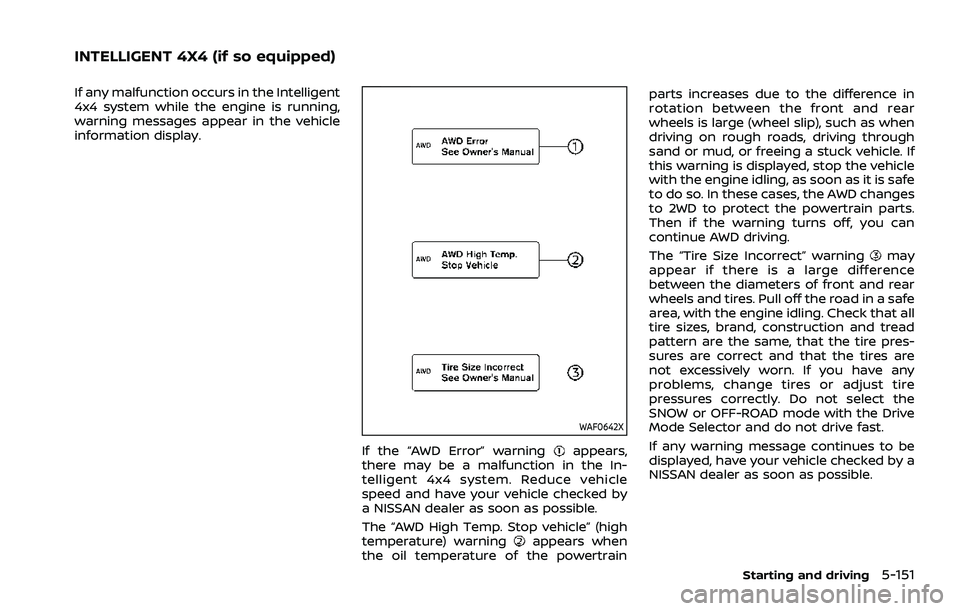
If the “AWD Error” warningappears,
there may be a malfunction in the In-
telligent 4x4 system. Reduce vehicle
speed and have your vehicle checked by
a NISSAN dealer as soon as possible.
The “AWD High Temp. Stop vehicle” (high
temperature) warning
appears when
the oil temperature of the powertrain parts increases due to the difference in
rotation between the front and rear
wheels is large (wheel slip), such as when
driving on rough roads, driving through
sand or mud, or freeing a stuck vehicle. If
this warning is displayed, stop the vehicle
with the engine idling, as soon as it is safe
to do so. In these cases, the AWD changes
to 2WD to protect the powertrain parts.
Then if the warning turns off, you can
continue AWD driving.
The “Tire Size Incorrect” warning
may
appear if there is a large difference
between the diameters of front and rear
wheels and tires. Pull off the road in a safe
area, with the engine idling. Check that all
tire sizes, brand, construction and tread
pattern are the same, that the tire pres-
sures are correct and that the tires are
not excessively worn. If you have any
problems, change tires or adjust tire
pressures correctly. Do not select the
SNOW or OFF-ROAD mode with the Drive
Mode Selector and do not drive fast.
If any warning message continues to be
displayed, have your vehicle checked by a
NISSAN dealer as soon as possible.
Starting and driving5-151
INTELLIGENT 4X4 (if so equipped)
Page 414 of 556
5-160Starting and driving
used, the VDC system may not
operate properly and the
indicator light may flash or both
theandindicator lights
may illuminate.
. The VDC system is not a substi-
tute for winter tires or tire chains
on a snow covered road. The chassis control is an electric control
module that includes the following func-
tions:
.
Intelligent Trace Control
. Active Ride Control
INTELLIGENT TRACE CONTROL
This system senses driving based on the
driver’s steering and acceleration/braking
patterns, and controls brake pressure at
individual wheels to aid tracing at corners
and help smooth vehicle response.
When the VDC system is turned off, the
Intelligent Trace Control is also turned off.
Amount of brake control is changed
based on Drive Mode selector.
When Intelligent Trace Control is not
functioning properly, the master warning
light illuminates, and warning message
“Chassis Control System Error” will also
appear in the vehicle information display.
If the chassis control warning message
appears in the vehicle information dis-
play, it may indicate that the Intelligent
Trace Control is not functioning properly.
Have the system checked as soon as
possible. It is recommended that you visit
a NISSAN dealer for this service. (See
“Vehicle information display warnings
and indicators” (P.2-34).)
WARNING
The Intelligent Trace Control may not
be effective depending on the driv-
ing condition. Always drive carefully
and attentively.
When the Intelligent Trace Control is
operating, you may feel a pulsation in
the brake pedal, sense slight deceleration,
or hear a noise. This is normal and
indicates that Intelligent Trace Control is
operating properly.
ACTIVE RIDE CONTROL
This system senses upper body motion
and controls four wheel brake pressure.
This will enhance ride comfort in effort to
restrain uncomfortable upper body
movement when passing over undulated
road surfaces. When the VDC system is
turned off, the Active Ride Control is also
turned off.
If the chassis control warning message
appears in the vehicle information dis-
play, it may indicate that the Active Ride
Control is not functioning properly. Have
the system checked as soon as possible.
It is recommended that you visit a NISSAN
dealer for this service.
CHASSIS CONTROL
Page 419 of 556
WAF0412X
Steering-wheel-mounted control (left
side)
Vehicle information display
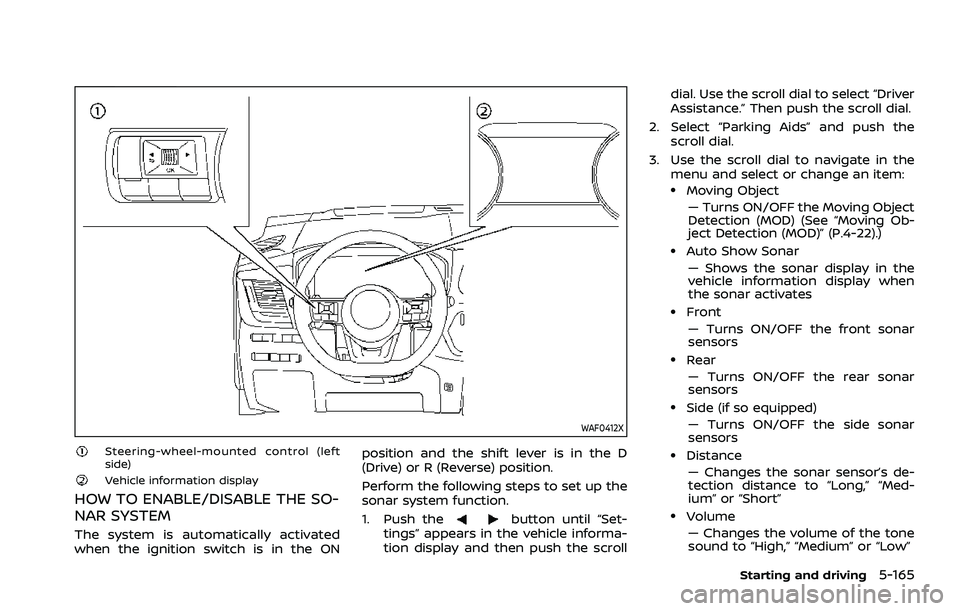
HOW TO ENABLE/DISABLE THE SO-
NAR SYSTEM
The system is automatically activated
when the ignition switch is in the ONposition and the shift lever is in the D
(Drive) or R (Reverse) position.
Perform the following steps to set up the
sonar system function.
1. Push thebutton until “Set-
tings” appears in the vehicle informa-
tion display and then push the scroll dial. Use the scroll dial to select “Driver
Assistance.” Then push the scroll dial.
2. Select “Parking Aids” and push the scroll dial.
3. Use the scroll dial to navigate in the menu and select or change an item:
.Moving Object
— Turns ON/OFF the Moving Object
Detection (MOD) (See “Moving Ob-
ject Detection (MOD)” (P.4-22).)
.Auto Show Sonar— Shows the sonar display in the
vehicle information display when
the sonar activates
.Front— Turns ON/OFF the front sonar
sensors
.Rear— Turns ON/OFF the rear sonar
sensors
.Side (if so equipped)
— Turns ON/OFF the side sonar
sensors
.Distance— Changes the sonar sensor’s de-
tection distance to “Long,” “Med-
ium” or “Short”
.Volume— Changes the volume of the tone
sound to “High,” “Medium” or “Low”
Starting and driving5-165
Page 424 of 556
5-170Starting and driving
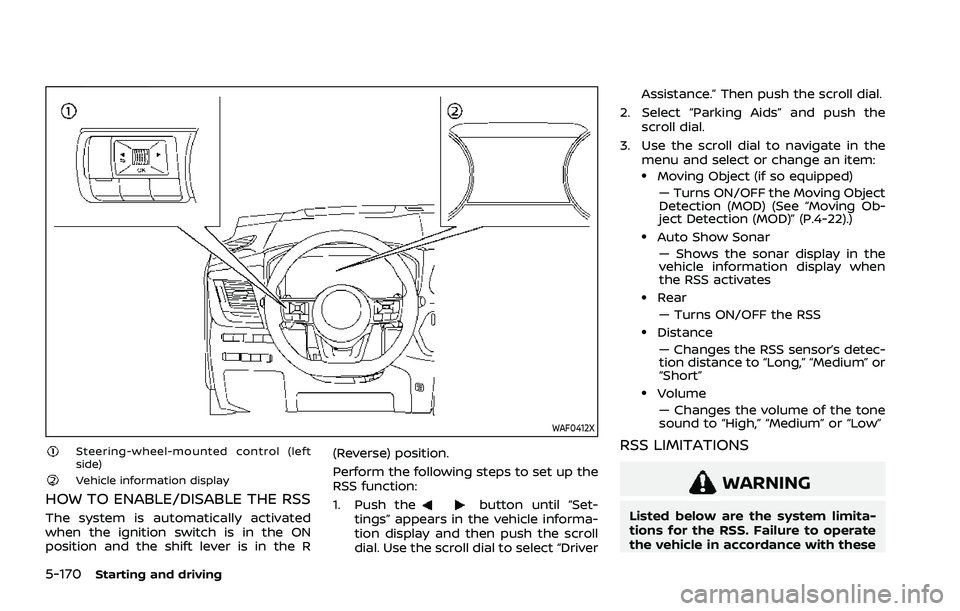
WAF0412X
Steering-wheel-mounted control (left
side)
Vehicle information display
HOW TO ENABLE/DISABLE THE RSS
The system is automatically activated
when the ignition switch is in the ON
position and the shift lever is in the R(Reverse) position.
Perform the following steps to set up the
RSS function:
1. Push thebutton until “Set-
tings” appears in the vehicle informa-
tion display and then push the scroll
dial. Use the scroll dial to select “Driver Assistance.” Then push the scroll dial.
2. Select “Parking Aids” and push the scroll dial.
3. Use the scroll dial to navigate in the menu and select or change an item:
.Moving Object (if so equipped)
— Turns ON/OFF the Moving Object
Detection (MOD) (See “Moving Ob-
ject Detection (MOD)” (P.4-22).)
.Auto Show Sonar— Shows the sonar display in the
vehicle information display when
the RSS activates
.Rear
— Turns ON/OFF the RSS
.Distance— Changes the RSS sensor’s detec-
tion distance to “Long,” “Medium” or
“Short”
.Volume— Changes the volume of the tone
sound to “High,” “Medium” or “Low”
RSS LIMITATIONS
WARNING
Listed below are the system limita-
tions for the RSS. Failure to operate
the vehicle in accordance with these
Page 432 of 556
6-4In case of emergency
of the TPMS.
. Do not inject any tire liquid or
aerosol tire sealant into the tires,
as this may cause a malfunction
of the tire pressure sensors.
CHANGING A FLAT TIRE
If you have a flat tire, follow the instruc-
tions below.
Stopping the vehicle
1. Safely move the vehicle off the road
and away from traffic.
2. Turn on the hazard warning flashers.
3. Park on a level surface and apply the parking brake.
4. Push the park button to engage the P (Park) position.
5. Turn off the engine.
6. Raise the hood to warn other traffic, and to signal professional road assis-
tance personnel that you need assis-
tance.
7. Have all passengers get out of the vehicle and stand in a safe place, away
from traffic and clear of the vehicle.
WARNING
.Make sure the parking brake is
securely applied and the shift
position is placed in the P (Park)
position.
. Never change tires when the ve-
hicle is on a slope, ice or slippery
areas. This is hazardous.
. Never change tires if oncoming
traffic is close to your vehicle.
Wait for professional road assis-
tance.
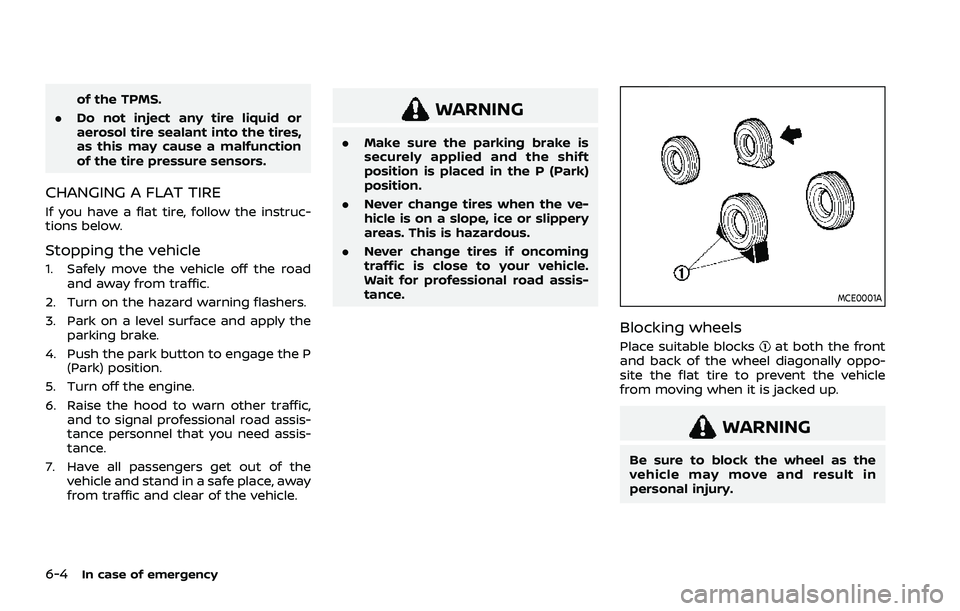
MCE0001A
Blocking wheels
Place suitable blocksat both the front
and back of the wheel diagonally oppo-
site the flat tire to prevent the vehicle
from moving when it is jacked up.
WARNING
Be sure to block the wheel as the
vehicle may move and result in
personal injury.