tow NISSAN ROGUE 2021 Owner´s Manual
[x] Cancel search | Manufacturer: NISSAN, Model Year: 2021, Model line: ROGUE, Model: NISSAN ROGUE 2021Pages: 556, PDF Size: 2.7 MB
Page 147 of 556
High beam assist
The high beam assist system will operate
when the vehicle is driven at speeds of
approximately 19 MPH (30 km/h) and
above. If an oncoming vehicle or leading
vehicle appears in front of your vehicle
when the headlight high beam is on, the
headlight will be switched to the low
beam automatically.
Precautions on high beam assist:
WARNING
.The high beam assist system is a
convenience but it is not a sub-
stitute for safe driving operation.
The driver should remain alert at
all times, ensure safe driving
practices and switch the high
beams and low beam manually
when necessary.
. The high beam or low beam may
not switch automatically under
the following conditions. Switch
the high beam and low beam
manually.
— During bad weather (rain, fog,
snow, wind, etc.).
— When a light source similar to a headlight or tail light is in the vicinity of the vehicle.
— When the headlights of the oncoming vehicle or the lead-
ing vehicle are turned off,
when the color of the light is
affected due to foreign mate-
rials on the lights, or when the
light beam is out of position.
— When there is a sudden, con- tinuous change in brightness.
— When driving on a road that passes over rolling hills, or a
road that has level differ-
ences.
— When driving on a road with many curves.
— When a sign or mirror-like surface is reflecting intense
light towards the front of the
vehicle.
— When the container, etc. being towed by a leading vehicle is
reflecting intense light.
— When a headlight on your vehicle is damaged or dirty.
— When the vehicle is leaning at an angle due to a punctured
tire, being towed, etc. .
The timing of switching the low
beam and high beam may
change under the following situa-
tions.
— The brightness of the head-
lights of the oncoming vehicle
or leading vehicle.
— The movement and direction of the oncoming vehicle and
the leading vehicle.
— When only one light on the oncoming vehicle or the lead-
ing vehicle is illuminated.
— When the oncoming vehicle or the leading vehicle is a two-
wheeled vehicle.
— Road conditions (incline, curve, the road surface, etc.).
— The number of passengers and the amount of cargo.
Instruments and controls2-59
Page 162 of 556
2-74Instruments and controls
WAC0328X
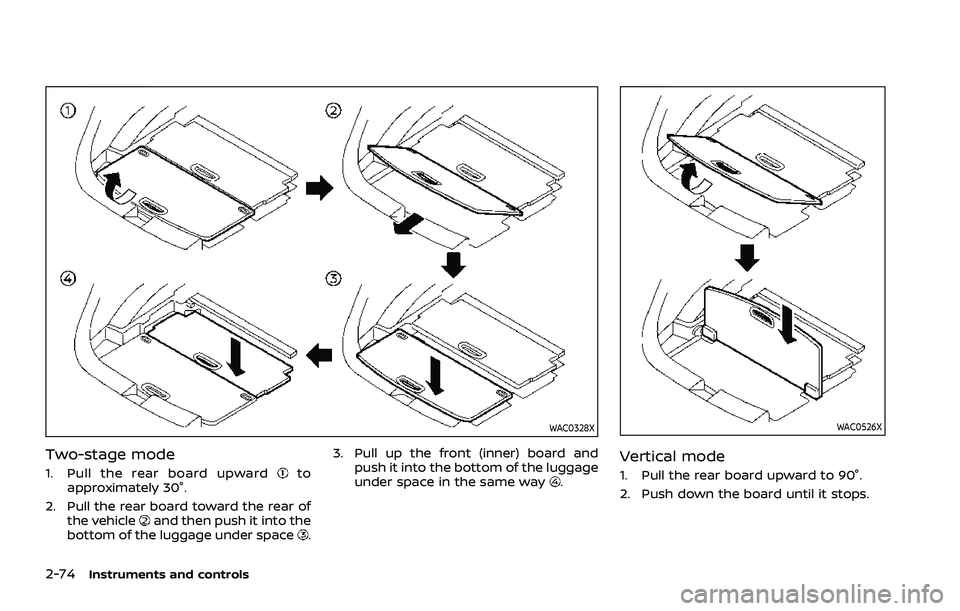
Two-stage mode
1. Pull the rear board upwardto
approximately 30°.
2. Pull the rear board toward the rear of the vehicle
and then push it into the
bottom of the luggage under space. 3. Pull up the front (inner) board and
push it into the bottom of the luggage
under space in the same way
.
WAC0526X
Vertical mode
1. Pull the rear board upward to 90°.
2. Push down the board until it stops.
Page 165 of 556
WAC0490X
CARD HOLDER
Slide a card in the card holder.
SIC3505
COAT HOOKS
The coat hook is located above the rear
side window.
CAUTION
Do not apply a total load of more
than 2 lb (1 kg) to the hook.WAC0329X
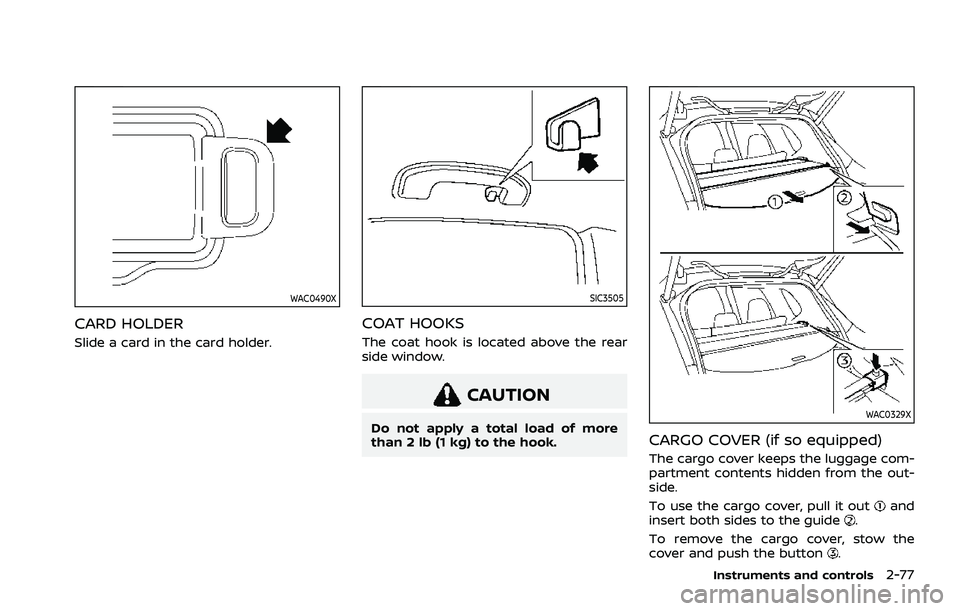
CARGO COVER (if so equipped)
The cargo cover keeps the luggage com-
partment contents hidden from the out-
side.
To use the cargo cover, pull it out
and
insert both sides to the guide.
To remove the cargo cover, stow the
cover and push the button
.
Instruments and controls2-77
Page 184 of 556
3-8Pre-driving checks and adjustments
CAUTION
.Be sure to carry the Intelligent
Key with you when operating the
vehicle.
. Never leave the Intelligent Key in
the vehicle when you leave the
vehicle.
The Intelligent Key is always communi-
cating with the vehicle as it receives radio
waves. The Intelligent Key system trans-
mits weak radio waves. Environmental
conditions may interfere with the opera-
tion of the Intelligent Key system under
the following operating conditions.
. When operating near a location where
strong radio waves are transmitted,
such as a TV tower, power station and
broadcasting station.
. When in possession of wireless equip-
ment, such as a cellular phone, trans-
ceiver, and CB radio.
. When the Intelligent Key is in contact
with or covered by metallic materials.
. When any type of radio wave remote
control is used nearby.
. When the Intelligent Key is placed near
an electric appliance such as a perso-
nal computer. .
When the vehicle is parked near a
parking meter.
In such cases, correct the operating
conditions before using the Intelligent
Key function or use the mechanical key.
Although the life of the battery varies
depending on the operating conditions,
the battery’s life is approximately 2 years.
If the battery is discharged, replace it with
a new one.
When the Intelligent Key battery is low, an
indicator illuminates in the vehicle infor-
mation display. (See “4. Key Battery Low
warning” (P.2-34).)
Since the Intelligent Key is continuously
receiving radio waves, if the key is left
near equipment which transmits strong
radio waves, such as signals from a TV
and personal computer, the battery life
may become shorter.
For information regarding replacement of
a battery, see “Intelligent Key battery
replacement” (P.8-20).
As many as 4 Intelligent Keys can be
registered and used with one vehicle. For
information about the purchase and use
of additional Intelligent Keys, it is recom-
mended that you contact a NISSAN deal-
er.
CAUTION
. Do not allow the Intelligent Key,
which contains electrical compo-
nents, to come into contact with
water or salt water. This could
affect the system function.
. Do not drop the Intelligent Key.
. Do not strike the Intelligent Key
sharply against another object.
. Do not change or modify the
Intelligent Key.
. Wetting may damage the Intelli-
gent Key. If the Intelligent Key
gets wet, immediately wipe until
it is completely dry.
. If the outside temperature is be-
low 14°F (−10°C) degrees, the bat-
tery of the Intelligent Key may not
function properly.
. Do not place the Intelligent Key
for an extended period in an area
where temperatures exceed
140°F (60°C).
. Do not attach the Intelligent Key
with a key holder that contains a
magnet.
. Do not place the Intelligent Key
near equipment that produces a
Page 196 of 556
3-20Pre-driving checks and adjustments
Other conditions may affect the remote
engine start function. See “Conditions the
remote engine start will not work” (P.3-21).
Other conditions can affect the perfor-
mance of the Intelligent Key transmitter.
See “Intelligent Key system” (P.3-7) for
additional information.
REMOTE ENGINE START OPERATING
RANGE
The remote engine start function can
only be used when the Intelligent Key is
within the specified operating range from
the vehicle.
When the Intelligent Key battery is dis-
charged or other strong radio wave
sources are present near the operating
location, the Intelligent Key operating
range becomes narrower, and the Intelli-
gent Key may not function properly.
The remote engine start operating range
is approximately 197 ft (60 m) from the
vehicle.
REMOTE STARTING THE ENGINE
To use the remote start function to start
the engine, perform the following:
1. If the doors are unlocked, push theLOCK
button to lock all doors.
2. Aim the Intelligent Key at the vehicle. 3. Push the LOCK
button again.
4. Within 5 seconds push and hold the remote engine start
button until
the turn signal lights flash and the tail
lights illuminate. If the vehicle is not
within view, push and hold the remote
engine start
button for at least 2
seconds.
The following events will occur when the
engine starts:
. The front parking lights will turn on
and remain on as long as the engine is
running.
. The doors will be locked and the air
conditioner system may turn on.
. The engine will continue to run for
about 10 minutes. Repeat the steps to
extend the time for an additional 10
minutes. See “Extending engine run
time” (P.3-20).
Depress and hold the brake pedal, then
place the ignition switch in the ON posi-
tion before driving. For further instruc-
tions, see “Driving the vehicle” (P.5-19).
EXTENDING ENGINE RUN TIME
The remote engine start function can be
extended one time by performing the
steps listed in “Remote starting the en-
gine” (P.3-20). Run time will be calculated
as follows:
. The first 10 minute run time will start
when the remote engine start func-
tion is performed.
. The second 10 minutes will start im-
mediately when the remote engine
start function is performed. For exam-
ple, if the engine has been running for
5 minutes, and 10 minutes are added,
the engine will run for a total of 15
minutes.
. Extending engine run time will count
towards the two remote engine start
limit.
A maximum of two remote engine starts,
or a single start with an extension can be
used.
The vehicle needs to be driven at speeds
of 4 MPH (7 km/h) before the remote
engine start procedure can be used
again.
Page 203 of 556
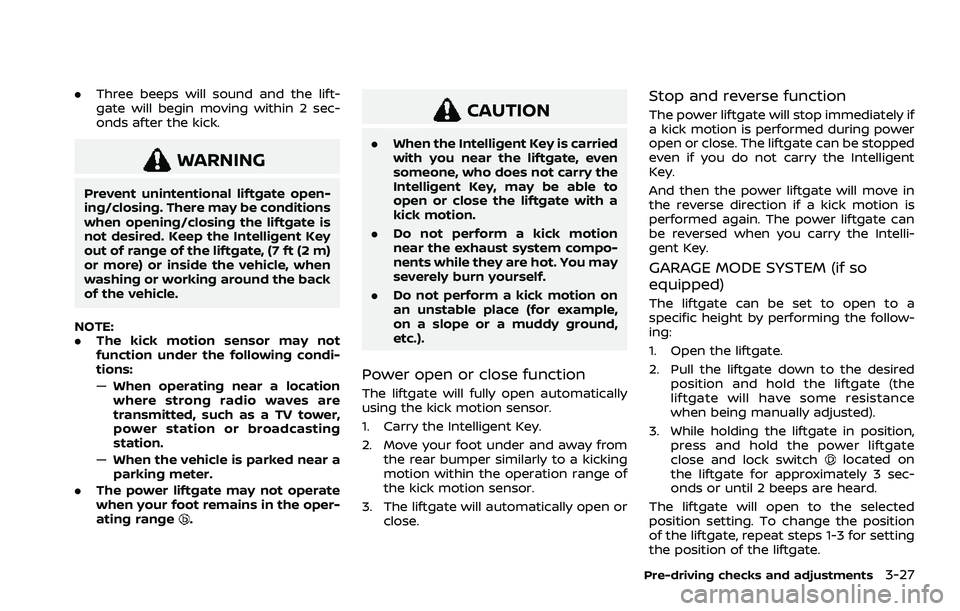
.Three beeps will sound and the lift-
gate will begin moving within 2 sec-
onds after the kick.
WARNING
Prevent unintentional liftgate open-
ing/closing. There may be conditions
when opening/closing the liftgate is
not desired. Keep the Intelligent Key
out of range of the liftgate, (7 ft (2 m)
or more) or inside the vehicle, when
washing or working around the back
of the vehicle.
NOTE:
. The kick motion sensor may not
function under the following condi-
tions:
—When operating near a location
where strong radio waves are
transmitted, such as a TV tower,
power station or broadcasting
station.
— When the vehicle is parked near a
parking meter.
. The power liftgate may not operate
when your foot remains in the oper-
ating range
.
CAUTION
.When the Intelligent Key is carried
with you near the liftgate, even
someone, who does not carry the
Intelligent Key, may be able to
open or close the liftgate with a
kick motion.
. Do not perform a kick motion
near the exhaust system compo-
nents while they are hot. You may
severely burn yourself.
. Do not perform a kick motion on
an unstable place (for example,
on a slope or a muddy ground,
etc.).
Power open or close function
The liftgate will fully open automatically
using the kick motion sensor.
1. Carry the Intelligent Key.
2. Move your foot under and away from
the rear bumper similarly to a kicking
motion within the operation range of
the kick motion sensor.
3. The liftgate will automatically open or close.
Stop and reverse function
The power liftgate will stop immediately if
a kick motion is performed during power
open or close. The liftgate can be stopped
even if you do not carry the Intelligent
Key.
And then the power liftgate will move in
the reverse direction if a kick motion is
performed again. The power liftgate can
be reversed when you carry the Intelli-
gent Key.
GARAGE MODE SYSTEM (if so
equipped)
The liftgate can be set to open to a
specific height by performing the follow-
ing:
1. Open the liftgate.
2. Pull the liftgate down to the desiredposition and hold the liftgate (the
liftgate will have some resistance
when being manually adjusted).
3. While holding the liftgate in position, press and hold the power liftgate
close and lock switch
located on
the liftgate for approximately 3 sec-
onds or until 2 beeps are heard.
The liftgate will open to the selected
position setting. To change the position
of the liftgate, repeat steps 1-3 for setting
the position of the liftgate.
Pre-driving checks and adjustments3-27
Page 211 of 556
Defrosting outside mirrors (if so
equipped)
The outside mirrors will be heated when
the rear window defroster switch is
operated. (See “Rear window and outside
mirror defroster switch” (P.2-55).)
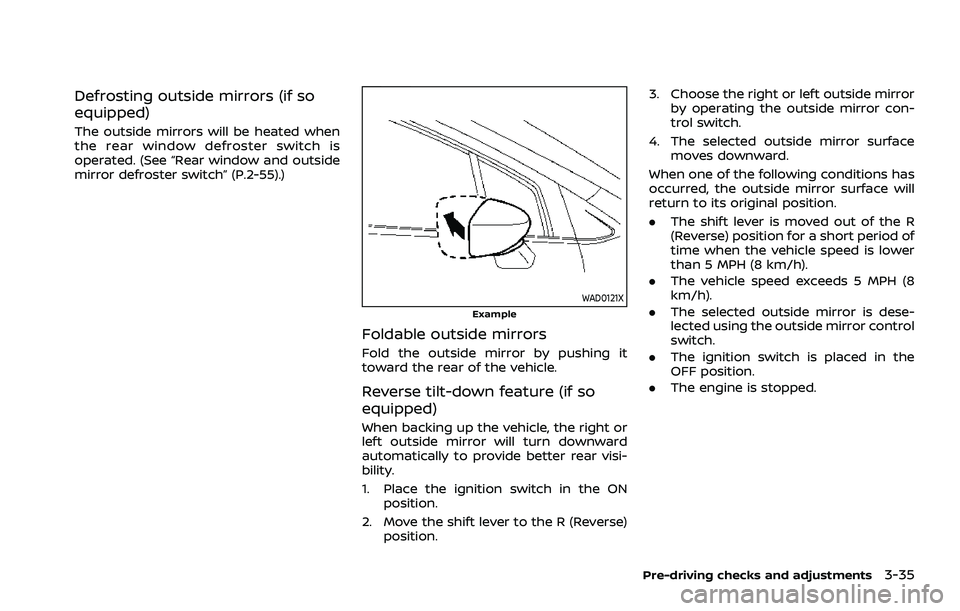
WAD0121XExample
Foldable outside mirrors
Fold the outside mirror by pushing it
toward the rear of the vehicle.
Reverse tilt-down feature (if so
equipped)
When backing up the vehicle, the right or
left outside mirror will turn downward
automatically to provide better rear visi-
bility.
1. Place the ignition switch in the ONposition.
2. Move the shift lever to the R (Reverse) position. 3. Choose the right or left outside mirror
by operating the outside mirror con-
trol switch.
4. The selected outside mirror surface moves downward.
When one of the following conditions has
occurred, the outside mirror surface will
return to its original position.
. The shift lever is moved out of the R
(Reverse) position for a short period of
time when the vehicle speed is lower
than 5 MPH (8 km/h).
. The vehicle speed exceeds 5 MPH (8
km/h).
. The selected outside mirror is dese-
lected using the outside mirror control
switch.
. The ignition switch is placed in the
OFF position.
. The engine is stopped.
Pre-driving checks and adjustments3-35
Page 238 of 556
4-24Monitor, heater, air conditioner, audio and phone systems
WAE0549XRear and front-side views
WAE0550XFront-wide view / rear-wide view
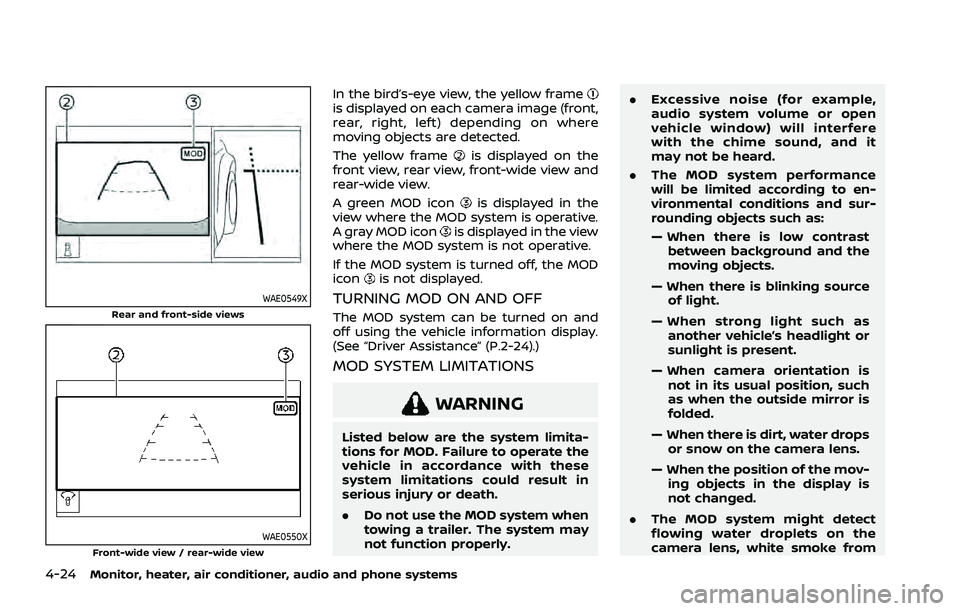
In the bird’s-eye view, the yellow frameis displayed on each camera image (front,
rear, right, left) depending on where
moving objects are detected.
The yellow frame
is displayed on the
front view, rear view, front-wide view and
rear-wide view.
A green MOD icon
is displayed in the
view where the MOD system is operative.
A gray MOD icon
is displayed in the view
where the MOD system is not operative.
If the MOD system is turned off, the MOD
icon
is not displayed.
TURNING MOD ON AND OFF
The MOD system can be turned on and
off using the vehicle information display.
(See “Driver Assistance” (P.2-24).)
MOD SYSTEM LIMITATIONS
WARNING
Listed below are the system limita-
tions for MOD. Failure to operate the
vehicle in accordance with these
system limitations could result in
serious injury or death.
. Do not use the MOD system when
towing a trailer. The system may
not function properly. .
Excessive noise (for example,
audio system volume or open
vehicle window) will interfere
with the chime sound, and it
may not be heard.
. The MOD system performance
will be limited according to en-
vironmental conditions and sur-
rounding objects such as:
— When there is low contrast
between background and the
moving objects.
— When there is blinking source of light.
— When strong light such as another vehicle’s headlight or
sunlight is present.
— When camera orientation is not in its usual position, such
as when the outside mirror is
folded.
— When there is dirt, water drops or snow on the camera lens.
— When the position of the mov- ing objects in the display is
not changed.
. The MOD system might detect
flowing water droplets on the
camera lens, white smoke from
Page 260 of 556
5-6Starting and driving
THREE-WAY CATALYST
The three-way catalyst is an emission
control device installed in the exhaust
system. Exhaust gases in the three-way
catalyst are burned at high temperatures
to help reduce pollutants.
WARNING
.The exhaust gas and the exhaust
system are very hot. Keep people,
animals and flammable materials
away from the exhaust system
components.
. Do not stop or park the vehicle
over flammable materials such as
dry grass, wastepaper or rags.
They may ignite and cause a fire.
CAUTION
.Do not use leaded gasoline. De-
posits from leaded gasoline will
seriously reduce the three-way
catalyst’s ability to help reduce
exhaust pollutants.
. Keep your engine tuned up. Mal-
functions in the ignition, fuel in-
jection, or electrical systems can cause overrich fuel flow into the
three-way catalyst, causing it to
overheat. Do not keep driving if
the engine misfires, or if notice-
able loss of performance or other
unusual operating conditions are
detected. Have the vehicle in-
spected. It is recommended you
visit a NISSAN dealer for this
service.
. Avoid driving with an extremely
low fuel level. Running out of fuel
could cause the engine to misfire,
damaging the three-way catalyst.
. Do not race the engine while
warming it up.
. Do not push or tow your vehicle
to start the engine.
TIRE PRESSURE MONITORING SYS-
TEM (TPMS)
Each tire, including the spare, should be
checked monthly when cold and inflated
to the inflation pressure recommended
by the vehicle manufacturer on the ve-
hicle placard or tire inflation pressure
label. (If your vehicle has tires of a
different size than the size indicated on
the vehicle placard or tire inflation pres-
sure label, you should determine the
proper tire inflation pressure for those tires.)
As an added safety feature, your vehicle
has been equipped with a Tire Pressure
Monitoring System (TPMS) that illumi-
nates a low tire pressure telltale when
one or more of your tires is significantly
under-inflated. Accordingly, when the low
tire pressure telltale illuminates, you
should stop and check your tires as soon
as possible, and inflate them to the
proper pressure. Driving on a significantly
under-inflated tire causes the tire to
overheat and can lead to tire failure.
Under-inflation also reduces fuel effi-
ciency and tire tread life, and may affect
the vehicle’s handling and stopping abil-
ity.
Please note that the TPMS is not a
substitute for proper tire maintenance,
and it is the driver’s responsibility to
maintain correct tire pressure, even if
under-inflation has not reached the level
to trigger illumination of the TPMS low
tire pressure telltale.
Your vehicle has also been equipped with
a TPMS malfunction indicator to indicate
when the system is not operating prop-
erly. The TPMS malfunction indicator is
combined with the low tire pressure tell-
tale. When the system detects a malfunc-
tion, the telltale will flash for
approximately one minute and then re-
Page 267 of 556
.Before operating the vehicle, en-
sure that the driver and all pas-
sengers have their seat belts
fastened.
. Always drive with the floor mats
in place as the floor may became
hot.
. Lower your speed when encoun-
tering strong crosswinds. With a
higher center of gravity, your
vehicle is more affected by strong
side winds. Slower speeds ensure
better vehicle control.
. Do not drive beyond the perfor-
mance capability of the tires,
even with AWD engaged.
. For AWD equipped vehicles, do
not attempt to raise two wheels
off the ground and shift the
transmission to any drive or re-
verse position with the engine
running. Doing so may result in
drivetrain damage or unexpected
vehicle movement which could
result in serious vehicle damage
or personal injury.
. Do not attempt to test an AWD
equipped vehicle on a 2-wheel
dynamometer (such as the dy-
namometers used by some
states for emissions testing), or similar equipment even if the
other two wheels are raised off
the ground. Make sure you inform
test facility personnel that your
vehicle is equipped with AWD
before it is placed on a dynam-
ometer. Using the wrong test
equipment may result in drive-
train damage or unexpected ve-
hicle movement which could
result in serious vehicle damage
or personal injury.
. When a wheel is off the ground
due to an unlevel surface, do not
spin the wheel excessively (AWD
model).
. Accelerating quickly, sharp steer-
ing maneuvers or sudden braking
may cause loss of control.
. If at all possible, avoid sharp
turning maneuvers, particularly
at high speeds. Your vehicle has
a higher center of gravity than a
conventional passenger car. The
vehicle is not designed for cor-
nering at the same speeds as
conventional passenger cars.
Failure to operate this vehicle
correctly could result in loss of
control and/or a rollover acci-
dent. .
Always use tires of the same type,
size, brand, construction (bias,
bias-belted or radial), and tread
pattern on all four wheels. Install
traction devices on the front
wheels when driving on slippery
roads and drive carefully.
. Be sure to check the brakes im-
mediately after driving in mud or
water. See “Brake system” (P.5-
155) for wet brakes.
. Avoid parking your vehicle on
steep hills. If you get out of the
vehicle and it rolls forward, back-
ward or sideways, you could be
injured.
. Whenever you drive off-road
through sand, mud or water as
deep as the wheel hub, more
frequent maintenance may be
required. See the maintenance
schedule shown in the “9. Main-
tenance and schedules” section.
. Spinning the front wheels on
slippery surfaces may cause the
AWD warning message to display
and the AWD system to automa-
tically switch from the AWD mode
to the 2WD mode. This could
reduce traction. Be especially
careful when towing a trailer
Starting and driving5-13