tow NISSAN ROGUE 2021 Owner´s Manual
[x] Cancel search | Manufacturer: NISSAN, Model Year: 2021, Model line: ROGUE, Model: NISSAN ROGUE 2021Pages: 556, PDF Size: 2.7 MB
Page 278 of 556
5-24Starting and driving
1M(1st):
Use this position when climbing steep
hills slowly or driving slowly through deep
snow, or for maximum engine braking on
steep downhill grades.
. Remember not to drive at high speeds
for extended periods of time in lower
than 8th gear. This reduces fuel econ-
omy.
. Pulling the same paddle shifter twice
will shift the ranges in succession.
However, if this motion is rapidly done,
the second shifting may not be com-
pleted properly.
. In the manual shift mode, the trans-
mission may not shift to the se-
lected gear. This helps maintain
driving performance and reduces
the chance of vehicle damage or
loss of control.
. When this situation occurs, the Con-
tinuously Variable Transmission
(CVT) position indicator will blink
and the chime will sound.
. In the manual shift mode, the trans-
mission may shift up automatically
to a higher range than selected if the
engine speed is too high. When the
vehicle speed decreases, the trans-
mission automatically shifts down
and shifts to 1st gear before the
vehicle comes to a stop. .
CVT operation is limited to automatic
drive mode when CVT fluid tempera-
ture is extremely low even if manual
shift mode is selected. This is not a
malfunction. When CVT fluid warms
up, manual shift mode can be se-
lected.
. When the CVT fluid temperature is
high, the shift range may upshift in
lower rpm than usual. This is not a
malfunction.
Accelerator downshift - in D (Drive)
position -
For passing or climbing hills, depress the
accelerator pedal to the floor. This shifts
the transmission down into a lower gear,
depending on the vehicle speed.
High fluid temperature protection
mode
This transmission has a high fluid tem-
perature protection mode. If the fluid
temperature becomes too high, (for ex-
ample, when climbing steep grades in
high temperatures with heavy loads, such
as when towing a trailer), engine power
and, under some conditions, vehicle
speed will be decreased automatically to
reduce the chance of transmission da-
mage. Vehicle speed can be controlled
with the accelerator pedal, but the engine and vehicle speed may be limited.
Fail-safe
When the fail-safe operation occurs, the
Continuously Variable Transmission will
not be shifted into the selected driving
position.
If the vehicle is driven under extreme
conditions, such as excessive wheel
spinning and subsequent hard braking,
the fail-safe system may be activated.
The Malfunction Indicator Light (MIL)
may come on to indicate the fail-safe
mode is activated. For additional infor-
mation, refer to “Malfunction Indicator
Light (MIL)” (P.2-19). This will occur even
if all electrical circuits are functioning
properly. In this case, place the ignition
switch in the OFF position and wait for
10 seconds. Then place the ignition
switch back in the ON position. The
vehicle should return to its normal
operating condition. (The MIL may be
illuminated even when the vehicle has
returned to its normal operating condi-
tion.) If it does not return to its normal
operating condition, have the transmis-
sion checked and repaired, if necessary,
by a NISSAN dealer.
Page 281 of 556
—If a malfunction occurs in the
automatic brake hold function.
. Make sure that the electronic park-
ing brake system warning light (yel-
low) is OFF before starting the
vehicle.
MANUAL OPERATION
To apply: When the vehicle is stopped,
pull the parking brake switchup. (The
electronic parking brake will apply even if
the ignition switch is placed in the OFF
position.) The indicator light
on the
switch and the electronic parking brake
warning light PARK or
(red) will
illuminate.
To release: With the ignition switch in the
ON position, depress the brake pedal and
push the parking brake switch down
.
The indicator lightand the electronic
parking brake warning light (red) will turn
off.
Before driving, check that the electronic
parking brake warning light (red) turns
off. For additional information, see “Warn-
ing lights, indicator lights and audible
reminders” (P.2-13).
NOTE:
. While the electronic parking brake is
applied or released, an operating
sound is heard from the lower side
of the rear seat. This is normal and does not indicate a malfunction.
. When the electronic parking brake is
frequently applied and released in a
short period of time, the electronic
parking brake system warning light
(yellow) may blink and the electronic
parking brake may not operate in
order to prevent the electronic park-
ing brake system from overheating.
If this occurs, operate the parking
brake switch again after waiting
approximately 1 minute.
. If the electronic parking brake must
be applied while driving in an emer-
gency, pull up and hold the parking
brake switch. When you release the
parking brake switch, the electronic
parking brake will be released.
. While pulling up the parking brake
switch during driving, the electronic
parking brake is applied and a chime
sounds. The electronic parking
brake warning light (red) and the
indicator light on the parking brake
switch illuminate. This does not in-
dicate a malfunction. The electronic
parking brake warning light (red)
and the indicator light on the park-
ing brake switch will turn off when
the electronic parking brake is re-
leased. .
When pulling the parking brake
switch up with the ignition switch
in the OFF position, the indicator
light on the parking brake switch
will continue to illuminate for a short
period of time.
When towing a trailer
Depending on the weight of the vehicle
and trailer and the steepness of the slope,
there may be a tendency for the vehicle
to move backwards when starting from a
standstill. When this occurs, you can use
the parking brake switch in the same way
as a conventional lever type parking
brake.
Before starting on sloping roads when
towing a trailer, be sure to read the
following to prevent the vehicle from
moving backward unintentionally.
.Release the parking brake switch as
soon as the engine is delivering en-
ough torque to the wheels.
Starting and driving5-27
Page 282 of 556
5-28Starting and driving
The automatic brake hold function main-
tains the braking force without the driver
having to depress the brake pedal when
the vehicle is stopped at a traffic light or
intersection. As soon as the driver de-
presses the accelerator pedal again, the
automatic brake hold function is deacti-
vated and the braking force is released.
The operating status of the automatic
brake hold can be displayed on the
vehicle information display.
WARNING
.The automatic brake hold func-
tion is not designed to hold the
vehicle on a steep hill or slippery
road. Never use the automatic
brake hold when the vehicle is
stopped on a steep hill or slippery
road. Failure to do so may cause
the vehicle to move.
. The automatic brake hold warn-
ing may appear in the vehicle
information display to request
that the driver retake control by
depressing the brake pedal.
. When the automatic brake hold
function is activated but fails to
maintain the vehicle at a stand-
still, depress the brake pedal to
stop the vehicle. If the vehicle unexpectedly moves due to out-
side conditions, the chime may
sound and automatic brake hold
warning may illuminate in the
vehicle information display.
. Be sure to deactivate the auto-
matic brake hold function when
using a car wash or towing your
vehicle.
. Make sure to push the park but-
ton to shift to the P (Park) posi-
tion and apply the electronic
parking brake when parking your
vehicle, riding on or off the vehi-
cle, or loading luggage. Failure to
do so could cause the vehicle to
move or roll away unexpectedly
and result in serious personal
injury or property damage.
. If any of the following conditions
occur, the automatic brake hold
function may not function. Have
the system checked promptly. It
is recommended that you visit a
NISSAN dealer for this service.
Failure to operate the vehicle in
accordance with these conditions
could cause the vehicle to move
or roll away unexpectedly and
result in serious personal injury
or property damage. — A warning message appears
in the vehicle information dis-
play.
— The indicator light on the automatic brake hold switch
does not illuminate when the
switch is pushed.
. The automatic brake hold func-
tion will not be activated if the
slip indicator light, electronic
parking brake system warning
light or master warning light illu-
minates and the Chassis Control
System Error warning message
appears in the vehicle informa-
tion display.
. To maintain the braking force to
keep the vehicle to a standstill, a
noise may be heard. This is not a
malfunction.
AUTOMATIC BRAKE HOLD
Page 303 of 556
— When there is a lane closuredue to road repairs.
— When driving in a makeshift or temporary lane.
— When driving on roads where the lane width is too narrow.
— When driving without normal tire conditions (for example,
tire wear, low tire pressure,
installation of spare tire, tire
chains, non-standard wheels).
— When the vehicle is equipped with non-original brake parts
or suspension parts.
— When towing a trailer or other vehicle.
. The system may not function
properly under the following con-
ditions:
— On roads where there are
multiple parallel lane markers;
lane markers that are faded or
not painted clearly; yellow
painted lane markers; non-
standard lane markers; or
lane markers covered with
water, dirt, snow, etc.
— On roads where discontinued lane markers are still detect- able.
— On roads where there are sharp curves.
— On roads where there are sharply contrasting objects,
such as shadows, snow,
water, wheel ruts, seams or
lines remaining after road re-
pairs. (The LDW system could
detect these items as lane
markers.)
— On roads where the traveling lane merges or separates.
— When the vehicle’s traveling direction does not align with
the lane marker.
— When traveling close to the vehicle in front of you, which
obstructs the lane camera
unit detection range.
— When rain, snow, dirt or object adheres to the windshield in
front of the lane camera unit.
— When the headlights are not bright due to dirt on the lens
or if the aiming is not adjusted
properly.
— When strong light enters the lane camera unit. (For exam- ple, the light directly shines on
the front of the vehicle at
sunrise or sunset.)
— When a sudden change in brightness occurs. (For exam-
ple, when the vehicle enters or
exits a tunnel or under a
bridge.)
SYSTEM TEMPORARILY UNAVAIL-
ABLE
Condition A:
If the vehicle is parked in direct sunlight
under high temperature conditions (over
approximately 104°F (40°C)) and then
started, the LDW system may be deacti-
vated automatically, the LDW indicator
will flash and the following message will
appear in the vehicle information display.
. “Unavailable High Cabin Temperature”
When the interior temperature is reduced,
the LDW system will resume operating
automatically and the LDW indicator will
stop flashing.
Condition B:
The warning function of the LDW system
is not designed to work under the follow-
ing conditions:
Starting and driving5-49
Page 308 of 556
5-54Starting and driving
directs traffic to cross an existing
lane marker. If this occurs you
may need to apply corrective
steering to complete your lane
change.
. Because the I-LI may not activate
under the road, weather, and lane
marker conditions described in
this section, it may not activate
every time your vehicle begins to
leave its lane and you will need to
apply corrective steering.
. The I-LI system will not operate at
speeds below approximately 37
MPH (60 km/h) or if it cannot
detect lane markers.
. When the I-LI system is operating,
avoid excessive or sudden steer-
ing maneuvers. Otherwise, you
could lose control of the vehicle.
. Do not use the I-LI system under
the following conditions as it may
not function properly:
— During bad weather (rain, fog,
snow, etc.).
— When driving on slippery roads, such as on ice or snow.
— When driving on winding or uneven roads. — When there is a lane closure
due to road repairs.
— When driving in a makeshift or temporary lane.
— When driving on roads where the lane width is too narrow.
— When driving without normal tire conditions (for example,
tire wear, low tire pressure,
installation of spare tire, tire
chains, non-standard wheels).
— When the vehicle is equipped with non-original brake parts
or suspension parts.
— When towing a trailer or other vehicle.
— On roads where there are multiple parallel lane markers;
lane markers that are faded or
not painted clearly; yellow
painted lane markers; non-
standard lane markers; or
lane markers covered with
water, dirt, snow, etc.
— On roads where discontinued lane markers are still detect-
able.
— On roads where there are sharp curves. — On roads where there are
sharply contrasting objects,
such as shadows, snow,
water, wheel ruts, seams or
lines remaining after road re-
pairs. (The I-LI system could
detect these items as lane
markers.)
— On roads where the traveling lane merges or separates.
— When the vehicle’s traveling direction does not align with
the lane marker.
— When traveling close to the vehicle in front of you, which
obstructs the lane camera
unit detection range.
— When rain, snow or dirt ad- heres to the windshield in
front of the lane camera unit.
— When the headlights are not bright due to dirt on the lens
or if the aiming is not adjusted
properly.
— When strong light enters the lane camera unit. (For exam-
ple, the light directly shines on
the front of the vehicle at
sunrise or sunset.)
Page 324 of 556
5-70Starting and driving
properly.
— When strong light enters a lane camera unit. (For exam-
ple: light directly shines on the
front of the vehicle at sunrise
or sunset.)
— When a sudden change in brightness occurs. (For exam-
ple: when the vehicle enters or
exits a tunnel or under a
bridge.)
. Do not use the I-BSI system under
the following conditions because
the system may not function
properly.
— During bad weather. (For ex-
ample: rain, fog, snow, etc.)
— When driving on slippery roads, such as on ice or snow,
etc.
— When driving on winding or uneven roads.
— When there is a lane closure due to road repairs.
— When driving in a makeshift or temporary lane.
— When driving on roads where the lane width is too narrow. — When driving with a tire that is
not within normal tire condi-
tions (for example, tire wear,
low tire pressure, installation
of spare tire, tire chains, non-
standard wheels).
— When the vehicle is equipped with non-original steering
parts or suspension parts.
— When towing a trailer or other vehicle.
. Excessive noise (for example,
audio system volume, open vehi-
cle window) will interfere with the
chime sound, and it may not be
heard.I-BSI DRIVING SITUATIONS
Indicator on
Indicator off
Indicator flashing
Page 361 of 556
map data):
— The time the vehicle can re-main stopped and automati-
cally restart is extended from
3 seconds to 30 seconds.
— If a vehicle ahead cuts in or out of the lane ahead, the
vehicle may not automatically
start when the traffic ahead
begins to move. You need to
push up the RES+ switch or
lightly depress the accelerator
pedal to follow the vehicle
directly ahead when it is safe
to do so.
. Always check surroundings be-
fore restarting the vehicle.
. Always pay attention to the op-
eration of the vehicle and be
ready to manually control the
proper following distance. The
ICC system may not be able to
maintain the selected distance
between vehicles (following dis-
tance) or selected vehicle speed
under some circumstances.
. The ICC system does not detect
the following objects:
— Stationary or slow moving ve-
hicles (when your vehicle is approaching them)
— Pedestrians or objects in the roadway
— Oncoming vehicles in the same lane
— Motorcycles traveling offset in the travel lane
. The ICC system may not detect a
vehicle ahead in certain road,
weather or driving conditions. To
avoid accidents, never use the ICC
system under the following con-
ditions:
— On roads with heavy, high-
speed traffic or sharp curves
— On slippery road surfaces such as on ice or snow, etc.
— On a bumpy road surface, such as an uneven dirt road
— On steep downhill roads (the vehicle may go beyond the
vehicle set speed and fre-
quent braking may result in
overheating the brakes)
— On repeated uphill and down- hill roads
— During bad weather (rain, fog, snow, etc.) — When the sensor detection is
reduced (conditions such as
rain, snow, fog, dust storms,
sandstorms, and road spray
from other vehicles)
— When dirt, ice, snow or other material adhere to the radar
sensor area
— When traffic conditions make it difficult to keep a proper
distance between vehicles be-
cause of frequent accelera-
tion or deceleration
— When a complicated-shaped vehicle such as a car carrier
trailer or flatbed truck/trailer
is near the vehicle ahead
— When there is interference by other radar sources
— When excessively heavy bag- gage is loaded in the rear seat
or cargo area of your vehicle
— When towing a trailer or other vehicle
. In some road or traffic conditions,
a vehicle or object can unexpect-
edly come into the sensor detec-
tion zone and cause automatic
braking. Always stay alert and
Starting and driving5-107
Page 371 of 556
tions (for example, tire wear,
abnormal tire pressure, instal-
lation of a spare tire, tire
chains, non-standard wheels)
— When the vehicle is equipped with non-original brake or
suspension parts
— When an object such as a sticker or cargo obstructs the
camera
— When excessively heavy bag- gage is loaded in the rear seat
or luggage area of your vehi-
cle
— When the vehicle load capa- city is exceeded
— When towing a trailer or other vehicle
. Excessive noise will interfere with
the warning chime sound, and
the beep may not be heard.
. For the ProPILOT Assist system to
operate properly, the windshield
in front of the camera must be
clean. Replace worn wiper blades.
The correct size wiper blades
must be used to help make sure
the windshield is kept clean. Only
use Genuine NISSAN wiper blades,
or equivalent wiper blades, that are specifically designed for use
on your vehicle model and model
year. It is recommended that you
visit your NISSAN dealer for the
correct parts for your vehicle.
Steering Assist temporary standby
Automatic standby due to driving op-
eration:
When the driver activates the turn signal,
the Steering Assist is temporarily placed
in a standby mode. (The Steering Assist
restarts automatically when the operat-
ing conditions are met again.)
Automatic standby:
In the following cases, “Not Available
Front Camera Obstructed” warning mes-
sage appears in the vehicle information
display, along with the chime, and the
Steering Assist is placed in a temporary
standby mode. (The Steering Assist re-
starts automatically when the operating
conditions are met again.)
.
When lane markers on both sides are
no longer detected
. When a vehicle ahead is no longer
detected under approximately 37 MPH
(60 km/h) NOTE:
For ProPILOT Assist with Navi-link
equipped vehicles on a limited access
freeway as identified in the navigation
map data, the Steering Assist system
may continue to operate with visible
lane markers on the both sides, even
when the vehicle speed is below ap-
proximately 37 MPH (60 km/h) and a
vehicle is not detected ahead.
Steering Assist cancel
Under the following conditions, the Steer-
ing Assist cancels, and the Steering Assist
status indicator and the Steering Assist
indicator turn off:
.
When unusual lane markers appear in
the traveling lane or when the lane
marker cannot be correctly detected
for some time due to certain condi-
tions (for example, a snow rut, the
reflection of light on a rainy day, the
presence of several unclear lane mar-
kers)
. When the windshield wiper operates
in the high speed operation (the
Steering Assist is disabled when the
wiper operates for more than approxi-
mately 10 seconds)
Starting and driving5-117
Page 381 of 556
— If there is interference byother radar sources.
— When your vehicle’s position or movement is changed
quickly or significantly (for
example, lane change, turning
vehicle, abrupt steering, sud-
den acceleration or decelera-
tion).
— When your vehicle or the ve- hicle, pedestrian or cyclist
ahead moves quickly or sig-
nificantly such that the sys-
tem cannot detect and react
in time (for example, pedes-
trian moving quickly toward
the vehicle at close range,
vehicle cutting in, changing
lanes, making a turn, steering
abruptly, sudden acceleration
or deceleration).
— When the vehicle, pedestrian or cyclist is offset from the
vehicle’s forward path.
— If the speed difference be- tween the two vehicles is
small.
— The pedestrian’s profile is par- tially obscured or unidentifi-
able; for example, due to transporting luggage, push-
ing a stroller, wearing bulky
or very loose-fitting clothing
or accessories, or being in a
unique posture (such as rais-
ing hands).
— There is poor contrast of a person to the background,
such as having clothing color
or pattern which is similar to
the background.
— For approximately 15 seconds after starting the engine
— If the vehicle ahead has a unique or unusual shape, ex-
tremely low or high clearance
heights, or unusual cargo
loading or is narrow (for ex-
ample, a motorcycle).
— When the vehicle, pedestrian or cyclist is located near a
traffic sign, a reflective area
(for example, water on road),
or is in a shadow.
— When multiple pedestrians or cyclists are grouped together.
— When the view of the pedes- trian or cyclist is obscured by
a vehicle or other object. — While towing a trailer or other
vehicle.
. The system performance may be
degraded in the following condi-
tions:
— The vehicle is driven on a
slippery road.
— The vehicle is driven on a slope.
— Excessively heavy baggage is loaded in the rear seat or the
cargo area of your vehicle.
. The system is designed to auto-
matically check the sensor (radar
and camera)’s functionality, with-
in certain limitations. The system
may not detect some forms of
obstruction of the sensor area
such as ice, snow or stickers, for
example. In these cases, the sys-
tem may not be able to warn the
driver properly. Be sure that you
check, clean and clear sensor
areas regularly.
. In some road and traffic condi-
tions, the AEB with pedestrian
detection system may unexpect-
edly apply partial braking. When
acceleration is necessary, de-
press the accelerator pedal to
Starting and driving5-127
Page 391 of 556
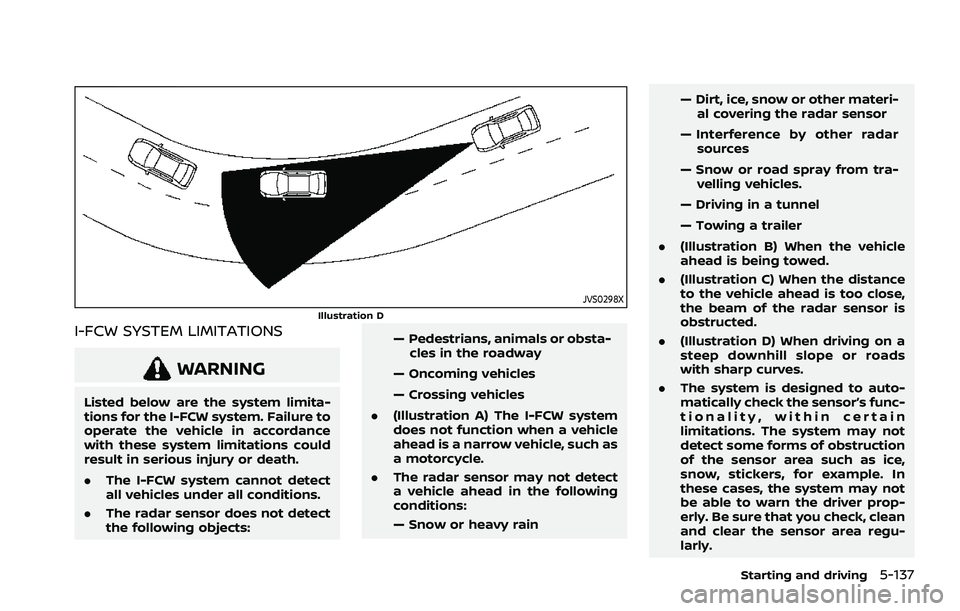
JVS0298XIllustration D
I-FCW SYSTEM LIMITATIONS
WARNING
Listed below are the system limita-
tions for the I-FCW system. Failure to
operate the vehicle in accordance
with these system limitations could
result in serious injury or death.
.The I-FCW system cannot detect
all vehicles under all conditions.
. The radar sensor does not detect
the following objects: — Pedestrians, animals or obsta-
cles in the roadway
— Oncoming vehicles
— Crossing vehicles
. (Illustration A) The I-FCW system
does not function when a vehicle
ahead is a narrow vehicle, such as
a motorcycle.
. The radar sensor may not detect
a vehicle ahead in the following
conditions:
— Snow or heavy rain — Dirt, ice, snow or other materi-
al covering the radar sensor
— Interference by other radar sources
— Snow or road spray from tra- velling vehicles.
— Driving in a tunnel
— Towing a trailer
. (Illustration B) When the vehicle
ahead is being towed.
. (Illustration C) When the distance
to the vehicle ahead is too close,
the beam of the radar sensor is
obstructed.
. (Illustration D) When driving on a
steep downhill slope or roads
with sharp curves.
. The system is designed to auto-
matically check the sensor’s func-
tionality, within certain
limitations. The system may not
detect some forms of obstruction
of the sensor area such as ice,
snow, stickers, for example. In
these cases, the system may not
be able to warn the driver prop-
erly. Be sure that you check, clean
and clear the sensor area regu-
larly.
Starting and driving5-137