towing NISSAN ROGUE 2021 Owner´s Manual
[x] Cancel search | Manufacturer: NISSAN, Model Year: 2021, Model line: ROGUE, Model: NISSAN ROGUE 2021Pages: 556, PDF Size: 2.7 MB
Page 371 of 556
tions (for example, tire wear,
abnormal tire pressure, instal-
lation of a spare tire, tire
chains, non-standard wheels)
— When the vehicle is equipped with non-original brake or
suspension parts
— When an object such as a sticker or cargo obstructs the
camera
— When excessively heavy bag- gage is loaded in the rear seat
or luggage area of your vehi-
cle
— When the vehicle load capa- city is exceeded
— When towing a trailer or other vehicle
. Excessive noise will interfere with
the warning chime sound, and
the beep may not be heard.
. For the ProPILOT Assist system to
operate properly, the windshield
in front of the camera must be
clean. Replace worn wiper blades.
The correct size wiper blades
must be used to help make sure
the windshield is kept clean. Only
use Genuine NISSAN wiper blades,
or equivalent wiper blades, that are specifically designed for use
on your vehicle model and model
year. It is recommended that you
visit your NISSAN dealer for the
correct parts for your vehicle.
Steering Assist temporary standby
Automatic standby due to driving op-
eration:
When the driver activates the turn signal,
the Steering Assist is temporarily placed
in a standby mode. (The Steering Assist
restarts automatically when the operat-
ing conditions are met again.)
Automatic standby:
In the following cases, “Not Available
Front Camera Obstructed” warning mes-
sage appears in the vehicle information
display, along with the chime, and the
Steering Assist is placed in a temporary
standby mode. (The Steering Assist re-
starts automatically when the operating
conditions are met again.)
.
When lane markers on both sides are
no longer detected
. When a vehicle ahead is no longer
detected under approximately 37 MPH
(60 km/h) NOTE:
For ProPILOT Assist with Navi-link
equipped vehicles on a limited access
freeway as identified in the navigation
map data, the Steering Assist system
may continue to operate with visible
lane markers on the both sides, even
when the vehicle speed is below ap-
proximately 37 MPH (60 km/h) and a
vehicle is not detected ahead.
Steering Assist cancel
Under the following conditions, the Steer-
ing Assist cancels, and the Steering Assist
status indicator and the Steering Assist
indicator turn off:
.
When unusual lane markers appear in
the traveling lane or when the lane
marker cannot be correctly detected
for some time due to certain condi-
tions (for example, a snow rut, the
reflection of light on a rainy day, the
presence of several unclear lane mar-
kers)
. When the windshield wiper operates
in the high speed operation (the
Steering Assist is disabled when the
wiper operates for more than approxi-
mately 10 seconds)
Starting and driving5-117
Page 381 of 556
— If there is interference byother radar sources.
— When your vehicle’s position or movement is changed
quickly or significantly (for
example, lane change, turning
vehicle, abrupt steering, sud-
den acceleration or decelera-
tion).
— When your vehicle or the ve- hicle, pedestrian or cyclist
ahead moves quickly or sig-
nificantly such that the sys-
tem cannot detect and react
in time (for example, pedes-
trian moving quickly toward
the vehicle at close range,
vehicle cutting in, changing
lanes, making a turn, steering
abruptly, sudden acceleration
or deceleration).
— When the vehicle, pedestrian or cyclist is offset from the
vehicle’s forward path.
— If the speed difference be- tween the two vehicles is
small.
— The pedestrian’s profile is par- tially obscured or unidentifi-
able; for example, due to transporting luggage, push-
ing a stroller, wearing bulky
or very loose-fitting clothing
or accessories, or being in a
unique posture (such as rais-
ing hands).
— There is poor contrast of a person to the background,
such as having clothing color
or pattern which is similar to
the background.
— For approximately 15 seconds after starting the engine
— If the vehicle ahead has a unique or unusual shape, ex-
tremely low or high clearance
heights, or unusual cargo
loading or is narrow (for ex-
ample, a motorcycle).
— When the vehicle, pedestrian or cyclist is located near a
traffic sign, a reflective area
(for example, water on road),
or is in a shadow.
— When multiple pedestrians or cyclists are grouped together.
— When the view of the pedes- trian or cyclist is obscured by
a vehicle or other object. — While towing a trailer or other
vehicle.
. The system performance may be
degraded in the following condi-
tions:
— The vehicle is driven on a
slippery road.
— The vehicle is driven on a slope.
— Excessively heavy baggage is loaded in the rear seat or the
cargo area of your vehicle.
. The system is designed to auto-
matically check the sensor (radar
and camera)’s functionality, with-
in certain limitations. The system
may not detect some forms of
obstruction of the sensor area
such as ice, snow or stickers, for
example. In these cases, the sys-
tem may not be able to warn the
driver properly. Be sure that you
check, clean and clear sensor
areas regularly.
. In some road and traffic condi-
tions, the AEB with pedestrian
detection system may unexpect-
edly apply partial braking. When
acceleration is necessary, de-
press the accelerator pedal to
Starting and driving5-127
Page 391 of 556
JVS0298XIllustration D
I-FCW SYSTEM LIMITATIONS
WARNING
Listed below are the system limita-
tions for the I-FCW system. Failure to
operate the vehicle in accordance
with these system limitations could
result in serious injury or death.
.The I-FCW system cannot detect
all vehicles under all conditions.
. The radar sensor does not detect
the following objects: — Pedestrians, animals or obsta-
cles in the roadway
— Oncoming vehicles
— Crossing vehicles
. (Illustration A) The I-FCW system
does not function when a vehicle
ahead is a narrow vehicle, such as
a motorcycle.
. The radar sensor may not detect
a vehicle ahead in the following
conditions:
— Snow or heavy rain — Dirt, ice, snow or other materi-
al covering the radar sensor
— Interference by other radar sources
— Snow or road spray from tra- velling vehicles.
— Driving in a tunnel
— Towing a trailer
. (Illustration B) When the vehicle
ahead is being towed.
. (Illustration C) When the distance
to the vehicle ahead is too close,
the beam of the radar sensor is
obstructed.
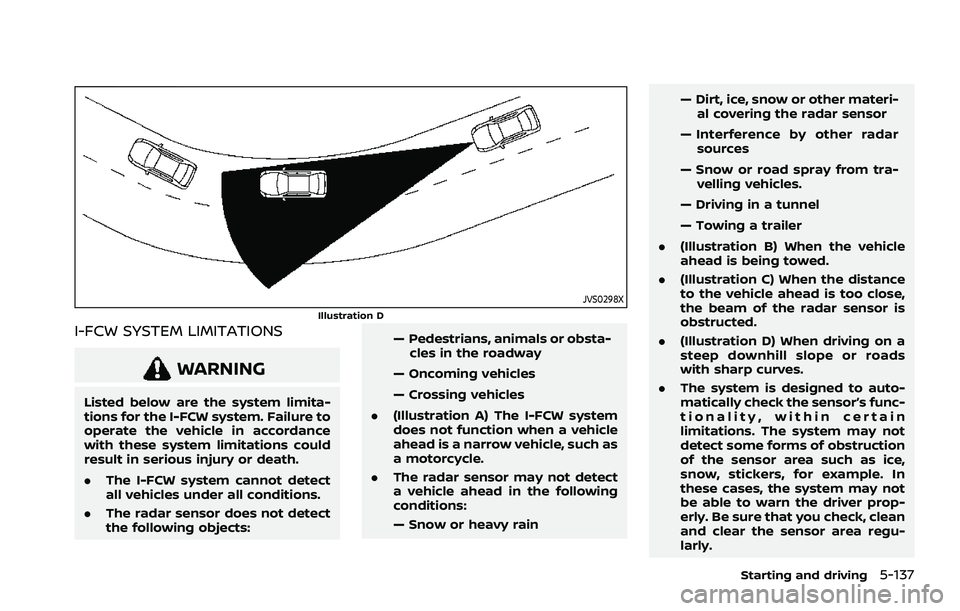
. (Illustration D) When driving on a
steep downhill slope or roads
with sharp curves.
. The system is designed to auto-
matically check the sensor’s func-
tionality, within certain
limitations. The system may not
detect some forms of obstruction
of the sensor area such as ice,
snow, stickers, for example. In
these cases, the system may not
be able to warn the driver prop-
erly. Be sure that you check, clean
and clear the sensor area regu-
larly.
Starting and driving5-137
Page 429 of 556
6 In case of emergency
Hazard warning flasher switch ......................................... 6-2
Connection to Roadside Assistance ............................. 6-2
Emergency engine shut off .................................................. 6-3
Flat tire ........................................................................\
.......................... 6-3Tire Pressure Monitoring System (TPMS) ........... 6-3
Changing a flat tire .............................................................. 6-4 Jump starting ........................................................................\
...... 6-11
Push starting ........................................................................\
........ 6-13
If your vehicle overheats .................................................... 6-13
Towing your vehicle ............................................................... 6-15
Towing recommended by NISSAN ..................... 6-16
Vehicle recovery (freeing a stuck vehicle) ...... 6-17
Page 438 of 556
6-10In case of emergency
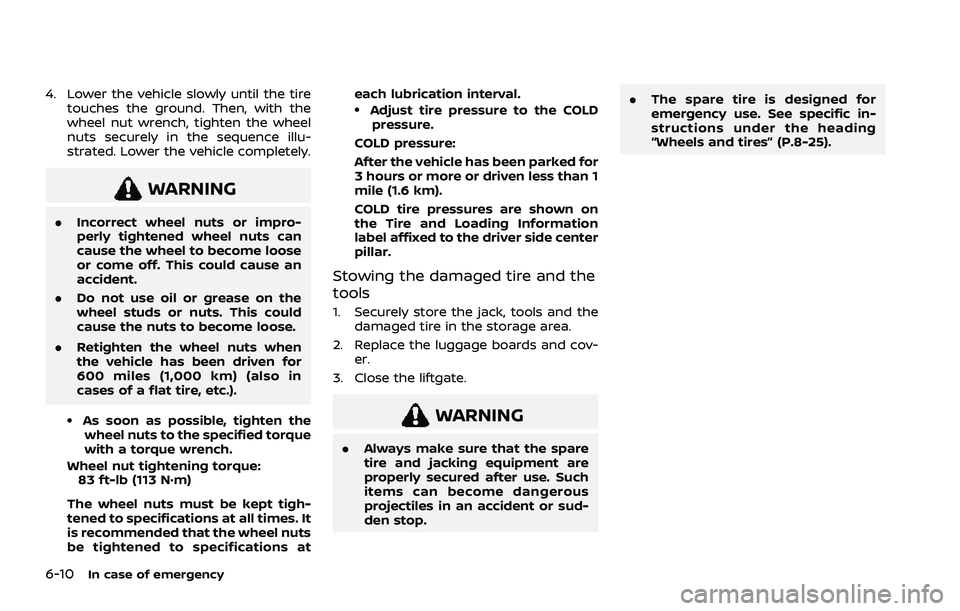
4. Lower the vehicle slowly until the tiretouches the ground. Then, with the
wheel nut wrench, tighten the wheel
nuts securely in the sequence illu-
strated. Lower the vehicle completely.
WARNING
.Incorrect wheel nuts or impro-
perly tightened wheel nuts can
cause the wheel to become loose
or come off. This could cause an
accident.
. Do not use oil or grease on the
wheel studs or nuts. This could
cause the nuts to become loose.
. Retighten the wheel nuts when
the vehicle has been driven for
600 miles (1,000 km) (also in
cases of a flat tire, etc.).
.As soon as possible, tighten the
wheel nuts to the specified torque
with a torque wrench.
Wheel nut tightening torque: 83 ft-lb (113 N·m)
The wheel nuts must be kept tigh-
tened to specifications at all times. It
is recommended that the wheel nuts
be tightened to specifications at each lubrication interval.
.Adjust tire pressure to the COLD
pressure.
COLD pressure:
After the vehicle has been parked for
3 hours or more or driven less than 1
mile (1.6 km).
COLD tire pressures are shown on
the Tire and Loading Information
label affixed to the driver side center
pillar.
Stowing the damaged tire and the
tools
1. Securely store the jack, tools and the damaged tire in the storage area.
2. Replace the luggage boards and cov- er.
3. Close the liftgate.
WARNING
. Always make sure that the spare
tire and jacking equipment are
properly secured after use. Such
items can become dangerous
projectiles in an accident or sud-
den stop. .
The spare tire is designed for
emergency use. See specific in-
structions under the heading
“Wheels and tires” (P.8-25).
Page 441 of 556
CAUTION
Do not keep the starter motor en-
gaged for more than 10 seconds. If
the engine does not start right away,
place the ignition switch in the OFF
position and wait 10 seconds before
trying again.
8. After starting your engine, carefully disconnect the negative cable and
then the positive cable (
???). Do not attempt to start the engine by
pushing.
CAUTION
.
Continuously Variable Transmis-
sion (CVT) models cannot be
push-started or tow-started. At-
tempting to do so may cause
transmission damage.
. Three-way catalyst equipped
models should not be started by
pushing since the three way cat-
alyst may be damaged.
. Never try to start the vehicle by
towing it; when the engine starts,
the forward surge could cause
the vehicle to collide with the
tow vehicle.
WARNING
.Never continue driving if your
vehicle overheats. Doing so could
cause a vehicle fire.
. Never open the hood if steam is
coming out.
. Never remove the radiator or
coolant reservoir cap while the
engine is hot. If the radiator or
coolant reservoir cap is removed
when the engine is hot, pressur-
ized hot water will spurt out and
possibly cause burning, scalding
or serious injury.
. If steam or coolant is coming
from the engine, stand clear of
the vehicle to prevent getting
burned.
. The engine cooling fan will start
at anytime when the coolant
temperature exceeds preset de-
grees.
. Be careful not to allow your
hands, hair, jewelry or clothing
to come into contact with, or to
get caught in the cooling fan or
drive belts.
In case of emergency6-13
PUSH STARTING IF YOUR VEHICLE OVERHEATS
Page 443 of 556
When towing your vehicle, all jurisdic-
tional and local regulations for towing
must be followed. Incorrect towing equip-
ment could damage your vehicle. Towing
instructions are available from a NISSAN
dealer. Local service operators are gen-
erally familiar with the applicable laws
and procedures for towing. To assure
proper towing and to prevent accidental
damage to your vehicle, NISSAN recom-
mends that you have a service operator
tow your vehicle. It is advisable to have
the service operator carefully read the
following precautions.
WARNING
.Never ride in a vehicle that is
being towed.
. Never get under your vehicle after
it has been lifted by a tow truck.
CAUTION
.When towing, make sure that the
transmission, axles, steering sys-
tem and powertrain are in work-
ing condition. If any of these
conditions apply, dollies or a
flatbed tow truck must be used. .
Always attach safety chains be-
fore towing.
(See “Flat towing for All–Wheel Drive
vehicle” (P.10-26) or “Flat towing for
Front-Wheel Drive vehicle” (P.10-26).)
NOTE:
If the battery is completely drained, the
transmission will not manually shift to
other positions. For shifting to other
positions, charge the battery or supply
power following the jump starting pro-
cedure. Push the park button to shift to
the P (Park) position before shifting to
other positions.
In case of emergency6-15
TOWING YOUR VEHICLE
Page 444 of 556
6-16In case of emergency
SCE0952
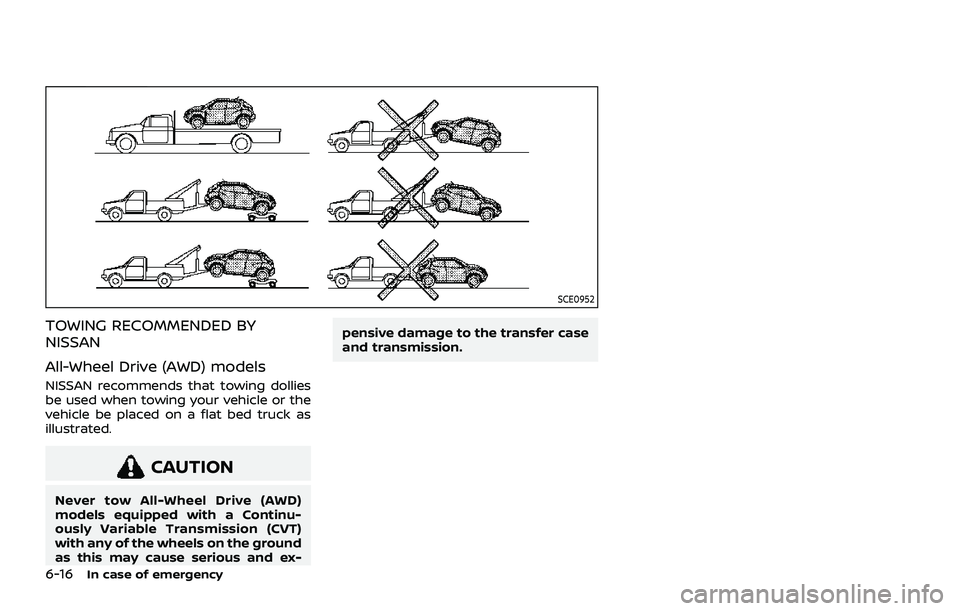
TOWING RECOMMENDED BY
NISSAN
All-Wheel Drive (AWD) models
NISSAN recommends that towing dollies
be used when towing your vehicle or the
vehicle be placed on a flat bed truck as
illustrated.
CAUTION
Never tow All-Wheel Drive (AWD)
models equipped with a Continu-
ously Variable Transmission (CVT)
with any of the wheels on the ground
as this may cause serious and ex-pensive damage to the transfer case
and transmission.
Page 445 of 556
SCE0950
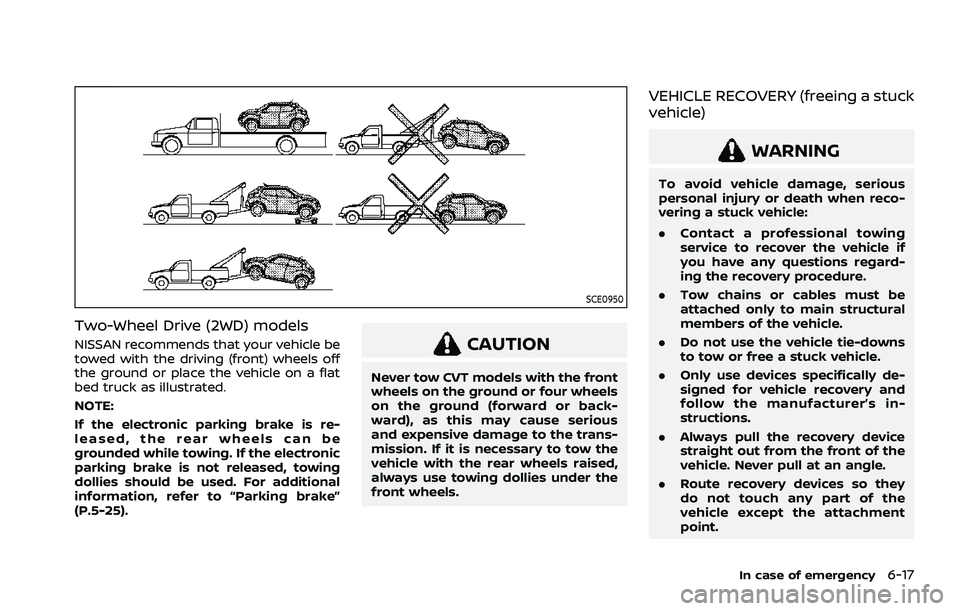
Two-Wheel Drive (2WD) models
NISSAN recommends that your vehicle be
towed with the driving (front) wheels off
the ground or place the vehicle on a flat
bed truck as illustrated.
NOTE:
If the electronic parking brake is re-
leased, the rear wheels can be
grounded while towing. If the electronic
parking brake is not released, towing
dollies should be used. For additional
information, refer to “Parking brake”
(P.5-25).CAUTION
Never tow CVT models with the front
wheels on the ground or four wheels
on the ground (forward or back-
ward), as this may cause serious
and expensive damage to the trans-
mission. If it is necessary to tow the
vehicle with the rear wheels raised,
always use towing dollies under the
front wheels.
VEHICLE RECOVERY (freeing a stuck
vehicle)
WARNING
To avoid vehicle damage, serious
personal injury or death when reco-
vering a stuck vehicle:
.Contact a professional towing
service to recover the vehicle if
you have any questions regard-
ing the recovery procedure.
. Tow chains or cables must be
attached only to main structural
members of the vehicle.
. Do not use the vehicle tie-downs
to tow or free a stuck vehicle.
. Only use devices specifically de-
signed for vehicle recovery and
follow the manufacturer’s in-
structions.
. Always pull the recovery device
straight out from the front of the
vehicle. Never pull at an angle.
. Route recovery devices so they
do not touch any part of the
vehicle except the attachment
point.
In case of emergency6-17
Page 498 of 556
9-6Maintenance and schedules
Engine oil and oil filter:
Replace engine oil and oil filter at the
specified intervals. For recommended oil
grade and viscosity refer to “Capacities
and recommended fluids/lubricants”
(P.10-3).
Engine valve clearance*:
Inspect only if valve noise increases.
Adjust valve clearance if necessary.
Evaporative emissions control vapor
lines*:
Check vapor lines for leaks or looseness.
Tighten connections or replace parts as
necessary.
Fuel filter
Periodic maintenance is not required (in-
tank type filter).
Fuel lines*:
Check the fuel hoses, piping and connec-
tions for leaks, looseness, or deterioration.
Tighten connections or replace parts as
necessary.
Spark plugs:
Replace at specified intervals. Install new
plugs of the type as originally equipped.CHASSIS AND BODY MAINTENANCE
Brake lines and cables:
Visually inspect for proper installation.
Check for chafing, cracks, deterioration,
and signs of leaking. Replace any deterio-
rated or damaged parts immediately.
Brake pads and rotors:
Check for wear, deterioration and fluid
leaks. Replace any deteriorated or da-
maged parts immediately.
Exhaust system:
Visually inspect the exhaust pipes, muffler
and hangers for leaks, cracks, deteriora-
tion, and damage. Tighten connections or
replace parts as necessary.
In-cabin microfilter:
Replace at specified intervals. When driv-
ing for prolonged periods in dusty condi-
tions, replace the filter more frequently.
Propeller shaft(s):
Check for damage, looseness, and grease
leakage. (AWD)
Steering gear and linkage, axle and
suspension parts, drive shaft boots:
Check for damage, looseness, and leak-
age of oil or grease. Under severe driving
conditions, inspect more frequently.
Tire rotation:
Rotate tires at the specified interval.Transmission fluid/oil, differential oil
and transfer case oil:
Visually inspect for signs of leakage at
specified intervals.
If using a car-top carrier, or towing a
trailer, or using a camper, or driving on
rough or muddy roads:
.
Replace the differential oil and trans-
fer case oil every 20,000 miles (32,000
km) or 24 months.
. Replace the CVT fluid every 60,000
miles (96,000 km) or request the deal-
er to inspect the fluid deterioration
data using a CONSULT. If the dete-
rioration data is more than 210,000,
replace the CVT fluid.