transmission NISSAN ROGUE 2021 Owner´s Manual
[x] Cancel search | Manufacturer: NISSAN, Model Year: 2021, Model line: ROGUE, Model: NISSAN ROGUE 2021Pages: 556, PDF Size: 2.7 MB
Page 273 of 556
CONTINUOUSLY VARIABLE TRANS-
MISSION (CVT)
The CVT in your vehicle is electronically
controlled to produce maximum power
and smooth operation.
The recommended operating procedures
for this transmission are shown on the
following pages. Follow these procedures
for maximum vehicle performance and
driving enjoyment.
Engine power may be automatically
reduced to protect the CVT if the engine
speed increases quickly when driving
on slippery roads or while being tested
on some dynamometers.
WARNING
.Do not depress the accelerator
pedal while shifting from P (Park)
or N (Neutral) to R (Reverse), D
(Drive), or M (Manual shift mode).
Always depress the brake pedal
until shifting is completed. Failure
to do so could cause you to lose
control and have an accident.
. Cold engine idle speed is high, so
use caution when shifting into a
forward or reverse gear before
the engine has warmed up. .
Do not downshift abruptly on
slippery roads. This may cause a
loss of control.
. Never shift to either the P (Park)
or R (Reverse) position while the
vehicle is moving forward and P
(Park) or D (Drive) position while
the vehicle is reversing. This could
cause an accident or damage the
transmission.
. Except in an emergency, do not
shift to the N (Neutral) position
while driving. Coasting with the
transmission in the N (Neutral)
position may cause serious da-
mage to the transmission.CAUTION
.To avoid possible damage to your
vehicle, when stopping the vehi-
cle on an uphill grade, do not hold
the vehicle by depressing the
accelerator pedal. The foot brake
should be used for this purpose.
. Do not hang items on the shift
lever. This may cause an accident
due to a sudden start.
Starting the vehicle
1. After starting the engine, fully depress
the foot brake pedal before attempt-
ing to place the shift position out of
the P (Park) position. This CVT is
designed so that the foot brake
pedal must be depressed before
shifting from P (Park) to any driving
position while the ignition switch is
in the ON position. The shift position
cannot be placed out of the P (Park)
position and into any of the other
positions if the ignition switch is
placed in the OFF position.
2. Keep the foot brake pedal depressed and move the shift lever into a driving
position.
3. Release the parking brake, the foot brake pedal, and then gradually start
the vehicle in motion.
CAUTION
.DEPRESS THE FOOT BRAKE PEDAL
- Shifting the shift lever to D
(Drive), R (Reverse) or M (Manual
shift mode) without depressing
the foot brake pedal causes the
vehicle to move slowly when the
engine is running. Make sure the
foot brake pedal is depressed
Starting and driving5-19
DRIVING THE VEHICLE
Page 275 of 556
in an accident.
. The following operations are not
allowed because excessive force
would be applied to the transmis-
sion and this may result in da-
mage to the vehicle:
— Moving the shift lever to the R
(Reverse) position when driv-
ing forward
— Moving the shift lever to the D (Drive) position when rever-
sing
If these operations are at-
tempted, a chime sounds and
the vehicle shifts to the N (Neu-
tral) position.
P (Park):
CAUTION
. To prevent transmission damage,
use the P (Park) position only
when the vehicle is completely
stopped.
. Do not slide the shift lever while
pushing the park button. This
may damage the shift control
system. Use this position when the vehicle is
parked or starting the engine. Always
make sure that the vehicle is completely
stopped before pushing the park button
to engage the P (Park) position. For
maximum safety, the brake pedal must
be depressed before engaging the P
(Park) position. Use this position together
with the electronic parking brake. When
parking on a hill, first depress the brake
pedal, apply the electronic parking brake
and then engage the P (Park) position.
The parking lock should not be used as a
brake when parking. In order to secure
the vehicle, always apply the electronic
parking brake in addition to the parking
lock.
In the event of a malfunction of the
vehicle’s electronics, the transmission
may lock in the P (Park) position. Have
the vehicle’s electronics checked immedi-
ately. It is recommended that you visit a
NISSAN dealer for this service.
The P (Park) position is automatically
engaged if:
.
You switch off the ignition switch
. You unfasten the driver’s seat belt and
open the driver side door when the
vehicle is stationary or driving at very
low speed and the transmission is in
the D (Drive) position, the R (Reverse)
position or the N position unless the Neutral hold mode is engaged.
CAUTION
To avoid CVT malfunction, it is re-
commended that you manually
place the shift position in the P (Park)
position under the above conditions.
R (Reverse):
CAUTION
To prevent transmission damage,
use the R (Reverse) position only
when the vehicle is completely
stopped.
Use the R (Reverse) position to back up.
Make sure the vehicle is completely
stopped before selecting the R (Reverse)
position. The brake pedal must be de-
pressed and the shift lever button
pushed to move the shift lever from
the home position to R (Reverse). If the
vehicle is placed in the R (Reverse)
position while the vehicle is moving
forward, the chime will sound and the
vehicle will switch into the N (Neutral)
position.
Starting and driving5-21
Page 276 of 556
5-22Starting and driving
N (Neutral):
Neither the forward nor reverse gear is
engaged. The engine can be started in
this position. You may shift to the N
(Neutral) position and restart a stalled
engine while the vehicle is moving.
You can select this position by holding
the shift lever at this position for 0.5
seconds.
D (Drive):
Use this position for all normal forward
driving. The CVT changes gears automa-
tically. All forward gears are available.If
the vehicle is placed in the D (Drive)
position while the vehicle is reversing,
the chime will sound and the vehicle will
switch into the N (Neutral) position.
Neutral hold mode function
This function enables you to turn off the
engine with the vehicle in the N (Neutral)
position. While this function is activated,
the vehicle can be moved by pushing with
hand (when car washing) even if the
ignition switch is in the OFF position.
When using this function, release the
electronic parking brake.
WARNING
. Use this function on a level sur-
face only. Failure to do so may
cause the vehicle to move acci-
dentally and could result in a
collision or serious personal in-
jury.
. Do not use this function for a
purpose other than car washing.
. When the ignition switch is placed
in the ON position after activating
this function, depress the brake
pedal to stop the vehicle because
the shift lever is in the N (Neutral)
position.
. If this function is not activated
regardless of proper operation,
transmission may malfunction. It
is recommended that you visit a
NISSAN dealer for this service.
To activate the Neutral hold mode, per-
form the following operations.
1. Push the ignition switch to start the engine.
2. Release the electronic parking brake.
3. Depress and hold the brake pedal. 4. Push the P position switch.
5. Slide the shift lever to the N (Neutral)
position, and hold it for 0.5 second
until “N” appears in the vehicle infor-
mation display.
6. Slide the shift lever to the N (Neutral) position again, and hold it for 0.5
second, until a message “Neutral Hold
Mode has been activated” appears in
the vehicle information display. (See
“66. Neutral Hold Mode activated in-
dicator” (P.2-42).)
7. Place the ignition switch in the OFF position. The engine will turn off with
holding the N (Neutral) position.
To exit the Neutral hold mode, place the
vehicle in other than N (Neutral) position.
NOTE:
. It is necessary to perform the steps
4 through 6 within approximately 5
seconds to prevent incorrect opera-
tion.
. When the ignition switch is placed in
the OFF position while the shift lever
is in the N (Neutral) position, a
message will appear in the vehicle
information display. (See “65. Neu-
tral Hold Mode guidance indicator”
(P.2-42).)
. If the Neutral hold mode is unavail-
able, a message will appear in the
Page 277 of 556
vehicle information display. (See “67.
Neutral Hold Mode was not activated
indicator” (P.2-42).) To activate the
Neutral hold mode, wait for a while
without shifting operation and then
perform the operations again.
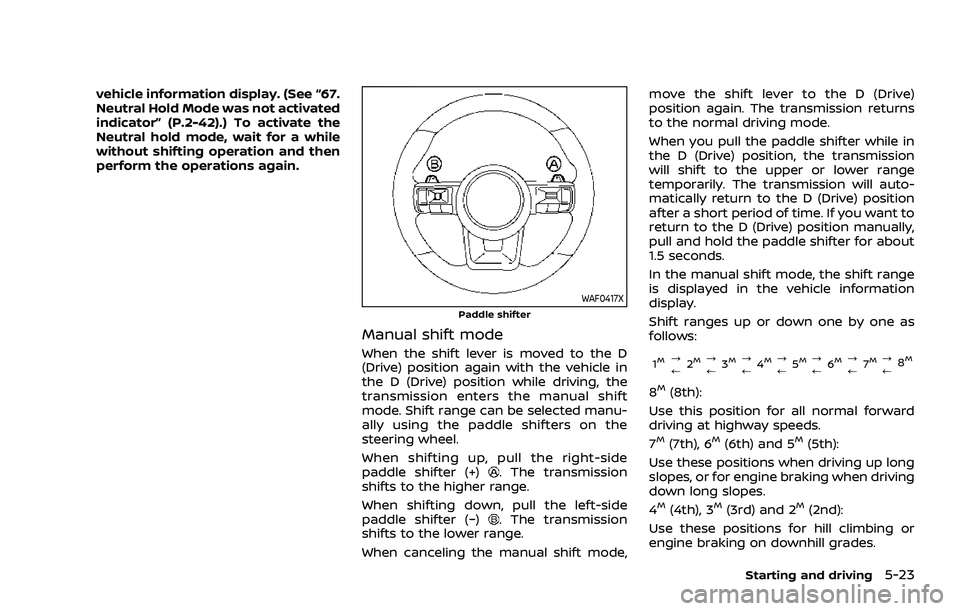
WAF0417XPaddle shifter
Manual shift mode
When the shift lever is moved to the D
(Drive) position again with the vehicle in
the D (Drive) position while driving, the
transmission enters the manual shift
mode. Shift range can be selected manu-
ally using the paddle shifters on the
steering wheel.
When shifting up, pull the right-side
paddle shifter (+)
. The transmission
shifts to the higher range.
When shifting down, pull the left-side
paddle shifter (−)
. The transmission
shifts to the lower range.
When canceling the manual shift mode, move the shift lever to the D (Drive)
position again. The transmission returns
to the normal driving mode.
When you pull the paddle shifter while in
the D (Drive) position, the transmission
will shift to the upper or lower range
temporarily. The transmission will auto-
matically return to the D (Drive) position
after a short period of time. If you want to
return to the D (Drive) position manually,
pull and hold the paddle shifter for about
1.5 seconds.
In the manual shift mode, the shift range
is displayed in the vehicle information
display.
Shift ranges up or down one by one as
follows:
1M?
/
2M?
/ 3M?
/4M?
/5M?
/ 6M?
/ 7M?
/8M
8M(8th):
Use this position for all normal forward
driving at highway speeds.
7
M(7th), 6M(6th) and 5M(5th):
Use these positions when driving up long
slopes, or for engine braking when driving
down long slopes.
4
M(4th), 3M(3rd) and 2M(2nd):
Use these positions for hill climbing or
engine braking on downhill grades.
Starting and driving5-23
Page 278 of 556
5-24Starting and driving
1M(1st):
Use this position when climbing steep
hills slowly or driving slowly through deep
snow, or for maximum engine braking on
steep downhill grades.
. Remember not to drive at high speeds
for extended periods of time in lower
than 8th gear. This reduces fuel econ-
omy.
. Pulling the same paddle shifter twice
will shift the ranges in succession.
However, if this motion is rapidly done,
the second shifting may not be com-
pleted properly.
. In the manual shift mode, the trans-
mission may not shift to the se-
lected gear. This helps maintain
driving performance and reduces
the chance of vehicle damage or
loss of control.
. When this situation occurs, the Con-
tinuously Variable Transmission
(CVT) position indicator will blink
and the chime will sound.
. In the manual shift mode, the trans-
mission may shift up automatically
to a higher range than selected if the
engine speed is too high. When the
vehicle speed decreases, the trans-
mission automatically shifts down
and shifts to 1st gear before the
vehicle comes to a stop. .
CVT operation is limited to automatic
drive mode when CVT fluid tempera-
ture is extremely low even if manual
shift mode is selected. This is not a
malfunction. When CVT fluid warms
up, manual shift mode can be se-
lected.
. When the CVT fluid temperature is
high, the shift range may upshift in
lower rpm than usual. This is not a
malfunction.
Accelerator downshift - in D (Drive)
position -
For passing or climbing hills, depress the
accelerator pedal to the floor. This shifts
the transmission down into a lower gear,
depending on the vehicle speed.
High fluid temperature protection
mode
This transmission has a high fluid tem-
perature protection mode. If the fluid
temperature becomes too high, (for ex-
ample, when climbing steep grades in
high temperatures with heavy loads, such
as when towing a trailer), engine power
and, under some conditions, vehicle
speed will be decreased automatically to
reduce the chance of transmission da-
mage. Vehicle speed can be controlled
with the accelerator pedal, but the engine and vehicle speed may be limited.
Fail-safe
When the fail-safe operation occurs, the
Continuously Variable Transmission will
not be shifted into the selected driving
position.
If the vehicle is driven under extreme
conditions, such as excessive wheel
spinning and subsequent hard braking,
the fail-safe system may be activated.
The Malfunction Indicator Light (MIL)
may come on to indicate the fail-safe
mode is activated. For additional infor-
mation, refer to “Malfunction Indicator
Light (MIL)” (P.2-19). This will occur even
if all electrical circuits are functioning
properly. In this case, place the ignition
switch in the OFF position and wait for
10 seconds. Then place the ignition
switch back in the ON position. The
vehicle should return to its normal
operating condition. (The MIL may be
illuminated even when the vehicle has
returned to its normal operating condi-
tion.) If it does not return to its normal
operating condition, have the transmis-
sion checked and repaired, if necessary,
by a NISSAN dealer.
Page 279 of 556
WARNING
When the high fluid temperature
protection mode or fail-safe opera-
tion occurs, vehicle speed may be
gradually reduced. The reduced
speed may be lower than other
traffic, which could increase the
chance of a collision. Be especially
careful when driving. If necessary,
pull to the side of the road at a safe
place and allow the transmission to
return to normal operation, or have it
repaired if necessary.
WARNING
.Never drive the vehicle with the
parking brake applied. The brake
will overheat and fail to operate
and will lead to an accident.
. Never release the parking brake
from outside the vehicle. If the
vehicle moves, it will be impossi-
ble to push the foot brake pedal
and will lead to an accident.
. Never use the shift lever in place
of the parking brake. When park-
ing, be sure the parking brake is
fully applied.
. To help avoid risk of injury or
death through unintended opera-
tion of the vehicle and/or its
systems, do not leave children,
people who require the assis-
tance of others or pets unat-
tended in your vehicle.
Additionally, the temperature in-
side a closed vehicle on a warm
day can quickly become high
enough to cause a significant risk
of injury or death to people and
pets.
WAF0517X
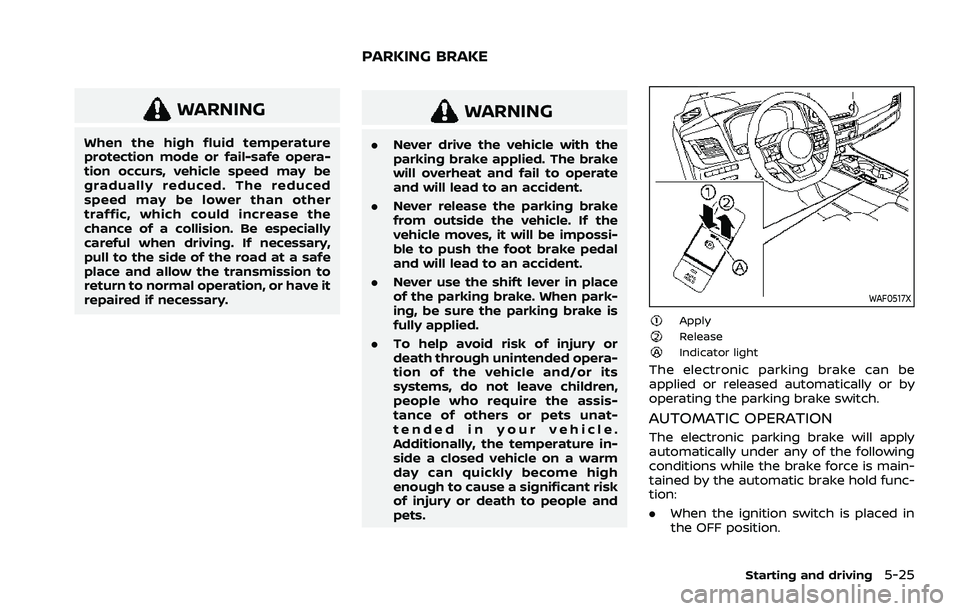
ApplyReleaseIndicator light
The electronic parking brake can be
applied or released automatically or by
operating the parking brake switch.
AUTOMATIC OPERATION
The electronic parking brake will apply
automatically under any of the following
conditions while the brake force is main-
tained by the automatic brake hold func-
tion:
.When the ignition switch is placed in
the OFF position.
Starting and driving5-25
PARKING BRAKE
Page 286 of 556
5-32Starting and driving
SNOW MODE (AWD models)
This mode makes it easier to start and
run from snowy roads and frozen roads.
CAUTION
Never drive on dry, hard surface
roads in the SNOW mode, as this will
overload the powertrain and may
cause a serious malfunction. Addi-
tionally, this will cause premature
tire wear and reduced fuel economy.
When the SNOW mode is selected, small
vibration in cornering may occur. This is
not a malfunction.
STANDARD MODE (2WD models)/
AUTO MODE (AWD models)
This is the standard mode that is most
suitable for normal driving.
This mode will be selected first each time
the ignition switch is placed in the ON
position.
ECO MODE
Assists the driver’s ECO-driving. The en-
gine and transmission points are adjusted
for improved fuel economy, providing
such a driving features as smooth start-
ing or constant cruising.
NOTE:
Selecting the ECO mode will not neces-
sarily improve fuel economy as many
driving factors influence its effective-
ness.
Operation
Select the ECO mode using the Drive
Mode Selector. The ECO indicator illumi-
nates.
When the accelerator pedal is depressed
within the range of economy drive, the
ECO indicator illuminates in green. When
the accelerator pedal is depressed above
the range of economy drive, the ECO
indicator turns off.
The ECO indicator will not illuminate in
the following cases:
. When the shift lever is in the R
(Reverse) position.
. When the vehicle speed is below 2
MPH (3.2 km/h) or over 90 MPH (144
km/h). .
When the cruise control (if so
equipped) or the Intelligent Cruise
Control (ICC) system (if so equipped)
is operated.
ECO Mode Customize
The “ECO Mode Customize” is a function
that can change the priority from the
Cruise Control (if so equipped) or the
Intelligent Cruise Control (ICC) function
to fuel efficiency improvements. It can be
set when the ECO mode is selected. To
activate or deactivate this function, see
“ECO Mode Setting” (P.2-26).
.Cruise Control
When the setting is ON, the fuel
efficiency while cruising will be im-
proved by lowering the acceleration
target from normal (setting OFF)
mode.
NOTE:
When the vehicle speed is reduced (for
example, when the vehicle is driven on
an uphill road from a flat road), it will
take more time to return to the pre-
viously set speed than normal mode.
Page 287 of 556
Tire Pres ECO advice
The “Tire Pres ECO advice” is a function to
show an ECO advice message in the
vehicle information display when low tire
pressure is detected. To activate or deac-
tivate this function, see “ECO Mode
Setting” (P.2-26).
When the setting is ON, the ECO Drive
Report display shows "See Tire Pres-
sures". You can switch the display to the
Tire Pressures display by pushing the
button on the steering wheel.
WAF0126X
ECO Pedal Guide function
The ECO Pedal Guide display can be
selected in the vehicle information display
in the ECO mode. (See “5. ECO Pedal
Guide” (P.2-45).) Use the ECO Pedal Guide
function for improving fuel economy.
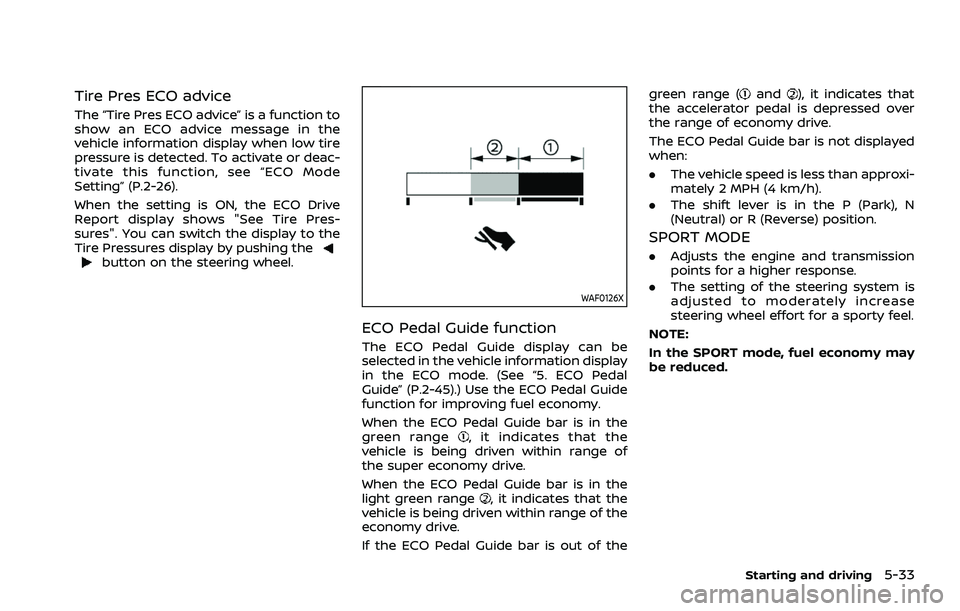
When the ECO Pedal Guide bar is in the
green range
, it indicates that the
vehicle is being driven within range of
the super economy drive.
When the ECO Pedal Guide bar is in the
light green range
, it indicates that the
vehicle is being driven within range of the
economy drive.
If the ECO Pedal Guide bar is out of the green range (
and), it indicates that
the accelerator pedal is depressed over
the range of economy drive.
The ECO Pedal Guide bar is not displayed
when:
. The vehicle speed is less than approxi-
mately 2 MPH (4 km/h).
. The shift lever is in the P (Park), N
(Neutral) or R (Reverse) position.
SPORT MODE
.Adjusts the engine and transmission
points for a higher response.
. The setting of the steering system is
adjusted to moderately increase
steering wheel effort for a sporty feel.
NOTE:
In the SPORT mode, fuel economy may
be reduced.
Starting and driving5-33
Page 406 of 556
5-152Starting and driving
WARNING
.For AWD equipped vehicles, do
not attempt to raise two wheels
off the ground and shift the
transmission to any drive or re-
verse position with the engine
running. Doing so may result in
drivetrain damage or unexpected
vehicle movement which could
result in serious vehicle damage
or personal injury.
. Do not attempt to test an AWD
equipped vehicle on a 2–wheel
dynamometer (such as the dy-
namometers used by some
states for emissions testing) or
similar equipment even if the
other two wheels are raised off
the ground. Make sure that you
inform the test facility personnel
that your vehicle is equipped with
AWD before it is placed on a
dynamometer. Using the wrong
test equipment may result in
drive train damage or unex-
pected vehicle movement which
could result in serious vehicle
damage or personal injury.
CAUTION
.Do not operate the engine on a
free roller when any of the wheels
raised.
. The power train may be damaged
if you continue driving with the
“AWD Error” warning on.
. If the warning message remains
on after the above operation,
have your vehicle checked as
soon as possible. It is recom-
mended that you visit a NISSAN
dealer for this service.
. If the “AWD Error” warning ap-
pears while driving, there may be
a malfunction in the AWD system.
Reduce the vehicle speed and
have your vehicle checked as
soon as possible. It is recom-
mended that you visit a NISSAN
dealer for this service.
When the vehicle is in the P (Park) posi-
tion, the operation noise may be heard
from the lower part of the vehicle. This is
not a malfunction.
Page 407 of 556
SSD0488
WARNING
.Do not stop or park the vehicle
over flammable materials such as
dry grass, waste paper or rags.
They may ignite and cause a fire.
. Never leave the engine running
while the vehicle is unattended.
. Do not leave children unattended
inside the vehicle. They could
unknowingly activate switches
or controls. Unattended children
could become involved in serious
accidents. .
To help avoid risk of injury or
death through unintended opera-
tion of the vehicle and/or its
systems, do not leave children,
people who require the assis-
tance of others or pets unat-
tended in your vehicle.
Additionally, the temperature in-
side a closed vehicle on a warm
day can quickly become high
enough to cause a significant risk
of injury or death to people and
pets.
. Safe parking procedures require
that both the parking brake be
applied and the transmission placed into P (Park). Failure to
do so could cause the vehicle to
move unexpectedly or roll away
and result in an accident.
. Make sure the shift lever cannot
be moved without depressing the
foot brake pedal.
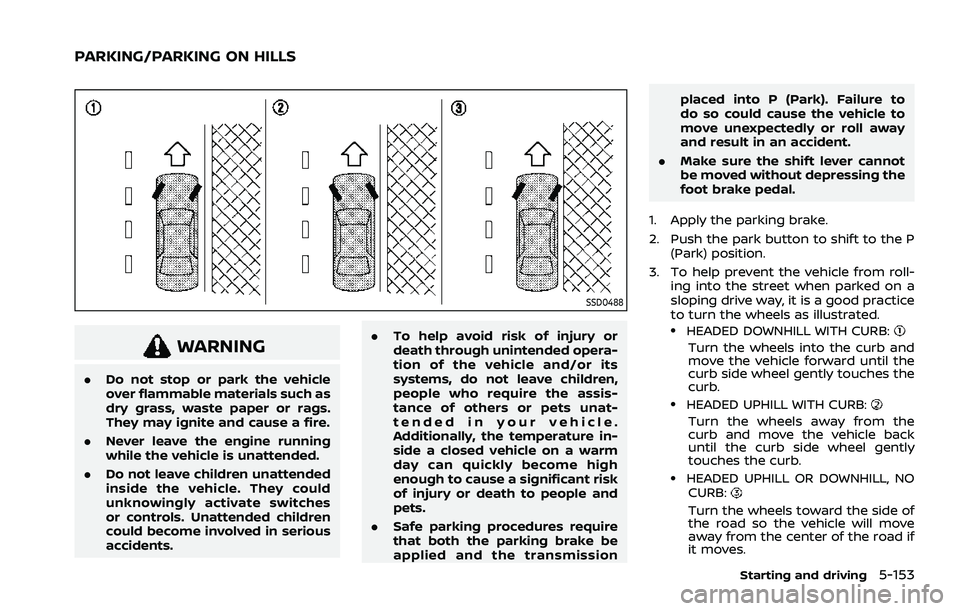
1. Apply the parking brake.
2. Push the park button to shift to the P (Park) position.
3. To help prevent the vehicle from roll- ing into the street when parked on a
sloping drive way, it is a good practice
to turn the wheels as illustrated.
.HEADED DOWNHILL WITH CURB:
Turn the wheels into the curb and
move the vehicle forward until the
curb side wheel gently touches the
curb.
.HEADED UPHILL WITH CURB:
Turn the wheels away from the
curb and move the vehicle back
until the curb side wheel gently
touches the curb.
.HEADED UPHILL OR DOWNHILL, NO
CURB:
Turn the wheels toward the side of
the road so the vehicle will move
away from the center of the road if
it moves.
Starting and driving5-153
PARKING/PARKING ON HILLS