maintenance NISSAN ROGUE 2021 Owner´s Manual
[x] Cancel search | Manufacturer: NISSAN, Model Year: 2021, Model line: ROGUE, Model: NISSAN ROGUE 2021Pages: 556, PDF Size: 2.7 MB
Page 267 of 556
.Before operating the vehicle, en-
sure that the driver and all pas-
sengers have their seat belts
fastened.
. Always drive with the floor mats
in place as the floor may became
hot.
. Lower your speed when encoun-
tering strong crosswinds. With a
higher center of gravity, your
vehicle is more affected by strong
side winds. Slower speeds ensure
better vehicle control.
. Do not drive beyond the perfor-
mance capability of the tires,
even with AWD engaged.
. For AWD equipped vehicles, do
not attempt to raise two wheels
off the ground and shift the
transmission to any drive or re-
verse position with the engine
running. Doing so may result in
drivetrain damage or unexpected
vehicle movement which could
result in serious vehicle damage
or personal injury.
. Do not attempt to test an AWD
equipped vehicle on a 2-wheel
dynamometer (such as the dy-
namometers used by some
states for emissions testing), or similar equipment even if the
other two wheels are raised off
the ground. Make sure you inform
test facility personnel that your
vehicle is equipped with AWD
before it is placed on a dynam-
ometer. Using the wrong test
equipment may result in drive-
train damage or unexpected ve-
hicle movement which could
result in serious vehicle damage
or personal injury.
. When a wheel is off the ground
due to an unlevel surface, do not
spin the wheel excessively (AWD
model).
. Accelerating quickly, sharp steer-
ing maneuvers or sudden braking
may cause loss of control.
. If at all possible, avoid sharp
turning maneuvers, particularly
at high speeds. Your vehicle has
a higher center of gravity than a
conventional passenger car. The
vehicle is not designed for cor-
nering at the same speeds as
conventional passenger cars.
Failure to operate this vehicle
correctly could result in loss of
control and/or a rollover acci-
dent. .
Always use tires of the same type,
size, brand, construction (bias,
bias-belted or radial), and tread
pattern on all four wheels. Install
traction devices on the front
wheels when driving on slippery
roads and drive carefully.
. Be sure to check the brakes im-
mediately after driving in mud or
water. See “Brake system” (P.5-
155) for wet brakes.
. Avoid parking your vehicle on
steep hills. If you get out of the
vehicle and it rolls forward, back-
ward or sideways, you could be
injured.
. Whenever you drive off-road
through sand, mud or water as
deep as the wheel hub, more
frequent maintenance may be
required. See the maintenance
schedule shown in the “9. Main-
tenance and schedules” section.
. Spinning the front wheels on
slippery surfaces may cause the
AWD warning message to display
and the AWD system to automa-
tically switch from the AWD mode
to the 2WD mode. This could
reduce traction. Be especially
careful when towing a trailer
Starting and driving5-13
Page 295 of 556
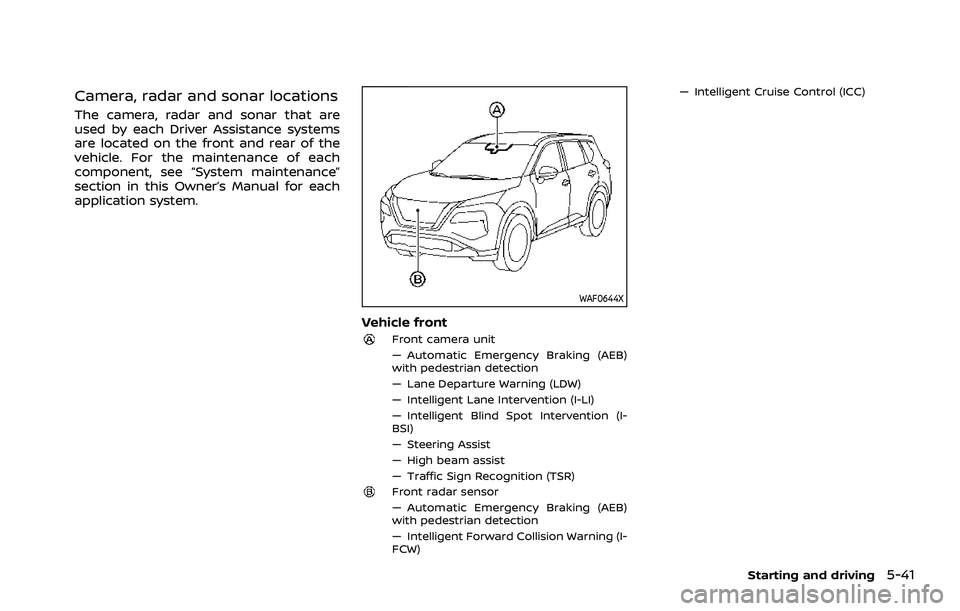
Camera, radar and sonar locations
The camera, radar and sonar that are
used by each Driver Assistance systems
are located on the front and rear of the
vehicle. For the maintenance of each
component, see “System maintenance”
section in this Owner’s Manual for each
application system.
WAF0644X
Vehicle front
Front camera unit
— Automatic Emergency Braking (AEB)
with pedestrian detection
— Lane Departure Warning (LDW)
— Intelligent Lane Intervention (I-LI)
— Intelligent Blind Spot Intervention (I-
BSI)
— Steering Assist
— High beam assist
— Traffic Sign Recognition (TSR)
Front radar sensor
— Automatic Emergency Braking (AEB)
with pedestrian detection
— Intelligent Forward Collision Warning (I-
FCW)— Intelligent Cruise Control (ICC)
Starting and driving5-41
Page 300 of 556
5-46Starting and driving
SYSTEM MAINTENANCE
The TSR system uses the same multi-
sensing front camera unit that is used by
the Lane Departure Warning (LDW) sys-
tem, located in front of the inside mirror.
For maintenance of the camera, see
“System maintenance” (P.5-50).WARNING
Failure to follow the warnings and
instructions for proper use of the
LDW system could result in serious
injury or death.
.This system is only a warning
device to inform the driver of a
potential unintended lane depar-
ture. It will not steer the vehicle or
prevent loss of control. It is the
driver’s responsibility to stay
alert, drive safely, keep the vehi-
cle in the traveling lane, and be in
control of the vehicle at all times.
WAC0523X
The LDW system will operate when the
vehicle is driven at speeds of approxi-
mately 37 MPH (60 km/h) and above, and
the lane markings are clearly visible on
the road.
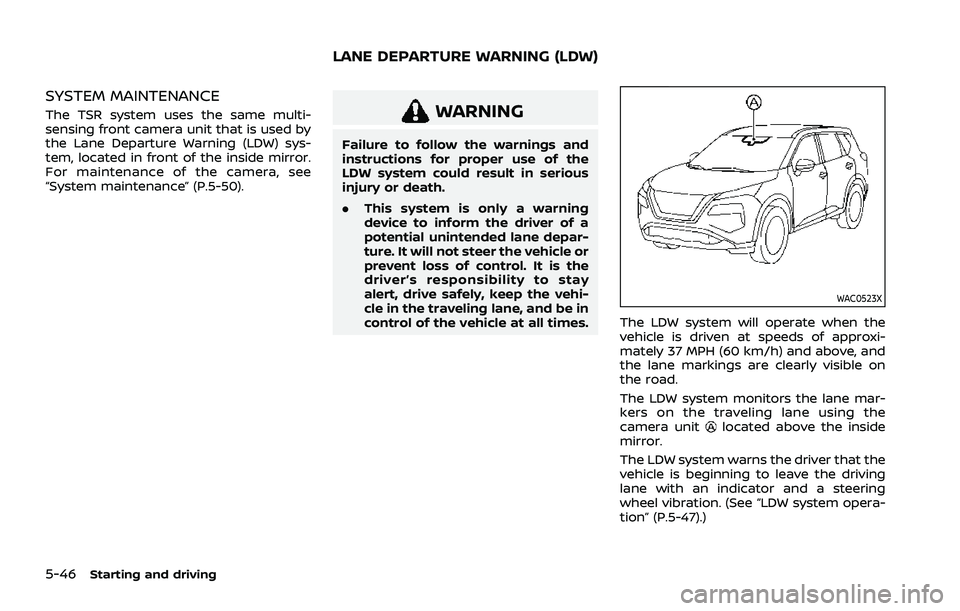
The LDW system monitors the lane mar-
kers on the traveling lane using the
camera unit
located above the inside
mirror.
The LDW system warns the driver that the
vehicle is beginning to leave the driving
lane with an indicator and a steering
wheel vibration. (See “LDW system opera-
tion” (P.5-47).)
LANE DEPARTURE WARNING (LDW)
Page 304 of 556
5-50Starting and driving
.When you operate the lane change
signal and change traveling lanes in
the direction of the signal. (The LDW
system will become operable again
approximately 2 seconds after the
lane change signal is turned off.)
. When the vehicle speed lowers to less
than approximately 37 MPH (60 km/h).
Action to take:
After the above conditions have finished
and the necessary operating conditions
are satisfied, the LDW system will resume.
SYSTEM MALFUNCTION
If the LDW system malfunctions, it will
cancel automatically and “Not Available
System Malfunction” warning message
will appear in the vehicle information
display. If the warning message appears,
pull off the road to a safe location and
stop the vehicle. Place the ignition switch
in the OFF position and restart the
engine. If the warning message continues
to appear, have the system checked. It is
recommended that you visit a NISSAN
dealer for this service.WAC0523X
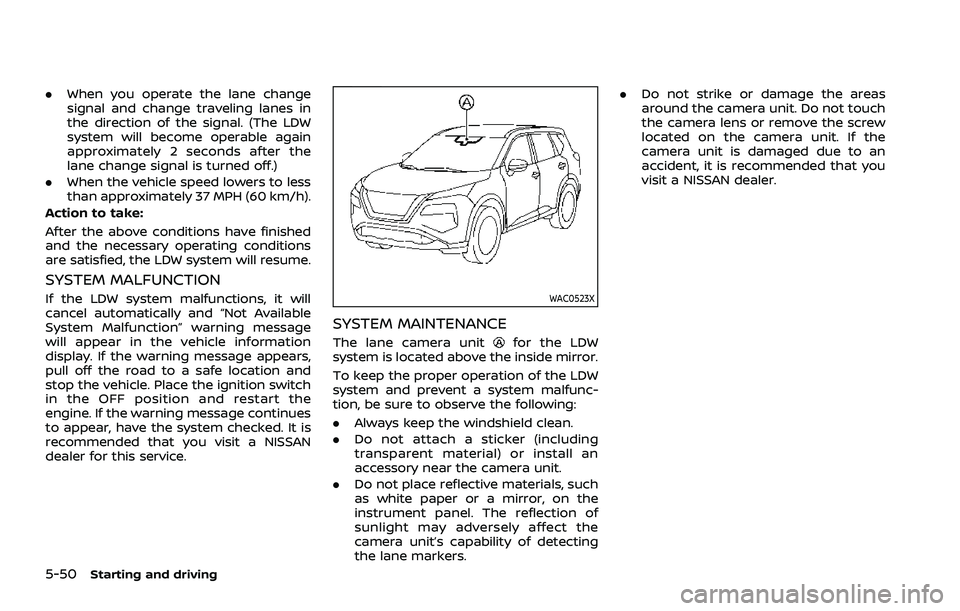
SYSTEM MAINTENANCE
The lane camera unitfor the LDW
system is located above the inside mirror.
To keep the proper operation of the LDW
system and prevent a system malfunc-
tion, be sure to observe the following:
. Always keep the windshield clean.
. Do not attach a sticker (including
transparent material) or install an
accessory near the camera unit.
. Do not place reflective materials, such
as white paper or a mirror, on the
instrument panel. The reflection of
sunlight may adversely affect the
camera unit’s capability of detecting
the lane markers. .
Do not strike or damage the areas
around the camera unit. Do not touch
the camera lens or remove the screw
located on the camera unit. If the
camera unit is damaged due to an
accident, it is recommended that you
visit a NISSAN dealer.
Page 310 of 556
5-56Starting and driving
the engine off and restart the engine. If
the I-LI indicator (orange) continues to
illuminate, have the I-LI system checked. It
is recommended that you visit a NISSAN
dealer for this service.
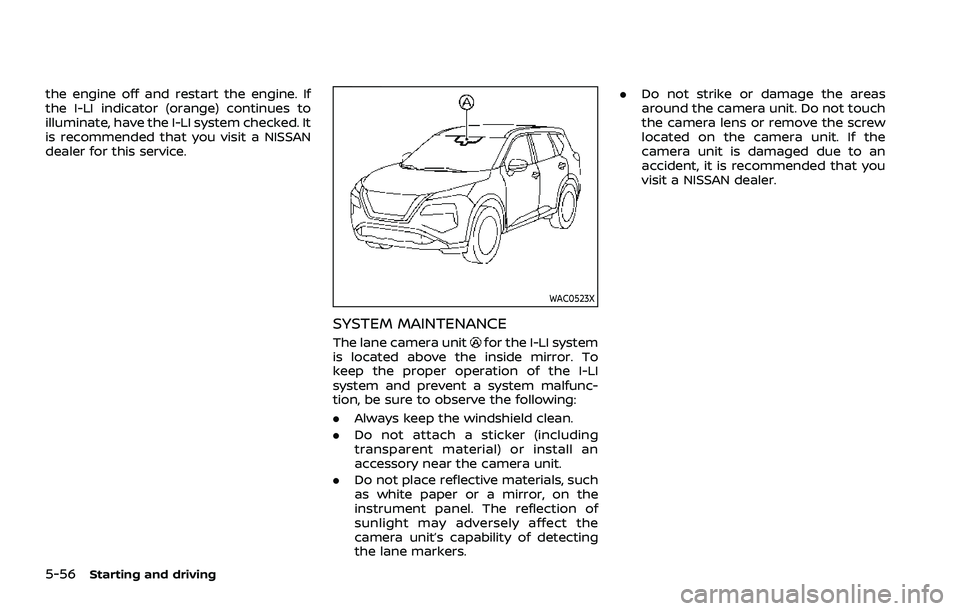
WAC0523X
SYSTEM MAINTENANCE
The lane camera unitfor the I-LI system
is located above the inside mirror. To
keep the proper operation of the I-LI
system and prevent a system malfunc-
tion, be sure to observe the following:
. Always keep the windshield clean.
. Do not attach a sticker (including
transparent material) or install an
accessory near the camera unit.
. Do not place reflective materials, such
as white paper or a mirror, on the
instrument panel. The reflection of
sunlight may adversely affect the
camera unit’s capability of detecting
the lane markers. .
Do not strike or damage the areas
around the camera unit. Do not touch
the camera lens or remove the screw
located on the camera unit. If the
camera unit is damaged due to an
accident, it is recommended that you
visit a NISSAN dealer.
Page 318 of 556
5-64Starting and driving
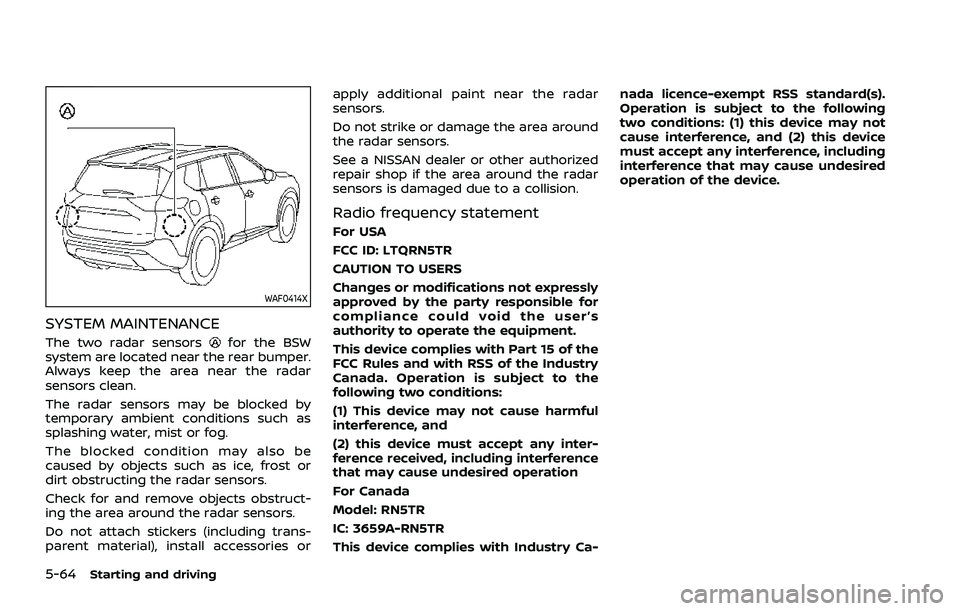
WAF0414X
SYSTEM MAINTENANCE
The two radar sensorsfor the BSW
system are located near the rear bumper.
Always keep the area near the radar
sensors clean.
The radar sensors may be blocked by
temporary ambient conditions such as
splashing water, mist or fog.
The blocked condition may also be
caused by objects such as ice, frost or
dirt obstructing the radar sensors.
Check for and remove objects obstruct-
ing the area around the radar sensors.
Do not attach stickers (including trans-
parent material), install accessories or apply additional paint near the radar
sensors.
Do not strike or damage the area around
the radar sensors.
See a NISSAN dealer or other authorized
repair shop if the area around the radar
sensors is damaged due to a collision.
Radio frequency statement
For USA
FCC ID: LTQRN5TR
CAUTION TO USERS
Changes or modifications not expressly
approved by the party responsible for
compliance could void the user’s
authority to operate the equipment.
This device complies with Part 15 of the
FCC Rules and with RSS of the Industry
Canada. Operation is subject to the
following two conditions:
(1) This device may not cause harmful
interference, and
(2) this device must accept any inter-
ference received, including interference
that may cause undesired operation
For Canada
Model: RN5TR
IC: 3659A-RN5TR
This device complies with Industry Ca-nada licence-exempt RSS standard(s).
Operation is subject to the following
two conditions: (1) this device may not
cause interference, and (2) this device
must accept any interference, including
interference that may cause undesired
operation of the device.
Page 329 of 556
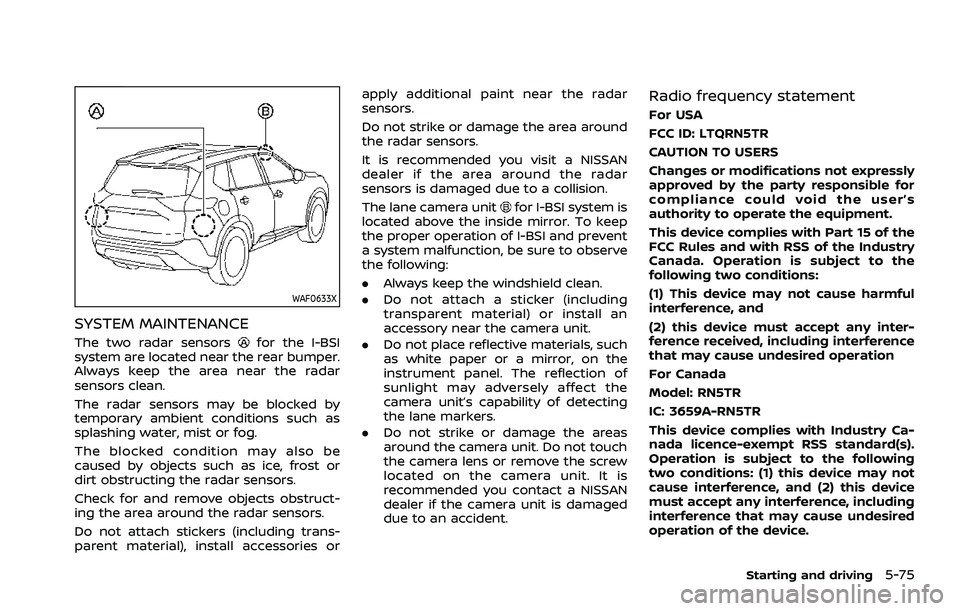
WAF0633X
SYSTEM MAINTENANCE
The two radar sensorsfor the I-BSI
system are located near the rear bumper.
Always keep the area near the radar
sensors clean.
The radar sensors may be blocked by
temporary ambient conditions such as
splashing water, mist or fog.
The blocked condition may also be
caused by objects such as ice, frost or
dirt obstructing the radar sensors.
Check for and remove objects obstruct-
ing the area around the radar sensors.
Do not attach stickers (including trans-
parent material), install accessories or apply additional paint near the radar
sensors.
Do not strike or damage the area around
the radar sensors.
It is recommended you visit a NISSAN
dealer if the area around the radar
sensors is damaged due to a collision.
The lane camera unit
for I-BSI system is
located above the inside mirror. To keep
the proper operation of I-BSI and prevent
a system malfunction, be sure to observe
the following:
. Always keep the windshield clean.
. Do not attach a sticker (including
transparent material) or install an
accessory near the camera unit.
. Do not place reflective materials, such
as white paper or a mirror, on the
instrument panel. The reflection of
sunlight may adversely affect the
camera unit’s capability of detecting
the lane markers.
. Do not strike or damage the areas
around the camera unit. Do not touch
the camera lens or remove the screw
located on the camera unit. It is
recommended you contact a NISSAN
dealer if the camera unit is damaged
due to an accident.
Radio frequency statement
For USA
FCC ID: LTQRN5TR
CAUTION TO USERS
Changes or modifications not expressly
approved by the party responsible for
compliance could void the user’s
authority to operate the equipment.
This device complies with Part 15 of the
FCC Rules and with RSS of the Industry
Canada. Operation is subject to the
following two conditions:
(1) This device may not cause harmful
interference, and
(2) this device must accept any inter-
ference received, including interference
that may cause undesired operation
For Canada
Model: RN5TR
IC: 3659A-RN5TR
This device complies with Industry Ca-
nada licence-exempt RSS standard(s).
Operation is subject to the following
two conditions: (1) this device may not
cause interference, and (2) this device
must accept any interference, including
interference that may cause undesired
operation of the device.
Starting and driving5-75
Page 335 of 556
cally.
SYSTEM MALFUNCTION
When the RCTA system malfunctions, it
will turn off automatically. The “Malfunc-
tion” warning message will appear in the
vehicle information display.
NOTE:
If the BSW system stops working, the
RCTA and I-BSI system will also stop
working.
Action to take:
Stop the vehicle in a safe location, turn
the engine off and restart the engine. If
the message continues to appear, have
the system checked. It is recommended
that you visit a NISSAN dealer for this
service.
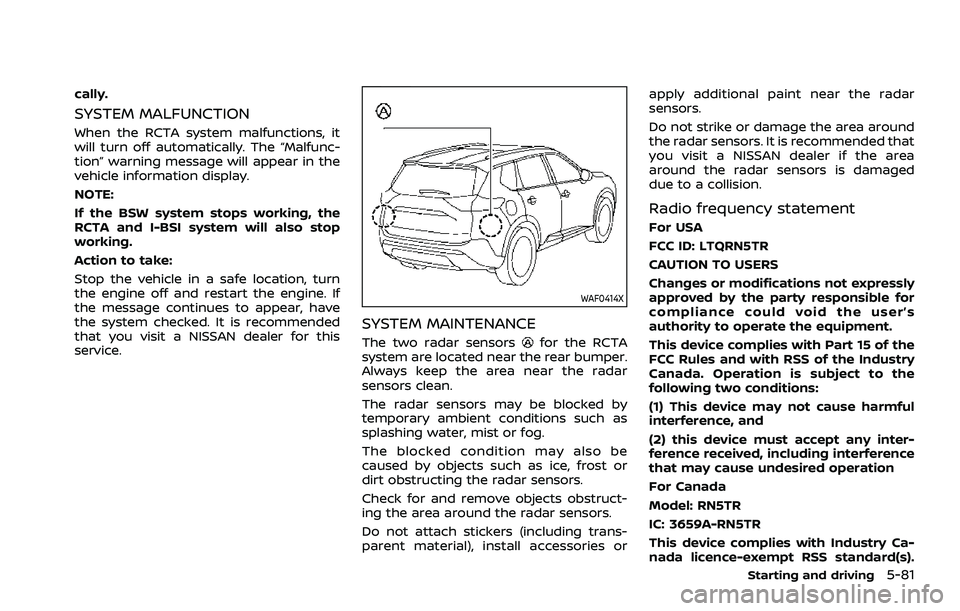
WAF0414X
SYSTEM MAINTENANCE
The two radar sensorsfor the RCTA
system are located near the rear bumper.
Always keep the area near the radar
sensors clean.
The radar sensors may be blocked by
temporary ambient conditions such as
splashing water, mist or fog.
The blocked condition may also be
caused by objects such as ice, frost or
dirt obstructing the radar sensors.
Check for and remove objects obstruct-
ing the area around the radar sensors.
Do not attach stickers (including trans-
parent material), install accessories or apply additional paint near the radar
sensors.
Do not strike or damage the area around
the radar sensors. It is recommended that
you visit a NISSAN dealer if the area
around the radar sensors is damaged
due to a collision.
Radio frequency statement
For USA
FCC ID: LTQRN5TR
CAUTION TO USERS
Changes or modifications not expressly
approved by the party responsible for
compliance could void the user’s
authority to operate the equipment.
This device complies with Part 15 of the
FCC Rules and with RSS of the Industry
Canada. Operation is subject to the
following two conditions:
(1) This device may not cause harmful
interference, and
(2) this device must accept any inter-
ference received, including interference
that may cause undesired operation
For Canada
Model: RN5TR
IC: 3659A-RN5TR
This device complies with Industry Ca-
nada licence-exempt RSS standard(s).
Starting and driving5-81
Page 339 of 556
the ProPILOT Assist system.
. The ProPILOT Assist system does
not react when approaching sta-
tionary and slow moving vehicles.
. Always drive carefully and atten-
tively when using the ProPILOT
Assist system. Read and under-
stand the Owner’s Manual thor-
oughly before using the ProPILOT
Assist system. To avoid serious
injury or death, do not rely on the
system to prevent accidents or to
control the vehicle’s speed in
emergency situations. Do not
use the ProPILOT Assist system
except in appropriate road and
traffic conditions.
WAF0644X
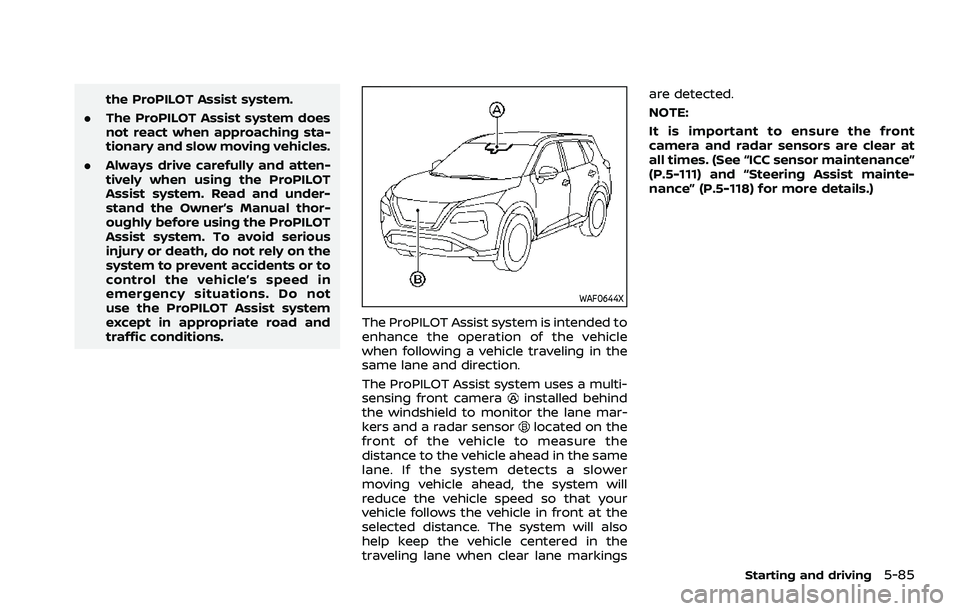
The ProPILOT Assist system is intended to
enhance the operation of the vehicle
when following a vehicle traveling in the
same lane and direction.
The ProPILOT Assist system uses a multi-
sensing front camera
installed behind
the windshield to monitor the lane mar-
kers and a radar sensor
located on the
front of the vehicle to measure the
distance to the vehicle ahead in the same
lane. If the system detects a slower
moving vehicle ahead, the system will
reduce the vehicle speed so that your
vehicle follows the vehicle in front at the
selected distance. The system will also
help keep the vehicle centered in the
traveling lane when clear lane markings are detected.
NOTE:
It is important to ensure the front
camera and radar sensors are clear at
all times. (See “ICC sensor maintenance”
(P.5-111) and “Steering Assist mainte-
nance” (P.5-118) for more details.)
Starting and driving5-85
Page 365 of 556
structed, the ICC system will automati-
cally be canceled.
The chime will sound and the “Forward
Driving Aids temporarily disabled Front
Sensor blocked” warning message will
appear in the vehicle information display.
Action to take:
If the warning message appears, stop the
vehicle in a safe place, push the park
button to engage the P (Park) position,
and turn the engine off. When the radar
signal is temporarily interrupted, clean
the sensor area and restart the engine. If
the warning message continues to ap-
pear, have the system checked. It is
recommended that you visit a NISSAN
dealer for this service.
Condition D:
When driving on roads with limited road
structures or buildings (for example, long
bridges, deserts, snow fields, driving next
to long walls), the system may display the
“Forward Driving Aids temporarily dis-
abled Front Sensor blocked” message.
Action to take:
When the above driving conditions no
longer exist, turn the system back on.ICC system malfunction
If the ICC system malfunctions, it will be
turned off automatically, a chime will
sound, and the speed control status
warning (orange) will illuminate.
Action to take:
If the warning illuminates, stop the vehicle
in a safe place. Turn the engine off, restart
the engine and set the ICC system again.
If it is not possible to set the ICC system or
the warning stays on, it may be a
malfunction. Although the normal driving
can be continued, the ICC system should
be inspected. It is recommended that you
visit a NISSAN dealer for this service.
NOTE:
If the ICC system is temporarily unavail-
able, the conventional cruise control
mode may still be used. For additional
information, see “Conventional (fixed
speed) cruise control mode” (P.5-118).
ICC sensor maintenance
The radar sensor is located on the front of
the vehicle.
To keep the ICC system operating prop-
erly, be sure to observe the following:
.Always keep the sensor area clean.
. Do not strike or damage the areas
around the sensor.
. Do not attach a sticker (including
transparent material) or install an
accessory near the sensor. This could
cause failure or malfunction.
. Do not attach metallic objects near
the sensor area (brush guard, etc.).
This could cause failure or malfunc-
tion.
. Do not alter, remove, or paint the front
bumper.
Before customizing or restoring the front
bumper, it is recommended that you visit
a NISSAN dealer.
The camera sensor is located above the
inside mirror.
To keep the proper operation of the
systems and prevent a system malfunc-
tion, be sure to observe the following:
. Always keep the windshield clean.
. Do not attach a sticker (including
transparent material) or install an
accessory near the camera unit.
Starting and driving5-111