warning lights NISSAN ROGUE 2021 Owner´s Manual
[x] Cancel search | Manufacturer: NISSAN, Model Year: 2021, Model line: ROGUE, Model: NISSAN ROGUE 2021Pages: 556, PDF Size: 2.7 MB
Page 9 of 556
 ........................................................................\
............. 0-2
Exterior front ...")
0 Illustrated table of contents
Seats, seat belts and Supplemental Restraint
System (SRS) ........................................................................\
............. 0-2
Exterior front ........................................................................\
............ 0-3
Exterior rear ........................................................................\
.............. 0-4
Passenger compartment ....................................................... 0-5
Cockpit ........................................................................\
.......................... 0-6
Instrument panel ........................................................................\
.. 0-7Meters and gauges .................................................................... 0-8
Models with analog meter and color
display ........................................................................\
.................. 0-8
Models with full-screen display ................................ 0-9
Engine compartment ............................................................ 0-10 PR25DD engine model ................................................. 0-10
Warning and indicator lights ........................................... 0-11
Page 16 of 556
0-8Illustrated table of contents
WAA0046X
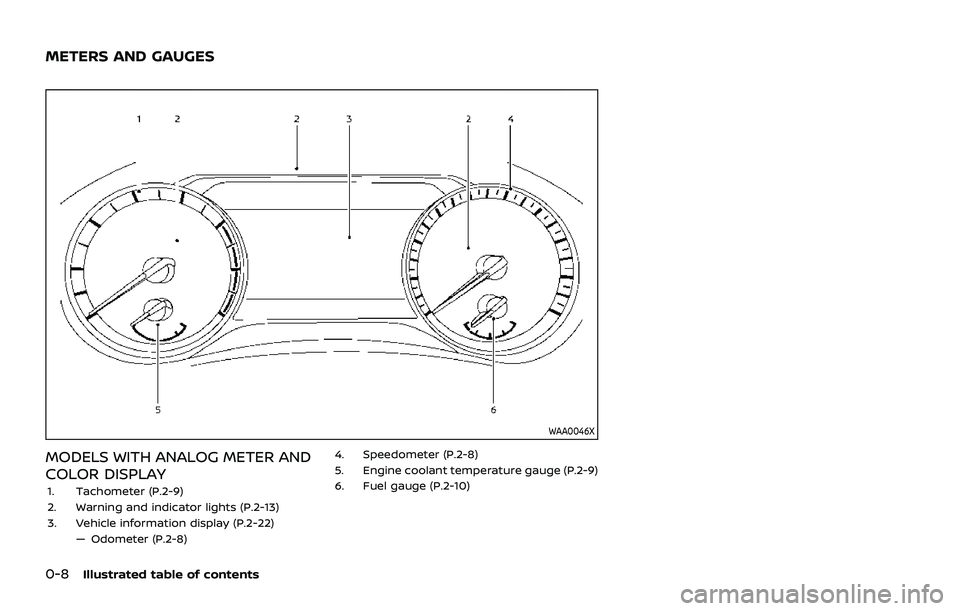
MODELS WITH ANALOG METER AND
COLOR DISPLAY
1. Tachometer (P.2-9)
2. Warning and indicator lights (P.2-13)
3. Vehicle information display (P.2-22)— Odometer (P.2-8) 4. Speedometer (P.2-8)
5. Engine coolant temperature gauge (P.2-9)
6. Fuel gauge (P.2-10)
METERS AND GAUGES
Page 17 of 556
WAA0167X
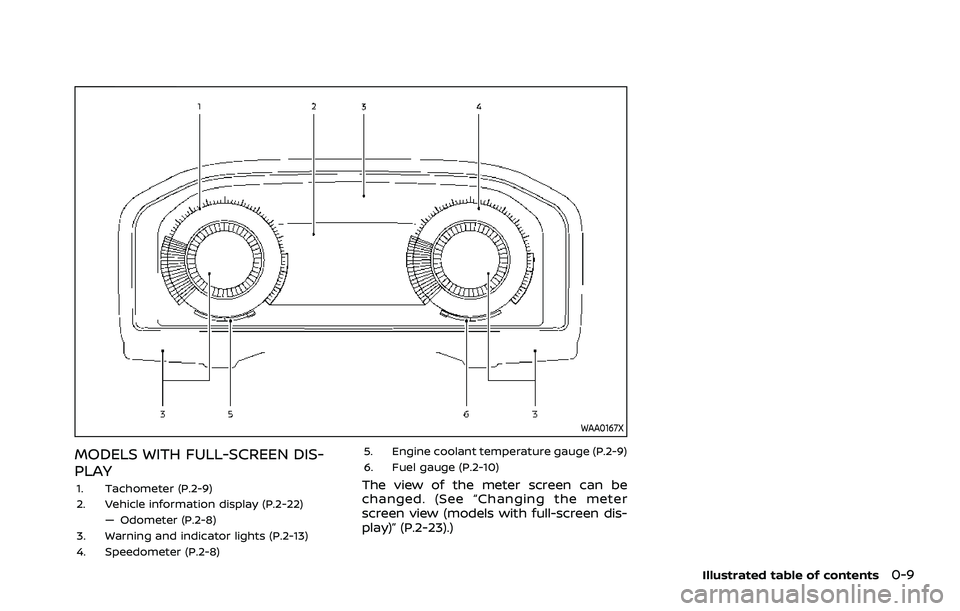
MODELS WITH FULL-SCREEN DIS-
PLAY
1. Tachometer (P.2-9)
2. Vehicle information display (P.2-22)— Odometer (P.2-8)
3. Warning and indicator lights (P.2-13)
4. Speedometer (P.2-8) 5. Engine coolant temperature gauge (P.2-9)
6. Fuel gauge (P.2-10)The view of the meter screen can be
changed. (See “Changing the meter
screen view (models with full-screen dis-
play)” (P.2-23).)
Illustrated table of contents0-9
Page 19 of 556
Red lightNamePage
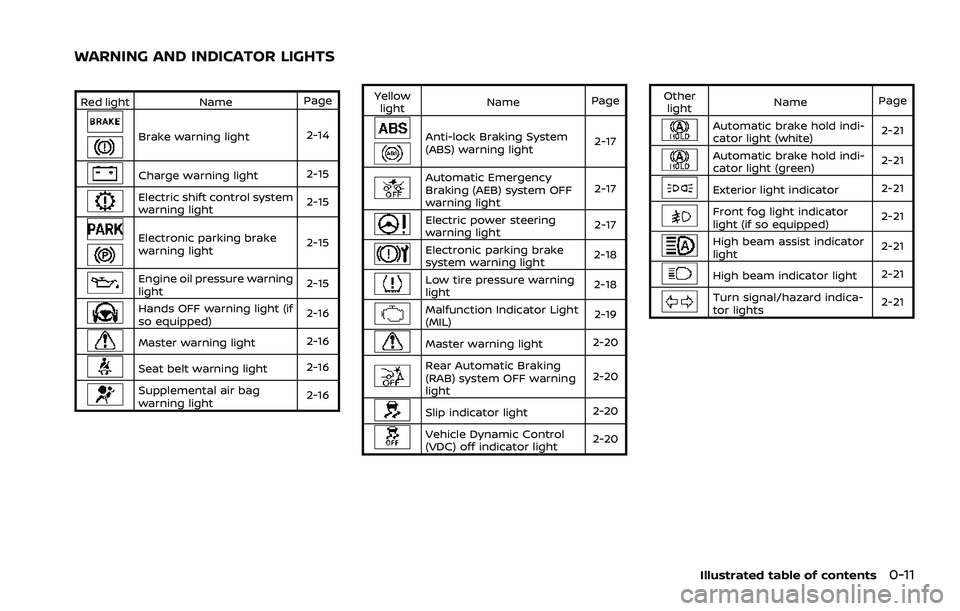
Brake warning light 2-14
Charge warning light 2-15
Electric shift control system
warning light2-15
Electronic parking brake
warning light2-15
Engine oil pressure warning
light
2-15
Hands OFF warning light (if
so equipped)2-16
Master warning light
2-16
Seat belt warning light2-16
Supplemental air bag
warning light2-16Yellow
light Name
Page
Anti-lock Braking System
(ABS) warning light 2-17
Automatic Emergency
Braking (AEB) system OFF
warning light2-17
Electric power steering
warning light
2-17
Electronic parking brake
system warning light2-18
Low tire pressure warning
light
2-18
Malfunction Indicator Light
(MIL) 2-19
Master warning light
2-20
Rear Automatic Braking
(RAB) system OFF warning
light2-20
Slip indicator light
2-20
Vehicle Dynamic Control
(VDC) off indicator light2-20Other
light Name
Page
Automatic brake hold indi-
cator light (white) 2-21
Automatic brake hold indi-
cator light (green)
2-21
Exterior light indicator
2-21
Front fog light indicator
light (if so equipped)2-21
High beam assist indicator
light2-21
High beam indicator light
2-21
Turn signal/hazard indica-
tor lights2-21
Illustrated table of contents0-11
WARNING AND INDICATOR LIGHTS
Page 89 of 556

2 Instruments and controls
Cockpit ........................................................................\
.......................... 2-3
Instrument panel ........................................................................\
.. 2-4
Meters and gauges ..................................................................... 2-5Models with analog meter and
color display ........................................................................\
....... 2-5
Models with full-screen display .................................. 2-6
Speedometer and odometer ........................................ 2-8
Tachometer ........................................................................\
........ 2-9
Engine coolant temperature gauge ....................... 2-9
Fuel gauge ........................................................................\
........ 2-10
Instrument brightness control ................................. 2-11
Continuously Variable Transmission (CVT)
position indicator ................................................................ 2-11
ECO Drive Report ................................................................ 2-11
Warning lights, indicator lights and
audible reminders ..................................................................... 2-13
Checking lights ..................................................................... 2-14
Warning/indicator lights (red) ................................... 2-14
Warning/indicator lights (yellow) ........................... 2-17
Warning/indicator lights (other) ............................. 2-21
Audible reminders .............................................................. 2-22
Vehicle information display ............................................... 2-22 Changing the meter screen view
(models with full-screen display) ............................ 2-23
How to use the vehicle
information display ........................................................... 2-23 Startup display ................................................................... 2-23
Settings ........................................................................\
............ 2-24
Vehicle information display warnings
and indicators ..................................................................... 2-34
Trip computer ..................................................................... 2-44
Clock and outside air temperature ................... 2-46
Head Up Display (HUD) (if so equipped) .................. 2-47 How to use the HUD ...................................................... 2-49
Driver Assistance/Navigation/Traffic
Sign/Audio/TEL/SMS linking ................................... 2-50
Security systems ....................................................................... 2-50 Vehicle Security System (if so equipped) ...... 2-50
NISSAN Vehicle Immobilizer System ................. 2-51
Wiper and washer switch ................................................... 2-52 Windshield wiper and washer operation ...... 2-53
Rear window wiper and
washer operation ............................................................. 2-53
Rear window and outside mirror
(if so equipped) defroster switch ................................. 2-55
Headlight and turn signal switch ................................ 2-55
Headlight switch ............................................................... 2-55
Turn signal switch ........................................................... 2-62
Fog light switch (if so equipped) ......................... 2-62
Horn ........................................................................\
............................. 2-63
Heated steering wheel (if so equipped) .................. 2-63
Page 93 of 556
WAA0046X
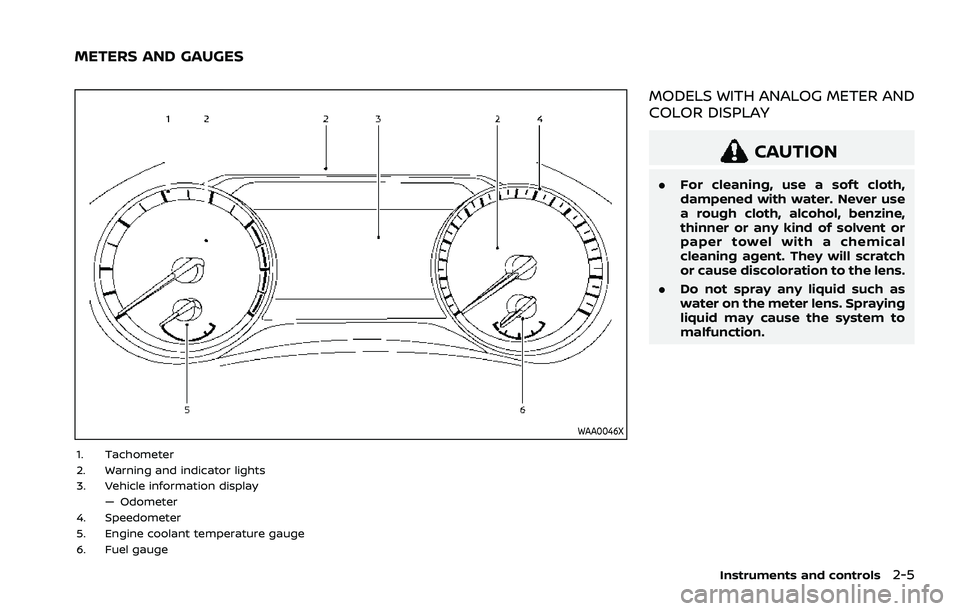
1. Tachometer
2. Warning and indicator lights
3. Vehicle information display— Odometer
4. Speedometer
5. Engine coolant temperature gauge
6. Fuel gauge
MODELS WITH ANALOG METER AND
COLOR DISPLAY
CAUTION
. For cleaning, use a soft cloth,
dampened with water. Never use
a rough cloth, alcohol, benzine,
thinner or any kind of solvent or
paper towel with a chemical
cleaning agent. They will scratch
or cause discoloration to the lens.
. Do not spray any liquid such as
water on the meter lens. Spraying
liquid may cause the system to
malfunction.
Instruments and controls2-5
METERS AND GAUGES
Page 94 of 556
2-6Instruments and controls
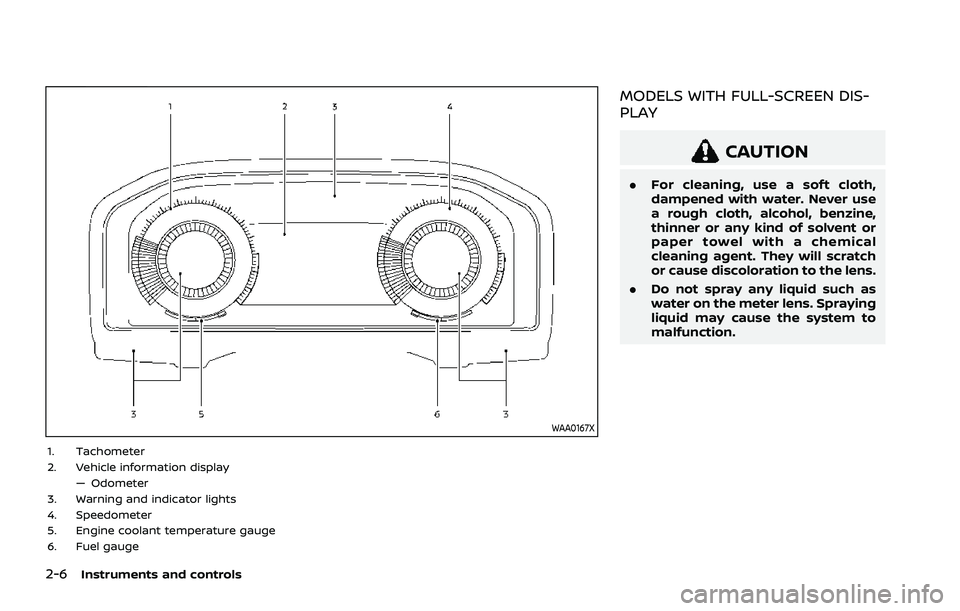
WAA0167X
1. Tachometer
2. Vehicle information display— Odometer
3. Warning and indicator lights
4. Speedometer
5. Engine coolant temperature gauge
6. Fuel gauge
MODELS WITH FULL-SCREEN DIS-
PLAY
CAUTION
. For cleaning, use a soft cloth,
dampened with water. Never use
a rough cloth, alcohol, benzine,
thinner or any kind of solvent or
paper towel with a chemical
cleaning agent. They will scratch
or cause discoloration to the lens.
. Do not spray any liquid such as
water on the meter lens. Spraying
liquid may cause the system to
malfunction.
Page 101 of 556
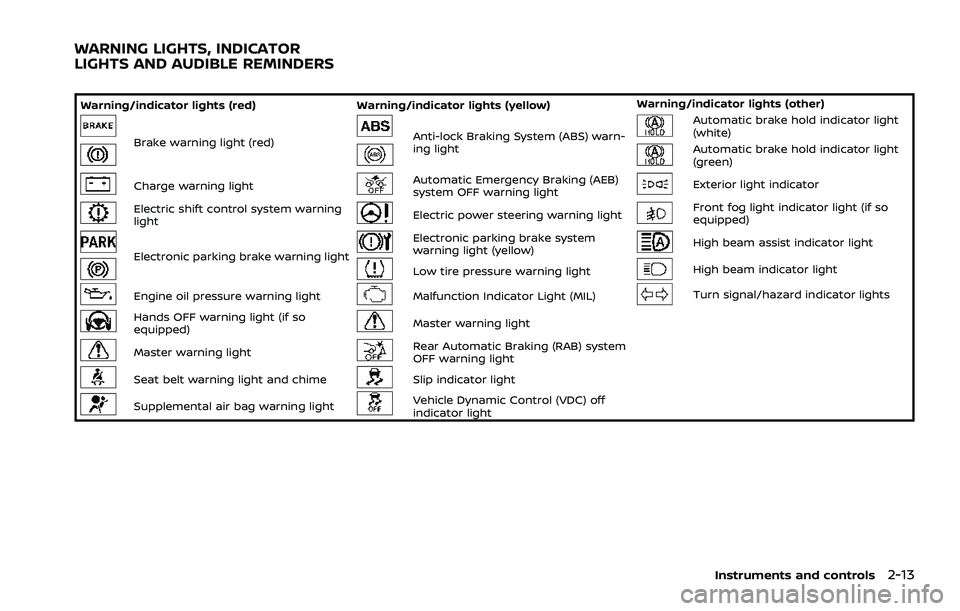
Warning/indicator lights (red)Warning/indicator lights (yellow) Warning/indicator lights (other)
Brake warning light (red)Anti-lock Braking System (ABS) warn-
ing lightAutomatic brake hold indicator light
(white)
Automatic brake hold indicator light
(green)
Charge warning lightAutomatic Emergency Braking (AEB)
system OFF warning lightExterior light indicator
Electric shift control system warning
lightElectric power steering warning lightFront fog light indicator light (if so
equipped)
Electronic parking brake warning light
Electronic parking brake system
warning light (yellow)High beam assist indicator light
Low tire pressure warning lightHigh beam indicator light
Engine oil pressure warning lightMalfunction Indicator Light (MIL)Turn signal/hazard indicator lights
Hands OFF warning light (if so
equipped)Master warning light
Master warning lightRear Automatic Braking (RAB) system
OFF warning light
Seat belt warning light and chimeSlip indicator light
Supplemental air bag warning lightVehicle Dynamic Control (VDC) off
indicator light
Instruments and controls2-13
WARNING LIGHTS, INDICATOR
LIGHTS AND AUDIBLE REMINDERS
Page 102 of 556
2-14Instruments and controls
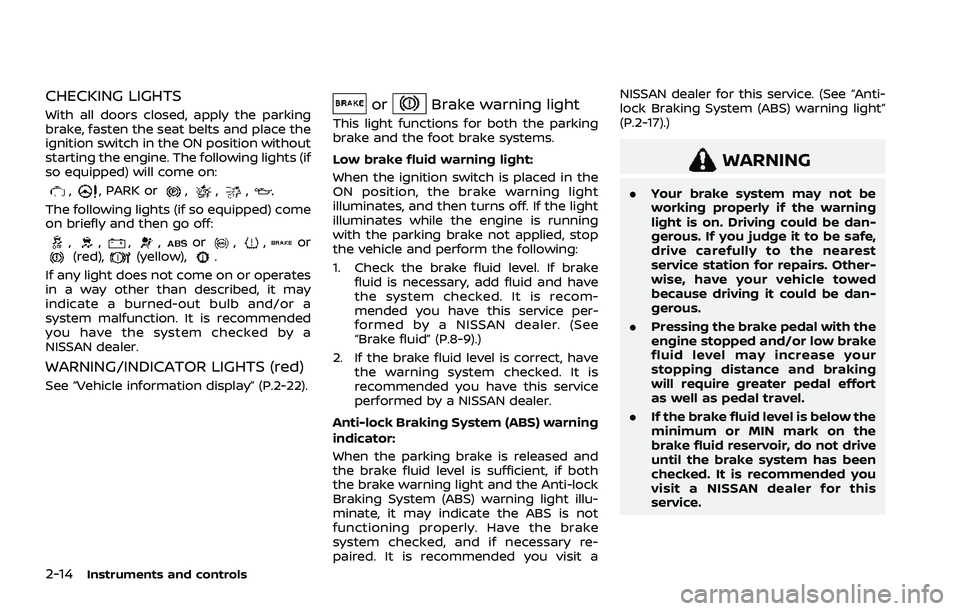
CHECKING LIGHTS
With all doors closed, apply the parking
brake, fasten the seat belts and place the
ignition switch in the ON position without
starting the engine. The following lights (if
so equipped) will come on:
,, PARK or,,,
The following lights (if so equipped) come
on briefly and then go off:
,,,,or,,or(red),(yellow),.
If any light does not come on or operates
in a way other than described, it may
indicate a burned-out bulb and/or a
system malfunction. It is recommended
you have the system checked by a
NISSAN dealer.
WARNING/INDICATOR LIGHTS (red)
See “Vehicle information display” (P.2-22).
orBrake warning light
This light functions for both the parking
brake and the foot brake systems.
Low brake fluid warning light:
When the ignition switch is placed in the
ON position, the brake warning light
illuminates, and then turns off. If the light
illuminates while the engine is running
with the parking brake not applied, stop
the vehicle and perform the following:
1. Check the brake fluid level. If brake fluid is necessary, add fluid and have
the system checked. It is recom-
mended you have this service per-
formed by a NISSAN dealer. (See
“Brake fluid” (P.8-9).)
2. If the brake fluid level is correct, have the warning system checked. It is
recommended you have this service
performed by a NISSAN dealer.
Anti-lock Braking System (ABS) warning
indicator:
When the parking brake is released and
the brake fluid level is sufficient, if both
the brake warning light and the Anti-lock
Braking System (ABS) warning light illu-
minate, it may indicate the ABS is not
functioning properly. Have the brake
system checked, and if necessary re-
paired. It is recommended you visit a NISSAN dealer for this service. (See “Anti-
lock Braking System (ABS) warning light”
(P.2-17).)
WARNING
.
Your brake system may not be
working properly if the warning
light is on. Driving could be dan-
gerous. If you judge it to be safe,
drive carefully to the nearest
service station for repairs. Other-
wise, have your vehicle towed
because driving it could be dan-
gerous.
. Pressing the brake pedal with the
engine stopped and/or low brake
fluid level may increase your
stopping distance and braking
will require greater pedal effort
as well as pedal travel.
. If the brake fluid level is below the
minimum or MIN mark on the
brake fluid reservoir, do not drive
until the brake system has been
checked. It is recommended you
visit a NISSAN dealer for this
service.
Page 104 of 556

2-16Instruments and controls
.The engine oil pressure warning
light is not designed to indicate a
low oil level. The oil level should
be checked using the dipstick.
(See “Engine oil” (P.8-5).)
Hands OFF warning light (if so
equipped)
When the Steering Assist is activated, it
monitors the driver’s steering wheel op-
eration. If the steering wheel is not
operated or the driver takes his/her
hands off the steering wheel for a period
of time, the warning light illuminates. If
the driver does not operate the steering
wheel after the warning light has been
illuminated, an audible alert sounds and
the warning flashes in the vehicle infor-
mation display, followed by a quick brake
application to request the driver to take
control of the vehicle again. If the driver
remains unresponsive, the vehicle will
automatically turn on the hazard lights
and slow to a complete stop. (See “Steer-
ing Assist” (P.5-113).)
Master warning light
When the ignition switch is in the ON
position, the master warning light illumi-
nates if a warning message appears in
the vehicle information display.
See “Vehicle information display” (P.2-22).
Seat belt warning light and
chime
The light and chime remind you to fasten
the seat belts.
The light illuminates whenever the igni-
tion switch is placed in the ON position,
and will remain illuminated until the seat
belts are fastened.
The seat belt warning light for the front
passenger will illuminate if the seat belt is
not fastened when the front passenger’s
seat is occupied.
When the vehicle speed exceeds 10 MPH
(15 km/h), the light will continue to blink
for about 95 seconds until the driver’s
seat belt is fastened and the light will
blink unless the front passenger’s seat
belts is securely fastened and the chime
will sound for about 95 seconds unless
the front passenger’s seat belt is securely
fastened.
When the ignition switch is placed in the
ON position, the chime will sound for about 6 seconds unless the driver’s seat
belt is securely fastened.
When the vehicle speed exceeds 10 MPH
(15 km/h), the chime will sound unless the
rear passenger’s seat belts are securely
fastened. The chime will continue to
sound for about 35 seconds until the rear
passenger’s seat belts are fastened.
For additional information, refer to “Seat
belt warning light and chime” (P.1-15).Supplemental air bag warning
light
After placing the ignition switch in the ON
position, the supplemental air bag warn-
ing light will illuminate. The supplemental
air bag warning light will turn off after
about 7 seconds if the supplemental front
air bag and supplemental side air bag,
curtain air bag systems and/or preten-
sioner seat belt are operational.
If any of the following conditions occur,
the front air bag, side air bag, curtain air
bag and pretensioner systems need ser-
vicing.
. The supplemental air bag warning
light remains on after approximately
7 seconds.
. The supplemental air bag warning
light flashes intermittently.