service NISSAN ROGUE 2021 Owner´s Manual
[x] Cancel search | Manufacturer: NISSAN, Model Year: 2021, Model line: ROGUE, Model: NISSAN ROGUE 2021Pages: 556, PDF Size: 2.7 MB
Page 108 of 556

2-20Instruments and controls
is recommended you visit a NISSAN
dealer for this service. You do not
need to have your vehicle towed to
the dealer.
. Malfunction indicator light blinking —
An engine misfire has been detected
which may damage the emission
control system.
To reduce or avoid emission control
system damage:
1) Do not drive at speeds above 45
MPH (72 km/h).
2) Avoid hard acceleration or decel- eration.
3) Avoid steep uphill grades.
4) If possible, reduce the amount of cargo being hauled or towed.
The malfunction indicator light may
stop blinking and remain on.
Have the vehicle inspected. It is re-
commended you visit a NISSAN dealer
for this service. You do not need to
have your vehicle towed to the dealer.
CAUTION
Continued vehicle operation without
having the emission control system
and/or CVT system checked and
repaired as necessary could lead to
poor driveability, reduced fuel econ- omy, and possible damage to the
emission control system.
Master warning light
When the ignition switch is in the ON
position, the master warning light illumi-
nates if a warning message appears in
the vehicle information display.
See “Vehicle information display” (P.2-22).
Rear Automatic Braking (RAB)
system OFF warning light
This light comes on when the ignition
switch is placed in the ON position. It
turns off after the engine is started.
This light illuminates when the RAB sys-
tem is turned off in the vehicle informa-
tion display.
If the light illuminates when the RAB
system is on, it may indicate that the
system is unavailable. For additional in-
formation, see “Rear Automatic Braking
(RAB)” (P.5-143).
Slip indicator light
When the ignition switch is in the ON
position, the slip indicator light illumi-
nates and then turns off.
The light will blink when the Vehicle
Dynamic Control (VDC) system or the
traction control system is operating, thus
alerting the driver that the vehicle is
nearing its traction limits. The road sur-
face may be slippery.
If the light illuminates while the VDC
system is on, this light alerts the driver
to the fact that the VDC system’s fail-safe
mode is operating, for example the VDC
system may not be functioning properly.
Have the system checked. It is recom-
mended you visit a NISSAN dealer for this
service. If a malfunction occurs in the
system, the VDC system function will be
canceled but the vehicle is still driveable.
For additional information, see “Vehicle
Dynamic Control (VDC) system” (P.5-157)
of this manual.
Vehicle Dynamic Control (VDC)
off indicator light
The light comes on when the VDC is
turned OFF. This indicates that the VDC
system and traction control system are
not operating.
Page 109 of 556

Turn the VDC on using the vehicle in-
formation display, or restart the engine
and the system will operate normally.
(See “Vehicle Dynamic Control (VDC) sys-
tem” (P.5-157).)
The light also comes on when placing the
ignition switch in the ON position. The
light will turn off after about 2 seconds if
the system is operational. If the light stays
on or comes on along with the
indicator light while you are driving, have
the VDC system checked. It is recom-
mended that you visit a NISSAN dealer for
this service.
WARNING
The VDC should remain on unless
freeing a vehicle from mud or snow.
While the VDC system is operating, you
might feel a slight vibration or hear the
system working when starting the vehicle
or accelerating, but this is not a malfunc-
tion.
WARNING/INDICATOR LIGHTS
(other)
See “Vehicle information display” (P.2-22).
Automatic brake hold indica-
tor light (white)
The automatic brake hold indicator light
(white) illuminates when the automatic
brake hold system is on standby. (See
“Automatic brake hold” (P.5-28).)
Automatic brake hold indica-
tor light (green)
The automatic brake hold indicator light
(green) illuminates while the automatic
brake hold system is operating. (See
“Automatic brake hold” (P.5-28).)
Exterior light indicator
This indicator illuminates when the head-
light switch is turned to the AUTO,orposition and the front parking lights,
rear combination lights, license plate
lights or headlights are on. The indicator
turns off when these lights are turned off.
Front fog light indicator light
(if so equipped)
The front fog light indicator light illumi-
nates when the front fog lights are on.
(See “Fog light switch” (P.2-62).)
High beam assist indicator
light
The high beam assist indicator light
illuminates when the high beam assist
system is turned on and it is operational.
(See “High beam assist” (P.2-59).)
High beam indicator light
This light illuminates when the headlight
high beam is on and goes out when the
low beam is selected.
Turn signal/hazard indicator
lights
The light flashes when the turn signal
switch lever or hazard switch is turned on.
Instruments and controls2-21
Page 117 of 556
.Alert Only
When selected, only the alert is dis-
played.
. OFF
When selected, no alert or horn will be
active.
(See “Rear Door Alert” (P.2-65).)
Maintenance
The maintenance mode allows user to set
alerts for the reminding of maintenance
intervals. To change an item:
Select “Maintenance” using the scroll dial
and push it.
. Oil Control System (if so equipped)
. Oil and Filter
. Tire
. Other
Oil Control System (if so equipped):
The Oil Control System can be accessed
in the Maintenance portion of the vehicle
information display settings.
Engine oil information informs the dis-
tance to oil change. Never exceed one
year or 10,000 miles (16,000 km) between
oil change intervals for the PR25DD en-
gine.
Display when
ignition is ON Display timing
Action Required
Engine
Oil Ser-
vice due in xxxmiles Remaining oil
life is less than
940 miles (1,500
km). Plan to have
your vehicle ser-
viced.
Engine
Oil Ser-
vice due Remaining oil
life is 0 miles (0
km). Have your vehi-
cle serviced
within two
weeks or less
than 500 miles
(800 km).
The oil change interval cannot be ad-
justed manually.
The distance to oil change interval is
calculated depending on the driving con-
ditions and set automatically by the oil
control system. A reminder will be dis-
played when approaching the end of the
service interval.
When the Factory Reset option is selected
in the vehicle information display, the oil
control system will also be reset to initial
value. Please change the engine oil when
Factory Reset is selected.
CAUTION
If the oil replacement indicator is
displayed, change the engine oil
within two weeks or less than 500
miles (800 km).
Operating the vehicle with deterio-
rated oil can damage the engine.
To reset oil control system:
1. Place the ignition switch in the ON position.
2. Push the
andbuttons on the
steering wheel until “Settings” appears
in the vehicle information display. Use
the scroll dial to select “Maintenance”.
Then, push the scroll dial.
3. Select the “Oil Control System” and push the scroll dial.
4. Push the scroll dial according to the reset instructions displayed at the
bottom of the “Oil Control System”
maintenance screen.
Oil and Filter:
This indicator appears when user set
distance comes for changing the engine
oil and filter. You can set or reset the
distance for checking or replacing these
items. For scheduled maintenance items
Instruments and controls2-29
Page 123 of 556
11. Rear seat belt warning
This warning appears for 35 seconds
after the ignition switch is placed in the
ON position.
This warning shows the status of the
three rear seat belts. When one of the rear
seat belts is buckled, the corresponding
rear seat belt indicator will appear gray.
When one of the rear seat belts is
unbuckled, the corresponding rear seat
belt indicator will appear red.
For precautions on seat belt usage, see
“Seat belts” (P.1-13).
12. Tire Pressure Low — Add Air
warning
This warning appears when the low tire
pressure warning light in the meter
illuminates and low tire pressure is de-
tected. The warning appears each time
the ignition switch is placed in the ON
position as long as the low tire pressure
warning light remains illuminated. If this
warning appears, stop the vehicle and
adjust the pressure to the recommended
COLD tire pressure shown on the Tire and
Loading Information label. (See “Low tire
pressure warning light” (P.2-18) and “Tire
Pressure Monitoring System (TPMS)” (P.5-
6).)
13. Shift to P range warning
This warning appears when the driver’s
door is opened while the shift lever is in
any position other than P (Park).
If this warning appears, push the park
button to engage the P (Park) position.
An inside warning chime will also sound.
(See “Intelligent Key system” (P.3-7).)
14. CVT Malfunction Service now
warning
This warning appears when there is a
malfunction with the CVT system. If this
warning appears, have the system
checked. It is recommended that you visit
a NISSAN dealer for this service.
15. CVT hot Power reduced warning
The CVT has a high fluid temperature
protection mode. If the fluid temperature
becomes too high (for example, climbing
steep grades in high temperatures with
heavy loads, such as when towing a
trailer), engine power and, under some
conditions, vehicle speed will be de-
creased automatically to reduce the
chance of transmission damage. Vehicle
speed can be controlled with the accel-
erator pedal, but the engine and vehicle
speed may be reduced.
16. CVT Malfunction Stop safely
warning
This warning appears when there is a
malfunction with the CVT system. If this
warning appears, stop the vehicle in a
safe place. Have the system checked. It is
recommended you visit a NISSAN dealer
for this service.
17. Check position of shift lever
warning
This warning appears if the system can-
not detect the shift position. Make sure
the vehicle is placed in a position properly.
Have the system checked. It is recom-
mended you contact a NISSAN dealer for
this service.
18. When parked apply parking
brake warning
This warning appears if a malfunction
occurs in the electric shift control system.
Contact a NISSAN dealer as soon as
possible. When parking the vehicle, make
sure that the parking brake is applied. If
the parking brake is not applied, the
ignition switch may not be turned off.
Instruments and controls2-35
Page 124 of 556
2-36Instruments and controls
19. Continuously Variable Trans-
mission (CVT) position indicator
This indicator shows the CVT shift posi-
tion.
In the manual shift mode, when the
transmission does not shift to the se-
lected gear due to a transmission protec-
tion mode, the CVT position indicator will
blink and a chime will sound.
See “Continuously Variable Transmission
(CVT)” (P.5-19) for further details.
20. Drive Mode Selector indicator
When a driving mode is selected using the
Drive Mode Selector, the selected mode
indicator is displayed.
.OFF-ROAD (AWD models)
. SNOW (AWD models)
. STANDARD (2WD models)
. AUTO (AWD models)
. ECO
. SPORT
(See “Drive Mode Selector” (P.5-30).)
21. AWD Error: See Owner’s Manual
warning (if so equipped)
This warning appears when the All-Wheel
Drive (AWD) system is not functioning
properly while the engine is running.
Reduce vehicle speed and have your
vehicle checked as soon as possible. It is
recommended that you visit a NISSAN
dealer for this service. (See “Intelligent
4x4” (P.5-151).)
22. AWD High Temp. Stop vehicle
warning (if so equipped)
This warning appears when the oil tem-
perature of the powertrain parts in-
creases due to the difference in rotation
between the front and rear wheels is
large (wheel slip), such as when driving
on rough roads, driving through sand or
mud, or freeing a stuck vehicle. If this
warning is displayed, stop the vehicle with
the engine idling, as soon as it is safe to
do so. In these cases, the AWD changes to
2WD to protect the powertrain parts.
Then if the warning turns off, you can
continue AWD driving. (See “Intelligent
4x4” (P.5-151).)
23. Tire Size Incorrect: See Owner’s
Manual warning (if so equipped)
This warning may appear if there is a
large difference between the diameters of
front and rear wheels and tires. Pull off
the road in a safe area, with the engine
idling. Check that all the tire sizes, brand,
construction and tread pattern are the
same, that the tire pressures are correct
and that the tires are not excessively
worn. If you have any problems, change
tires or adjust tire pressures correctly. Do
not select the SNOW or OFF-ROAD mode
with the Drive Mode Selector and do not
drive fast. (See “Intelligent 4x4” (P.5-151).)
24. Shipping Mode On Push Storage
Fuse warning (if so equipped)
This warning may appear if the extended
storage switch is not pushed in. When this
warning appears, push in the extended
storage switch to turn off the warning.
(See “Extended storage switch” (P.8-20).)
25. Power will turn off to save the
battery warning
Under the specific conditions, this warn-
ing may appear after the ignition switch is
in the ON position for a certain period of
time.
Page 125 of 556
26. Power turned off to save the
battery warning
Under the specific conditions, this warn-
ing may appear after the ignition switch is
automatically turned OFF to save the
battery.
27. Reminder Turn OFF Headlights
warning
This warning appears when the driver
side door is opened with the headlight
switch is left ON and the ignition switch is
placed in the OFF position. Place the
headlight switch in OFF (if so equipped)
or AUTO position. For additional informa-
tion, (See “Headlight and turn signal
switch” (P.2-55).)
28. Headlight System Error: See
Owner’s Manual warning
This warning appears if the LED head-
lights are malfunctioning. Have the sys-
tem checked. It is recommended that you
visit a NISSAN dealer for this service.
29. Time for a break? indicator
This indicator appears when the set
Timer Alert activates. You can set the
time for up to 6 hours.
30. Chassis Control System Error:
See Owner’s Manual warning
This warning appears if the chassis con-
trol module detects a malfunction in the
chassis control system. Have the system
checked. It is recommended that you visit
a NISSAN dealer for this service. (See
“Chassis control” (P.5-160).)
31. Rear Door Alert is activated
indicator
When the system is enabled, this message
appears when the Rear Door Alert system
is active and can remind the driver to
check the rear seat.
.Using the steering switch, the driver
can select “Dismiss Message” to clear
the display for a period of time.
. Using the steering switch, the driver
can select “Disable Alert” to disable the
horn alert for the remainder of the
current trip.
For additional information, see “Rear Door
Alert” (P.2-65).
WARNING
Selecting “Dismiss Message” during a
stop within a trip temporarily dis-
misses the message for that stop
without turning the system off. Alerts can be provided for other
stops during the trip. Selecting “Dis-
able Alert” turns off the Rear Door
Alert system for the remainder of a
trip and no audible alert will be
provided.
NOTE:
This system is disabled until the driver
enables it using the settings menu. See
“Vehicle Settings” (P.2-27).
32. Check Rear Seat For all articles
indicator
When the system is enabled, this message
appears when the vehicle comes to a
complete stop, the shift position is placed
from the D (Drive) to P (Park), and the
driver exits the vehicle. This message
alerts the driver, after a period of time,
to check for items in the rear seat after
the audible alert has been provided.
NOTE:
This system is disabled until the driver
enables it using the settings menu. See
“Vehicle Settings” (P.2-27).
Instruments and controls2-37
Page 127 of 556
40. Not Available System Malfunc-
tion warning
This warning appears when the following
systems malfunction.
.Lane Departure Warning (LDW)
. Intelligent Lane Intervention (I-LI)
. Blind Spot Warning (BSW)
. Intelligent Blind Spot Intervention (I-
BSI) (if so equipped)
. ProPILOT Assist (if so equipped)
(See “Lane Departure Warning (LDW)” (P.5-
46), “Intelligent Lane Intervention (I-LI)”
(P.5-51), “Blind Spot Warning (BSW)” (P.5-
57) or “ProPILOT Assist” (P.5-84).)
41. Unavailable High Cabin Tem-
perature warning
This warning appears if the interior tem-
perature of the vehicle has reached such
a high temperature that the sensor for
the following systems can no longer
function reliably.
. Lane Departure Warning (LDW)
. Intelligent Lane Intervention (I-LI)
. Automatic Emergency Braking (AEB)
with pedestrian detection
. Intelligent Blind Spot Intervention (I-
BSI)
. Traffic Sign Recognition (TSR) (if so
equipped) Once the interior temperature has
reached normal levels, the warning
should disappear.
If the warning continues to display, have
the system checked. It is recommended
that you visit a NISSAN dealer for this
service.
For additional information, refer to “Lane
Departure Warning (LDW)” (P.5-46), “Intel-
ligent Lane Intervention (I-LI)” (P.5-115),
“Automatic Emergency Braking (AEB) with
pedestrian detection system” (P.5-122),
“Intelligent Blind Spot Intervention (I-BSI)”
(P.5-65) or “Traffic Sign Recognition (TSR)”
(P.5-43).
42. Currently not available warning
This warning appears when the Intelli-
gent Lane Intervention (I-LI), Intelligent
Blind Spot Intervention (I-BSI) (if so
equipped) or the Intelligent Cruise Control
(ICC) system (if so equipped) becomes
unavailable in the following conditions:
.
The Vehicle Dynamic Control (VDC)
system is turned off
. The SNOW mode or the OFF-ROAD
mode is selected (AWD models).
For additional information, refer to “In-
telligent Lane Intervention (I-LI)” (P.5-51),
“Intelligent Blind Spot Intervention (I-BSI)”
(P.5-65) or “Intelligent Cruise Control (ICC)”
(P.5-97).
43. Forward Driving Aids tempora-
rily disabled Front Sensor blocked
warning
If the front radar sensor area on the front
of the vehicle is covered with dirt or
obstructed, making it impossible to de-
tect a vehicle ahead, the following system
is automatically turned off.
. Intelligent Cruise Control (ICC) (on
ProPILOT Assist system) (if so
equipped)
. Automatic Emergency Braking (AEB)
with pedestrian detection
. Intelligent Forward Collision Warning
(I-FCW)
If the warning message appears, park the
vehicle in a safe location and turn the
engine off.
Check to see if the sensor area is blocked.
If the sensor area is blocked, remove the
blocking material. Restart the engine. If
the warning message continues to ap-
pear, have the system checked. It is
recommended that you visit a NISSAN
dealer for this service.
For more details, see “ProPILOT Assist”
(P.5-84), “Automatic Emergency Braking
(AEB) with pedestrian detection system”
(P.5-122) or “Intelligent Forward Collision
Warning (I-FCW)” (P.5-132).
Instruments and controls2-39
Page 152 of 556
2-64Instruments and controls
.Any liquid spilled on the heated
seat should be removed immedi-
ately with a dry cloth.
. When cleaning the seat, never use
gasoline, thinner, or any similar
materials.
. If any malfunctions are found or
the heated seat does not operate,
turn the switch off and have the
system checked. It is recom-
mended you visit a NISSAN dealer
for this service.
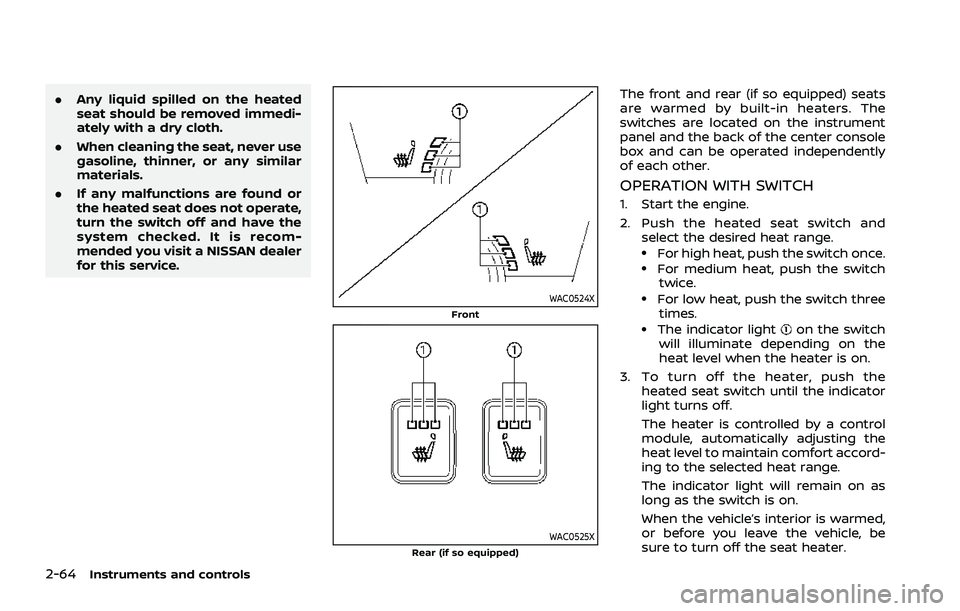
WAC0524XFront
WAC0525XRear (if so equipped)
The front and rear (if so equipped) seats
are warmed by built-in heaters. The
switches are located on the instrument
panel and the back of the center console
box and can be operated independently
of each other.
OPERATION WITH SWITCH
1. Start the engine.
2. Push the heated seat switch and
select the desired heat range.
.For high heat, push the switch once..For medium heat, push the switchtwice.
.For low heat, push the switch three
times.
.The indicator lighton the switch
will illuminate depending on the
heat level when the heater is on.
3. To turn off the heater, push the heated seat switch until the indicator
light turns off.
The heater is controlled by a control
module, automatically adjusting the
heat level to maintain comfort accord-
ing to the selected heat range.
The indicator light will remain on as
long as the switch is on.
When the vehicle’s interior is warmed,
or before you leave the vehicle, be
sure to turn off the seat heater.
Page 158 of 556

2-70Instruments and controls
EMERGENCY SUPPORT
NissanConnect® Services provide various
services to support dealing with emer-
gencies of the subscribed vehicle and the
driver.
For example, in case of an illness or
serious injury, you can seek support by
pushing the in-vehicle Emergency Call
(SOS) button and connecting to the
NissanConnect® Services Response Cen-
ter. The NissanConnect® Services Re-
sponse Center can specify the location
of the vehicle via GPS, and the informa-
tion will be sent to the police or other
agencies as needed.
For information about other NissanCon-
nect® Services emergency support re-
lated services, contact the
NissanConnect® Customer Support line
at 1-855-426-6628 or refer to the Nissan-
Connect® Services website www.nissanu-
sa.com/connect (for U.S.) or www.nissan.
ca/nissanconnect (English)/www.nissan.
ca/nissanconnect/fr (French) (for Cana-
da).
WARNING
.Please note that the Automatic
Collision Notification service and
Emergency Call function cannot be used in the following condi-
tions:
— Emergency functions and ser-
vices will not be available
without a paid subscription
to NissanConnect® Services.
— The NissanConnect® Services network system is disabled.
— The vehicle moves outside the service area where the TCU
(Telematics Control Unit) is
connected to the system.
— The vehicle is outside the area where the cellular network
service is receivable.
— The vehicle is in a location with poor signal reception
such as tunnels, underground
parking garages, behind
buildings or in mountainous
areas.
— The line is busy.
— The TCU (Telematics Control Unit) or other systems of your
vehicle are not working prop-
erly.
— It may not be possible to make an emergency call de-
pending on the severity of a collision and/or emergency.
. Park the vehicle in a safe location
and set the parking brake before
operating the Emergency Call
(SOS) button.
. Only use this service in case of an
emergency. There may be a pen-
alty for inappropriate use of the
service.
. Radio waves could adversely af-
fect electric medical equipment.
Individuals who use a pacemaker
should contact the device manu-
facturer regarding any possible
effects before using the system.
. The TCU (Telematics Control Unit)
antenna is installed inside the
upper central part of the instru-
ment panel. An occupant should
not get any closer to the antenna
than specified by the pacemaker
manufacturer. The radio waves
from the TCU antenna may ad-
versely affect the operation of the
pacemaker while using the Nis-
sanConnect® Services.
EMERGENCY CALL (SOS) BUTTON
(if so equipped)
Page 159 of 556

WAC0491X
Making an emergency call
The Emergency Call (SOS) button is lo-
cated near the map light.
1. Push the cover to expose the Emer-gency Call (SOS) button
.
2. Push the Emergency Call (SOS) button to make an emergency call.
3. When the line is connected, speak to the Response Specialist.
If you want to cancel the emergency call,
push and hold the Emergency Call (SOS)
button for a few seconds. NOTE:
.
After the Emergency Call (SOS) but-
ton is pushed, it may take some time
until the system initiates connec-
tion, depending on the technical
environment and whether the TCU
(Telematics Control Unit) is being
used by other services.
. An indicator light on the Emergency
Call (SOS) button shows the readi-
ness of the emergency support sys-
tem. If the indicator light is not
illuminated, pushing the Emergency
Call (SOS) button does not connect
your vehicle to the Response Spe-
cialist.
The indicator light blinks while con-
nected to the NissanConnect® Ser-
vices Response Center.
. Even when the indicator light is
illuminated, connection to the Nis-
sanConnect® Services Response
Center may not be possible. If this
occurs in an emergency situation,
contact the authorities by other
means.
. To avoid disconnecting the line,
keep the engine running during an
emergency call, if it is safe to do so.
CUP HOLDERS
CAUTION
.Avoid abrupt starting and braking
when the cup holder is being
used to prevent spilling the drink.
If the liquid is hot, it can scald you
or your passenger.
. Use only soft cups in the cup
holder. Hard objects can injure
you in an accident.
Instruments and controls2-71
STORAGE