service NISSAN ROGUE 2021 Owner´s Manual
[x] Cancel search | Manufacturer: NISSAN, Model Year: 2021, Model line: ROGUE, Model: NISSAN ROGUE 2021Pages: 556, PDF Size: 2.7 MB
Page 276 of 556
5-22Starting and driving
N (Neutral):
Neither the forward nor reverse gear is
engaged. The engine can be started in
this position. You may shift to the N
(Neutral) position and restart a stalled
engine while the vehicle is moving.
You can select this position by holding
the shift lever at this position for 0.5
seconds.
D (Drive):
Use this position for all normal forward
driving. The CVT changes gears automa-
tically. All forward gears are available.If
the vehicle is placed in the D (Drive)
position while the vehicle is reversing,
the chime will sound and the vehicle will
switch into the N (Neutral) position.
Neutral hold mode function
This function enables you to turn off the
engine with the vehicle in the N (Neutral)
position. While this function is activated,
the vehicle can be moved by pushing with
hand (when car washing) even if the
ignition switch is in the OFF position.
When using this function, release the
electronic parking brake.
WARNING
. Use this function on a level sur-
face only. Failure to do so may
cause the vehicle to move acci-
dentally and could result in a
collision or serious personal in-
jury.
. Do not use this function for a
purpose other than car washing.
. When the ignition switch is placed
in the ON position after activating
this function, depress the brake
pedal to stop the vehicle because
the shift lever is in the N (Neutral)
position.
. If this function is not activated
regardless of proper operation,
transmission may malfunction. It
is recommended that you visit a
NISSAN dealer for this service.
To activate the Neutral hold mode, per-
form the following operations.
1. Push the ignition switch to start the engine.
2. Release the electronic parking brake.
3. Depress and hold the brake pedal. 4. Push the P position switch.
5. Slide the shift lever to the N (Neutral)
position, and hold it for 0.5 second
until “N” appears in the vehicle infor-
mation display.
6. Slide the shift lever to the N (Neutral) position again, and hold it for 0.5
second, until a message “Neutral Hold
Mode has been activated” appears in
the vehicle information display. (See
“66. Neutral Hold Mode activated in-
dicator” (P.2-42).)
7. Place the ignition switch in the OFF position. The engine will turn off with
holding the N (Neutral) position.
To exit the Neutral hold mode, place the
vehicle in other than N (Neutral) position.
NOTE:
. It is necessary to perform the steps
4 through 6 within approximately 5
seconds to prevent incorrect opera-
tion.
. When the ignition switch is placed in
the OFF position while the shift lever
is in the N (Neutral) position, a
message will appear in the vehicle
information display. (See “65. Neu-
tral Hold Mode guidance indicator”
(P.2-42).)
. If the Neutral hold mode is unavail-
able, a message will appear in the
Page 282 of 556
5-28Starting and driving
The automatic brake hold function main-
tains the braking force without the driver
having to depress the brake pedal when
the vehicle is stopped at a traffic light or
intersection. As soon as the driver de-
presses the accelerator pedal again, the
automatic brake hold function is deacti-
vated and the braking force is released.
The operating status of the automatic
brake hold can be displayed on the
vehicle information display.
WARNING
.The automatic brake hold func-
tion is not designed to hold the
vehicle on a steep hill or slippery
road. Never use the automatic
brake hold when the vehicle is
stopped on a steep hill or slippery
road. Failure to do so may cause
the vehicle to move.
. The automatic brake hold warn-
ing may appear in the vehicle
information display to request
that the driver retake control by
depressing the brake pedal.
. When the automatic brake hold
function is activated but fails to
maintain the vehicle at a stand-
still, depress the brake pedal to
stop the vehicle. If the vehicle unexpectedly moves due to out-
side conditions, the chime may
sound and automatic brake hold
warning may illuminate in the
vehicle information display.
. Be sure to deactivate the auto-
matic brake hold function when
using a car wash or towing your
vehicle.
. Make sure to push the park but-
ton to shift to the P (Park) posi-
tion and apply the electronic
parking brake when parking your
vehicle, riding on or off the vehi-
cle, or loading luggage. Failure to
do so could cause the vehicle to
move or roll away unexpectedly
and result in serious personal
injury or property damage.
. If any of the following conditions
occur, the automatic brake hold
function may not function. Have
the system checked promptly. It
is recommended that you visit a
NISSAN dealer for this service.
Failure to operate the vehicle in
accordance with these conditions
could cause the vehicle to move
or roll away unexpectedly and
result in serious personal injury
or property damage. — A warning message appears
in the vehicle information dis-
play.
— The indicator light on the automatic brake hold switch
does not illuminate when the
switch is pushed.
. The automatic brake hold func-
tion will not be activated if the
slip indicator light, electronic
parking brake system warning
light or master warning light illu-
minates and the Chassis Control
System Error warning message
appears in the vehicle informa-
tion display.
. To maintain the braking force to
keep the vehicle to a standstill, a
noise may be heard. This is not a
malfunction.
AUTOMATIC BRAKE HOLD
Page 285 of 556
WAF0540XVehicle information display: 2WD models
WAF0541XVehicle information display: AWD models
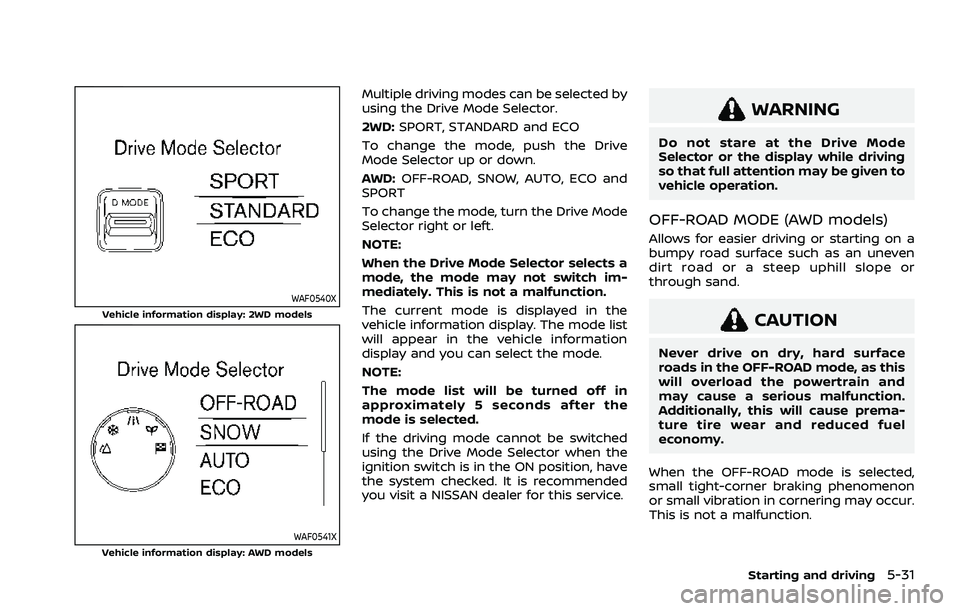
Multiple driving modes can be selected by
using the Drive Mode Selector.
2WD:SPORT, STANDARD and ECO
To change the mode, push the Drive
Mode Selector up or down.
AWD: OFF-ROAD, SNOW, AUTO, ECO and
SPORT
To change the mode, turn the Drive Mode
Selector right or left.
NOTE:
When the Drive Mode Selector selects a
mode, the mode may not switch im-
mediately. This is not a malfunction.
The current mode is displayed in the
vehicle information display. The mode list
will appear in the vehicle information
display and you can select the mode.
NOTE:
The mode list will be turned off in
approximately 5 seconds after the
mode is selected.
If the driving mode cannot be switched
using the Drive Mode Selector when the
ignition switch is in the ON position, have
the system checked. It is recommended
you visit a NISSAN dealer for this service.
WARNING
Do not stare at the Drive Mode
Selector or the display while driving
so that full attention may be given to
vehicle operation.
OFF-ROAD MODE (AWD models)
Allows for easier driving or starting on a
bumpy road surface such as an uneven
dirt road or a steep uphill slope or
through sand.
CAUTION
Never drive on dry, hard surface
roads in the OFF-ROAD mode, as this
will overload the powertrain and
may cause a serious malfunction.
Additionally, this will cause prema-
ture tire wear and reduced fuel
economy.
When the OFF-ROAD mode is selected,
small tight-corner braking phenomenon
or small vibration in cornering may occur.
This is not a malfunction.
Starting and driving5-31
Page 294 of 556
5-40Starting and driving
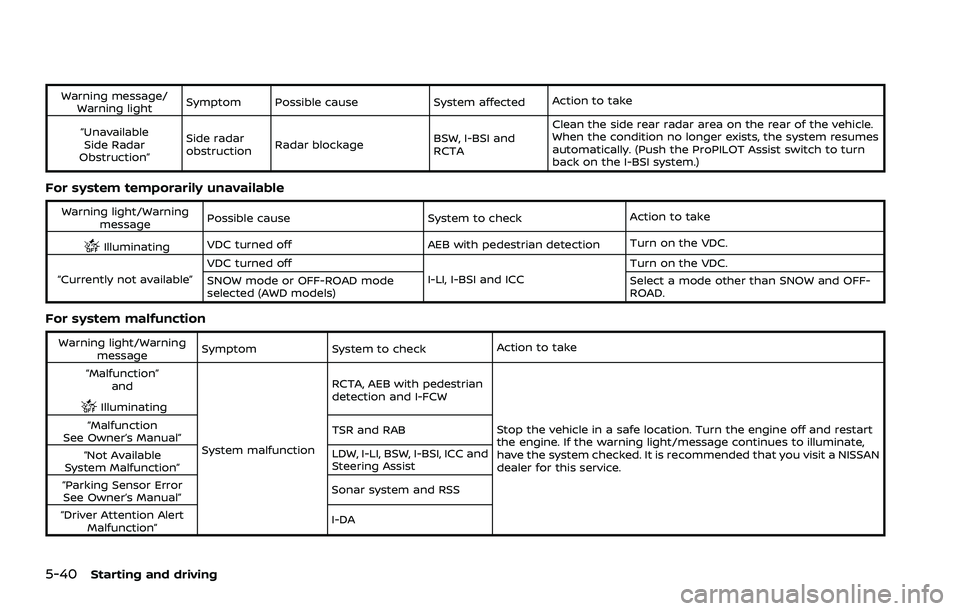
Warning message/Warning light Symptom Possible cause System affected
Action to take
“Unavailable Side Radar
Obstruction” Side radar
obstruction
Radar blockage
BSW, I-BSI and
RCTAClean the side rear radar area on the rear of the vehicle.
When the condition no longer exists, the system resumes
automatically. (Push the ProPILOT Assist switch to turn
back on the I-BSI system.)
For system temporarily unavailable
Warning light/Warning
message Possible cause
System to checkAction to take
IlluminatingVDC turned off AEB with pedestrian detection
Turn on the VDC.
“Currently not available” VDC turned off
I-LI, I-BSI and ICCTurn on the VDC.
SNOW mode or OFF-ROAD mode
selected (AWD models) Select a mode other than SNOW and OFF-
ROAD.
For system malfunction
Warning light/Warning
message Symptom
System to check Action to take
“Malfunction” and
Illuminating
System malfunction RCTA, AEB with pedestrian
detection and I-FCW
Stop the vehicle in a safe location. Turn the engine off and restart
the engine. If the warning light/message continues to illuminate,
have the system checked. It is recommended that you visit a NISSAN
dealer for this service.
“Malfunction
See Owner’s Manual” TSR and RAB
“Not Available
System Malfunction” LDW, I-LI, BSW, I-BSI, ICC and
Steering Assist
“Parking Sensor Error See Owner’s Manual” Sonar system and RSS
“Driver Attention Alert Malfunction” I-DA
Page 304 of 556
5-50Starting and driving
.When you operate the lane change
signal and change traveling lanes in
the direction of the signal. (The LDW
system will become operable again
approximately 2 seconds after the
lane change signal is turned off.)
. When the vehicle speed lowers to less
than approximately 37 MPH (60 km/h).
Action to take:
After the above conditions have finished
and the necessary operating conditions
are satisfied, the LDW system will resume.
SYSTEM MALFUNCTION
If the LDW system malfunctions, it will
cancel automatically and “Not Available
System Malfunction” warning message
will appear in the vehicle information
display. If the warning message appears,
pull off the road to a safe location and
stop the vehicle. Place the ignition switch
in the OFF position and restart the
engine. If the warning message continues
to appear, have the system checked. It is
recommended that you visit a NISSAN
dealer for this service.WAC0523X
SYSTEM MAINTENANCE
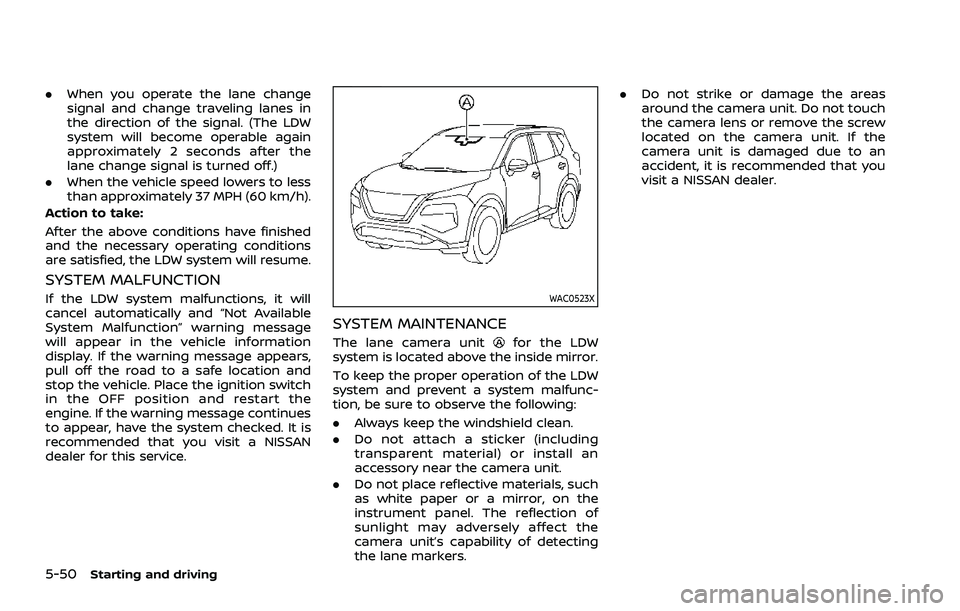
The lane camera unitfor the LDW
system is located above the inside mirror.
To keep the proper operation of the LDW
system and prevent a system malfunc-
tion, be sure to observe the following:
. Always keep the windshield clean.
. Do not attach a sticker (including
transparent material) or install an
accessory near the camera unit.
. Do not place reflective materials, such
as white paper or a mirror, on the
instrument panel. The reflection of
sunlight may adversely affect the
camera unit’s capability of detecting
the lane markers. .
Do not strike or damage the areas
around the camera unit. Do not touch
the camera lens or remove the screw
located on the camera unit. If the
camera unit is damaged due to an
accident, it is recommended that you
visit a NISSAN dealer.
Page 310 of 556
5-56Starting and driving
the engine off and restart the engine. If
the I-LI indicator (orange) continues to
illuminate, have the I-LI system checked. It
is recommended that you visit a NISSAN
dealer for this service.
WAC0523X
SYSTEM MAINTENANCE
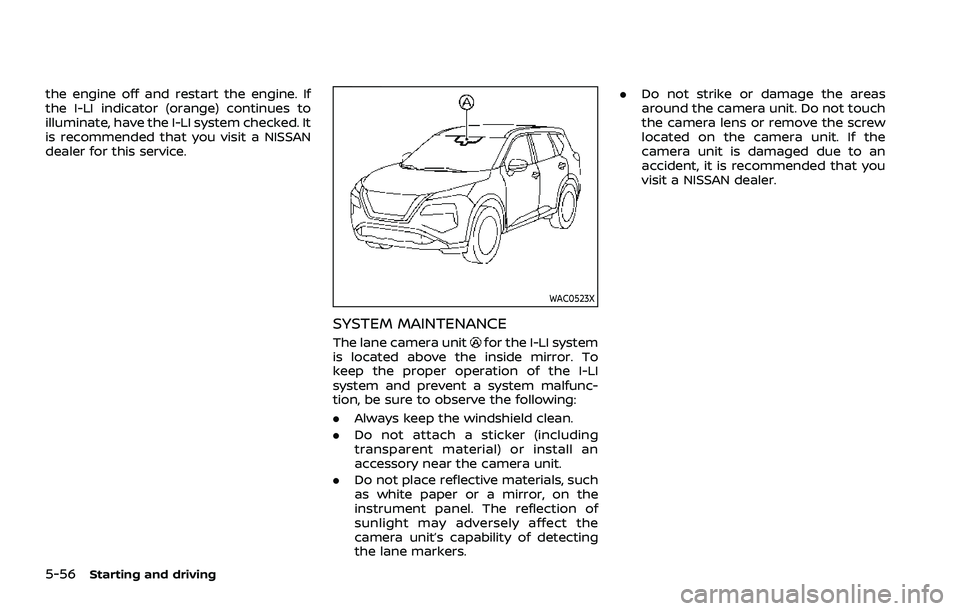
The lane camera unitfor the I-LI system
is located above the inside mirror. To
keep the proper operation of the I-LI
system and prevent a system malfunc-
tion, be sure to observe the following:
. Always keep the windshield clean.
. Do not attach a sticker (including
transparent material) or install an
accessory near the camera unit.
. Do not place reflective materials, such
as white paper or a mirror, on the
instrument panel. The reflection of
sunlight may adversely affect the
camera unit’s capability of detecting
the lane markers. .
Do not strike or damage the areas
around the camera unit. Do not touch
the camera lens or remove the screw
located on the camera unit. If the
camera unit is damaged due to an
accident, it is recommended that you
visit a NISSAN dealer.
Page 317 of 556
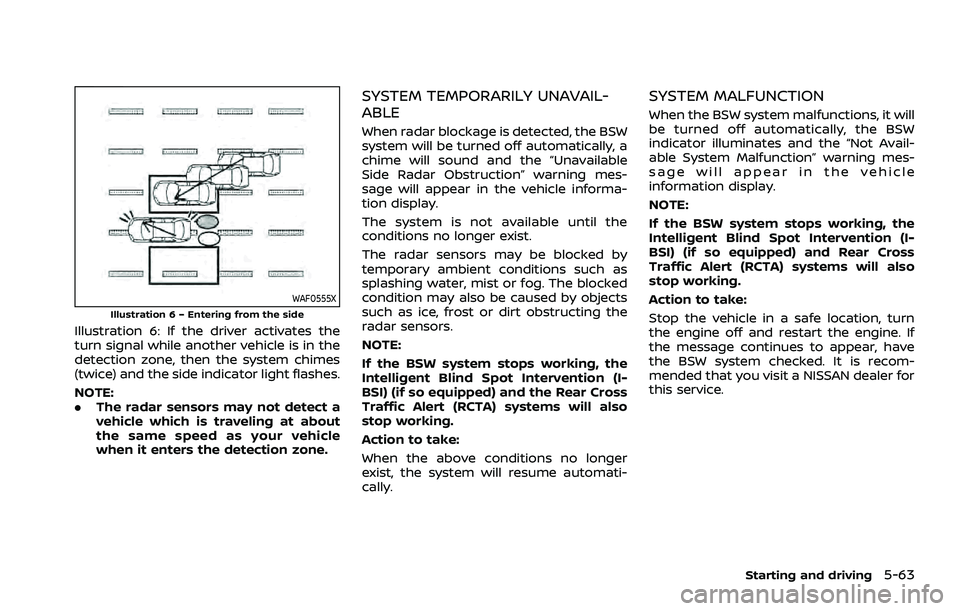
WAF0555XIllustration 6 – Entering from the side
Illustration 6: If the driver activates the
turn signal while another vehicle is in the
detection zone, then the system chimes
(twice) and the side indicator light flashes.
NOTE:
.The radar sensors may not detect a
vehicle which is traveling at about
the same speed as your vehicle
when it enters the detection zone.
SYSTEM TEMPORARILY UNAVAIL-
ABLE
When radar blockage is detected, the BSW
system will be turned off automatically, a
chime will sound and the “Unavailable
Side Radar Obstruction” warning mes-
sage will appear in the vehicle informa-
tion display.
The system is not available until the
conditions no longer exist.
The radar sensors may be blocked by
temporary ambient conditions such as
splashing water, mist or fog. The blocked
condition may also be caused by objects
such as ice, frost or dirt obstructing the
radar sensors.
NOTE:
If the BSW system stops working, the
Intelligent Blind Spot Intervention (I-
BSI) (if so equipped) and the Rear Cross
Traffic Alert (RCTA) systems will also
stop working.
Action to take:
When the above conditions no longer
exist, the system will resume automati-
cally.
SYSTEM MALFUNCTION
When the BSW system malfunctions, it will
be turned off automatically, the BSW
indicator illuminates and the “Not Avail-
able System Malfunction” warning mes-
sage will appear in the vehicle
information display.
NOTE:
If the BSW system stops working, the
Intelligent Blind Spot Intervention (I-
BSI) (if so equipped) and Rear Cross
Traffic Alert (RCTA) systems will also
stop working.
Action to take:
Stop the vehicle in a safe location, turn
the engine off and restart the engine. If
the message continues to appear, have
the BSW system checked. It is recom-
mended that you visit a NISSAN dealer for
this service.
Starting and driving5-63
Page 328 of 556
5-74Starting and driving
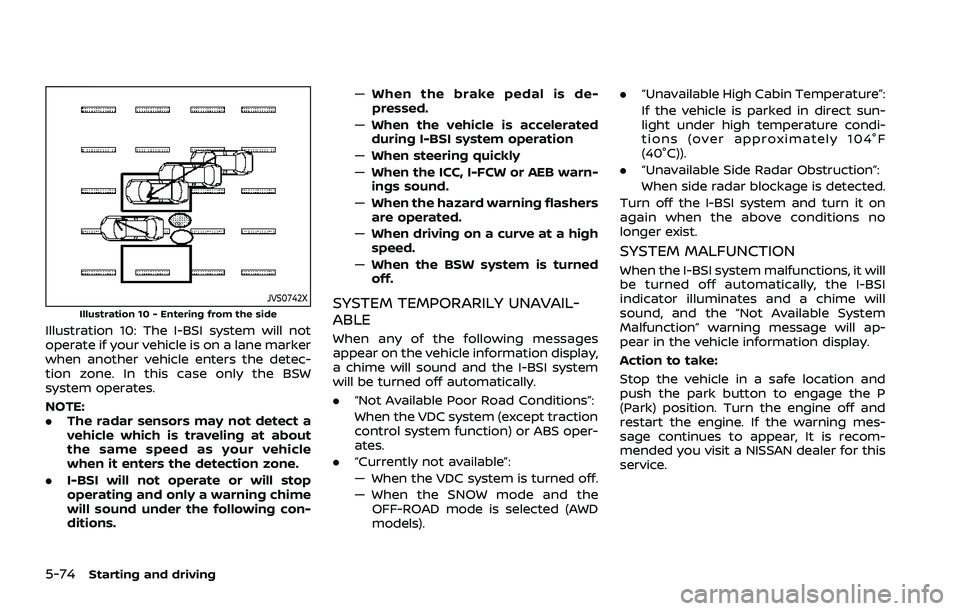
JVS0742XIllustration 10 - Entering from the side
Illustration 10: The I-BSI system will not
operate if your vehicle is on a lane marker
when another vehicle enters the detec-
tion zone. In this case only the BSW
system operates.
NOTE:
.The radar sensors may not detect a
vehicle which is traveling at about
the same speed as your vehicle
when it enters the detection zone.
. I-BSI will not operate or will stop
operating and only a warning chime
will sound under the following con-
ditions. —
When the brake pedal is de-
pressed.
— When the vehicle is accelerated
during I-BSI system operation
— When steering quickly
— When the ICC, I-FCW or AEB warn-
ings sound.
— When the hazard warning flashers
are operated.
— When driving on a curve at a high
speed.
— When the BSW system is turned
off.
SYSTEM TEMPORARILY UNAVAIL-
ABLE
When any of the following messages
appear on the vehicle information display,
a chime will sound and the I-BSI system
will be turned off automatically.
. “Not Available Poor Road Conditions”:
When the VDC system (except traction
control system function) or ABS oper-
ates.
. “Currently not available”:
— When the VDC system is turned off.
— When the SNOW mode and the
OFF-ROAD mode is selected (AWD
models). .
“Unavailable High Cabin Temperature”:
If the vehicle is parked in direct sun-
light under high temperature condi-
tions (over approximately 104°F
(40°C)).
. “Unavailable Side Radar Obstruction”:
When side radar blockage is detected.
Turn off the I-BSI system and turn it on
again when the above conditions no
longer exist.
SYSTEM MALFUNCTION
When the I-BSI system malfunctions, it will
be turned off automatically, the I-BSI
indicator illuminates and a chime will
sound, and the “Not Available System
Malfunction” warning message will ap-
pear in the vehicle information display.
Action to take:
Stop the vehicle in a safe location and
push the park button to engage the P
(Park) position. Turn the engine off and
restart the engine. If the warning mes-
sage continues to appear, It is recom-
mended you visit a NISSAN dealer for this
service.
Page 335 of 556
cally.
SYSTEM MALFUNCTION
When the RCTA system malfunctions, it
will turn off automatically. The “Malfunc-
tion” warning message will appear in the
vehicle information display.
NOTE:
If the BSW system stops working, the
RCTA and I-BSI system will also stop
working.
Action to take:
Stop the vehicle in a safe location, turn
the engine off and restart the engine. If
the message continues to appear, have
the system checked. It is recommended
that you visit a NISSAN dealer for this
service.
WAF0414X
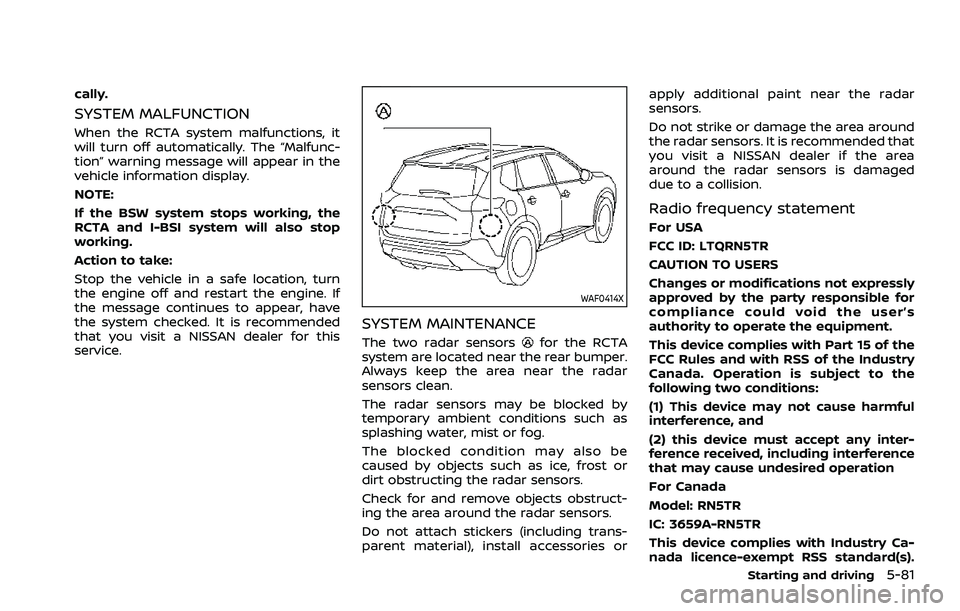
SYSTEM MAINTENANCE
The two radar sensorsfor the RCTA
system are located near the rear bumper.
Always keep the area near the radar
sensors clean.
The radar sensors may be blocked by
temporary ambient conditions such as
splashing water, mist or fog.
The blocked condition may also be
caused by objects such as ice, frost or
dirt obstructing the radar sensors.
Check for and remove objects obstruct-
ing the area around the radar sensors.
Do not attach stickers (including trans-
parent material), install accessories or apply additional paint near the radar
sensors.
Do not strike or damage the area around
the radar sensors. It is recommended that
you visit a NISSAN dealer if the area
around the radar sensors is damaged
due to a collision.
Radio frequency statement
For USA
FCC ID: LTQRN5TR
CAUTION TO USERS
Changes or modifications not expressly
approved by the party responsible for
compliance could void the user’s
authority to operate the equipment.
This device complies with Part 15 of the
FCC Rules and with RSS of the Industry
Canada. Operation is subject to the
following two conditions:
(1) This device may not cause harmful
interference, and
(2) this device must accept any inter-
ference received, including interference
that may cause undesired operation
For Canada
Model: RN5TR
IC: 3659A-RN5TR
This device complies with Industry Ca-
nada licence-exempt RSS standard(s).
Starting and driving5-81
Page 336 of 556
5-82Starting and driving
Operation is subject to the following
two conditions: (1) this device may not
cause interference, and (2) this device
must accept any interference, including
interference that may cause undesired
operation of the device.
WAF0421X
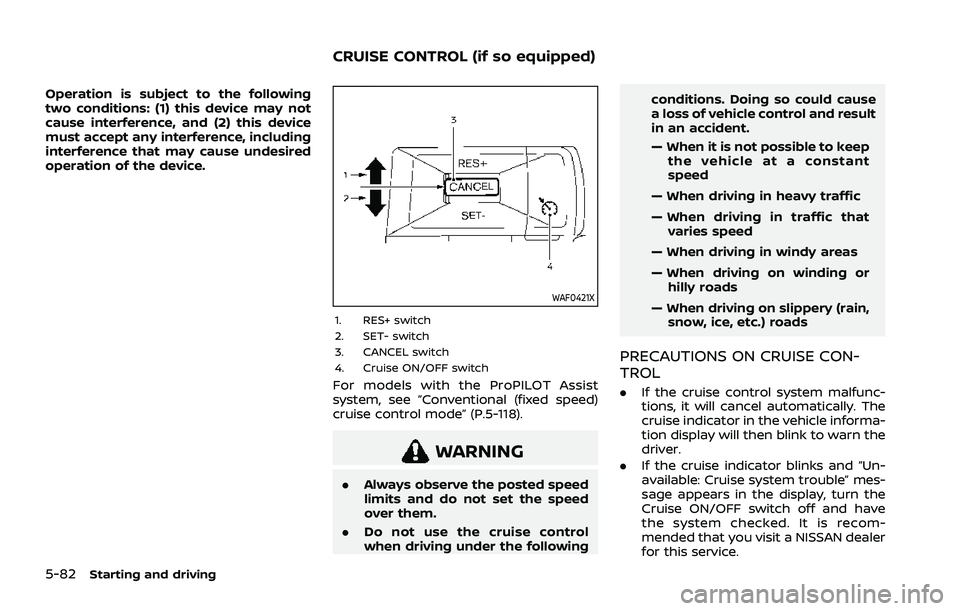
1. RES+ switch
2. SET- switch
3. CANCEL switch
4. Cruise ON/OFF switch
For models with the ProPILOT Assist
system, see “Conventional (fixed speed)
cruise control mode” (P.5-118).
WARNING
.Always observe the posted speed
limits and do not set the speed
over them.
. Do not use the cruise control
when driving under the following conditions. Doing so could cause
a loss of vehicle control and result
in an accident.
— When it is not possible to keep
the vehicle at a constant
speed
— When driving in heavy traffic
— When driving in traffic that varies speed
— When driving in windy areas
— When driving on winding or hilly roads
— When driving on slippery (rain, snow, ice, etc.) roads
PRECAUTIONS ON CRUISE CON-
TROL
. If the cruise control system malfunc-
tions, it will cancel automatically. The
cruise indicator in the vehicle informa-
tion display will then blink to warn the
driver.
. If the cruise indicator blinks and “Un-
available: Cruise system trouble” mes-
sage appears in the display, turn the
Cruise ON/OFF switch off and have
the system checked. It is recom-
mended that you visit a NISSAN dealer
for this service.
CRUISE CONTROL (if so equipped)