service NISSAN ROGUE 2021 Owner´s Manual
[x] Cancel search | Manufacturer: NISSAN, Model Year: 2021, Model line: ROGUE, Model: NISSAN ROGUE 2021Pages: 556, PDF Size: 2.7 MB
Page 409 of 556
BRAKING PRECAUTIONS
The brake system has two separate
hydraulic circuits. If one circuit malfunc-
tions, you will still have braking at two
wheels.
Vacuum assisted brakes
The brake booster aids braking by using
engine vacuum. If the engine stops, you
can stop the vehicle by depressing the
brake pedal. However, greater foot pres-
sure on the brake pedal will be required to
stop the vehicle and the stopping dis-
tance will be longer.
Using the brakes
Avoid resting your foot on the brake
pedal while driving. This will cause over-
heating of the brakes, wearing out the
brake pads faster and reduce gas mile-
age.
To help reduce brake wear and to prevent
the brakes from overheating, reduce
speed and downshift to a lower gear
before going down a slope or long grade.
Overheated brakes may reduce braking
performance and could result in loss of
vehicle control.
WARNING
.While driving on a slippery sur-
face, be careful when braking,
accelerating or downshifting.
Abrupt braking or accelerating
could cause the wheels to skid
and result in an accident.
. If the engine is not running or is
turned off while driving, the
power assist for the brakes will
not work. Braking will be harder.
Wet brakes
When the vehicle is washed or driven
through water, the brakes may get wet.
As a result, your braking distance will be
longer and the vehicle may pull to one
side during braking.
To dry brakes, drive the vehicle at a safe
speed while lightly tapping the brake
pedal to heat-up the brakes. Do this until
the brakes return to normal. Avoid driving
the vehicle at high speeds until the brakes
function correctly.
Parking brake break-in
Break in the parking brake pads when-
ever the stopping effect of the parking
brake is weakened or whenever the
parking brake pads and/or calipers/ro-
tors are replaced, in order to assure the
best braking performance.
This procedure is described in the vehicle
service manual. It is recommended you
visit a NISSAN dealer for this service.
Starting and driving5-155
BRAKE SYSTEM
Page 411 of 556
tion, it switches the ABS off and illumi-
nates the ABS warning light on the
instrument panel. The brake system then
operates normally, but without anti-lock
assistance.
If the ABS warning light illuminates during
the self-test or while driving, have the
vehicle checked. It is recommended you
visit a NISSAN dealer for this service.
Normal operation
The ABS operates at speeds above 3 to 6
MPH (5 to 10 km/h). The speed varies
according to road conditions.
When the ABS senses that one or more
wheels are close to locking up, the
actuator rapidly applies and releases
hydraulic pressure. This action is similar
to pumping the brakes very quickly. You
may feel a pulsation in the brake pedal
and hear a noise from under the hood or
feel a vibration from the actuator when it
is operating. This is normal and indicates
that the ABS is operating properly. How-
ever, the pulsation may indicate that road
conditions are hazardous and extra care
is required while driving.The Vehicle Dynamic Control (VDC) sys-
tem uses various sensors to monitor
driver inputs and vehicle motion. Under
certain driving conditions, the VDC sys-
tem helps to perform the following func-
tions.
.
Controls brake pressure to reduce
wheel slip on one slipping drive wheel
so power is transferred to a non
slipping drive wheel on the same axle.
. Controls brake pressure and engine
output to reduce drive wheel slip
based on vehicle speed (traction con-
trol function).
. Controls brake pressure at individual
wheels and engine output to help the
driver maintain control of the vehicle
in the following conditions:
— understeer (vehicle tends to not
follow the steered path despite
increased steering input)
— oversteer (vehicle tends to spin due to certain road or driving condi-
tions).
The VDC system can help the driver to
maintain control of the vehicle, but it
cannot prevent loss of vehicle control in
all driving situations.
When the VDC system operates, the slip
indicator light
in the instrument panel
flashes so note the following: .
The road may be slippery or the
system may determine some action
is required to help keep the vehicle on
the steered path.
. You may feel a pulsation in the brake
pedal and hear a noise or vibration
from under the hood. This is normal
and indicates that the VDC system is
working properly.
. Adjust your speed and driving to the
road conditions.
If a malfunction occurs in the system, the
slip indicator light
illuminates in the
instrument panel. The VDC system auto-
matically turns off.
The vehicle information display is used to
turn off the VDC system. The VDC off
indicator
illuminates to indicate the
VDC system is off. When the VDC system
is turned off, the VDC system still oper-
ates to prevent one drive wheel from
slipping by transferring power to a non
slipping drive wheel. The slip indicator
light
flashes if this occurs. All other
VDC functions are off, and the slip in-
dicator light
will not flash. The VDC
system is automatically reset to on when
the ignition switch is placed in the off
position then back to the on position.
See “Slip indicator light” (P.2-20) and
“Vehicle Dynamic Control (VDC) off indi-
cator light” (P.2-20).
Starting and driving5-157
VEHICLE DYNAMIC CONTROL (VDC) SYSTEM
Page 414 of 556
5-160Starting and driving
used, the VDC system may not
operate properly and the
indicator light may flash or both
theandindicator lights
may illuminate.
. The VDC system is not a substi-
tute for winter tires or tire chains
on a snow covered road. The chassis control is an electric control
module that includes the following func-
tions:
.
Intelligent Trace Control
. Active Ride Control
INTELLIGENT TRACE CONTROL
This system senses driving based on the
driver’s steering and acceleration/braking
patterns, and controls brake pressure at
individual wheels to aid tracing at corners
and help smooth vehicle response.
When the VDC system is turned off, the
Intelligent Trace Control is also turned off.
Amount of brake control is changed
based on Drive Mode selector.
When Intelligent Trace Control is not
functioning properly, the master warning
light illuminates, and warning message
“Chassis Control System Error” will also
appear in the vehicle information display.
If the chassis control warning message
appears in the vehicle information dis-
play, it may indicate that the Intelligent
Trace Control is not functioning properly.
Have the system checked as soon as
possible. It is recommended that you visit
a NISSAN dealer for this service. (See
“Vehicle information display warnings
and indicators” (P.2-34).)
WARNING
The Intelligent Trace Control may not
be effective depending on the driv-
ing condition. Always drive carefully
and attentively.
When the Intelligent Trace Control is
operating, you may feel a pulsation in
the brake pedal, sense slight deceleration,
or hear a noise. This is normal and
indicates that Intelligent Trace Control is
operating properly.
ACTIVE RIDE CONTROL
This system senses upper body motion
and controls four wheel brake pressure.
This will enhance ride comfort in effort to
restrain uncomfortable upper body
movement when passing over undulated
road surfaces. When the VDC system is
turned off, the Active Ride Control is also
turned off.
If the chassis control warning message
appears in the vehicle information dis-
play, it may indicate that the Active Ride
Control is not functioning properly. Have
the system checked as soon as possible.
It is recommended that you visit a NISSAN
dealer for this service.
CHASSIS CONTROL
Page 421 of 556
SYSTEM TEMPORARILY UNAVAIL-
ABLE
When sonar blockage is detected, the
system will be deactivated automatically.
The system is not available until the
conditions no longer exist.
The sonar sensors may be blocked by
temporary ambient conditions such as
splashing water, mist or fog. The blocked
condition may also be caused by objects
such as ice, frost or dirt obstructing the
sonar sensors.
Action to take:
When the above conditions no longer
exist, the system will resume automati-
cally.
WAF0649X
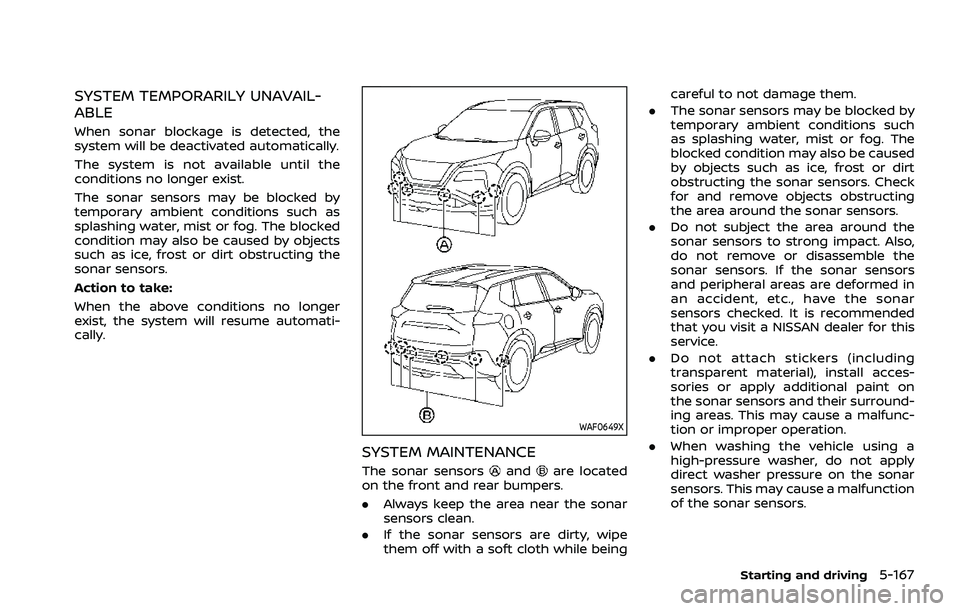
SYSTEM MAINTENANCE
The sonar sensorsandare located
on the front and rear bumpers.
. Always keep the area near the sonar
sensors clean.
. If the sonar sensors are dirty, wipe
them off with a soft cloth while being careful to not damage them.
. The sonar sensors may be blocked by
temporary ambient conditions such
as splashing water, mist or fog. The
blocked condition may also be caused
by objects such as ice, frost or dirt
obstructing the sonar sensors. Check
for and remove objects obstructing
the area around the sonar sensors.
. Do not subject the area around the
sonar sensors to strong impact. Also,
do not remove or disassemble the
sonar sensors. If the sonar sensors
and peripheral areas are deformed in
an accident, etc., have the sonar
sensors checked. It is recommended
that you visit a NISSAN dealer for this
service.
. Do not attach stickers (including
transparent material), install acces-
sories or apply additional paint on
the sonar sensors and their surround-
ing areas. This may cause a malfunc-
tion or improper operation.
. When washing the vehicle using a
high-pressure washer, do not apply
direct washer pressure on the sonar
sensors. This may cause a malfunction
of the sonar sensors.
Starting and driving5-167
Page 426 of 556
5-172Starting and driving
WAF0647X
SYSTEM MAINTENANCE
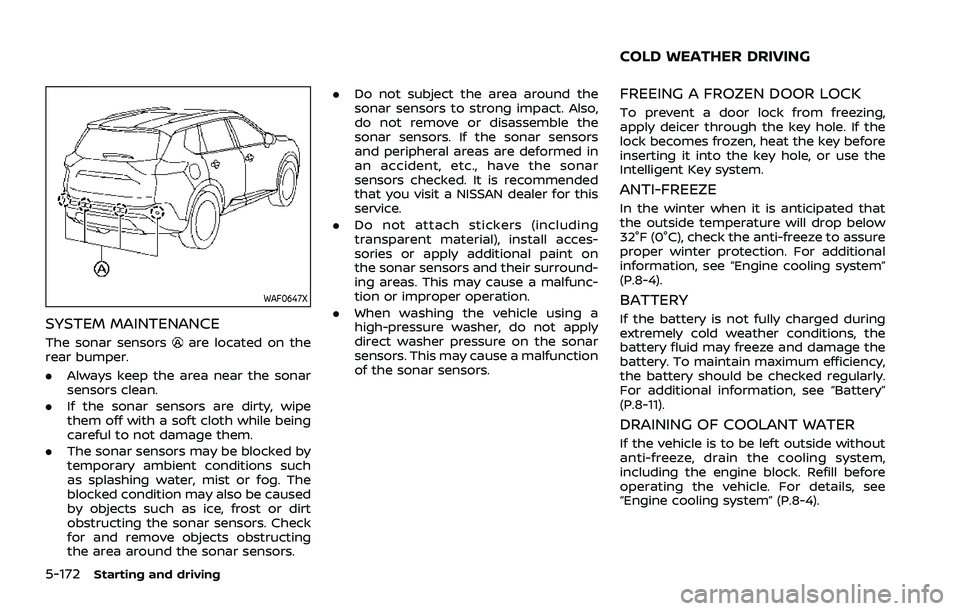
The sonar sensorsare located on the
rear bumper.
. Always keep the area near the sonar
sensors clean.
. If the sonar sensors are dirty, wipe
them off with a soft cloth while being
careful to not damage them.
. The sonar sensors may be blocked by
temporary ambient conditions such
as splashing water, mist or fog. The
blocked condition may also be caused
by objects such as ice, frost or dirt
obstructing the sonar sensors. Check
for and remove objects obstructing
the area around the sonar sensors. .
Do not subject the area around the
sonar sensors to strong impact. Also,
do not remove or disassemble the
sonar sensors. If the sonar sensors
and peripheral areas are deformed in
an accident, etc., have the sonar
sensors checked. It is recommended
that you visit a NISSAN dealer for this
service.
. Do not attach stickers (including
transparent material), install acces-
sories or apply additional paint on
the sonar sensors and their surround-
ing areas. This may cause a malfunc-
tion or improper operation.
. When washing the vehicle using a
high-pressure washer, do not apply
direct washer pressure on the sonar
sensors. This may cause a malfunction
of the sonar sensors.
FREEING A FROZEN DOOR LOCK
To prevent a door lock from freezing,
apply deicer through the key hole. If the
lock becomes frozen, heat the key before
inserting it into the key hole, or use the
Intelligent Key system.
ANTI-FREEZE
In the winter when it is anticipated that
the outside temperature will drop below
32°F (0°C), check the anti-freeze to assure
proper winter protection. For additional
information, see “Engine cooling system”
(P.8-4).
BATTERY
If the battery is not fully charged during
extremely cold weather conditions, the
battery fluid may freeze and damage the
battery. To maintain maximum efficiency,
the battery should be checked regularly.
For additional information, see “Battery”
(P.8-11).
DRAINING OF COOLANT WATER
If the vehicle is to be left outside without
anti-freeze, drain the cooling system,
including the engine block. Refill before
operating the vehicle. For details, see
“Engine cooling system” (P.8-4).
COLD WEATHER DRIVING
Page 430 of 556
6-2In case of emergency
SIC2574
Push the switch on to warn other drivers
when you must stop or park under
emergency conditions. All turn signal
lights will flash.
WARNING
.If stopping for an emergency, be
sure to move the vehicle well off
the road.
. Do not use the hazard warning
flashers while moving on the
highway unless unusual circum-
stances force you to drive so
slowly that your vehicle might
become a hazard to other traffic. .
Turn signals do not work when
the hazard warning flasher lights
are on.
The flasher can be actuated with the
ignition switch in any position.
Some state laws may prohibit the use of
the hazard warning flasher switch while
driving. In the event of a roadside emergency,
Roadside Assistance Service is available
to you. Please refer to your Warranty
Information Booklet (U.S.) or Warranty &
Roadside Assistance Information Booklet
(Canada) for details.
HAZARD WARNING FLASHER SWITCHCONNECTION TO ROADSIDE ASSISTANCE
Page 431 of 556
To shut off the engine in an emergency
situation while driving, perform the fol-
lowing procedure:
.Rapidly push the push-button ignition
switch 3 consecutive times in less
than 1.5 seconds, or
. Push and hold the push-button igni-
tion switch for more than 2 seconds.TIRE PRESSURE MONITORING SYS-
TEM (TPMS)
This vehicle is equipped with the Tire
Pressure Monitoring System (TPMS). It
monitors tire pressure of all tires except
the spare. When the low tire pressure
warning light is lit, and the “Tire Pressure
Low - Add Air” warning message is
displayed in the vehicle information dis-
play, one or more of your tires is sig-
nificantly under-inflated. If the vehicle is
being driven with low tire pressure, the
TPMS will activate and warn you of it by
the low tire pressure warning light. This
system will activate only when the vehicle
is driven at speeds above 16 MPH (25
km/h). For more details, see “Warning
lights, indicator lights and audible remin-
ders” (P.2-13) and “Tire Pressure Monitor-
ing System (TPMS)” (P.5-6).
WARNING
.If the low tire pressure warning
light illuminates while driving,
avoid sudden steering maneu-
vers or abrupt braking, reduce
vehicle speed, pull off the road
to a safe location and stop the
vehicle as soon as possible. Driv-
ing with under-inflated tires may
permanently damage the tires and increase the likelihood of tire
failure. Serious vehicle damage
could occur and may lead to an
accident and could result in ser-
ious personal injury. Check the
tire pressure for all four tires.
Adjust the tire pressure to the
recommended COLD tire pressure
shown on the Tire and Loading
Information label to turn the low
tire pressure warning light OFF. If
the light still illuminates while
driving after adjusting the tire
pressure, a tire may be flat. If
you have a flat tire, replace it with
a spare tire as soon as possible.
. Since the spare tire is not
equipped with the TPMS, when a
spare tire is mounted or a wheel
is replaced, the TPMS will not
function and the low tire pressure
warning light will flash for ap-
proximately 1 minute. The light
will remain on after 1 minute.
Have your tires replaced and/or
TPMS system reset as soon as
possible. It is recommended you
visit a NISSAN dealer for these
services.
. Replacing tires with those not
originally specified by NISSAN
could affect the proper operation
In case of emergency6-3
EMERGENCY ENGINE SHUT OFF FLAT TIRE
Page 442 of 556
6-14In case of emergency
If your vehicle is overheating (indicated by
an extremely high temperature gauge
reading), or if you feel a lack of engine
power, detect abnormal noise, etc., take
the following steps:
1. Move the vehicle safely off the roadand apply the parking brake.
2. Push the park button to shift to the P (Park) position.
Do not stop the engine.
3. Turn off the air conditioner (if so equipped). Open all the windows,
move the heater or air conditioner
temperature control to maximum hot
and fan control to high speed.
4. Get out of the vehicle. Look and listen for steam or coolant escaping from
the radiator before opening the hood.
(If steam or coolant is escaping, turn
off the engine.) Do not open the hood
further until no steam or coolant can
be seen.
5. Open the engine hood.
WARNING
If steam or water is coming from the
engine, stand clear to prevent get-
ting burned.
6. Visually check the drive belt for da- mage or looseness. Also check if the
cooling fan is running. The radiator
hoses and radiator should not leak
water. If coolant is leaking or the
cooling fan does not run, stop the
engine.
WARNING
Be careful not to allow your hands,
hair, jewelry or clothing to come into
contact with, or get caught in, engine
belts or the engine cooling fan. The
engine cooling fan can start at any
time. 7. After the engine cools down, check
the coolant level in the reservoir with
the engine running. Add coolant to
the reservoir if necessary. Have your
vehicle repaired. It is recommended
you visit a NISSAN dealer for this
service.
Page 443 of 556
When towing your vehicle, all jurisdic-
tional and local regulations for towing
must be followed. Incorrect towing equip-
ment could damage your vehicle. Towing
instructions are available from a NISSAN
dealer. Local service operators are gen-
erally familiar with the applicable laws
and procedures for towing. To assure
proper towing and to prevent accidental
damage to your vehicle, NISSAN recom-
mends that you have a service operator
tow your vehicle. It is advisable to have
the service operator carefully read the
following precautions.
WARNING
.Never ride in a vehicle that is
being towed.
. Never get under your vehicle after
it has been lifted by a tow truck.
CAUTION
.When towing, make sure that the
transmission, axles, steering sys-
tem and powertrain are in work-
ing condition. If any of these
conditions apply, dollies or a
flatbed tow truck must be used. .
Always attach safety chains be-
fore towing.
(See “Flat towing for All–Wheel Drive
vehicle” (P.10-26) or “Flat towing for
Front-Wheel Drive vehicle” (P.10-26).)
NOTE:
If the battery is completely drained, the
transmission will not manually shift to
other positions. For shifting to other
positions, charge the battery or supply
power following the jump starting pro-
cedure. Push the park button to shift to
the P (Park) position before shifting to
other positions.
In case of emergency6-15
TOWING YOUR VEHICLE
Page 445 of 556
SCE0950
Two-Wheel Drive (2WD) models
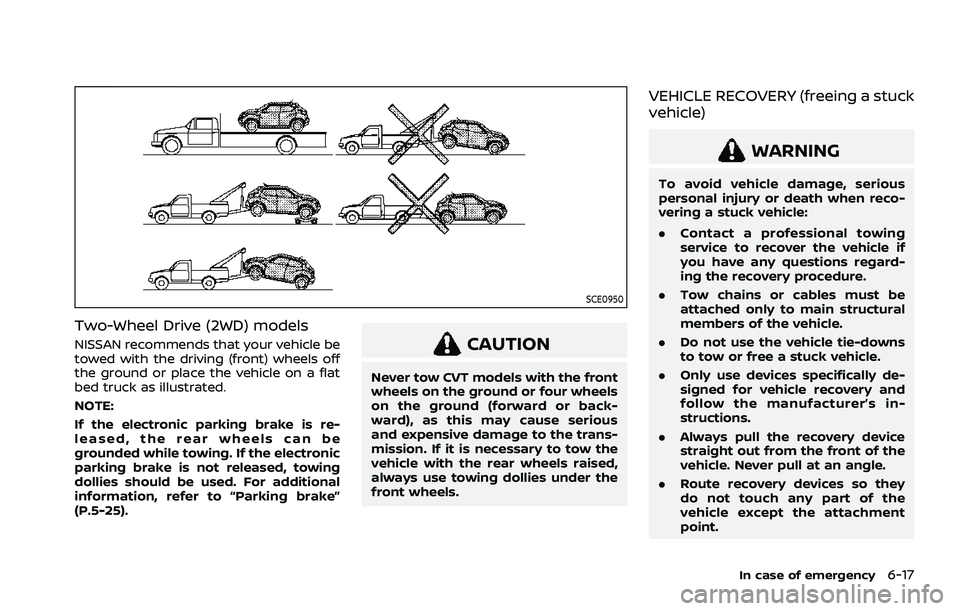
NISSAN recommends that your vehicle be
towed with the driving (front) wheels off
the ground or place the vehicle on a flat
bed truck as illustrated.
NOTE:
If the electronic parking brake is re-
leased, the rear wheels can be
grounded while towing. If the electronic
parking brake is not released, towing
dollies should be used. For additional
information, refer to “Parking brake”
(P.5-25).CAUTION
Never tow CVT models with the front
wheels on the ground or four wheels
on the ground (forward or back-
ward), as this may cause serious
and expensive damage to the trans-
mission. If it is necessary to tow the
vehicle with the rear wheels raised,
always use towing dollies under the
front wheels.
VEHICLE RECOVERY (freeing a stuck
vehicle)
WARNING
To avoid vehicle damage, serious
personal injury or death when reco-
vering a stuck vehicle:
.Contact a professional towing
service to recover the vehicle if
you have any questions regard-
ing the recovery procedure.
. Tow chains or cables must be
attached only to main structural
members of the vehicle.
. Do not use the vehicle tie-downs
to tow or free a stuck vehicle.
. Only use devices specifically de-
signed for vehicle recovery and
follow the manufacturer’s in-
structions.
. Always pull the recovery device
straight out from the front of the
vehicle. Never pull at an angle.
. Route recovery devices so they
do not touch any part of the
vehicle except the attachment
point.
In case of emergency6-17