light NISSAN ROGUE 2021 Owner´s Manual
[x] Cancel search | Manufacturer: NISSAN, Model Year: 2021, Model line: ROGUE, Model: NISSAN ROGUE 2021Pages: 556, PDF Size: 2.7 MB
Page 86 of 556
1-66Safety — Seats, seat belts and supplemental restraint system
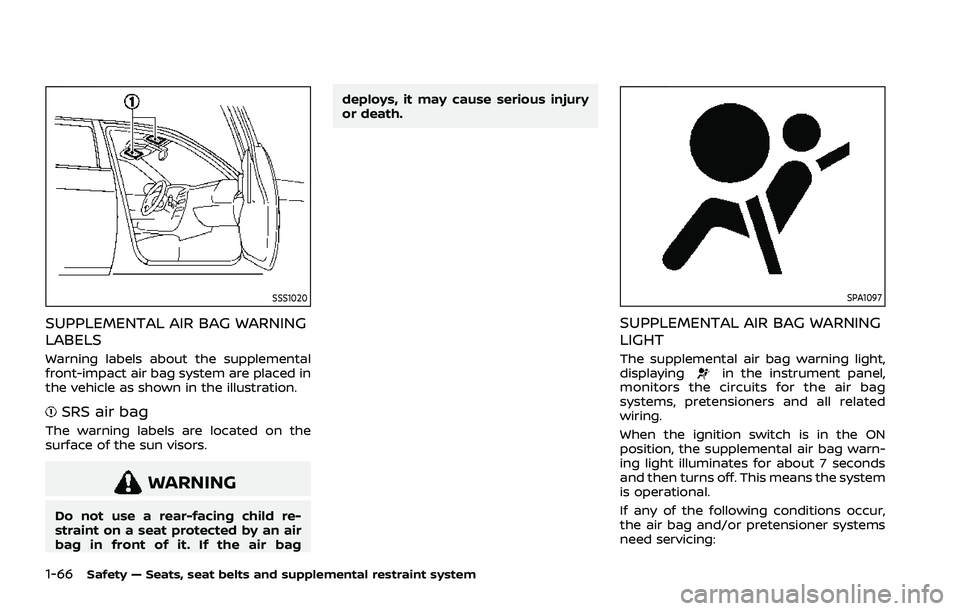
SSS1020
SUPPLEMENTAL AIR BAG WARNING
LABELS
Warning labels about the supplemental
front-impact air bag system are placed in
the vehicle as shown in the illustration.
SRS air bag
The warning labels are located on the
surface of the sun visors.
WARNING
Do not use a rear-facing child re-
straint on a seat protected by an air
bag in front of it. If the air bagdeploys, it may cause serious injury
or death.
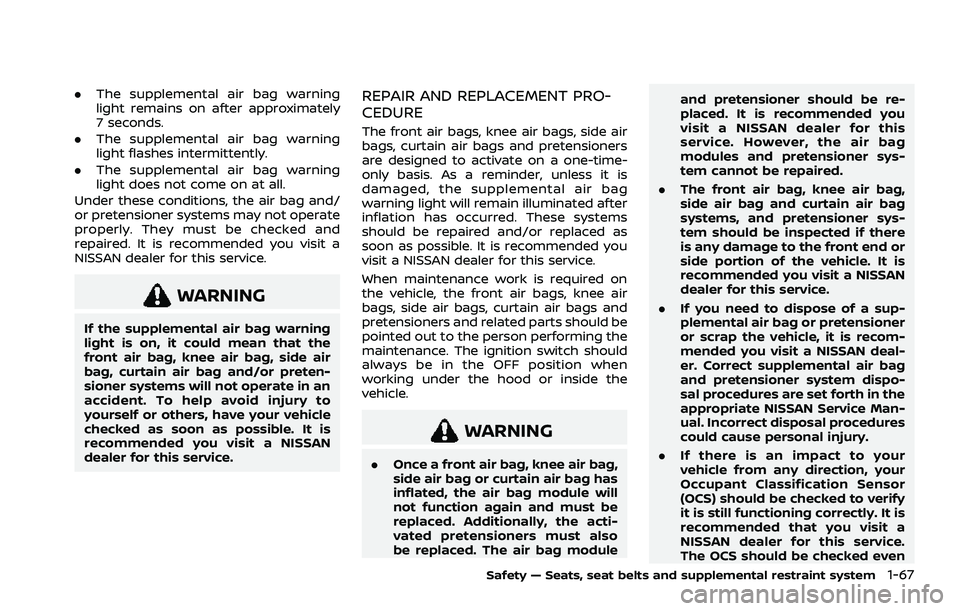
SPA1097
SUPPLEMENTAL AIR BAG WARNING
LIGHT
The supplemental air bag warning light,
displayingin the instrument panel,
monitors the circuits for the air bag
systems, pretensioners and all related
wiring.
When the ignition switch is in the ON
position, the supplemental air bag warn-
ing light illuminates for about 7 seconds
and then turns off. This means the system
is operational.
If any of the following conditions occur,
the air bag and/or pretensioner systems
need servicing:
Page 87 of 556
.The supplemental air bag warning
light remains on after approximately
7 seconds.
. The supplemental air bag warning
light flashes intermittently.
. The supplemental air bag warning
light does not come on at all.
Under these conditions, the air bag and/
or pretensioner systems may not operate
properly. They must be checked and
repaired. It is recommended you visit a
NISSAN dealer for this service.
WARNING
If the supplemental air bag warning
light is on, it could mean that the
front air bag, knee air bag, side air
bag, curtain air bag and/or preten-
sioner systems will not operate in an
accident. To help avoid injury to
yourself or others, have your vehicle
checked as soon as possible. It is
recommended you visit a NISSAN
dealer for this service.
REPAIR AND REPLACEMENT PRO-
CEDURE
The front air bags, knee air bags, side air
bags, curtain air bags and pretensioners
are designed to activate on a one-time-
only basis. As a reminder, unless it is
damaged, the supplemental air bag
warning light will remain illuminated after
inflation has occurred. These systems
should be repaired and/or replaced as
soon as possible. It is recommended you
visit a NISSAN dealer for this service.
When maintenance work is required on
the vehicle, the front air bags, knee air
bags, side air bags, curtain air bags and
pretensioners and related parts should be
pointed out to the person performing the
maintenance. The ignition switch should
always be in the OFF position when
working under the hood or inside the
vehicle.
WARNING
. Once a front air bag, knee air bag,
side air bag or curtain air bag has
inflated, the air bag module will
not function again and must be
replaced. Additionally, the acti-
vated pretensioners must also
be replaced. The air bag module and pretensioner should be re-
placed. It is recommended you
visit a NISSAN dealer for this
service. However, the air bag
modules and pretensioner sys-
tem cannot be repaired.
. The front air bag, knee air bag,
side air bag and curtain air bag
systems, and pretensioner sys-
tem should be inspected if there
is any damage to the front end or
side portion of the vehicle. It is
recommended you visit a NISSAN
dealer for this service.
. If you need to dispose of a sup-
plemental air bag or pretensioner
or scrap the vehicle, it is recom-
mended you visit a NISSAN deal-
er. Correct supplemental air bag
and pretensioner system dispo-
sal procedures are set forth in the
appropriate NISSAN Service Man-
ual. Incorrect disposal procedures
could cause personal injury.
. If there is an impact to your
vehicle from any direction, your
Occupant Classification Sensor
(OCS) should be checked to verify
it is still functioning correctly. It is
recommended that you visit a
NISSAN dealer for this service.
The OCS should be checked even
Safety — Seats, seat belts and supplemental restraint system1-67
Page 89 of 556

2 Instruments and controls
Cockpit ........................................................................\
.......................... 2-3
Instrument panel ........................................................................\
.. 2-4
Meters and gauges ..................................................................... 2-5Models with analog meter and
color display ........................................................................\
....... 2-5
Models with full-screen display .................................. 2-6
Speedometer and odometer ........................................ 2-8
Tachometer ........................................................................\
........ 2-9
Engine coolant temperature gauge ....................... 2-9
Fuel gauge ........................................................................\
........ 2-10
Instrument brightness control ................................. 2-11
Continuously Variable Transmission (CVT)
position indicator ................................................................ 2-11
ECO Drive Report ................................................................ 2-11
Warning lights, indicator lights and
audible reminders ..................................................................... 2-13
Checking lights ..................................................................... 2-14
Warning/indicator lights (red) ................................... 2-14
Warning/indicator lights (yellow) ........................... 2-17
Warning/indicator lights (other) ............................. 2-21
Audible reminders .............................................................. 2-22
Vehicle information display ............................................... 2-22 Changing the meter screen view
(models with full-screen display) ............................ 2-23
How to use the vehicle
information display ........................................................... 2-23 Startup display ................................................................... 2-23
Settings ........................................................................\
............ 2-24
Vehicle information display warnings
and indicators ..................................................................... 2-34
Trip computer ..................................................................... 2-44
Clock and outside air temperature ................... 2-46
Head Up Display (HUD) (if so equipped) .................. 2-47 How to use the HUD ...................................................... 2-49
Driver Assistance/Navigation/Traffic
Sign/Audio/TEL/SMS linking ................................... 2-50
Security systems ....................................................................... 2-50 Vehicle Security System (if so equipped) ...... 2-50
NISSAN Vehicle Immobilizer System ................. 2-51
Wiper and washer switch ................................................... 2-52 Windshield wiper and washer operation ...... 2-53
Rear window wiper and
washer operation ............................................................. 2-53
Rear window and outside mirror
(if so equipped) defroster switch ................................. 2-55
Headlight and turn signal switch ................................ 2-55
Headlight switch ............................................................... 2-55
Turn signal switch ........................................................... 2-62
Fog light switch (if so equipped) ......................... 2-62
Horn ........................................................................\
............................. 2-63
Heated steering wheel (if so equipped) .................. 2-63
Page 90 of 556
Heated seats (if so equipped) .......................................... 2-63Operation with switch .................................................... 2-64
Steering Assist switch (models with
ProPILOT Assist) ........................................................................\
.. 2-65
Rear Door Alert ........................................................................\
.... 2-65
Power outlets ........................................................................\
....... 2-66 USB (Universal Serial Bus) charging
connector (if so equipped) .......................................... 2-67
Wireless charger (if so equipped) ........................... 2-68
Emergency Call (SOS) button (if
so equipped) ........................................................................\
.......... 2-70
Emergency support .......................................................... 2-70
Storage ........................................................................\
...................... 2-71 Cup holders ........................................................................\
..... 2-71
Soft bottle holders ............................................................. 2-72
Adjustable luggage floor (if so equipped) ....... 2-72
Glove box ........................................................................\
........... 2-75
Console box ........................................................................\
..... 2-75
Lower console tray ............................................................ 2-76 Sunglasses holder ............................................................ 2-76
Card holder ........................................................................\
... 2-77
Coat hooks ........................................................................\
.... 2-77
Cargo cover (if so equipped) ................................... 2-77
Luggage hooks .................................................................. 2-78
Roof rack (if so equipped) .................................................. 2-78
Windows ........................................................................\
................... 2-79 Power windows ................................................................. 2-79
Moonroof (if so equipped) ................................................. 2-83 Automatic moonroof and sunshade ................ 2-83
Interior lights ........................................................................\
...... 2-85
Interior light switch ........................................................ 2-85
Map lights ........................................................................\
....... 2-86
Room lights (if so equipped) ................................... 2-86
Rear personal lights (if so equipped) ................ 2-86
Vanity mirror light ............................................................ 2-87
Cargo light ........................................................................\
..... 2-87
Page 91 of 556
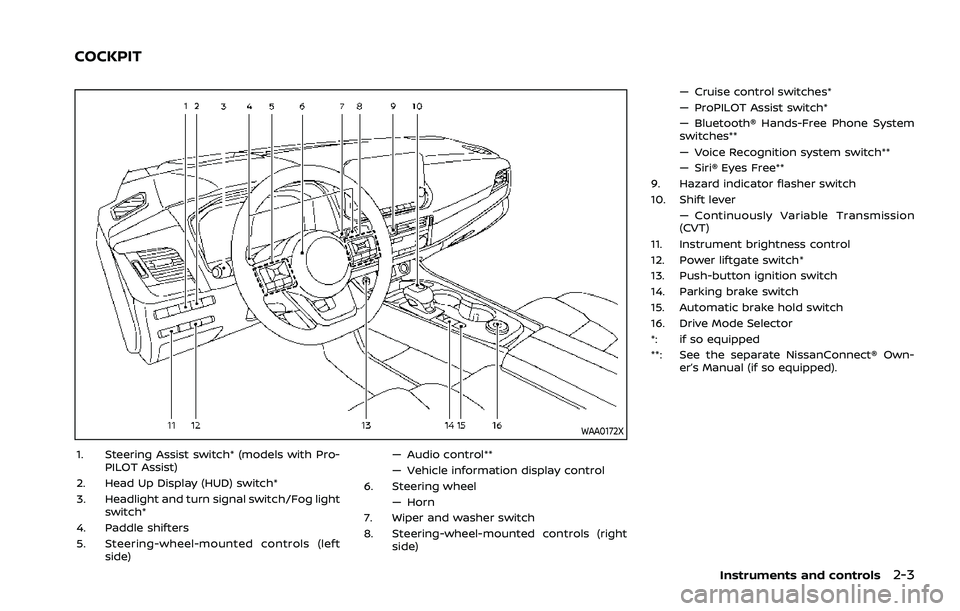
WAA0172X
1. Steering Assist switch* (models with Pro-PILOT Assist)
2. Head Up Display (HUD) switch*
3. Headlight and turn signal switch/Fog light switch*
4. Paddle shifters
5. Steering-wheel-mounted controls (left side) — Audio control**
— Vehicle information display control
6. Steering wheel
— Horn
7. Wiper and washer switch
8. Steering-wheel-mounted controls (right side) — Cruise control switches*
— ProPILOT Assist switch*
— Bluetooth® Hands-Free Phone System
switches**
— Voice Recognition system switch**
— Siri® Eyes Free**
9. Hazard indicator flasher switch
10. Shift lever — Continuously Variable Transmission
(CVT)
11. Instrument brightness control
12. Power liftgate switch*
13. Push-button ignition switch
14. Parking brake switch
15. Automatic brake hold switch
16. Drive Mode Selector
*: if so equipped
**: See the separate NissanConnect® Own- er’s Manual (if so equipped).
Instruments and controls2-3
COCKPIT
Page 93 of 556
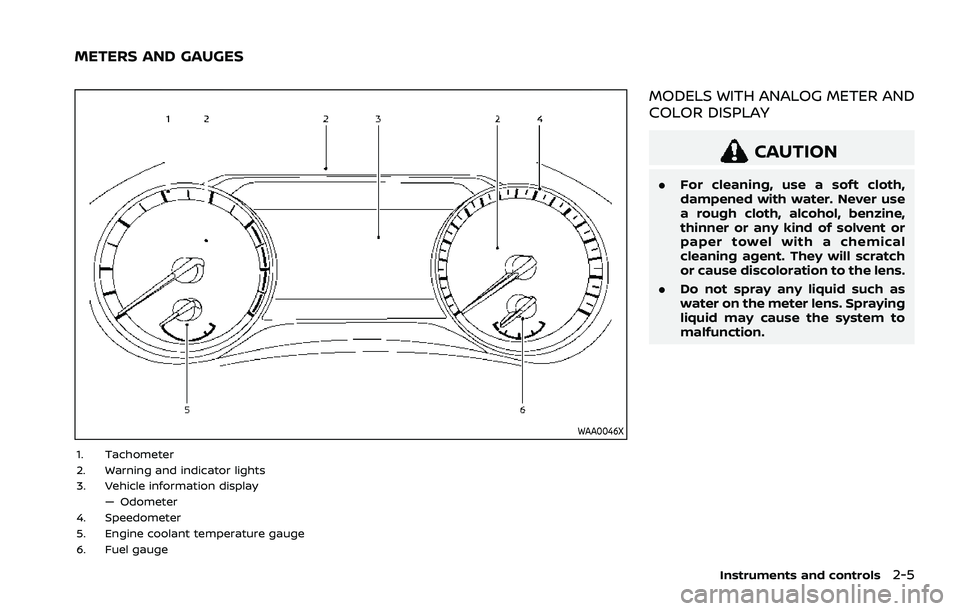
WAA0046X
1. Tachometer
2. Warning and indicator lights
3. Vehicle information display— Odometer
4. Speedometer
5. Engine coolant temperature gauge
6. Fuel gauge
MODELS WITH ANALOG METER AND
COLOR DISPLAY
CAUTION
. For cleaning, use a soft cloth,
dampened with water. Never use
a rough cloth, alcohol, benzine,
thinner or any kind of solvent or
paper towel with a chemical
cleaning agent. They will scratch
or cause discoloration to the lens.
. Do not spray any liquid such as
water on the meter lens. Spraying
liquid may cause the system to
malfunction.
Instruments and controls2-5
METERS AND GAUGES
Page 94 of 556
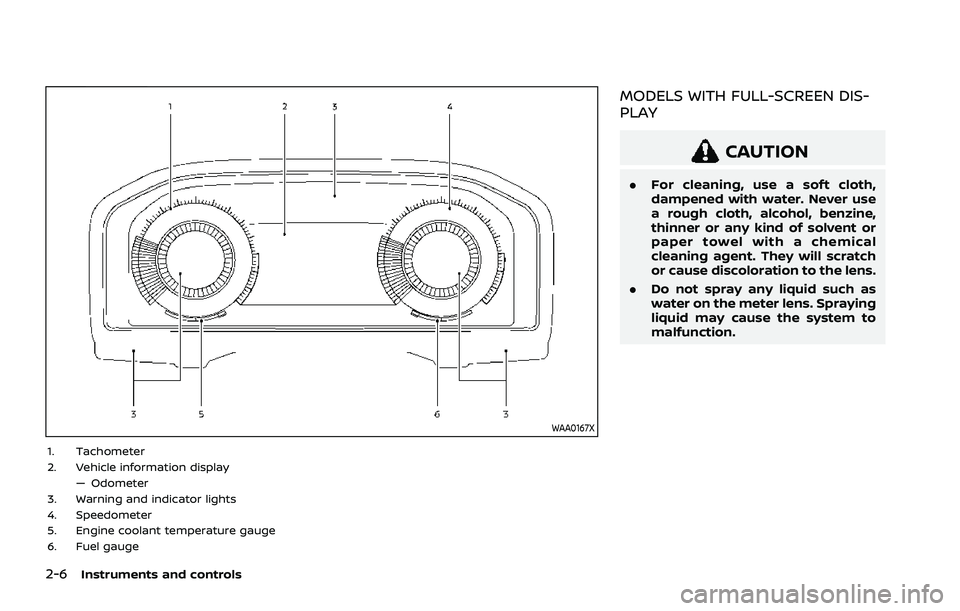
2-6Instruments and controls
WAA0167X
1. Tachometer
2. Vehicle information display— Odometer
3. Warning and indicator lights
4. Speedometer
5. Engine coolant temperature gauge
6. Fuel gauge
MODELS WITH FULL-SCREEN DIS-
PLAY
CAUTION
. For cleaning, use a soft cloth,
dampened with water. Never use
a rough cloth, alcohol, benzine,
thinner or any kind of solvent or
paper towel with a chemical
cleaning agent. They will scratch
or cause discoloration to the lens.
. Do not spray any liquid such as
water on the meter lens. Spraying
liquid may cause the system to
malfunction.
Page 98 of 556
2-10Instruments and controls
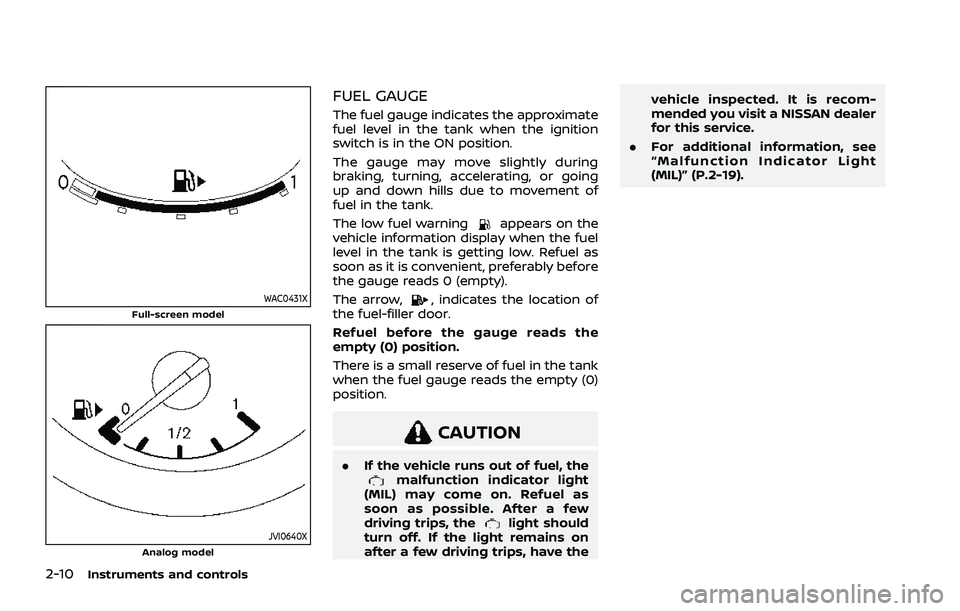
WAC0431XFull-screen model
JVI0640XAnalog model
FUEL GAUGE
The fuel gauge indicates the approximate
fuel level in the tank when the ignition
switch is in the ON position.
The gauge may move slightly during
braking, turning, accelerating, or going
up and down hills due to movement of
fuel in the tank.
The low fuel warning
appears on the
vehicle information display when the fuel
level in the tank is getting low. Refuel as
soon as it is convenient, preferably before
the gauge reads 0 (empty).
The arrow,
, indicates the location of
the fuel-filler door.
Refuel before the gauge reads the
empty (0) position.
There is a small reserve of fuel in the tank
when the fuel gauge reads the empty (0)
position.
CAUTION
. If the vehicle runs out of fuel, themalfunction indicator light
(MIL) may come on. Refuel as
soon as possible. After a few
driving trips, the
light should
turn off. If the light remains on
after a few driving trips, have the vehicle inspected. It is recom-
mended you visit a NISSAN dealer
for this service.
. For additional information, see
“Malfunction Indicator Light
(MIL)” (P.2-19).
Page 99 of 556
WAC0566X
WAC0489X
INSTRUMENT BRIGHTNESS CON-
TROL
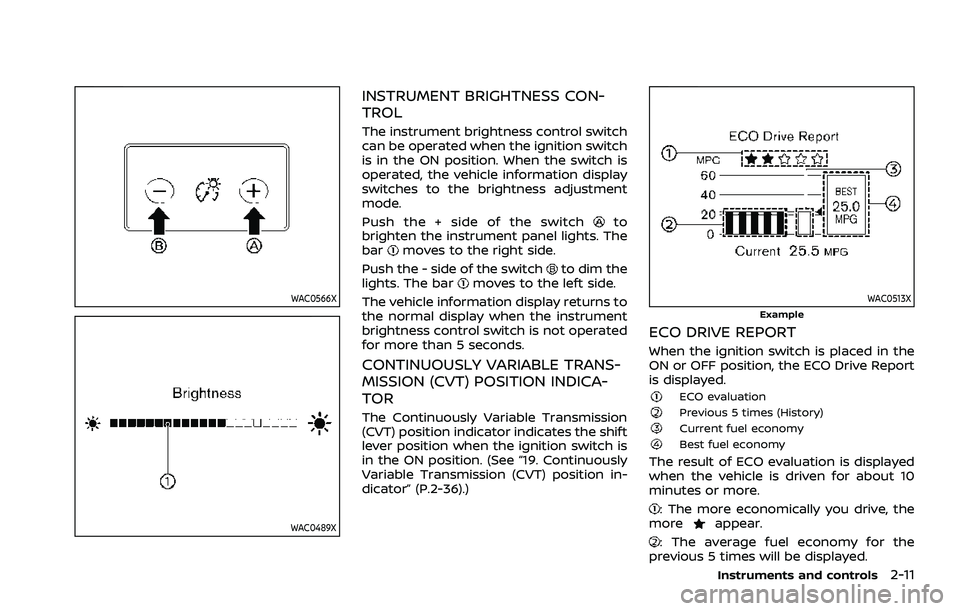
The instrument brightness control switch
can be operated when the ignition switch
is in the ON position. When the switch is
operated, the vehicle information display
switches to the brightness adjustment
mode.
Push the + side of the switch
to
brighten the instrument panel lights. The
bar
moves to the right side.
Push the - side of the switch
to dim the
lights. The barmoves to the left side.
The vehicle information display returns to
the normal display when the instrument
brightness control switch is not operated
for more than 5 seconds.
CONTINUOUSLY VARIABLE TRANS-
MISSION (CVT) POSITION INDICA-
TOR
The Continuously Variable Transmission
(CVT) position indicator indicates the shift
lever position when the ignition switch is
in the ON position. (See “19. Continuously
Variable Transmission (CVT) position in-
dicator” (P.2-36).)
WAC0513XExample
ECO DRIVE REPORT
When the ignition switch is placed in the
ON or OFF position, the ECO Drive Report
is displayed.
ECO evaluationPrevious 5 times (History)Current fuel economyBest fuel economy
The result of ECO evaluation is displayed
when the vehicle is driven for about 10
minutes or more.
: The more economically you drive, the
moreappear.
: The average fuel economy for the
previous 5 times will be displayed.
Instruments and controls2-11
Page 101 of 556
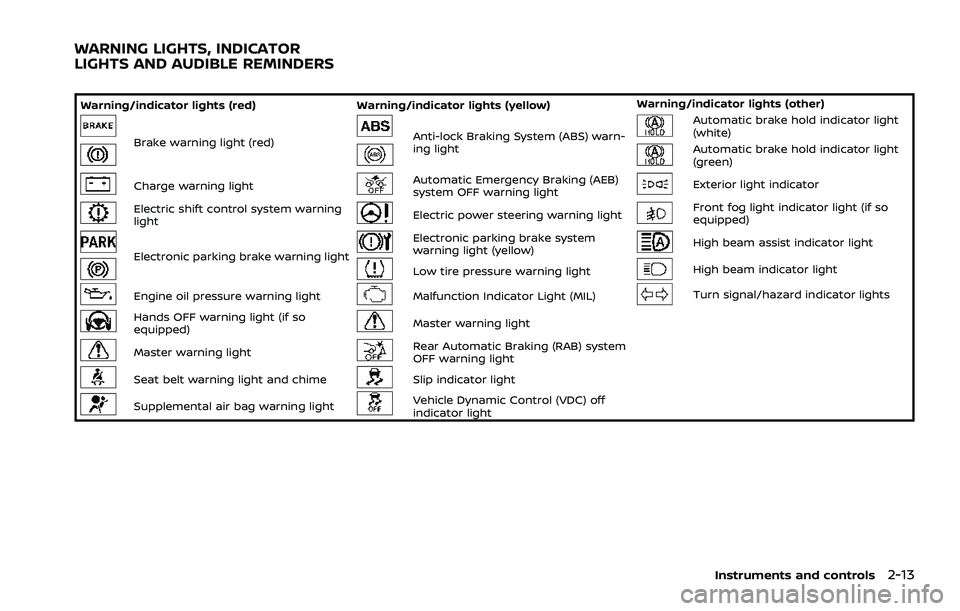
Warning/indicator lights (red)Warning/indicator lights (yellow) Warning/indicator lights (other)
Brake warning light (red)Anti-lock Braking System (ABS) warn-
ing lightAutomatic brake hold indicator light
(white)
Automatic brake hold indicator light
(green)
Charge warning lightAutomatic Emergency Braking (AEB)
system OFF warning lightExterior light indicator
Electric shift control system warning
lightElectric power steering warning lightFront fog light indicator light (if so
equipped)
Electronic parking brake warning light
Electronic parking brake system
warning light (yellow)High beam assist indicator light
Low tire pressure warning lightHigh beam indicator light
Engine oil pressure warning lightMalfunction Indicator Light (MIL)Turn signal/hazard indicator lights
Hands OFF warning light (if so
equipped)Master warning light
Master warning lightRear Automatic Braking (RAB) system
OFF warning light
Seat belt warning light and chimeSlip indicator light
Supplemental air bag warning lightVehicle Dynamic Control (VDC) off
indicator light
Instruments and controls2-13
WARNING LIGHTS, INDICATOR
LIGHTS AND AUDIBLE REMINDERS