light NISSAN ROGUE 2021 Owner´s Manual
[x] Cancel search | Manufacturer: NISSAN, Model Year: 2021, Model line: ROGUE, Model: NISSAN ROGUE 2021Pages: 556, PDF Size: 2.7 MB
Page 156 of 556
2-68Instruments and controls
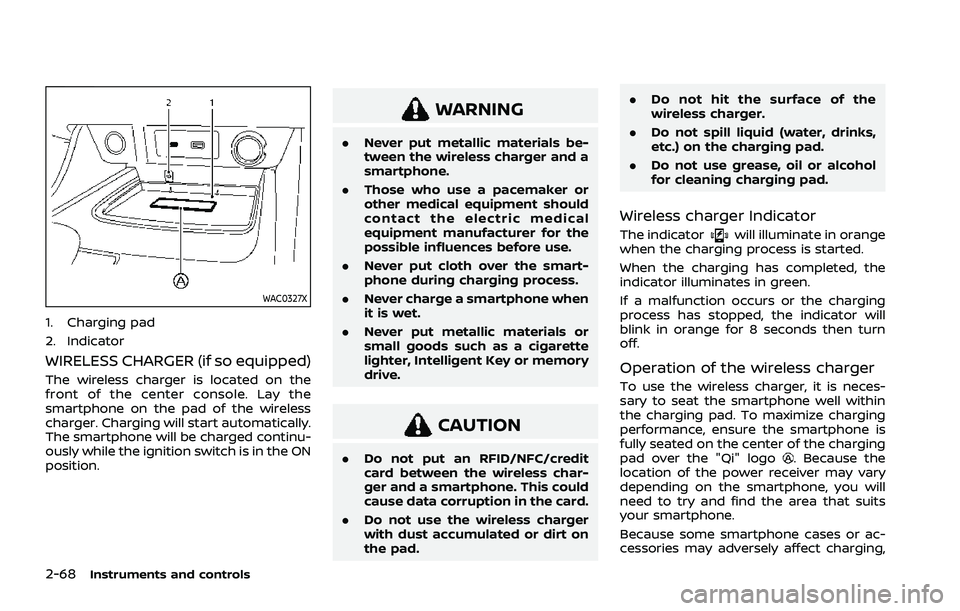
WAC0327X
1. Charging pad
2. Indicator
WIRELESS CHARGER (if so equipped)
The wireless charger is located on the
front of the center console. Lay the
smartphone on the pad of the wireless
charger. Charging will start automatically.
The smartphone will be charged continu-
ously while the ignition switch is in the ON
position.
WARNING
.Never put metallic materials be-
tween the wireless charger and a
smartphone.
. Those who use a pacemaker or
other medical equipment should
contact the electric medical
equipment manufacturer for the
possible influences before use.
. Never put cloth over the smart-
phone during charging process.
. Never charge a smartphone when
it is wet.
. Never put metallic materials or
small goods such as a cigarette
lighter, Intelligent Key or memory
drive.
CAUTION
.Do not put an RFID/NFC/credit
card between the wireless char-
ger and a smartphone. This could
cause data corruption in the card.
. Do not use the wireless charger
with dust accumulated or dirt on
the pad. .
Do not hit the surface of the
wireless charger.
. Do not spill liquid (water, drinks,
etc.) on the charging pad.
. Do not use grease, oil or alcohol
for cleaning charging pad.
Wireless charger Indicator
The indicatorwill illuminate in orange
when the charging process is started.
When the charging has completed, the
indicator illuminates in green.
If a malfunction occurs or the charging
process has stopped, the indicator will
blink in orange for 8 seconds then turn
off.
Operation of the wireless charger
To use the wireless charger, it is neces-
sary to seat the smartphone well within
the charging pad. To maximize charging
performance, ensure the smartphone is
fully seated on the center of the charging
pad over the "Qi" logo
. Because the
location of the power receiver may vary
depending on the smartphone, you will
need to try and find the area that suits
your smartphone.
Because some smartphone cases or ac-
cessories may adversely affect charging,
Page 159 of 556

WAC0491X
Making an emergency call
The Emergency Call (SOS) button is lo-
cated near the map light.
1. Push the cover to expose the Emer-gency Call (SOS) button
.
2. Push the Emergency Call (SOS) button to make an emergency call.
3. When the line is connected, speak to the Response Specialist.
If you want to cancel the emergency call,
push and hold the Emergency Call (SOS)
button for a few seconds. NOTE:
.
After the Emergency Call (SOS) but-
ton is pushed, it may take some time
until the system initiates connec-
tion, depending on the technical
environment and whether the TCU
(Telematics Control Unit) is being
used by other services.
. An indicator light on the Emergency
Call (SOS) button shows the readi-
ness of the emergency support sys-
tem. If the indicator light is not
illuminated, pushing the Emergency
Call (SOS) button does not connect
your vehicle to the Response Spe-
cialist.
The indicator light blinks while con-
nected to the NissanConnect® Ser-
vices Response Center.
. Even when the indicator light is
illuminated, connection to the Nis-
sanConnect® Services Response
Center may not be possible. If this
occurs in an emergency situation,
contact the authorities by other
means.
. To avoid disconnecting the line,
keep the engine running during an
emergency call, if it is safe to do so.
CUP HOLDERS
CAUTION
.Avoid abrupt starting and braking
when the cup holder is being
used to prevent spilling the drink.
If the liquid is hot, it can scald you
or your passenger.
. Use only soft cups in the cup
holder. Hard objects can injure
you in an accident.
Instruments and controls2-71
STORAGE
Page 163 of 556
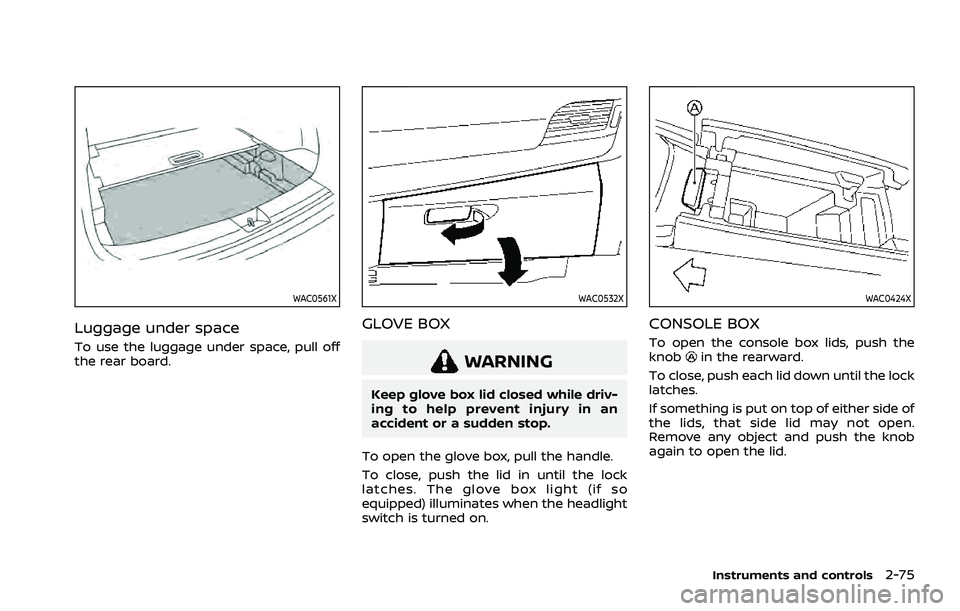
WAC0561X
Luggage under space
To use the luggage under space, pull off
the rear board.
WAC0532X
GLOVE BOX
WARNING
Keep glove box lid closed while driv-
ing to help prevent injury in an
accident or a sudden stop.
To open the glove box, pull the handle.
To close, push the lid in until the lock
latches. The glove box light (if so
equipped) illuminates when the headlight
switch is turned on.
WAC0424X
CONSOLE BOX
To open the console box lids, push the
knobin the rearward.
To close, push each lid down until the lock
latches.
If something is put on top of either side of
the lids, that side lid may not open.
Remove any object and push the knob
again to open the lid.
Instruments and controls2-75
Page 164 of 556
2-76Instruments and controls
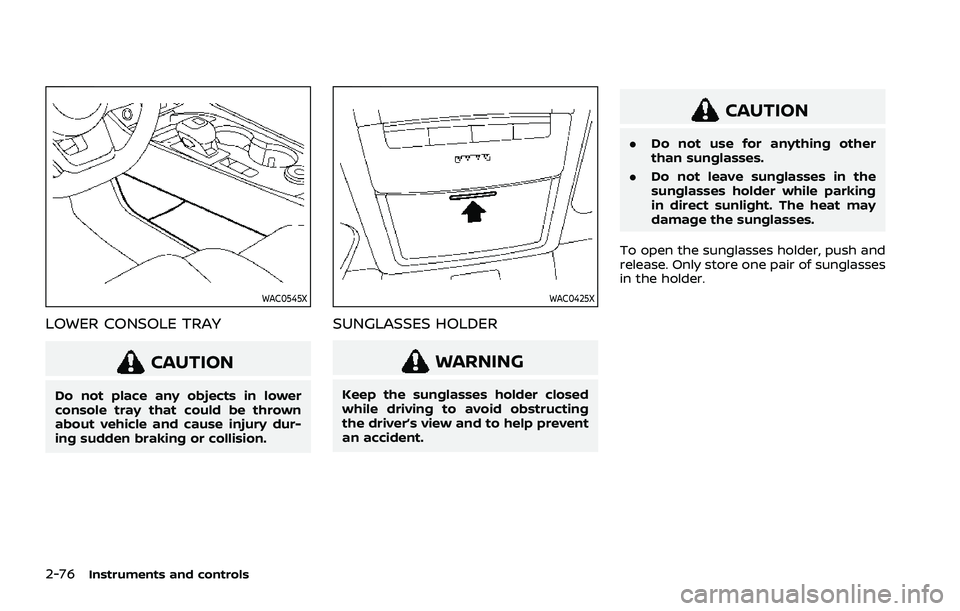
WAC0545X
LOWER CONSOLE TRAY
CAUTION
Do not place any objects in lower
console tray that could be thrown
about vehicle and cause injury dur-
ing sudden braking or collision.
WAC0425X
SUNGLASSES HOLDER
WARNING
Keep the sunglasses holder closed
while driving to avoid obstructing
the driver’s view and to help prevent
an accident.
CAUTION
.Do not use for anything other
than sunglasses.
. Do not leave sunglasses in the
sunglasses holder while parking
in direct sunlight. The heat may
damage the sunglasses.
To open the sunglasses holder, push and
release. Only store one pair of sunglasses
in the holder.
Page 172 of 556
2-84Instruments and controls
Auto-reverse function
WARNING
There are some small distances just
before the closed position which
cannot be detected. Make sure that
all passengers have their hands, etc.
inside the vehicle before closing the
moonroof and sunshade.
The auto-reverse function enables the
moonroof and sunshade to automatically
reverse when something is caught in the
moonroof and sunshade as it is closing.
When the control unit detects an obsta-
cle, the moonroof and sunshade will open
immediately.
Depending on the environment or driving
conditions, the auto-reverse function
may activate if an impact or load similar
to something being caught in the moon-
roof and sunshade occurs.
If the auto-reverse function activates
consecutively or the battery is dis-
charged, the moonroof and sunshade
may not close properly. In this case, push
and hold the switch to the CLOSE position
to close the moonroof.
If the moonroof does not operate
If the moonroof and sunshade do not
operate properly, perform the following
procedure to initialize the operation sys-
tem.
1. If the moonroof and sunshade are open, close them fully by repeatedly
pushing the moonroof switch to the
CLOSE
andposition.
2. Push and hold the moonroof switch to the CLOSE
position for 10 seconds.
3. After the moonroof and sunshade move slightly to the closed position
and then move back a little, release
the moonroof switch.
4. Push and hold the moonroof switch to the CLOSE
position, and the glass
and shade will move.
5. Release the moonroof switch. Then the moonroof and sunshade will fully
open and then fully close.
6. Check if the moonroof switch oper- ates normally.
WARNING
The driver is always responsible for
operating the moonroof properly,
including the operation by all pas-
sengers. Failure to follow the warn- ings and instructions for proper use
of the moonroof could result in
serious injury or death.
.
Do not allow children to operate
the moonroof. Improper opera-
tion by children may cause an
accident. If children or others get
caught in the moonroof, it could
cause serious injury.
. To help avoid risk of injury or
death through unintended opera-
tion of the moonroof, place the
ignition switch in the OFF position
when leaving the vehicle, and do
not leave children and the Intelli-
gent Key inside the vehicle.
. Do not activate the auto-reverse
function intentionally. If hands or
face, etc. get caught in the moon-
roof, it could cause serious injury.
CAUTION
.Do not place objects (such as
newspapers, handkerchiefs, etc.)
on the sunshade when it is ex-
tending or retracting causing im-
proper operation or damage to
the sunshade.
Page 173 of 556
.Do not push the sunshade arm
with your hands, etc., as this may
deform it. Improper operation or
damage to the sunshade may
result.
. Do not put any object into the
sunshade inlet port as this may
result in improper operation or
damage the sunshade.
. Do not hang any object on the
arm rail as this may result in
improper operation or damage
the sunshade.
. Do not forcefully pull the sun-
shade. Doing so may elongate
the sunshade. Improper opera-
tion or damage to the sunshade
may result.
If the moonroof does not operate prop-
erly after performing the procedure
above, have your vehicle checked by a
NISSAN dealer.CAUTION
. Do not leave the light switch on
when the engine is not running
for extended periods of time to
prevent the battery from being
discharged.
. Turn off the lights when you leave
the vehicle.
WAC0066X
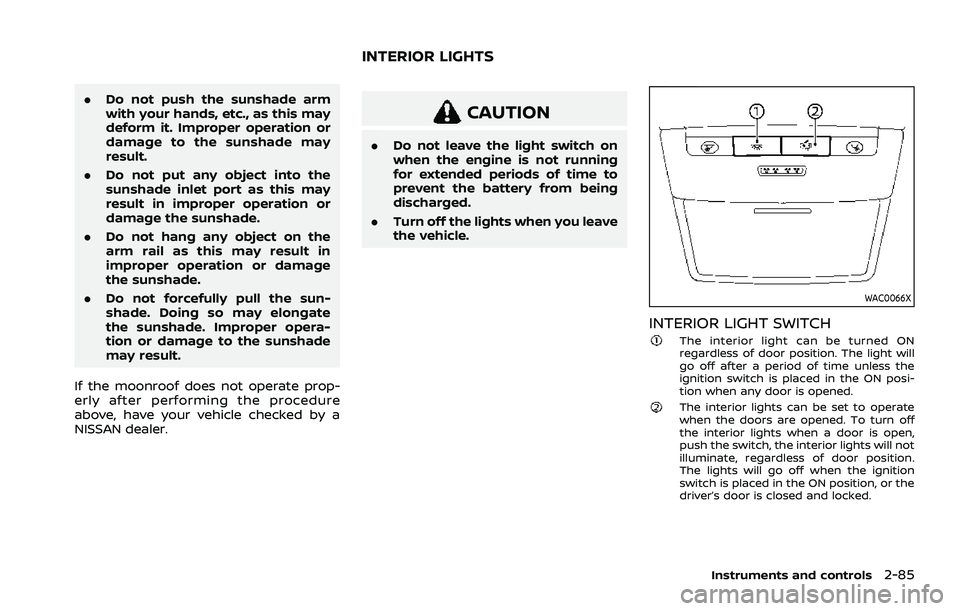
INTERIOR LIGHT SWITCHThe interior light can be turned ON
regardless of door position. The light will
go off after a period of time unless the
ignition switch is placed in the ON posi-
tion when any door is opened.
The interior lights can be set to operate
when the doors are opened. To turn off
the interior lights when a door is open,
push the switch, the interior lights will not
illuminate, regardless of door position.
The lights will go off when the ignition
switch is placed in the ON position, or the
driver’s door is closed and locked.
Instruments and controls2-85
INTERIOR LIGHTS
Page 174 of 556
2-86Instruments and controls
WAC0067X
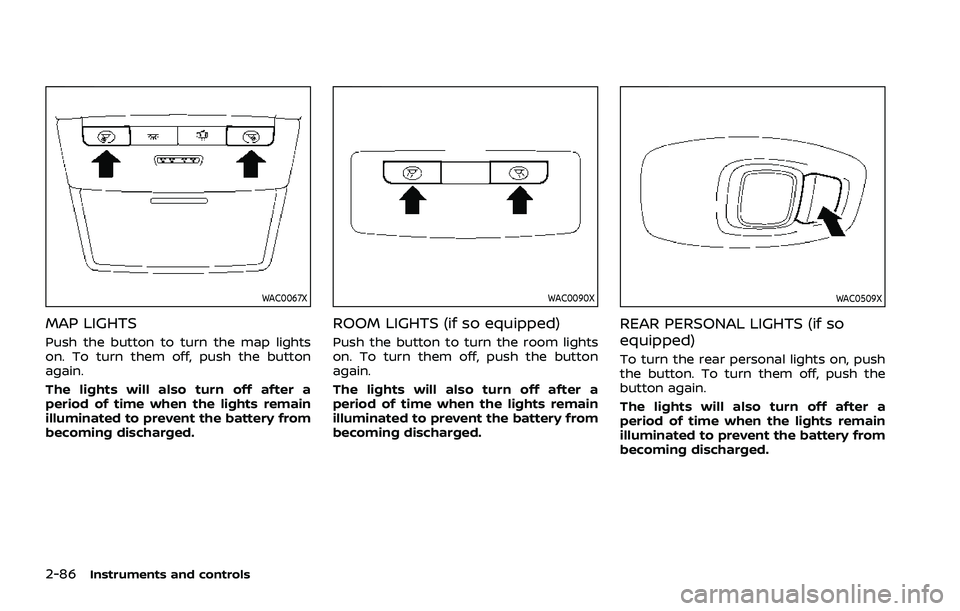
MAP LIGHTS
Push the button to turn the map lights
on. To turn them off, push the button
again.
The lights will also turn off after a
period of time when the lights remain
illuminated to prevent the battery from
becoming discharged.
WAC0090X
ROOM LIGHTS (if so equipped)
Push the button to turn the room lights
on. To turn them off, push the button
again.
The lights will also turn off after a
period of time when the lights remain
illuminated to prevent the battery from
becoming discharged.
WAC0509X
REAR PERSONAL LIGHTS (if so
equipped)
To turn the rear personal lights on, push
the button. To turn them off, push the
button again.
The lights will also turn off after a
period of time when the lights remain
illuminated to prevent the battery from
becoming discharged.
Page 175 of 556
WAC0492X
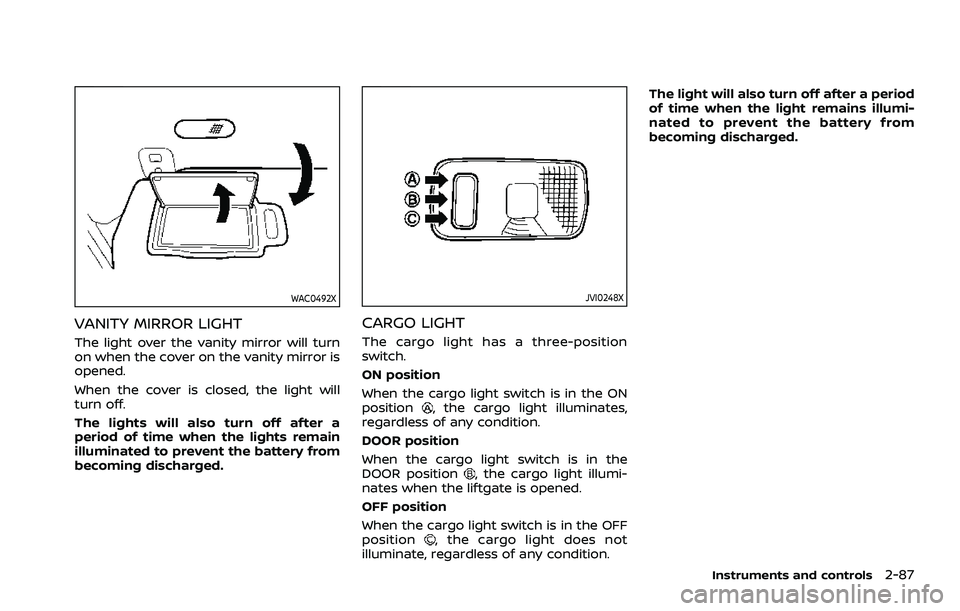
VANITY MIRROR LIGHT
The light over the vanity mirror will turn
on when the cover on the vanity mirror is
opened.
When the cover is closed, the light will
turn off.
The lights will also turn off after a
period of time when the lights remain
illuminated to prevent the battery from
becoming discharged.
JVI0248X
CARGO LIGHT
The cargo light has a three-position
switch.
ON position
When the cargo light switch is in the ON
position
, the cargo light illuminates,
regardless of any condition.
DOOR position
When the cargo light switch is in the
DOOR position
, the cargo light illumi-
nates when the liftgate is opened.
OFF position
When the cargo light switch is in the OFF
position
, the cargo light does not
illuminate, regardless of any condition. The light will also turn off after a period
of time when the light remains illumi-
nated to prevent the battery from
becoming discharged.
Instruments and controls2-87
Page 177 of 556

3 Pre-driving checks and adjustments
Keys ........................................................................\
................................. 3-3Intelligent Key ........................................................................\
... 3-3
Doors ........................................................................\
.............................. 3-5
Locking with key .................................................................... 3-5
Locking with inside lock knob ..................................... 3-6
Locking with power door lock switch ................... 3-6
Automatic door locks ......................................................... 3-7
Child safety rear door lock ............................................. 3-7
Intelligent Key system .............................................................. 3-7 Intelligent Key operating range (models with
request switch) ........................................................................\
3-9
Door locks/unlocks precaution (models with
request switch) ..................................................................... 3-10
Intelligent Key operation (models with
request switch) ..................................................................... 3-11
Battery saver system ....................................................... 3-12
Warning lights and audible reminders .............. 3-12
Troubleshooting guide ................................................... 3-13
How to use remote keyless entry function ...... 3-15
Remote engine start (if so equipped) ....................... 3-19
Remote engine start operating range ............... 3-20
Remote starting the engine ....................................... 3-20
Extending engine run time ......................................... 3-20
Canceling a remote engine start ........................... 3-21
Conditions the remote engine start will
not work ........................................................................\
............. 3-21 Hood ........................................................................\
............................ 3-22
Liftgate ........................................................................\
...................... 3-23
Operating manual liftgate (if
so equipped) ........................................................................\
. 3-23
Operating power liftgate (if so equipped) ...... 3-24
Motion-activated liftgate (if
so equipped) ........................................................................\
. 3-26
Garage mode system (if so equipped) ............ 3-27
Auto closure (if so equipped) .................................. 3-28
liftgate release lever ....................................................... 3-28
Fuel-filler door ........................................................................\
..... 3-29 Opening the fuel-filler door ...................................... 3-29
How to refuel ....................................................................... 3-29
When refueling from a portable
fuel container ...................................................................... 3-30
Tilt/telescopic steering ........................................................ 3-31
Tilt and telescopic operation .................................. 3-31
Sun visors ........................................................................\
................ 3-32
Rear sunshade (if so equipped) .................................... 3-32
Mirrors ........................................................................\
...................... 3-33
Inside mirror ........................................................................\
. 3-33
Outside mirrors .................................................................. 3-34
Vanity mirror ........................................................................\
3-36
Memory seat (if so equipped) ......................................... 3-36 Memory storage function .......................................... 3-36
Page 183 of 556
AUTOMATIC DOOR LOCKS
.All doors lock automatically when the
vehicle speed reaches 15 MPH (24
km/h).
. All doors unlock automatically when
the ignition switch is placed in the OFF
position or when the shift position is
placed in the P (Park) position, if
selected.
NOTE:
The Automatic door unlock feature can
be changed using the "Vehicle Settings"
menu on the vehicle information dis-
play. (See “Vehicle Settings” (P.2-27).)
WAD0021X
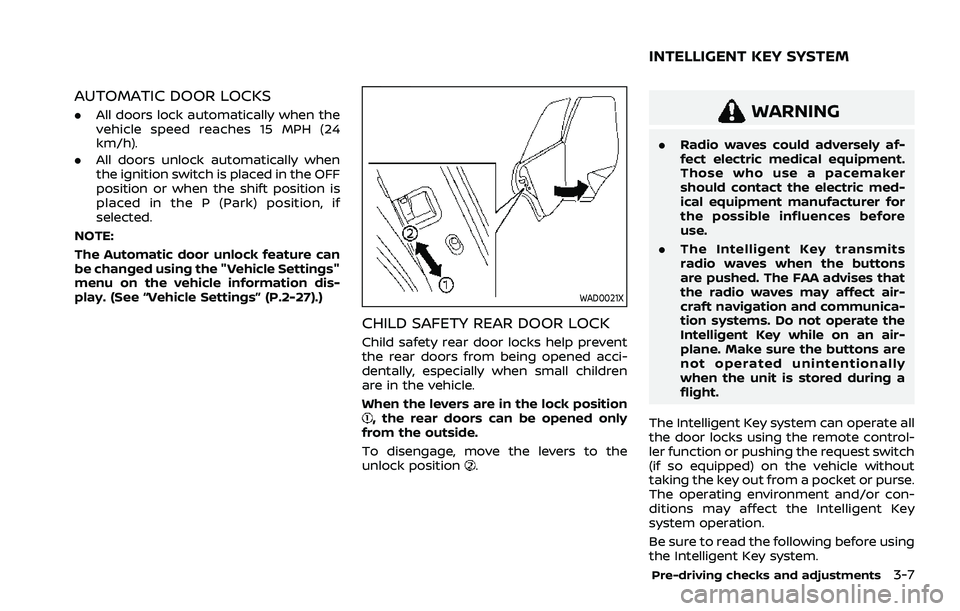
CHILD SAFETY REAR DOOR LOCK
Child safety rear door locks help prevent
the rear doors from being opened acci-
dentally, especially when small children
are in the vehicle.
When the levers are in the lock position
, the rear doors can be opened only
from the outside.
To disengage, move the levers to the
unlock position
.
WARNING
. Radio waves could adversely af-
fect electric medical equipment.
Those who use a pacemaker
should contact the electric med-
ical equipment manufacturer for
the possible influences before
use.
. The Intelligent Key transmits
radio waves when the buttons
are pushed. The FAA advises that
the radio waves may affect air-
craft navigation and communica-
tion systems. Do not operate the
Intelligent Key while on an air-
plane. Make sure the buttons are
not operated unintentionally
when the unit is stored during a
flight.
The Intelligent Key system can operate all
the door locks using the remote control-
ler function or pushing the request switch
(if so equipped) on the vehicle without
taking the key out from a pocket or purse.
The operating environment and/or con-
ditions may affect the Intelligent Key
system operation.
Be sure to read the following before using
the Intelligent Key system.
Pre-driving checks and adjustments3-7
INTELLIGENT KEY SYSTEM