stop start NISSAN ROGUE 2021 Owner´s Manual
[x] Cancel search | Manufacturer: NISSAN, Model Year: 2021, Model line: ROGUE, Model: NISSAN ROGUE 2021Pages: 556, PDF Size: 2.7 MB
Page 352 of 556
5-98Starting and driving
.Always drive carefully and atten-
tively when using the ICC system.
Read and understand the Owner’s
Manual thoroughly before using
the ICC system. To avoid serious
injury or death, do not rely on the
system to prevent accidents or to
control the vehicle’s speed in
emergency situations. Do not
use the ICC system except in
appropriate road and traffic con-
ditions.
ICC system operation
The ICC system is designed to maintain a
selected distance from the vehicle in front
of you and can reduce the speed to
match a slower vehicle ahead. The sys-
tem decelerates the vehicle as necessary
and if the vehicle ahead comes to a stop,
the vehicle decelerates to a standstill.
However, the ICC system can only apply
up to 40% of the vehicle’s total braking
power.
This system should only be used when
traffic conditions allow vehicle speeds to
remain fairly constant or when vehicle
speeds change gradually. If a vehicle
moves into the traveling lane ahead or if
a vehicle traveling ahead rapidly decele-
rates, the distance between vehicles may become closer because the ICC system
cannot decelerate the vehicle quickly
enough. If this occurs, the ICC system
sounds a warning chime and blinks the
system display to notify the driver to take
necessary action.
The ICC system cancels and a warning
chime sounds if the speed is below
approximately 15 MPH (25 km/h) and a
vehicle is not detected ahead. For ProPI-
LOT Assist with Navi-link equipped vehi-
cles on a limited access freeway as
identified in the navigation map data,
the ICC system cancels and a warning
chime sounds if your vehicle is at a
standstill for more than approximately 3
seconds and a vehicle is not detected
ahead.
The ICC system operates as follows:
.
When there are no vehicles traveling
ahead, the ICC system maintains the
speed set by the driver. The vehicle set
speed range is between approxi-
mately 20 and 90 MPH (30 and 144
km/h).
. When there is a vehicle traveling
ahead, the ICC system adjusts the
speed to maintain the distance, se-
lected by the driver, from the vehicle
ahead. If the vehicle ahead comes to a
stop, the vehicle decelerates to a
standstill. Once your vehicle stops, the ICC system keeps the vehicle
stopped.
. When the vehicle traveling ahead
moves to a different traveling lane,
the ICC system accelerates and main-
tains vehicle speed up to the set
speed.
The ICC system does not control vehicle
speed or warn you when you approach
stationary and slow moving vehicles. You
must pay attention to vehicle operation
to maintain proper distance from vehicles
ahead when approaching toll gates or
traffic congestion.
Page 354 of 556
5-100Starting and driving
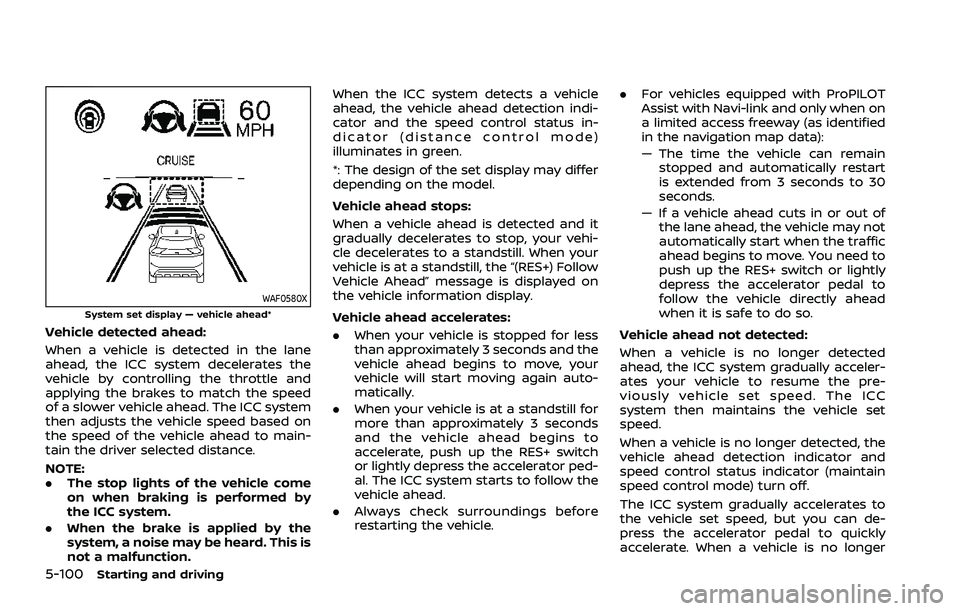
WAF0580XSystem set display — vehicle ahead*
Vehicle detected ahead:
When a vehicle is detected in the lane
ahead, the ICC system decelerates the
vehicle by controlling the throttle and
applying the brakes to match the speed
of a slower vehicle ahead. The ICC system
then adjusts the vehicle speed based on
the speed of the vehicle ahead to main-
tain the driver selected distance.
NOTE:
.The stop lights of the vehicle come
on when braking is performed by
the ICC system.
. When the brake is applied by the
system, a noise may be heard. This is
not a malfunction. When the ICC system detects a vehicle
ahead, the vehicle ahead detection indi-
cator and the speed control status in-
dicator (distance control mode)
illuminates in green.
*: The design of the set display may differ
depending on the model.
Vehicle ahead stops:
When a vehicle ahead is detected and it
gradually decelerates to stop, your vehi-
cle decelerates to a standstill. When your
vehicle is at a standstill, the “(RES+) Follow
Vehicle Ahead” message is displayed on
the vehicle information display.
Vehicle ahead accelerates:. When your vehicle is stopped for less
than approximately 3 seconds and the
vehicle ahead begins to move, your
vehicle will start moving again auto-
matically.
. When your vehicle is at a standstill for
more than approximately 3 seconds
and the vehicle ahead begins to
accelerate, push up the RES+ switch
or lightly depress the accelerator ped-
al. The ICC system starts to follow the
vehicle ahead.
. Always check surroundings before
restarting the vehicle. .
For vehicles equipped with ProPILOT
Assist with Navi-link and only when on
a limited access freeway (as identified
in the navigation map data):
— The time the vehicle can remain
stopped and automatically restart
is extended from 3 seconds to 30
seconds.
— If a vehicle ahead cuts in or out of the lane ahead, the vehicle may not
automatically start when the traffic
ahead begins to move. You need to
push up the RES+ switch or lightly
depress the accelerator pedal to
follow the vehicle directly ahead
when it is safe to do so.
Vehicle ahead not detected:
When a vehicle is no longer detected
ahead, the ICC system gradually acceler-
ates your vehicle to resume the pre-
viously vehicle set speed. The ICC
system then maintains the vehicle set
speed.
When a vehicle is no longer detected, the
vehicle ahead detection indicator and
speed control status indicator (maintain
speed control mode) turn off.
The ICC system gradually accelerates to
the vehicle set speed, but you can de-
press the accelerator pedal to quickly
accelerate. When a vehicle is no longer
Page 356 of 556
5-102Starting and driving
The warning chime will not sound when:
.Your vehicle approaches other vehi-
cles that are parked or moving slowly.
. The accelerator pedal is depressed,
overriding the system.
NOTE:
The approach warning chime may
sound and the system display may
flash when the radar sensor detects
objects on the side of the vehicle or on
the side of the road. This may cause the
ICC system to decelerate or accelerate
the vehicle. The radar sensor may de-
tect these objects when the vehicle is
driven on winding, narrow, or hilly roads
or when the vehicle is entering or
exiting a curve. In these cases, you will
have to manually control the proper
distance ahead of your vehicle.
Also, the sensor sensitivity can be af-
fected by vehicle operation (steering
maneuver or driving position in the
lane) or traffic or vehicle conditions
(for example, if a vehicle is being driven
with some damage).Acceleration when passing
When the ICC system is engaged above
44 MPH (70 km/h) and following a slower
vehicle (below the vehicle set speed), and
the turn signal is activated to the left, the
ICC system will automatically start to
accelerate the vehicle to help initiate
passing on the left and will begin to
reduce the distance to vehicle directly
ahead. Only the left side turn signal
operates this feature. As the driver steers
the vehicle and moves into the passing
lane, if no vehicle is detected ahead the
ICC system will continue to accelerate to
the vehicle set speed. If another vehicle is
detected ahead, then the vehicle will
accelerate up to the following speed of
that vehicle. If the vehicle is not steered
into the left lane to pass, the acceleration
will stop after a short time and regain the
set following distance. Acceleration can
be stopped at any point by depressing
the brake pedal or the CANCEL switch on
the steering wheel.
WARNING
In order to reduce the risk of a
collision that may result in serious
injury or death, please be aware of
the following: .
This function is only activated
with the left turn signal and will
briefly accelerate the vehicle even
if a lane change is not initiated.
This can include non-passing si-
tuations such as left side exits.
. Ensure that when passing an-
other vehicle, the adjacent lane
is clear before initiating the pass.
Sudden changes in traffic may
occur while passing. Always
manually steer or brake as
needed. Never solely rely on the
system.
Speed Limit Assist - a feature of
ProPILOT Assist with Navi-link (if so
equipped)
WARNING
Listed below are the system limita-
tions for the Speed Limit Assist. Fail-
ure to operate the vehicle in
accordance with these system lim-
itations could result in serious injury
or death:
.It is the driver’s responsibility to
select the proper speed, follow all
traffic regulations and observe
Page 359 of 556
To deactivate the system, select “OFF”.
NOTE:
The system will retain current settings
in the vehicle information display even
if the engine is restarted.
Speed Adjust by Route - a feature
of ProPILOT Assist with Navi-link (if
so equipped)
WARNING
Listed below are the system limita-
tions for the Speed Adjust by Route.
Failure to operate the vehicle in
accordance with these system lim-
itations could result in serious injury
or death:
.There are limitations to the Speed
Adjust by Route system capabil-
ity. The system does not function
in all driving, traffic, weather and
road conditions. It is the driver’s
responsibility to stay alert, drive
safely, and be in control of the
vehicle at all times.
. The Speed Adjust by Route sys-
tem does not brake the vehicle to
a stop. Whenever necessary, the
driver must apply appropriate
braking. .
It is the driver’s responsibility to
select the proper speed, follow all
traffic regulations and observe
other road users.
. The Speed Adjust by Route sys-
tem will not function in Hawaii or
US island territories.
. The Speed Adjust by Route may
not operate properly in some
road and traffic conditions, the
system may unexpectedly
change the speed. The driver
must manually control the vehicle
speed.
Below are some examples:
— When the data from the navi-
gation system is not up-to-
date or is unavailable.
— When not driving along the route suggested by the navi-
gation system.
— When the navigation system is recalculating the route.
— When driving in countries or areas not covered by the na-
vigation system.
— When driving on a road under construction or newly con-
structed road. — When driving near a road split
or junction.
— When driving in bad weather or poor road conditions.
When the ProPILOT Assist with Navi-link is
active on a limited access freeway (as
identified in the navigation map data), the
Speed Adjust by Route uses road infor-
mation provided by the navigation sys-
tem and can adjust the vehicle speed
depending on curves, junctions and exits.
The system may not always reduce speed
for all curves, junctions or exits and the
driver may need to apply additional brak-
ing at any time.
When the vehicle is through the curve or
junction, the vehicle will accelerate again
to the set speed. When exiting the limited
access freeway, the driver will need to
apply braking at the end of the exit.
NOTE:
. The system does not operate when
the accelerator pedal is depressed.
. The system may not operate de-
pending on the set distance to the
vehicle ahead and vehicles detected
ahead.
Starting and driving5-105
Page 360 of 556
5-106Starting and driving
WAF0583XExample
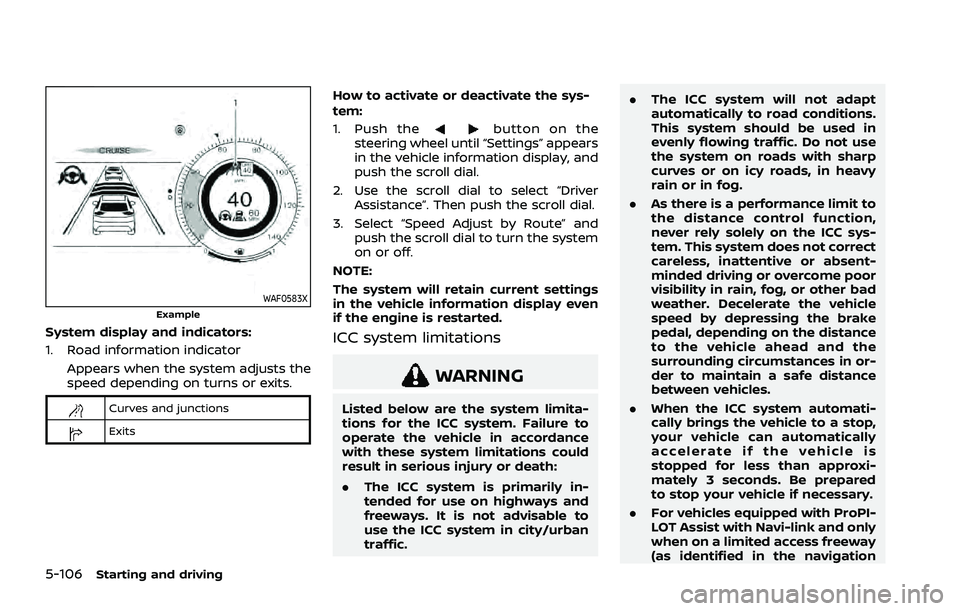
System display and indicators:
1. Road information indicatorAppears when the system adjusts the
speed depending on turns or exits.
Curves and junctions
Exits
How to activate or deactivate the sys-
tem:
1. Push the
button on the
steering wheel until “Settings” appears
in the vehicle information display, and
push the scroll dial.
2. Use the scroll dial to select “Driver Assistance”. Then push the scroll dial.
3. Select “Speed Adjust by Route” and push the scroll dial to turn the system
on or off.
NOTE:
The system will retain current settings
in the vehicle information display even
if the engine is restarted.
ICC system limitations
WARNING
Listed below are the system limita-
tions for the ICC system. Failure to
operate the vehicle in accordance
with these system limitations could
result in serious injury or death:
. The ICC system is primarily in-
tended for use on highways and
freeways. It is not advisable to
use the ICC system in city/urban
traffic. .
The ICC system will not adapt
automatically to road conditions.
This system should be used in
evenly flowing traffic. Do not use
the system on roads with sharp
curves or on icy roads, in heavy
rain or in fog.
. As there is a performance limit to
the distance control function,
never rely solely on the ICC sys-
tem. This system does not correct
careless, inattentive or absent-
minded driving or overcome poor
visibility in rain, fog, or other bad
weather. Decelerate the vehicle
speed by depressing the brake
pedal, depending on the distance
to the vehicle ahead and the
surrounding circumstances in or-
der to maintain a safe distance
between vehicles.
. When the ICC system automati-
cally brings the vehicle to a stop,
your vehicle can automatically
accelerate if the vehicle is
stopped for less than approxi-
mately 3 seconds. Be prepared
to stop your vehicle if necessary.
. For vehicles equipped with ProPI-
LOT Assist with Navi-link and only
when on a limited access freeway
(as identified in the navigation
Page 361 of 556
map data):
— The time the vehicle can re-main stopped and automati-
cally restart is extended from
3 seconds to 30 seconds.
— If a vehicle ahead cuts in or out of the lane ahead, the
vehicle may not automatically
start when the traffic ahead
begins to move. You need to
push up the RES+ switch or
lightly depress the accelerator
pedal to follow the vehicle
directly ahead when it is safe
to do so.
. Always check surroundings be-
fore restarting the vehicle.
. Always pay attention to the op-
eration of the vehicle and be
ready to manually control the
proper following distance. The
ICC system may not be able to
maintain the selected distance
between vehicles (following dis-
tance) or selected vehicle speed
under some circumstances.
. The ICC system does not detect
the following objects:
— Stationary or slow moving ve-
hicles (when your vehicle is approaching them)
— Pedestrians or objects in the roadway
— Oncoming vehicles in the same lane
— Motorcycles traveling offset in the travel lane
. The ICC system may not detect a
vehicle ahead in certain road,
weather or driving conditions. To
avoid accidents, never use the ICC
system under the following con-
ditions:
— On roads with heavy, high-
speed traffic or sharp curves
— On slippery road surfaces such as on ice or snow, etc.
— On a bumpy road surface, such as an uneven dirt road
— On steep downhill roads (the vehicle may go beyond the
vehicle set speed and fre-
quent braking may result in
overheating the brakes)
— On repeated uphill and down- hill roads
— During bad weather (rain, fog, snow, etc.) — When the sensor detection is
reduced (conditions such as
rain, snow, fog, dust storms,
sandstorms, and road spray
from other vehicles)
— When dirt, ice, snow or other material adhere to the radar
sensor area
— When traffic conditions make it difficult to keep a proper
distance between vehicles be-
cause of frequent accelera-
tion or deceleration
— When a complicated-shaped vehicle such as a car carrier
trailer or flatbed truck/trailer
is near the vehicle ahead
— When there is interference by other radar sources
— When excessively heavy bag- gage is loaded in the rear seat
or cargo area of your vehicle
— When towing a trailer or other vehicle
. In some road or traffic conditions,
a vehicle or object can unexpect-
edly come into the sensor detec-
tion zone and cause automatic
braking. Always stay alert and
Starting and driving5-107
Page 364 of 556
5-110Starting and driving
ICC system temporarily unavailable
The following are conditions in which the
ICC system may be temporarily unavail-
able. In these instances, the ICC system
may not cancel and may not be able to
maintain the selected following distance
from the vehicle ahead.
Condition A:
Under the following conditions, the ICC
system is automatically canceled. A chime
will sound and the system will not be able
to be set:
.Any door is open.
. The driver’s seat belt is unfastened.
. The vehicle ahead is not detected and
your vehicle is traveling below the
speed of 15 MPH (25 km/h). For
ProPILOT Assist with Navi-link
equipped vehicles on a limited access
freeway as identified in the navigation
map data, the ICC system cancels and
a warning chime sounds if your vehi-
cle is at a standstill for more than
approximately 3 seconds and a vehi-
cle is not detected ahead.
. Your vehicle has been stopped by the
ICC system for approximately 3 min-
utes or longer.
. The shift lever is moved out of the D
(Drive) position or into the manual
shift mode. .
The electronic parking brake is ap-
plied.
. The VDC system is turned off.
. The AEB applies harder braking
. VDC (including the traction control
system) operates.
. The SNOW mode or OFF-ROAD mode
is selected (AWD models).
. A wheel slips.
. When the front radar is impaired due
to dirt or an other obstruction block-
ing the radar sensor.
. When the radar signal is temporarily
interrupted.
Action to take:
When the conditions listed above are no
longer present, turn the system off using
the ProPILOT Assist switch. Turn the
ProPILOT Assist system back on to use
the system.
NOTE:
When the ICC system is canceled under
any of the following conditions at a
standstill, the electronic parking brake
is automatically activated:
. Any door is open.
. The driver’s seat belt is unfastened.
. Your vehicle has been stopped by
the ICC system for approximately 3
minutes or longer. .
The shift lever is moved out of the D
(Drive) position or into the manual
shift mode.
. The VDC system is turned off.
. When the front radar is impaired due
to dirt or an other obstruction block-
ing the radar sensor.
. When the radar signal is temporarily
interrupted.
Condition B:
When there is inclement weather (rain,
fog, snow, etc.) blocking the front radar
sensor, the ICC system will automatically
be canceled, the chime will sound and the
“Forward Driving Aids temporarily dis-
abled Front Sensor blocked” warning
message will appear in the vehicle infor-
mation display.
Action to take:
When the above condition is no longer
present, the warning message will no
longer be available in the vehicle informa-
tion display and the system will operate
normally. If the warning message con-
tinues to appear, have the system
checked. It is recommended that you visit
a NISSAN dealer for this service.
Condition C:
When the radar sensor on the front of the
vehicle is covered with dirt or is ob-
Page 365 of 556
structed, the ICC system will automati-
cally be canceled.
The chime will sound and the “Forward
Driving Aids temporarily disabled Front
Sensor blocked” warning message will
appear in the vehicle information display.
Action to take:
If the warning message appears, stop the
vehicle in a safe place, push the park
button to engage the P (Park) position,
and turn the engine off. When the radar
signal is temporarily interrupted, clean
the sensor area and restart the engine. If
the warning message continues to ap-
pear, have the system checked. It is
recommended that you visit a NISSAN
dealer for this service.
Condition D:
When driving on roads with limited road
structures or buildings (for example, long
bridges, deserts, snow fields, driving next
to long walls), the system may display the
“Forward Driving Aids temporarily dis-
abled Front Sensor blocked” message.
Action to take:
When the above driving conditions no
longer exist, turn the system back on.ICC system malfunction
If the ICC system malfunctions, it will be
turned off automatically, a chime will
sound, and the speed control status
warning (orange) will illuminate.
Action to take:
If the warning illuminates, stop the vehicle
in a safe place. Turn the engine off, restart
the engine and set the ICC system again.
If it is not possible to set the ICC system or
the warning stays on, it may be a
malfunction. Although the normal driving
can be continued, the ICC system should
be inspected. It is recommended that you
visit a NISSAN dealer for this service.
NOTE:
If the ICC system is temporarily unavail-
able, the conventional cruise control
mode may still be used. For additional
information, see “Conventional (fixed
speed) cruise control mode” (P.5-118).
ICC sensor maintenance
The radar sensor is located on the front of
the vehicle.
To keep the ICC system operating prop-
erly, be sure to observe the following:
.Always keep the sensor area clean.
. Do not strike or damage the areas
around the sensor.
. Do not attach a sticker (including
transparent material) or install an
accessory near the sensor. This could
cause failure or malfunction.
. Do not attach metallic objects near
the sensor area (brush guard, etc.).
This could cause failure or malfunc-
tion.
. Do not alter, remove, or paint the front
bumper.
Before customizing or restoring the front
bumper, it is recommended that you visit
a NISSAN dealer.
The camera sensor is located above the
inside mirror.
To keep the proper operation of the
systems and prevent a system malfunc-
tion, be sure to observe the following:
. Always keep the windshield clean.
. Do not attach a sticker (including
transparent material) or install an
accessory near the camera unit.
Starting and driving5-111
Page 369 of 556
When the Steering Assist is in operation,
the Steering Assist status indicator, the
Steering Assist indicator, and the lane
marker indicatorandon the vehicle
information display turn green. A chime
sounds when the Steering Assist initially
activates.
When the Steering Assist deactivates, the
Steering Assist status indicator
, the
Steering Assist indicator, and the lane
marker indicatorandon the vehicle
information display turn gray and a chime
sounds twice.
Intelligent Lane Intervention (I-LI)
With the Steering Assist active, when a
curve or strong cross wind exceeds the
capabilities of the system and your vehi-
cle approaches either the left or the right
side of the traveling lane, the I-LI system
will flash the I-LI indicator on the vehicle
information display and provide steering
wheel vibration to alert the driver. The
warning chime will also sound (4 rapid
beeps). Then, the I-LI system automati-
cally applies the brakes for a short period
of time to help assist the driver to return
the vehicle to the center of the traveling
lane. This action is in addition to any
Steering Assist actions and the warnings
cannot be turned off. For more informa-
tion, see “Intelligent Lane Intervention (I-
LI)” (P.5-51).WAF0639X
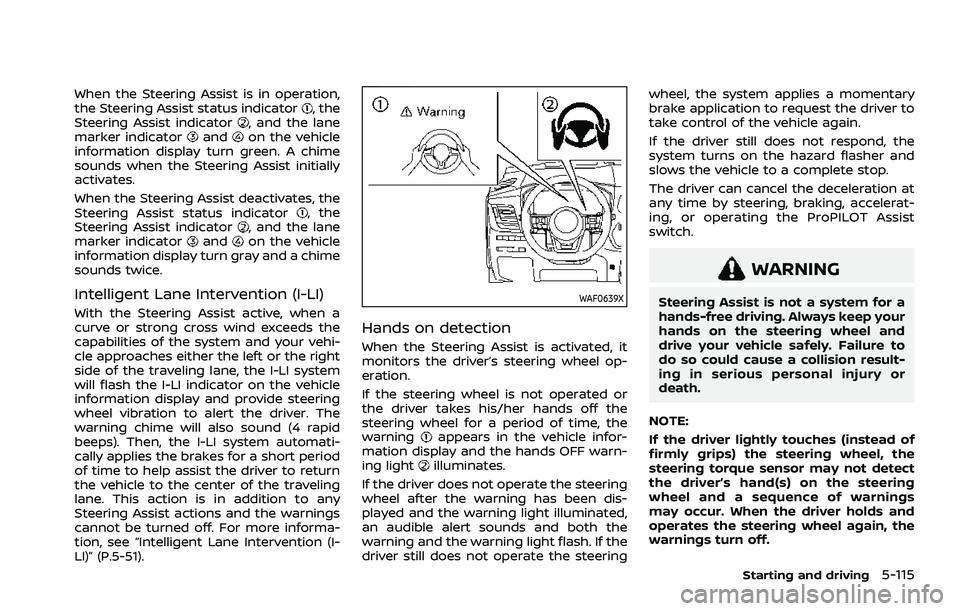
Hands on detection
When the Steering Assist is activated, it
monitors the driver’s steering wheel op-
eration.
If the steering wheel is not operated or
the driver takes his/her hands off the
steering wheel for a period of time, the
warning
appears in the vehicle infor-
mation display and the hands OFF warn-
ing light
illuminates.
If the driver does not operate the steering
wheel after the warning has been dis-
played and the warning light illuminated,
an audible alert sounds and both the
warning and the warning light flash. If the
driver still does not operate the steering wheel, the system applies a momentary
brake application to request the driver to
take control of the vehicle again.
If the driver still does not respond, the
system turns on the hazard flasher and
slows the vehicle to a complete stop.
The driver can cancel the deceleration at
any time by steering, braking, accelerat-
ing, or operating the ProPILOT Assist
switch.
WARNING
Steering Assist is not a system for a
hands-free driving. Always keep your
hands on the steering wheel and
drive your vehicle safely. Failure to
do so could cause a collision result-
ing in serious personal injury or
death.
NOTE:
If the driver lightly touches (instead of
firmly grips) the steering wheel, the
steering torque sensor may not detect
the driver’s hand(s) on the steering
wheel and a sequence of warnings
may occur. When the driver holds and
operates the steering wheel again, the
warnings turn off.
Starting and driving5-115
Page 372 of 556
5-118Starting and driving
Action to take:
Turn the ICC system off using the CANCEL
switch. When the conditions listed above
are no longer present, turn the ICC
system on again.
Steering Assist malfunction
When the system malfunctions, it turns
off automatically. The Steering Assist
status warning (orange) illuminates. A
chime may sound depending on the
situation.
Action to take:
Stop the vehicle in a safe location, push
the park button to shift to the P (Park)
position, turn the engine off, restart the
engine, resume driving, and set the ICC
system again. If the warning (orange)
continues to illuminate, the Steering As-
sist is malfunctioning. Although the vehi-
cle is still drivable under normal
conditions, have the system checked. It
is recommended that you visit a NISSAN
dealer for this service.
Steering Assist maintenance
The camera is located above the inside
mirror.
To keep the proper operation of the
system and prevent a system malfunc-
tion, be sure to observe the following:.
Always keep the windshield clean.
. Do not attach a sticker (including
transparent material) or install an
accessory near the camera unit.
. Do not place reflective materials, such
as white paper or a mirror, on the
instrument panel. The reflection of
sunlight may adversely affect the
camera unit’s capability of detecting
the lane markers.
. Do not strike or damage the areas
around the camera unit. Do not touch
the camera lens or remove the screw
located on the camera unit.
If the camera unit is damaged due to an
accident, it is recommended that you visit
a NISSAN dealer.
For additional information, see “Common
troubleshooting guide” (P.5-39).
CONVENTIONAL (fixed speed)
CRUISE CONTROL MODE
NOTE:
ProPILOT Assist provides no approach
warnings, automatic braking, or Steer-
ing Assist in the conventional (fixed
speed) cruise control mode.
This mode allows driving at a speed
between 20 to 90 MPH (30 to 144 km/h)
without keeping your foot on the accel-
erator pedal.
WARNING
. In the conventional (fixed speed)
cruise control mode, a warning
chime does not sound to warn
you if you are too close to the
vehicle ahead, as neither the pre-
sence of the vehicle ahead nor
the vehicle-to-vehicle distance is
detected.
. Pay special attention to the dis-
tance between your vehicle and
the vehicle ahead of you or a
collision could occur.
. Always confirm the setting in the
ICC system display.
. Do not use the conventional
(fixed speed) cruise control mode
when driving under the following
conditions:
— When it is not possible to keep
the vehicle at a set speed
— In heavy traffic or in traffic that varies in speed
— On winding or hilly roads
— On slippery roads (rain, snow, ice, etc.)