lock NISSAN ROGUE 2021 Owner´s Manual
[x] Cancel search | Manufacturer: NISSAN, Model Year: 2021, Model line: ROGUE, Model: NISSAN ROGUE 2021Pages: 556, PDF Size: 2.7 MB
Page 271 of 556
onds after the chime sounds. The
engine will start.
After step 3 is performed, when the
ignition switch is pushed without depres-
sing the brake pedal, the ignition switch
position will change to ON.
NOTE:
. When the ignition switch is pushed
to the ON position or the engine is
started by the above procedures, the
“Key Battery Low” warning appears
(on the vehicle information display)
even if the Intelligent Key is inside
the vehicle. This is not a malfunction.
To turn off the warning, touch the
ignition switch with the Intelligent
Key again.
. If the “Key Battery Low” warning
appears, replace the battery as soon
as possible. (See “Intelligent Key
battery replacement” (P.8-20).) .
Make sure the area around the vehicle
is clear.
. Check fluid levels such as engine oil,
coolant, brake fluid, and window
washer fluid as frequently as possible,
or at least whenever you refuel.
. Check that all windows and lights are
clean.
. Visually inspect tires for their appear-
ance and condition. Also check tires
for proper inflation.
. Lock all doors.
. Position seat and adjust head re-
straints/headrests.
. Adjust inside and outside mirrors.
. Fasten seat belts and ask all passen-
gers to do likewise.
. Check the operation of warning lights
when the ignition switch is placed in
the ON position. (See “Warning lights,
indicator lights and audible remin-
ders” (P.2-13).) 1. Apply the parking brake.
2. Confirm that the vehicle is in the P
(Park) position.
The Intelligent Key must be carried
when operating the ignition switch.
3. Push the ignition switch to the ON position. Depress the brake pedal and
push the ignition switch to start the
engine.
To start the engine immediately, push
and release the ignition switch while
depressing the brake pedal with the
ignition switch in any position.
.If the engine is very hard to start inextremely cold weather or when
restarting, depress the accelerator
pedal a little (approximately 1/3 to
the floor) and while holding, crank
the engine. Release the accelerator
pedal when the engine starts.
.If the engine is very hard to startbecause it is flooded, depress the
accelerator pedal all the way to the
floor and hold it. Push the ignition
switch to the ON position to start
cranking the engine. After 5 or 6
seconds, stop cranking by pushing
the ignition switch to OFF. After
cranking the engine, release the
accelerator pedal. Crank the engine
with your foot off the accelerator
pedal by depressing the brake
Starting and driving5-17
BEFORE STARTING THE ENGINE STARTING THE ENGINE
Page 275 of 556
in an accident.
. The following operations are not
allowed because excessive force
would be applied to the transmis-
sion and this may result in da-
mage to the vehicle:
— Moving the shift lever to the R
(Reverse) position when driv-
ing forward
— Moving the shift lever to the D (Drive) position when rever-
sing
If these operations are at-
tempted, a chime sounds and
the vehicle shifts to the N (Neu-
tral) position.
P (Park):
CAUTION
. To prevent transmission damage,
use the P (Park) position only
when the vehicle is completely
stopped.
. Do not slide the shift lever while
pushing the park button. This
may damage the shift control
system. Use this position when the vehicle is
parked or starting the engine. Always
make sure that the vehicle is completely
stopped before pushing the park button
to engage the P (Park) position. For
maximum safety, the brake pedal must
be depressed before engaging the P
(Park) position. Use this position together
with the electronic parking brake. When
parking on a hill, first depress the brake
pedal, apply the electronic parking brake
and then engage the P (Park) position.
The parking lock should not be used as a
brake when parking. In order to secure
the vehicle, always apply the electronic
parking brake in addition to the parking
lock.
In the event of a malfunction of the
vehicle’s electronics, the transmission
may lock in the P (Park) position. Have
the vehicle’s electronics checked immedi-
ately. It is recommended that you visit a
NISSAN dealer for this service.
The P (Park) position is automatically
engaged if:
.
You switch off the ignition switch
. You unfasten the driver’s seat belt and
open the driver side door when the
vehicle is stationary or driving at very
low speed and the transmission is in
the D (Drive) position, the R (Reverse)
position or the N position unless the Neutral hold mode is engaged.
CAUTION
To avoid CVT malfunction, it is re-
commended that you manually
place the shift position in the P (Park)
position under the above conditions.
R (Reverse):
CAUTION
To prevent transmission damage,
use the R (Reverse) position only
when the vehicle is completely
stopped.
Use the R (Reverse) position to back up.
Make sure the vehicle is completely
stopped before selecting the R (Reverse)
position. The brake pedal must be de-
pressed and the shift lever button
pushed to move the shift lever from
the home position to R (Reverse). If the
vehicle is placed in the R (Reverse)
position while the vehicle is moving
forward, the chime will sound and the
vehicle will switch into the N (Neutral)
position.
Starting and driving5-21
Page 280 of 556
5-26Starting and driving
.When the shift position is placed in the
P (Park) position.
. When the driver’s door is opened.
. When the driver’s seat belt is unfas-
tened.
The electronic parking brake is automati-
cally released as soon as the vehicle
starts while the accelerator pedal is
depressed under the following condi-
tions.
. While the engine is running.
. When the shift position is in the D
(Drive) or R (Reverse) position.
. When the driver’s door is closed.
The electronic parking brake is automati-
cally released within 5 seconds after the
shift position is placed in the D (Drive) or R
(Reverse) position even if the driver’s door
is opened. Be sure to close the door
before starting the vehicle.
WARNING
. When the automatic brake hold
function is activated, the electro-
nic parking brake will not be
automatically applied when the
engine is stopped without using
the ignition switch (for example,
by engine stalling). Without the vehicle stationary,
the electronic parking brake will
not be automatically applied
even if the engine is turned off
with the ignition switch.
. Before leaving the vehicle, place
the shift position in the P (Park)
position and check that the elec-
tronic parking brake warning
light is illuminated to confirm
that the electronic parking brake
is applied. The electronic parking
brake warning light will remain
on for a period of time after the
driver’s door is locked.
CAUTION
When parking in an area where the
outside temperature is below 32°F
(0°C), the electronic parking brake, if
applied, may freeze in place and may
be difficult to release.
For safe parking, it is recommended
that you place the shift position in
the P (Park) position and securely
block the wheels. NOTE:
.
To keep the electronic parking brake
released after the engine is turned
off, place the ignition switch in the
OFF position, depress the brake
pedal and push down the parking
brake switch before opening the
driver’s door.
. If a malfunction occurs in the elec-
tronic parking brake system (for
example, due to battery discharge),
it is recommended to contact a
NISSAN dealer.
. Under the following conditions, the
electronic parking brake will auto-
matically be applied and the brake
force of the automatic brake hold
will be released.
—The braking force is applied by
the automatic brake hold function
for 3 minutes or longer.
— The vehicle is placed in the P
(Park) position.
— The driver’s seat belt is unfas-
tened.
— The driver’s door is opened.
— The ignition switch is placed in
the OFF position.
— The electronic parking brake is
applied manually.
Page 293 of 556
COMMON TROUBLESHOOTING GUIDE
Some of the Driver Assistance systems use the common parts (camera, radar, etc.) to function. When a pop-up warning message
appears in the vehicle information display, or the warning light flashes/illuminates, check the system condition. For details, see
“System temporarily unavailable” and “System malfunction” sections in this Owner’s Manual for each applicable system.
For camera and radar temporary blockage
Warning message/Warning light Symptom Possible cause System affected
Action to take
“Unavailable High Cabin
Temperature” High camera
temperatureDirect sunlight/High cabin
temperature TSR, LDW, I-LI and I-
BSI and Steering
Assist
When the interior temperature is reduced, the system
resumes automatically. (Push the ProPILOT Assist switch
to turn back on the I-LI and I-BSI systems.)
Flashing AEB with pedes-
trian detection and
I-FCW
“Not Available
Front Camera Obstructed”
or
Flashing Poor camera
visibility
Direct sunlight
Steering Assist and
AEB with pedes-
trian detectionWhen the condition no longer exists, the system resumes
automatically.
Camera
obstruction Windshield glass misted,
frozen or covered with dirt Clean the windshield glass of the camera area. Use the
wipers and the defroster to help clear the windshield glass.
“Forward Driving Aids temporarily disabled
Front Sensor blocked See Owner’s Manual” and
Flashing Front radar
obstruction Inclement weather (rain,
fog, snow, etc.)
ICC, AEB with pe-
destrian detection
and I-FCWWhen the condition no longer exists, the system resumes
automatically. (Push the ProPILOT Assist switch to turn
back on the ICC system.)
Sensor covered with dirt
or obstructed Clean the front radar sensor area on the front of the
vehicle.
Roads with limited road
structures or buildings When the condition no longer exists, the system resumes
automatically. (Push the ProPILOT Assist switch to turn
back on the ICC system.)
Flashing
Front radar
interruption Interference from another
radar source ICC, AEB with pe-
destrian detection
and I-FCWWhen the condition no longer exists, the system resumes
automatically. (Push the ProPILOT Assist switch to turn
back on the ICC system.)
Starting and driving5-39
Page 294 of 556
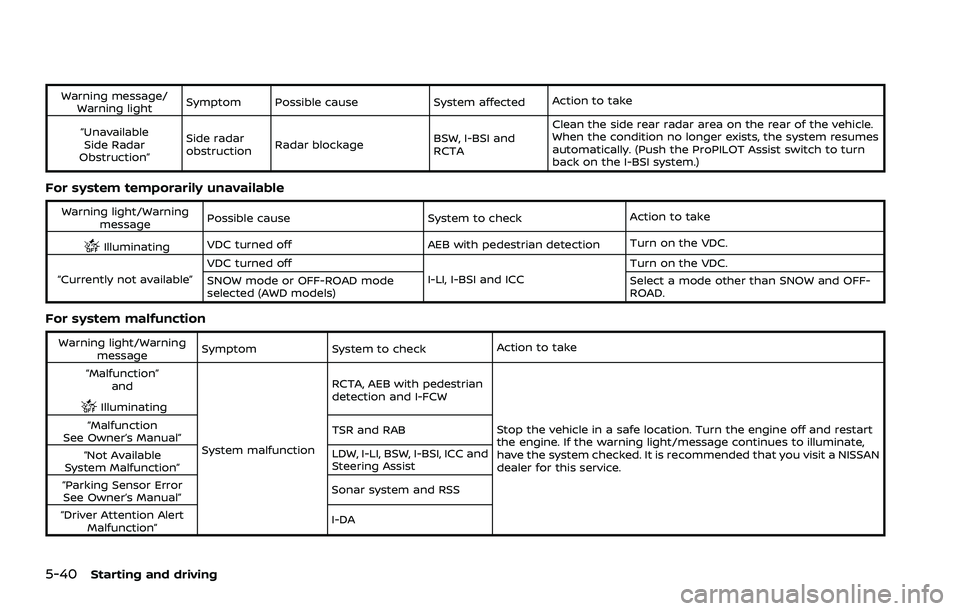
5-40Starting and driving
Warning message/Warning light Symptom Possible cause System affected
Action to take
“Unavailable Side Radar
Obstruction” Side radar
obstruction
Radar blockage
BSW, I-BSI and
RCTAClean the side rear radar area on the rear of the vehicle.
When the condition no longer exists, the system resumes
automatically. (Push the ProPILOT Assist switch to turn
back on the I-BSI system.)
For system temporarily unavailable
Warning light/Warning
message Possible cause
System to checkAction to take
IlluminatingVDC turned off AEB with pedestrian detection
Turn on the VDC.
“Currently not available” VDC turned off
I-LI, I-BSI and ICCTurn on the VDC.
SNOW mode or OFF-ROAD mode
selected (AWD models) Select a mode other than SNOW and OFF-
ROAD.
For system malfunction
Warning light/Warning
message Symptom
System to check Action to take
“Malfunction” and
Illuminating
System malfunction RCTA, AEB with pedestrian
detection and I-FCW
Stop the vehicle in a safe location. Turn the engine off and restart
the engine. If the warning light/message continues to illuminate,
have the system checked. It is recommended that you visit a NISSAN
dealer for this service.
“Malfunction
See Owner’s Manual” TSR and RAB
“Not Available
System Malfunction” LDW, I-LI, BSW, I-BSI, ICC and
Steering Assist
“Parking Sensor Error See Owner’s Manual” Sonar system and RSS
“Driver Attention Alert Malfunction” I-DA
Page 317 of 556
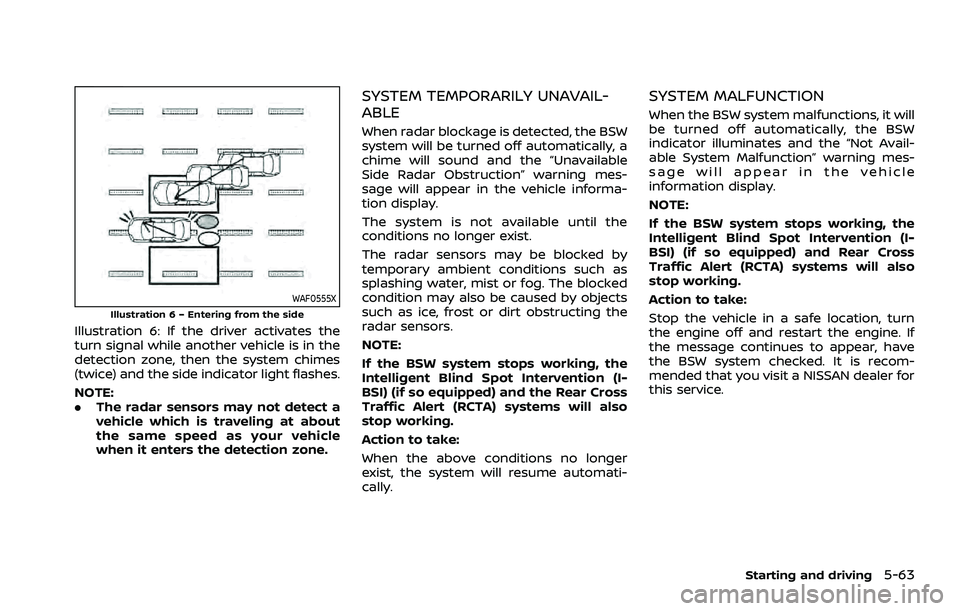
WAF0555XIllustration 6 – Entering from the side
Illustration 6: If the driver activates the
turn signal while another vehicle is in the
detection zone, then the system chimes
(twice) and the side indicator light flashes.
NOTE:
.The radar sensors may not detect a
vehicle which is traveling at about
the same speed as your vehicle
when it enters the detection zone.
SYSTEM TEMPORARILY UNAVAIL-
ABLE
When radar blockage is detected, the BSW
system will be turned off automatically, a
chime will sound and the “Unavailable
Side Radar Obstruction” warning mes-
sage will appear in the vehicle informa-
tion display.
The system is not available until the
conditions no longer exist.
The radar sensors may be blocked by
temporary ambient conditions such as
splashing water, mist or fog. The blocked
condition may also be caused by objects
such as ice, frost or dirt obstructing the
radar sensors.
NOTE:
If the BSW system stops working, the
Intelligent Blind Spot Intervention (I-
BSI) (if so equipped) and the Rear Cross
Traffic Alert (RCTA) systems will also
stop working.
Action to take:
When the above conditions no longer
exist, the system will resume automati-
cally.
SYSTEM MALFUNCTION
When the BSW system malfunctions, it will
be turned off automatically, the BSW
indicator illuminates and the “Not Avail-
able System Malfunction” warning mes-
sage will appear in the vehicle
information display.
NOTE:
If the BSW system stops working, the
Intelligent Blind Spot Intervention (I-
BSI) (if so equipped) and Rear Cross
Traffic Alert (RCTA) systems will also
stop working.
Action to take:
Stop the vehicle in a safe location, turn
the engine off and restart the engine. If
the message continues to appear, have
the BSW system checked. It is recom-
mended that you visit a NISSAN dealer for
this service.
Starting and driving5-63
Page 318 of 556
5-64Starting and driving
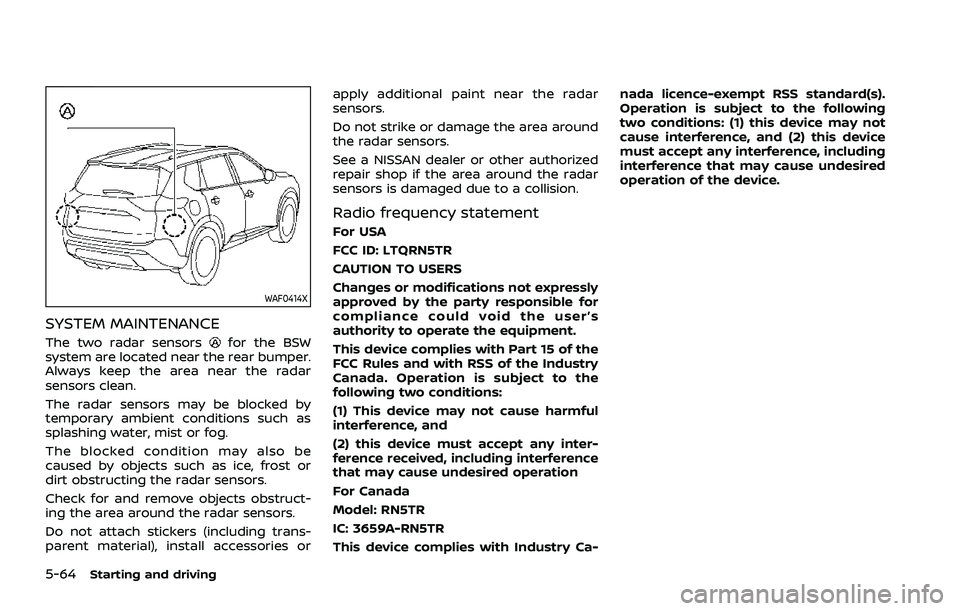
WAF0414X
SYSTEM MAINTENANCE
The two radar sensorsfor the BSW
system are located near the rear bumper.
Always keep the area near the radar
sensors clean.
The radar sensors may be blocked by
temporary ambient conditions such as
splashing water, mist or fog.
The blocked condition may also be
caused by objects such as ice, frost or
dirt obstructing the radar sensors.
Check for and remove objects obstruct-
ing the area around the radar sensors.
Do not attach stickers (including trans-
parent material), install accessories or apply additional paint near the radar
sensors.
Do not strike or damage the area around
the radar sensors.
See a NISSAN dealer or other authorized
repair shop if the area around the radar
sensors is damaged due to a collision.
Radio frequency statement
For USA
FCC ID: LTQRN5TR
CAUTION TO USERS
Changes or modifications not expressly
approved by the party responsible for
compliance could void the user’s
authority to operate the equipment.
This device complies with Part 15 of the
FCC Rules and with RSS of the Industry
Canada. Operation is subject to the
following two conditions:
(1) This device may not cause harmful
interference, and
(2) this device must accept any inter-
ference received, including interference
that may cause undesired operation
For Canada
Model: RN5TR
IC: 3659A-RN5TR
This device complies with Industry Ca-nada licence-exempt RSS standard(s).
Operation is subject to the following
two conditions: (1) this device may not
cause interference, and (2) this device
must accept any interference, including
interference that may cause undesired
operation of the device.
Page 328 of 556
5-74Starting and driving
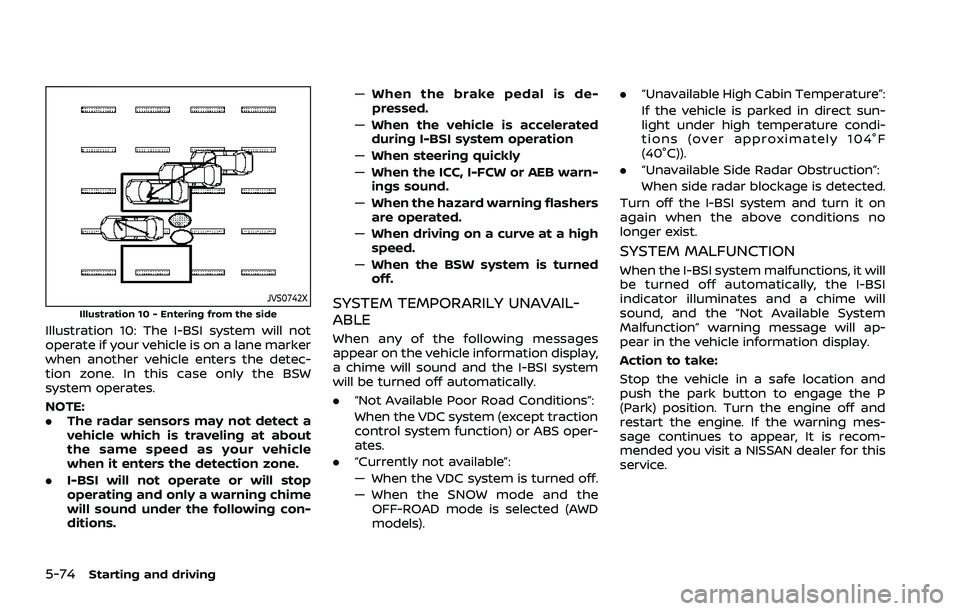
JVS0742XIllustration 10 - Entering from the side
Illustration 10: The I-BSI system will not
operate if your vehicle is on a lane marker
when another vehicle enters the detec-
tion zone. In this case only the BSW
system operates.
NOTE:
.The radar sensors may not detect a
vehicle which is traveling at about
the same speed as your vehicle
when it enters the detection zone.
. I-BSI will not operate or will stop
operating and only a warning chime
will sound under the following con-
ditions. —
When the brake pedal is de-
pressed.
— When the vehicle is accelerated
during I-BSI system operation
— When steering quickly
— When the ICC, I-FCW or AEB warn-
ings sound.
— When the hazard warning flashers
are operated.
— When driving on a curve at a high
speed.
— When the BSW system is turned
off.
SYSTEM TEMPORARILY UNAVAIL-
ABLE
When any of the following messages
appear on the vehicle information display,
a chime will sound and the I-BSI system
will be turned off automatically.
. “Not Available Poor Road Conditions”:
When the VDC system (except traction
control system function) or ABS oper-
ates.
. “Currently not available”:
— When the VDC system is turned off.
— When the SNOW mode and the
OFF-ROAD mode is selected (AWD
models). .
“Unavailable High Cabin Temperature”:
If the vehicle is parked in direct sun-
light under high temperature condi-
tions (over approximately 104°F
(40°C)).
. “Unavailable Side Radar Obstruction”:
When side radar blockage is detected.
Turn off the I-BSI system and turn it on
again when the above conditions no
longer exist.
SYSTEM MALFUNCTION
When the I-BSI system malfunctions, it will
be turned off automatically, the I-BSI
indicator illuminates and a chime will
sound, and the “Not Available System
Malfunction” warning message will ap-
pear in the vehicle information display.
Action to take:
Stop the vehicle in a safe location and
push the park button to engage the P
(Park) position. Turn the engine off and
restart the engine. If the warning mes-
sage continues to appear, It is recom-
mended you visit a NISSAN dealer for this
service.
Page 329 of 556
WAF0633X
SYSTEM MAINTENANCE
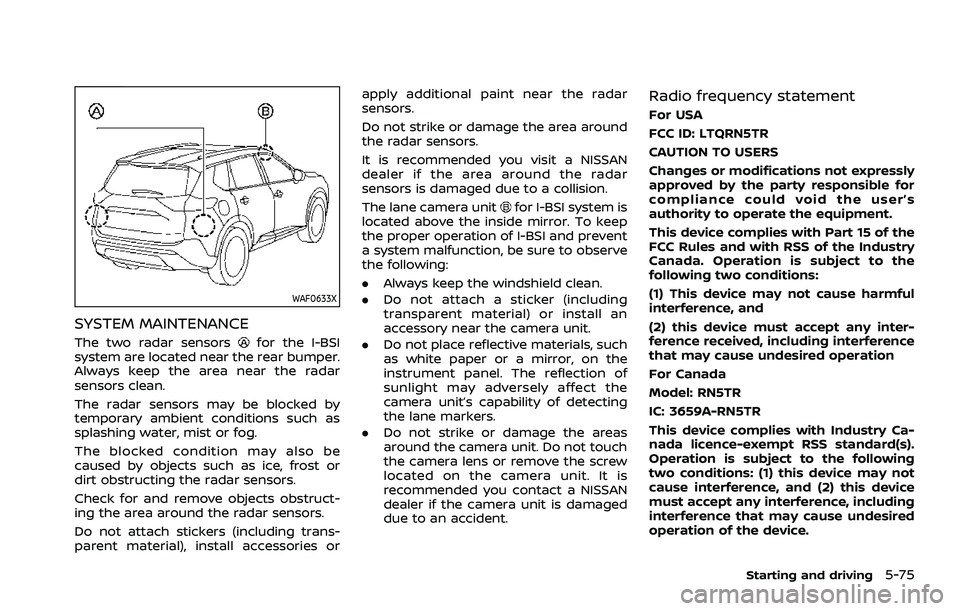
The two radar sensorsfor the I-BSI
system are located near the rear bumper.
Always keep the area near the radar
sensors clean.
The radar sensors may be blocked by
temporary ambient conditions such as
splashing water, mist or fog.
The blocked condition may also be
caused by objects such as ice, frost or
dirt obstructing the radar sensors.
Check for and remove objects obstruct-
ing the area around the radar sensors.
Do not attach stickers (including trans-
parent material), install accessories or apply additional paint near the radar
sensors.
Do not strike or damage the area around
the radar sensors.
It is recommended you visit a NISSAN
dealer if the area around the radar
sensors is damaged due to a collision.
The lane camera unit
for I-BSI system is
located above the inside mirror. To keep
the proper operation of I-BSI and prevent
a system malfunction, be sure to observe
the following:
. Always keep the windshield clean.
. Do not attach a sticker (including
transparent material) or install an
accessory near the camera unit.
. Do not place reflective materials, such
as white paper or a mirror, on the
instrument panel. The reflection of
sunlight may adversely affect the
camera unit’s capability of detecting
the lane markers.
. Do not strike or damage the areas
around the camera unit. Do not touch
the camera lens or remove the screw
located on the camera unit. It is
recommended you contact a NISSAN
dealer if the camera unit is damaged
due to an accident.
Radio frequency statement
For USA
FCC ID: LTQRN5TR
CAUTION TO USERS
Changes or modifications not expressly
approved by the party responsible for
compliance could void the user’s
authority to operate the equipment.
This device complies with Part 15 of the
FCC Rules and with RSS of the Industry
Canada. Operation is subject to the
following two conditions:
(1) This device may not cause harmful
interference, and
(2) this device must accept any inter-
ference received, including interference
that may cause undesired operation
For Canada
Model: RN5TR
IC: 3659A-RN5TR
This device complies with Industry Ca-
nada licence-exempt RSS standard(s).
Operation is subject to the following
two conditions: (1) this device may not
cause interference, and (2) this device
must accept any interference, including
interference that may cause undesired
operation of the device.
Starting and driving5-75
Page 334 of 556
5-80Starting and driving
.The following conditions may re-
duce the ability of the radar to
detect other vehicles:
— Severe weather
— Road spray
— Ice/frost/dirt build-up on the
vehicle
. Do not attach stickers (including
transparent material), install ac-
cessories or apply additional
paint near the radar sensors.
These conditions may reduce the
ability of the radar to detect other
vehicles
. Excessive noise (e.g. audio sys-
tem volume, open vehicle win-
dow) will interfere with the
chime sound, and it may not be
heard.
JVS0172XIllustration 1
JVS0173XIllustration 2
NOTE:
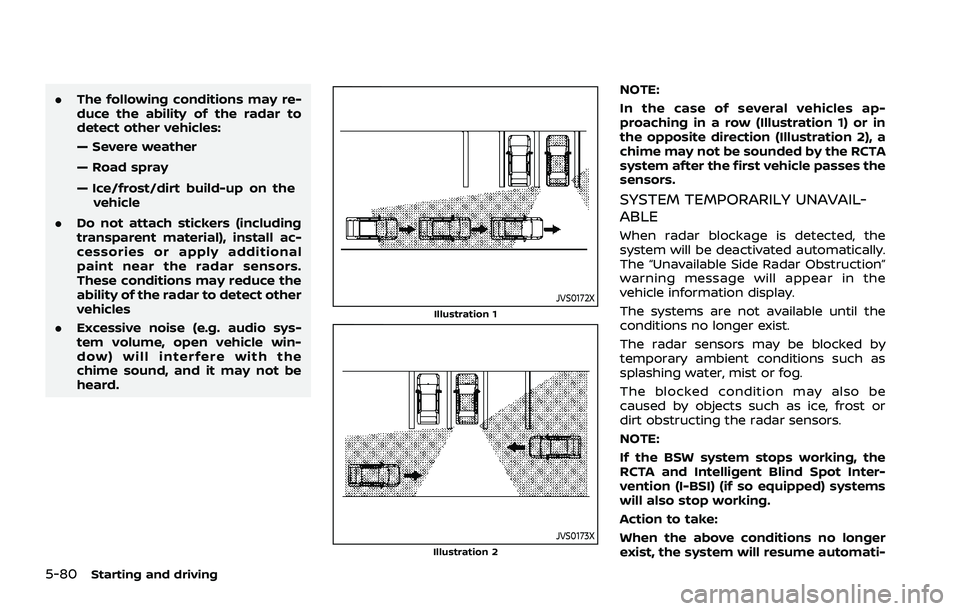
In the case of several vehicles ap-
proaching in a row (Illustration 1) or in
the opposite direction (Illustration 2), a
chime may not be sounded by the RCTA
system after the first vehicle passes the
sensors.
SYSTEM TEMPORARILY UNAVAIL-
ABLE
When radar blockage is detected, the
system will be deactivated automatically.
The “Unavailable Side Radar Obstruction”
warning message will appear in the
vehicle information display.
The systems are not available until the
conditions no longer exist.
The radar sensors may be blocked by
temporary ambient conditions such as
splashing water, mist or fog.
The blocked condition may also be
caused by objects such as ice, frost or
dirt obstructing the radar sensors.
NOTE:
If the BSW system stops working, the
RCTA and Intelligent Blind Spot Inter-
vention (I-BSI) (if so equipped) systems
will also stop working.
Action to take:
When the above conditions no longer
exist, the system will resume automati-