lock NISSAN ROGUE 2021 Owner´s Manual
[x] Cancel search | Manufacturer: NISSAN, Model Year: 2021, Model line: ROGUE, Model: NISSAN ROGUE 2021Pages: 556, PDF Size: 2.7 MB
Page 195 of 556
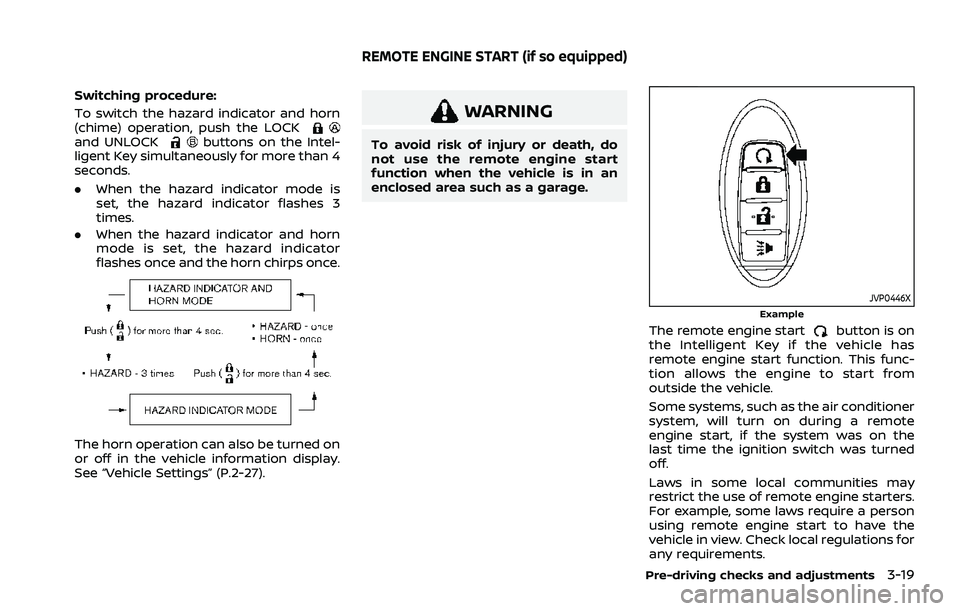
Switching procedure:
To switch the hazard indicator and horn
(chime) operation, push the LOCK
and UNLOCKbuttons on the Intel-
ligent Key simultaneously for more than 4
seconds.
. When the hazard indicator mode is
set, the hazard indicator flashes 3
times.
. When the hazard indicator and horn
mode is set, the hazard indicator
flashes once and the horn chirps once.
The horn operation can also be turned on
or off in the vehicle information display.
See “Vehicle Settings” (P.2-27).
WARNING
To avoid risk of injury or death, do
not use the remote engine start
function when the vehicle is in an
enclosed area such as a garage.
JVP0446XExample
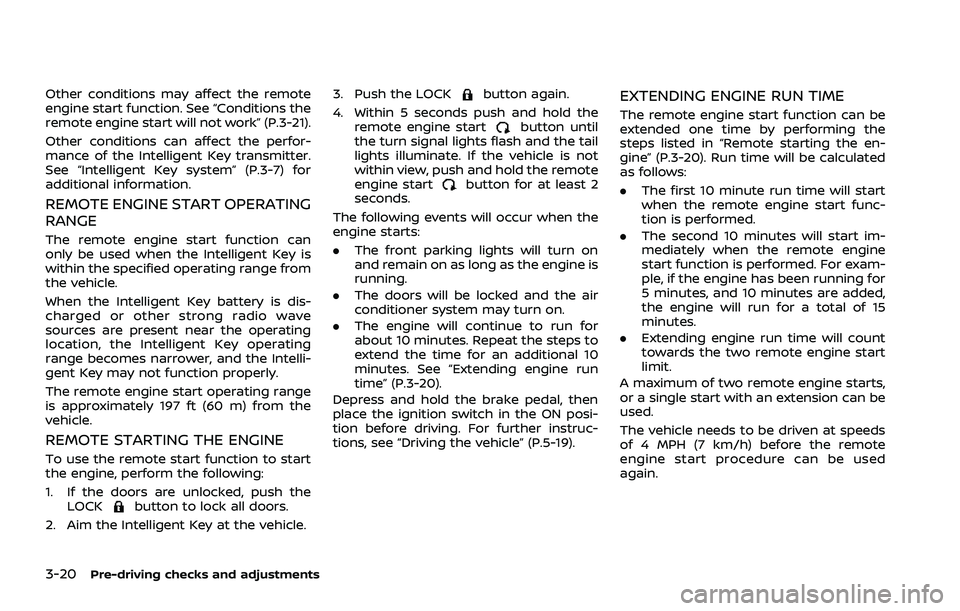
The remote engine startbutton is on
the Intelligent Key if the vehicle has
remote engine start function. This func-
tion allows the engine to start from
outside the vehicle.
Some systems, such as the air conditioner
system, will turn on during a remote
engine start, if the system was on the
last time the ignition switch was turned
off.
Laws in some local communities may
restrict the use of remote engine starters.
For example, some laws require a person
using remote engine start to have the
vehicle in view. Check local regulations for
any requirements.
Pre-driving checks and adjustments3-19
REMOTE ENGINE START (if so equipped)
Page 196 of 556
3-20Pre-driving checks and adjustments
Other conditions may affect the remote
engine start function. See “Conditions the
remote engine start will not work” (P.3-21).
Other conditions can affect the perfor-
mance of the Intelligent Key transmitter.
See “Intelligent Key system” (P.3-7) for
additional information.
REMOTE ENGINE START OPERATING
RANGE
The remote engine start function can
only be used when the Intelligent Key is
within the specified operating range from
the vehicle.
When the Intelligent Key battery is dis-
charged or other strong radio wave
sources are present near the operating
location, the Intelligent Key operating
range becomes narrower, and the Intelli-
gent Key may not function properly.
The remote engine start operating range
is approximately 197 ft (60 m) from the
vehicle.
REMOTE STARTING THE ENGINE
To use the remote start function to start
the engine, perform the following:
1. If the doors are unlocked, push theLOCK
button to lock all doors.
2. Aim the Intelligent Key at the vehicle. 3. Push the LOCK
button again.
4. Within 5 seconds push and hold the remote engine start
button until
the turn signal lights flash and the tail
lights illuminate. If the vehicle is not
within view, push and hold the remote
engine start
button for at least 2
seconds.
The following events will occur when the
engine starts:
. The front parking lights will turn on
and remain on as long as the engine is
running.
. The doors will be locked and the air
conditioner system may turn on.
. The engine will continue to run for
about 10 minutes. Repeat the steps to
extend the time for an additional 10
minutes. See “Extending engine run
time” (P.3-20).
Depress and hold the brake pedal, then
place the ignition switch in the ON posi-
tion before driving. For further instruc-
tions, see “Driving the vehicle” (P.5-19).
EXTENDING ENGINE RUN TIME
The remote engine start function can be
extended one time by performing the
steps listed in “Remote starting the en-
gine” (P.3-20). Run time will be calculated
as follows:
. The first 10 minute run time will start
when the remote engine start func-
tion is performed.
. The second 10 minutes will start im-
mediately when the remote engine
start function is performed. For exam-
ple, if the engine has been running for
5 minutes, and 10 minutes are added,
the engine will run for a total of 15
minutes.
. Extending engine run time will count
towards the two remote engine start
limit.
A maximum of two remote engine starts,
or a single start with an extension can be
used.
The vehicle needs to be driven at speeds
of 4 MPH (7 km/h) before the remote
engine start procedure can be used
again.
Page 197 of 556
CANCELING A REMOTE ENGINE
START
To cancel a remote engine start, perform
one of the following:
.Aim the Intelligent Key at the vehicle
and push the remote engine start
button until the front parking lights
turn off.
. Turn on the hazard indicator flashers.
. Cycle the ignition switch ON and then
OFF.
. The extended engine run time has
expired.
. The first 10 minute timer has expired.
. The engine hood has been opened.
. The shift position is shifted out of the
P (Park) position.
. The theft alarm sounds due to illegal
entry into the vehicle.
. The ignition switch is pushed without
an Intelligent Key in the vehicle.
. The ignition switch is pushed with an
Intelligent Key in the vehicle but the
brake pedal is not depressed.
. The accelerator pedal is depressed.
. The vehicle moves after a remote
engine start. (The hazard indicator
flashers blink once and the engine is
stopped.)
CONDITIONS THE REMOTE ENGINE
START WILL NOT WORK
The remote engine start will not operate
if any of the following conditions are
present:
.The ignition switch is placed in the ON
position.
. The hood is not securely closed.
. The hazard indicator flashers are on.
. The engine is still running. The engine
must be completely stopped. This is
not applicable when extending engine
run time.
. The remote engine start
button is
not pushed and held for at least 2
seconds.
. The remote engine start
button is
not pushed and held within 5 seconds
of pushing the LOCK
button.
. The doors are not closed and locked.
(The hazard indicator flashers blink
twice to indicate the function is not
operated.)
. The liftgate is open. (The hazard
indicator flashers blink twice to indi-
cate the function is not operated.)
. The Key System Error warning mes-
sage remains on in the vehicle infor-
mation display. .
The theft alarm sounds due to illegal
entry into the vehicle. (The hazard
indicator flashers blink twice to indi-
cate the function is not operated.)
. Two remote engine starts, or a single
remote engine start with an exten-
sion, have already been used. (To use
the remote engine start function
again, the vehicle needs to be driven
at speeds of 4 MPH (7 km/h).)
. The shift position is not in the P (Park)
position.
Pre-driving checks and adjustments3-21
Page 198 of 556
3-22Pre-driving checks and adjustments
WARNING
.Make sure the hood is completely
closed and latched before driving.
Failure to do so could cause the
hood to fly open and result in an
accident.
. Never open the hood if steam or
smoke is coming from the engine
compartment to avoid injury.
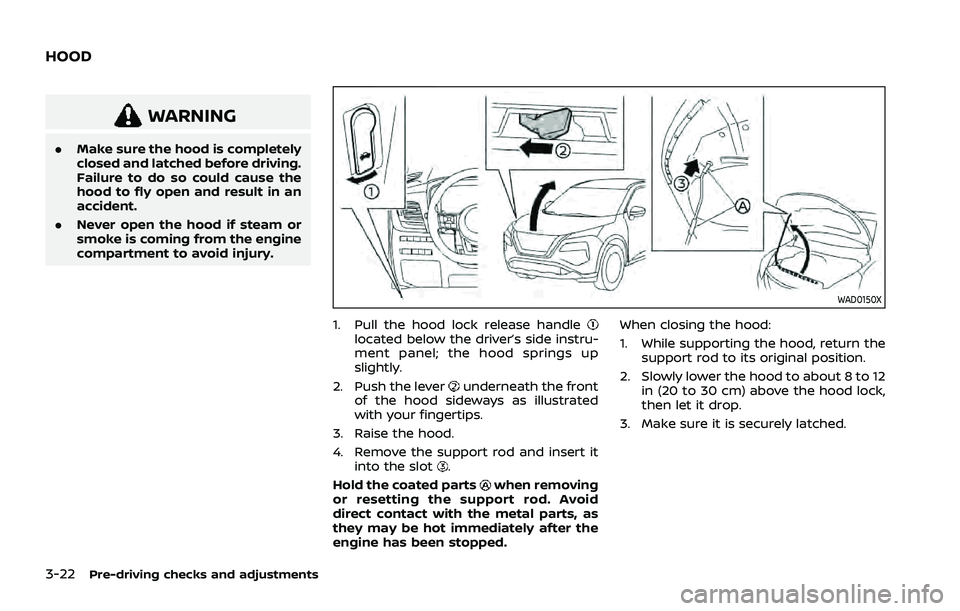
WAD0150X
1. Pull the hood lock release handlelocated below the driver’s side instru-
ment panel; the hood springs up
slightly.
2. Push the lever
underneath the front
of the hood sideways as illustrated
with your fingertips.
3. Raise the hood.
4. Remove the support rod and insert it into the slot
.
Hold the coated parts
when removing
or resetting the support rod. Avoid
direct contact with the metal parts, as
they may be hot immediately after the
engine has been stopped. When closing the hood:
1. While supporting the hood, return the
support rod to its original position.
2. Slowly lower the hood to about 8 to 12 in (20 to 30 cm) above the hood lock,
then let it drop.
3. Make sure it is securely latched.
HOOD
Page 199 of 556
WARNING
.Always be sure the liftgate has
been closed securely to prevent it
from opening while driving.
. Do not drive with the liftgate
open. This could allow dangerous
exhaust gases to be drawn into
the vehicle. For additional infor-
mation, refer to “Exhaust gas
(carbon monoxide)” (P.5-5).
. To help avoid risk of injury or
death through unintended opera-
tion of the vehicle and or its
systems, including entrapment
in windows or inadvertent door
lock activation, do not leave chil-
dren, people who require the
assistance of others or pets un-
attended in your vehicle. Addi-
tionally, the temperature inside a
closed vehicle on a warm day can
quickly become high enough to
cause a significant risk of injury
or death to people and pets.
. Always be sure that hands and
feet are clear of the door frame to
avoid injury while closing the
liftgate.
CAUTION
Do not use accessory carriers that
attach to the liftgate. Doing so will
cause damage to the vehicle.
WAD0151X
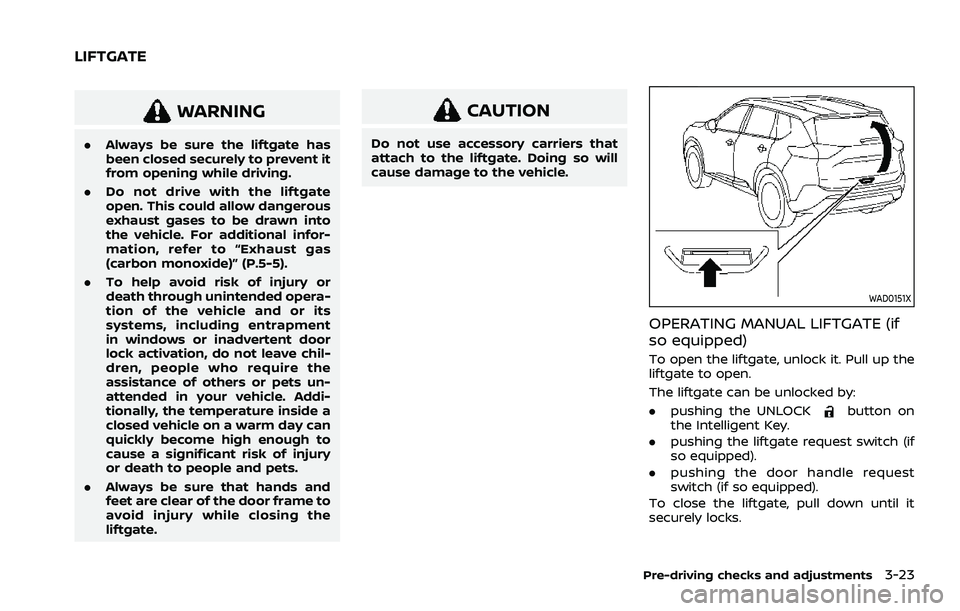
OPERATING MANUAL LIFTGATE (if
so equipped)
To open the liftgate, unlock it. Pull up the
liftgate to open.
The liftgate can be unlocked by:
.pushing the UNLOCK
button on
the Intelligent Key.
. pushing the liftgate request switch (if
so equipped).
. pushing the door handle request
switch (if so equipped).
To close the liftgate, pull down until it
securely locks.
Pre-driving checks and adjustments3-23
LIFTGATE
Page 200 of 556
3-24Pre-driving checks and adjustments
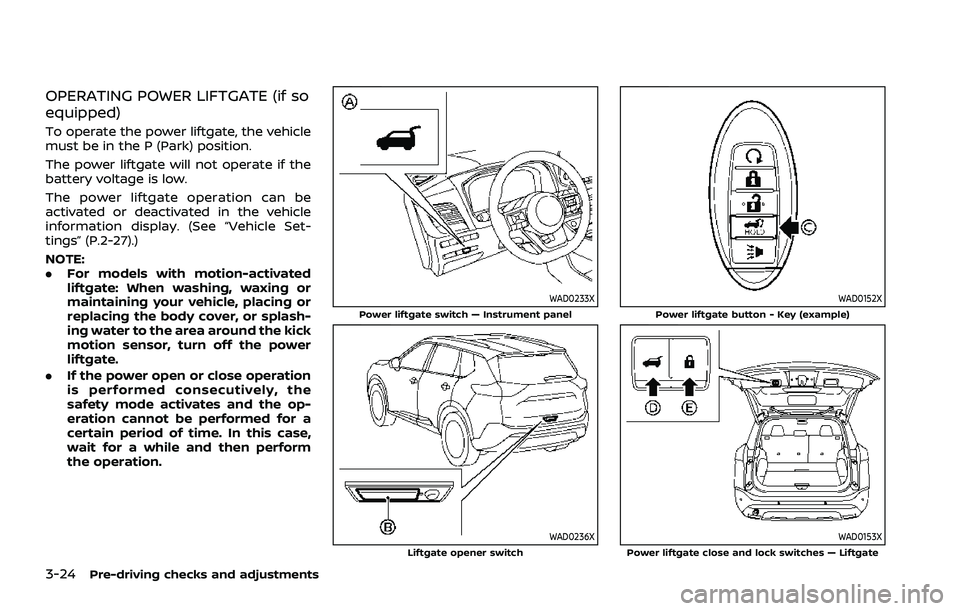
OPERATING POWER LIFTGATE (if so
equipped)
To operate the power liftgate, the vehicle
must be in the P (Park) position.
The power liftgate will not operate if the
battery voltage is low.
The power liftgate operation can be
activated or deactivated in the vehicle
information display. (See “Vehicle Set-
tings” (P.2-27).)
NOTE:
.For models with motion-activated
liftgate: When washing, waxing or
maintaining your vehicle, placing or
replacing the body cover, or splash-
ing water to the area around the kick
motion sensor, turn off the power
liftgate.
. If the power open or close operation
is performed consecutively, the
safety mode activates and the op-
eration cannot be performed for a
certain period of time. In this case,
wait for a while and then perform
the operation.
WAD0233XPower liftgate switch — Instrument panel
WAD0236XLiftgate opener switch
WAD0152XPower liftgate button - Key (example)
WAD0153XPower liftgate close and lock switches — Liftgate
Page 201 of 556
Power open (using switches)
When the liftgate is fully closed, the
liftgate will fully open automatically by:
.pushing the power liftgate switch
on the instrument panel for more
than 1 second
. pushing the liftgate opener switch
.pushing the power liftgate buttonon the key for more than 1 second
The outside chime sounds when the
liftgate starts opening.
NOTE:
The liftgate can be opened by the
power liftgate switch
or the power
liftgate buttoneven if the
liftgate is locked. The liftgate can be
unlocked and opened independently of
the other doors, even when they are
locked. The liftgate must be unlocked
(or the Intelligent Key must be within
range) to open with the liftgate opener
switch
.
Power close (using switches)
When the liftgate is fully opened, the
liftgate will fully close automatically by:
. pushing the power liftgate switch
on the instrument panel for more
than 1 second .
pushing the power liftgate button
on the key for more than 1 second
. pushing the power liftgate close
switch
on the lower part of the
liftgate for 1 second
The outside chime sounds when the
liftgate starts closing.
Power close and lock
When the liftgate is fully opened and the
Intelligent Key is carried with you near the
liftgate, the liftgate will fully close and lock
automatically by pushing the power lift-
gate lock switch
on the lower part of
the liftgate.
The outside chime sounds when the
liftgate starts closing.
Stop and reverse function (if so
equipped)
The power liftgate will stop immediately if
one of the following actions is performed
during power open or close.
. pushing the power liftgate switch
.pushing the liftgate opener switch
.pushing the power liftgate close
switchon the lower part of the
liftgate
. pushing the power liftgate button
on the key
And then the power liftgate will move in the reverse direction if one of the above
actions is performed again.
The outside chime sounds when the
liftgate starts to reverse.
Auto reverse function
The auto-reverse function enables the
liftgate to automatically reverse when
something is caught in the liftgate as it
is opening or closing. When the control
unit detects an obstacle, the liftgate will
reverse and return to the full open or full
close position.
If a second obstacle is detected, the
liftgate motion will stop. The liftgate will
enter the manual mode.
A pinch sensor is mounted on each side
of the liftgate. If an obstacle is detected
by the pinch sensor during power close,
the liftgate will reverse and return to the
full open position immediately.
NOTE:
If the pinch sensor is damaged or
removed, the power close function will
not operate.
WARNING
There is a small distance immedi-
ately before the closed position that
cannot be detected. Make sure that
Pre-driving checks and adjustments3-25
Page 203 of 556
.Three beeps will sound and the lift-
gate will begin moving within 2 sec-
onds after the kick.
WARNING
Prevent unintentional liftgate open-
ing/closing. There may be conditions
when opening/closing the liftgate is
not desired. Keep the Intelligent Key
out of range of the liftgate, (7 ft (2 m)
or more) or inside the vehicle, when
washing or working around the back
of the vehicle.
NOTE:
. The kick motion sensor may not
function under the following condi-
tions:
—When operating near a location
where strong radio waves are
transmitted, such as a TV tower,
power station or broadcasting
station.
— When the vehicle is parked near a
parking meter.
. The power liftgate may not operate
when your foot remains in the oper-
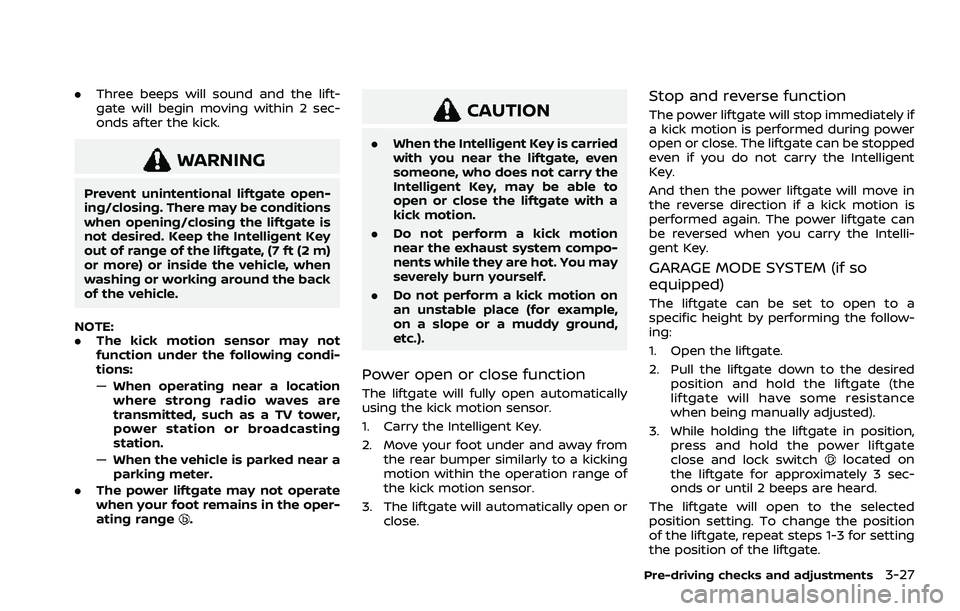
ating range
.
CAUTION
.When the Intelligent Key is carried
with you near the liftgate, even
someone, who does not carry the
Intelligent Key, may be able to
open or close the liftgate with a
kick motion.
. Do not perform a kick motion
near the exhaust system compo-
nents while they are hot. You may
severely burn yourself.
. Do not perform a kick motion on
an unstable place (for example,
on a slope or a muddy ground,
etc.).
Power open or close function
The liftgate will fully open automatically
using the kick motion sensor.
1. Carry the Intelligent Key.
2. Move your foot under and away from
the rear bumper similarly to a kicking
motion within the operation range of
the kick motion sensor.
3. The liftgate will automatically open or close.
Stop and reverse function
The power liftgate will stop immediately if
a kick motion is performed during power
open or close. The liftgate can be stopped
even if you do not carry the Intelligent
Key.
And then the power liftgate will move in
the reverse direction if a kick motion is
performed again. The power liftgate can
be reversed when you carry the Intelli-
gent Key.
GARAGE MODE SYSTEM (if so
equipped)
The liftgate can be set to open to a
specific height by performing the follow-
ing:
1. Open the liftgate.
2. Pull the liftgate down to the desiredposition and hold the liftgate (the
liftgate will have some resistance
when being manually adjusted).
3. While holding the liftgate in position, press and hold the power liftgate
close and lock switch
located on
the liftgate for approximately 3 sec-
onds or until 2 beeps are heard.
The liftgate will open to the selected
position setting. To change the position
of the liftgate, repeat steps 1-3 for setting
the position of the liftgate.
Pre-driving checks and adjustments3-27
Page 204 of 556
3-28Pre-driving checks and adjustments
CAUTION
Do not set the height of the liftgate
below approximately 1/3 of the way
to the floor using garage mode. Even
if you set the height below approxi-
mately 1/3 of the way to the floor,
the height will automatically be set
to approximately 1/3 of the way to
the floor.
AUTO CLOSURE (if so equipped)
When the liftgate reaches the secondary
position, the closure motor engages and
pulls the liftgate to its primary latch
position.
Do not apply excessive force when the
auto closure is operating. Excessive
force applied may cause the mechan-
ism to malfunction.
CAUTION
.The liftgate will automatically
close from the secondary posi-
tion. To avoid pinching, keep
hands and fingers away from
liftgate opening. .
Do not let children operate the
liftgate.
WAD0155X
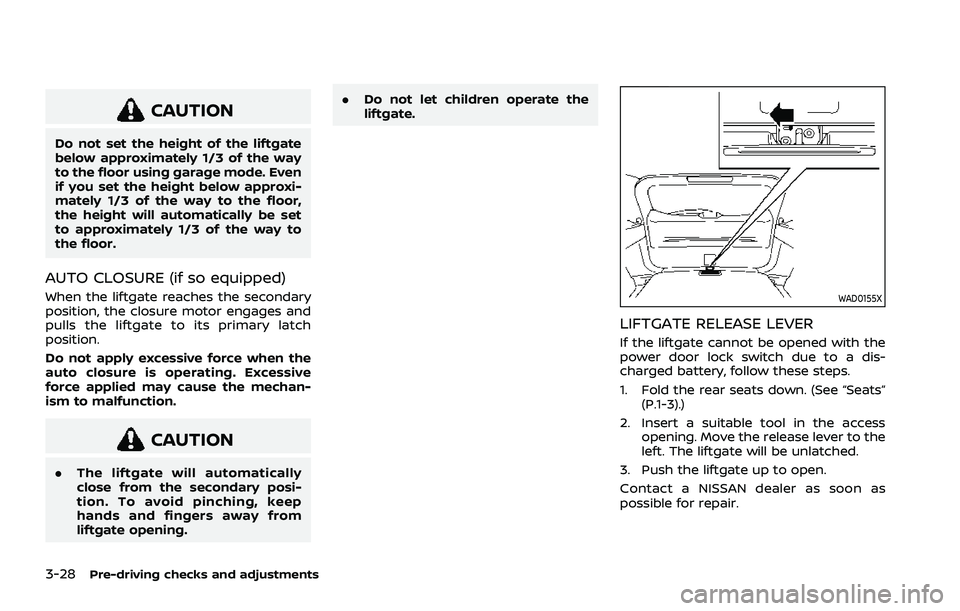
LIFTGATE RELEASE LEVER
If the liftgate cannot be opened with the
power door lock switch due to a dis-
charged battery, follow these steps.
1. Fold the rear seats down. (See “Seats”
(P.1-3).)
2. Insert a suitable tool in the access opening. Move the release lever to the
left. The liftgate will be unlatched.
3. Push the liftgate up to open.
Contact a NISSAN dealer as soon as
possible for repair.
Page 207 of 556
filler opening slowly and fully. Insert the
nozzle of the portable fuel container into
the opening along the funnel and fill the
fuel tank.
After refueling, remove the funnel from
the fuel-filler opening. Wipe the funnel
clean and return it to the tool bag.
CAUTION
.Do not insert the nozzle of the
portable fuel container directly
into the fuel-filler opening. Doing
so may damage the opening and
the fuel system.
. Use only the funnel provided with
your vehicle. Otherwise, the fuel-
filler opening and the fuel system
may be damaged.
WARNING
.Do not adjust the steering wheel
while driving. You could lose con-
trol of your vehicle and cause an
accident.
. Do not adjust the steering wheel
any closer to you than is neces-
sary for proper steering opera-
tion and comfort. The driver’s air
bag inflates with great force. If
you are unrestrained, leaning for-
ward, sitting sideways or out of
position in any way, you are at
greater risk of injury or death in a
crash. You may also receive ser-
ious or fatal injuries from the air
bag if you are up against it when
it inflates. Always sit back against
the seatback and as far away as
practical from the steering wheel.
Always use the seat belts.
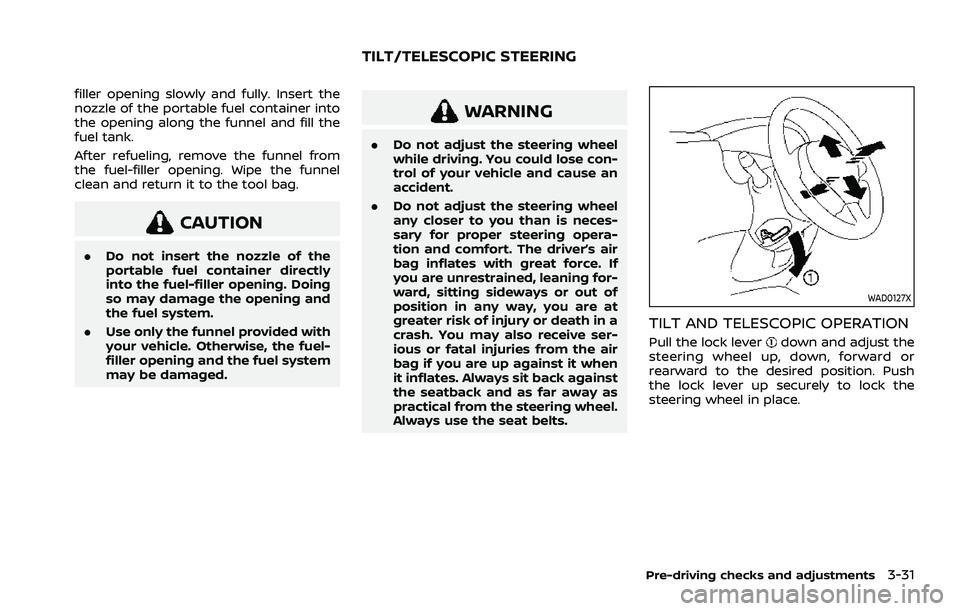
WAD0127X
TILT AND TELESCOPIC OPERATION
Pull the lock leverdown and adjust the
steering wheel up, down, forward or
rearward to the desired position. Push
the lock lever up securely to lock the
steering wheel in place.
Pre-driving checks and adjustments3-31
TILT/TELESCOPIC STEERING