lock NISSAN ROGUE 2021 Owner´s Manual
[x] Cancel search | Manufacturer: NISSAN, Model Year: 2021, Model line: ROGUE, Model: NISSAN ROGUE 2021Pages: 556, PDF Size: 2.7 MB
Page 208 of 556
3-32Pre-driving checks and adjustments
WAD0250X
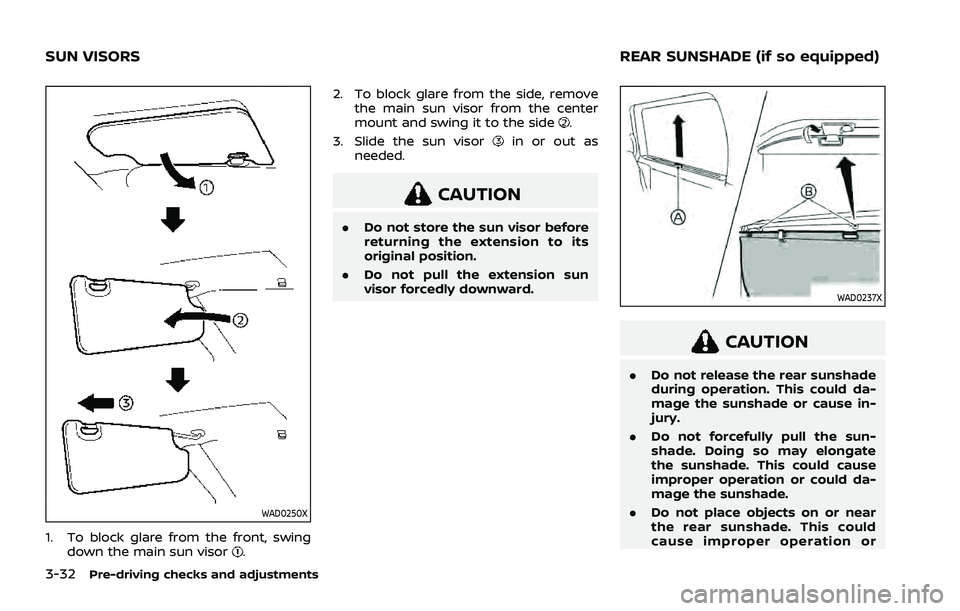
1. To block glare from the front, swingdown the main sun visor. 2. To block glare from the side, remove
the main sun visor from the center
mount and swing it to the side
.
3. Slide the sun visor
in or out as
needed.
CAUTION
. Do not store the sun visor before
returning the extension to its
original position.
. Do not pull the extension sun
visor forcedly downward.
WAD0237X
CAUTION
.Do not release the rear sunshade
during operation. This could da-
mage the sunshade or cause in-
jury.
. Do not forcefully pull the sun-
shade. Doing so may elongate
the sunshade. This could cause
improper operation or could da-
mage the sunshade.
. Do not place objects on or near
the rear sunshade. This could
cause improper operation or
SUN VISORS REAR SUNSHADE (if so equipped)
Page 219 of 556
WAE0288X
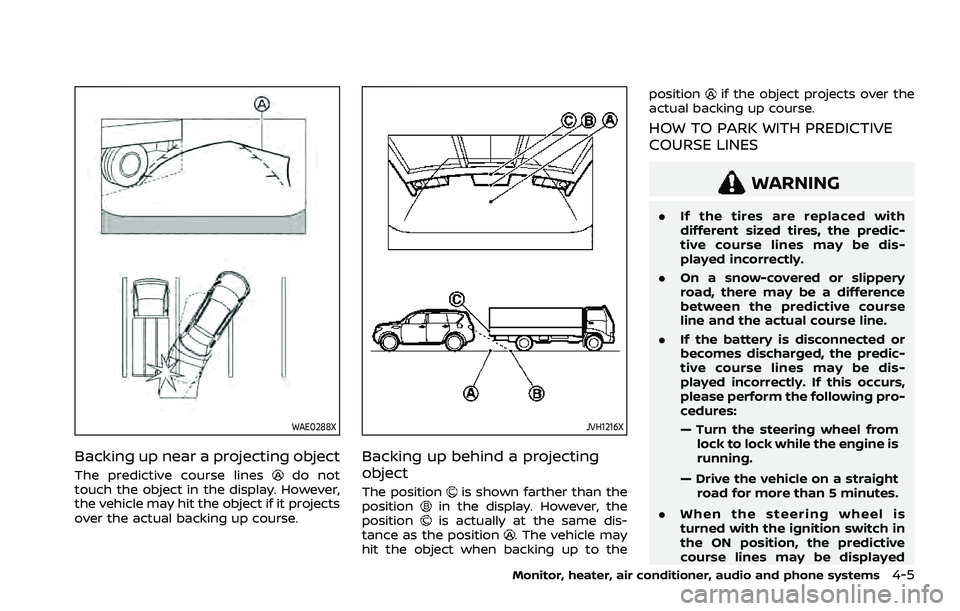
Backing up near a projecting object
The predictive course linesdo not
touch the object in the display. However,
the vehicle may hit the object if it projects
over the actual backing up course.
JVH1216X
Backing up behind a projecting
object
The positionis shown farther than the
positionin the display. However, the
positionis actually at the same dis-
tance as the position. The vehicle may
hit the object when backing up to the position
if the object projects over the
actual backing up course.
HOW TO PARK WITH PREDICTIVE
COURSE LINES
WARNING
. If the tires are replaced with
different sized tires, the predic-
tive course lines may be dis-
played incorrectly.
. On a snow-covered or slippery
road, there may be a difference
between the predictive course
line and the actual course line.
. If the battery is disconnected or
becomes discharged, the predic-
tive course lines may be dis-
played incorrectly. If this occurs,
please perform the following pro-
cedures:
— Turn the steering wheel from
lock to lock while the engine is
running.
— Drive the vehicle on a straight road for more than 5 minutes.
. When the steering wheel is
turned with the ignition switch in
the ON position, the predictive
course lines may be displayed
Monitor, heater, air conditioner, audio and phone systems4-5
Page 230 of 556
4-16Monitor, heater, air conditioner, audio and phone systems
JVH1216X
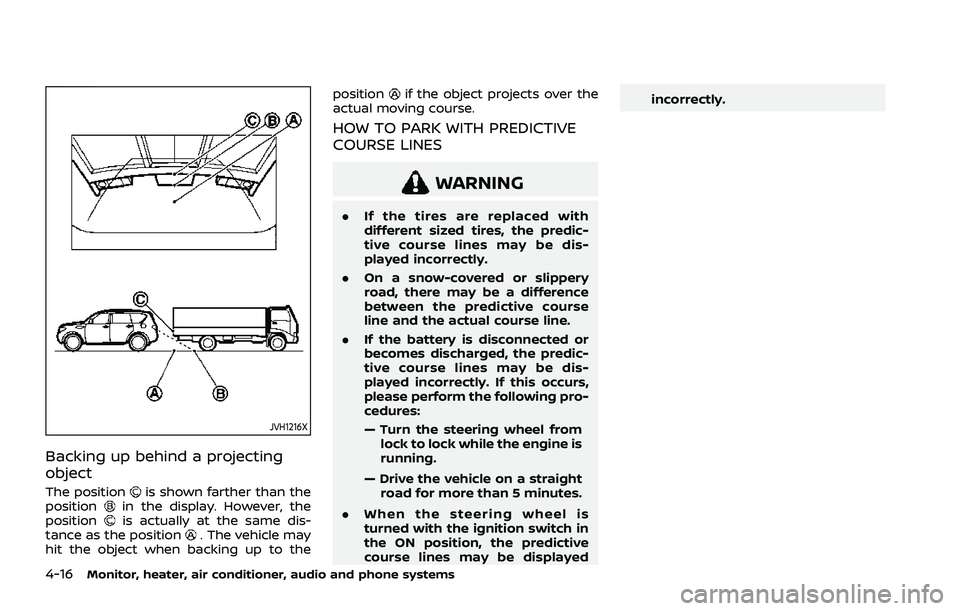
Backing up behind a projecting
object
The positionis shown farther than the
positionin the display. However, the
positionis actually at the same dis-
tance as the position. The vehicle may
hit the object when backing up to the position
if the object projects over the
actual moving course.
HOW TO PARK WITH PREDICTIVE
COURSE LINES
WARNING
. If the tires are replaced with
different sized tires, the predic-
tive course lines may be dis-
played incorrectly.
. On a snow-covered or slippery
road, there may be a difference
between the predictive course
line and the actual course line.
. If the battery is disconnected or
becomes discharged, the predic-
tive course lines may be dis-
played incorrectly. If this occurs,
please perform the following pro-
cedures:
— Turn the steering wheel from
lock to lock while the engine is
running.
— Drive the vehicle on a straight road for more than 5 minutes.
. When the steering wheel is
turned with the ignition switch in
the ON position, the predictive
course lines may be displayed incorrectly.
Page 239 of 556
the muffler, moving shadows, etc.
. The MOD system may not func-
tion properly depending on the
speed, direction, distance or
shape of the moving objects.
. If your vehicle sustains damage
to the parts where the camera is
installed, leaving it misaligned or
bent, the sensing zone may be
altered and the MOD system may
not detect objects properly.
. When the temperature is extre-
mely high or low, the screen may
not display objects clearly. This is
not a malfunction.
NOTE:
The green MOD icon will change to
orange if one of the following has
occurred.
. When the system is malfunctioning.
. When the component temperature
reaches a high level.
. When the rear view camera has
detected a blockage.
If the icon light continues to illuminate
in orange, have the MOD system
checked. It is recommended that you
visit a NISSAN dealer for this service.
WAE0360X
SYSTEM MAINTENANCE
CAUTION
. Do not use alcohol, benzine or
thinner to clean the camera. This
will cause discoloration.
. Do not damage the camera as the
monitor screen may be adversely
affected.
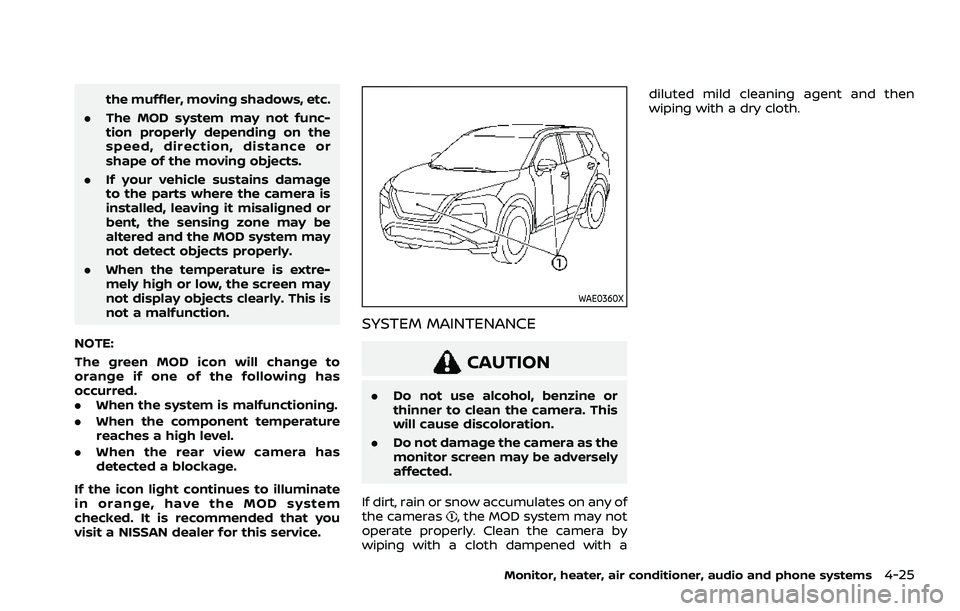
If dirt, rain or snow accumulates on any of
the cameras
, the MOD system may not
operate properly. Clean the camera by
wiping with a cloth dampened with a diluted mild cleaning agent and then
wiping with a dry cloth.
Monitor, heater, air conditioner, audio and phone systems4-25
Page 242 of 556
4-28Monitor, heater, air conditioner, audio and phone systems
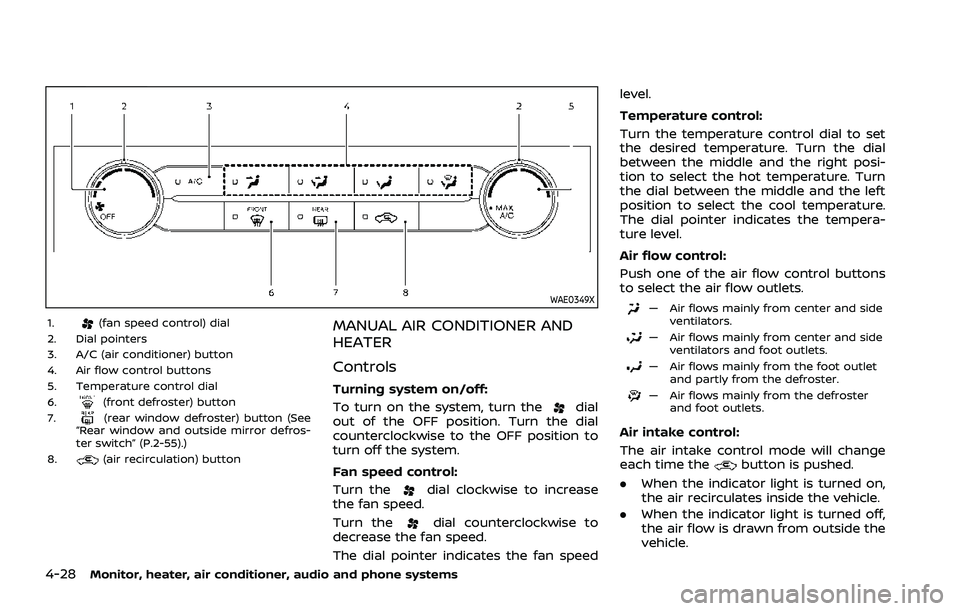
WAE0349X
1.(fan speed control) dial
2. Dial pointers
3. A/C (air conditioner) button
4. Air flow control buttons
5. Temperature control dial
6.
(front defroster) button
7.(rear window defroster) button (See
“Rear window and outside mirror defros-
ter switch” (P.2-55).)
8.
(air recirculation) button
MANUAL AIR CONDITIONER AND
HEATER
Controls
Turning system on/off:
To turn on the system, turn the
dial
out of the OFF position. Turn the dial
counterclockwise to the OFF position to
turn off the system.
Fan speed control:
Turn the
dial clockwise to increase
the fan speed.
Turn the
dial counterclockwise to
decrease the fan speed.
The dial pointer indicates the fan speed level.
Temperature control:
Turn the temperature control dial to set
the desired temperature. Turn the dial
between the middle and the right posi-
tion to select the hot temperature. Turn
the dial between the middle and the left
position to select the cool temperature.
The dial pointer indicates the tempera-
ture level.
Air flow control:
Push one of the air flow control buttons
to select the air flow outlets.
— Air flows mainly from center and side
ventilators.
— Air flows mainly from center and sideventilators and foot outlets.
— Air flows mainly from the foot outletand partly from the defroster.
— Air flows mainly from the defrosterand foot outlets.
Air intake control:
The air intake control mode will change
each time the
button is pushed.
. When the indicator light is turned on,
the air recirculates inside the vehicle.
. When the indicator light is turned off,
the air flow is drawn from outside the
vehicle.
Page 243 of 556
A/C (Air Conditioner) operation:
Push the A/C button to turn on or off the
air conditioner. When the air conditioner
is on, the A/C indicator light on the button
illuminates.
MAX A/C (Quick Air Conditioning) op-
eration:
To turn on the MAX A/C mode for
maximum cooling and dehumidifying,
turn the temperature control dial coun-
terclockwise until the dial pointer is at the
"MAX A/C" position.
When the MAX A/C mode is turned on, the
air flow mode indicator light will turn off
with the air flow mode fixed at
.
At the same time, the indicator light on
the A/C button and the air recirculation
mode will turn on.
To turn off the MAX A/C mode, turn the
temperature control dial clockwise so
that the dial pointer is out of the "MAX
A/C" position. When the MAX A/C mode is
turned off, most of the settings will return
to the previous state, while the indicator
light on the A/C button will stay on.
Heater operation
Heating:
This mode is used to direct heated air
from the foot outlets. Some air also flows
from the defroster outlets and the side
ventilator outlets.
1. Push the
button for normal heat-
ing. (The indicator light will turn off.)
2. Push the
button. (The indicator
light will turn on.)
3. Turn the
dial to the desired
position.
4. Turn the temperature control dial to the desired position between the
middle and the hot (right) position.
Ventilation:
This mode directs outside air from the
side and center ventilators.
1. Push the
button. (The indicator
light will turn off.)
2. Push the
button. (The indicator
light will turn on.)
3. Turn the
dial to the desired
position.
4. Turn the temperature control dial to the desired position. Defrosting or defogging:
This mode directs the air to the defroster
outlets to defrost/defog the windows.
1. Push the
button. (The indicator
light will turn on.)
2. Turn the
dial to the desired
position.
3. Turn the temperature control dial to the desired position between the
middle and the hot (right) position.
To remove frost from the windshield
quickly, turn the temperature control
dial to the maximum hot (right) posi-
tion and the
dial to the maximum
position.
When the front defroster mode is
selected, the air conditioner automa-
tically turns on if the outside tempera-
ture is more than slightly above
freezing. This dehumidifies the air
which helps defog the windshield.
The air recirculation indicator light
automatically turns off, allowing out-
side air to be drawn into the passen-
ger compartment to further improve
the defogging performance. The re-
circulation mode cannot be activated
in the front defroster mode.
Bi-level heating:
The bi-level mode directs warmed air to
Monitor, heater, air conditioner, audio and phone systems4-29
Page 253 of 556
A NISSAN dealer will be able to service
your environmentally friendly air condi-
tioner system.
In-cabin microfilter
The air conditioner system is equipped
with an in-cabin microfilter. To make sure
the air conditioner heats, defogs, and
ventilates efficiently, replace the filter
according the specified maintenance in-
tervals listed in the "9. Maintenance and
schedules" section. It is recommended to
visit a NISSAN dealer to replace the filter.
The filter should be replaced if the air flow
decreases significantly or if windows fog
up easily when operating the heater or air
conditioner.
SHARK FIN ANTENNA
The shark fin antenna is located on the
rear part of the vehicle roof.
The radio performance may be affected if
cargo carried on the roof blocks the radio
signal. If possible, do not put cargo near
the shark fin antenna.
A build up of ice on the shark fin antenna
can affect radio performance. Remove
the ice to restore radio reception.When installing a car phone or a CB radio
in your vehicle, be sure to observe the
following precautions, otherwise the new
equipment may adversely affect the elec-
tronic control modules and electronic
control system harness.
WARNING
.
A cellular phone should not be
used for any purpose while driv-
ing so full attention may be given
to vehicle operation. Some juris-
dictions prohibit the use of cellu-
lar phones while driving.
. If you must make a call while your
vehicle is in motion, the hands-
free cellular phone operational
mode (if so equipped) is highly
recommended. Exercise extreme
caution at all times so full atten-
tion may be given to vehicle
operation.
. If a conversation in a moving
vehicle requires you to take
notes, pull off the road to a safe
location and stop your vehicle
before doing so.
Monitor, heater, air conditioner, audio and phone systems4-39
ANTENNA CAR PHONE OR CB RADIO
Page 257 of 556
Turning the AEB with pedestrian detection
system ON/OFF ................................................................ 5-125
AEB with pedestrian detection
system limitations .......................................................... 5-126
System temporarily unavailable ......................... 5-129
System malfunction ...................................................... 5-130
System maintenance ................................................... 5-130
Intelligent Forward Collision
Warning (I-FCW) ....................................................................... 5-132 I-FCW system operation ............................................ 5-134
Turning the I-FCW system ON/OFF ................. 5-135
I-FCW system limitations .......................................... 5-137
System temporarily unavailable ......................... 5-139
System malfunction ...................................................... 5-139
System maintenance ................................................... 5-139
Intelligent Driver Alertness (I-DA) .............................. 5-141 I-DA system operation ................................................ 5-141
How to enable/disable the I-DA system ...... 5-142
I-DA system limitations .............................................. 5-142
System malfunction ...................................................... 5-143
Rear Automatic Braking (RAB) .................................... 5-143
RAB system operation ................................................ 5-145
Turning the RAB system ON/OFF ...................... 5-145
RAB system limitations .............................................. 5-146
System malfunction ...................................................... 5-147
System maintenance ................................................... 5-148
Break-in schedule ................................................................. 5-149
Fuel Efficient Driving Tips ................................................ 5-149
Increasing fuel economy ................................................. 5-150 Intelligent 4x4 (if so equipped) .................................. 5-151
Parking/parking on hills .................................................. 5-153
Electric power steering .................................................... 5-154
Brake system ........................................................................\
... 5-155
Braking precautions ................................................... 5-155
Brake assist ........................................................................\
....... 5-156 Brake assist ....................................................................... 5-156
Anti-lock Braking System (ABS) ........................ 5-156
Vehicle Dynamic Control (VDC) system .............. 5-157 How to turn off the VDC system ..................... 5-158
Brake Force Distribution ......................................... 5-159
Chassis control ....................................................................... 5-160 Intelligent Trace Control ......................................... 5-160
Active Ride Control ..................................................... 5-160
Hill Start Assist system ..................................................... 5-161
Sonar system (if so equipped) ................................... 5-162 System operation ......................................................... 5-163
How to enable/disable the
sonar system ................................................................... 5-165
Sonar system limitations ....................................... 5-166
System temporarily unavailable ....................... 5-167
System maintenance ................................................ 5-167
Rear Sonar System (RSS) (if so equipped) ........ 5-168 System operation ......................................................... 5-168
How to enable/disable the RSS ........................ 5-170
RSS limitations ................................................................ 5-170
System temporarily unavailable ....................... 5-171
System maintenance ................................................ 5-172
Page 258 of 556
Cold weather driving .......................................................... 5-172Freeing a frozen door lock ...................................... 5-172
Anti-freeze ........................................................................\
.... 5-172
Battery ........................................................................\
............. 5-172 Draining of coolant water ..................................... 5-172
Tire equipment ............................................................... 5-173
Special winter equipment ..................................... 5-173
Driving on snow or ice ............................................. 5-173
Page 270 of 556
5-16Starting and driving
3. Push the ignition switch again to theOFF position.
The shift position can be shifted from
the P (Park) position if the ignition
switch is in the ON position and the
brake pedal is depressed.
PUSH-BUTTON IGNITION SWITCH
POSITIONS
ON (Normal operating position)
The ignition system and the electrical
accessory power activate at this position
without the engine turned on.
The ON position has a battery saver
feature that will place the ignition switch
in the OFF position, if the vehicle is not
running, after some time under the fol-
lowing conditions:
. all doors are closed.
. vehicle is in P (Park) position.
OFF position
The engine is turned off in this position.
Auto ACC position
With the vehicle in the P (Park) position,
the Intelligent Key with you and the
ignition placed from ON to OFF, the radio
can still be used for a period of time, or
until the driver’s door is opened. After a
period of time, functions such as radio,
navigation (if so equipped), and Blue-
tooth® Hands-Free Phone System may
be restarted by turning on the audio
system (see the separate NissanConnect®
Owner’s Manual), or by pushing the UN-
LOCK button on the Intelligent Key for up
to a total of 30 minutes.
EMERGENCY ENGINE SHUT OFF
To shut off the engine in an emergency
situation while driving or when the In-
telligent Key battery is discharged, per-
form the following procedure:
.Rapidly push the push-button ignition
switch 3 consecutive times in less
than 1.5 seconds, or
. Push and hold the push-button igni-
tion switch for more than 2 seconds.
After engine shut-off, open the door to
return to the normal condition.
JVS0404X
INTELLIGENT KEY BATTERY DIS-
CHARGE
If the battery of the Intelligent Key is
discharged, or environmental conditions
interfere with the Intelligent Key opera-
tion, start the engine according to the
following procedure:
1. Push the park button to shift to the P (Park) position.
2. Firmly apply the foot brake.
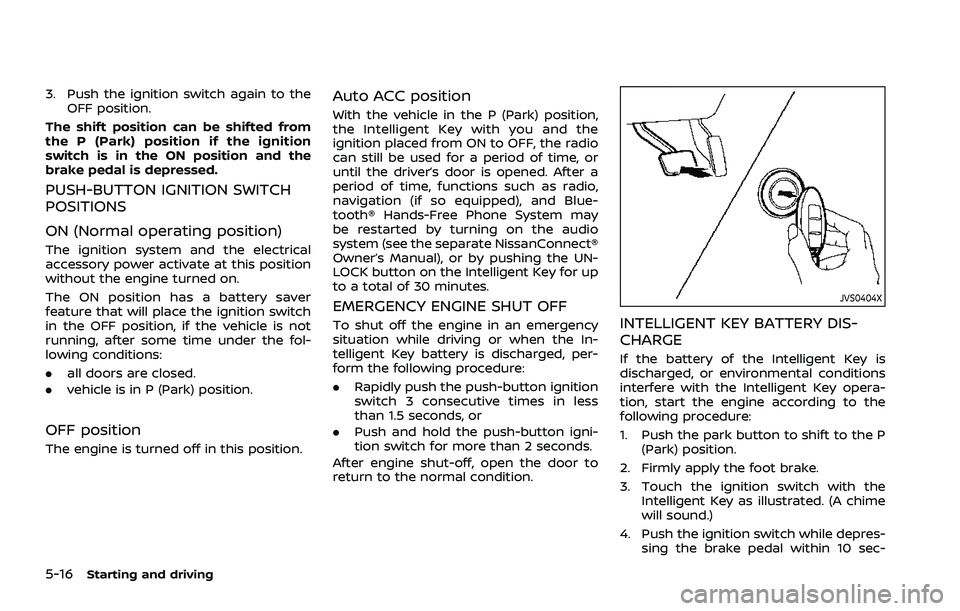
3. Touch the ignition switch with the Intelligent Key as illustrated. (A chime
will sound.)
4. Push the ignition switch while depres- sing the brake pedal within 10 sec-