auto hold NISSAN ROGUE 2021 Owner´s Manual
[x] Cancel search | Manufacturer: NISSAN, Model Year: 2021, Model line: ROGUE, Model: NISSAN ROGUE 2021Pages: 556, PDF Size: 2.7 MB
Page 14 of 556
0-6Illustrated table of contents
WAA0172X
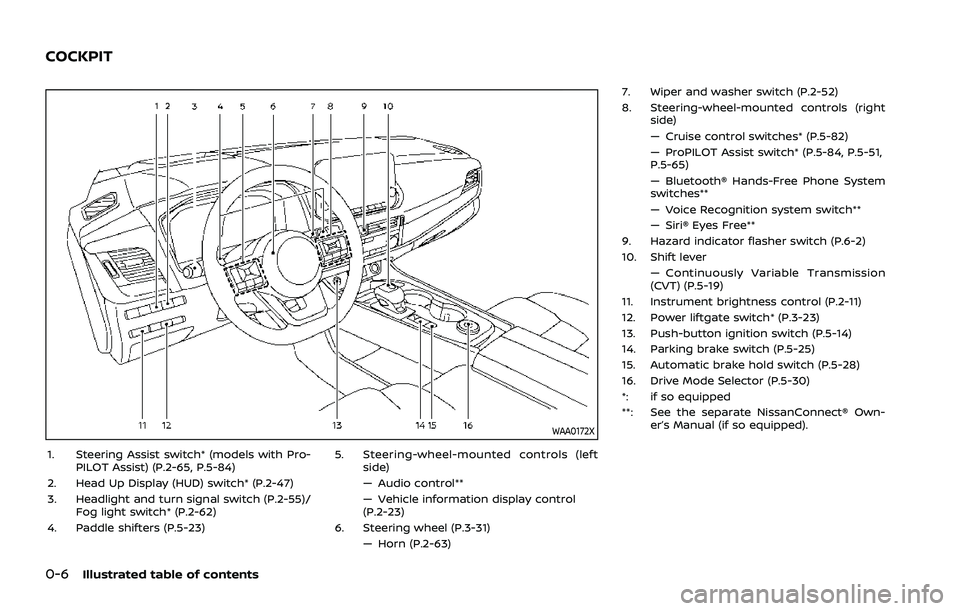
1. Steering Assist switch* (models with Pro-PILOT Assist) (P.2-65, P.5-84)
2. Head Up Display (HUD) switch* (P.2-47)
3. Headlight and turn signal switch (P.2-55)/ Fog light switch* (P.2-62)
4. Paddle shifters (P.5-23) 5. Steering-wheel-mounted controls (left
side)
— Audio control**
— Vehicle information display control
(P.2-23)
6. Steering wheel (P.3-31) — Horn (P.2-63) 7. Wiper and washer switch (P.2-52)
8. Steering-wheel-mounted controls (right
side)
— Cruise control switches* (P.5-82)
— ProPILOT Assist switch* (P.5-84, P.5-51,
P.5-65)
— Bluetooth® Hands-Free Phone System
switches**
— Voice Recognition system switch**
— Siri® Eyes Free**
9. Hazard indicator flasher switch (P.6-2)
10. Shift lever — Continuously Variable Transmission
(CVT) (P.5-19)
11. Instrument brightness control (P.2-11)
12. Power liftgate switch* (P.3-23)
13. Push-button ignition switch (P.5-14)
14. Parking brake switch (P.5-25)
15. Automatic brake hold switch (P.5-28)
16. Drive Mode Selector (P.5-30)
*: if so equipped
**: See the separate NissanConnect® Own- er’s Manual (if so equipped).
COCKPIT
Page 19 of 556
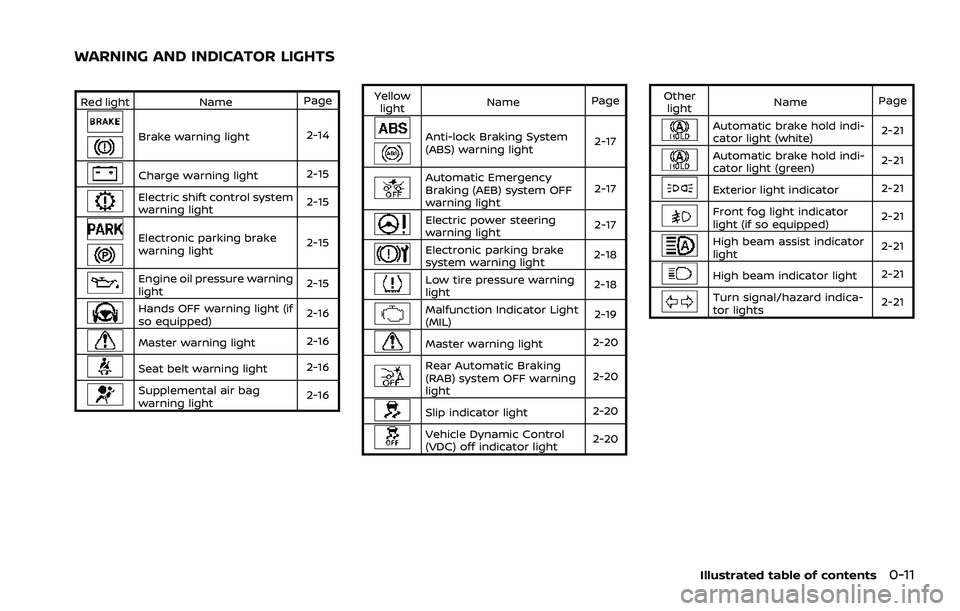
Red lightNamePage
Brake warning light 2-14
Charge warning light 2-15
Electric shift control system
warning light2-15
Electronic parking brake
warning light2-15
Engine oil pressure warning
light
2-15
Hands OFF warning light (if
so equipped)2-16
Master warning light
2-16
Seat belt warning light2-16
Supplemental air bag
warning light2-16Yellow
light Name
Page
Anti-lock Braking System
(ABS) warning light 2-17
Automatic Emergency
Braking (AEB) system OFF
warning light2-17
Electric power steering
warning light
2-17
Electronic parking brake
system warning light2-18
Low tire pressure warning
light
2-18
Malfunction Indicator Light
(MIL) 2-19
Master warning light
2-20
Rear Automatic Braking
(RAB) system OFF warning
light2-20
Slip indicator light
2-20
Vehicle Dynamic Control
(VDC) off indicator light2-20Other
light Name
Page
Automatic brake hold indi-
cator light (white) 2-21
Automatic brake hold indi-
cator light (green)
2-21
Exterior light indicator
2-21
Front fog light indicator
light (if so equipped)2-21
High beam assist indicator
light2-21
High beam indicator light
2-21
Turn signal/hazard indica-
tor lights2-21
Illustrated table of contents0-11
WARNING AND INDICATOR LIGHTS
Page 90 of 556
Heated seats (if so equipped) .......................................... 2-63Operation with switch .................................................... 2-64
Steering Assist switch (models with
ProPILOT Assist) ........................................................................\
.. 2-65
Rear Door Alert ........................................................................\
.... 2-65
Power outlets ........................................................................\
....... 2-66 USB (Universal Serial Bus) charging
connector (if so equipped) .......................................... 2-67
Wireless charger (if so equipped) ........................... 2-68
Emergency Call (SOS) button (if
so equipped) ........................................................................\
.......... 2-70
Emergency support .......................................................... 2-70
Storage ........................................................................\
...................... 2-71 Cup holders ........................................................................\
..... 2-71
Soft bottle holders ............................................................. 2-72
Adjustable luggage floor (if so equipped) ....... 2-72
Glove box ........................................................................\
........... 2-75
Console box ........................................................................\
..... 2-75
Lower console tray ............................................................ 2-76 Sunglasses holder ............................................................ 2-76
Card holder ........................................................................\
... 2-77
Coat hooks ........................................................................\
.... 2-77
Cargo cover (if so equipped) ................................... 2-77
Luggage hooks .................................................................. 2-78
Roof rack (if so equipped) .................................................. 2-78
Windows ........................................................................\
................... 2-79 Power windows ................................................................. 2-79
Moonroof (if so equipped) ................................................. 2-83 Automatic moonroof and sunshade ................ 2-83
Interior lights ........................................................................\
...... 2-85
Interior light switch ........................................................ 2-85
Map lights ........................................................................\
....... 2-86
Room lights (if so equipped) ................................... 2-86
Rear personal lights (if so equipped) ................ 2-86
Vanity mirror light ............................................................ 2-87
Cargo light ........................................................................\
..... 2-87
Page 91 of 556
WAA0172X
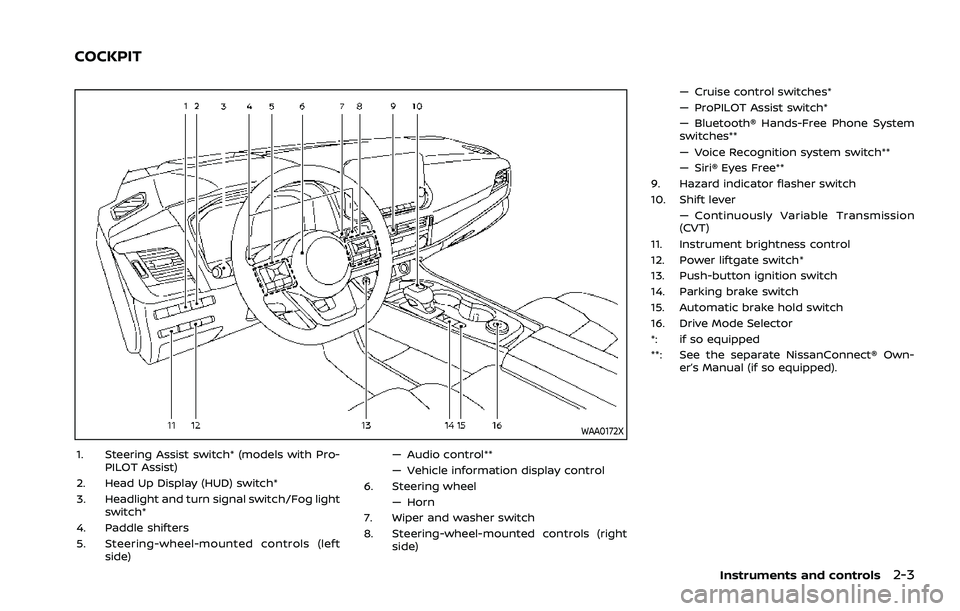
1. Steering Assist switch* (models with Pro-PILOT Assist)
2. Head Up Display (HUD) switch*
3. Headlight and turn signal switch/Fog light switch*
4. Paddle shifters
5. Steering-wheel-mounted controls (left side) — Audio control**
— Vehicle information display control
6. Steering wheel
— Horn
7. Wiper and washer switch
8. Steering-wheel-mounted controls (right side) — Cruise control switches*
— ProPILOT Assist switch*
— Bluetooth® Hands-Free Phone System
switches**
— Voice Recognition system switch**
— Siri® Eyes Free**
9. Hazard indicator flasher switch
10. Shift lever — Continuously Variable Transmission
(CVT)
11. Instrument brightness control
12. Power liftgate switch*
13. Push-button ignition switch
14. Parking brake switch
15. Automatic brake hold switch
16. Drive Mode Selector
*: if so equipped
**: See the separate NissanConnect® Own- er’s Manual (if so equipped).
Instruments and controls2-3
COCKPIT
Page 101 of 556
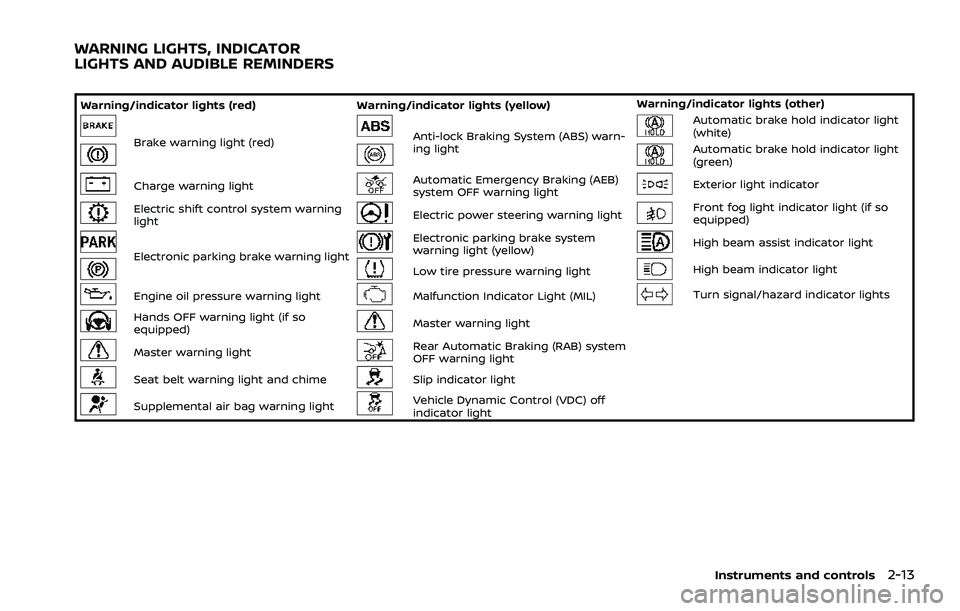
Warning/indicator lights (red)Warning/indicator lights (yellow) Warning/indicator lights (other)
Brake warning light (red)Anti-lock Braking System (ABS) warn-
ing lightAutomatic brake hold indicator light
(white)
Automatic brake hold indicator light
(green)
Charge warning lightAutomatic Emergency Braking (AEB)
system OFF warning lightExterior light indicator
Electric shift control system warning
lightElectric power steering warning lightFront fog light indicator light (if so
equipped)
Electronic parking brake warning light
Electronic parking brake system
warning light (yellow)High beam assist indicator light
Low tire pressure warning lightHigh beam indicator light
Engine oil pressure warning lightMalfunction Indicator Light (MIL)Turn signal/hazard indicator lights
Hands OFF warning light (if so
equipped)Master warning light
Master warning lightRear Automatic Braking (RAB) system
OFF warning light
Seat belt warning light and chimeSlip indicator light
Supplemental air bag warning lightVehicle Dynamic Control (VDC) off
indicator light
Instruments and controls2-13
WARNING LIGHTS, INDICATOR
LIGHTS AND AUDIBLE REMINDERS
Page 109 of 556

Turn the VDC on using the vehicle in-
formation display, or restart the engine
and the system will operate normally.
(See “Vehicle Dynamic Control (VDC) sys-
tem” (P.5-157).)
The light also comes on when placing the
ignition switch in the ON position. The
light will turn off after about 2 seconds if
the system is operational. If the light stays
on or comes on along with the
indicator light while you are driving, have
the VDC system checked. It is recom-
mended that you visit a NISSAN dealer for
this service.
WARNING
The VDC should remain on unless
freeing a vehicle from mud or snow.
While the VDC system is operating, you
might feel a slight vibration or hear the
system working when starting the vehicle
or accelerating, but this is not a malfunc-
tion.
WARNING/INDICATOR LIGHTS
(other)
See “Vehicle information display” (P.2-22).
Automatic brake hold indica-
tor light (white)
The automatic brake hold indicator light
(white) illuminates when the automatic
brake hold system is on standby. (See
“Automatic brake hold” (P.5-28).)
Automatic brake hold indica-
tor light (green)
The automatic brake hold indicator light
(green) illuminates while the automatic
brake hold system is operating. (See
“Automatic brake hold” (P.5-28).)
Exterior light indicator
This indicator illuminates when the head-
light switch is turned to the AUTO,orposition and the front parking lights,
rear combination lights, license plate
lights or headlights are on. The indicator
turns off when these lights are turned off.
Front fog light indicator light
(if so equipped)
The front fog light indicator light illumi-
nates when the front fog lights are on.
(See “Fog light switch” (P.2-62).)
High beam assist indicator
light
The high beam assist indicator light
illuminates when the high beam assist
system is turned on and it is operational.
(See “High beam assist” (P.2-59).)
High beam indicator light
This light illuminates when the headlight
high beam is on and goes out when the
low beam is selected.
Turn signal/hazard indicator
lights
The light flashes when the turn signal
switch lever or hazard switch is turned on.
Instruments and controls2-21
Page 128 of 556
2-40Instruments and controls
44. Unavailable Side Radar Ob-
struction warning
This warning appears when the following
systems become unavailable because a
radar blockage is detected.
.Blind Spot Warning (BSW)
. Intelligent Blind Spot Intervention (I-
BSI) (if so equipped)
. Rear Cross Traffic Alert (RCTA)
(See “Blind Spot Warning (BSW)” (P.5-57),
“Intelligent Blind Spot Intervention (I-BSI)”
(P.5-65) or “Rear Cross Traffic Alert (RCTA)”
(P.5-76).)
45. I-LI ON indicator/I-BSI ON indi-
cator/ProPILOT Assist status indi-
cator
This indicator appears when the following
systems are turned on:
. Intelligent Lane Intervention (I-LI)
. Intelligent Blind Spot Intervention (I-
BSI) (if so equipped)
. ProPILOT Assist (if so equipped)
See “Intelligent Lane Intervention (I-LI)”
(P.5-51), “Intelligent Blind Spot Intervention
(I-BSI)” (P.5-65) or “ProPILOT Assist” (P.5-
84).
46. Steering Assist indicator (if so
equipped)
This indicator appears when the Steering
Assist system is engaged.
See “ProPILOT Assist” (P.5-84).
47. Hands on detection warning (if
so equipped)
This warning may appear when the
Steering Assist system is engaged and
the following condition(s) occur:
. When not holding the steering wheel
. When there is no steering wheel
operation
Hold on the steering wheel immediately.
When the steering operation is detected,
the warning turns off and the Steering
Assist function is automatically restored.
For additional information, refer to “Pro-
PILOT Assist” (P.5-84).
48. Press Brake Pedal indicator (if
so equipped)
This message may appear when the
Intelligent Cruise Control (ICC) system is
engaged and the following condition
occurs:
. While the vehicle is stopped by the ICC
system, the driver’s door is opened but
the electronic parking brake was not
activated. Step on the brake pedal immediately.
49. Not Available Poor Road Condi-
tions warning (if so equipped)
This warning appears when the following
systems become unavailable because the
road is slippery.
.
Intelligent Lane Intervention (I-LI)
. Intelligent Blind Spot Intervention (I-
BSI) (if so equipped)
. Intelligent Cruise Control (ICC) (if so
equipped)
(See “Intelligent Lane Intervention (I-LI)”
(P.5-51), “Intelligent Blind Spot Intervention
(I-BSI)” (P.5-65) or “Intelligent Cruise Con-
trol (ICC)” (P.5-97).)
50. Not Available Seat Belt Not
Fastened indicator (if so equipped)
This message may appear when the
Intelligent Cruise Control (ICC) system is
engaged.
Under the following condition, the ICC
system is automatically canceled:
. When the driver’s seat belt is not
fastened.
The ICC system cannot be used when the
driver’s seat belt is not fastened.
Page 130 of 556
2-42Instruments and controls
58. Parking Sensor Error warning
This warning appears when there is a
malfunction with the sonar system (if so
equipped) or the Rear Sonar System (RSS)
(if so equipped). (See “Sonar system” (P.5-
162) or “Rear Sonar System (RSS)” (P.5-
168).)
59. Press Brake Pedal warning
This warning appears in the following
situations:
.The driver tries to release the electro-
nic parking brake manually without
depressing the brake pedal.
. The vehicle is stopped on a steep hill
and there is a possibility of moving
backward, even if the electronic park-
ing brake is applied.
. This warning appears if the vehicle
moves while the automatic brake hold
is activated.
60. Press brake to operate switch
indicator
This indicator appears if the automatic
brake hold switch is pushed without
depressing the brake pedal while the
automatic brake hold function is acti-
vated. Depress the brake pedal and push
the switch to deactivate the automatic
brake hold function. (See “Automatic
brake hold” (P.5-28).)
61. Caution Steep slope indicator
This indicator appears when the auto-
matic brake hold function is activated
while the vehicle is on a steep hill. (See
“Automatic brake hold” (P.5-28).)
62. Steep Slope Apply foot brake
indicator
This indicator appears if “Caution Steep
slope indicator” has appeared over about
3 minutes. Then, the parking brake will
automatically be applied and the brake
force of the automatic brake hold will be
released, and vehicle may move or roll
away unexpectedly. Apply the foot brake
to stop the vehicle moving. (See “Auto-
matic brake hold” (P.5-28).)
63. Take a Break? indicator
This indicator appears when the Intelli-
gent Driver Alertness (I-DA) system detect
that the driver attention is decreasing.
(See “Intelligent Driver Alertness (I-DA)”
(P.5-141).)
64. Intelligent Driver Alertness (I-DA)
malfunction warning
This warning appears when the Intelli-
gent Driver Alertness (I-DA) system mal-
functions. (See “Intelligent Driver Alertness
(I-DA)” (P.5-141).)
65. Neutral Hold Mode guidance
indicator (if so equipped)
This indicator appears when the ignition
switch is placed in the OFF position while
the shift position is in the N (Neutral)
position (Neutral hold mode is available).
(See “Neutral hold mode function” (P.5-
22).)
66. Neutral Hold Mode activated
indicator (if so equipped)
This indicator appears when the Neutral
hold mode is activated. To exit the Neutral
hold mode, place the vehicle in other than
N (Neutral) position. (See “Neutral hold
mode function” (P.5-22).)
67. Neutral Hold Mode was not
activated indicator (if so equipped)
This indicator appears when the Neutral
hold mode is unavailable. To activate the
Neutral hold mode, wait for a while with-
out shifting and then perform the opera-
tions again. (See “Neutral hold mode
function” (P.5-22).)
Page 150 of 556
2-62Instruments and controls
WAC0323XExample
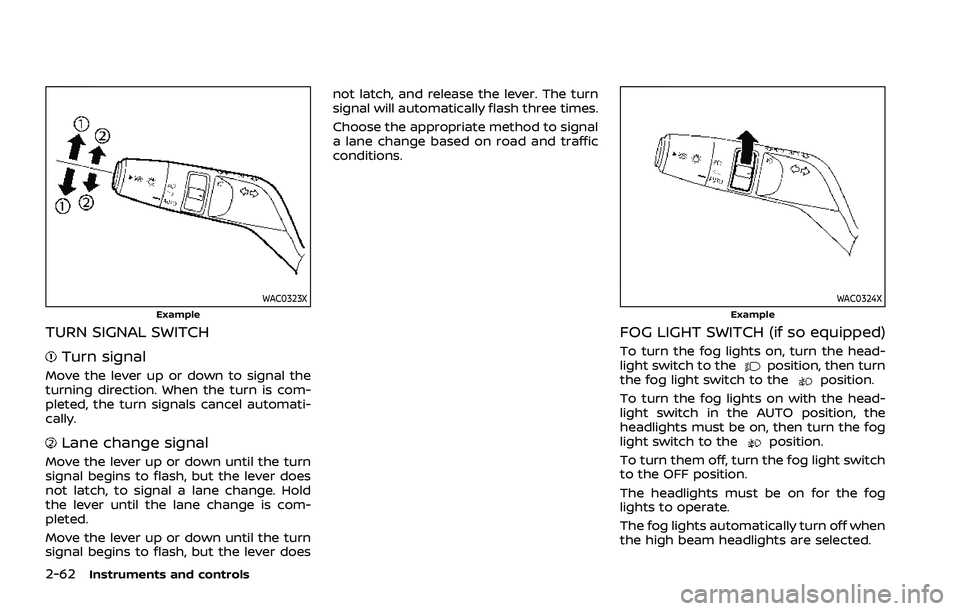
TURN SIGNAL SWITCH
Turn signal
Move the lever up or down to signal the
turning direction. When the turn is com-
pleted, the turn signals cancel automati-
cally.
Lane change signal
Move the lever up or down until the turn
signal begins to flash, but the lever does
not latch, to signal a lane change. Hold
the lever until the lane change is com-
pleted.
Move the lever up or down until the turn
signal begins to flash, but the lever doesnot latch, and release the lever. The turn
signal will automatically flash three times.
Choose the appropriate method to signal
a lane change based on road and traffic
conditions.
WAC0324XExample
FOG LIGHT SWITCH (if so equipped)
To turn the fog lights on, turn the head-
light switch to theposition, then turn
the fog light switch to theposition.
To turn the fog lights on with the head-
light switch in the AUTO position, the
headlights must be on, then turn the fog
light switch to the
position.
To turn them off, turn the fog light switch
to the OFF position.
The headlights must be on for the fog
lights to operate.
The fog lights automatically turn off when
the high beam headlights are selected.
Page 169 of 556
WAC0535X
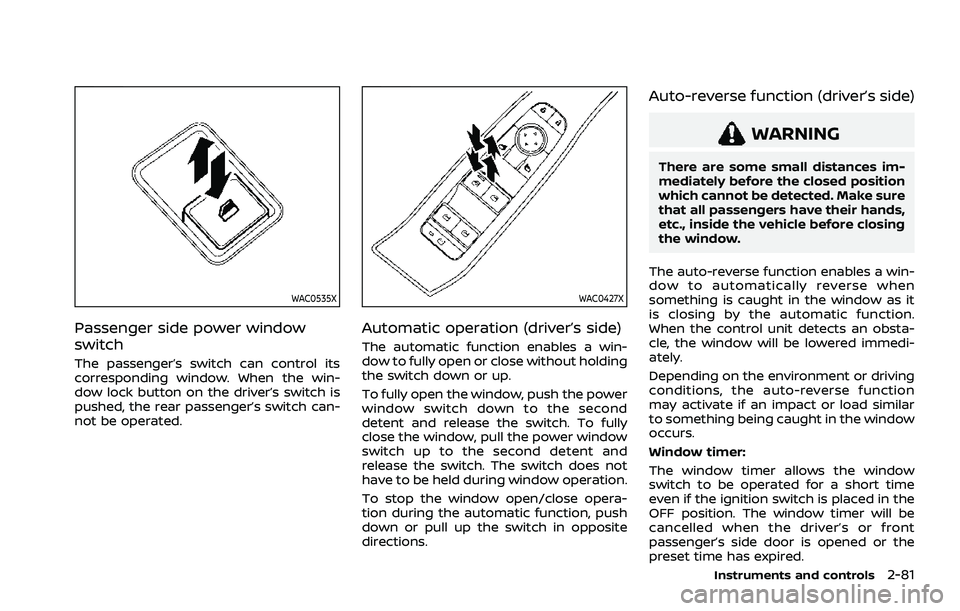
Passenger side power window
switch
The passenger’s switch can control its
corresponding window. When the win-
dow lock button on the driver’s switch is
pushed, the rear passenger’s switch can-
not be operated.
WAC0427X
Automatic operation (driver’s side)
The automatic function enables a win-
dow to fully open or close without holding
the switch down or up.
To fully open the window, push the power
window switch down to the second
detent and release the switch. To fully
close the window, pull the power window
switch up to the second detent and
release the switch. The switch does not
have to be held during window operation.
To stop the window open/close opera-
tion during the automatic function, push
down or pull up the switch in opposite
directions.
Auto-reverse function (driver’s side)
WARNING
There are some small distances im-
mediately before the closed position
which cannot be detected. Make sure
that all passengers have their hands,
etc., inside the vehicle before closing
the window.
The auto-reverse function enables a win-
dow to automatically reverse when
something is caught in the window as it
is closing by the automatic function.
When the control unit detects an obsta-
cle, the window will be lowered immedi-
ately.
Depending on the environment or driving
conditions, the auto-reverse function
may activate if an impact or load similar
to something being caught in the window
occurs.
Window timer:
The window timer allows the window
switch to be operated for a short time
even if the ignition switch is placed in the
OFF position. The window timer will be
cancelled when the driver’s or front
passenger’s side door is opened or the
preset time has expired.
Instruments and controls2-81