auto hold NISSAN ROGUE 2021 Owner´s Manual
[x] Cancel search | Manufacturer: NISSAN, Model Year: 2021, Model line: ROGUE, Model: NISSAN ROGUE 2021Pages: 556, PDF Size: 2.7 MB
Page 170 of 556
2-82Instruments and controls
When power window switch does
not operate
If the power window automatic function
does not operate properly, perform the
following procedure to initialize the
power window functions.
1. Close the door.
2. Place the ignition switch in the ONposition.
3. Pull the power window switch and hold it to fully close the window.*1
4. Release the power window switch.
5. Pull the power window switch and hold it for approximately 5 seconds or
more.*2
6. Push the power window switch down and hold it to fully open the window.
7. Release the power window switch.
8. Push the power window switch down and hold it for approximately 5 sec-
onds or more.*2
9. Pull the power window switch and hold it to fully close the window.*1
10. Operate the window by the automatic function (window open and close) to
confirm that the initialization is com-
plete.
*1: If the window stops before reaching
the fully closed position, release the switch, then pull and hold it again to fully
close the window.
*2: After pulling or pushing the power
window switch and holding it for approxi-
mately 5 seconds or more, the window
will move again.
If the window cannot automatically be
closed since the auto-reverse function
activated due to a malfunction, perform
the following procedure to cancel the
auto-reverse function.
1. Pull the power window switch up until
the auto-reverse function is activated,
then the window will reverse automa-
tically.
2. Repeat the procedure twice.
3. Pull the power window switch and hold it to close the window to confirm
that the cancellation is completed.
WARNING
When the auto-reverse function is
canceled, the window will not auto-
matically reverse even if the control
unit detects an obstacle. Make sure
that all passengers have their hands,
etc. inside the vehicle before closing
the windows. If the power window functions do not
operate properly after performing the
procedure above, have your vehicle
checked by a NISSAN dealer.
Page 172 of 556
2-84Instruments and controls
Auto-reverse function
WARNING
There are some small distances just
before the closed position which
cannot be detected. Make sure that
all passengers have their hands, etc.
inside the vehicle before closing the
moonroof and sunshade.
The auto-reverse function enables the
moonroof and sunshade to automatically
reverse when something is caught in the
moonroof and sunshade as it is closing.
When the control unit detects an obsta-
cle, the moonroof and sunshade will open
immediately.
Depending on the environment or driving
conditions, the auto-reverse function
may activate if an impact or load similar
to something being caught in the moon-
roof and sunshade occurs.
If the auto-reverse function activates
consecutively or the battery is dis-
charged, the moonroof and sunshade
may not close properly. In this case, push
and hold the switch to the CLOSE position
to close the moonroof.
If the moonroof does not operate
If the moonroof and sunshade do not
operate properly, perform the following
procedure to initialize the operation sys-
tem.
1. If the moonroof and sunshade are open, close them fully by repeatedly
pushing the moonroof switch to the
CLOSE
andposition.
2. Push and hold the moonroof switch to the CLOSE
position for 10 seconds.
3. After the moonroof and sunshade move slightly to the closed position
and then move back a little, release
the moonroof switch.
4. Push and hold the moonroof switch to the CLOSE
position, and the glass
and shade will move.
5. Release the moonroof switch. Then the moonroof and sunshade will fully
open and then fully close.
6. Check if the moonroof switch oper- ates normally.
WARNING
The driver is always responsible for
operating the moonroof properly,
including the operation by all pas-
sengers. Failure to follow the warn- ings and instructions for proper use
of the moonroof could result in
serious injury or death.
.
Do not allow children to operate
the moonroof. Improper opera-
tion by children may cause an
accident. If children or others get
caught in the moonroof, it could
cause serious injury.
. To help avoid risk of injury or
death through unintended opera-
tion of the moonroof, place the
ignition switch in the OFF position
when leaving the vehicle, and do
not leave children and the Intelli-
gent Key inside the vehicle.
. Do not activate the auto-reverse
function intentionally. If hands or
face, etc. get caught in the moon-
roof, it could cause serious injury.
CAUTION
.Do not place objects (such as
newspapers, handkerchiefs, etc.)
on the sunshade when it is ex-
tending or retracting causing im-
proper operation or damage to
the sunshade.
Page 202 of 556
3-26Pre-driving checks and adjustments
all passengers keep their hands, etc.,
clear from the liftgate opening be-
fore closing the liftgate.
Manual mode
If power operation is not available, the
liftgate can be operated manually. Power
operation may not be available if multiple
obstacles have been detected in a single
power cycle or if the battery voltage is
low. When the power liftgate is turned off,
the liftgate can be opened manually by
pushing the liftgate opener switch. If the
power liftgate opener switch is pushed
during power open or close, the power
operation will be canceled and the liftgate
can be operated manually. This will allow
normal power operation functions to
resume.
WAD0154X
JVP0487X
MOTION-ACTIVATED LIFTGATE (if so
equipped)
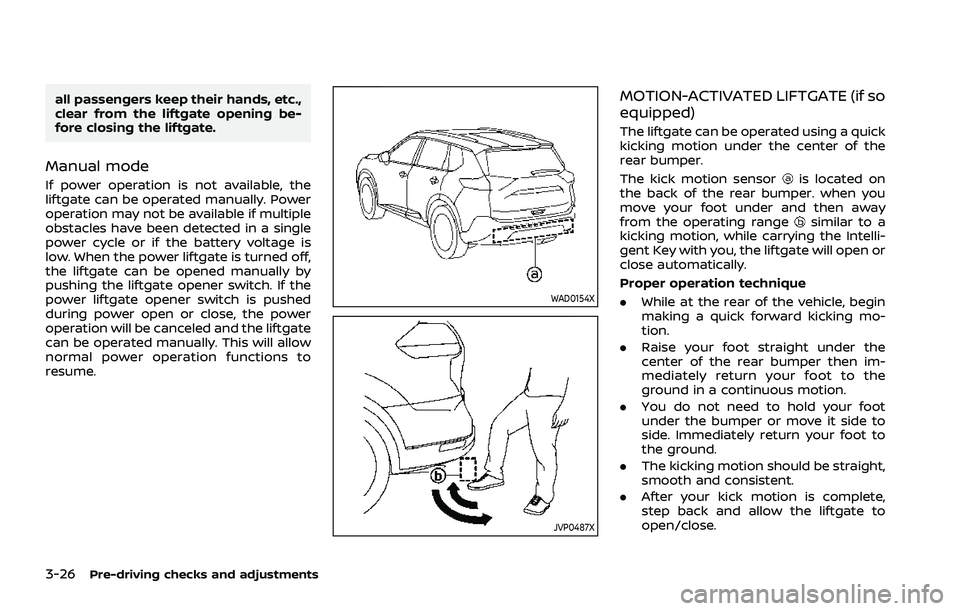
The liftgate can be operated using a quick
kicking motion under the center of the
rear bumper.
The kick motion sensor
is located on
the back of the rear bumper. when you
move your foot under and then away
from the operating range
similar to a
kicking motion, while carrying the Intelli-
gent Key with you, the liftgate will open or
close automatically.
Proper operation technique
. While at the rear of the vehicle, begin
making a quick forward kicking mo-
tion.
. Raise your foot straight under the
center of the rear bumper then im-
mediately return your foot to the
ground in a continuous motion.
. You do not need to hold your foot
under the bumper or move it side to
side. Immediately return your foot to
the ground.
. The kicking motion should be straight,
smooth and consistent.
. After your kick motion is complete,
step back and allow the liftgate to
open/close.
Page 203 of 556
.Three beeps will sound and the lift-
gate will begin moving within 2 sec-
onds after the kick.
WARNING
Prevent unintentional liftgate open-
ing/closing. There may be conditions
when opening/closing the liftgate is
not desired. Keep the Intelligent Key
out of range of the liftgate, (7 ft (2 m)
or more) or inside the vehicle, when
washing or working around the back
of the vehicle.
NOTE:
. The kick motion sensor may not
function under the following condi-
tions:
—When operating near a location
where strong radio waves are
transmitted, such as a TV tower,
power station or broadcasting
station.
— When the vehicle is parked near a
parking meter.
. The power liftgate may not operate
when your foot remains in the oper-
ating range
.
CAUTION
.When the Intelligent Key is carried
with you near the liftgate, even
someone, who does not carry the
Intelligent Key, may be able to
open or close the liftgate with a
kick motion.
. Do not perform a kick motion
near the exhaust system compo-
nents while they are hot. You may
severely burn yourself.
. Do not perform a kick motion on
an unstable place (for example,
on a slope or a muddy ground,
etc.).
Power open or close function
The liftgate will fully open automatically
using the kick motion sensor.
1. Carry the Intelligent Key.
2. Move your foot under and away from
the rear bumper similarly to a kicking
motion within the operation range of
the kick motion sensor.
3. The liftgate will automatically open or close.
Stop and reverse function
The power liftgate will stop immediately if
a kick motion is performed during power
open or close. The liftgate can be stopped
even if you do not carry the Intelligent
Key.
And then the power liftgate will move in
the reverse direction if a kick motion is
performed again. The power liftgate can
be reversed when you carry the Intelli-
gent Key.
GARAGE MODE SYSTEM (if so
equipped)
The liftgate can be set to open to a
specific height by performing the follow-
ing:
1. Open the liftgate.
2. Pull the liftgate down to the desiredposition and hold the liftgate (the
liftgate will have some resistance
when being manually adjusted).
3. While holding the liftgate in position, press and hold the power liftgate
close and lock switch
located on
the liftgate for approximately 3 sec-
onds or until 2 beeps are heard.
The liftgate will open to the selected
position setting. To change the position
of the liftgate, repeat steps 1-3 for setting
the position of the liftgate.
Pre-driving checks and adjustments3-27
Page 247 of 556
2. Turn the temperature control dial onthe corresponding side to set the
desired temperature.
.You can individually set tempera-tures for the driver’s side and front
passenger’s side when the indica-
tor light on the SYNC button is not
illuminated.
A visible mist may be seen coming from
the ventilators in hot, humid conditions as
the air is cooled rapidly. This does not
indicate a malfunction.
Heating (A/C OFF):
The air conditioner does not activate in
this mode. Use this mode when you only
need to heat.
1. Push the AUTO button on. (The in- dicator light on the button will illumi-
nate.)
2. Push the A/C button. (The indicator light will turn off.)
3. Turn the temperature control dial on the corresponding side to set the
desired temperature.
.You can individually set tempera-
tures for the driver’s side and front
passenger’s side when the indica-
tor light on the SYNC button is not
illuminated.
.The temperature of the passengercompartment will be maintained
automatically. Air flow distribution
and fan speed are also controlled
automatically.
NOTE:
. Do not set the temperature lower
than the outside air temperature or
the system may not work properly.
. Not recommended if windows fog
up.
Dehumidified defrosting or defogging:
1. Push the
button. (The indicator
light on the button will turn on.)
2. Turn the temperature control dial on the corresponding side to set the
desired temperature.
.To quickly remove ice from theoutside of the windows, use the
button to set the fan speed to
maximum.
.As soon as possible after the wind- shield is clean, push the AUTO
button to return to the automatic
mode.
.When thebutton is pushed, the
air conditioner will automatically be
turned on at outside temperatures
more than slightly above freezing.
The air recirculation mode auto-
matically turns off, allowing outside air to be drawn into the passenger
compartment to further improve
the defogging performance.
Manual operation
Fan speed control:
Push the
buttons to manually control
the fan speed.
Air intake control:
The air intake control mode will change
each time the
button is pushed.
. When the indicator light is turned on,
the air recirculates inside the vehicle.
. When the indicator light is turned off,
the air flow is drawn from outside the
vehicle.
. To switch to automatic control mode,
push and hold the
button for
about 2 seconds. The indicator light
will blink, and then the air intake will
be controlled automatically.
Air flow control:
Pushing the
button manually con-
trols air flow and selects the air outlet:
Monitor, heater, air conditioner, audio and phone systems4-33
Page 250 of 556
4-36Monitor, heater, air conditioner, audio and phone systems
.The temperature of the passengercompartment will be maintained
automatically. Air flow distribution
and fan speed are also controlled
automatically.
NOTE:
. Do not set the temperature lower
than the outside air temperature or
the system may not work properly.
. Not recommended if windows fog
up.
Dehumidified defrosting or defogging:
1. Push the
button. (The indicator
light on the button will come on.)
2. Turn the temperature control dial on the corresponding side to set the
desired temperature.
.To quickly remove ice from theoutside of the windows, use the
button to set the fan speed to
maximum.
.As soon as possible after the wind- shield is clean, push the AUTO
button to return to the automatic
mode.
.When thebutton is pushed, the
air conditioner will automatically be
turned on at outside temperatures
more than slightly above freezing.
The air recirculation mode auto-
matically turns off, allowing outside air to be drawn into the passenger
compartment to further improve
the defogging performance.
Manual operation
Fan speed control:
Push the
buttons to manually control
the fan speed.
Air intake control:
. Push the
button to recirculate
interior air inside the vehicle. The
indicator light on the button will come
on.
. Push the
button to draw outside
air into the passenger compartment.
The indicator light on the button will
come on.
. To control the air intake automatically,
push and hold either the
button
or thebutton. The indicator light
will blink, and then the air intake will
switch to automatic control. When the
automatic control is set, the system
automatically alternates between the
outside air circulation and the air
recirculation modes. (The indicator
light of the active mode will turn on.) Air flow control:
Pushing the
button manually con-
trols air flow and selects the air outlet:
— Air flows mainly from center and side
ventilators.
— Air flows mainly from center and sideventilators and foot outlets.
— Air flows mainly from the foot outletand partly from the defroster.
— Air flows mainly from the defrosterand foot outlets.
Synchronize temperature settings:
Push the SYNC button to turn on the
SYNC mode. (The indicator light on the
button will turn on.)
When the SYNC mode is active, the
driver’s side temperature control dial will
control the driver’s side, front passenger’s
side and rear temperatures.
When the passenger’s side temperature
control dial or the rear temperature
control buttons are operated, it will can-
cel the SYNC mode of the individual zone.
(The indicator light on the SYNC button
will remain on.)
Operating both the passenger’s side
temperature control dial and the rear
temperature control buttons will turn off
the SYNC mode. (The indicator light on
the SYNC button will turn off.) (See “Rear
Page 255 of 556
5 Starting and driving
Precautions when starting and driving ...................... 5-5Exhaust gas (carbon monoxide) ................................ 5-5
Three-way catalyst ............................................................... 5-6
Tire Pressure Monitoring System (TPMS) ........... 5-6
Avoiding collision and rollover ................................. 5-10
On-pavement and off-road
driving precautions ........................................................... 5-10
Off-road recovery ............................................................... 5-10
Rapid air pressure loss ................................................... 5-11
Drinking alcohol/drugs and driving ..................... 5-11
Driving safety precautions .......................................... 5-12
Push-button ignition switch ............................................. 5-14 Operating range for engine start function ...... 5-14
Push-button ignition switch operation ............. 5-15
Push-button ignition switch positions .............. 5-16
Emergency engine shut off ........................................ 5-16
Intelligent Key battery discharge ........................... 5-16
Before starting the engine ................................................. 5-17
Starting the engine .................................................................. 5-17 Remote engine start (if so equipped) ................. 5-18
Driving the vehicle .................................................................... 5-19 Continuously Variable
Transmission (CVT) ............................................................ 5-19
Parking brake ........................................................................\
....... 5-25 Automatic operation ........................................................ 5-25 Manual operation ............................................................. 5-27
Automatic brake hold ........................................................... 5-28 How to activate/deactivate the automatic
brake hold function ........................................................ 5-29
How to use the automatic brake
hold function ........................................................................\
5-29
Drive Mode Selector ............................................................... 5-30 OFF-ROAD mode (AWD models) ........................... 5-31
SNOW mode (AWD models) ...................................... 5-32
STANDARD mode (2WD models)/AUTO
mode (AWD models) ....................................................... 5-32
ECO mode ........................................................................\
...... 5-32
SPORT mode ........................................................................\
5-33
Driver Assistance systems ................................................. 5-34 How to enable/disable the systems ................. 5-37
Common troubleshooting guide ......................... 5-39
Traffic Sign Recognition (TSR) (if
so equipped) ........................................................................\
......... 5-43 System operation ............................................................. 5-43
How to enable/disable the TSR system ........ 5-45
System temporarily unavailable ........................... 5-45
System malfunction ....................................................... 5-45
System maintenance .................................................... 5-46
Lane Departure Warning (LDW) ..................................... 5-46 LDW system operation ................................................. 5-47
How to enable/disable the LDW system ....... 5-48
Page 270 of 556
5-16Starting and driving
3. Push the ignition switch again to theOFF position.
The shift position can be shifted from
the P (Park) position if the ignition
switch is in the ON position and the
brake pedal is depressed.
PUSH-BUTTON IGNITION SWITCH
POSITIONS
ON (Normal operating position)
The ignition system and the electrical
accessory power activate at this position
without the engine turned on.
The ON position has a battery saver
feature that will place the ignition switch
in the OFF position, if the vehicle is not
running, after some time under the fol-
lowing conditions:
. all doors are closed.
. vehicle is in P (Park) position.
OFF position
The engine is turned off in this position.
Auto ACC position
With the vehicle in the P (Park) position,
the Intelligent Key with you and the
ignition placed from ON to OFF, the radio
can still be used for a period of time, or
until the driver’s door is opened. After a
period of time, functions such as radio,
navigation (if so equipped), and Blue-
tooth® Hands-Free Phone System may
be restarted by turning on the audio
system (see the separate NissanConnect®
Owner’s Manual), or by pushing the UN-
LOCK button on the Intelligent Key for up
to a total of 30 minutes.
EMERGENCY ENGINE SHUT OFF
To shut off the engine in an emergency
situation while driving or when the In-
telligent Key battery is discharged, per-
form the following procedure:
.Rapidly push the push-button ignition
switch 3 consecutive times in less
than 1.5 seconds, or
. Push and hold the push-button igni-
tion switch for more than 2 seconds.
After engine shut-off, open the door to
return to the normal condition.
JVS0404X
INTELLIGENT KEY BATTERY DIS-
CHARGE
If the battery of the Intelligent Key is
discharged, or environmental conditions
interfere with the Intelligent Key opera-
tion, start the engine according to the
following procedure:
1. Push the park button to shift to the P (Park) position.
2. Firmly apply the foot brake.
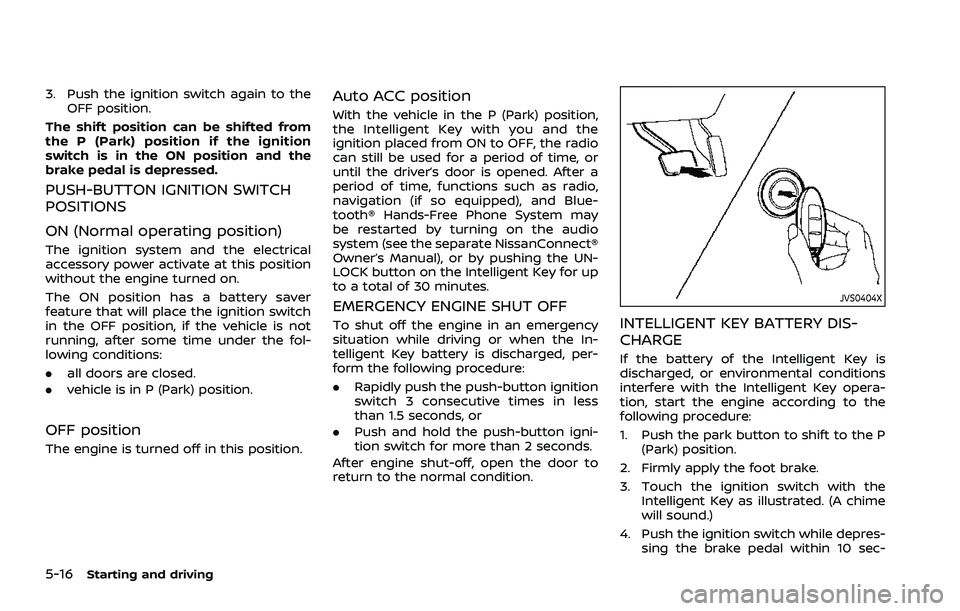
3. Touch the ignition switch with the Intelligent Key as illustrated. (A chime
will sound.)
4. Push the ignition switch while depres- sing the brake pedal within 10 sec-
Page 273 of 556
CONTINUOUSLY VARIABLE TRANS-
MISSION (CVT)
The CVT in your vehicle is electronically
controlled to produce maximum power
and smooth operation.
The recommended operating procedures
for this transmission are shown on the
following pages. Follow these procedures
for maximum vehicle performance and
driving enjoyment.
Engine power may be automatically
reduced to protect the CVT if the engine
speed increases quickly when driving
on slippery roads or while being tested
on some dynamometers.
WARNING
.Do not depress the accelerator
pedal while shifting from P (Park)
or N (Neutral) to R (Reverse), D
(Drive), or M (Manual shift mode).
Always depress the brake pedal
until shifting is completed. Failure
to do so could cause you to lose
control and have an accident.
. Cold engine idle speed is high, so
use caution when shifting into a
forward or reverse gear before
the engine has warmed up. .
Do not downshift abruptly on
slippery roads. This may cause a
loss of control.
. Never shift to either the P (Park)
or R (Reverse) position while the
vehicle is moving forward and P
(Park) or D (Drive) position while
the vehicle is reversing. This could
cause an accident or damage the
transmission.
. Except in an emergency, do not
shift to the N (Neutral) position
while driving. Coasting with the
transmission in the N (Neutral)
position may cause serious da-
mage to the transmission.CAUTION
.To avoid possible damage to your
vehicle, when stopping the vehi-
cle on an uphill grade, do not hold
the vehicle by depressing the
accelerator pedal. The foot brake
should be used for this purpose.
. Do not hang items on the shift
lever. This may cause an accident
due to a sudden start.
Starting the vehicle
1. After starting the engine, fully depress
the foot brake pedal before attempt-
ing to place the shift position out of
the P (Park) position. This CVT is
designed so that the foot brake
pedal must be depressed before
shifting from P (Park) to any driving
position while the ignition switch is
in the ON position. The shift position
cannot be placed out of the P (Park)
position and into any of the other
positions if the ignition switch is
placed in the OFF position.
2. Keep the foot brake pedal depressed and move the shift lever into a driving
position.
3. Release the parking brake, the foot brake pedal, and then gradually start
the vehicle in motion.
CAUTION
.DEPRESS THE FOOT BRAKE PEDAL
- Shifting the shift lever to D
(Drive), R (Reverse) or M (Manual
shift mode) without depressing
the foot brake pedal causes the
vehicle to move slowly when the
engine is running. Make sure the
foot brake pedal is depressed
Starting and driving5-19
DRIVING THE VEHICLE
Page 275 of 556
in an accident.
. The following operations are not
allowed because excessive force
would be applied to the transmis-
sion and this may result in da-
mage to the vehicle:
— Moving the shift lever to the R
(Reverse) position when driv-
ing forward
— Moving the shift lever to the D (Drive) position when rever-
sing
If these operations are at-
tempted, a chime sounds and
the vehicle shifts to the N (Neu-
tral) position.
P (Park):
CAUTION
. To prevent transmission damage,
use the P (Park) position only
when the vehicle is completely
stopped.
. Do not slide the shift lever while
pushing the park button. This
may damage the shift control
system. Use this position when the vehicle is
parked or starting the engine. Always
make sure that the vehicle is completely
stopped before pushing the park button
to engage the P (Park) position. For
maximum safety, the brake pedal must
be depressed before engaging the P
(Park) position. Use this position together
with the electronic parking brake. When
parking on a hill, first depress the brake
pedal, apply the electronic parking brake
and then engage the P (Park) position.
The parking lock should not be used as a
brake when parking. In order to secure
the vehicle, always apply the electronic
parking brake in addition to the parking
lock.
In the event of a malfunction of the
vehicle’s electronics, the transmission
may lock in the P (Park) position. Have
the vehicle’s electronics checked immedi-
ately. It is recommended that you visit a
NISSAN dealer for this service.
The P (Park) position is automatically
engaged if:
.
You switch off the ignition switch
. You unfasten the driver’s seat belt and
open the driver side door when the
vehicle is stationary or driving at very
low speed and the transmission is in
the D (Drive) position, the R (Reverse)
position or the N position unless the Neutral hold mode is engaged.
CAUTION
To avoid CVT malfunction, it is re-
commended that you manually
place the shift position in the P (Park)
position under the above conditions.
R (Reverse):
CAUTION
To prevent transmission damage,
use the R (Reverse) position only
when the vehicle is completely
stopped.
Use the R (Reverse) position to back up.
Make sure the vehicle is completely
stopped before selecting the R (Reverse)
position. The brake pedal must be de-
pressed and the shift lever button
pushed to move the shift lever from
the home position to R (Reverse). If the
vehicle is placed in the R (Reverse)
position while the vehicle is moving
forward, the chime will sound and the
vehicle will switch into the N (Neutral)
position.
Starting and driving5-21