liftgate NISSAN ROGUE 2021 Owner´s Manual
[x] Cancel search | Manufacturer: NISSAN, Model Year: 2021, Model line: ROGUE, Model: NISSAN ROGUE 2021Pages: 556, PDF Size: 2.7 MB
Page 12 of 556
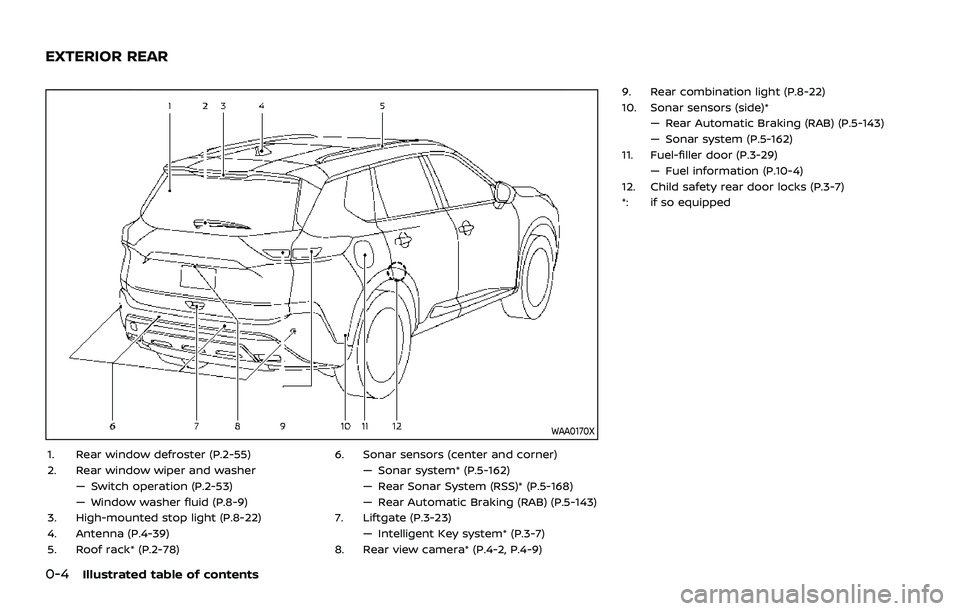
0-4Illustrated table of contents
WAA0170X
1. Rear window defroster (P.2-55)
2. Rear window wiper and washer— Switch operation (P.2-53)
— Window washer fluid (P.8-9)
3. High-mounted stop light (P.8-22)
4. Antenna (P.4-39)
5. Roof rack* (P.2-78) 6. Sonar sensors (center and corner)
— Sonar system* (P.5-162)
— Rear Sonar System (RSS)* (P.5-168)
— Rear Automatic Braking (RAB) (P.5-143)
7. Liftgate (P.3-23) — Intelligent Key system* (P.3-7)
8. Rear view camera* (P.4-2, P.4-9) 9. Rear combination light (P.8-22)
10. Sonar sensors (side)*
— Rear Automatic Braking (RAB) (P.5-143)
— Sonar system (P.5-162)
11. Fuel-filler door (P.3-29) — Fuel information (P.10-4)
12. Child safety rear door locks (P.3-7)
*: if so equipped
EXTERIOR REAR
Page 14 of 556
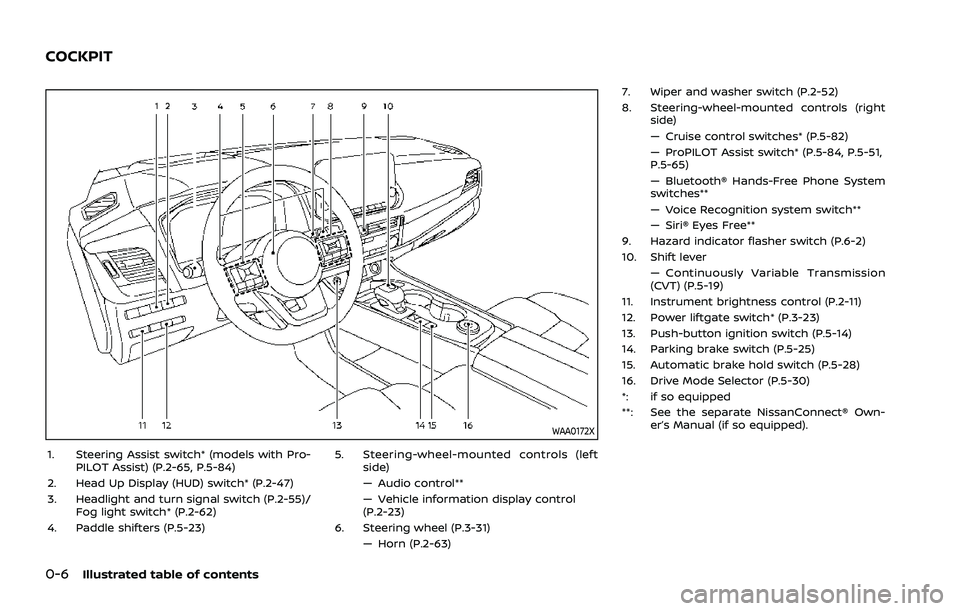
0-6Illustrated table of contents
WAA0172X
1. Steering Assist switch* (models with Pro-PILOT Assist) (P.2-65, P.5-84)
2. Head Up Display (HUD) switch* (P.2-47)
3. Headlight and turn signal switch (P.2-55)/ Fog light switch* (P.2-62)
4. Paddle shifters (P.5-23) 5. Steering-wheel-mounted controls (left
side)
— Audio control**
— Vehicle information display control
(P.2-23)
6. Steering wheel (P.3-31) — Horn (P.2-63) 7. Wiper and washer switch (P.2-52)
8. Steering-wheel-mounted controls (right
side)
— Cruise control switches* (P.5-82)
— ProPILOT Assist switch* (P.5-84, P.5-51,
P.5-65)
— Bluetooth® Hands-Free Phone System
switches**
— Voice Recognition system switch**
— Siri® Eyes Free**
9. Hazard indicator flasher switch (P.6-2)
10. Shift lever — Continuously Variable Transmission
(CVT) (P.5-19)
11. Instrument brightness control (P.2-11)
12. Power liftgate switch* (P.3-23)
13. Push-button ignition switch (P.5-14)
14. Parking brake switch (P.5-25)
15. Automatic brake hold switch (P.5-28)
16. Drive Mode Selector (P.5-30)
*: if so equipped
**: See the separate NissanConnect® Own- er’s Manual (if so equipped).
COCKPIT
Page 91 of 556
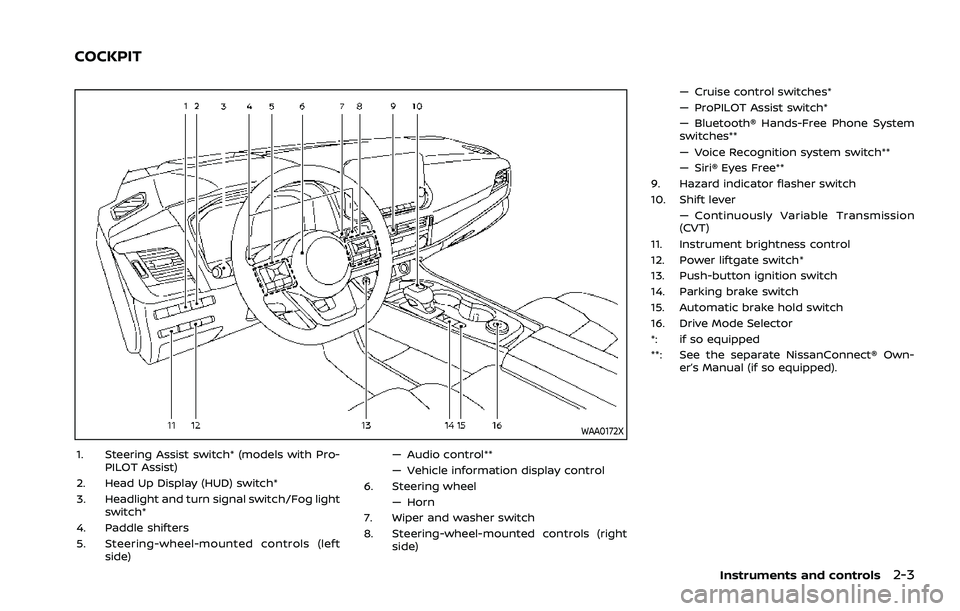
WAA0172X
1. Steering Assist switch* (models with Pro-PILOT Assist)
2. Head Up Display (HUD) switch*
3. Headlight and turn signal switch/Fog light switch*
4. Paddle shifters
5. Steering-wheel-mounted controls (left side) — Audio control**
— Vehicle information display control
6. Steering wheel
— Horn
7. Wiper and washer switch
8. Steering-wheel-mounted controls (right side) — Cruise control switches*
— ProPILOT Assist switch*
— Bluetooth® Hands-Free Phone System
switches**
— Voice Recognition system switch**
— Siri® Eyes Free**
9. Hazard indicator flasher switch
10. Shift lever — Continuously Variable Transmission
(CVT)
11. Instrument brightness control
12. Power liftgate switch*
13. Push-button ignition switch
14. Parking brake switch
15. Automatic brake hold switch
16. Drive Mode Selector
*: if so equipped
**: See the separate NissanConnect® Own- er’s Manual (if so equipped).
Instruments and controls2-3
COCKPIT
Page 115 of 556
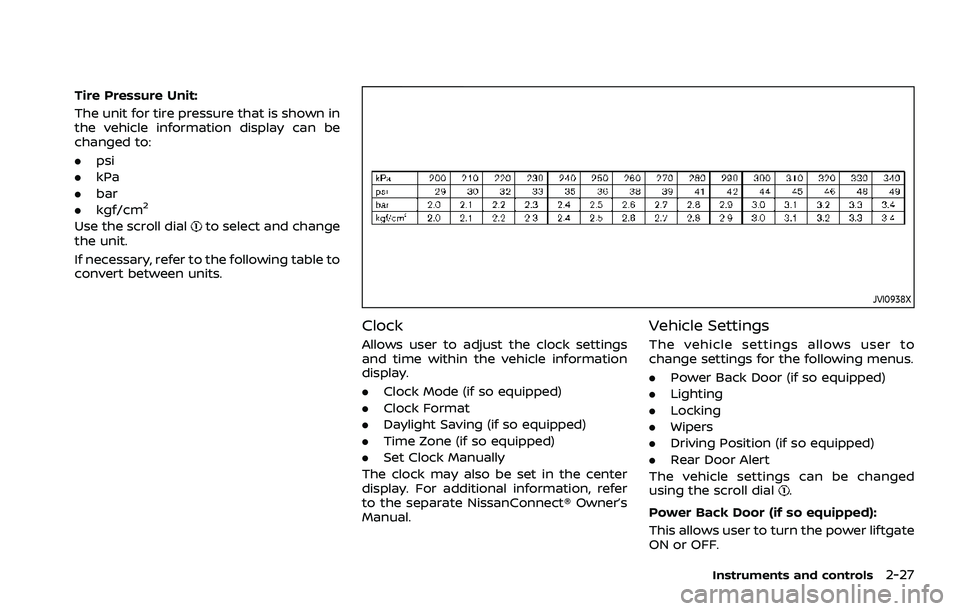
Tire Pressure Unit:
The unit for tire pressure that is shown in
the vehicle information display can be
changed to:
.psi
. kPa
. bar
. kgf/cm
2
Use the scroll dialto select and change
the unit.
If necessary, refer to the following table to
convert between units.
JVI0938X
Clock
Allows user to adjust the clock settings
and time within the vehicle information
display.
. Clock Mode (if so equipped)
. Clock Format
. Daylight Saving (if so equipped)
. Time Zone (if so equipped)
. Set Clock Manually
The clock may also be set in the center
display. For additional information, refer
to the separate NissanConnect® Owner’s
Manual.
Vehicle Settings
The vehicle settings allows user to
change settings for the following menus.
. Power Back Door (if so equipped)
. Lighting
. Locking
. Wipers
. Driving Position (if so equipped)
. Rear Door Alert
The vehicle settings can be changed
using the scroll dial
.
Power Back Door (if so equipped):
This allows user to turn the power liftgate
ON or OFF.
Instruments and controls2-27
Page 122 of 556
2-34Instruments and controls
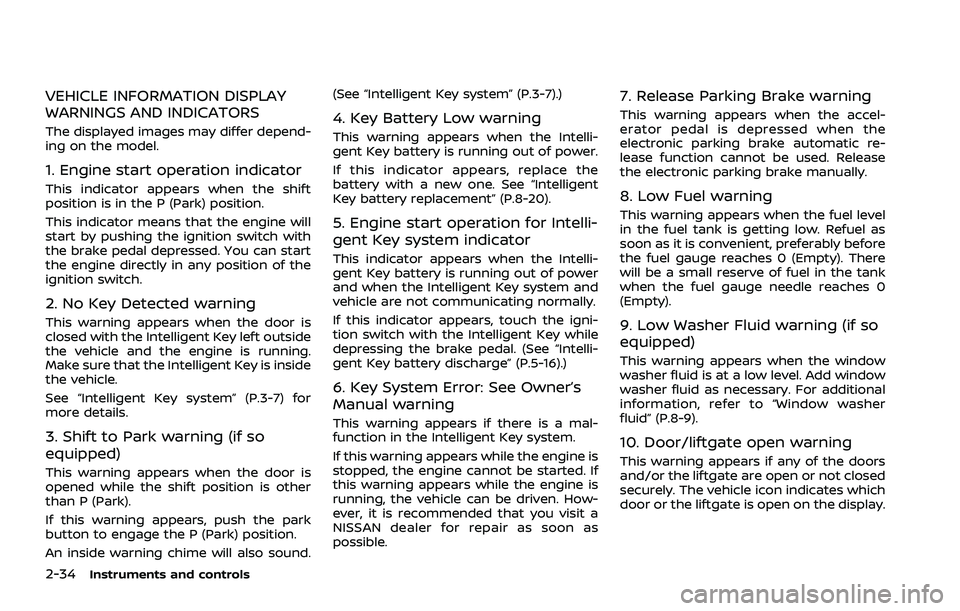
VEHICLE INFORMATION DISPLAY
WARNINGS AND INDICATORS
The displayed images may differ depend-
ing on the model.
1. Engine start operation indicator
This indicator appears when the shift
position is in the P (Park) position.
This indicator means that the engine will
start by pushing the ignition switch with
the brake pedal depressed. You can start
the engine directly in any position of the
ignition switch.
2. No Key Detected warning
This warning appears when the door is
closed with the Intelligent Key left outside
the vehicle and the engine is running.
Make sure that the Intelligent Key is inside
the vehicle.
See “Intelligent Key system” (P.3-7) for
more details.
3. Shift to Park warning (if so
equipped)
This warning appears when the door is
opened while the shift position is other
than P (Park).
If this warning appears, push the park
button to engage the P (Park) position.
An inside warning chime will also sound.(See “Intelligent Key system” (P.3-7).)
4. Key Battery Low warning
This warning appears when the Intelli-
gent Key battery is running out of power.
If this indicator appears, replace the
battery with a new one. See “Intelligent
Key battery replacement” (P.8-20).
5. Engine start operation for Intelli-
gent Key system indicator
This indicator appears when the Intelli-
gent Key battery is running out of power
and when the Intelligent Key system and
vehicle are not communicating normally.
If this indicator appears, touch the igni-
tion switch with the Intelligent Key while
depressing the brake pedal. (See “Intelli-
gent Key battery discharge” (P.5-16).)
6. Key System Error: See Owner’s
Manual warning
This warning appears if there is a mal-
function in the Intelligent Key system.
If this warning appears while the engine is
stopped, the engine cannot be started. If
this warning appears while the engine is
running, the vehicle can be driven. How-
ever, it is recommended that you visit a
NISSAN dealer for repair as soon as
possible.
7. Release Parking Brake warning
This warning appears when the accel-
erator pedal is depressed when the
electronic parking brake automatic re-
lease function cannot be used. Release
the electronic parking brake manually.
8. Low Fuel warning
This warning appears when the fuel level
in the fuel tank is getting low. Refuel as
soon as it is convenient, preferably before
the fuel gauge reaches 0 (Empty). There
will be a small reserve of fuel in the tank
when the fuel gauge needle reaches 0
(Empty).
9. Low Washer Fluid warning (if so
equipped)
This warning appears when the window
washer fluid is at a low level. Add window
washer fluid as necessary. For additional
information, refer to “Window washer
fluid” (P.8-9).
10. Door/liftgate open warning
This warning appears if any of the doors
and/or the liftgate are open or not closed
securely. The vehicle icon indicates which
door or the liftgate is open on the display.
Page 138 of 556
2-50Instruments and controls
DRIVER ASSISTANCE/NAVIGATION/
TRAFFIC SIGN/AUDIO/TEL/SMS
LINKING
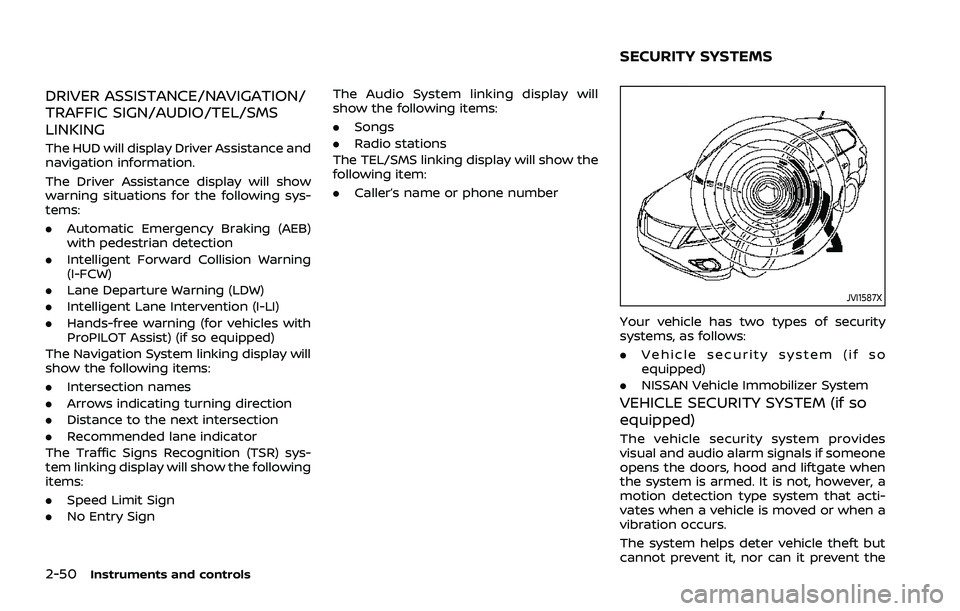
The HUD will display Driver Assistance and
navigation information.
The Driver Assistance display will show
warning situations for the following sys-
tems:
.Automatic Emergency Braking (AEB)
with pedestrian detection
. Intelligent Forward Collision Warning
(I-FCW)
. Lane Departure Warning (LDW)
. Intelligent Lane Intervention (I-LI)
. Hands-free warning (for vehicles with
ProPILOT Assist) (if so equipped)
The Navigation System linking display will
show the following items:
. Intersection names
. Arrows indicating turning direction
. Distance to the next intersection
. Recommended lane indicator
The Traffic Signs Recognition (TSR) sys-
tem linking display will show the following
items:
. Speed Limit Sign
. No Entry Sign The Audio System linking display will
show the following items:
.
Songs
. Radio stations
The TEL/SMS linking display will show the
following item:
. Caller’s name or phone number
JVI1587X
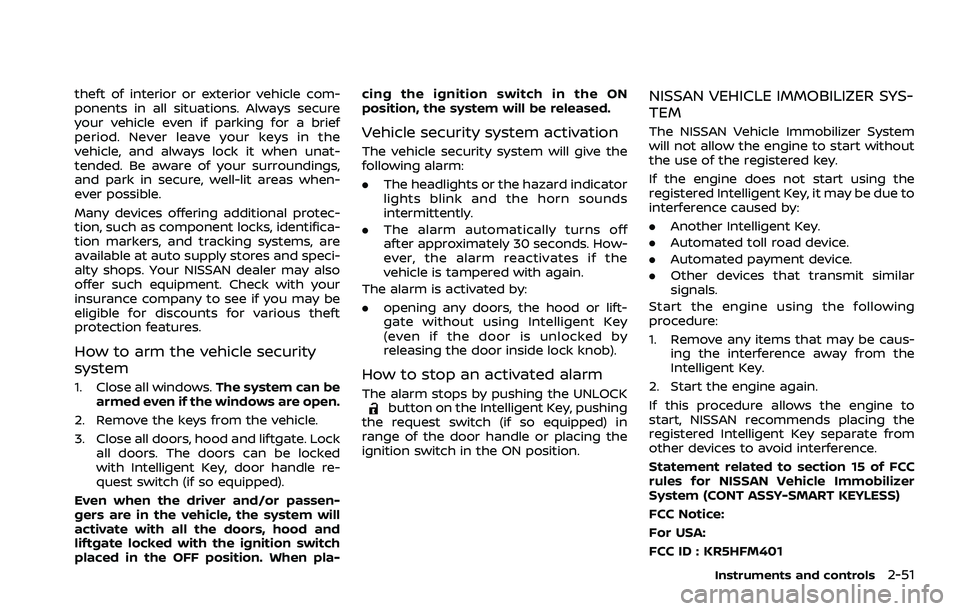
Your vehicle has two types of security
systems, as follows:
.Vehicle security system (if so
equipped)
. NISSAN Vehicle Immobilizer System
VEHICLE SECURITY SYSTEM (if so
equipped)
The vehicle security system provides
visual and audio alarm signals if someone
opens the doors, hood and liftgate when
the system is armed. It is not, however, a
motion detection type system that acti-
vates when a vehicle is moved or when a
vibration occurs.
The system helps deter vehicle theft but
cannot prevent it, nor can it prevent the
SECURITY SYSTEMS
Page 139 of 556
theft of interior or exterior vehicle com-
ponents in all situations. Always secure
your vehicle even if parking for a brief
period. Never leave your keys in the
vehicle, and always lock it when unat-
tended. Be aware of your surroundings,
and park in secure, well-lit areas when-
ever possible.
Many devices offering additional protec-
tion, such as component locks, identifica-
tion markers, and tracking systems, are
available at auto supply stores and speci-
alty shops. Your NISSAN dealer may also
offer such equipment. Check with your
insurance company to see if you may be
eligible for discounts for various theft
protection features.
How to arm the vehicle security
system
1. Close all windows.The system can be
armed even if the windows are open.
2. Remove the keys from the vehicle.
3. Close all doors, hood and liftgate. Lock all doors. The doors can be locked
with Intelligent Key, door handle re-
quest switch (if so equipped).
Even when the driver and/or passen-
gers are in the vehicle, the system will
activate with all the doors, hood and
liftgate locked with the ignition switch
placed in the OFF position. When pla- cing the ignition switch in the ON
position, the system will be released.
Vehicle security system activation
The vehicle security system will give the
following alarm:
.
The headlights or the hazard indicator
lights blink and the horn sounds
intermittently.
. The alarm automatically turns off
after approximately 30 seconds. How-
ever, the alarm reactivates if the
vehicle is tampered with again.
The alarm is activated by:
. opening any doors, the hood or lift-
gate without using Intelligent Key
(even if the door is unlocked by
releasing the door inside lock knob).
How to stop an activated alarm
The alarm stops by pushing the UNLOCKbutton on the Intelligent Key, pushing
the request switch (if so equipped) in
range of the door handle or placing the
ignition switch in the ON position.
NISSAN VEHICLE IMMOBILIZER SYS-
TEM
The NISSAN Vehicle Immobilizer System
will not allow the engine to start without
the use of the registered key.
If the engine does not start using the
registered Intelligent Key, it may be due to
interference caused by:
. Another Intelligent Key.
. Automated toll road device.
. Automated payment device.
. Other devices that transmit similar
signals.
Start the engine using the following
procedure:
1. Remove any items that may be caus- ing the interference away from the
Intelligent Key.
2. Start the engine again.
If this procedure allows the engine to
start, NISSAN recommends placing the
registered Intelligent Key separate from
other devices to avoid interference.
Statement related to section 15 of FCC
rules for NISSAN Vehicle Immobilizer
System (CONT ASSY-SMART KEYLESS)
FCC Notice:
For USA:
FCC ID : KR5HFM401
Instruments and controls2-51
Page 153 of 556
WAF0222X
The Steering Assist switch is used to
temporarily turn on and off the Steering
Assist system.
You can also use the “Driver Assistance”
menu in the vehicle information display to
turn on and off the Steering Assist
system. (See “How to enable/disable the
Steering Assist” (P.5-96).)
The Steering Assist system controls the
steering system to help keep your vehicle
near the center of the lane when driving.
(See “ProPILOT Assist” (P.5-84).)
The Rear Door Alert system functions
under certain conditions to indicate there
may be an object or passenger in the rear
seat(s). Check the seat(s) before exiting
the vehicle.
The Rear Door Alert system is initially
disabled. The driver can enable the sys-
tem using the vehicle information display.
(See “Vehicle Settings” (P.2-27).)
When the system is enabled:
.The system is activated when a rear
door is opened and closed. When the
vehicle is started and the system is
activated, a visual message appears in
the vehicle information display. (See
“31. Rear Door Alert is activated indi-
cator” (P.2-37).)
. If a rear door is opened and closed but
the vehicle is not driven, the system
will not be activated. A rear door must
be opened and closed and the car
driven for the system to activate.
. The time interval to activate the
system between when the rear door
is opened and closed and the vehicle
is started is about 10 minutes. A longer
interval does not indicate a malfunc-
tion.
When the Rear Door Alert system is
activated: .
When the driver puts the vehicle in the
P (Park) position, a notification mes-
sage appears in the vehicle informa-
tion display with the options to
“Dismiss Message” or “Disable Alert” if
desired.
— Select “Disable Alert” to temporarily
disable for that stop.
— No selection or ‘Dismiss Message” will keep the alert enabled for that
stop.
. If the alert is enabled when a driver
exits the vehicle, a message will ap-
pear in the vehicle information display
that states “Check Rear Seat for All
Articles.”
If “Horn & Alert” setting is selected:
— An audible horn sound will occur
after a short time unless a rear
door is opened and closed within a
short time to deactivate the alert.
— If the doors are locked before the alert is deactivated by opening a
rear door, the horn will sound.
— If the liftgate is opened before a rear door is opened, the horn will be
delayed until after the liftgate is
closed.
NOTE:
If “Alert Only” setting is selected, the
message alert will still be shown in the
Instruments and controls2-65
STEERING ASSIST SWITCH (models
with ProPILOT Assist) REAR DOOR ALERT
Page 175 of 556
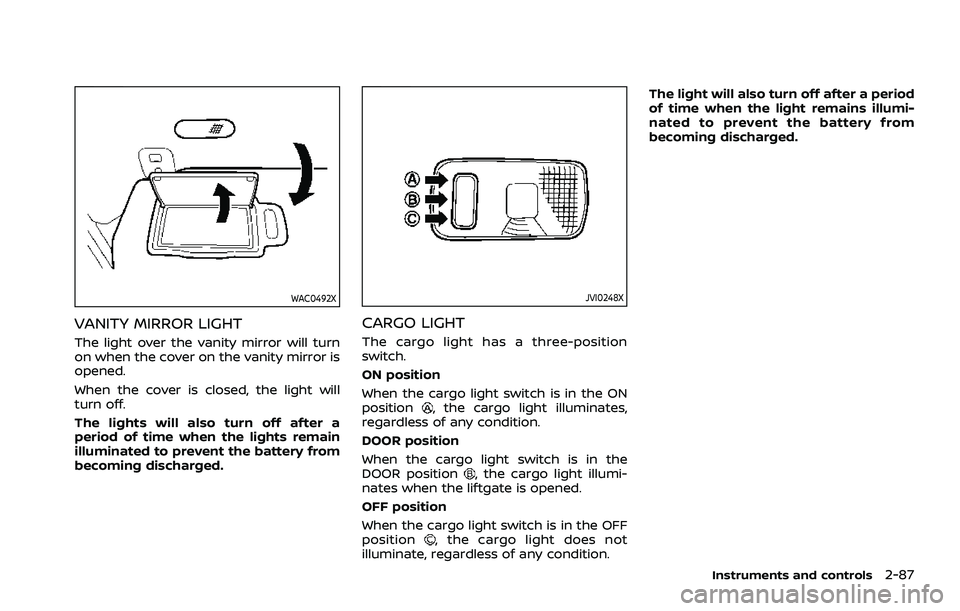
WAC0492X
VANITY MIRROR LIGHT
The light over the vanity mirror will turn
on when the cover on the vanity mirror is
opened.
When the cover is closed, the light will
turn off.
The lights will also turn off after a
period of time when the lights remain
illuminated to prevent the battery from
becoming discharged.
JVI0248X
CARGO LIGHT
The cargo light has a three-position
switch.
ON position
When the cargo light switch is in the ON
position
, the cargo light illuminates,
regardless of any condition.
DOOR position
When the cargo light switch is in the
DOOR position
, the cargo light illumi-
nates when the liftgate is opened.
OFF position
When the cargo light switch is in the OFF
position
, the cargo light does not
illuminate, regardless of any condition. The light will also turn off after a period
of time when the light remains illumi-
nated to prevent the battery from
becoming discharged.
Instruments and controls2-87
Page 177 of 556

3 Pre-driving checks and adjustments
Keys ........................................................................\
................................. 3-3Intelligent Key ........................................................................\
... 3-3
Doors ........................................................................\
.............................. 3-5
Locking with key .................................................................... 3-5
Locking with inside lock knob ..................................... 3-6
Locking with power door lock switch ................... 3-6
Automatic door locks ......................................................... 3-7
Child safety rear door lock ............................................. 3-7
Intelligent Key system .............................................................. 3-7 Intelligent Key operating range (models with
request switch) ........................................................................\
3-9
Door locks/unlocks precaution (models with
request switch) ..................................................................... 3-10
Intelligent Key operation (models with
request switch) ..................................................................... 3-11
Battery saver system ....................................................... 3-12
Warning lights and audible reminders .............. 3-12
Troubleshooting guide ................................................... 3-13
How to use remote keyless entry function ...... 3-15
Remote engine start (if so equipped) ....................... 3-19
Remote engine start operating range ............... 3-20
Remote starting the engine ....................................... 3-20
Extending engine run time ......................................... 3-20
Canceling a remote engine start ........................... 3-21
Conditions the remote engine start will
not work ........................................................................\
............. 3-21 Hood ........................................................................\
............................ 3-22
Liftgate ........................................................................\
...................... 3-23
Operating manual liftgate (if
so equipped) ........................................................................\
. 3-23
Operating power liftgate (if so equipped) ...... 3-24
Motion-activated liftgate (if
so equipped) ........................................................................\
. 3-26
Garage mode system (if so equipped) ............ 3-27
Auto closure (if so equipped) .................................. 3-28
liftgate release lever ....................................................... 3-28
Fuel-filler door ........................................................................\
..... 3-29 Opening the fuel-filler door ...................................... 3-29
How to refuel ....................................................................... 3-29
When refueling from a portable
fuel container ...................................................................... 3-30
Tilt/telescopic steering ........................................................ 3-31
Tilt and telescopic operation .................................. 3-31
Sun visors ........................................................................\
................ 3-32
Rear sunshade (if so equipped) .................................... 3-32
Mirrors ........................................................................\
...................... 3-33
Inside mirror ........................................................................\
. 3-33
Outside mirrors .................................................................. 3-34
Vanity mirror ........................................................................\
3-36
Memory seat (if so equipped) ......................................... 3-36 Memory storage function .......................................... 3-36