lights NISSAN ROGUE HYBRID 2017 2.G User Guide
[x] Cancel search | Manufacturer: NISSAN, Model Year: 2017, Model line: ROGUE HYBRID, Model: NISSAN ROGUE HYBRID 2017 2.GPages: 520
Page 103 of 520
1. Tachometer
2. Warning and indicator lights
3. Vehicle information display
4. Speedometer
5. Fuel gauge
6. Assist charge gaugeSPEEDOMETER AND ODOMETER
This vehicle is equipped with a speedometer and
odometer. The speedometer is located on the
right side of the meter cluster. The odometer is
located within the vehicle information display.
Speedometer
The speedometer indicates vehicle speed.
LIC3636
LIC2255
METERS AND GAUGES
2-4Instruments and controls
Page 109 of 520
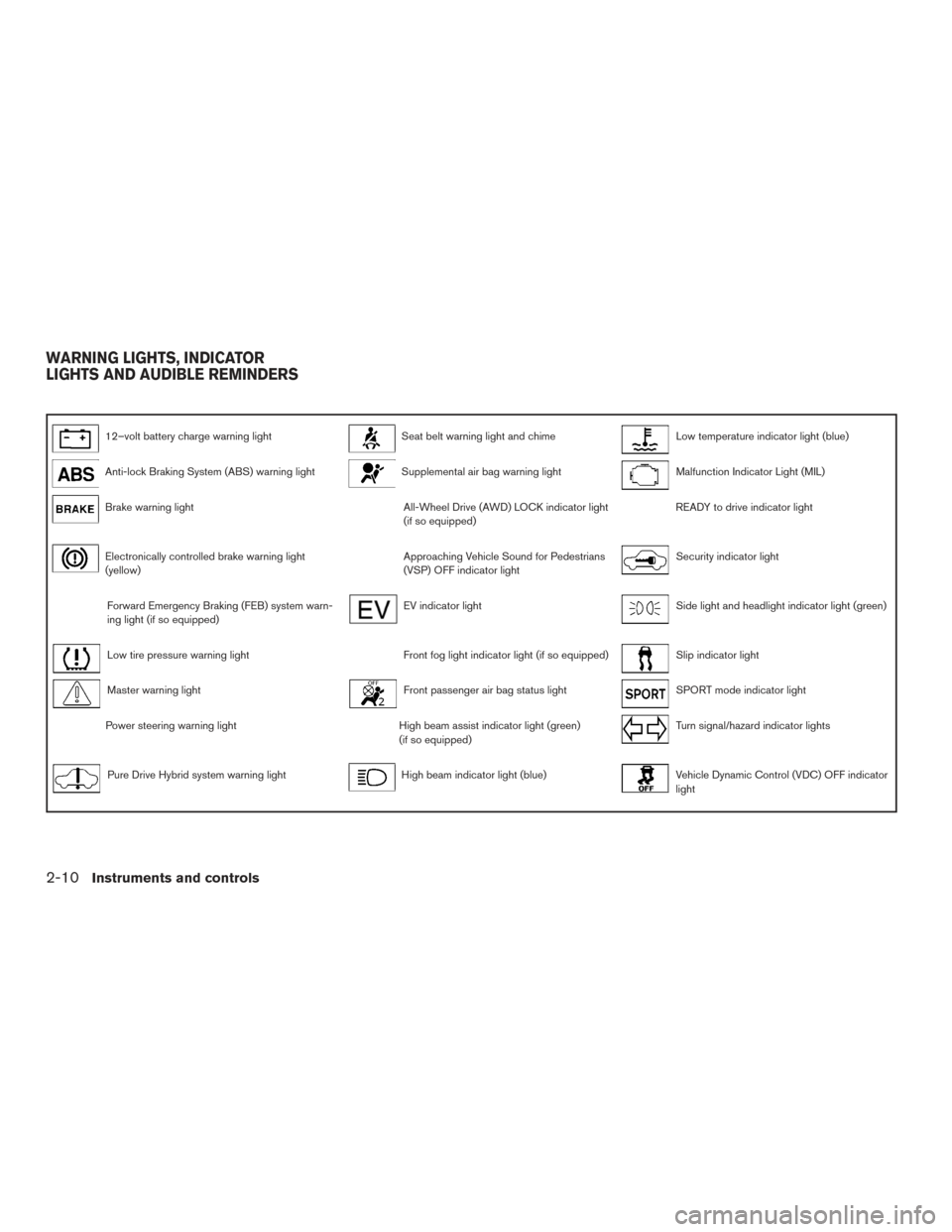
12–volt battery charge warning lightSeat belt warning light and chimeLow temperature indicator light (blue)
Anti-lock Braking System (ABS) warning lightSupplemental air bag warning lightMalfunction Indicator Light (MIL)
Brake warning lightAll-Wheel Drive (AWD) LOCK indicator light
(if so equipped)READY to drive indicator light
Electronically controlled brake warning light
(yellow)Approaching Vehicle Sound for Pedestrians
(VSP) OFF indicator lightSecurity indicator light
Forward Emergency Braking (FEB) system warn-
ing light (if so equipped)EV indicator lightSide light and headlight indicator light (green)
Low tire pressure warning lightFront fog light indicator light (if so equipped)Slip indicator light
Master warning lightFront passenger air bag status lightSPORT mode indicator light
Power steering warning lightHigh beam assist indicator light (green)
(if so equipped)Turn signal/hazard indicator lights
Pure Drive Hybrid system warning lightHigh beam indicator light (blue)Vehicle Dynamic Control (VDC) OFF indicator
light
WARNING LIGHTS, INDICATOR
LIGHTS AND AUDIBLE REMINDERS
2-10Instruments and controls
Page 110 of 520
CHECKING LIGHTS
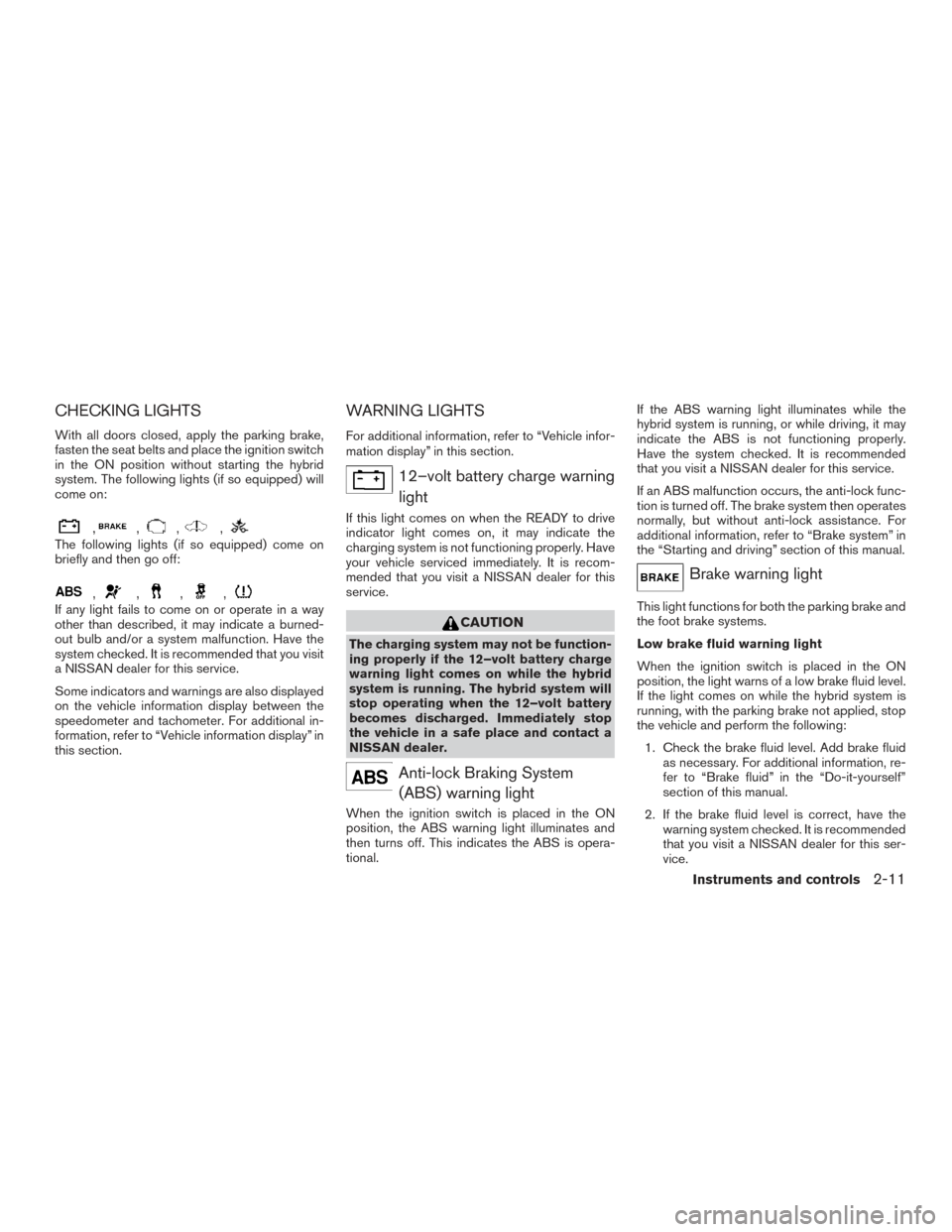
With all doors closed, apply the parking brake,
fasten the seat belts and place the ignition switch
in the ON position without starting the hybrid
system. The following lights (if so equipped) will
come on:
,,,,
The following lights (if so equipped) come on
briefly and then go off:
,,,,
If any light fails to come on or operate in a way
other than described, it may indicate a burned-
out bulb and/or a system malfunction. Have the
system checked. It is recommended that you visit
a NISSAN dealer for this service.
Some indicators and warnings are also displayed
on the vehicle information display between the
speedometer and tachometer. For additional in-
formation, refer to “Vehicle information display” in
this section.
WARNING LIGHTS
For additional information, refer to “Vehicle infor-
mation display” in this section.
12–volt battery charge warninglight
If this light comes on when the READY to drive
indicator light comes on, it may indicate the
charging system is not functioning properly. Have
your vehicle serviced immediately. It is recom-
mended that you visit a NISSAN dealer for this
service.
CAUTION
The charging system may not be function-
ing properly if the 12–volt battery charge
warning light comes on while the hybrid
system is running. The hybrid system will
stop operating when the 12–volt battery
becomes discharged. Immediately stop
the vehicle in a safe place and contact a
NISSAN dealer.
Anti-lock Braking System(ABS) warning light
When the ignition switch is placed in the ON
position, the ABS warning light illuminates and
then turns off. This indicates the ABS is opera-
tional. If the ABS warning light illuminates while the
hybrid system is running, or while driving, it may
indicate the ABS is not functioning properly.
Have the system checked. It is recommended
that you visit a NISSAN dealer for this service.
If an ABS malfunction occurs, the anti-lock func-
tion is turned off. The brake system then operates
normally, but without anti-lock assistance. For
additional information, refer to “Brake system” in
the “Starting and driving” section of this manual.
Brake warning light
This light functions for both the parking brake and
the foot brake systems.
Low brake fluid warning light
When the ignition switch is placed in the ON
position, the light warns of a low brake fluid level.
If the light comes on while the hybrid system is
running, with the parking brake not applied, stop
the vehicle and perform the following:
1. Check the brake fluid level. Add brake fluid as necessary. For additional information, re-
fer to “Brake fluid” in the “Do-it-yourself”
section of this manual.
2. If the brake fluid level is correct, have the warning system checked. It is recommended
that you visit a NISSAN dealer for this ser-
vice.
Instruments and controls2-11
Page 115 of 520
sounds for about 6 seconds unless the driver’s
seat belt is securely fastened.
The seat belt warning light may also illuminate if
the front passenger’s seat belt is not fastened
when the front passenger’s seat is occupied. For
7 seconds after the ignition switch is placed in
the ON position, the system does not activate the
warning light for the front passenger.
For additional information, refer to “Seat belts” in
the “Safety—Seats, seat belts and supplemental
restraint system” section of this manual.
Supplemental air bag warninglight
When the ignition switch is placed in the ON or
START position, the supplemental air bag warn-
ing light illuminates for about 7 seconds and then
turns off. This means the system is operational.
If any of the following conditions occur, the front
air bag, side air bag, curtain air bag, and preten-
sioner seat belt systems need servicing:
● The supplemental air bag warning light re-
mains on after approximately 7 seconds.
● The supplemental air bag warning light
flashes intermittently.
● The supplemental air bag warning light does
not come on at all. It is recommended that you visit a NISSAN dealer
for these services.
Unless checked and repaired, the supplemental
restraint system (air bag system) and/or the pre-
tensioner(s) may not function properly. For addi-
tional information, refer to “Supplemental Re-
straint System (SRS)” in the “Safety—Seats, seat
belts and supplemental restraint system” section
of this manual.
WARNING
If the supplemental air bag warning light
is on, it could mean that the front air bag,
side air bag, curtain air bag and/or preten-
sioner systems will not operate in an acci-
dent. To help avoid injury to yourself or
others, have your vehicle checked as soon
as possible. It is recommended that you
visit a NISSAN dealer for this service.
INDICATOR LIGHTS
For additional information, refer to “Vehicle infor-
mation display” in this section.
All-Wheel Drive (AWD) LOCK
indicator light (if so equipped)
When the ignition switch is in the ON position,
the All-Wheel Drive (AWD) LOCK indicator light
illuminates and then turns off. When selecting AWD LOCK mode while the
hybrid system is running, the AWD LOCK indica-
tor light illuminates.
CAUTION
Do not drive on dry hard surface roads in
the LOCK mode.
Approaching Vehicle Sound
for Pedestrians (VSP) OFF
indicator light
This light comes on if there is a malfunction in the
Approaching Vehicle Sound for Pedestrians
(VSP) system.
EV indicator light
This light illuminates when the engine stops run-
ning.
Front fog light indicator light (ifso equipped)
The front fog light indicator light illuminates when
the front fog lights are on. For additional informa-
tion, refer to “Fog light switch” in this section.
2-16Instruments and controls
Page 116 of 520
Front passenger air bag statuslight
The front passenger air bag status light will be lit
and the passenger front air bag will be off de-
pending on how the front passenger seat is being
used.
For additional information, refer to “Front passen-
ger air bag and status light” in the “Safety —
Seats, seat belts and supplemental restraint sys-
tem” section of this manual.
High beam assist indicator light(green) (if so equipped)
This indicator light illuminates when the head-
lights come on while the headlight switch is in the
AUTO position with the high beams selected.
This indicates that the high beam assist is opera-
tional.
For additional information, refer to “Headlight and
turn signal switch” in this section.
High beam indicator light(blue)
This blue light comes on when the headlight high
beams are on and goes out when the low beams
are selected.
The high beam indicator light also comes on
when the passing signal is activated.
Low temperature indicator
light (blue)
The low temperature indicator light illuminates
when the engine coolant temperature is low.
When the ignition switch is placed in the ON
position, the low temperature indicator light illu-
minates and then turns off after the engine cool-
ant has warmed up.
If the low temperature indicator light stays illumi-
nated after the engine has sufficiently warmed
up, it may indicate the low temperature sensor in
the engine coolant system is not functioning
properly and may need servicing. Have the sys-
tem checked, and if necessary repaired. It is
recommended that you visit a NISSAN dealer for
this service.
Malfunction Indicator Light(MIL)
If this indicator light comes on steady or blinks
while the hybrid system is running, it may indicate
a potential emission control malfunction.
The MIL may also come on steady if the fuel-filler
cap is loose or missing, or if the vehicle runs out
of fuel. Check to make sure the fuel-filler cap is
installed and closed tightly, and that the vehicle
has at least 3 gallons (11.4 liters) of fuel in the
fuel tank. After a few driving trips, the
light should
turn off if no other potential emission control
system malfunction exists.
If this indicator light comes on steady for 20 sec-
onds and then blinks for 10 seconds when the
hybrid system is not running, it indicates that the
vehicle is not ready for an emission control sys-
tem inspection/maintenance test. For additional
information, refer to “Readiness for
inspection/maintenance (I/M) test” in the “Tech-
nical and consumer information” section of this
manual.
Operation
The MIL will come on in one of two ways:
● MIL on steady — An emission control system
malfunction has been detected. Check the
fuel-filler cap if the LOOSE FUEL CAP
warning appears in the vehicle information
display. If the fuel-filler cap is loose or miss-
ing, tighten or install the cap and continue to
drive the vehicle. The
light should turn
off after a few driving trips. If the
light
does not turn off after a few driving trips,
have the vehicle inspected. It is recom-
mended that you visit a NISSAN dealer for
this service. You do not need to have your
vehicle towed to the dealer.
Instruments and controls2-17
Page 117 of 520
●MIL blinking — An engine misfire has been
detected which may damage the emission
control system. To reduce or avoid emission
control system damage:
– do not drive at speeds above 45 mph (72 km/h).
– avoid hard acceleration or deceleration.
– avoid steep uphill grades.
– if possible, reduce the amount of cargo being hauled or towed.
The MIL may stop blinking and come on steady.
Have the vehicle inspected. It is recommended
that you visit a NISSAN dealer for this service.
You do not need to have your vehicle towed to the
dealer.
CAUTION
Continued vehicle operation without hav-
ing the emission control system checked
and repaired as necessary could lead to
poor driveability, reduced fuel economy,
and possible damage to the emission con-
trol system.
READY to drive indicator light
The READY to drive indicator light illuminates
when the hybrid system is powered and the ve-
hicle may be driven.
Security indicator light
This light blinks when the ignition switch is
placed in the OFF or LOCK position.
The blinking security indicator light indicates that
the security systems equipped on the vehicle are
operational.
For additional information, refer to “Security sys-
tems” in this section.
Side light and headlight indicator light (green)
The side light and headlight indicator light illumi-
nates when the side light or headlight position is
selected. For additional information, refer to
“Headlight and turn signal switch” in this section.
Slip indicator light
This indicator will blink when the VDC system is
operating, thus alerting the driver to the fact that
the road surface is slippery and the vehicle is
nearing its traction limits. You may feel or hear the system working; this is
normal.
The light will blink for a few seconds after the
VDC system stops limiting wheel spin.
The
indicator light also comes on when
you place the ignition switch in the ON position.
The light will turn off after approximately 2 sec-
onds if the system is operational. If the light does
not come on, or remains on, have the system
checked. It is recommended that you visit a
NISSAN dealer for this service.
SPORT mode indicator light
This light illuminates and then turns off when the
ignition switch is placed in the ON position, and
when the SPORT mode is selected.
For additional information, refer to “Continuously
Variable Transmission (CVT)” in the “Starting and
driving” section of this manual.
Turn signal/hazard indicator
lights
The appropriate light flashes when the turn signal
switch is activated.
Both lights flash when the hazard switch is turned
on.
2-18Instruments and controls
Page 118 of 520
Vehicle Dynamic Control(VDC) OFF indicator light
This indicator light comes on when the VDC OFF
switch is pushed to off. This indicates the VDC
system has been turned off.
Push the VDC OFF switch again or restart the
hybrid system and the system will operate nor-
mally. For additional information, refer to “Vehicle
Dynamic Control (VDC) system” in the “Starting
and driving” section of this manual.
The VDC indicator light also comes on when you
place the ignition switch in the ON position. The
light will turn off after about 2 seconds if the
system is operational. If the
indicator light
stays on while you are driving, have the system
checked. It is recommended that you visit a
NISSAN dealer for this service.
While the VDC system is operating, you might
feel a slight vibration or hear the system working
when starting the vehicle or accelerating, but this
is normal.
AUDIBLE REMINDERS
Brake pad wear warning
The disc brake pads have audible wear warnings.
When a disc brake pad requires replacement, it
makes a high pitched scraping sound when the
vehicle is in motion, whether or not the brake
pedal is depressed. Have the brakes checked as
soon as possible if the warning sound is heard.
Key reminder chime
A chime sounds if the driver’s door is opened
while the ignition switch is placed in the OFF
position or placed in the OFF or LOCK position
with the key left in the vehicle. Make sure the
ignition switch is placed in the LOCK position,
and take the key with you when leaving the ve-
hicle.
Light reminder chime
With the ignition switch placed in the OFF posi-
tion, a chime sounds when the driver’s door is
opened if the headlights or parking lights are on.
Turn the headlight control switch off before leav-
ing the vehicle.
NISSAN Intelligent Key® door buzzer
The Intelligent Key door buzzer sounds if any one
of the following improper operations is found.
● The Intelligent Key is left inside the vehicle
when locking the doors.
● Any doors are not closed securely when
locking the doors.
When the buzzer sounds, be sure to check both
the vehicle and the Intelligent Key. For additional
information, refer to “NISSAN Intelligent Key®” in
the “Pre-driving checks and adjustments” section
of this manual.
Instruments and controls2-19
Page 123 of 520
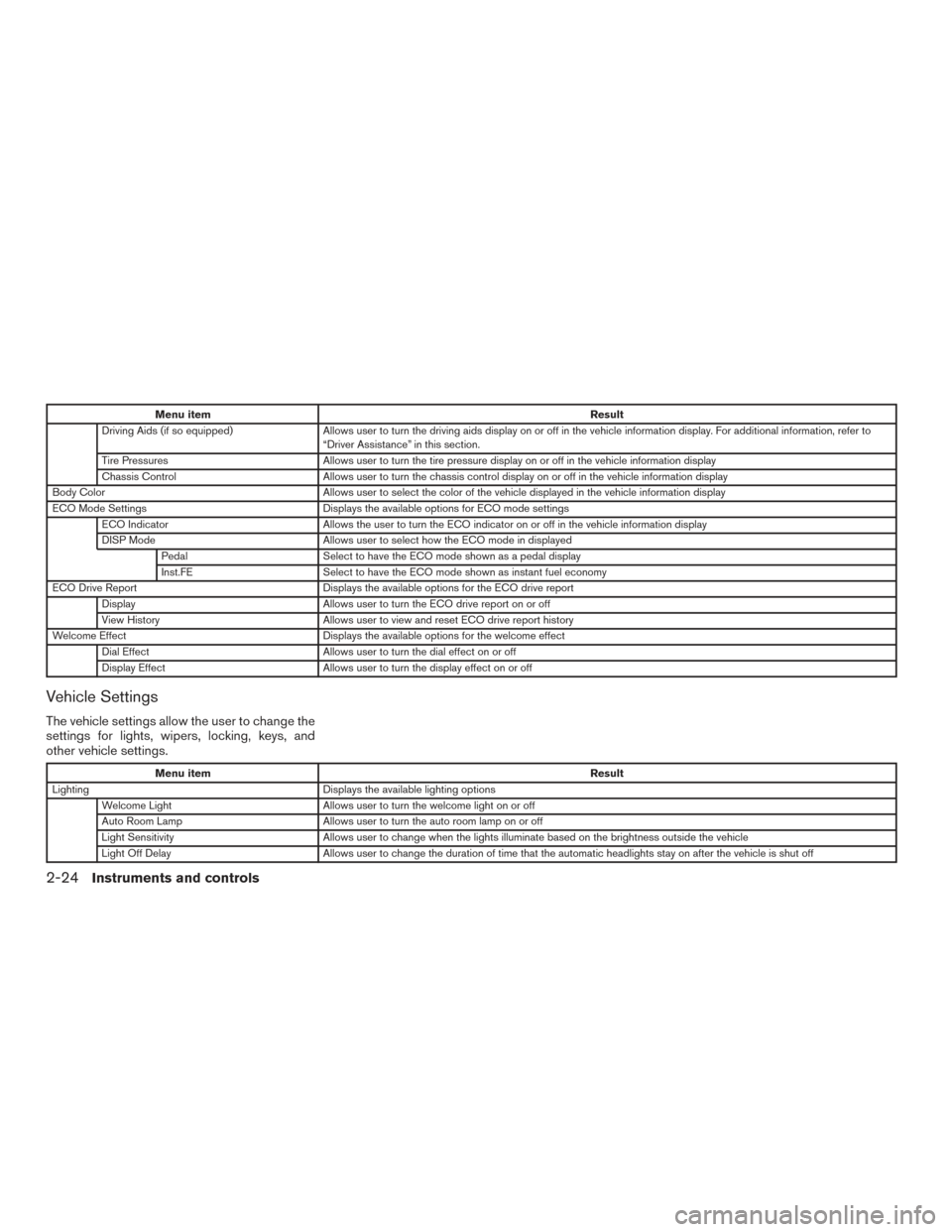
Menu itemResult
Driving Aids (if so equipped) Allows user to turn the driving aids display on or off in the vehicle information display. For additional information, refer to
“Driver Assistance” in this section.
Tire Pressures Allows user to turn the tire pressure display on or off in the vehicle information display
Chassis Control Allows user to turn the chassis control display on or off in the vehicle information display
Body Color Allows user to select the color of the vehicle displayed in the vehicle information display
ECO Mode Settings Displays the available options for ECO mode settings
ECO Indicator Allows the user to turn the ECO indicator on or off in the vehicle information display
DISP Mode Allows user to select how the ECO mode in displayed
Pedal Select to have the ECO mode shown as a pedal display
Inst.FE Select to have the ECO mode shown as instant fuel economy
ECO Drive Report Displays the available options for the ECO drive report
Display Allows user to turn the ECO drive report on or off
View History Allows user to view and reset ECO drive report history
Welcome Effect Displays the available options for the welcome effect
Dial Effect Allows user to turn the dial effect on or off
Display Effect Allows user to turn the display effect on or off
Vehicle Settings
The vehicle settings allow the user to change the
settings for lights, wipers, locking, keys, and
other vehicle settings.
Menu item Result
Lighting Displays the available lighting options
Welcome Light Allows user to turn the welcome light on or off
Auto Room Lamp Allows user to turn the auto room lamp on or off
Light Sensitivity Allows user to change when the lights illuminate based on the brightness outside the vehicle
Light Off Delay Allows user to change the duration of time that the automatic headlights stay on after the vehicle is shut off
2-24Instruments and controls
Page 129 of 520
VEHICLE INFORMATION DISPLAY
WARNINGS AND INDICATORS
1. Hybrid system start operation
2. No Key Detected
3. Shift to Park
4. Key Battery Low
5. Hybrid system start operation for IntelligentKey system (if I-Key battery level is low)
6. Key ID Incorrect
7. Release Parking Brake
8. Low Fuel
9. Low Washer Fluid (if so equipped)
10. Door/liftgate Open
11. I-Key System Error: See Owner’s Manual
12. Loose Fuel Cap
13. Tire Pressure Low — Add Air
14. Flat Tire — Visit Dealer (if so equipped)
15. Low Oil Pressure Stop Vehicle
16. AWD Error: See Owner’s Manual (if so equipped)
17. AWD High Temp. Stop Vehicle (if so equipped) 18. Tire Size Incorrect: See Owner’s Manual (if
so equipped)
19. Battery Voltage Low Charge Battery
20. Shipping Mode On Push Storage Fuse
21. Power will turn off to save the battery
22. Power turned off to save the battery
23. Reminder: Turn OFF headlights
24. Timer Alert — Time for a driver break?
25. Low Outside Temperature
26. Chassis Control System Error: See Owner’s Manual
27. Cruise indicator (if so equipped)
28. Intelligent Cruise Control (ICC) indicators (if so equipped)
29. Transmission Shift Position Indicator
30. CVT Error: See Owner’s Manual
31. Malfunction: See Owner’s Manual (if so equipped)
32. ECO mode indicator
33. High Coolant Temp Stop Vehicle
34. Hybrid System Overheated Stop Vehicle Hybrid system start operation
This indicator appears when the shift lever is in
the P (Park) position.
This indicator means that the hybrid system will
start by pushing the ignition switch with the brake
pedal depressed. You can start the hybrid system
from any position of the ignition switch.
No Key Detected
This warning appears when the Intelligent Key is
left outside the vehicle with the ignition switch in
the ON position. Make sure the Intelligent Key is
inside the vehicle.
For additional information, refer to “NISSAN In-
telligent Key®” in the “Pre-driving checks and
adjustments” section of this manual.
Shift to Park
This warning illuminates when the ignition switch
is in the OFF position and the shift lever is not in
the P (Park) position. Also, a chime sounds when
the ignition switch is in the OFF position.
If this warning illuminates, move the shift lever to
the P (Park) position and start the hybrid system.
Key Battery Low
This indicator illuminates when the Intelligent Key
battery is running out of power.
2-30Instruments and controls
Page 131 of 520
and “Tire Pressure Monitoring System (TPMS)”
in the “Starting and driving” section of this
manual.
Flat Tire – Visit Dealer (if so equipped)
This warning appears when the low tire pressure
warning light in the meter illuminates and one or
more flat tires are detected while driving. A chime
also sounds for approximately 10 seconds.
Low Oil Pressure Stop Vehicle
This warning appears in the message area of the
vehicle information display if low oil pressure is
detected. This gauge is not designed to indicate
low oil level.The low oil pressure warning is
not designed to indicate a low oil level. Use
the dipstick to check the oil level. For additional
information, refer to “Engine oil” in the “Do-it-
yourself” section of this manual.
AWD Error: See Owner’s Manual (if so
equipped)
This warning appears when the all-wheel drive
system is not functioning properly while the hy-
brid system is running.
AWD High Temp. Stop vehicle (if so
equipped)
This warning may appear while trying to free a
stuck vehicle due to increased oil temperature.
The driving mode may change to 2-Wheel Drive (2WD) . If this warning is displayed, stop the
vehicle with the engine idling, as soon as it is safe
to do so. Then if the warning turns off, you can
continue driving.
Tire Size Incorrect: See Owner’s Manual
(if so equipped)
This warning may appear if there is a large differ-
ence between the diameters of the front and rear
wheels. Pull off the road in a safe area, with the
engine idling. Check that all the tire sizes are the
same, that the tire pressure is correct and that the
tires are not excessively worn.
Battery Voltage Low Charge Battery
This warning appears when the battery is low and
needs to be charged.
Shipping Mode On Push Storage Fuse
This warning may appear if the extended storage
switch is not pushed in. When this warning ap-
pears, push in the extended storage switch to
turn off the warning. For additional information,
refer to “Extended storage switch” in this section.
Power will turn off to save the battery
This warning appears in the message area of the
vehicle information display after a period of time if
the shift lever has not moved from the P (Park)
position.Power turned off to save the battery
This message appears after the ignition switch is
automatically turned to off to save the 12–volt
battery. For additional information, refer to “Push-
button ignition switch positions” in the “Starting
and driving” section of this manual.
Reminder: Turn OFF headlights
This warning appears when the headlights are
left in the ON position when exiting the vehicle.
Place the headlight switch in the OFF or AUTO
position. For additional information, refer to
“Headlight and turn signal switch” in this section.
Timer Alert – Time for a driver break?
This indicator appears when the set time is
reached. The time can be set up to six hours. For
additional information on setting the timer, refer
to “Alarm” in this section.
Low Outside Temperature
This warning appears if the outside temperature
is below 37°F (3°C) . The temperature can be
changed to display in Celsius or Fahrenheit. For
additional information, refer to “Unit” in this sec-
tion.
2-32Instruments and controls