engine NISSAN ROGUE SPORT 2017 Owners Manual
[x] Cancel search | Manufacturer: NISSAN, Model Year: 2017, Model line: ROGUE SPORT, Model: NISSAN ROGUE SPORT 2017Pages: 512, PDF Size: 3.33 MB
Page 394 of 512
The computer has a built-in diagnostic
feature that tests the system each time
you start the engine and move the vehicle
forward or in reverse at a slow speed.
When the self-test occurs, you may hear a
“clunk” noise and/or feel a pulsation in the
brake pedal. This is normal and is not an
indication of a malfunction.
WARNING
.The VDC system is designed to
help improve driving stability but
does not prevent accidents due
to abrupt steering operation at
high speeds or by careless or
dangerous driving techniques.
Reduce vehicle speed and be
especially careful when driving
and cornering on slippery sur-
faces and always drive carefully.
. Do not modify the vehicle’s sus-
pension. If suspension parts such
as shock absorbers, struts,
springs, stabilizer bars, bushings
and wheels are not NISSAN re-
commended for your vehicle or
are extremely deteriorated, the
VDC system may not operate
properly. This could adversely
affect vehicle handling perfor-
mance, and the VDC warning light
may illuminate.
. If brake related parts such as
brake pads, rotors and calipers
are not NISSAN recommended or
are extremely deteriorated, the
VDC system may not operate
properly and the VDC warning
light
may illuminate.
. If engine control related parts are
not NISSAN recommended or are
extremely deteriorated, the VDC
warning light
may illuminate.
. When driving on extremely in-
clined surfaces such as higher
banked corners, the VDC system
may not operate properly and the
VDC warning light
may illumi-
nate. Do not drive on these types
of roads.
. When driving on an unstable sur-
face such as a turntable, ferry,
elevator or ramp, the VDC warn-
ing light
may illuminate. This
is not a malfunction. Restart the
engine after driving onto a stable
surface.
. If wheels or tires other than the
NISSAN recommended ones are
used, the VDC system may not
operate properly and the VDC
warning light
may illuminate. .
The VDC system is not a substi-
tute for winter tires or tire chains
on a snow covered road.
Starting and driving5-109
Page 395 of 512

5-110Starting and driving
The chassis control is an electric control
module that includes the following func-
tions:
.Intelligent Trace Control
. Intelligent Engine Brake
. Active Ride Control
INTELLIGENT TRACE CONTROL
This system senses driving based on the
driver’s steering and acceleration/braking
patterns, and controls brake pressure at
individual wheels to aid tracing at corners
and help smooth vehicle response.
Intelligent Trace Control can be set to ON
(enabled) or OFF (disabled) through the
Vehicle Information Display “Settings”
page. See “Vehicle information display”
(P.2-18) for more information.
When the Vehicle Dynamic Control (VDC)
OFF switch is used to turn off the VDC
system, the Intelligent Trace Control is
also turned off.
JVS0403X
When the Intelligent Trace Control is
operated and the “Chassis Control” mode
is selected in the trip computer, the
Intelligent Trace Control graphics are
shown in the vehicle information display.
(See “Trip computer” (P.2-34).)
If the chassis control warning message
appears in the vehicle information dis-
play, it may indicate that the Intelligent
Trace Control is not functioning properly.
Have the system checked as soon as
possible. It is recommended that you visit
a NISSAN dealer for this service. (See
“Vehicle information display warnings
and indicators” (P.2-28).)
WARNING
The Intelligent Trace Control may not
be effective depending on the driv-
ing condition. Always drive carefully
and attentively.
When the Intelligent Trace Control is
operating, you may feel a pulsation in
the brake pedal and hear a noise. This is
normal and indicates that the Intelligent
Trace Control is operating properly.
Even if the Intelligent Trace Control is set
to OFF, some functions will remain on to
assist the driver (for example, avoidance
CHASSIS CONTROL
Page 396 of 512

scenes).
INTELLIGENT ENGINE BRAKE (Con-
tinuously Variable Transmission
(CVT) models)
The Intelligent Engine Brake function
adds subtle deceleration by controlling
CVT gear ratio, depending on the corner-
ing condition calculated from driver’s
steering input and plural sensors. This
benefit to easier traceability and less
workload of adjusting speed with braking
at corners.
The Intelligent Engine Brake also adds
subtle deceleration with gear ratio con-
trol according to driver’s brake pedal
operation.
The Intelligent Engine Brake can be set to
ON (enabled) or OFF (disabled) through
the Vehicle Information Display “Settings”
page. See “Vehicle information display”
(P.2-18) for more information.
JVS0403X
When the Intelligent Engine Brake is
operated at corners and the “Chassis
Control” mode is selected in the trip
computer, the Intelligent Engine Brake
graphics are shown in the vehicle infor-
mation display. See “Trip computer” (P.2-
34) for more information.
If the chassis control warning message
appears in the vehicle information dis-
play, it may indicate that the Intelligent
Engine Brake is not functioning properly.
Have the system checked as soon as
possible. It is recommended that you visit
a NISSAN dealer for this service.
WARNING
The Intelligent Engine Brake may not
be effective depending on the driv-
ing condition. Always drive carefully
and attentively.
When the Intelligent Engine Brake is
operating, the needle of the tachometer
will rise up and you may hear an engine
noise. This is normal and indicates that
the Intelligent Engine Brake is operating
properly.
Starting and driving5-111
Page 397 of 512

5-112Starting and driving
ACTIVE RIDE CONTROL
This system senses upper body motion
based on wheel speed information and
controls engine torque and four wheel
brake pressure to enhance ride comfort
in effort to restrain uncomfortable upper
body movement. This system come into
effect above 25 MPH (40 km/h). When the
VDC OFF switch is used to turn off the
VDC system, the Active Ride Control is
also turned off.
JVS0398X
When the brake control of the Active Ride
Control is operated and the “Chassis
Control” mode is selected in the trip
computer, the Active Ride Control gra-
phics are shown in the vehicle informa-
tion display. See “Trip computer” (P.2-34)
for more information.
If the chassis control warning message
appears in the vehicle information dis-
play, it may indicate that the Active Ride
Control is not functioning properly. Have
the system checked as soon as possible.
It is recommended that you visit a NISSAN
dealer for this service.
When the Active Ride Control is operating,
you may hear noise and sense slightdeceleration. This is normal and indicates
that the Active Ride Control is operating
properly.
Page 398 of 512
WARNING
.Never rely solely on the hill start
assist system to prevent the ve-
hicle from moving backward on a
hill. Always drive carefully and
attentively. Depress the brake
pedal when the vehicle is stopped
on a steep hill. Be especially care-
ful when stopped on a hill on
frozen or muddy roads. Failure
to prevent the vehicle from rolling
backwards may result in a loss of
control of the vehicle and possi-
ble serious injury or death.
. The hill start assist system is not
designed to hold the vehicle at a
standstill on a hill. Depress the
brake pedal when the vehicle is
stopped on a steep hill. Failure to
do so may cause the vehicle to
roll backwards and may result in
a collision or serious personal
injury.
. The hill start assist system may
not prevent the vehicle from roll-
ing backwards on a hill under all
load or road conditions. Always
be prepared to depress the brake
pedal to prevent the vehicle from
rolling backwards. Failure to do so may result in a collision or
serious personal injury.
The hill start assist system automatically
keeps the brakes applied to help prevent
the vehicle from rolling backwards in the
time it takes the driver to release the
brake pedal and apply the accelerator
when the vehicle is stopped on a hill.
The hill start assist system will operate
automatically under the following condi-
tions:
. The transmission is shifted to a for-
ward or reverse gear.
. The vehicle is stopped completely on a
hill by applying the brake.
The maximum holding time is 2 seconds.
After 2 seconds the vehicle will begin to
roll back and the hill start assist system
will stop operating completely.
The hill start assist system will not
operate when the transmission is shifted
to the N (Neutral) or P (Park) position (CVT
models) or on a flat and level road.
When the Vehicle Dynamic Control (VDC)
warning light illuminates in the meter, the
hill start assist system will not operate.
(See “Vehicle Dynamic Control (VDC)
warning light” (P.2-15).)
FREEING A FROZEN DOOR LOCK
To prevent a door lock from freezing,
apply deicer through the key hole. If the
lock becomes frozen, heat the key before
inserting it into the key hole, or use the
Intelligent Key system or the remote
keyless entry key fob.
ANTI-FREEZE
In the winter when it is anticipated that
the outside temperature will drop below
32°F (0°C), check the anti-freeze to assure
proper winter protection. For additional
information, see “Engine cooling system”
(P.8-4).
BATTERY
If the battery is not fully charged during
extremely cold weather conditions, the
battery fluid may freeze and damage the
battery. To maintain maximum efficiency,
the battery should be checked regularly.
For additional information, see “Battery”
(P.8-11).
DRAINING OF COOLANT WATER
If the vehicle is to be left outside without
anti-freeze, drain the cooling system,
including the engine block. Refill before
operating the vehicle. For details, see
“Engine cooling system” (P.8-4).
Starting and driving5-113
HILL START ASSIST SYSTEM COLD WEATHER DRIVING
Page 400 of 512

6 In case of emergency
Hazard warning flasher switch ......................................... 6-2
Roadside assistance program ........................................... 6-2
Emergency engine shut off (models with push-
button ignition switch) ............................................................. 6-3
Flat tire ........................................................................\
.......................... 6-3Tire Pressure Monitoring System (TPMS) ........... 6-3
Changing a flat tire .............................................................. 6-4 Jump starting ........................................................................\
......... 6-9
Push starting ........................................................................\
........ 6-11
If your vehicle overheats .................................................... 6-11
Towing your vehicle ............................................................... 6-13
Towing recommended by NISSAN ..................... 6-14
Vehicle recovery (freeing a stuck vehicle) ...... 6-16
Page 402 of 512
To shut off the engine in an emergency
situation while driving, perform the fol-
lowing procedure:
.Rapidly push the push-button ignition
switch 3 consecutive times in less
than 1.5 seconds, or
. Push and hold the push-button igni-
tion switch for more than 2 seconds.TIRE PRESSURE MONITORING SYS-
TEM (TPMS)
This vehicle is equipped with the Tire
Pressure Monitoring System (TPMS). It
monitors tire pressure of all tires except
the spare. When the low tire pressure
warning light is lit, and the “Tire Pressure
Low - Add Air” warning message is
displayed in the vehicle information dis-
play, one or more of your tires is sig-
nificantly under-inflated. If the vehicle is
being driven with low tire pressure, the
TPMS will activate and warn you of it by
the low tire pressure warning light. This
system will activate only when the vehicle
is driven at speeds above 16 MPH (25
km/h). For more details, see “Warning
lights, indicator lights and audible remin-
ders” (P.2-10) and “Tire Pressure Monitor-
ing System (TPMS)” (P.5-5).
WARNING
.If the low tire pressure warning
light illuminates while driving,
avoid sudden steering maneu-
vers or abrupt braking, reduce
vehicle speed, pull off the road
to a safe location and stop the
vehicle as soon as possible. Driv-
ing with under-inflated tires may
permanently damage the tires and increase the likelihood of tire
failure. Serious vehicle damage
could occur and may lead to an
accident and could result in ser-
ious personal injury. Check the
tire pressure for all four tires.
Adjust the tire pressure to the
recommended COLD tire pressure
shown on the Tire and Loading
Information label to turn the low
tire pressure warning light OFF. If
the light still illuminates while
driving after adjusting the tire
pressure, a tire may be flat. If
you have a flat tire, replace it with
a spare tire as soon as possible.
. Since the spare tire is not
equipped with the TPMS, when a
spare tire is mounted or a wheel
is replaced, the TPMS will not
function and the low tire pressure
warning light will flash for ap-
proximately 1 minute. The light
will remain on after 1 minute.
Have your tires replaced and/or
TPMS system reset as soon as
possible. It is recommended you
visit a NISSAN dealer for these
services.
. Replacing tires with those not
originally specified by NISSAN
could affect the proper operation
In case of emergency6-3
EMERGENCY ENGINE SHUT OFF (models
with push-button ignition switch)FLAT TIRE
Page 403 of 512
6-4In case of emergency
of the TPMS.
. Do not inject any tire liquid or
aerosol tire sealant into the tires,
as this may cause a malfunction
of the tire pressure sensors.
CHANGING A FLAT TIRE
If you have a flat tire, follow the instruc-
tions below.
Stopping the vehicle
1. Safely move the vehicle off the road
and away from traffic.
2. Turn on the hazard warning flashers.
3. Park on a level surface and apply the parking brake.
4. Continuously Variable Transmission
(CVT) models:
Move the shift lever to the P (Park)
position.
Manual Transmission (MT) models:
Move the shift lever to the R (Reverse)
position.
5. Turn off the engine.
6. Raise the hood to warn other traffic, and to signal professional road assis-
tance personnel that you need assis-
tance. 7. Have all passengers get out of the
vehicle and stand in a safe place, away
from traffic and clear of the vehicle.
WARNING
.Make sure the parking brake is
securely applied and the Manual
Transmission is shifted into R
(Reverse), or the CVT into P (Park).
. Never change tires when the ve-
hicle is on a slope, ice or slippery
areas. This is hazardous.
. Never change tires if oncoming
traffic is close to your vehicle.
Wait for professional road assis-
tance.
MCE0001A
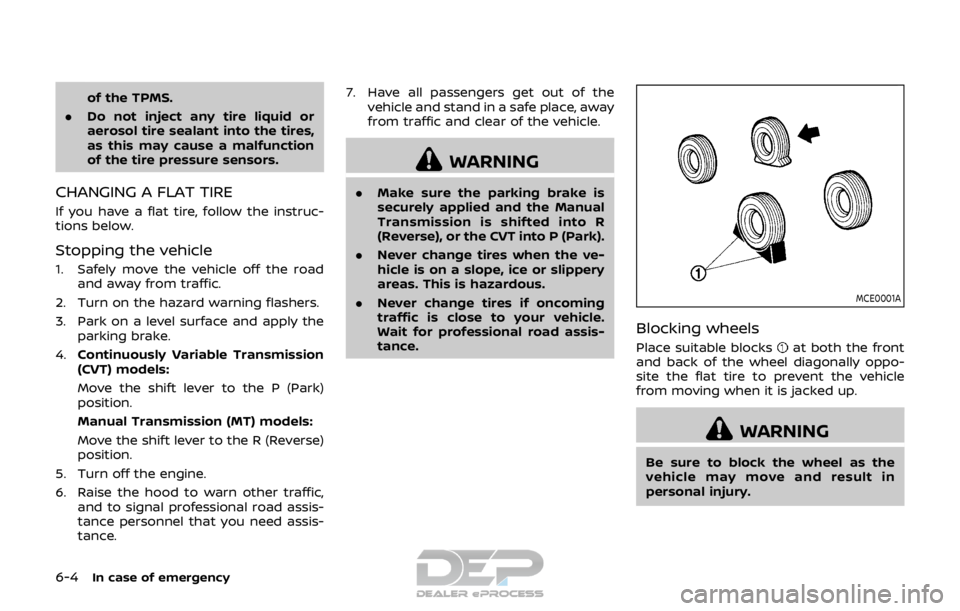
Blocking wheels
Place suitable blocksat both the front
and back of the wheel diagonally oppo-
site the flat tire to prevent the vehicle
from moving when it is jacked up.
WARNING
Be sure to block the wheel as the
vehicle may move and result in
personal injury.
Page 405 of 512
6-6In case of emergency
SCE0630
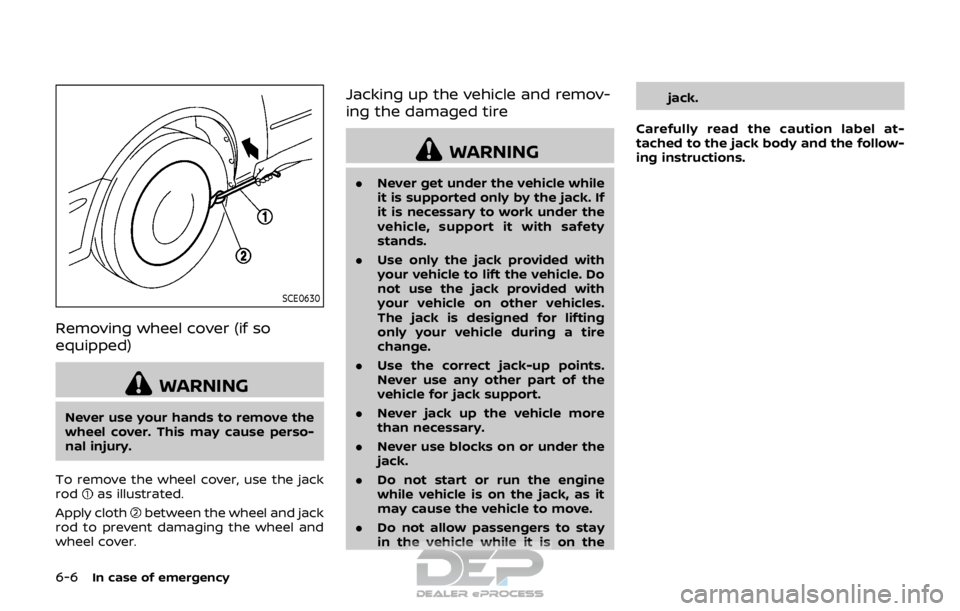
Removing wheel cover (if so
equipped)
WARNING
Never use your hands to remove the
wheel cover. This may cause perso-
nal injury.
To remove the wheel cover, use the jack
rod
as illustrated.
Apply cloth
between the wheel and jack
rod to prevent damaging the wheel and
wheel cover.
Jacking up the vehicle and remov-
ing the damaged tire
WARNING
. Never get under the vehicle while
it is supported only by the jack. If
it is necessary to work under the
vehicle, support it with safety
stands.
. Use only the jack provided with
your vehicle to lift the vehicle. Do
not use the jack provided with
your vehicle on other vehicles.
The jack is designed for lifting
only your vehicle during a tire
change.
. Use the correct jack-up points.
Never use any other part of the
vehicle for jack support.
. Never jack up the vehicle more
than necessary.
. Never use blocks on or under the
jack.
. Do not start or run the engine
while vehicle is on the jack, as it
may cause the vehicle to move.
. Do not allow passengers to stay
in the vehicle while it is on the jack.
Carefully read the caution label at-
tached to the jack body and the follow-
ing instructions.
Page 408 of 512
.The spare tire is designed for
emergency use. See specific in-
structions under the heading
“Wheels and tires” (P.8-29). To start your engine with a booster
battery, the instructions and precautions
below must be followed.
WARNING
.
If done incorrectly, jump starting
can lead to a battery explosion,
resulting in severe injury or
death. It could also damage your
vehicle.
. Explosive hydrogen gas is always
present in the vicinity of the
battery. Keep all sparks and
flames away from the battery.
. Do not allow battery fluid to come
into contact with eyes, skin,
clothing or painted surfaces. Bat-
tery fluid is a corrosive sulfuric
acid solution which can cause
severe burns. If the fluid should
come into contact with anything,
immediately flush the contacted
area with water.
. Keep the battery out of the reach
of children.
. The booster battery must be
rated at 12 volts. Use of an im-
properly rated battery can da-
mage your vehicle. .
Whenever working on or near a
battery, always wear suitable eye
protectors (for example, goggles
or industrial safety spectacles)
and remove rings, metal bands,
or any other jewelry. Do not lean
over the battery when jump start-
ing.
. Do not attempt to jump start a
frozen battery. It could explode
and cause serious injury.
. Your vehicle has an automatic
engine cooling fan. It could come
on at any time. Keep hands and
other objects away from it.
In case of emergency6-9
JUMP STARTING