check engine NISSAN ROGUE SPORT 2021 Service Manual
[x] Cancel search | Manufacturer: NISSAN, Model Year: 2021, Model line: ROGUE SPORT, Model: NISSAN ROGUE SPORT 2021Pages: 516, PDF Size: 2.43 MB
Page 325 of 516
.Any door is open.
. The driver’s seat belt is not fastened.
. The vehicle ahead is not detected and
your vehicle is traveling below the
speed of 15 MPH (24 km/h).
. Your vehicle has been stopped by the
ICC system for approximately 3 min-
utes or longer.
. The shift lever is not in the D (Drive)
position or manual shift mode.
. The electronic parking brake is ap-
plied.
. The VDC system is turned off.
. The AEB applies harder braking
. VDC (including the traction control
system) operates.
. A wheel slips.
. When distance measurement be-
comes impaired due to adhesion of
dirt or obstruction to the sensor.
. When the radar signal is temporarily
interrupted.
Action to take:
When the conditions listed above are no
longer present, turn the system off using
the ProPILOT Assist switch. Turn the
ProPILOT Assist system back on to use
the system. NOTE:
When the ICC system is canceled under
the following conditions at a standstill,
the electronic parking brake is automa-
tically activated:
.
Any door is open.
. The driver’s seat belt is not fastened.
. Your vehicle has been stopped by
the ICC system for approximately 3
minutes or longer.
. The shift lever is not in the D (Drive)
position or manual shift mode.
. The VDC system is turned off.
. When distance measurement be-
comes impaired due to adhesion of
dirt or obstruction to the sensor.
. When the radar signal is temporarily
interrupted.
Condition B:
When the radar sensor of the front
bumper is covered with dirt or is ob-
structed, the ICC system will automati-
cally be canceled.
The chime will sound and the “Forward
Driving Aids Temporarily Disabled Front
Sensor Blocked” or “Unavailable: Front
Radar Obstruction” warning message will
appear in the vehicle information display. Action to take:
If the warning message appears, stop the
vehicle in a safe place, place the shift lever
in the P (Park) position, and turn the
engine off. When the radar signal is
temporarily interrupted, clean the sensor
area of the front bumper and restart the
engine. If the “Forward Driving Aids Tem-
porarily Disabled Front Sensor Blocked” or
“Unavailable: Front Radar Obstruction”
warning message continues to be dis-
played, have the system checked. It is
recommended that you visit a NISSAN
dealer for this service.
Condition C:
When driving on roads with limited road
structures or buildings (for example, long
bridges, deserts, snow fields, driving next
to long walls), the system may illuminate
the system warning light and display the
“Forward Driving Aids Temporarily Dis-
abled Front Sensor Blocked” or “Unavail-
able: Front Radar Obstruction” warning
message.
Action to take:
When the above driving conditions no
longer exist, turn the system back on.
Starting and driving5-83
Page 332 of 516
5-90Starting and driving
Action to take:
Stop the vehicle in a safe location, place
the shift lever in the P (Park) position, turn
the engine off, restart the engine, resume
driving, and set the ICC system again. If
the warning (orange) continues to illumi-
nate, the steering assist is malfunctioning.
Although the vehicle is still drivable under
normal conditions, have the system
checked. It is recommended that you visit
a NISSAN dealer for this service.
Steering assist maintenance
The camera is located above the inside
mirror.
To keep the proper operation of the
system and prevent a system malfunc-
tion, be sure to observe the following:
.Always keep the windshield clean.
. Do not attach a sticker (including
transparent material) or install an
accessory near the camera unit.
. Do not place reflective materials, such
as white paper or a mirror, on the
instrument panel. The reflection of
sunlight may adversely affect the
camera unit’s capability of detecting
the lane markers.
. Do not strike or damage the areas
around the camera unit. Do not touch
the camera lens or remove the screw
located on the camera unit. If the camera unit is damaged due to an
accident, it is recommendedthat you visit
a NISSAN dealer.
Radio frequency statement:
For USA
FCC ID OAYARS4B
This device complies with Part 15 of the
FCC Rules. Operation is subject to the
following two conditions:
1. This device may not cause harmful
interference, and
2. This device must accept any interfer- ence received, including interference
that may cause undesired operation.
FCC Warning
Changes or modifications not expressly
approved by the party responsible for
compliance could void the user’s author-
ity to operate the equipment.
For Canada
Model: ARS4–B
IC: 4135A-ARS4B
FCC ID: OAYARS4B
This device complies with Part 15 of the
FCC Rules and with Industry Canada
licence-exempt RSS standard(s). Opera-
tion is subject to the following two con-
ditions: 1. This device may not cause harmful
interference, and
2. This device must accept any interfer- ence received, including interference
that may cause undesired operation.
Le present appareil est conforme aux CNR
d’Industrie Canada applicables aux appa-
reils radio exempts de licence. L’exploita-
tion est autorisee aux deux conditions
suivantes:
1. L’appareil ne doit pas produire de brouillage, et
2. L’utilisateur de l’appareil doit accepter tout brouillage radioelectrique subi,
meme si le brouillage est susceptible
d’en compromettre le fonctionne-
ment.
Radio Frequency Radiation Exposure In-
formation:
This equipment complies with FCC radia-
tion exposure limits set forth for an
uncontrolled environment.
This equipment should be installed and
operated with minimum distance of 30
cm between the radiator and your body.
The transmitter must not be co-located
or operating in conjunction with any
other antenna or transmitter.
Cet equipement est conforme aux limites
d’exposition aux rayonnements IC eta-
Page 339 of 516
— Frequent lane changes orchanges to vehicle speed.
. The I-DA system may not provide
an alert in the following condi-
tions:
— Vehicle speeds lower than 37
MPH (60 km/h).
— Short lapses of attention.
— Instantaneous distractions such as dropping an object.
WAF0643X
SYSTEM MALFUNCTION
If the I-DA system malfunctions, the
warning message will appear in the
vehicle information display and the func-
tion will be stopped automatically.
Action to take:
Stop the vehicle in a safe location, place
the vehicle in P (Park) position, turn the
engine off and restart the engine. If the
system warning message continues to
appear, have the system checked. It is
recommended that you visit a NISSAN
dealer for this service.
*: if so equipped
WARNING
Failure to follow the warnings and
instructions for proper use of the
AEB with pedestrian detection sys-
tem could result in serious injury or
death.
. The AEB with pedestrian detec-
tion system is a supplemental aid
to the driver. It is not a replace-
ment for the driver’s attention to
traffic conditions or responsibility
to drive safely. It cannot prevent
accidents due to carelessness or
dangerous driving techniques.
. The AEB with pedestrian detec-
tion system does not function in
all driving, traffic, weather and
road conditions.
The AEB with pedestrian detection sys-
tem can assist the driver when there is a
risk of a forward collision with the vehicle
ahead in the traveling lane or with a
pedestrian.
Starting and driving5-97
AUTOMATIC EMERGENCY BRAKING (AEB)
WITH PEDESTRIAN DETECTION SYSTEM*
Page 347 of 516
.The camera area of windshield glass is
continuously covered with dirt, etc.
Action to take:
When the above conditions no longer
exist, the AEB with pedestrian detection
system will resume automatically.
NOTE:
When the inside of the windshield on
camera area is misted or frozen, it will
take a period of time to remove it after
air conditioner turns on. If dirt appears
on this area, it is recommended you
visit a NISSAN dealer.
Condition B
In the following condition, the “Forward
Driving Aids Temporarily Disabled Front
Sensor Blocked” or “Unavailable: Front
Radar Obstruction” warning message will
appear in the vehicle information display.
. The sensor area of the front of the
vehicle is covered with dirt or is
obstructed
Action to take:
If the message appears, stop the vehicle
in a safe place and turn the engine off.
Clean the radar cover on the front of the
vehicle with a soft cloth, and restart the
engine. If the warning message continues
to illuminate, have the AEB with pedes-
trian detection system checked. It is recommended that you visit a NISSAN
dealer for this service.
.
When driving on roads with limited
road structures or buildings (for ex-
ample, long bridges, deserts, snow
fields, driving next to long walls).
Action to take:
When the above conditions no longer
exist, the AEB with pedestrian detection
system will resume automatically.
Condition C
When VDC system is OFF, the AEB brake
will not operate. In this case only visible
and audible warning operates. The AEB
system warning light (orange) will illumi-
nate.
Action to take:
When VDC system is ON, the AEB with
pedestrian detection system will resume
automatically.
SYSTEM MALFUNCTION
If the AEB with pedestrian detection
system malfunctions, it will be turned off
automatically, a chime will sound, the AEB
system warning light will (orange) will
illuminate and the warning message
“Malfunction” will appear in the vehicle
information display. Action to take:
If the warning light (orange) comes on,
stop the vehicle in a safe location. Turn
the engine off and restart the engine. If
the warning light continues to illuminate,
have the AEB with pedestrian detection
system checked. It is recommended that
you visit a NISSAN dealer for this service.
Starting and driving5-105
Page 356 of 516
5-114Starting and driving
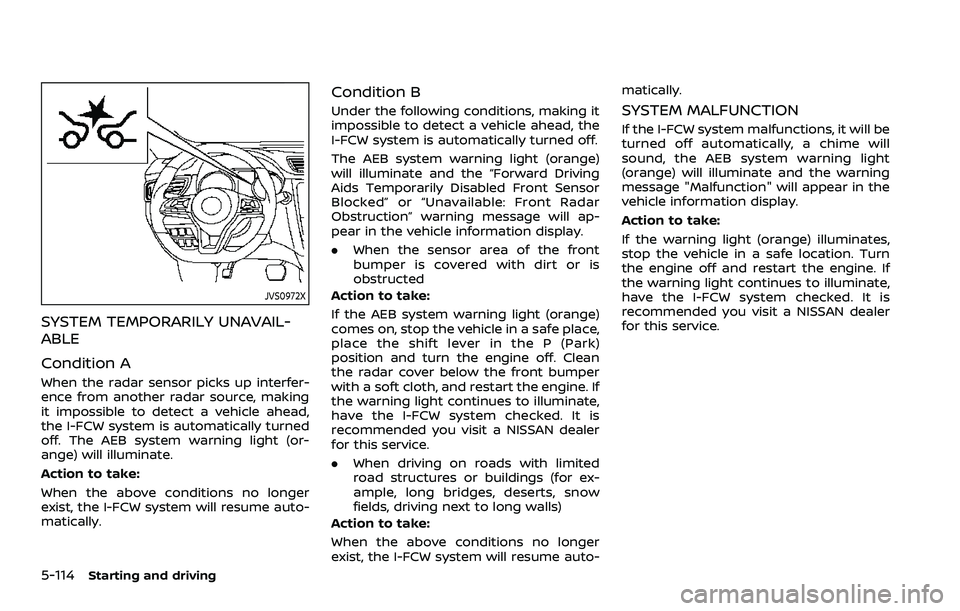
JVS0972X
SYSTEM TEMPORARILY UNAVAIL-
ABLE
Condition A
When the radar sensor picks up interfer-
ence from another radar source, making
it impossible to detect a vehicle ahead,
the I-FCW system is automatically turned
off. The AEB system warning light (or-
ange) will illuminate.
Action to take:
When the above conditions no longer
exist, the I-FCW system will resume auto-
matically.
Condition B
Under the following conditions, making it
impossible to detect a vehicle ahead, the
I-FCW system is automatically turned off.
The AEB system warning light (orange)
will illuminate and the “Forward Driving
Aids Temporarily Disabled Front Sensor
Blocked” or “Unavailable: Front Radar
Obstruction” warning message will ap-
pear in the vehicle information display.
.When the sensor area of the front
bumper is covered with dirt or is
obstructed
Action to take:
If the AEB system warning light (orange)
comes on, stop the vehicle in a safe place,
place the shift lever in the P (Park)
position and turn the engine off. Clean
the radar cover below the front bumper
with a soft cloth, and restart the engine. If
the warning light continues to illuminate,
have the I-FCW system checked. It is
recommended you visit a NISSAN dealer
for this service.
. When driving on roads with limited
road structures or buildings (for ex-
ample, long bridges, deserts, snow
fields, driving next to long walls)
Action to take:
When the above conditions no longer
exist, the I-FCW system will resume auto- matically.SYSTEM MALFUNCTION
If the I-FCW system malfunctions, it will be
turned off automatically, a chime will
sound, the AEB system warning light
(orange) will illuminate and the warning
message "Malfunction" will appear in the
vehicle information display.
Action to take:
If the warning light (orange) illuminates,
stop the vehicle in a safe location. Turn
the engine off and restart the engine. If
the warning light continues to illuminate,
have the I-FCW system checked. It is
recommended you visit a NISSAN dealer
for this service.
Page 360 of 516
5-118Starting and driving
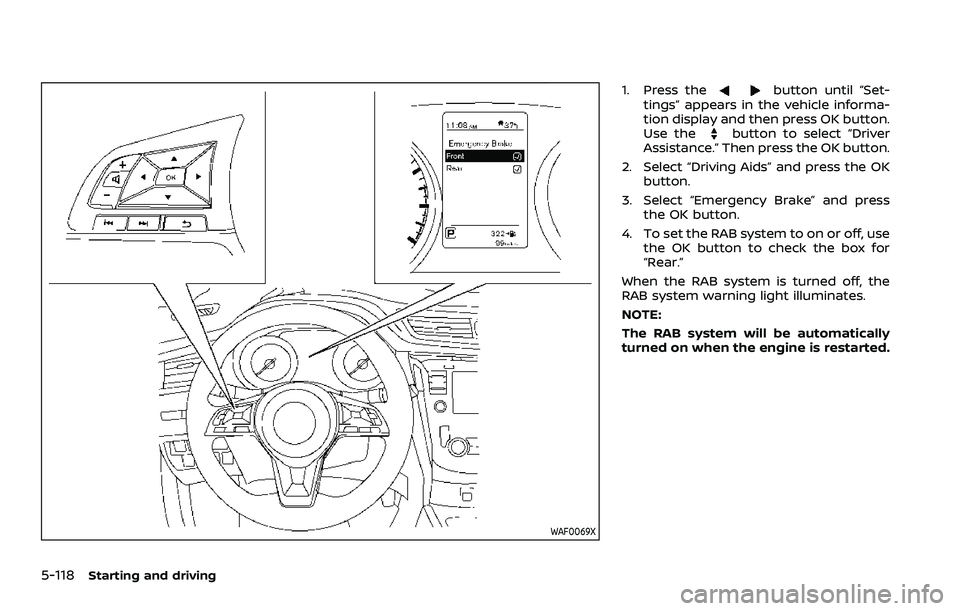
WAF0069X
1. Press thebutton until “Set-
tings” appears in the vehicle informa-
tion display and then press OK button.
Use the
button to select “Driver
Assistance.” Then press the OK button.
2. Select “Driving Aids” and press the OK button.
3. Select “Emergency Brake” and press the OK button.
4. To set the RAB system to on or off, use the OK button to check the box for
“Rear.”
When the RAB system is turned off, the
RAB system warning light illuminates.
NOTE:
The RAB system will be automatically
turned on when the engine is restarted.
Page 363 of 516
SYSTEM MALFUNCTION
If the RAB system malfunctions, it will be
turned off automatically, the RAB system
warning light will illuminate, and the
“Malfunction” warning message will ap-
pear in the vehicle information display.
Action to take
If the warning light illuminates, park the
vehicle in a safe location, turn the engine
off, and restart the engine. If the warning
light continues to illuminate, have the
RAB system checked. It is recommended
that you visit a NISSAN dealer for this
service.
NOTE:
If the RAB system cannot be operated
temporarily, the RAB system warning
light blinks.
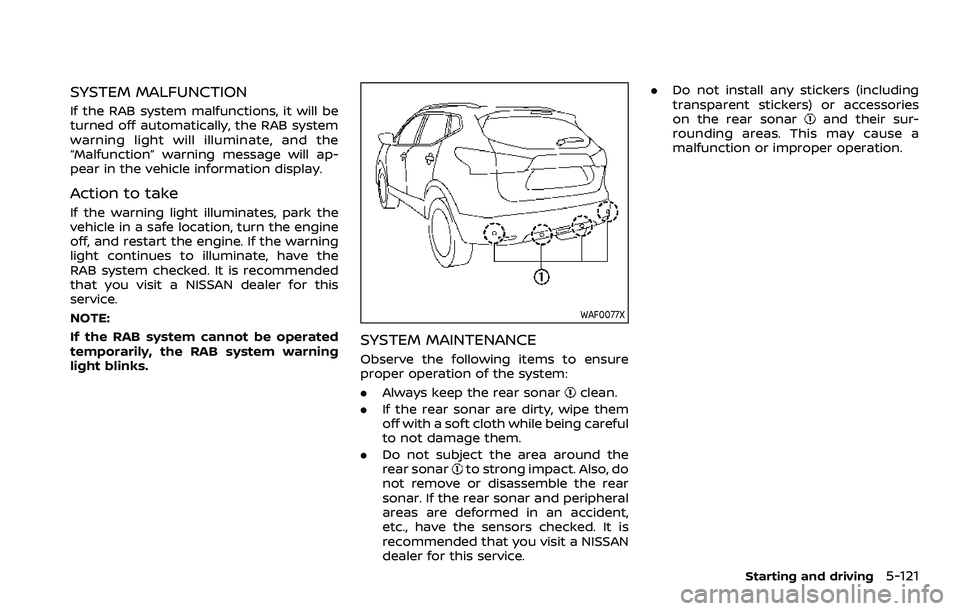
WAF0077X
SYSTEM MAINTENANCE
Observe the following items to ensure
proper operation of the system:
.Always keep the rear sonar
clean.
. If the rear sonar are dirty, wipe them
off with a soft cloth while being careful
to not damage them.
. Do not subject the area around the
rear sonar
to strong impact. Also, do
not remove or disassemble the rear
sonar. If the rear sonar and peripheral
areas are deformed in an accident,
etc., have the sensors checked. It is
recommended that you visit a NISSAN
dealer for this service. .
Do not install any stickers (including
transparent stickers) or accessories
on the rear sonar
and their sur-
rounding areas. This may cause a
malfunction or improper operation.
Starting and driving5-121
Page 366 of 516

5-124Starting and driving
JVS1120X
If the “AWD Error” warningappears,
there may be a malfunction in the In-
telligent 4x4 system. Reduce vehicle
speed and have your vehicle checked by
a NISSAN dealer as soon as possible.
The “AWD High Temp. Stop vehicle” (high
temperature) warning
may appear
while trying to free a stuck vehicle due to increased oil temperature. The driving
mode may change to Two-Wheel Drive
(2WD). If this warning is displayed, stop
the vehicle with the engine idling, as soon
as it is safe to do so. Then if the warning
turns off, you can continue driving.
The “Tire Size Incorrect” warning
may
appear if there is a large difference
between the diameters of front and rear
wheels. Pull off the road in a safe area,
with the engine idling. Check that all tire
sizes are the same, that the tire pressure
is correct and that the tires are not
excessively worn. Turn off the Intelligent
4x4 LOCK switch and do not drive fast.
If any warning message continues to be
displayed, have your vehicle checked by a
NISSAN dealer as soon as possible.
WARNING
. For AWD equipped vehicles, do
not attempt to raise two wheels
off the ground and shift the
transmission to any drive or re-
verse position with the engine
running. Doing so may result in
drivetrain damage or unexpected
vehicle movement which could
result in serious vehicle damage
or personal injury.
. Do not attempt to test an AWD
equipped vehicle on a 2–wheel
dynamometer (such as the dy-
namometers used by some
states for emissions testing) or
similar equipment even if the
other two wheels are raised off
the ground. Make sure that you
inform the test facility personnel
that your vehicle is equipped with
AWD before it is placed on a
dynamometer. Using the wrong
test equipment may result in
drive train damage or unex-
pected vehicle movement which
could result in serious vehicle
damage or personal injury.
Page 367 of 516
CAUTION
.Do not operate the engine on a
free roller when any of the wheels
raised.
. The power train may be damaged
if you continue driving with the
“AWD Error” warning on.
. If the warning message remains
on after the above operation,
have your vehicle checked as
soon as possible. It is recom-
mended that you visit a NISSAN
dealer for this service.
. If the “AWD Error” warning ap-
pears while driving, there may be
a malfunction in the AWD system.
Reduce the vehicle speed and
have your vehicle checked as
soon as possible. It is recom-
mended that you visit a NISSAN
dealer for this service.
. Never drive on dry, hard surface
roads in the LOCK mode, as this
will overload the powertrain and
may cause a serious malfunction.
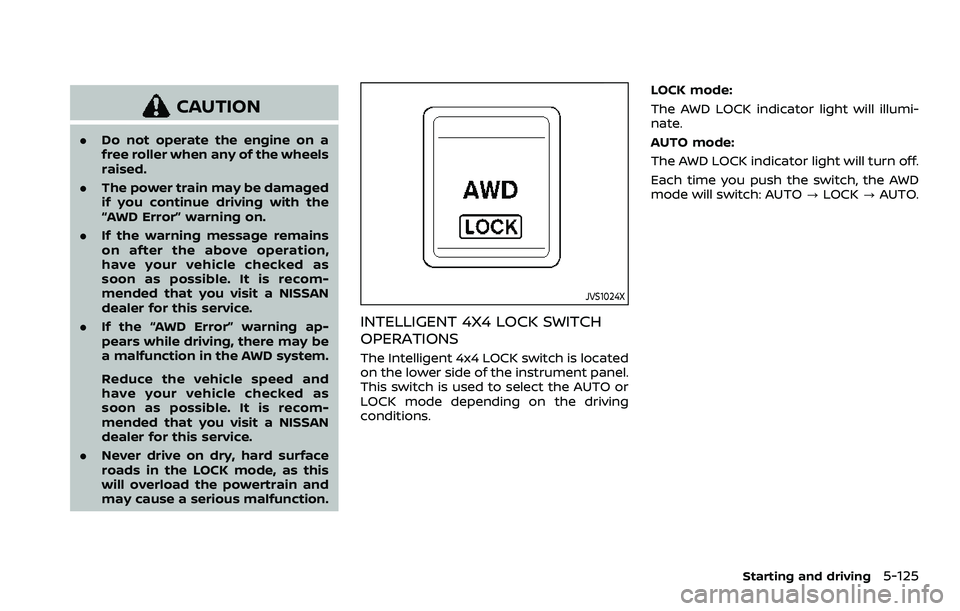
JVS1024X
INTELLIGENT 4X4 LOCK SWITCH
OPERATIONS
The Intelligent 4x4 LOCK switch is located
on the lower side of the instrument panel.
This switch is used to select the AUTO or
LOCK mode depending on the driving
conditions. LOCK mode:
The AWD LOCK indicator light will illumi-
nate.
AUTO mode:
The AWD LOCK indicator light will turn off.
Each time you push the switch, the AWD
mode will switch: AUTO
?LOCK ?AUTO.
Starting and driving5-125
Page 368 of 516

5-126Starting and driving
AWD modeWheels driven AWD LOCK indicator light Use conditions
AUTO Distribution of torque to
the front and rear wheels
changes automatically,
depending on road condi-
tions encountered [ratio;
100 : 0
/?50 : 50]. This
results in improved driving
stability.*1 -
For driving on paved
or slippery roads
LOCK All-Wheel Drive (AWD) *2*3*
For driving on rough
roads
*1: When the rotation difference between the front and rear wheels is large, the AWD
mode may change from AUTO to LOCK
for a while, however, this is not a mal-
function.
*2: The LOCK mode will change to the AUTO mode automatically when the vehicle has
been driven at a high speed. The AWD
LOCK indicator light turns off.
*3: The LOCK mode will automatically be cancelled when the ignition switch is
placed in the OFF position.
.The AWD torque distribution between
the front and rear wheels can be
displayed in the vehicle information
display. See “Vehicle information dis-
play” (P.2-19).
. If the Intelligent 4x4 LOCK switch is
operated while accelerating or decel-
erating, or if the ignition switch is
turned off, you may feel a jolt. This is
normal. .
The oil temperature of the powertrain
parts will increase if the vehicle is
continuously operated under condi-
tions where the difference in rotation
between the front and rear wheels is
large (wheel slip), such as when driving
the vehicle on rough roads, through
sand or mud, or freeing a stuck
vehicle. In these cases, the master
warning light illuminates and the
AWD mode changes to 2WD to protect
the powertrain parts. Stop driving
with the engine idling and wait until
the warning light turns off and the
AWD returns to the AUTO mode. If the
warning light remains on, have your
vehicle checked as soon as possible. It
is recommended that you visit a
NISSAN dealer for this service.
WARNING
.When driving straight, shift the
Intelligent 4x4 LOCK switch to
AUTO. Do not operate the Intelli-
gent 4x4 LOCK switch when mak-
ing a turn or backing up.
. Do not operate the Intelligent 4x4
LOCK switch with the front wheel
spinning.
. Engine idling speed is high while
warming up the engine. Be espe-
cially careful when starting or
driving on slippery surfaces.
. When turning the vehicle in LOCK
mode on paved roads, you may
feel a braking effect. This is a
normal condition of the AWD
model.