gas NISSAN SENTRA 2005 B15 / 5.G Owners Manual
[x] Cancel search | Manufacturer: NISSAN, Model Year: 2005, Model line: SENTRA, Model: NISSAN SENTRA 2005 B15 / 5.GPages: 192, PDF Size: 4.45 MB
Page 14 of 192

The main feature of the NISSAN Navigation Sys-
tem is Visual and Audio Route Guidance in se-
lected detailed map coverage areas. Utilizing a
network of GPS (Global Positioning System)
satellites, the NISSAN Navigation System tracks
your location on the map and directs you where
you want to go.
Once you program a destination covered by a
detailed map, The NISSAN Navigation System
will determine a route from your current location
to your destination. The moving map display and
turn-by-turn voice commands help the driver de-
termine upcoming turns.
This feature can be especially helpful in finding
unfamiliar locations or businesses. The system
may be unable to set a destination and/or calcu-
late distance when a destination is outside a de-
tailed map coverage area. Additionally, audio
route guidance may not be available if the desti-
nation is outside a detailed map coverage area.
For more information on how to program a
destination, please refer to section 5.The NISSAN Navigation System offers an exten-
sive Point of Interest (POI) directory in detailed
map coverage areas for your convenience. This
directory includes a wide variety of destinations
ranging from gas stations, ATMs, and restau-
rants to casinos, ski resorts, shopping centers
and businesses. By accessing the Point of Inter-
est directory, you can search for addresses and
phone numbers for a destination, and with a
press of a button, the NISSAN Navigation Sys-
tem will calculate a route to the destination.
The Point of Interest directory offers many uses.
For example, the directory can be sorted by the
various types of restaurants near your current
location. If you need an ATM or gas station, the
NISSAN Navigation System can point you to the
closest one or the closest one of your favorite
brand.
For more information on how to use the Point of
Interest directory, please refer to section 6.Using the Address Book feature, you will have
the ability to store up to 50 locations in detailed
map coverage areas into a personal directory.
This is especially useful for frequently visited
locations, such as your clients, relatives, or
friends. The Address Book feature will provide
you with easy access to frequently visited loca-
tions when setting them as your destination.
For more information on how to use your Ad-
dress Book, please refer to section 7.
ROUTE GUIDANCE POINT OF INTEREST (POI) DIREC-
TORYADDRESS BOOK
3-2What features are available on the Nissan navigation system?
ZREVIEW COPYÐ2005(nav)
Navigation System OMÐUSA_English(nna)
07/10/04Ðdebbie
X
Page 29 of 192
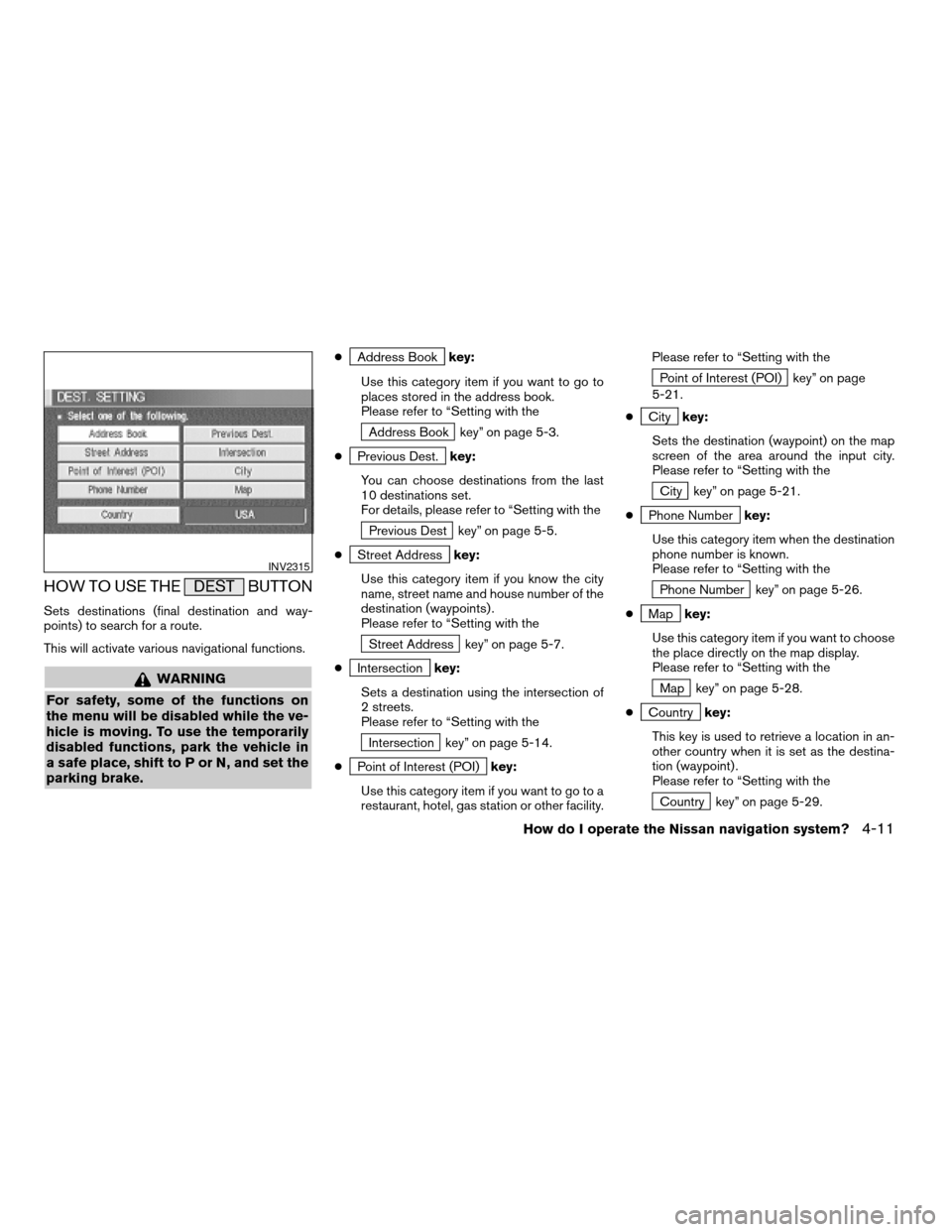
HOW TO USE THE DEST BUTTON
Sets destinations (final destination and way-
points) to search for a route.
This will activate various navigational functions.
WARNING
For safety, some of the functions on
the menu will be disabled while the ve-
hicle is moving. To use the temporarily
disabled functions, park the vehicle in
a safe place, shift to P or N, and set the
parking brake.
cAddress Bookkey:
Use this category item if you want to go to
places stored in the address book.
Please refer to “Setting with the
Address Book key” on page 5-3.
c
Previous Dest.key:
You can choose destinations from the last
10 destinations set.
For details, please refer to “Setting with the
Previous Dest key” on page 5-5.
c
Street Addresskey:
Use this category item if you know the city
name, street name and house number of the
destination (waypoints) .
Please refer to “Setting with the
Street Address key” on page 5-7.
c
Intersectionkey:
Sets a destination using the intersection of
2 streets.
Please refer to “Setting with the
Intersection key” on page 5-14.
c
Point of Interest (POI)key:
Use this category item if you want to go to a
restaurant, hotel, gas station or other facility.Please refer to “Setting with the
Point of Interest (POI) key” on page
5-21.
c
Citykey:
Sets the destination (waypoint) on the map
screen of the area around the input city.
Please refer to “Setting with the
City key” on page 5-21.
c
Phone Numberkey:
Use this category item when the destination
phone number is known.
Please refer to “Setting with the
Phone Number key” on page 5-26.
c
Mapkey:
Use this category item if you want to choose
the place directly on the map display.
Please refer to “Setting with the
Map key” on page 5-28.
c
Countrykey:
This key is used to retrieve a location in an-
other country when it is set as the destina-
tion (waypoint) .
Please refer to “Setting with the
Country key” on page 5-29.
INV2315
How do I operate the Nissan navigation system?4-11
ZREVIEW COPYÐ2005(nav)
Navigation System OMÐUSA_English(nna)
07/10/04Ðdebbie
X
Page 67 of 192
![NISSAN SENTRA 2005 B15 / 5.G Owners Manual 4. The screen returns to the [DEST. SETTING
(Intersection)] screen.
When the city is set, the display shows the
selected city next to the
City key.
Input the street name of your choice.
Proceed to “](/img/5/686/w960_686-66.png "NISSAN SENTRA 2005 B15 / 5.G Owners Manual 4. The screen returns to the [DEST. SETTING
(Intersection)] screen.
When the city is set, the display shows the
selected city next to the
City key.
Input the street name of your choice.
Proceed to “")
4. The screen returns to the [DEST. SETTING
(Intersection)] screen.
When the city is set, the display shows the
selected city next to the
City key.
Input the street name of your choice.
Proceed to “Setting with the
List key” on page
5-15.
SETTING WITH
THE
KEY
The NISSAN Navigation System includes a da-
tabase of Point of Interest (POI) locations such
as restaurants, hotels, and gas stations. (refer to
section 6.)
By using this feature, you can set a Point of Inter-
est location as a destination. For details on how
to use the POI feature, please refer to section 6.
SETTING WITH THECity KEY
Sets the destination (waypoints) on the map
screen of the area in and around the input city.
1. Press the DEST button.
INV1831INV2337
How do I program a destination?5-21
ZREVIEW COPYÐ2005(nav)
Navigation System OMÐUSA_English(nna)
07/10/04Ðdebbie
X
Page 87 of 192
![NISSAN SENTRA 2005 B15 / 5.G Owners Manual 2. The [EDIT ROUTE] screen will be displayed.
Select the
All Clear key.3. Select the
Yes key. The system will display pre-defined POI’s
(Points of Interest) in the current vicinity of the
vehicle an](/img/5/686/w960_686-86.png "NISSAN SENTRA 2005 B15 / 5.G Owners Manual 2. The [EDIT ROUTE] screen will be displayed.
Select the
All Clear key.3. Select the
Yes key. The system will display pre-defined POI’s
(Points of Interest) in the current vicinity of the
vehicle an")
2. The [EDIT ROUTE] screen will be displayed.
Select the
All Clear key.3. Select the
Yes key. The system will display pre-defined POI’s
(Points of Interest) in the current vicinity of the
vehicle and the distances to them. These POI’s
can be gas stations, hotels, restaurants, ATM’s
or customer-programmed facilities. This function
will operate while the vehicle is moving.
1. Press the ROUTE button.
The display shows several keys on the right of
the screen.
Select the
Quick Stop key.
INV1875INV1876INV1314
QUICK STOP
How do I program a destination?5-41
ZREVIEW COPYÐ2005(nav)
Navigation System OMÐUSA_English(nna)
07/10/04Ðdebbie
X
Page 107 of 192

AIRPORT FERRY TERMINAL PARKING GARAGE
AMUSEMENT PARK GAS STATION PARKING LOT
ATM GOLF COURSE PERFORMING ARTS
AUTO SERVICE & MAINTENANCE GROCERY STORE POLICE STATION
AUTOMOBILE CLUB HISTORICAL MONUMENT RENTAL CAR AGENCY
BANK HOSPITAL REST AREA
BORDER CROSSING HOTEL RESTAURANT
BOWLING CENTER ICE SKATING RINK SCHOOL
BUS STATION INFINITI DEALER SHOPPING
BUSINESS FACILITY LIBRARY SKI RESORT
CASINO MARINA SPORTS CENTER
CITY CENTER MOVIE THEATER SPORTS COMPLEX
CITY HALL MUSEUM TOURIST ATTRACTION
COLLEGE AND UNIVERSITY NIGHTLIFE TOURIST INFORMATION
COMMUNITY CENTER NISSAN DEALER TRAIN STATION
COMMUTER RAIL STATION OTHERS WINERY
CONVENTION/EXHIBITION CENTER PARK & RIDE
COURT HOUSE PARK/RECREATION AREA
POI CATEGORIES
How do I use the Point of Interest (POI) feature?6-13
ZREVIEW COPYÐ2005(nav)
Navigation System OMÐUSA_English(nna)
07/10/04Ðdebbie
X
Page 108 of 192
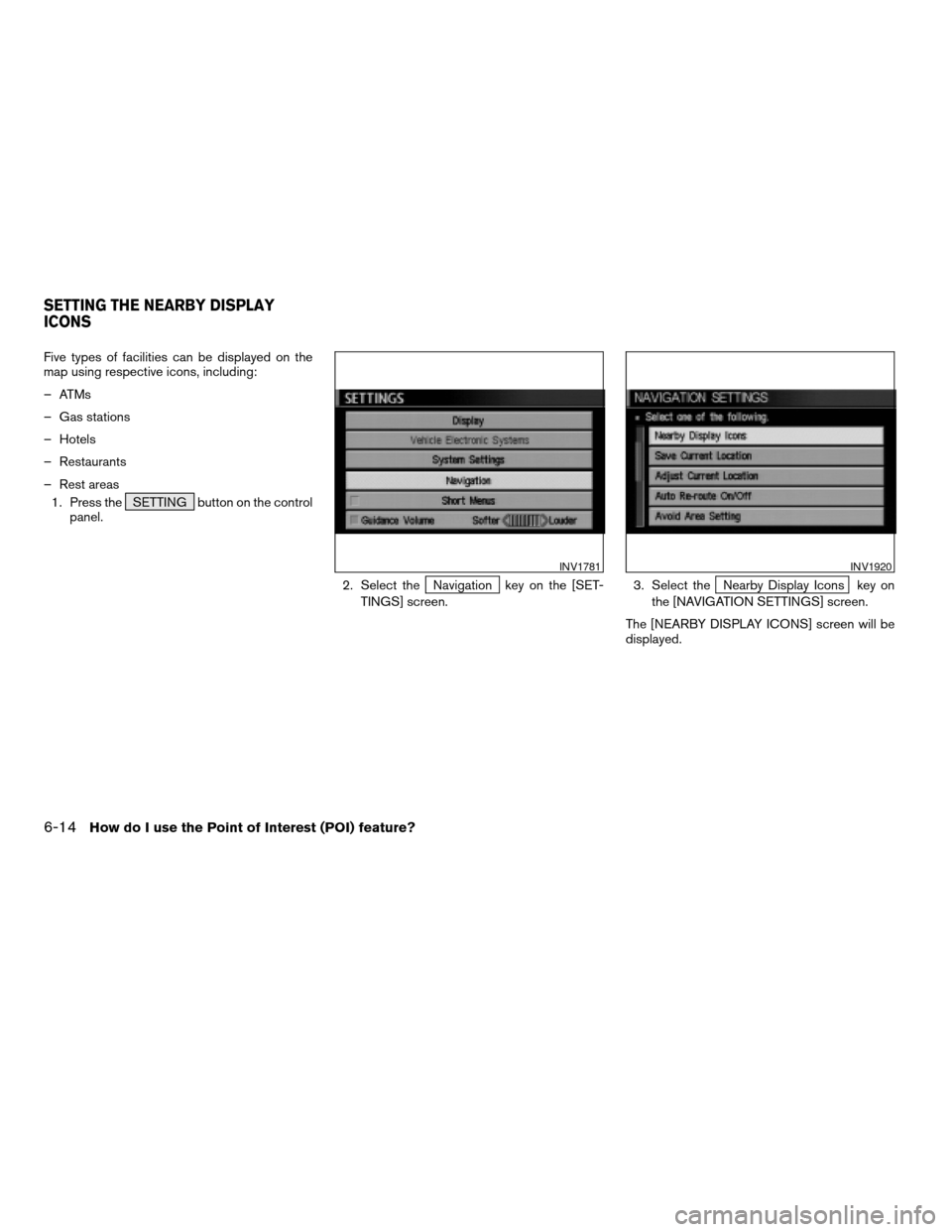
Five types of facilities can be displayed on the
map using respective icons, including:
– ATMs
– Gas stations
– Hotels
– Restaurants
– Rest areas
1. Press the SETTING button on the control
panel.
2. Select the
Navigation key on the [SET-
TINGS] screen.3. Select theNearby Display Icons key on
the [NAVIGATION SETTINGS] screen.
The [NEARBY DISPLAY ICONS] screen will be
displayed.
INV1781INV1920
SETTING THE NEARBY DISPLAY
ICONS
6-14How do I use the Point of Interest (POI) feature?
ZREVIEW COPYÐ2005(nav)
Navigation System OMÐUSA_English(nna)
07/10/04Ðdebbie
X