Fuel system NISSAN SENTRA 2017 B17 / 7.G User Guide
[x] Cancel search | Manufacturer: NISSAN, Model Year: 2017, Model line: SENTRA, Model: NISSAN SENTRA 2017 B17 / 7.GPages: 491
Page 106 of 491
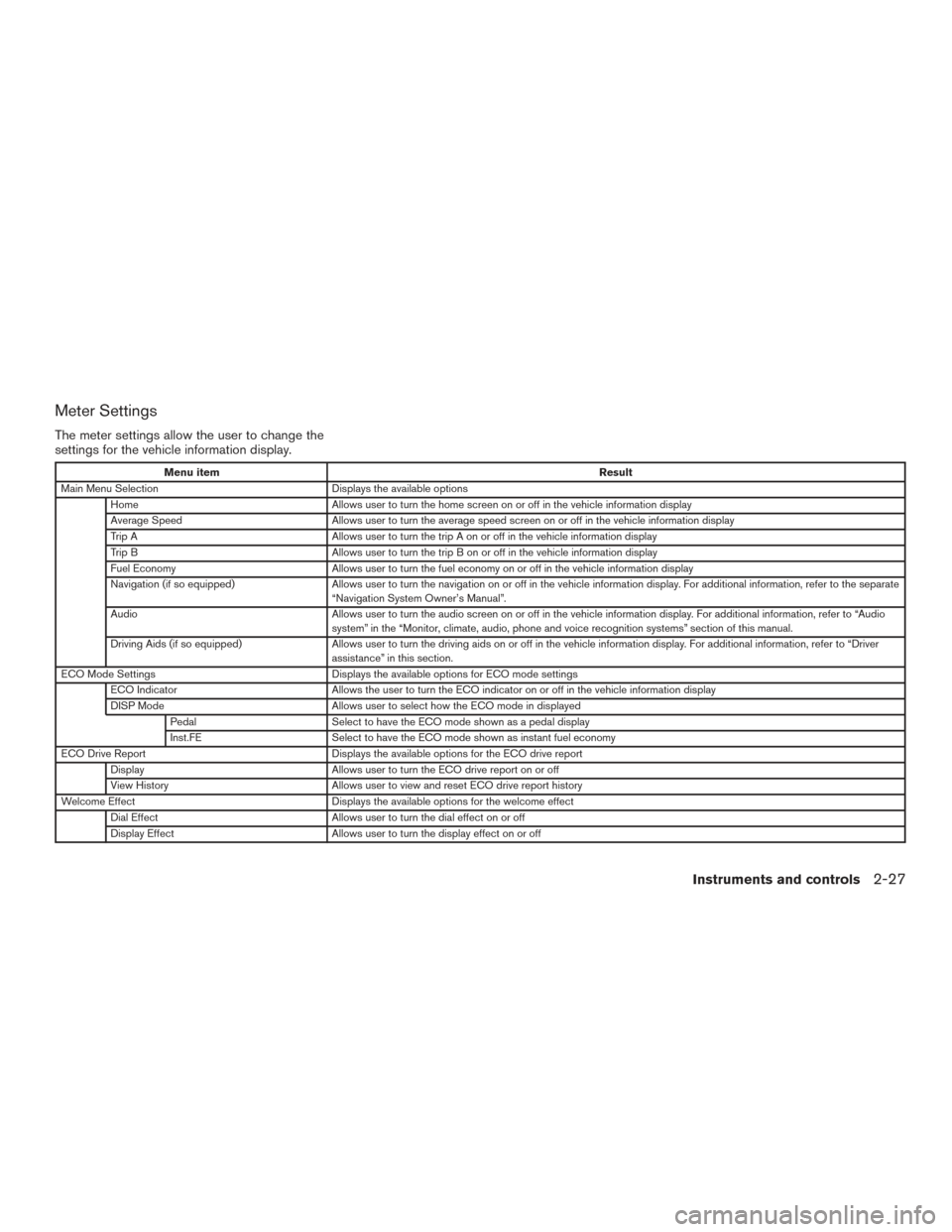
Meter Settings
The meter settings allow the user to change the
settings for the vehicle information display.
Menu itemResult
Main Menu Selection Displays the available options
Home Allows user to turn the home screen on or off in the vehicle information display
Average Speed Allows user to turn the average speed screen on or off in the vehicle information display
Trip A Allows user to turn the trip A on or off in the vehicle information display
Trip B Allows user to turn the trip B on or off in the vehicle information display
Fuel Economy Allows user to turn the fuel economy on or off in the vehicle information display
Navigation (if so equipped) Allows user to turn the navigation on or off in the vehicle information display. For additional information, refer to the separate
“Navigation System Owner’s Manual”.
Audio Allows user to turn the audio screen on or off in the vehicle information display. For additional information, refer to “Audio
system” in the “Monitor, climate, audio, phone and voice recognition systems” section of this manual.
Driving Aids (if so equipped) Allows user to turn the driving aids on or off in the vehicle information display. For additional information, refer to “Driver
assistance” in this section.
ECO Mode Settings Displays the available options for ECO mode settings
ECO Indicator Allows the user to turn the ECO indicator on or off in the vehicle information display
DISP Mode Allows user to select how the ECO mode in displayed
Pedal Select to have the ECO mode shown as a pedal display
Inst.FE Select to have the ECO mode shown as instant fuel economy
ECO Drive Report Displays the available options for the ECO drive report
Display Allows user to turn the ECO drive report on or off
View History Allows user to view and reset ECO drive report history
Welcome Effect Displays the available options for the welcome effect
Dial Effect Allows user to turn the dial effect on or off
Display Effect Allows user to turn the display effect on or off
Instruments and controls2-27
Page 112 of 491
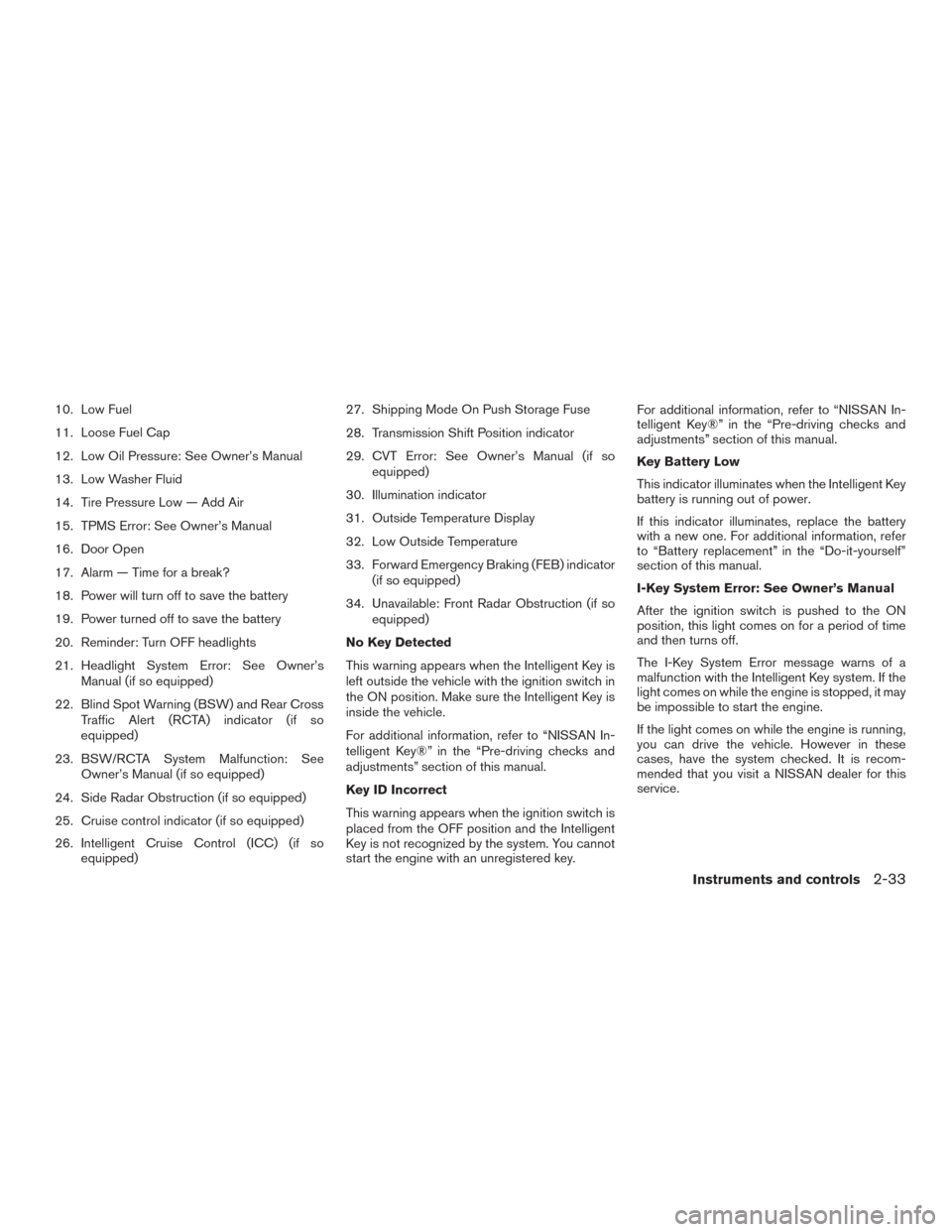
10. Low Fuel
11. Loose Fuel Cap
12. Low Oil Pressure: See Owner’s Manual
13. Low Washer Fluid
14. Tire Pressure Low — Add Air
15. TPMS Error: See Owner’s Manual
16. Door Open
17. Alarm — Time for a break?
18. Power will turn off to save the battery
19. Power turned off to save the battery
20. Reminder: Turn OFF headlights
21. Headlight System Error: See Owner’sManual (if so equipped)
22. Blind Spot Warning (BSW) and Rear Cross Traffic Alert (RCTA) indicator (if so
equipped)
23. BSW/RCTA System Malfunction: See Owner’s Manual (if so equipped)
24. Side Radar Obstruction (if so equipped)
25. Cruise control indicator (if so equipped)
26. Intelligent Cruise Control (ICC) (if so equipped) 27. Shipping Mode On Push Storage Fuse
28. Transmission Shift Position indicator
29. CVT Error: See Owner’s Manual (if so
equipped)
30. Illumination indicator
31. Outside Temperature Display
32. Low Outside Temperature
33. Forward Emergency Braking (FEB) indicator (if so equipped)
34. Unavailable: Front Radar Obstruction (if so equipped)
No Key Detected
This warning appears when the Intelligent Key is
left outside the vehicle with the ignition switch in
the ON position. Make sure the Intelligent Key is
inside the vehicle.
For additional information, refer to “NISSAN In-
telligent Key®” in the “Pre-driving checks and
adjustments” section of this manual.
Key ID Incorrect
This warning appears when the ignition switch is
placed from the OFF position and the Intelligent
Key is not recognized by the system. You cannot
start the engine with an unregistered key. For additional information, refer to “NISSAN In-
telligent Key®” in the “Pre-driving checks and
adjustments” section of this manual.
Key Battery Low
This indicator illuminates when the Intelligent Key
battery is running out of power.
If this indicator illuminates, replace the battery
with a new one. For additional information, refer
to “Battery replacement” in the “Do-it-yourself”
section of this manual.
I-Key System Error: See Owner’s Manual
After the ignition switch is pushed to the ON
position, this light comes on for a period of time
and then turns off.
The I-Key System Error message warns of a
malfunction with the Intelligent Key system. If the
light comes on while the engine is stopped, it may
be impossible to start the engine.
If the light comes on while the engine is running,
you can drive the vehicle. However in these
cases, have the system checked. It is recom-
mended that you visit a NISSAN dealer for this
service.
Instruments and controls2-33
Page 113 of 491
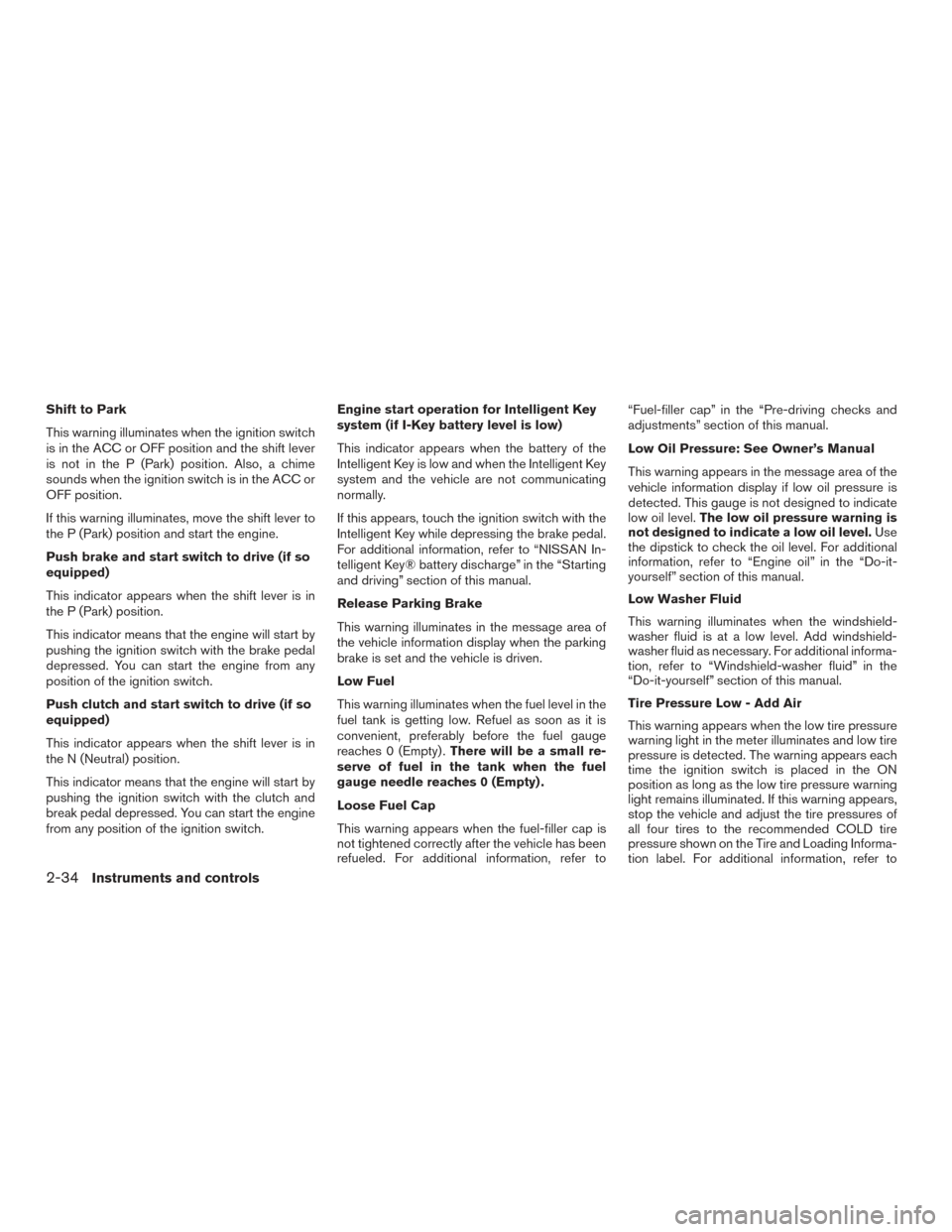
Shift to Park
This warning illuminates when the ignition switch
is in the ACC or OFF position and the shift lever
is not in the P (Park) position. Also, a chime
sounds when the ignition switch is in the ACC or
OFF position.
If this warning illuminates, move the shift lever to
the P (Park) position and start the engine.
Push brake and start switch to drive (if so
equipped)
This indicator appears when the shift lever is in
the P (Park) position.
This indicator means that the engine will start by
pushing the ignition switch with the brake pedal
depressed. You can start the engine from any
position of the ignition switch.
Push clutch and start switch to drive (if so
equipped)
This indicator appears when the shift lever is in
the N (Neutral) position.
This indicator means that the engine will start by
pushing the ignition switch with the clutch and
break pedal depressed. You can start the engine
from any position of the ignition switch.Engine start operation for Intelligent Key
system (if I-Key battery level is low)
This indicator appears when the battery of the
Intelligent Key is low and when the Intelligent Key
system and the vehicle are not communicating
normally.
If this appears, touch the ignition switch with the
Intelligent Key while depressing the brake pedal.
For additional information, refer to “NISSAN In-
telligent Key® battery discharge” in the “Starting
and driving” section of this manual.
Release Parking Brake
This warning illuminates in the message area of
the vehicle information display when the parking
brake is set and the vehicle is driven.
Low Fuel
This warning illuminates when the fuel level in the
fuel tank is getting low. Refuel as soon as it is
convenient, preferably before the fuel gauge
reaches 0 (Empty) .
There will be a small re-
serve of fuel in the tank when the fuel
gauge needle reaches 0 (Empty) .
Loose Fuel Cap
This warning appears when the fuel-filler cap is
not tightened correctly after the vehicle has been
refueled. For additional information, refer to “Fuel-filler cap” in the “Pre-driving checks and
adjustments” section of this manual.
Low Oil Pressure: See Owner’s Manual
This warning appears in the message area of the
vehicle information display if low oil pressure is
detected. This gauge is not designed to indicate
low oil level.
The low oil pressure warning is
not designed to indicate a low oil level. Use
the dipstick to check the oil level. For additional
information, refer to “Engine oil” in the “Do-it-
yourself” section of this manual.
Low Washer Fluid
This warning illuminates when the windshield-
washer fluid is at a low level. Add windshield-
washer fluid as necessary. For additional informa-
tion, refer to “Windshield-washer fluid” in the
“Do-it-yourself” section of this manual.
Tire Pressure Low - Add Air
This warning appears when the low tire pressure
warning light in the meter illuminates and low tire
pressure is detected. The warning appears each
time the ignition switch is placed in the ON
position as long as the low tire pressure warning
light remains illuminated. If this warning appears,
stop the vehicle and adjust the tire pressures of
all four tires to the recommended COLD tire
pressure shown on the Tire and Loading Informa-
tion label. For additional information, refer to
2-34Instruments and controls
Page 146 of 491
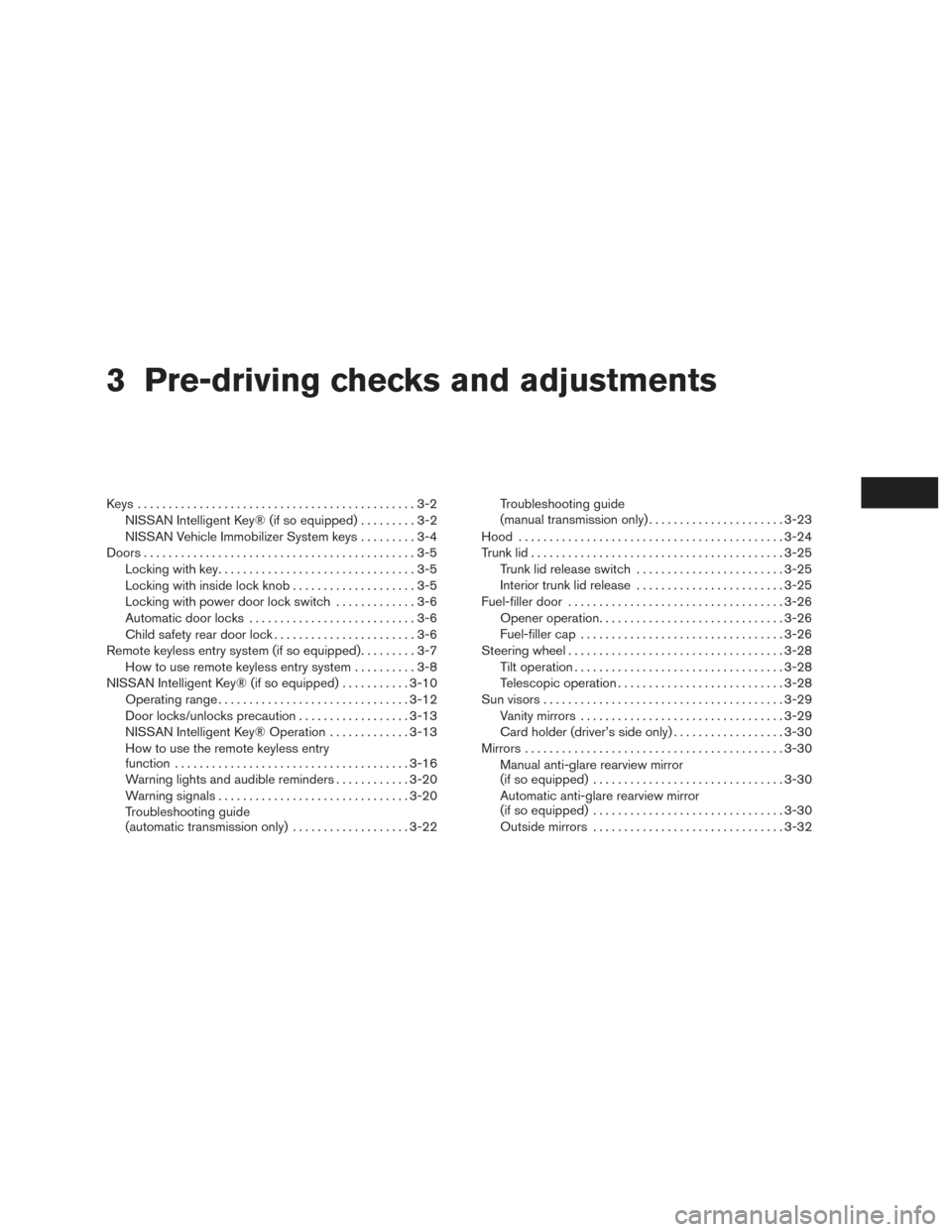
3 Pre-driving checks and adjustments
Keys .............................................3-2NISSAN Intelligent Key® (if so equipped) .........3-2
NISSAN Vehicle Immobilizer System keys .........3-4
Doors ............................................3-5
Locking with key ................................3-5
Locking with inside lock knob ....................3-5
Locking with power door lock switch . . . ..........3-6
Automatic door locks ...........................3-6
Child safety rear door lock .......................3-6
Remote keyless entry system (if so equipped) .........3-7
How to use remote keyless entry system ..........3-8
NISSAN Intelligent Key® (if so equipped) ...........3-10
Operating range ............................... 3-12
Door locks/unlocks precaution ..................3-13
NISSAN Intelligent Key® Operation .............3-13
How to use the remote keyless entry
function ...................................... 3-16
Warning lights and audible reminders . . . .........3-20
Warning signals ............................... 3-20
Troubleshooting guide
(automatic transmission only) . . .................3-22Troubleshooting guide
(manual transmission only)
......................3-23
Hood ........................................... 3-24
Trunk lid ......................................... 3-25
Trunk lid release switch ........................ 3-25
Interior trunk lid release ........................ 3-25
Fuel-filler door ................................... 3-26
Opener operation .............................. 3-26
Fuel-filler cap ................................. 3-26
Steering wheel ................................... 3-28
Tilt operation .................................. 3-28
Telescopic operation ........................... 3-28
Sun visors ....................................... 3-29
Vanity mirrors ................................. 3-29
Card holder (driver’s side only) ..................3-30
Mirrors .......................................... 3-30
Manual anti-glare rearview mirror
(if so equipped) ............................... 3-30
Automatic anti-glare rearview mirror
(if so equipped) ............................... 3-30
Outside mirrors ............................... 3-32
Page 171 of 491
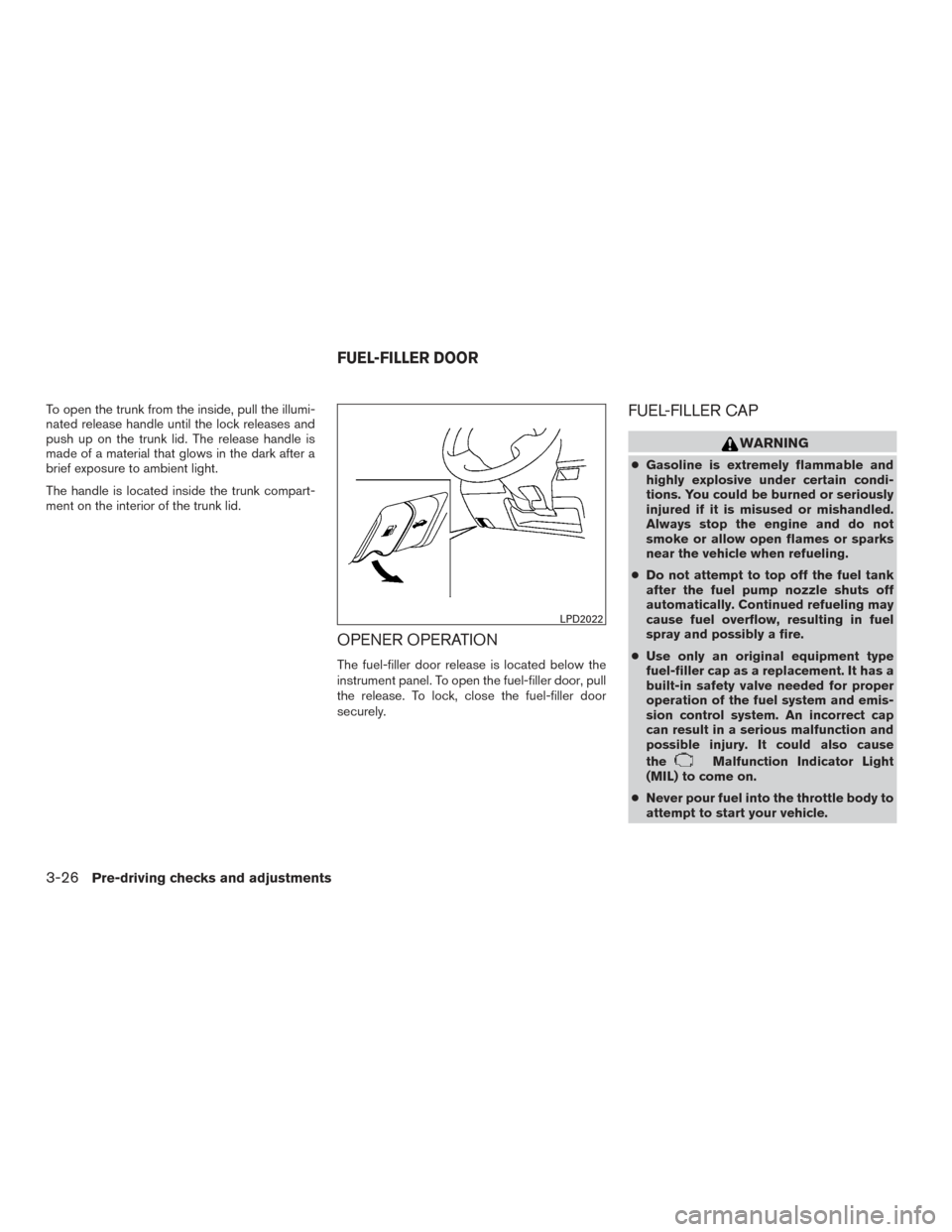
To open the trunk from the inside, pull the illumi-
nated release handle until the lock releases and
push up on the trunk lid. The release handle is
made of a material that glows in the dark after a
brief exposure to ambient light.
The handle is located inside the trunk compart-
ment on the interior of the trunk lid.
OPENER OPERATION
The fuel-filler door release is located below the
instrument panel. To open the fuel-filler door, pull
the release. To lock, close the fuel-filler door
securely.
FUEL-FILLER CAP
WARNING
●Gasoline is extremely flammable and
highly explosive under certain condi-
tions. You could be burned or seriously
injured if it is misused or mishandled.
Always stop the engine and do not
smoke or allow open flames or sparks
near the vehicle when refueling.
● Do not attempt to top off the fuel tank
after the fuel pump nozzle shuts off
automatically. Continued refueling may
cause fuel overflow, resulting in fuel
spray and possibly a fire.
● Use only an original equipment type
fuel-filler cap as a replacement. It has a
built-in safety valve needed for proper
operation of the fuel system and emis-
sion control system. An incorrect cap
can result in a serious malfunction and
possible injury. It could also cause
the
Malfunction Indicator Light
(MIL) to come on.
● Never pour fuel into the throttle body to
attempt to start your vehicle.
LPD2022
FUEL-FILLER DOOR
3-26Pre-driving checks and adjustments
Page 192 of 491
●Underneath the bumper and the corner
areas of the bumper cannot be viewed
on the RearView Monitor because of its
monitoring range limitation. The system
will not show small objects below the
bumper, and may not show objects
close to the bumper or on the ground.
● Objects viewed in the RearView Moni-
tor differ from actual distance because
a wide-angle lens is used.
● Objects in the RearView Monitor will
appear visually opposite compared to
when viewed in the rearview and out-
side mirrors.
● Use the displayed lines as a reference.
The lines are highly affected by the
number of occupants, fuel level, vehicle
position, road conditions and road
grade.
● Make sure that the trunk is securely
closed when backing up.
● Do not put anything on the rearview
camera. The rearview camera is in-
stalled above the license plate. ●
When washing the vehicle with high
pressure water, be sure not to spray it
around the camera. Otherwise, water
may enter the camera unit causing wa-
ter condensation on the lens, a mal-
function, fire or an electric shock.
● Do not strike the camera. It is a preci-
sion instrument. Otherwise, it may mal-
function or cause damage resulting in a
fire or an electric shock.
The following are operating limitations and do not
represent a system malfunction: ● When the temperature is extremely high or
low, the screen may not clearly display ob-
jects.
● When strong light directly shines on the
camera, objects may not be displayed
clearly.
● Vertical lines may be seen in objects on the
screen. This is due to strong reflected light
from the bumper.
● The screen may flicker under fluorescent
light.
● The colors of objects on the RearView Moni-
tor may differ somewhat from the actual
color of objects. ●
Objects on the monitor may not be clear in a
dark environment.
● There may be a delay when switching be-
tween views.
● If dirt, rain or snow accumulate on the cam-
era, the RearView Monitor may not display
objects clearly. Clean the camera.
● Do not use wax on the camera lens. Wipe off
any wax with a clean cloth dampened with a
diluted mild cleaning agent, then wipe with a
dry cloth.
Monitor, climate, audio, phone and voice recognition systems4-15
Page 296 of 491
NAVIGATION SYSTEM VOICE
COMMANDS
The following voice commands are available for
the Navigation System:● Street Address (address)
● Points of Interest (name)
● POI by Category
● Home
● Address Book
● Previous Destinations
● Enter Address in Steps
● Cancel Route
For additional information, refer to the separate
Navigation System Owner’s Manual.
AUDIO SYSTEM VOICE
COMMANDS
To access the audio system voice commands:
1. Press the
button.
2. Say “Audio”
3. Speak a command from the following avail- able commands:
● Play (AM, FM, etc.)
Allows user to select radio band ●
Tune AM (number)
Allows user to tune directly to a desired AM
frequency
● Tune FM (number)
Allows user to tune directly to a desired FM
frequency
● SXM channel (number)
Allows user to tune directly to a desired
SXM station (if so equipped)
● CD Track (number)
Allows user to select track to be played
● Play Song (name)
Allows user to select song name to be
played
● Play Artist (name)
Allows user to select artist to be played
● Play Album (name)
Allows user to select album name to be
played
For additional information, refer to “Audio sys-
tem” in this section.
INFORMATION VOICE COMMANDS
The following voice commands are available for the
information functions of the Navigation System:
● Traffic
● Fuel Prices
● Stocks
● Movie Listings
● Current Weather
● Weather Map
● 5 — day Forecast
● 6 — hour Forecast
For additional information, refer to the Navigation
System Owner’s Manual.
MY APPS VOICE COMMANDS
Many Apps can be accessed using this voice
command. For additional information, refer to
“NissanConnect
SMMobile Apps” in this section.
Monitor, climate, audio, phone and voice recognition systems4-119
Page 300 of 491
Cruise control (if so equipped) .....................5-45
Precautions on cruise control ...................5-45
Cruise control operations .......................5-46
Intelligent Cruise Control (ICC) (if so equipped) ......5-47
ICC system operation .......................... 5-48
The ICC switch ............................... 5-50
ICC system limitations ......................... 5-56
System temporarily unavailable ..................5-59
System maintenance ........................... 5-61
Forward Emergency Braking (FEB) (if so equipped) . . 5-62 FEB system operation .......................... 5-63
Turning the FEB system on/off . . ................5-65
FEB system limitations ......................... 5-65
System temporarily unavailable ..................5-66
System malfunction ............................ 5-67
System maintenance ........................... 5-67
Break-in schedule ................................ 5-68
Fuel efficient driving tips ........................... 5-68
Increasing fuel economy ........................... 5-70Parking/parking on hills
............................ 5-70
Power steering ................................... 5-71
Brake system .................................... 5-72
Brake precautions ............................. 5-72
Anti-lock Braking System (ABS) .................5-73
Brake assist .................................. 5-74
Vehicle Dynamic Control (VDC) system .............5-74
Rise-up and build-up .......................... 5-75
Brake force distribution ........................ 5-75
Cold weather driving .............................. 5-76
Freeing a frozen door lock ......................5-76
Antifreeze ..................................... 5-76
Battery ....................................... 5-76
Draining of coolant water .......................5-76
Tire equipment . . .............................. 5-77
Special winter equipment .......................5-77
Driving
on snow or ice ......................... 5-77
Engine block heater (if so equipped) .............5-77
Page 302 of 491
●Do not stop or park the vehicle over
flammable materials such as dry grass,
waste paper or rags. They may ignite
and cause a fire.
CAUTION
● Do not use leaded gasoline. Deposits
from leaded gasoline will seriously re-
duce the three-way catalyst’s ability to
help reduce exhaust pollutants.
● Keep your engine tuned up. Malfunc-
tions in the ignition, fuel injection, or
electrical systems can cause overrich
fuel flow into the three-way catalyst,
causing it to overheat. Do not keep driv-
ing if the engine misfires, or if notice-
able loss of performance or other un-
usual operating conditions are
detected. Have the vehicle inspected
promptly. It is recommended that you
visit a NISSAN dealer for this service.
● Avoid driving with an extremely low fuel
level. Running out of fuel could cause
the engine to misfire, damaging the
three-way catalyst.
● Do not race the engine while warming it
up.
● Do not push or tow your vehicle to start
the engine.
TIRE PRESSURE MONITORING
SYSTEM (TPMS)
Each tire, including the spare (if provided) ,
should be checked monthly when cold and in-
flated to the inflation pressure recommended by
the vehicle manufacturer on the vehicle placard
or tire inflation pressure label. (If your vehicle has
tires of a different size than the size indicated on
the vehicle placard or tire inflation pressure label,
you should determine the proper tire inflation
pressure for those tires.)
As an added safety feature, your vehicle has been
equipped with a Tire Pressure Monitoring System
(TPMS) that illuminates a low tire pressure telltale
when one or more of your tires is significantly
under-inflated. Accordingly, when the low tire
pressure telltale illuminates, you should stop and
check your tires as soon as possible, and inflate
them to the proper pressure. Driving on a signifi-
cantly under-inflated tire causes the tire to over-
heat and can lead to tire failure. Under-inflation
also reduces fuel efficiency and tire tread life, and
may affect the vehicle’s handling and stopping
ability. Please note that the TPMS is not a substitute for
proper tire maintenance, and it is the driver’s
responsibility to maintain correct tire pressure,
even if under-inflation has not reached the level to
trigger illumination of the TPMS low tire pressure
telltale.
Your vehicle has also been equipped with a
TPMS malfunction indicator to indicate when the
system is not operating properly. The TPMS mal-
function indicator is combined with the low tire
pressure telltale. When the system detects a
malfunction, the telltale will flash for approxi-
mately one minute and then remain continuously
illuminated. This sequence will continue upon
subsequent vehicle start-ups as long as the mal-
function exists. When the malfunction indicator is
illuminated, the system may not be able to detect
or signal low tire pressure as intended. TPMS
malfunctions may occur for a variety of reasons,
including the installation of replacement or alter-
nate tires or wheels on the vehicle that prevent
the TPMS from functioning properly. Always
check the TPMS malfunction telltale after replac-
ing one or more tires or wheels on your vehicle to
ensure that the replacement or alternate tires and
wheels allow the TPMS to continue to function
properly.
Starting and driving5-3
Page 313 of 491
●Make sure the area around the vehicle is
clear.
● Check fluid levels such as engine oil, cool-
ant, brake and clutch fluid (if so equipped) ,
and windshield-washer fluid as frequently as
possible, or at least whenever you refuel.
● Check that all windows and lights are clean.
● Visually inspect tires for their appearance
and condition. Also check tires for proper
inflation.
● Lock all doors.
● Position seat and adjust head
restraints/headrests.
● Adjust inside and outside mirrors.
● Fasten seat belts and ask all passengers to
do likewise.
● Check the operation of warning lights when
the ignition switch is placed in the ON posi-
tion. For additional information, refer to
“Warning lights, indicator lights and audible
reminders” in the “Instruments and controls”
section of this manual. 1. Apply the parking brake.
2.
CVT model:
Move the shift lever to P (Park) or N (Neu-
tral) . P (Park) is recommended.
The shift lever cannot be moved out of
P (Park) and into any of the other gear
positions if the ignition switch is
turned to the OFF position or if the key
is removed from the ignition switch.
The starter is designed not to operate if
the shift lever is in any of the driving
positions.
Manual transmission model:
Move the shift lever to N (Neutral) . Depress
the clutch pedal to the floor while cranking
the engine.
The starter is designed not to operate
unless the clutch pedal is fully de-
pressed.
The Intelligent Key must be carried
when operating the ignition switch.
3. Crank the engine with your foot off the
accelerator pedal by turning the ignition
switch to START. Release the switch when
the engine starts. If the engine starts, but
fails to run, repeat the above procedure. ●
If the engine is very hard to start in ex-
tremely cold weather or when restarting,
depress the accelerator pedal a little (ap-
proximately 1/3 to the floor) and hold it
and then crank the engine. Release the
switch and the accelerator pedal when
the engine starts.
● If the engine is very hard to start because
it is flooded, depress the accelerator
pedal all the way to the floor and hold it.
Crank the engine for 5-6 seconds. After
cranking the engine, release the accel-
erator pedal. Crank the engine with your
foot off the accelerator pedal by turn-
ing the ignition switch to START. Release
the key when the engine starts. If the
engine starts, but fails to run, repeat the
above procedure.
CAUTION
Do not operate the starter for more than
15 seconds at a time. If the engine does
not start, turn the ignition switch to off and
wait 10 seconds before cranking again,
otherwise the starter could be damaged.
BEFORE STARTING THE ENGINE STARTING THE ENGINE (models without NISSAN Intelligent Key®
system)
5-14Starting and driving