display NISSAN SENTRA 2023 Owners Manual
[x] Cancel search | Manufacturer: NISSAN, Model Year: 2023, Model line: SENTRA, Model: NISSAN SENTRA 2023Pages: 556, PDF Size: 6.11 MB
Page 414 of 556
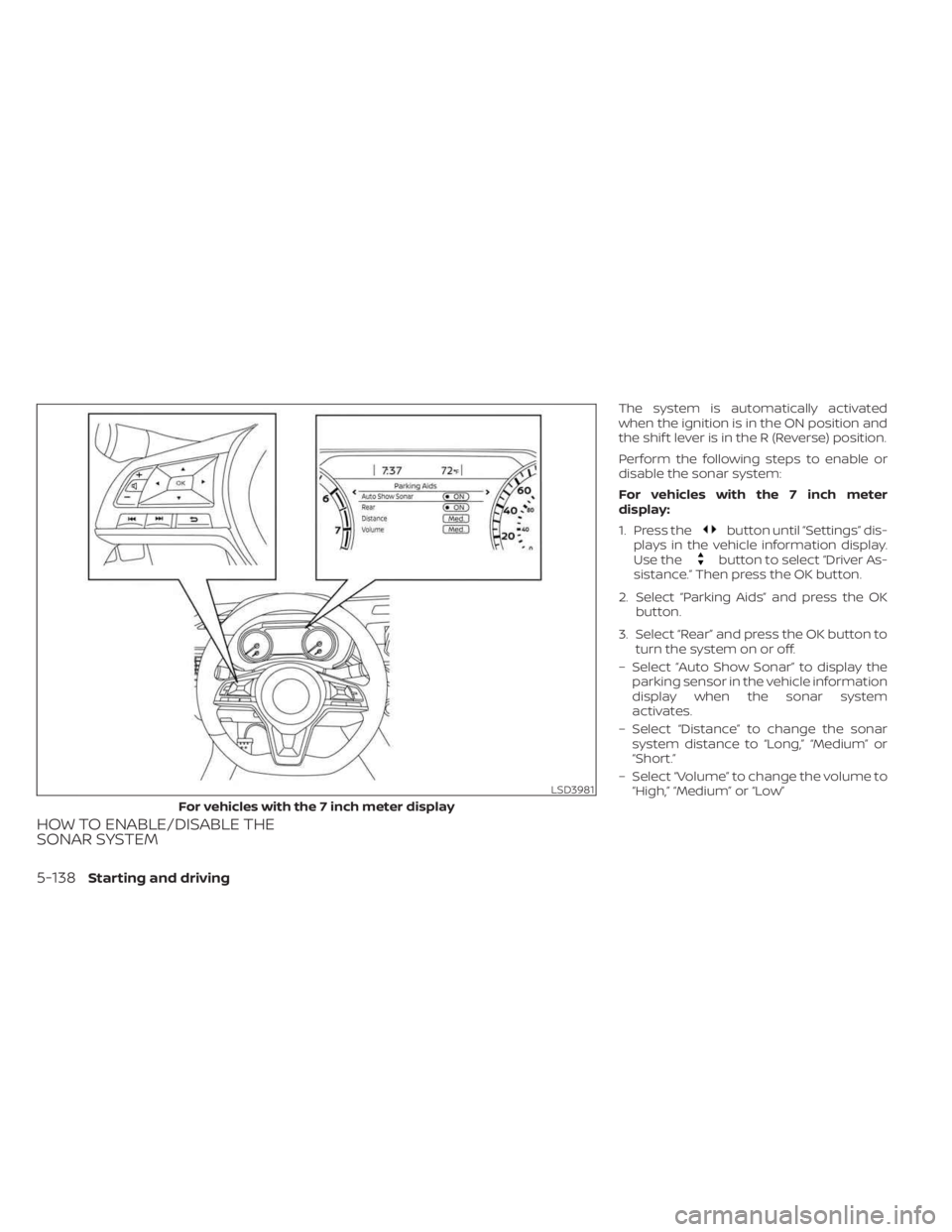
HOW TO ENABLE/DISABLE THE
SONAR SYSTEM
The system is automatically activated
when the ignition is in the ON position and
the shif t lever is in the R (Reverse) position.
Perform the following steps to enable or
disable the sonar system:
For vehicles with the 7 inch meter
display:
1. Press the
button until “Settings” dis-
plays in the vehicle information display.
Use the
button to select “Driver As-
sistance.” Then press the OK button.
2. Select “Parking Aids” and press the OK button.
3. Select “Rear” and press the OK button to turn the system on or off.
– Select “Auto Show Sonar” to display the parking sensor in the vehicle information
display when the sonar system
activates.
– Select “Distance” to change the sonar system distance to “Long,” “Medium” or
“Short.”
– Select “Volume” to change the volume to “High,” “Medium” or “Low”
LSD3981
For vehicles with the 7 inch meter display
5-138Starting and driving
Page 415 of 556
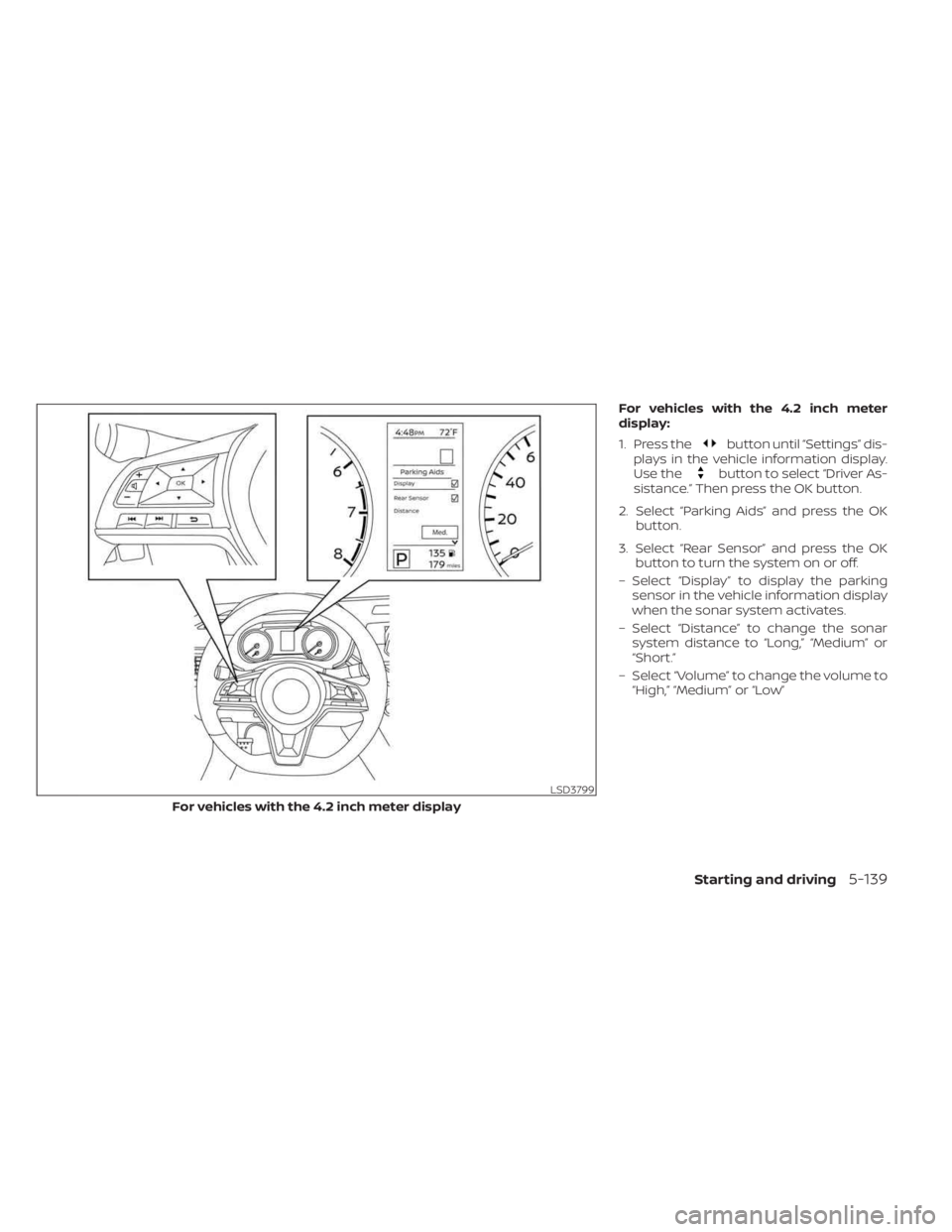
For vehicles with the 4.2 inch meter
display:
1. Press the
button until “Settings” dis-
plays in the vehicle information display.
Use the
button to select “Driver As-
sistance.” Then press the OK button.
2. Select “Parking Aids” and press the OK button.
3. Select “Rear Sensor” and press the OK button to turn the system on or off.
– Select “Display” to display the parking sensor in the vehicle information display
when the sonar system activates.
– Select “Distance” to change the sonar system distance to “Long,” “Medium” or
“Short.”
– Select “Volume” to change the volume to “High,” “Medium” or “Low”
LSD3799
For vehicles with the 4.2 inch meter display
Starting and driving5-139
Page 428 of 556
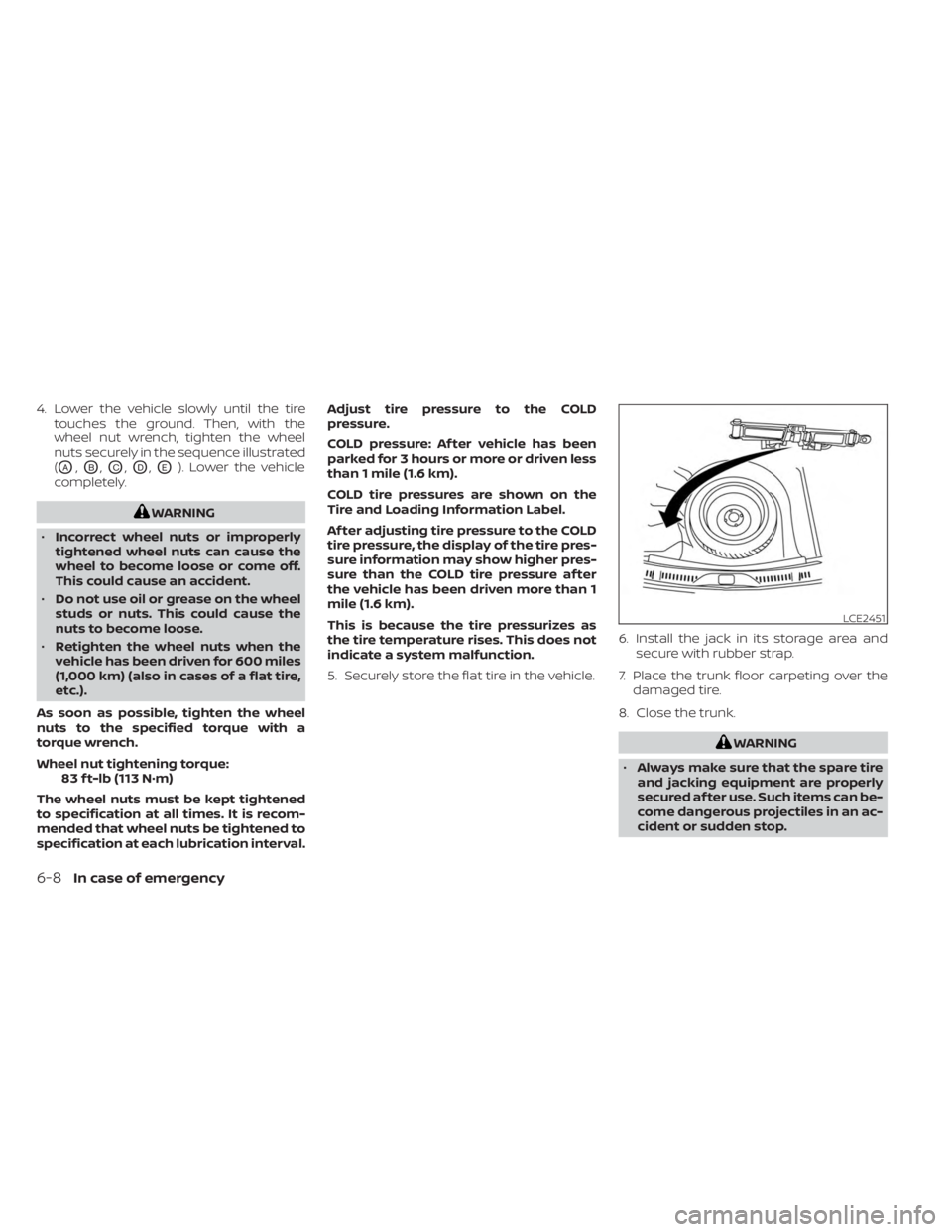
4. Lower the vehicle slowly until the tiretouches the ground. Then, with the
wheel nut wrench, tighten the wheel
nuts securely in the sequence illustrated
(
OA,OB,OC,OD,OE). Lower the vehicle
completely.
WARNING
• Incorrect wheel nuts or improperly
tightened wheel nuts can cause the
wheel to become loose or come off.
This could cause an accident.
• Do not use oil or grease on the wheel
studs or nuts. This could cause the
nuts to become loose.
• Retighten the wheel nuts when the
vehicle has been driven for 600 miles
(1,000 km) (also in cases of a flat tire,
etc.).
As soon as possible, tighten the wheel
nuts to the specified torque with a
torque wrench.
Wheel nut tightening torque: 83 f t-lb (113 N·m)
The wheel nuts must be kept tightened
to specification at all times. It is recom-
mended that wheel nuts be tightened to
specification at each lubrication interval. Adjust tire pressure to the COLD
pressure.
COLD pressure: Af ter vehicle has been
parked for 3 hours or more or driven less
than 1 mile (1.6 km).
COLD tire pressures are shown on the
Tire and Loading Information Label.
Af ter adjusting tire pressure to the COLD
tire pressure, the display of the tire pres-
sure information may show higher pres-
sure than the COLD tire pressure af ter
the vehicle has been driven more than 1
mile (1.6 km).
This is because the tire pressurizes as
the tire temperature rises. This does not
indicate a system malfunction.
5. Securely store the flat tire in the vehicle.
6. Install the jack in its storage area and
secure with rubber strap.
7. Place the trunk floor carpeting over the damaged tire.
8. Close the trunk.
WARNING
• Always make sure that the spare tire
and jacking equipment are properly
secured af ter use. Such items can be-
come dangerous projectiles in an ac-
cident or sudden stop.
LCE2451
6-8In case of emergency
Page 455 of 556
CAUTION
Be careful not to burn yourself, as the
engine oil is hot.
WARNING
• Prolonged and repeated contact
with used engine oil may cause skin
cancer.
• Try to avoid direct skin contact with
used oil. If skin contact is made, wash
thoroughly with soap or hand
cleaner as soon as possible.
• Keep used engine oil out of reach of
children.
4. Loosen the oil filter with an oil filter wrench by turning it counterclockwise.
Remove the oil filter by turning it by
hand.
5. Wipe the engine oil filter mounting sur- face with a clean rag.
CAUTION
Be sure to remove any old gasket ma-
terial remaining on the sealing surface
of the engine. Failure to do so could
lead to an oil leak and engine damage. •
The dipstick must be inserted in
place to prevent oil spillage from the
dipstick hole when filling the engine
with oil.
6. Coat the gasket on the new filter with clean engine oil.
7. Screw in the oil filter clockwise until a slight resistance is felt, then tighten addi-
tionally more than 2/3 turn.
Oil filter tightening torque: 11 to 15 f t-lb (14.7 to 20.6 N·m)
8. Clean and re-install the drain plug with a new washer. Securely tighten the drain
plug with a wrench. Do not use exces-
sive force.
Drain plug tightening torque: 22 to 29 f t-lb (29.4 to 39.2 N·m)
9. Refill the engine with the recommended oil through the oil filler opening, and in-
stall the oil filler cap securely.
For additional information about drain and
refill capacity, see “Recommended fluids/
lubricants and capacities” (P. 10-2). The
drain and refill capacity depends on the oil
temperature and drain time. Use these
specifications for reference only. Always use the dipstick to determine the proper
amount of oil in the engine.
10. Start the engine and check for leakage
around the drain plug and the oil filter.
Correct as required. Turn the engine off
and wait more than 15 minutes. Check
the oil level with the dipstick. Add en-
gine oil if necessary.
Af ter the operation
1. Reinstall under engine protector in re-verse order.
2. Lower the vehicle carefully to the ground.
3. Reset oil and oil filter maintenance re- minder and oil control system. For addi-
tional information, see “Vehicle informa-
tion display 4.2 inch (11 cm) Type A”
(P. 2-18) or “Vehicle information display 7
inch (18 cm) Type B” (P. 2-32).
• Dispose of waste oil and filter properly.
• Check your local regulations.
Do-it-yourself8-9
Page 457 of 556
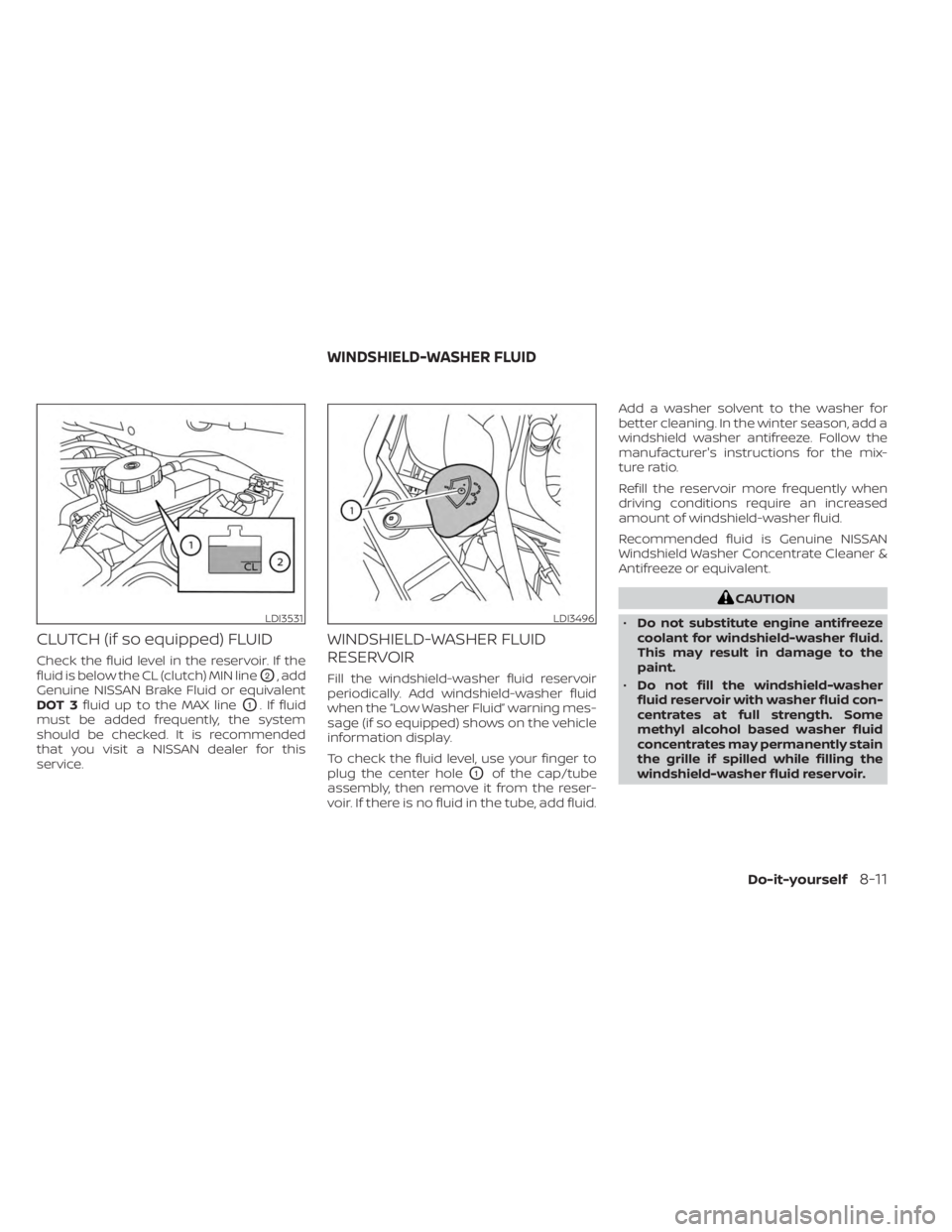
CLUTCH (if so equipped) FLUID
Check the fluid level in the reservoir. If the
fluid is below the CL (clutch) MIN line
O2, add
Genuine NISSAN Brake Fluid or equivalent
DOT 3 fluid up to the MAX line
O1. If fluid
must be added frequently, the system
should be checked. It is recommended
that you visit a NISSAN dealer for this
service.
WINDSHIELD-WASHER FLUID
RESERVOIR
Fill the windshield-washer fluid reservoir
periodically. Add windshield-washer fluid
when the “Low Washer Fluid” warning mes-
sage (if so equipped) shows on the vehicle
information display.
To check the fluid level, use your finger to
plug the center hole
O1of the cap/tube
assembly, then remove it from the reser-
voir. If there is no fluid in the tube, add fluid. Add a washer solvent to the washer for
better cleaning. In the winter season, add a
windshield washer antifreeze. Follow the
manufacturer's instructions for the mix-
ture ratio.
Refill the reservoir more frequently when
driving conditions require an increased
amount of windshield-washer fluid.
Recommended fluid is Genuine NISSAN
Windshield Washer Concentrate Cleaner &
Antifreeze or equivalent.
CAUTION
• Do not substitute engine antifreeze
coolant for windshield-washer fluid.
This may result in damage to the
paint.
• Do not fill the windshield-washer
fluid reservoir with washer fluid con-
centrates at full strength. Some
methyl alcohol based washer fluid
concentrates may permanently stain
the grille if spilled while filling the
windshield-washer fluid reservoir.
LDI3531LDI3496
WINDSHIELD-WASHER FLUID
Do-it-yourself8-11
Page 475 of 556
If you have a flat tire, see “Flat tire”
(P. 6-3).
TIRE PRESSURE
Tire Pressure Monitoring System
(TPMS)
WARNING
Radio waves could adversely af-
fect electric medical equipment.
Those who use a pacemaker
should contact the electric medi-
cal equipment manufacturer for
the possible influences before
use.
This vehicle is equipped with the Tire
Pressure Monitoring System (TPMS).
It monitors tire pressure of all tires
except the spare. When the low tire
pressure warning light is lit and
warning is displayed in the odom-
eter, or the “Tire Pressure Low — Add
Air” appears in the vehicle informa- tion display, one or more of your tires
is significantly under-inflated.
The TPMS will activate only when the
vehicle is driven at speeds above 16
mph (25 km/h). Also, this system
may not detect a sudden drop in tire
pressure (for example a flat tire while
driving).
For additional information, see “Low
tire pressure warning light” (P. 2-13),
“Tire Pressure Monitoring System
(TPMS)” (P. 5-5), and “Flat tire” (P. 6-3).
Tire inflation pressure
Check the tire pressures (including
the spare) of ten and always prior to
long distance trips. The recom-
mended tire pressure specifications
are shown on the F.M.V.S.S./C.M.V.S.S.
certification label or the Tire and
Loading Information label under the
“Cold Tire Pressure” heading. The Tire
and Loading Information label is af-
fixed to the driver side center pillar.
LDI2135
Trunk light
WHEELS AND TIRES
Do-it-yourself8-29
Page 496 of 556
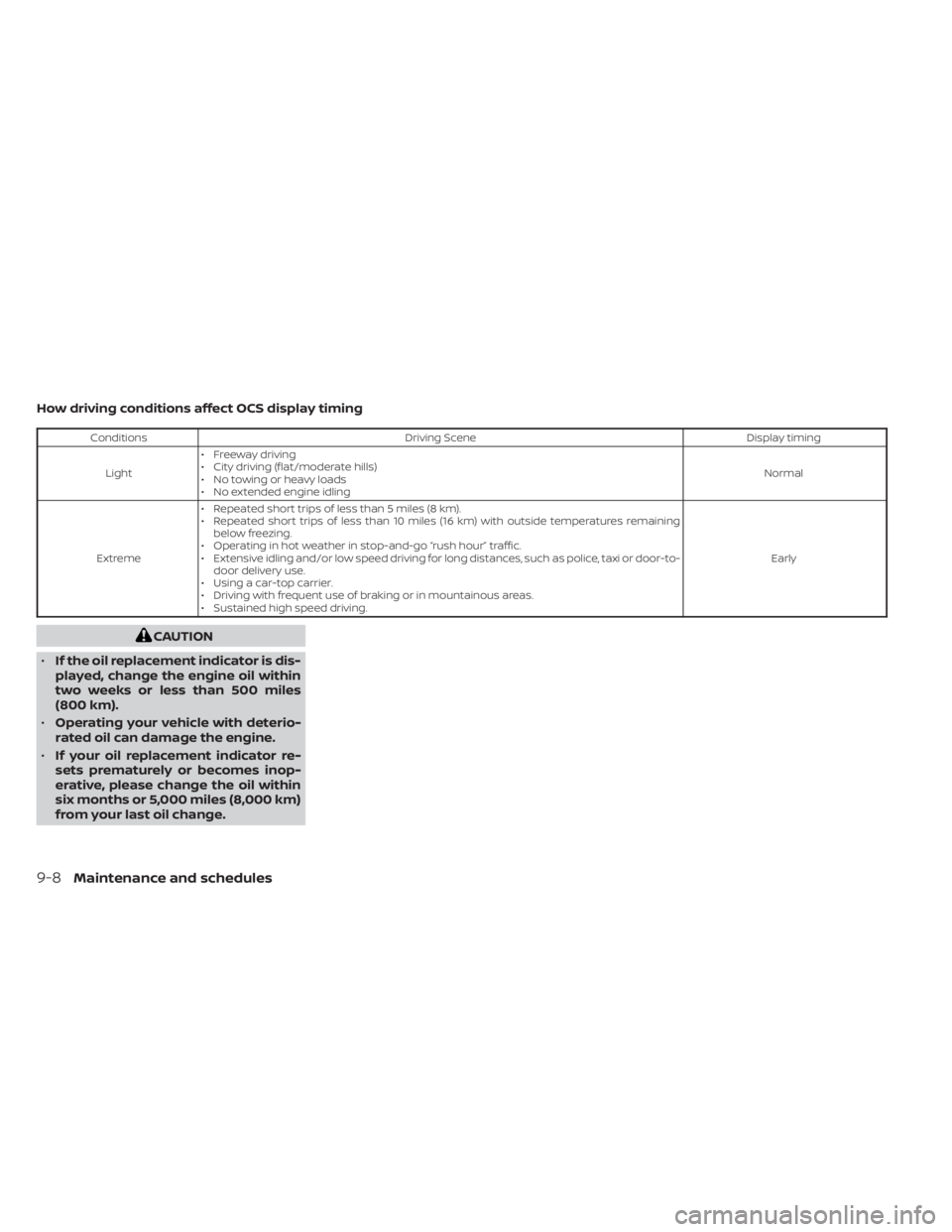
How driving conditions affect OCS display timing
ConditionsDriving Scene Display timing
Light • Freeway driving
• City driving (flat/moderate hills)
• No towing or heavy loads
• No extended engine idling Normal
Extreme • Repeated short trips of less than 5 miles (8 km).
• Repeated short trips of less than 10 miles (16 km) with outside temperatures remaining
below freezing.
• Operating in hot weather in stop-and-go “rush hour” traffic.
• Extensive idling and/or low speed driving for long distances, such as police, taxi or door-to- door delivery use.
• Using a car-top carrier.
• Driving with frequent use of braking or in mountainous areas.
• Sustained high speed driving. Early
CAUTION
• If the oil replacement indicator is dis-
played, change the engine oil within
two weeks or less than 500 miles
(800 km).
• Operating your vehicle with deterio-
rated oil can damage the engine.
• If your oil replacement indicator re-
sets prematurely or becomes inop-
erative, please change the oil within
six months or 5,000 miles (8,000 km)
from your last oil change.
9-8Maintenance and schedules
Page 540 of 556
Bulb check/instrument panel........2-10Bulb replacement...............8-27
C
C.M.V.S.S. certification label.........10-13Capacities and recommended
fuel/lubricants.................10-2Car phone or CB radio............4-66Cargo
(See vehicle loading information).....10-16Chassis control................5-133Check tire pressure..........2-29,2-44Child restraints.......1-21,1-22,1-23,1-25LATCH (Lower Anchors and Tethers for
CHildren) System..............1-25Precautions on child
restraints............1-30, 1-36, 1-40Top tether strap anchor point
locations...................1-28Child safety rear door lock..........3-7Cleaning exterior and interior......7-2,7-5Clock set/adjustment.............4-5Clutch
Clutch fluid..................8-11Cold weather driving............5-141Console box................. .2-67Continuously Variable Transmission
(CVT).......................5-16Continuously Variable Transmission
(CVT) fluid..................8-10Driving with Continuously Variable
Transmission (CVT)............5-16
Control panel buttons.............4-3Brightness/contrast button........4-7Controls
Audio controls (steering wheel).....4-62Heater and air conditioner
controls................4-32, 4-40CoolantCapacities and recommended
fuel/lubricants
...............10-2Changing engine coolant.........8-5Checking engine coolant level......8-5Engine coolant temperature gauge. . .2-6Corrosion protection..............7-8Cruise control................ .5-59Cup holders...............2-68, 2-69
D
Daytime Running Light System......2-57Defroster switch
Rear window and outside mirror
defroster switch
..............2-51Dimensions and weights..........10-11Dimmer switch for instrument panel. . .2-58Display controls (see control panel
buttons).................... .4-3Door locks....................3-4Drive belt....................8-15Driving
Cold weather driving...........5-141Driving with Continuously Variable
Transmission (CVT)............5-16Driving with manual transmission. . .5-21
Precautions when starting and
driving.................... .5-4Driving the vehicle...............5-16
E
ECO mode switch...............5-24Economy - fuel................5-126Emergency call (SOS) button........2-62Emergency engine shutoff.......5-13,6-2Emission control information label. . . .10-13Emission control system warranty. . . .10-22Engine
Before starting the engine........5-14Capacities and recommended
fuel/lubricants...............10-2Changing engine coolant.........8-5Changing engine oil............8-6Changing engine oil filter.........8-6Checking engine coolant level......8-5Checking engine oil level.........8-6Engine compartment check
locations.................. .8-3Engine coolant temperature gauge. . .2-6Engine cooling system...........8-4Engine oil...................8-6Engine oil and oil filter
recommendation.............10-7Engine oil pressure warning light. . . .2-11Engine oil viscosity.............10-7Engine serial number..........10-13Engine specifications...........10-9Starting the engine............5-14
11-2
Page 545 of 556
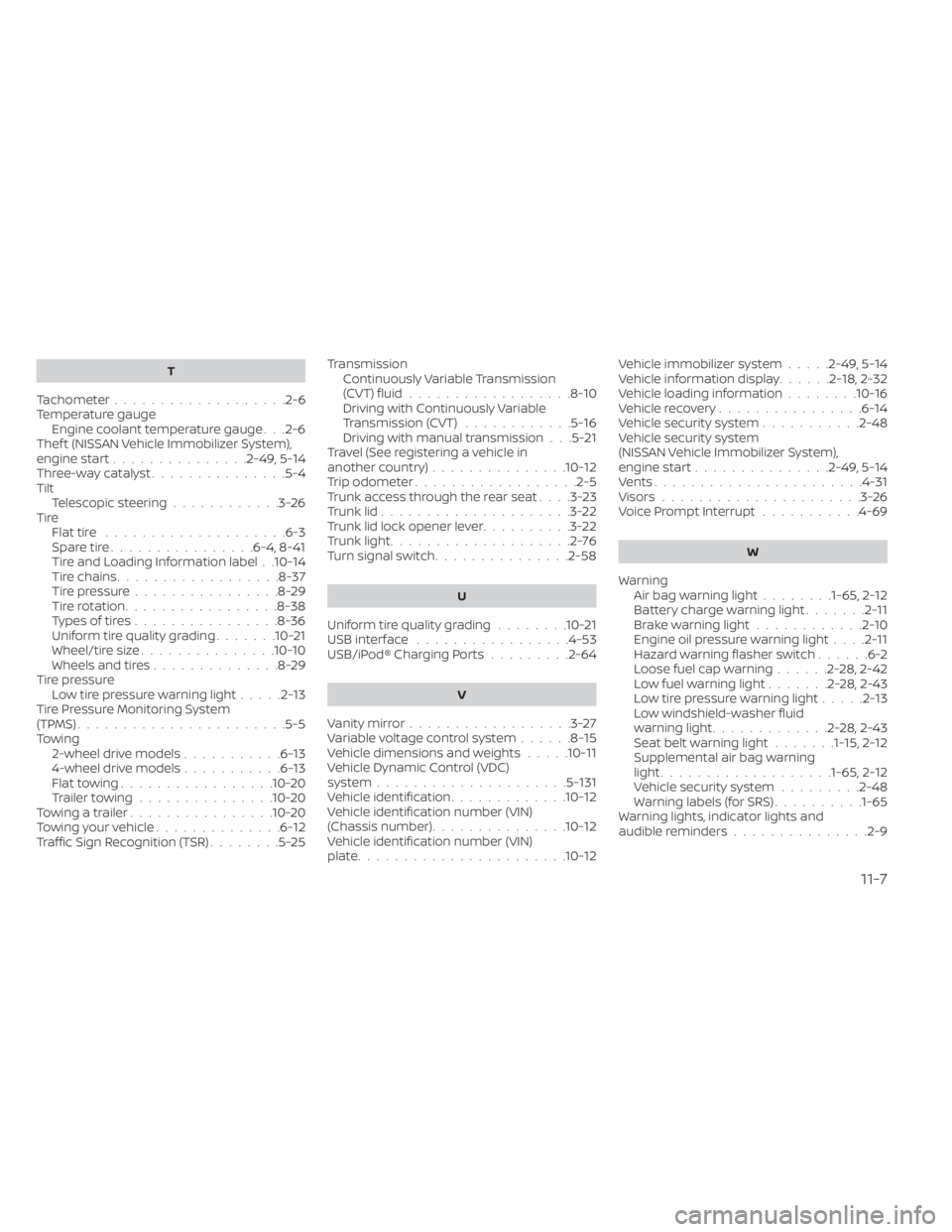
T
Tachometer...................2-6Temperature gauge
Engine coolant temperature gauge. . .2-6Thef t (NISSAN Vehicle Immobilizer System),
engine start...............2-49, 5-14Three-way catalyst...............5-4TiltTelescopic steering............3-26TireFlat tire................... .6-3Spare tire................6-4, 8-41Tire and Loading Information label. .10-14Tire chains..................8-37Tire pressure................8-29Tire rotation.................8-38Types of tires................8-36Uniform tire quality grading.......10-21Wheel/tire size...............10-10Wheels and tires..............8-29Tire pressure
Low tire pressure warning light.....2-13Tire Pressure Monitoring System
(TPMS)...................... .5-5Towing
2-wheel drive models...........6-134-wheel drive models...........6-13Flat towing................ .10-20Trailer towing...............10-20Towing a trailer................10-20Towing your vehicle..............6-12Traffic Sign Recognition (TSR)........5-25
Transmission
Continuously Variable Transmission
(CVT) fluid
..................8-10Driving with Continuously Variable
Transmission (CVT)............5-16Driving with manual transmission. . .5-21Travel (See registering a vehicle in
another country)...............10-12Trip odometer................. .2-5Trunk access through the rear seat. . . .3-23Trunk lid.....................3-22Trunk lid lock opener lever..........3-22Trunk light....................2-76Turn signal switch...............2-58
U
Uniform tire quality grading........10-21USB interface.................4-53USB/iPod® Charging Ports.........2-64
V
Vanity mirror..................3-27Variable voltage control system......8-15Vehicle dimensions and weights.....10-11Vehicle Dynamic Control (VDC)
system.....................5-131Vehicle identification.............10-12Vehicle identification number (VIN)
(Chassis number)...............10-12Vehicle identification number (VIN)
plate...................... .10-12
Vehicle immobilizer system.....2-49, 5-14Vehicle information display......2-18,2-32Vehicle loading information........10-16Vehicle recovery................6-14Vehicle security system...........2-48Vehicle security system
(NISSAN Vehicle Immobilizer System),
engine start
...............2-49, 5-14Vents...................... .4-31Visors......................3-26Voice Prompt Interrupt...........4-69
W
Warning
Air bag warning light........1-65, 2-12Battery charge warning light.......2-11Brake warning light............2-10Engine oil pressure warning light. . . .2-11Hazard warning flasher switch......6-2Loose fuel cap warning......2-28, 2-42Low fuel warning light.......2-28, 2-43Low tire pressure warning light.....2-13Low windshield-washer fluid
warning light.............2-28, 2-43Seat belt warning light.......1-15,2-12Supplemental air bag warning
light.................. .1-65, 2-12Vehicle security system.........2-48Warning labels (for SRS)..........1-65Warning lights, indicator lights and
audible reminders...............2-9
11-7