cam NISSAN TEANA 2003 User Guide
[x] Cancel search | Manufacturer: NISSAN, Model Year: 2003, Model line: TEANA, Model: NISSAN TEANA 2003Pages: 3502, PDF Size: 74.56 MB
Page 623 of 3502
INTEGRATED COLOR DISPLAY SYSTEM
AV-95
C
D
E
F
G
H
I
J
L
MA
B
AV
Vehicle Width and Distance Guiding Line CorrectionBKS00282
DESCRIPTION
CONSULT-II is used to modify the guiding lines of the width of vehicle and the distance from rear end of vehi-
cle on the rear view monitor when these lines are derated from the actual width and/or distance, because of
rear view camera replacement, etc.
VEHICLE WIDTH AND DISTANCE GUIDING LINE CORRECTION PROCEDURE
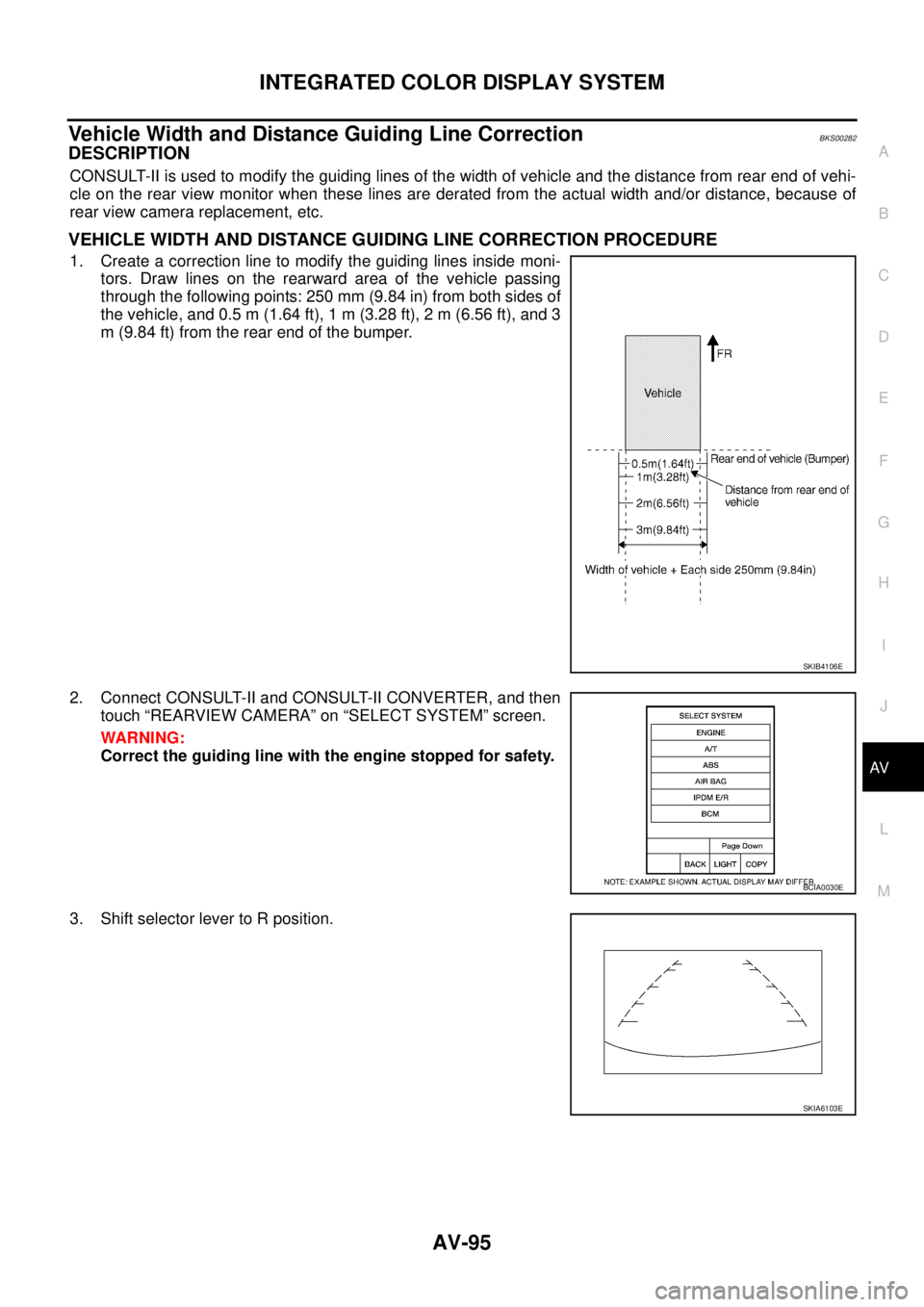
1. Create a correction line to modify the guiding lines inside moni-
tors. Draw lines on the rearward area of the vehicle passing
through the following points: 250 mm (9.84 in) from both sides of
the vehicle, and 0.5 m (1.64 ft), 1 m (3.28 ft), 2 m (6.56 ft), and 3
m (9.84 ft) from the rear end of the bumper.
2. Connect CONSULT-II and CONSULT-II CONVERTER, and then
touch “REARVIEW CAMERA” on “SELECT SYSTEM” screen.
WARNING:
Correct the guiding line with the engine stopped for safety.
3. Shift selector lever to R position.
SKIB4106E
BCIA0030E
SKIA6103E
Page 629 of 3502
INTEGRATED COLOR DISPLAY SYSTEM
AV-101
C
D
E
F
G
H
I
J
L
MA
B
AV
Rear View Image Is Not Displayed (RGB Image Is Displayed)BKS00286
Symptom: Rear view image is not displayed when selector lever is set in R position. (RGB image is displayed.)
1. CHECK CONDITION
1. Turn ignition switch ON.
2. When setting selector lever in R position, make sure that the screen does not change or changes into the
screen where nothing is displayed.
Does the screen change into the screen where nothing is displayed?
YES >> GO TO 2.
NO >> GO TO 12.
2. CONSULT-II FUNCTIONS
1. Connect “CONSULT-II”. Refer to AV- 9 4 , "
CONSULT-II BASIC OPERATION PROCEDURE" .
2. Check if “REARVIEW CAMERA” is shown on the SELECT SYSTEM screen.
Is
“REARVIEW CAMERA” shown?
YES >> GO TO 3.
NO >> Check rear view camera control unit power supply and ground circuit, and repair malfunctioning
part.
3. CONSULT-II FUNCTIONS
Check if reverse signals input to the rear view camera control unit are normal with DATA MONITOR. Refer to
AV- 9 4 , "
DATA MONITOR" .
OK or NG
OK >> GO TO 4.
NG >> Check rear view camera control unit reverse signal circuit, and repair malfunctioning part.
4. CHECK HARNESS
1. Turn ignition switch OFF.
2. Disconnect rear view camera control unit and rear view camera connectors.
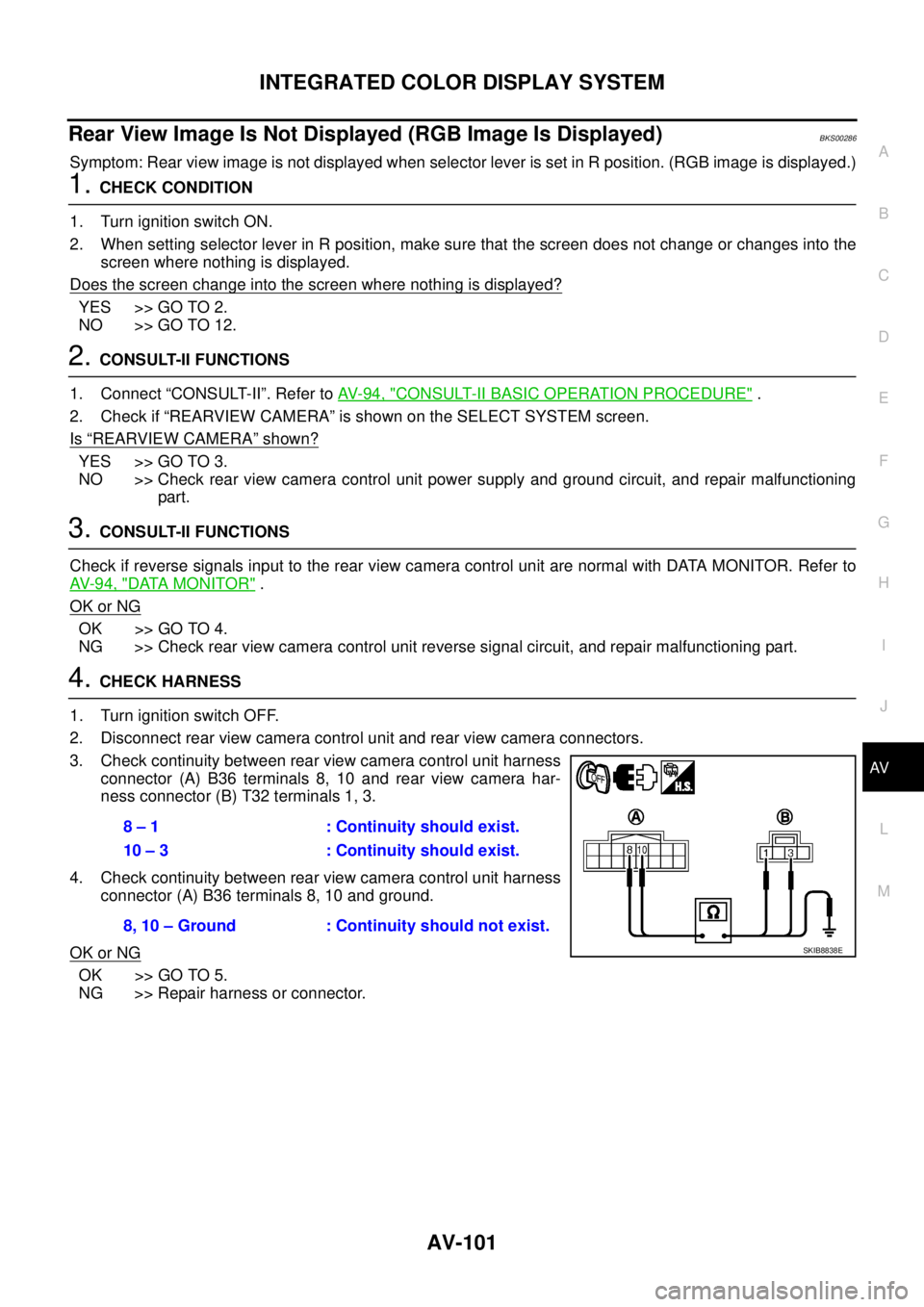
3. Check continuity between rear view camera control unit harness
connector (A) B36 terminals 8, 10 and rear view camera har-
ness connector (B) T32 terminals 1, 3.
4. Check continuity between rear view camera control unit harness
connector (A) B36 terminals 8, 10 and ground.
OK or NG
OK >> GO TO 5.
NG >> Repair harness or connector.8 – 1 : Continuity should exist.
10 – 3 : Continuity should exist.
8, 10 – Ground : Continuity should not exist.
SKIB8838E
Page 630 of 3502
AV-102
INTEGRATED COLOR DISPLAY SYSTEM
5. CHECK REAR VIEW CAMERA GROUND CIRCUIT
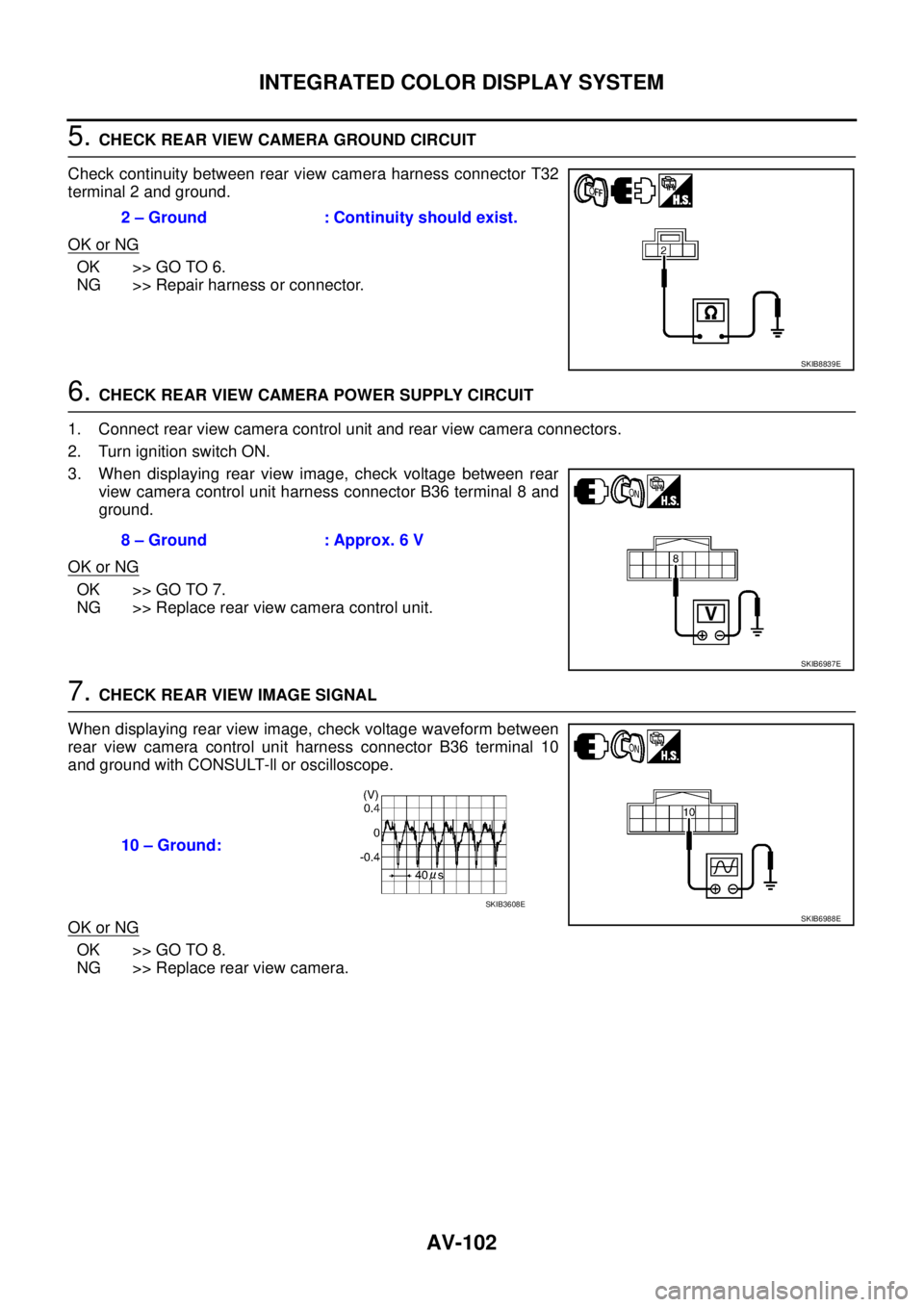
Check continuity between rear view camera harness connector T32
terminal 2 and ground.
OK or NG
OK >> GO TO 6.
NG >> Repair harness or connector.
6. CHECK REAR VIEW CAMERA POWER SUPPLY CIRCUIT
1. Connect rear view camera control unit and rear view camera connectors.
2. Turn ignition switch ON.
3. When displaying rear view image, check voltage between rear
view camera control unit harness connector B36 terminal 8 and
ground.
OK or NG
OK >> GO TO 7.
NG >> Replace rear view camera control unit.
7. CHECK REAR VIEW IMAGE SIGNAL
When displaying rear view image, check voltage waveform between
rear view camera control unit harness connector B36 terminal 10
and ground with CONSULT-ll or oscilloscope.
OK or NG
OK >> GO TO 8.
NG >> Replace rear view camera.2 – Ground : Continuity should exist.
SKIB8839E
8 – Ground : Approx. 6 V
SKIB6987E
10 – Ground:
SKIB6988ESKIB3608E
Page 631 of 3502
INTEGRATED COLOR DISPLAY SYSTEM
AV-103
C
D
E
F
G
H
I
J
L
MA
B
AV
8. CHECK HARNESS
1. Turn ignition switch OFF.
2. Disconnect display and rear view camera control unit connectors.
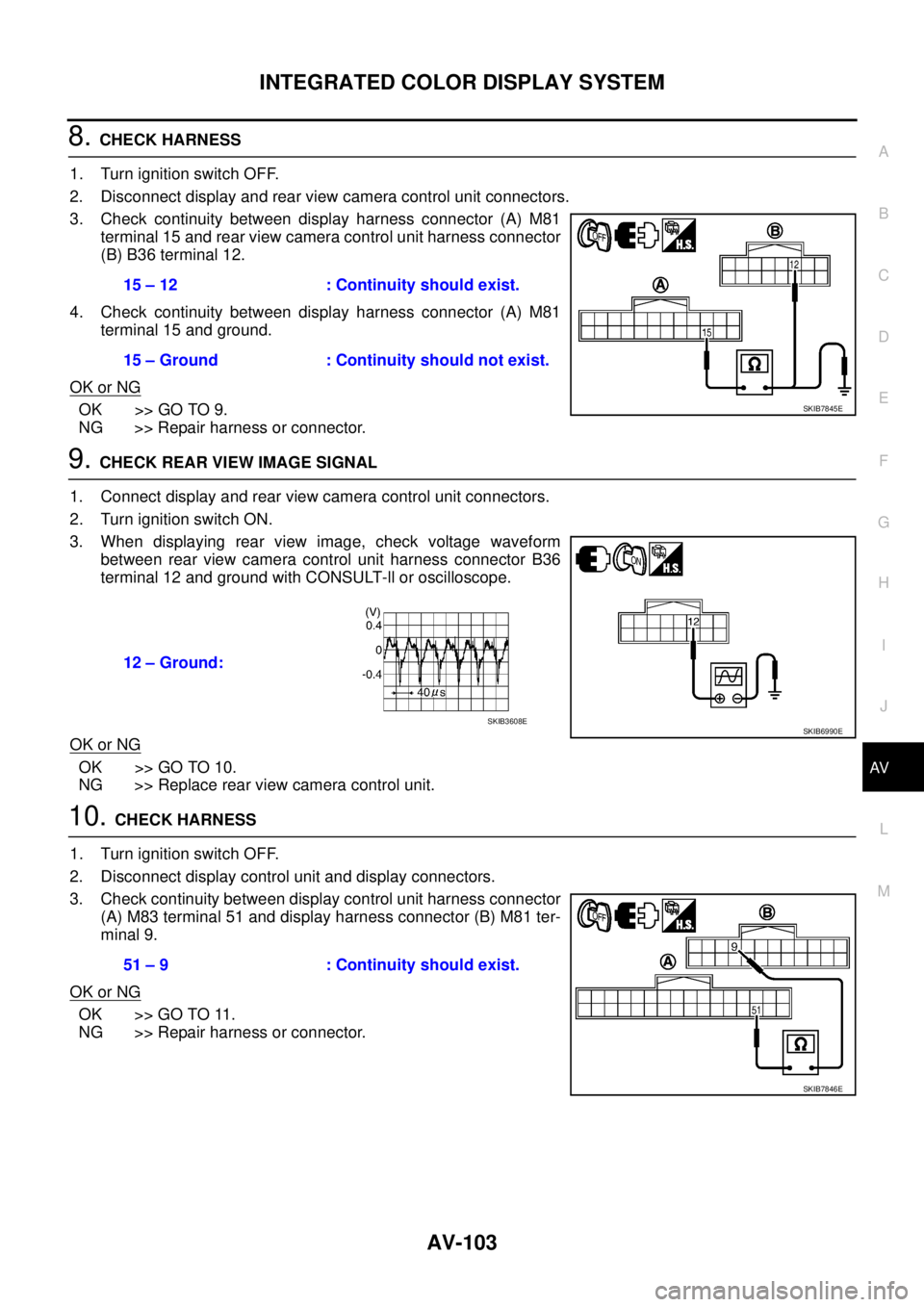
3. Check continuity between display harness connector (A) M81
terminal 15 and rear view camera control unit harness connector
(B) B36 terminal 12.
4. Check continuity between display harness connector (A) M81
terminal 15 and ground.
OK or NG
OK >> GO TO 9.
NG >> Repair harness or connector.
9. CHECK REAR VIEW IMAGE SIGNAL
1. Connect display and rear view camera control unit connectors.
2. Turn ignition switch ON.
3. When displaying rear view image, check voltage waveform
between rear view camera control unit harness connector B36
terminal 12 and ground with CONSULT-ll or oscilloscope.
OK or NG
OK >> GO TO 10.
NG >> Replace rear view camera control unit.
10. CHECK HARNESS
1. Turn ignition switch OFF.
2. Disconnect display control unit and display connectors.
3. Check continuity between display control unit harness connector
(A) M83 terminal 51 and display harness connector (B) M81 ter-
minal 9.
OK or NG
OK >> GO TO 11.
NG >> Repair harness or connector.15 – 12 : Continuity should exist.
15 – Ground : Continuity should not exist.
SKIB7845E
12 – Ground:
SKIB6990ESKIB3608E
51 – 9 : Continuity should exist.
SKIB7846E
Page 632 of 3502
AV-104
INTEGRATED COLOR DISPLAY SYSTEM
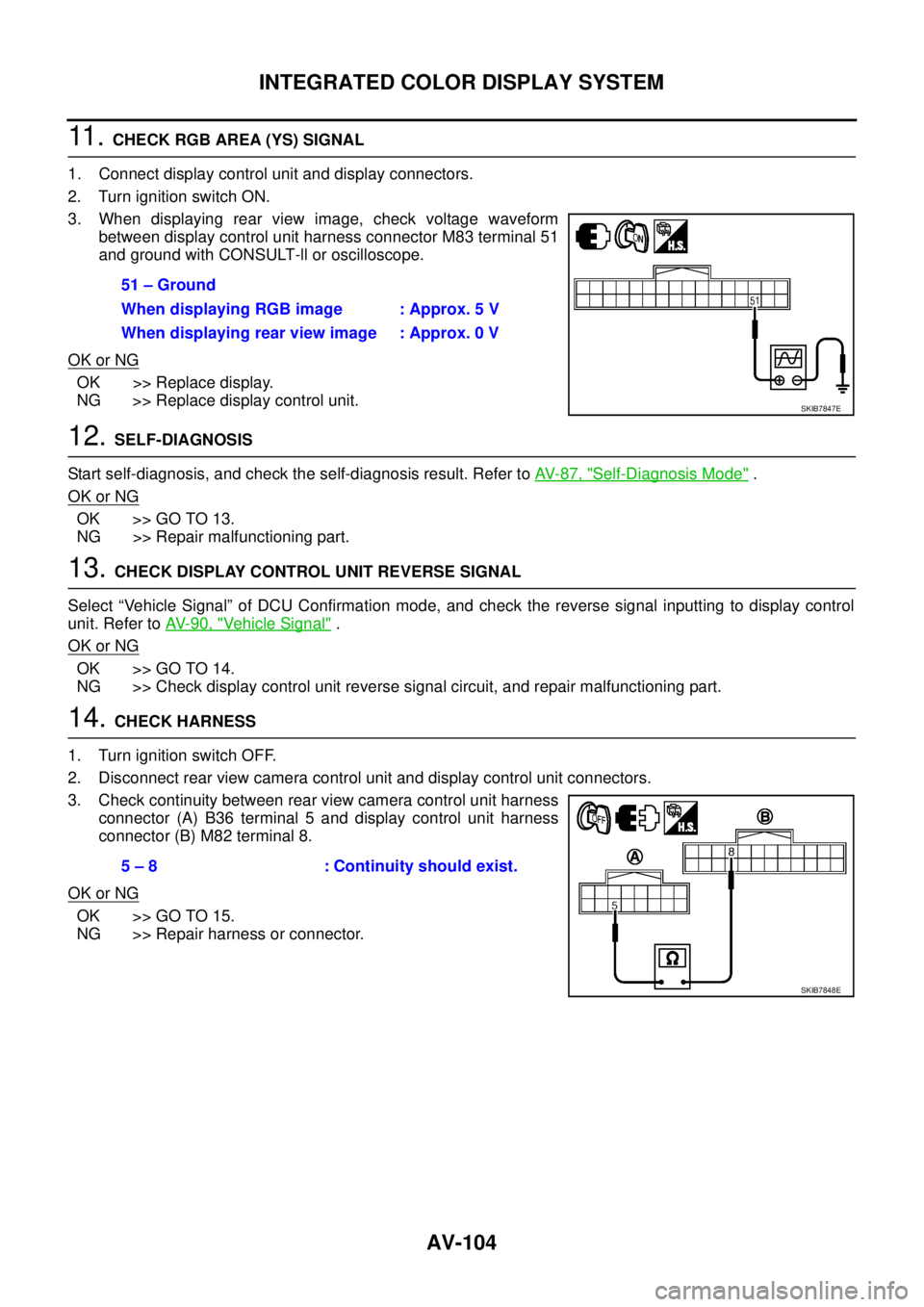
11 . CHECK RGB AREA (YS) SIGNAL
1. Connect display control unit and display connectors.
2. Turn ignition switch ON.
3. When displaying rear view image, check voltage waveform
between display control unit harness connector M83 terminal 51
and ground with CONSULT-ll or oscilloscope.
OK or NG
OK >> Replace display.
NG >> Replace display control unit.
12. SELF-DIAGNOSIS
Start self-diagnosis, and check the self-diagnosis result. Refer to AV- 8 7 , "
Self-Diagnosis Mode" .
OK or NG
OK >> GO TO 13.
NG >> Repair malfunctioning part.
13. CHECK DISPLAY CONTROL UNIT REVERSE SIGNAL
Select “Vehicle Signal” of DCU Confirmation mode, and check the reverse signal inputting to display control
unit. Refer to AV- 9 0 , "
Vehicle Signal" .
OK or NG
OK >> GO TO 14.
NG >> Check display control unit reverse signal circuit, and repair malfunctioning part.
14. CHECK HARNESS
1. Turn ignition switch OFF.
2. Disconnect rear view camera control unit and display control unit connectors.
3. Check continuity between rear view camera control unit harness
connector (A) B36 terminal 5 and display control unit harness
connector (B) M82 terminal 8.
OK or NG
OK >> GO TO 15.
NG >> Repair harness or connector.51 – Ground
When displaying RGB image : Approx. 5 V
When displaying rear view image : Approx. 0 V
SKIB7847E
5 – 8 : Continuity should exist.
SKIB7848E
Page 633 of 3502
INTEGRATED COLOR DISPLAY SYSTEM
AV-105
C
D
E
F
G
H
I
J
L
MA
B
AV
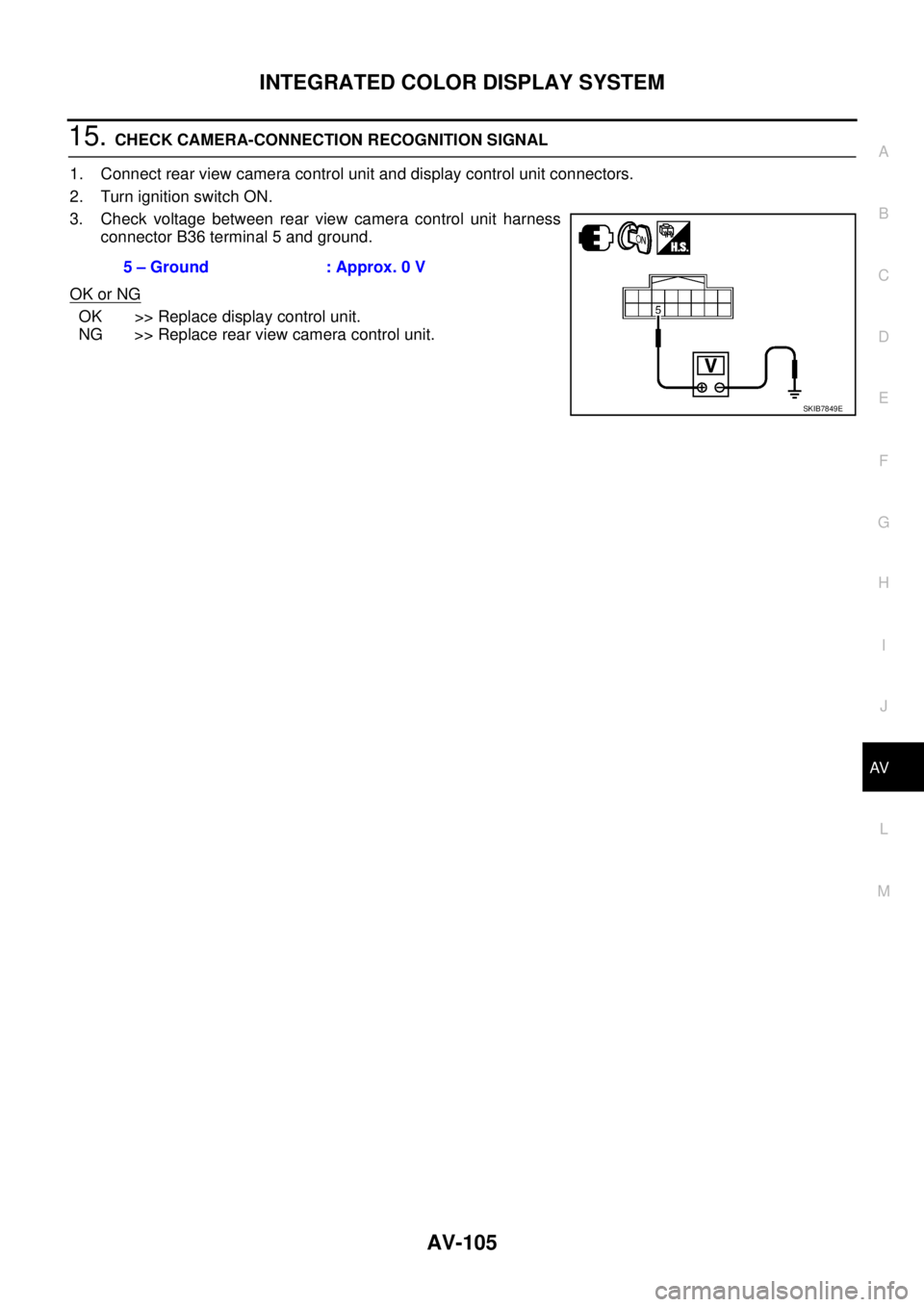
15. CHECK CAMERA-CONNECTION RECOGNITION SIGNAL
1. Connect rear view camera control unit and display control unit connectors.
2. Turn ignition switch ON.
3. Check voltage between rear view camera control unit harness
connector B36 terminal 5 and ground.
OK or NG
OK >> Replace display control unit.
NG >> Replace rear view camera control unit.5 – Ground : Approx. 0 V
SKIB7849E
Page 639 of 3502
INTEGRATED COLOR DISPLAY SYSTEM
AV-111
C
D
E
F
G
H
I
J
L
MA
B
AV
Example of Symptoms Possible No MalfunctionBKS0028D
For system operation information, refer to Owner's Manual.
DISPLAY
REAR VIEW MONITOR
Symptom Possible cause Possible solution
No image is displayed.The brightness is at the lowest setting. Adjust the brightness of the display.
The display is turned off. Turn on the display.
The screen is too dim. The move-
ment is slow.The temperature in the interior of the vehicle is
low.Wait until the interior of the vehicle has
warmed up.
Some pixels in the display are
darker or brighter than others.This condition is an inherent characteristic of
liquid crystal displays.This is not a malfunction.
Some menu items cannot be
selected.Some menu items become unavailable while
the vehicle is driven.Park the vehicle in a safe location, then oper-
ate the system.
Symptom Possible cause Possible solution
Rear view monitor image is not
shown.Selector lever is not set to R position. Shift the selector lever to R position.
Rear view monitor image is fuzzy.The front glass of the camera lens is dirty. Wipe it with a soft wet cloth lightly.
Adherence of raindrops or snow. Wipe it with a soft cloth lightly.
The lens is illuminated directly by sunlight or light
from headlight of cars behind.The fuzzy image recovers when the light is
covered.
Page 641 of 3502
INTEGRATED COLOR DISPLAY SYSTEM
AV-113
C
D
E
F
G
H
I
J
L
MA
B
AV
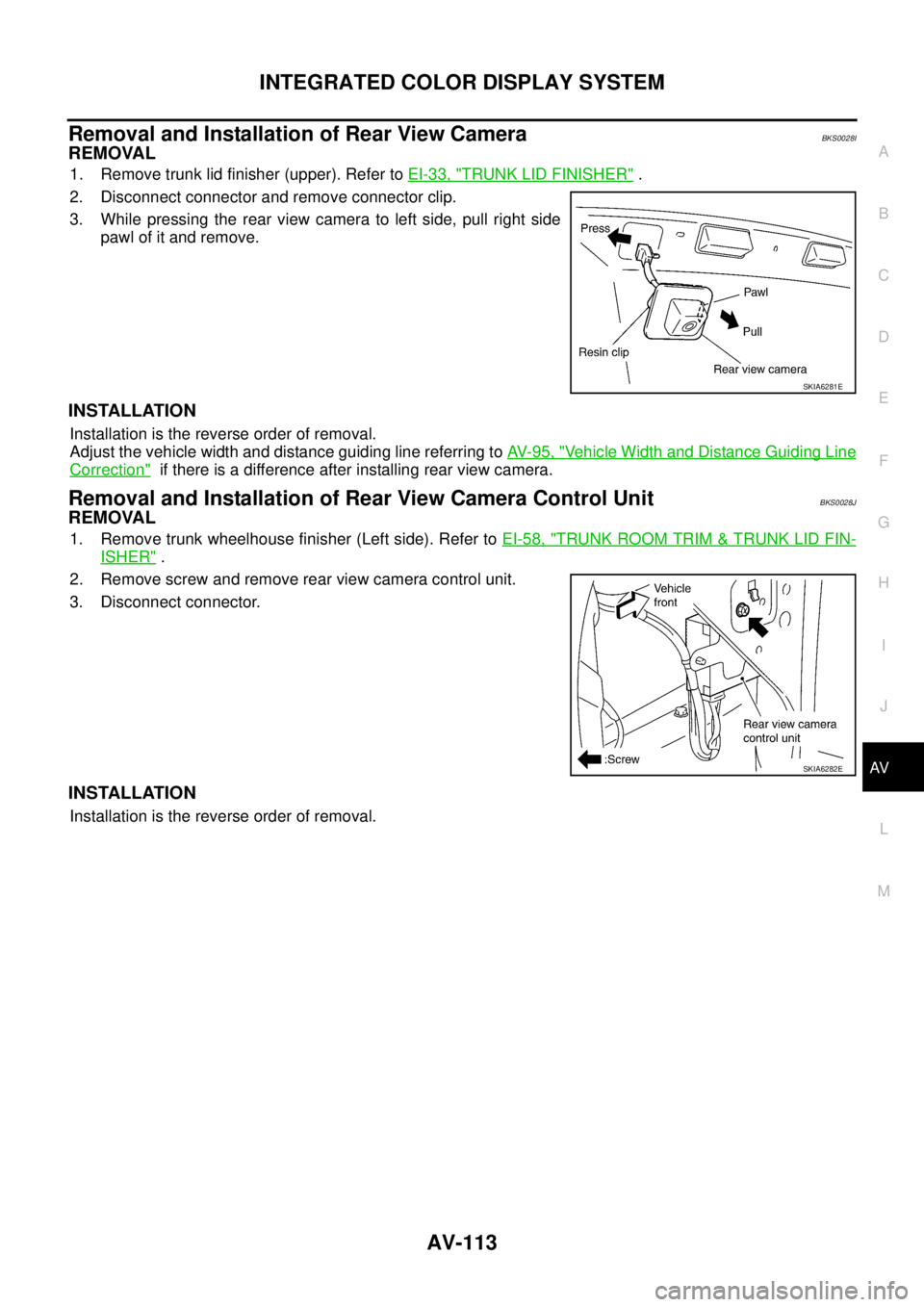
Removal and Installation of Rear View CameraBKS0028I
REMOVAL
1. Remove trunk lid finisher (upper). Refer to EI-33, "TRUNK LID FINISHER" .
2. Disconnect connector and remove connector clip.
3. While pressing the rear view camera to left side, pull right side
pawl of it and remove.
INSTALLATION
Installation is the reverse order of removal.
Adjust the vehicle width and distance guiding line referring to AV- 9 5 , "
Vehicle Width and Distance Guiding Line
Correction" if there is a difference after installing rear view camera.
Removal and Installation of Rear View Camera Control UnitBKS0028J
REMOVAL
1. Remove trunk wheelhouse finisher (Left side). Refer to EI-58, "TRUNK ROOM TRIM & TRUNK LID FIN-
ISHER" .
2. Remove screw and remove rear view camera control unit.
3. Disconnect connector.
INSTALLATION
Installation is the reverse order of removal.
SKIA6281E
SKIA6282E
Page 1286 of 3502

EC-4 DTC P2138 APP SENSOR .....................................272
Component Description ........................................272
CONSULT-II Reference Value in Data Monitor Mode
.272
On Board Diagnosis Logic ....................................272
DTC Confirmation Procedure ...............................273
Wiring Diagram .....................................................274
Diagnostic Procedure ...........................................275
Component Inspection ..........................................279
Removal and Installation ......................................279
ELECTRICAL LOAD SIGNAL ................................280
Description ............................................................280
CONSULT-II Reference Value in Data Monitor Mode
.280
Diagnostic Procedure ...........................................280
EVAP CANISTER PURGE VOLUME CONTROL
SOLENOID VALVE .................................................282
Description ............................................................282
CONSULT-II Reference Value in Data Monitor Mode
.282
Wiring Diagram .....................................................283
Diagnostic Procedure ...........................................285
Component Inspection ..........................................288
Removal and Installation ......................................288
FUEL INJECTOR ....................................................289
Component Description ........................................289
CONSULT-II Reference Value in Data Monitor Mode
.289
Wiring Diagram .....................................................290
Diagnostic Procedure ...........................................291
Component Inspection ..........................................293
Removal and Installation ......................................294
FUEL PUMP ............................................................295
Description ............................................................295
CONSULT-II Reference Value in Data Monitor Mode
.295
Wiring Diagram .....................................................296
Diagnostic Procedure ...........................................297
Component Inspection ..........................................300
Removal and Installation ......................................300
HO2S1 .....................................................................301
Component Description ........................................301
CONSULT-II Reference Value in Data Monitor Mode
.301
Wiring Diagram .....................................................302
Diagnostic Procedure ...........................................304
Component Inspection ..........................................305
Removal and Installation ......................................307
HO2S1 HEATER .....................................................308
Description ............................................................308
CONSULT-II Reference Value in Data Monitor Mode
.308
Wiring Diagram .....................................................309
Diagnostic Procedure ...........................................310
Component Inspection ..........................................312
Removal and Installation ......................................312
HO2S2 .....................................................................313
Component Description ........................................313CONSULT-II Reference Value in Data Monitor Mode
.313
Wiring Diagram .....................................................314
Diagnostic Procedure ............................................315
Component Inspection ..........................................317
Removal and Installation .......................................318
HO2S2 HEATER ......................................................319
Description ............................................................319
CONSULT-II Reference Value in Data Monitor Mode
.319
Wiring Diagram .....................................................320
Diagnostic Procedure ............................................321
Component Inspection ..........................................323
Removal and Installation .......................................323
IAT SENSOR ...........................................................324
Component Description ........................................324
Wiring Diagram .....................................................325
Diagnostic Procedure ............................................326
Component Inspection ..........................................328
Removal and Installation .......................................328
IGNITION SIGNAL ..................................................329
Component Description ........................................329
Wiring Diagram .....................................................330
Diagnostic Procedure ............................................333
Component Inspection ..........................................337
Removal and Installation .......................................338
REFRIGERANT PRESSURE SENSOR ..................339
Component Description ........................................339
Wiring Diagram .....................................................340
Diagnostic Procedure ............................................341
Removal and Installation .......................................343
MI & DATA LINK CONNECTORS ...........................344
Wiring Diagram .....................................................344
SERVICE DATA AND SPECIFICATIONS (SDS) ....346
Fuel Pressure ........................................................346
Idle Speed and Ignition Timing ..............................346
Mass Air Flow Sensor ...........................................346
Intake Air Temperature Sensor .............................346
Engine Coolant Temperature Sensor ....................346
Crankshaft Position Sensor (POS) .......................346
Camshaft Position Sensor (PHASE) .....................346
Heated Oxygen Sensor 1 Heater ..........................346
Heated Oxygen sensor 2 Heater ..........................346
Throttle Control Motor ...........................................346
Fuel Injector ..........................................................346
Fuel Pump .............................................................346
VQ
INDEX FOR DTC .....................................................347
DTC No. Index ......................................................347
Alphabetical Index .................................................349
PRECAUTIONS .......................................................351
Precautions for Supplemental Restraint System
(SRS) “AIR BAG” and “SEAT BELT PRE-TEN-
SIONER” ...............................................................351
On Board Diagnostic (OBD) System of Engine ....351
Precaution .............................................................351
Page 1291 of 3502
EC-9
C
D
E
F
G
H
I
J
K
L
M
ECA
Component Inspection ......................................... 760
Removal and Installation ...................................... 761
VSS ......................................................................... 762
Description ........................................................... 762
Diagnostic Procedure ........................................... 762
MI & DATA LINK CONNECTORS .......................... 763
Wiring Diagram .................................................... 763
SERVICE DATA AND SPECIFICATIONS (SDS) .... 765
Fuel Pressure ....................................................... 765
Idle Speed and Ignition Timing ............................. 765Mass Air Flow Sensor ...........................................765
Intake Air Temperature Sensor .............................765
Engine Coolant Temperature Sensor ...................765
Heated Oxygen Sensor 1 Heater .........................765
Heated Oxygen sensor 2 Heater ..........................765
Crankshaft Position Sensor (POS) .......................765
Camshaft Position Sensor (PHASE) ....................765
Throttle Control Motor ...........................................765
Fuel Injector ..........................................................765
Fuel Pump ............................................................766