ignition NISSAN TEANA 2003 Service Manual
[x] Cancel search | Manufacturer: NISSAN, Model Year: 2003, Model line: TEANA, Model: NISSAN TEANA 2003Pages: 3502, PDF Size: 74.56 MB
Page 1272 of 3502
DI-66
WARNING CHIME
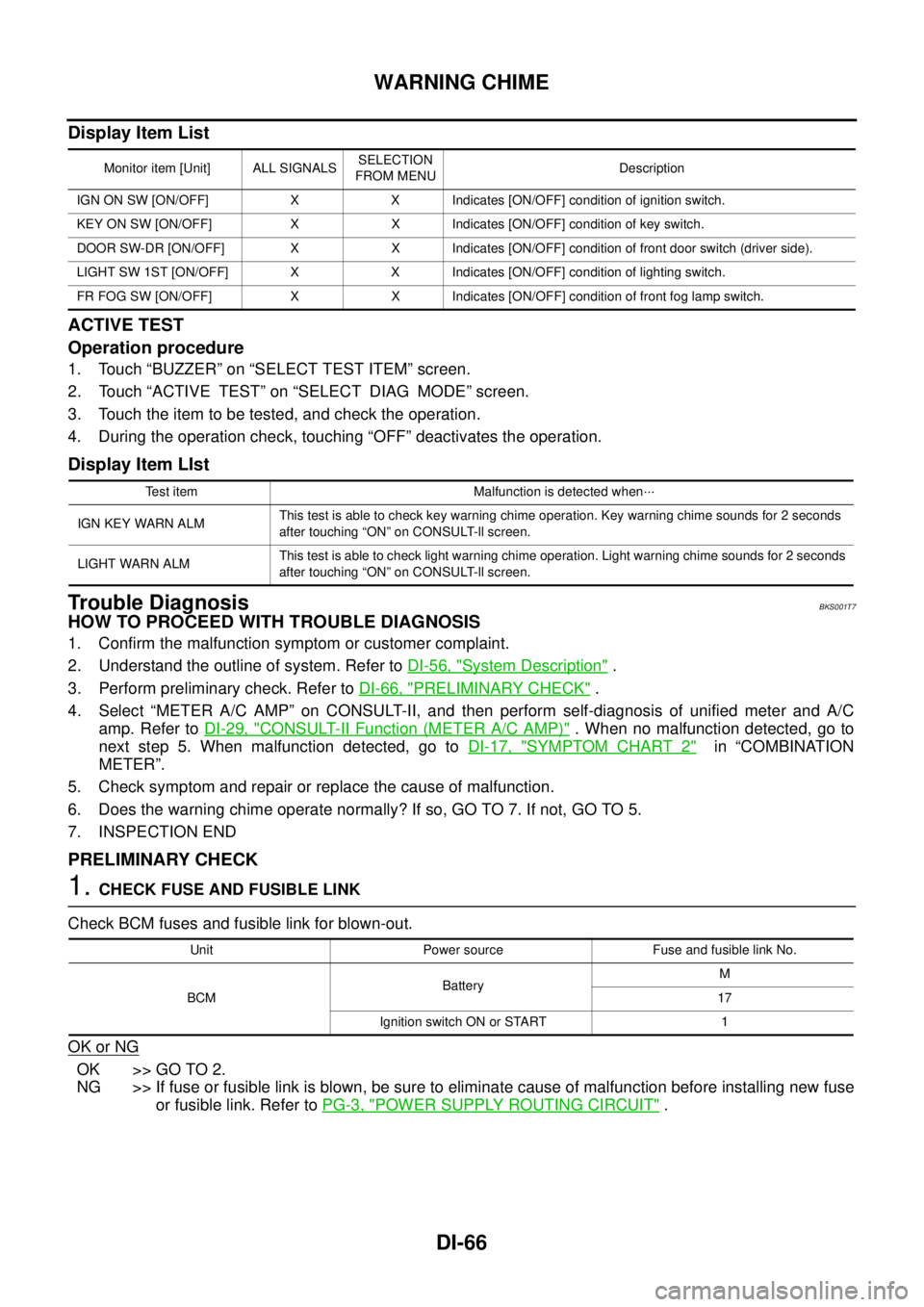
Display Item List
ACTIVE TEST
Operation procedure
1. Touch “BUZZER” on “SELECT TEST ITEM” screen.
2. Touch “ACTIVE TEST” on “SELECT DIAG MODE” screen.
3. Touch the item to be tested, and check the operation.
4. During the operation check, touching “OFF” deactivates the operation.
Display Item LIst
Trouble DiagnosisBKS001T7
HOW TO PROCEED WITH TROUBLE DIAGNOSIS
1. Confirm the malfunction symptom or customer complaint.
2. Understand the outline of system. Refer to DI-56, "
System Description" .
3. Perform preliminary check. Refer to DI-66, "
PRELIMINARY CHECK" .
4. Select “METER A/C AMP” on CONSULT-II, and then perform self-diagnosis of unified meter and A/C
amp. Refer to DI-29, "
CONSULT-II Function (METER A/C AMP)" . When no malfunction detected, go to
next step 5. When malfunction detected, go to DI-17, "
SYMPTOM CHART 2" in “COMBINATION
METER”.
5. Check symptom and repair or replace the cause of malfunction.
6. Does the warning chime operate normally? If so, GO TO 7. If not, GO TO 5.
7. INSPECTION END
PRELIMINARY CHECK
1. CHECK FUSE AND FUSIBLE LINK
Check BCM fuses and fusible link for blown-out.
OK or NG
OK >> GO TO 2.
NG >> If fuse or fusible link is blown, be sure to eliminate cause of malfunction before installing new fuse
or fusible link. Refer to PG-3, "
POWER SUPPLY ROUTING CIRCUIT" .
Monitor item [Unit] ALL SIGNALSSELECTION
FROM MENUDescription
IGN ON SW [ON/OFF] X X Indicates [ON/OFF] condition of ignition switch.
KEY ON SW [ON/OFF] X X Indicates [ON/OFF] condition of key switch.
DOOR SW-DR [ON/OFF] X X Indicates [ON/OFF] condition of front door switch (driver side).
LIGHT SW 1ST [ON/OFF] X X Indicates [ON/OFF] condition of lighting switch.
FR FOG SW [ON/OFF] X X Indicates [ON/OFF] condition of front fog lamp switch.
Test item Malfunction is detected when···
IGN KEY WARN ALMThis test is able to check key warning chime operation. Key warning chime sounds for 2 seconds
after touching “ON” on CONSULT-ll screen.
LIGHT WARN ALMThis test is able to check light warning chime operation. Light warning chime sounds for 2 seconds
after touching “ON” on CONSULT-ll screen.
Unit Power source Fuse and fusible link No.
BCMBatteryM
17
Ignition switch ON or START 1
Page 1273 of 3502
WARNING CHIME
DI-67
C
D
E
F
G
H
I
J
L
MA
B
DI
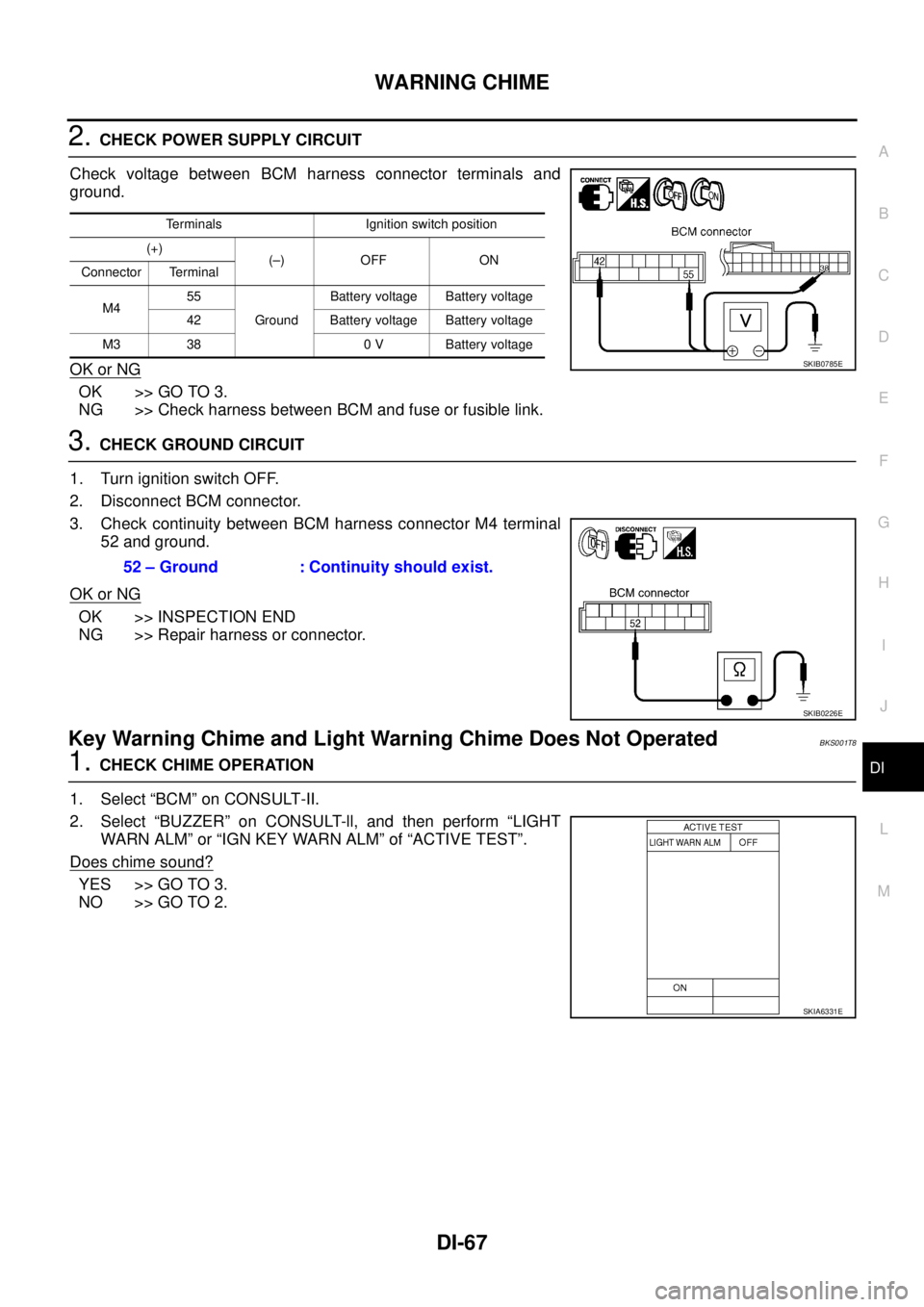
2. CHECK POWER SUPPLY CIRCUIT
Check voltage between BCM harness connector terminals and
ground.
OK or NG
OK >> GO TO 3.
NG >> Check harness between BCM and fuse or fusible link.
3. CHECK GROUND CIRCUIT
1. Turn ignition switch OFF.
2. Disconnect BCM connector.
3. Check continuity between BCM harness connector M4 terminal
52 and ground.
OK or NG
OK >> INSPECTION END
NG >> Repair harness or connector.
Key Warning Chime and Light Warning Chime Does Not OperatedBKS001T8
1. CHECK CHIME OPERATION
1. Select “BCM” on CONSULT-II.
2. Select “BUZZER” on CONSULT-ll, and then perform “LIGHT
WARN ALM” or “IGN KEY WARN ALM” of “ACTIVE TEST”.
Does chime sound?
YES >> GO TO 3.
NO >> GO TO 2.
Terminals Ignition switch position
(+)
(–) OFF ON
Connector Terminal
M455
GroundBattery voltage Battery voltage
42 Battery voltage Battery voltage
M3 38 0 V Battery voltage
SKIB0785E
52 – Ground : Continuity should exist.
SKIB0226E
SKIA6331E
Page 1275 of 3502
WARNING CHIME
DI-69
C
D
E
F
G
H
I
J
L
MA
B
DI
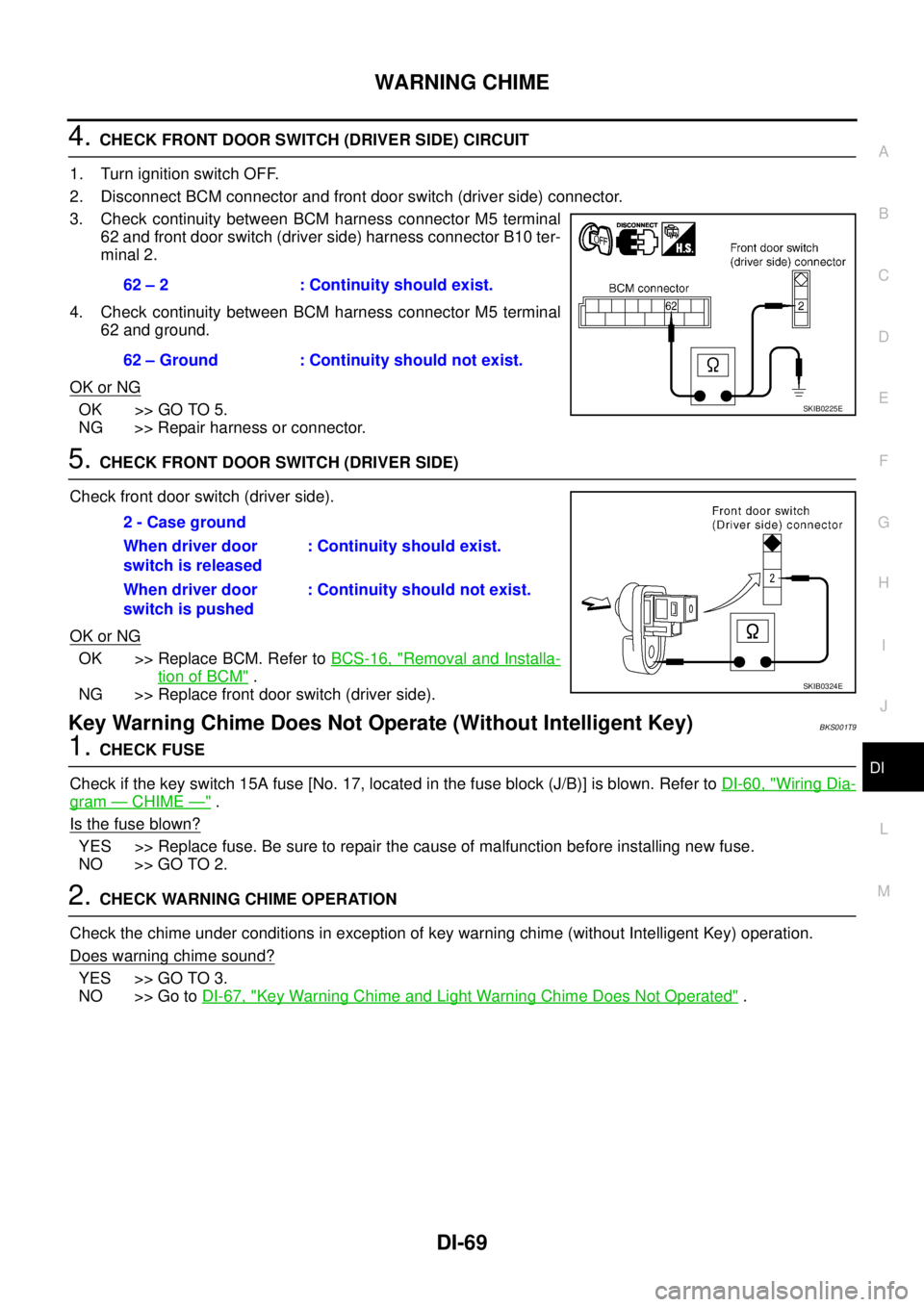
4. CHECK FRONT DOOR SWITCH (DRIVER SIDE) CIRCUIT
1. Turn ignition switch OFF.
2. Disconnect BCM connector and front door switch (driver side) connector.
3. Check continuity between BCM harness connector M5 terminal
62 and front door switch (driver side) harness connector B10 ter-
minal 2.
4. Check continuity between BCM harness connector M5 terminal
62 and ground.
OK or NG
OK >> GO TO 5.
NG >> Repair harness or connector.
5. CHECK FRONT DOOR SWITCH (DRIVER SIDE)
Check front door switch (driver side).
OK or NG
OK >> Replace BCM. Refer to BCS-16, "Removal and Installa-
tion of BCM" .
NG >> Replace front door switch (driver side).
Key Warning Chime Does Not Operate (Without Intelligent Key)BKS001T9
1. CHECK FUSE
Check if the key switch 15A fuse [No. 17, located in the fuse block (J/B)] is blown. Refer to DI-60, "
Wiring Dia-
gram — CHIME —" .
Is the fuse blown?
YES >> Replace fuse. Be sure to repair the cause of malfunction before installing new fuse.
NO >> GO TO 2.
2. CHECK WARNING CHIME OPERATION
Check the chime under conditions in exception of key warning chime (without Intelligent Key) operation.
Does warning chime sound?
YES >> GO TO 3.
NO >> Go to DI-67, "
Key Warning Chime and Light Warning Chime Does Not Operated" . 62 – 2 : Continuity should exist.
62 – Ground : Continuity should not exist.
SKIB0225E
2 - Case ground
When driver door
switch is released: Continuity should exist.
When driver door
switch is pushed: Continuity should not exist.
SKIB0324E
Page 1276 of 3502
DI-70
WARNING CHIME
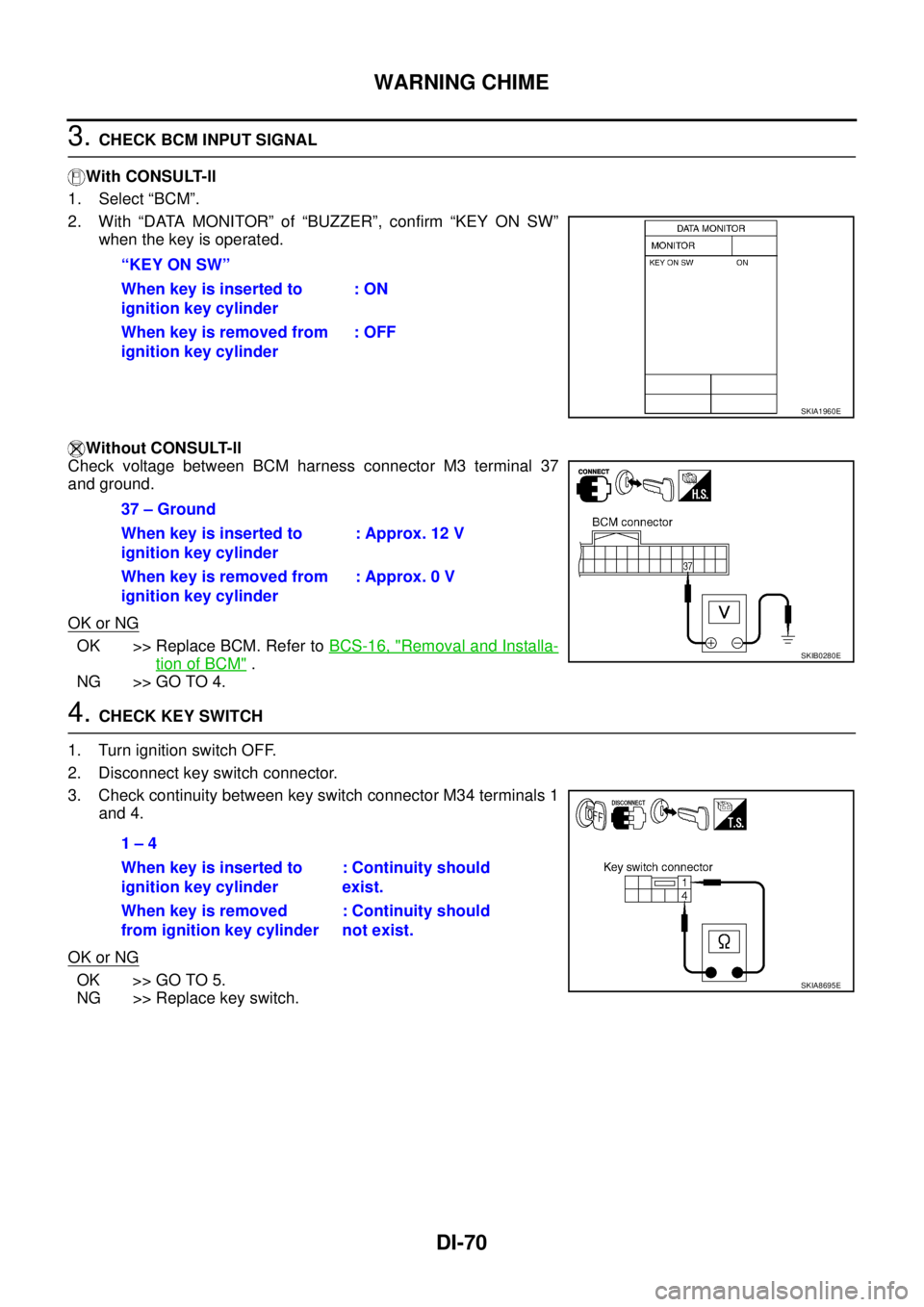
3. CHECK BCM INPUT SIGNAL
With CONSULT-ll
1. Select “BCM”.
2. With “DATA MONITOR” of “BUZZER”, confirm “KEY ON SW”
when the key is operated.
Without CONSULT-ll
Check voltage between BCM harness connector M3 terminal 37
and ground.
OK or NG
OK >> Replace BCM. Refer to BCS-16, "Removal and Installa-
tion of BCM" .
NG >> GO TO 4.
4. CHECK KEY SWITCH
1. Turn ignition switch OFF.
2. Disconnect key switch connector.
3. Check continuity between key switch connector M34 terminals 1
and 4.
OK or NG
OK >> GO TO 5.
NG >> Replace key switch.“KEY ON SW”
When key is inserted to
ignition key cylinder: ON
When key is removed from
ignition key cylinder: OFF
SKIA1960E
37 – Ground
When key is inserted to
ignition key cylinder: Approx. 12 V
When key is removed from
ignition key cylinder: Approx. 0 V
SKIB0280E
1 – 4
When key is inserted to
ignition key cylinder: Continuity should
exist.
When key is removed
from ignition key cylinder: Continuity should
not exist.
SKIA8695E
Page 1278 of 3502
DI-72
WARNING CHIME
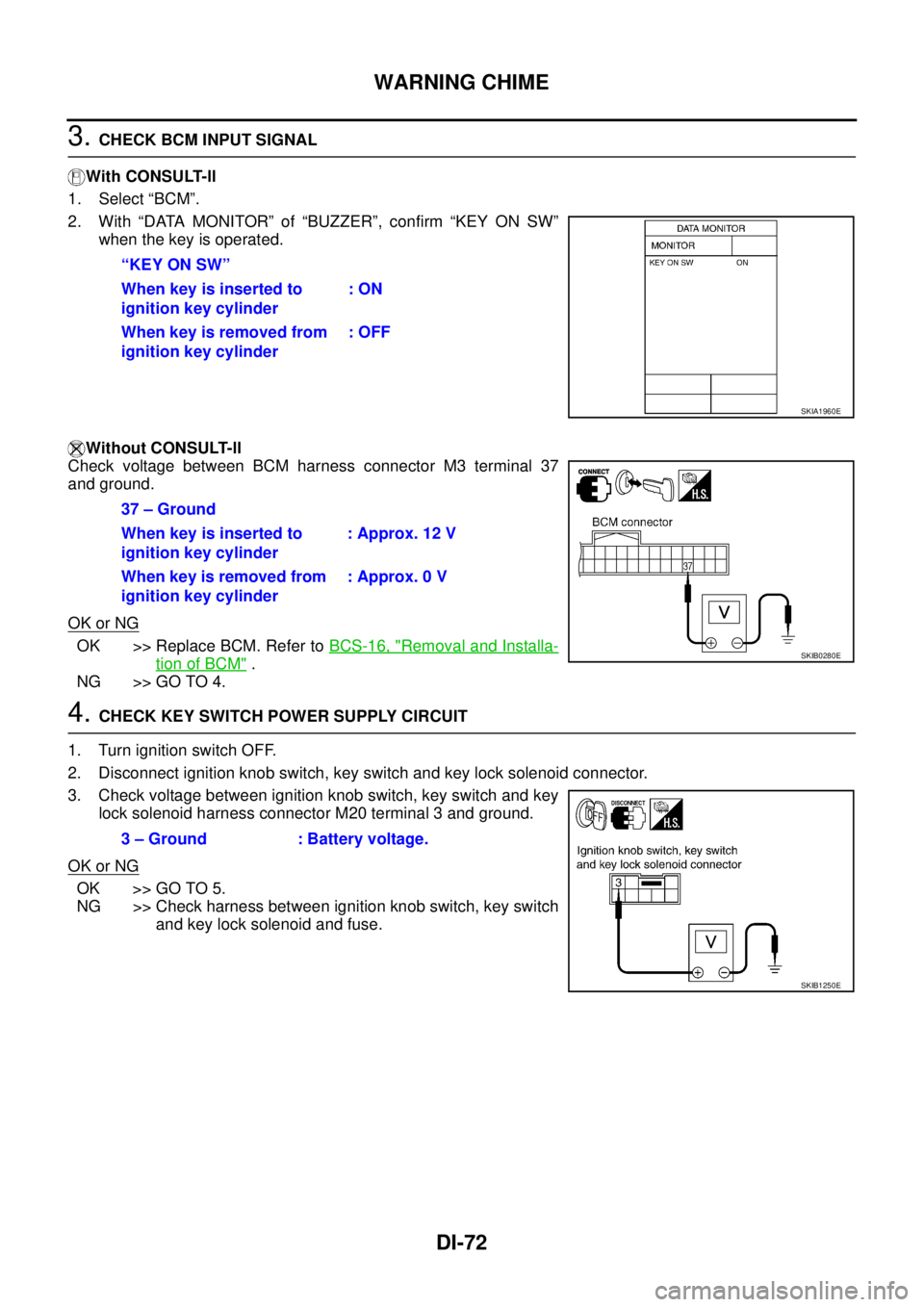
3. CHECK BCM INPUT SIGNAL
With CONSULT-ll
1. Select “BCM”.
2. With “DATA MONITOR” of “BUZZER”, confirm “KEY ON SW”
when the key is operated.
Without CONSULT-ll
Check voltage between BCM harness connector M3 terminal 37
and ground.
OK or NG
OK >> Replace BCM. Refer to BCS-16, "Removal and Installa-
tion of BCM" .
NG >> GO TO 4.
4. CHECK KEY SWITCH POWER SUPPLY CIRCUIT
1. Turn ignition switch OFF.
2. Disconnect ignition knob switch, key switch and key lock solenoid connector.
3. Check voltage between ignition knob switch, key switch and key
lock solenoid harness connector M20 terminal 3 and ground.
OK or NG
OK >> GO TO 5.
NG >> Check harness between ignition knob switch, key switch
and key lock solenoid and fuse. “KEY ON SW”
When key is inserted to
ignition key cylinder: ON
When key is removed from
ignition key cylinder: OFF
SKIA1960E
37 – Ground
When key is inserted to
ignition key cylinder: Approx. 12 V
When key is removed from
ignition key cylinder: Approx. 0 V
SKIB0280E
3 – Ground : Battery voltage.
SKIB1250E
Page 1279 of 3502
WARNING CHIME
DI-73
C
D
E
F
G
H
I
J
L
MA
B
DI
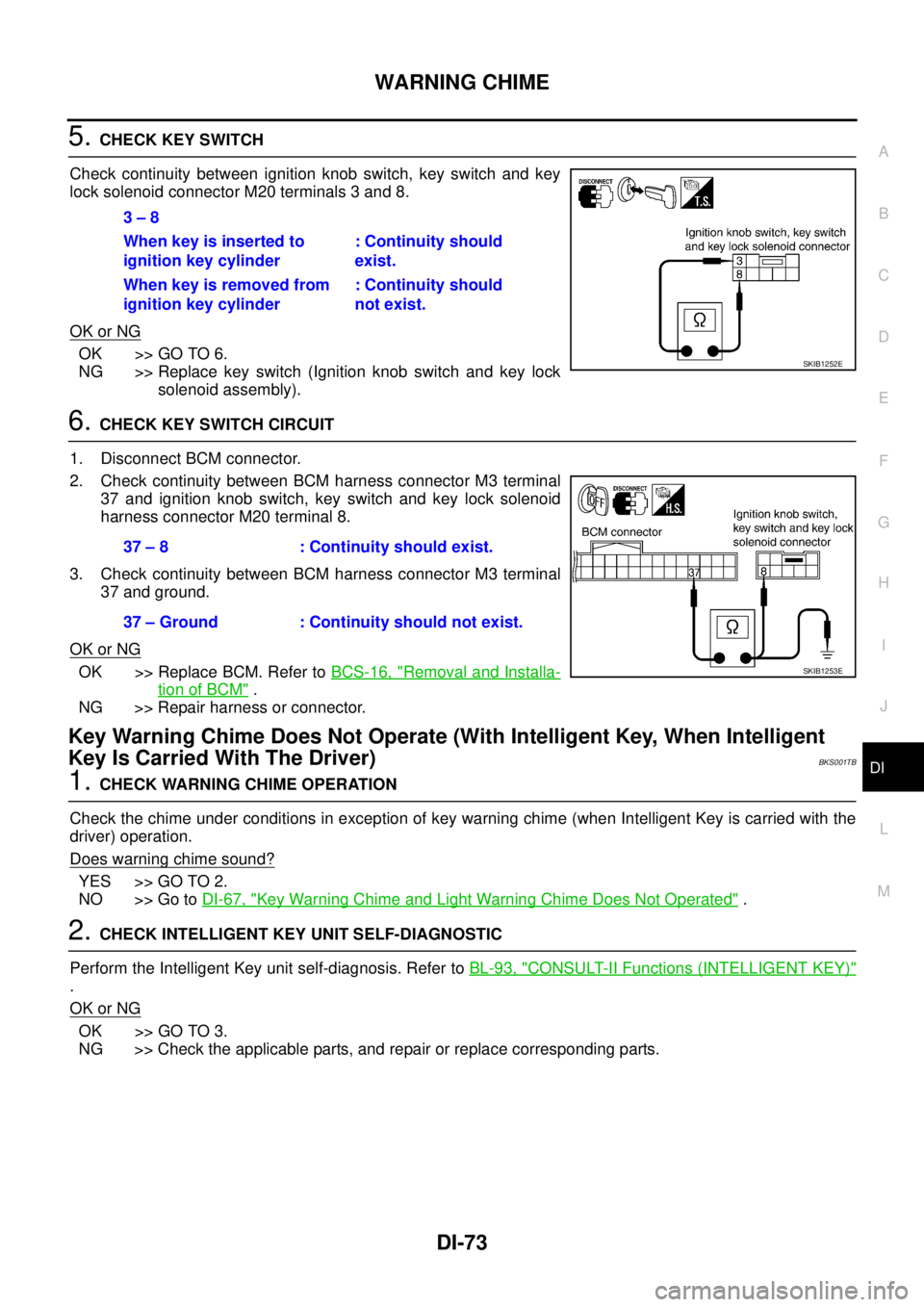
5. CHECK KEY SWITCH
Check continuity between ignition knob switch, key switch and key
lock solenoid connector M20 terminals 3 and 8.
OK or NG
OK >> GO TO 6.
NG >> Replace key switch (Ignition knob switch and key lock
solenoid assembly).
6. CHECK KEY SWITCH CIRCUIT
1. Disconnect BCM connector.
2. Check continuity between BCM harness connector M3 terminal
37 and ignition knob switch, key switch and key lock solenoid
harness connector M20 terminal 8.
3. Check continuity between BCM harness connector M3 terminal
37 and ground.
OK or NG
OK >> Replace BCM. Refer to BCS-16, "Removal and Installa-
tion of BCM" .
NG >> Repair harness or connector.
Key Warning Chime Does Not Operate (With Intelligent Key, When Intelligent
Key Is Carried With The Driver)
BKS001TB
1. CHECK WARNING CHIME OPERATION
Check the chime under conditions in exception of key warning chime (when Intelligent Key is carried with the
driver) operation.
Does warning chime sound?
YES >> GO TO 2.
NO >> Go to DI-67, "
Key Warning Chime and Light Warning Chime Does Not Operated" .
2. CHECK INTELLIGENT KEY UNIT SELF-DIAGNOSTIC
Perform the Intelligent Key unit self-diagnosis. Refer to BL-93, "
CONSULT-II Functions (INTELLIGENT KEY)"
.
OK or NG
OK >> GO TO 3.
NG >> Check the applicable parts, and repair or replace corresponding parts.3 – 8
When key is inserted to
ignition key cylinder: Continuity should
exist.
When key is removed from
ignition key cylinder: Continuity should
not exist.
SKIB1252E
37 – 8 : Continuity should exist.
37 – Ground : Continuity should not exist.
SKIB1253E
Page 1280 of 3502
DI-74
WARNING CHIME
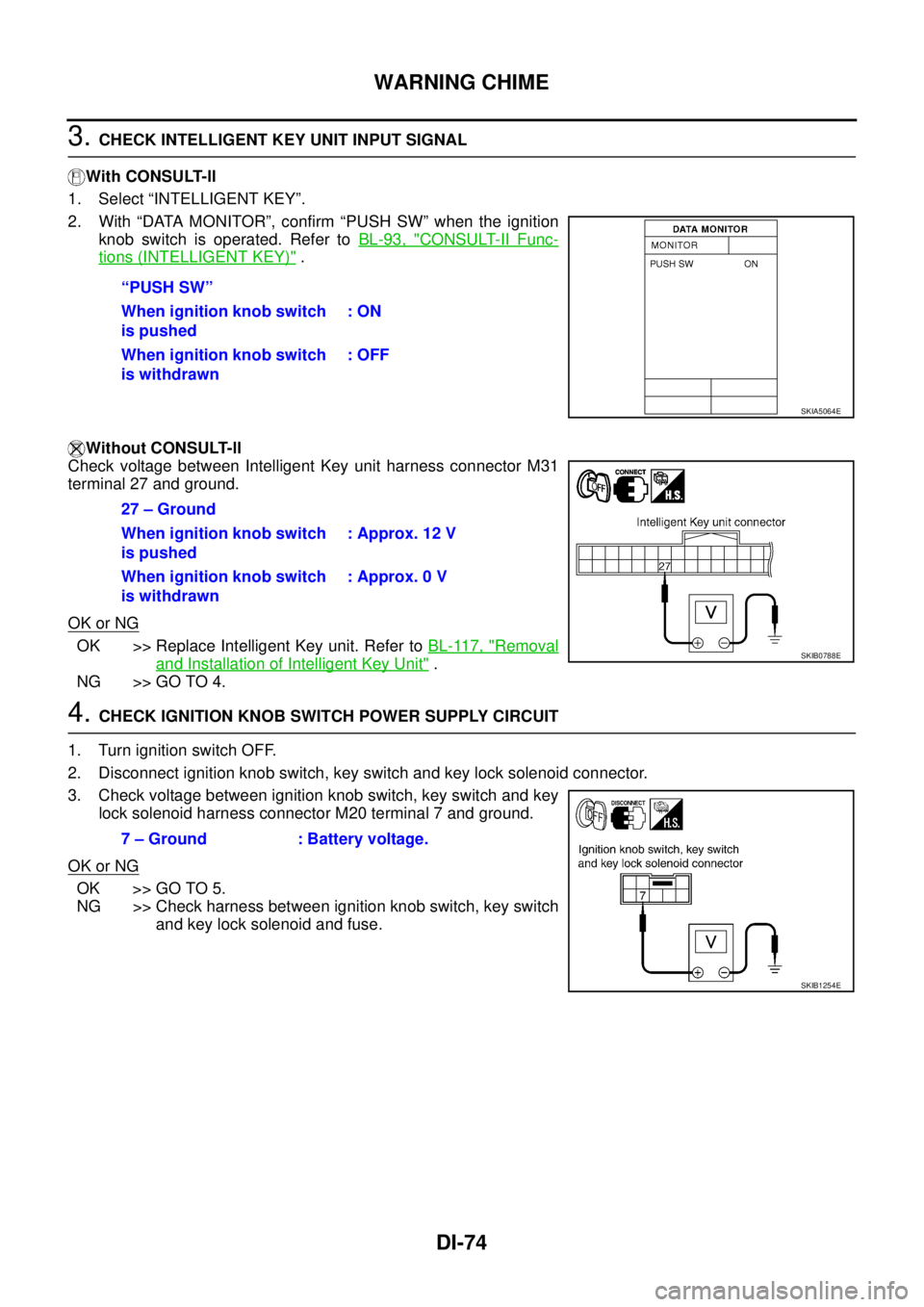
3. CHECK INTELLIGENT KEY UNIT INPUT SIGNAL
With CONSULT-ll
1. Select “INTELLIGENT KEY”.
2. With “DATA MONITOR”, confirm “PUSH SW” when the ignition
knob switch is operated. Refer to BL-93, "
CONSULT-II Func-
tions (INTELLIGENT KEY)" .
Without CONSULT-ll
Check voltage between Intelligent Key unit harness connector M31
terminal 27 and ground.
OK or NG
OK >> Replace Intelligent Key unit. Refer to BL-117, "Removal
and Installation of Intelligent Key Unit" .
NG >> GO TO 4.
4. CHECK IGNITION KNOB SWITCH POWER SUPPLY CIRCUIT
1. Turn ignition switch OFF.
2. Disconnect ignition knob switch, key switch and key lock solenoid connector.
3. Check voltage between ignition knob switch, key switch and key
lock solenoid harness connector M20 terminal 7 and ground.
OK or NG
OK >> GO TO 5.
NG >> Check harness between ignition knob switch, key switch
and key lock solenoid and fuse. “PUSH SW”
When ignition knob switch
is pushed: ON
When ignition knob switch
is withdrawn: OFF
SKIA5064E
27 – Ground
When ignition knob switch
is pushed: Approx. 12 V
When ignition knob switch
is withdrawn: Approx. 0 V
SKIB0788E
7 – Ground : Battery voltage.
SKIB1254E
Page 1281 of 3502
WARNING CHIME
DI-75
C
D
E
F
G
H
I
J
L
MA
B
DI
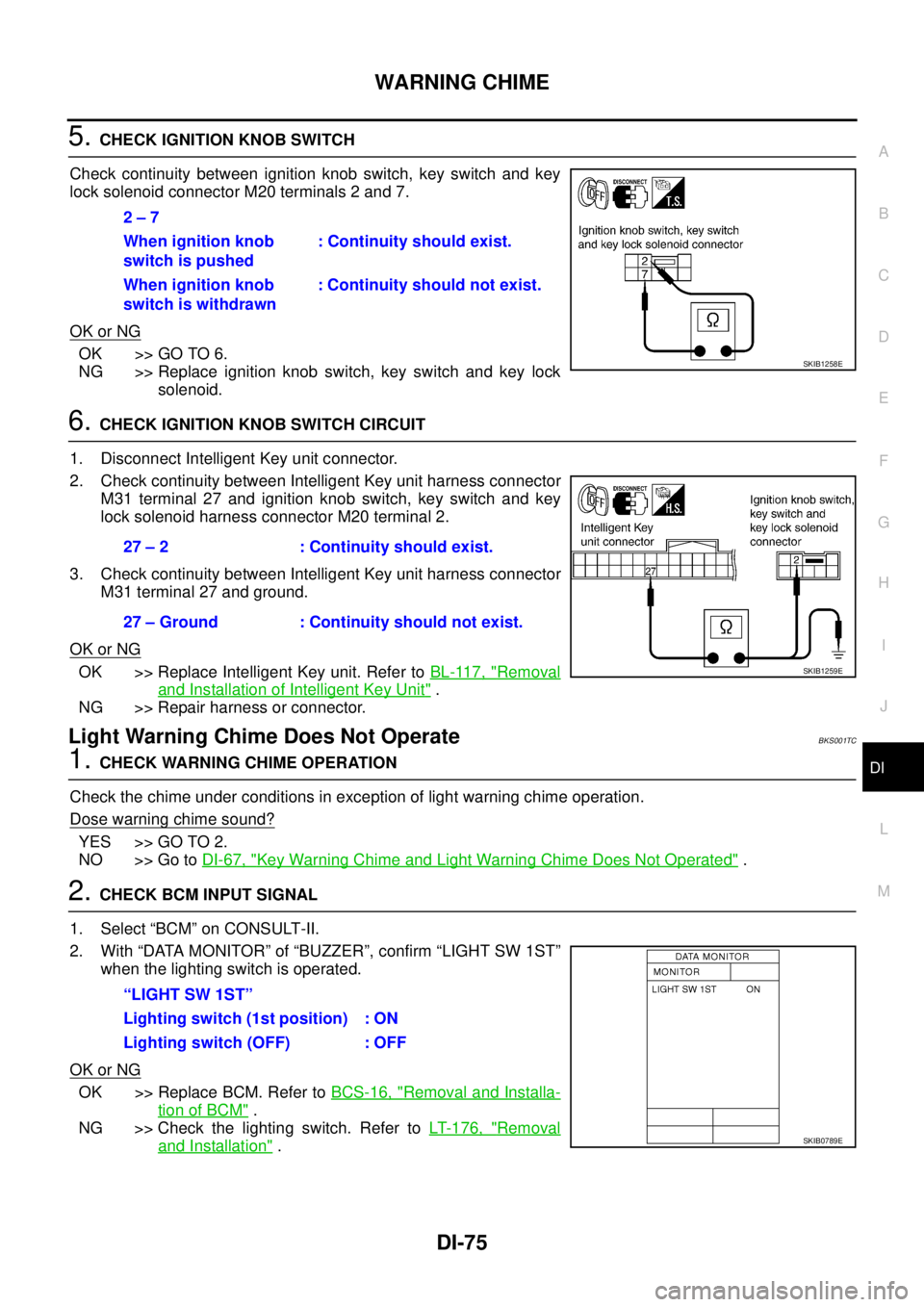
5. CHECK IGNITION KNOB SWITCH
Check continuity between ignition knob switch, key switch and key
lock solenoid connector M20 terminals 2 and 7.
OK or NG
OK >> GO TO 6.
NG >> Replace ignition knob switch, key switch and key lock
solenoid.
6. CHECK IGNITION KNOB SWITCH CIRCUIT
1. Disconnect Intelligent Key unit connector.
2. Check continuity between Intelligent Key unit harness connector
M31 terminal 27 and ignition knob switch, key switch and key
lock solenoid harness connector M20 terminal 2.
3. Check continuity between Intelligent Key unit harness connector
M31 terminal 27 and ground.
OK or NG
OK >> Replace Intelligent Key unit. Refer to BL-117, "Removal
and Installation of Intelligent Key Unit" .
NG >> Repair harness or connector.
Light Warning Chime Does Not OperateBKS001TC
1. CHECK WARNING CHIME OPERATION
Check the chime under conditions in exception of light warning chime operation.
Dose warning chime sound?
YES >> GO TO 2.
NO >> Go to DI-67, "
Key Warning Chime and Light Warning Chime Does Not Operated" .
2. CHECK BCM INPUT SIGNAL
1. Select “BCM” on CONSULT-II.
2. With “DATA MONITOR” of “BUZZER”, confirm “LIGHT SW 1ST”
when the lighting switch is operated.
OK or NG
OK >> Replace BCM. Refer to BCS-16, "Removal and Installa-
tion of BCM" .
NG >> Check the lighting switch. Refer to LT- 1 7 6 , "
Removal
and Installation" . 2 – 7
When ignition knob
switch is pushed: Continuity should exist.
When ignition knob
switch is withdrawn: Continuity should not exist.
SKIB1258E
27 – 2 : Continuity should exist.
27 – Ground : Continuity should not exist.
SKIB1259E
“LIGHT SW 1ST”
Lighting switch (1st position) : ON
Lighting switch (OFF) : OFF
SKIB0789E
Page 1283 of 3502

EC-1
ENGINE CONTROL SYSTEM
B ENGINE
CONTENTS
C
D
E
F
G
H
I
J
K
L
M
SECTION EC
A
EC
ENGINE CONTROL SYSTEM
QR
INDEX FOR DTC ...................................................... 10
DTC No. Index ....................................................... 10
Alphabetical Index .................................................. 12
PRECAUTIONS ........................................................ 14
Precautions for Supplemental Restraint System
(SRS) “AIR BAG” and “SEAT BELT PRE-TEN-
SIONER” ................................................................ 14
On Board Diagnostic (OBD) System of Engine ...... 14
Precaution .............................................................. 14
PREPARATION ......................................................... 18
Special Service Tools ............................................. 18
Commercial Service Tools ...................................... 19
ENGINE CONTROL SYSTEM .................................. 20
System Diagram ..................................................... 20
Multiport Fuel Injection (MFI) System .................... 21
Electronic Ignition (EI) System ............................... 23
Fuel Cut Control (At No Load and High Engine
Speed) .................................................................... 24
AIR CONDITIONING CUT CONTROL ..................... 25
Input/Output Signal Chart ....................................... 25
CAN COMMUNICATION .......................................... 26
System Description ................................................ 26
EVAPORATIVE EMISSION SYSTEM ....................... 27
Description ............................................................. 27
Component Inspection ........................................... 29
POSITIVE CRANKCASE VENTILATION ................. 30
Description ............................................................. 30
Component Inspection ........................................... 30
NATS (NISSAN ANTI-THEFT SYSTEM) .................. 32
Description ............................................................. 32
ON BOARD DIAGNOSTIC (OBD) SYSTEM ............ 33
Introduction ............................................................ 33
Two Trip Detection Logic ........................................ 33
Emission-related Diagnostic Information ................ 33
Malfunction Indicator (MI) ....................................... 36
BASIC SERVICE PROCEDURE .............................. 40
Basic Inspection ..................................................... 40
Idle Speed and Ignition Timing Check .................... 45
Procedure After Replacing ECM ............................ 47Accelerator Pedal Released Position Learning ...... 47
Throttle Valve Closed Position Learning ................. 47
Idle Air Volume Learning ........................................ 47
Fuel Pressure Check .............................................. 49
TROUBLE DIAGNOSIS ............................................ 52
Trouble Diagnosis Introduction ............................... 52
DTC Inspection Priority Chart ................................. 58
Fail-Safe Chart ....................................................... 59
Symptom Matrix Chart ............................................ 60
Engine Control Component Parts Location ............ 64
Vacuum Hose Drawing ........................................... 69
Circuit Diagram ....................................................... 70
ECM Harness Connector Terminal Layout ............. 72
ECM Terminals and Reference Value ..................... 72
CONSULT-II Function (ENGINE) ............................ 80
CONSULT-II Reference Value in Data Monitor Mode
... 90
Major Sensor Reference Graph in Data Monitor
Mode ....................................................................... 93
TROUBLE DIAGNOSIS - SPECIFICATION VALUE ... 95
Description .............................................................. 95
Testing Condition .................................................... 95
Inspection Procedure .............................................. 95
Diagnostic Procedure ............................................. 96
TROUBLE DIAGNOSIS FOR INTERMITTENT INCI-
DENT .......................................................................105
Description ............................................................105
Diagnostic Procedure ...........................................105
POWER SUPPLY AND GROUND CIRCUIT ...........106
Wiring Diagram .....................................................106
Diagnostic Procedure ...........................................107
Ground Inspection .................................................111
DTC U1000, U1001 CAN COMMUNICATION LINE .113
Description ............................................................113
On Board Diagnosis Logic ....................................113
DTC Confirmation Procedure ...............................113
Wiring Diagram .....................................................114
Diagnostic Procedure ...........................................115
DTC P0011 IVT CONTROL .....................................116
Description ............................................................116
Page 1286 of 3502

EC-4 DTC P2138 APP SENSOR .....................................272
Component Description ........................................272
CONSULT-II Reference Value in Data Monitor Mode
.272
On Board Diagnosis Logic ....................................272
DTC Confirmation Procedure ...............................273
Wiring Diagram .....................................................274
Diagnostic Procedure ...........................................275
Component Inspection ..........................................279
Removal and Installation ......................................279
ELECTRICAL LOAD SIGNAL ................................280
Description ............................................................280
CONSULT-II Reference Value in Data Monitor Mode
.280
Diagnostic Procedure ...........................................280
EVAP CANISTER PURGE VOLUME CONTROL
SOLENOID VALVE .................................................282
Description ............................................................282
CONSULT-II Reference Value in Data Monitor Mode
.282
Wiring Diagram .....................................................283
Diagnostic Procedure ...........................................285
Component Inspection ..........................................288
Removal and Installation ......................................288
FUEL INJECTOR ....................................................289
Component Description ........................................289
CONSULT-II Reference Value in Data Monitor Mode
.289
Wiring Diagram .....................................................290
Diagnostic Procedure ...........................................291
Component Inspection ..........................................293
Removal and Installation ......................................294
FUEL PUMP ............................................................295
Description ............................................................295
CONSULT-II Reference Value in Data Monitor Mode
.295
Wiring Diagram .....................................................296
Diagnostic Procedure ...........................................297
Component Inspection ..........................................300
Removal and Installation ......................................300
HO2S1 .....................................................................301
Component Description ........................................301
CONSULT-II Reference Value in Data Monitor Mode
.301
Wiring Diagram .....................................................302
Diagnostic Procedure ...........................................304
Component Inspection ..........................................305
Removal and Installation ......................................307
HO2S1 HEATER .....................................................308
Description ............................................................308
CONSULT-II Reference Value in Data Monitor Mode
.308
Wiring Diagram .....................................................309
Diagnostic Procedure ...........................................310
Component Inspection ..........................................312
Removal and Installation ......................................312
HO2S2 .....................................................................313
Component Description ........................................313CONSULT-II Reference Value in Data Monitor Mode
.313
Wiring Diagram .....................................................314
Diagnostic Procedure ............................................315
Component Inspection ..........................................317
Removal and Installation .......................................318
HO2S2 HEATER ......................................................319
Description ............................................................319
CONSULT-II Reference Value in Data Monitor Mode
.319
Wiring Diagram .....................................................320
Diagnostic Procedure ............................................321
Component Inspection ..........................................323
Removal and Installation .......................................323
IAT SENSOR ...........................................................324
Component Description ........................................324
Wiring Diagram .....................................................325
Diagnostic Procedure ............................................326
Component Inspection ..........................................328
Removal and Installation .......................................328
IGNITION SIGNAL ..................................................329
Component Description ........................................329
Wiring Diagram .....................................................330
Diagnostic Procedure ............................................333
Component Inspection ..........................................337
Removal and Installation .......................................338
REFRIGERANT PRESSURE SENSOR ..................339
Component Description ........................................339
Wiring Diagram .....................................................340
Diagnostic Procedure ............................................341
Removal and Installation .......................................343
MI & DATA LINK CONNECTORS ...........................344
Wiring Diagram .....................................................344
SERVICE DATA AND SPECIFICATIONS (SDS) ....346
Fuel Pressure ........................................................346
Idle Speed and Ignition Timing ..............................346
Mass Air Flow Sensor ...........................................346
Intake Air Temperature Sensor .............................346
Engine Coolant Temperature Sensor ....................346
Crankshaft Position Sensor (POS) .......................346
Camshaft Position Sensor (PHASE) .....................346
Heated Oxygen Sensor 1 Heater ..........................346
Heated Oxygen sensor 2 Heater ..........................346
Throttle Control Motor ...........................................346
Fuel Injector ..........................................................346
Fuel Pump .............................................................346
VQ
INDEX FOR DTC .....................................................347
DTC No. Index ......................................................347
Alphabetical Index .................................................349
PRECAUTIONS .......................................................351
Precautions for Supplemental Restraint System
(SRS) “AIR BAG” and “SEAT BELT PRE-TEN-
SIONER” ...............................................................351
On Board Diagnostic (OBD) System of Engine ....351
Precaution .............................................................351