diagram NISSAN TEANA 2003 Workshop Manual
[x] Cancel search | Manufacturer: NISSAN, Model Year: 2003, Model line: TEANA, Model: NISSAN TEANA 2003Pages: 3502, PDF Size: 74.56 MB
Page 209 of 3502
TROUBLE DIAGNOSIS FOR SYMPTOMS
AT-201
D
E
F
G
H
I
J
K
L
MA
B
AT
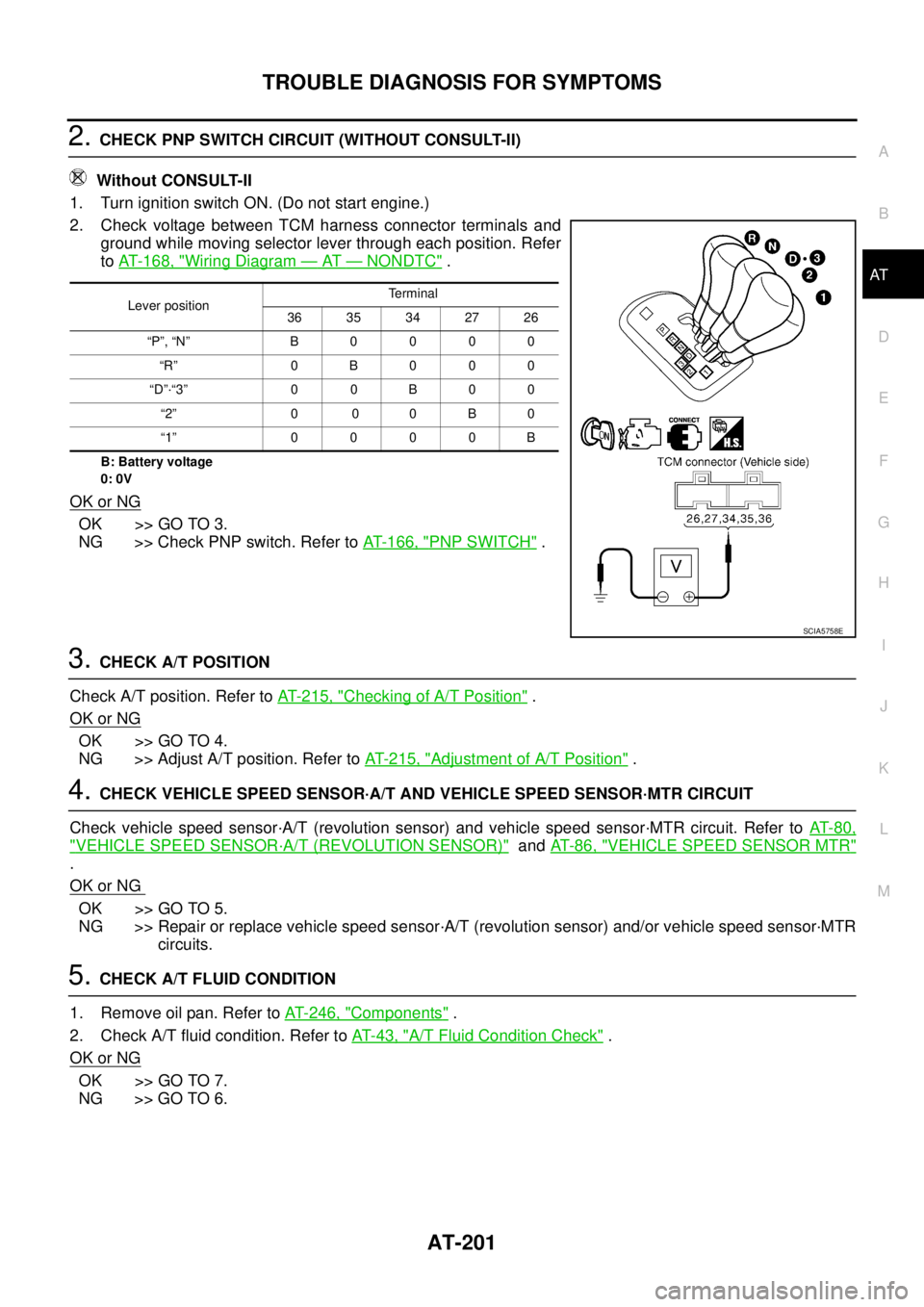
2. CHECK PNP SWITCH CIRCUIT (WITHOUT CONSULT-II)
Without CONSULT-II
1. Turn ignition switch ON. (Do not start engine.)
2. Check voltage between TCM harness connector terminals and
ground while moving selector lever through each position. Refer
to AT- 1 6 8 , "
Wiring Diagram — AT — NONDTC" .
B: Battery voltage
0: 0V
OK or NG
OK >> GO TO 3.
NG >> Check PNP switch. Refer to AT- 1 6 6 , "
PNP SWITCH" .
3. CHECK A/T POSITION
Check A/T position. Refer to AT- 2 1 5 , "
Checking of A/T Position" .
OK or NG
OK >> GO TO 4.
NG >> Adjust A/T position. Refer to AT- 2 1 5 , "
Adjustment of A/T Position" .
4. CHECK VEHICLE SPEED SENSOR·A/T AND VEHICLE SPEED SENSOR·MTR CIRCUIT
Check vehicle speed sensor·A/T (revolution sensor) and vehicle speed sensor·MTR circuit. Refer to AT- 8 0 ,
"VEHICLE SPEED SENSOR·A/T (REVOLUTION SENSOR)" and AT- 8 6 , "VEHICLE SPEED SENSOR MTR"
.
OK or NG
OK >> GO TO 5.
NG >> Repair or replace vehicle speed sensor·A/T (revolution sensor) and/or vehicle speed sensor·MTR
circuits.
5. CHECK A/T FLUID CONDITION
1. Remove oil pan. Refer to AT- 2 4 6 , "
Components" .
2. Check A/T fluid condition. Refer to AT- 4 3 , "
A/T Fluid Condition Check" .
OK or NG
OK >> GO TO 7.
NG >> GO TO 6.
Lever positionTerminal
36 35 34 27 26
“P”, “N” B 0 0 0 0
“R” 0 B 0 0 0
“D”·“3” 0 0 B 0 0
“2” 0 0 0 B 0
“1” 0 0 0 0 B
SCIA5758E
Page 211 of 3502
TROUBLE DIAGNOSIS FOR SYMPTOMS
AT-203
D
E
F
G
H
I
J
K
L
MA
B
AT
Vehicle Does Not Decelerate By Engine Brake (D4 → 33 )BCS0014S
SYMPTOM:
Vehicle does not decelerate by engine brake when A/T selector lever is in “3” position on “Cruise
Test— Part 3”.
DIAGNOSTIC PROCEDURE
1. CHECK 3RD POSITION SWITCH CIRCUIT
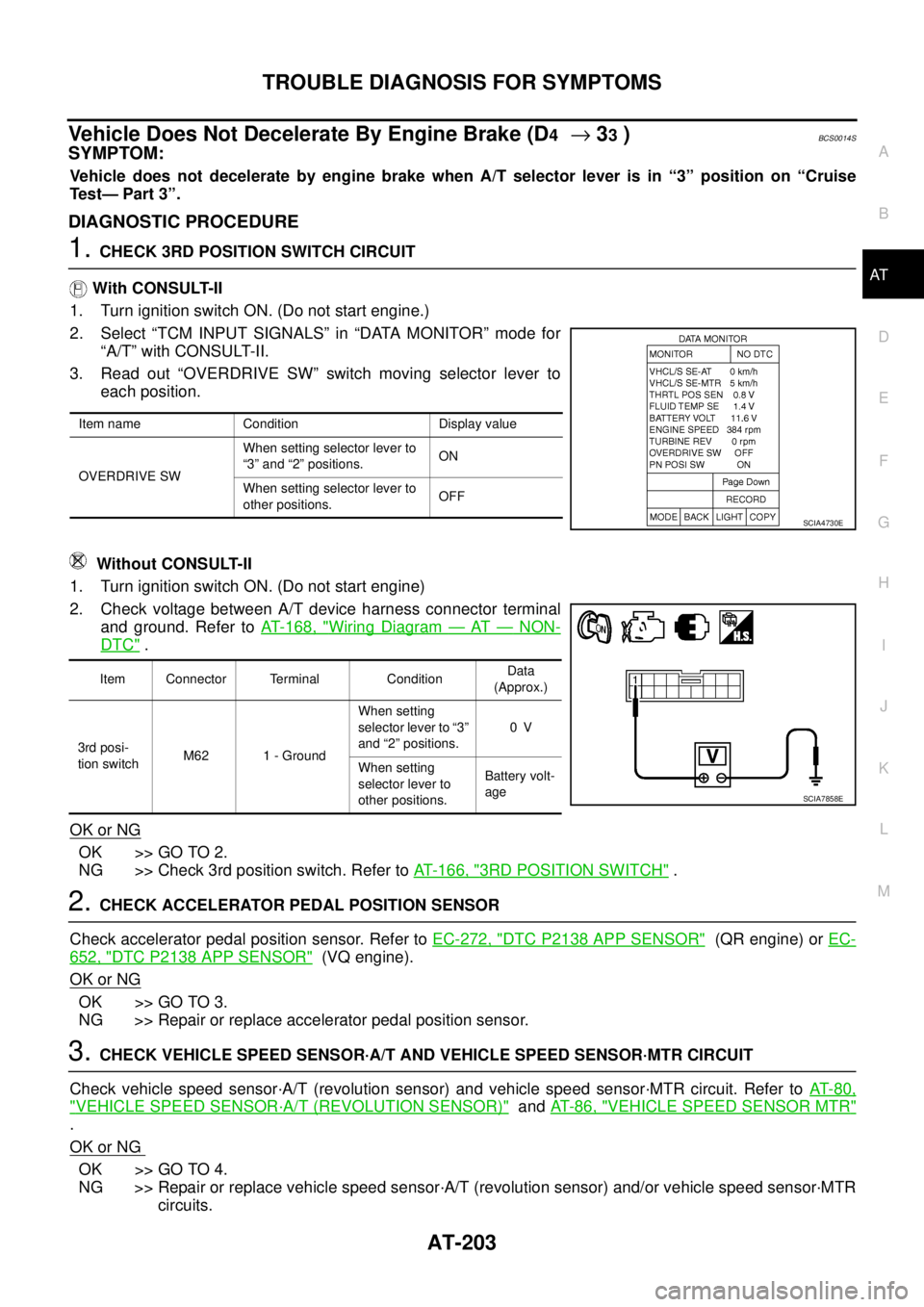
With CONSULT-II
1. Turn ignition switch ON. (Do not start engine.)
2. Select “TCM INPUT SIGNALS” in “DATA MONITOR” mode for
“A/T” with CONSULT-II.
3. Read out “OVERDRIVE SW” switch moving selector lever to
each position.
Without CONSULT-II
1. Turn ignition switch ON. (Do not start engine)
2. Check voltage between A/T device harness connector terminal
and ground. Refer to AT- 1 6 8 , "
Wiring Diagram — AT — NON-
DTC" .
OK or NG
OK >> GO TO 2.
NG >> Check 3rd position switch. Refer to AT- 1 6 6 , "
3RD POSITION SWITCH" .
2. CHECK ACCELERATOR PEDAL POSITION SENSOR
Check accelerator pedal position sensor. Refer to EC-272, "
DTC P2138 APP SENSOR" (QR engine) or EC-
652, "DTC P2138 APP SENSOR" (VQ engine).
OK or NG
OK >> GO TO 3.
NG >> Repair or replace accelerator pedal position sensor.
3. CHECK VEHICLE SPEED SENSOR·A/T AND VEHICLE SPEED SENSOR·MTR CIRCUIT
Check vehicle speed sensor·A/T (revolution sensor) and vehicle speed sensor·MTR circuit. Refer to AT- 8 0 ,
"VEHICLE SPEED SENSOR·A/T (REVOLUTION SENSOR)" and AT- 8 6 , "VEHICLE SPEED SENSOR MTR"
.
OK or NG
OK >> GO TO 4.
NG >> Repair or replace vehicle speed sensor·A/T (revolution sensor) and/or vehicle speed sensor·MTR
circuits.
Item name Condition Display value
OVERDRIVE SWWhen setting selector lever to
“3” and “2” positions.ON
When setting selector lever to
other positions.OFF
SCIA4730E
Item Connector Terminal ConditionData
(Approx.)
3rd posi-
tion switchM62 1 - GroundWhen setting
selector lever to “3”
and “2” positions.0V
When setting
selector lever to
other positions.Battery volt-
age
SCIA7858E
Page 214 of 3502
AT-206
TROUBLE DIAGNOSIS FOR SYMPTOMS
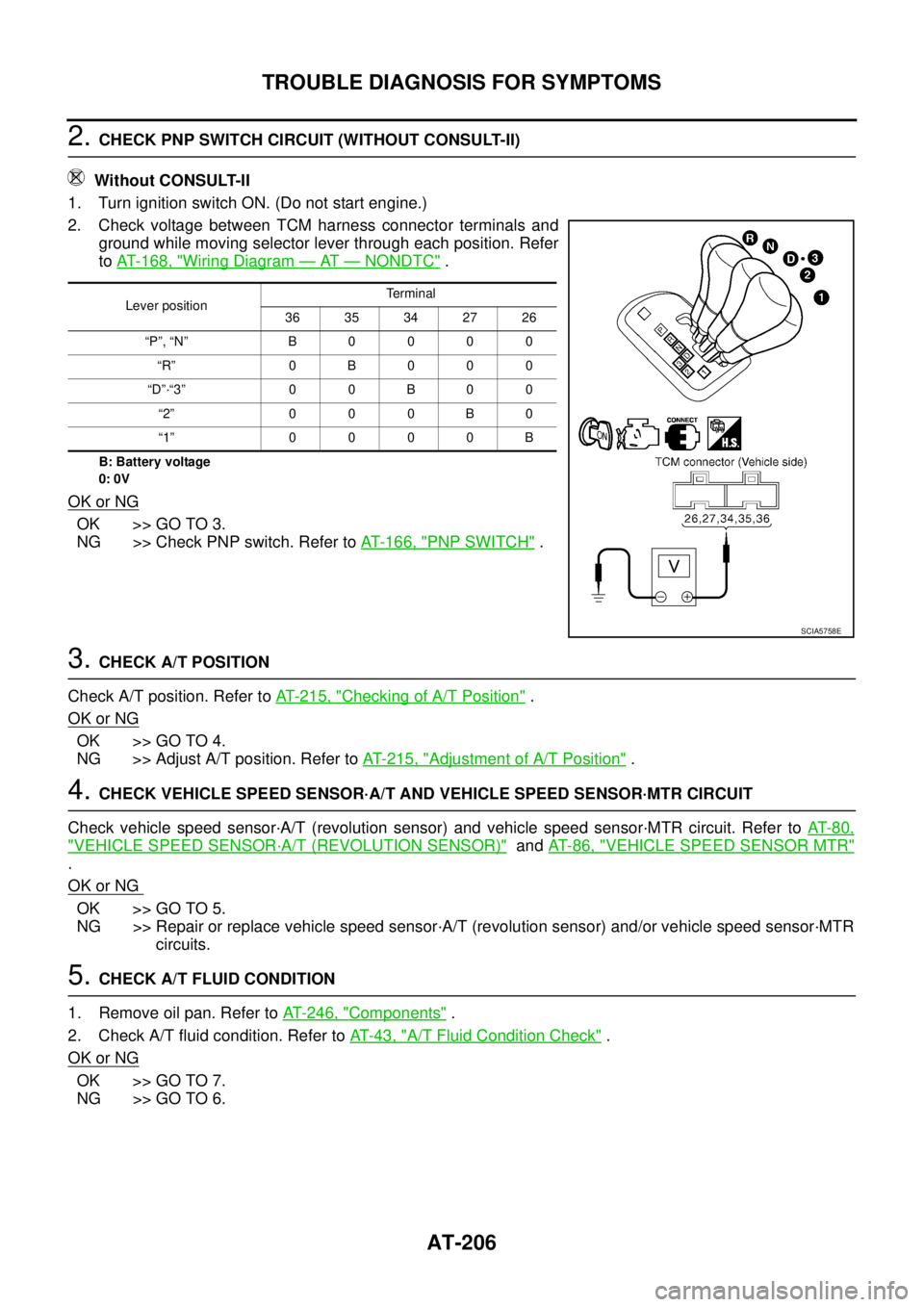
2. CHECK PNP SWITCH CIRCUIT (WITHOUT CONSULT-II)
Without CONSULT-II
1. Turn ignition switch ON. (Do not start engine.)
2. Check voltage between TCM harness connector terminals and
ground while moving selector lever through each position. Refer
to AT- 1 6 8 , "
Wiring Diagram — AT — NONDTC" .
B: Battery voltage
0: 0V
OK or NG
OK >> GO TO 3.
NG >> Check PNP switch. Refer to AT- 1 6 6 , "
PNP SWITCH" .
3. CHECK A/T POSITION
Check A/T position. Refer to AT- 2 1 5 , "
Checking of A/T Position" .
OK or NG
OK >> GO TO 4.
NG >> Adjust A/T position. Refer to AT- 2 1 5 , "
Adjustment of A/T Position" .
4. CHECK VEHICLE SPEED SENSOR·A/T AND VEHICLE SPEED SENSOR·MTR CIRCUIT
Check vehicle speed sensor·A/T (revolution sensor) and vehicle speed sensor·MTR circuit. Refer to AT- 8 0 ,
"VEHICLE SPEED SENSOR·A/T (REVOLUTION SENSOR)" and AT- 8 6 , "VEHICLE SPEED SENSOR MTR"
.
OK or NG
OK >> GO TO 5.
NG >> Repair or replace vehicle speed sensor·A/T (revolution sensor) and/or vehicle speed sensor·MTR
circuits.
5. CHECK A/T FLUID CONDITION
1. Remove oil pan. Refer to AT- 2 4 6 , "
Components" .
2. Check A/T fluid condition. Refer to AT- 4 3 , "
A/T Fluid Condition Check" .
OK or NG
OK >> GO TO 7.
NG >> GO TO 6.
Lever positionTe r m i n a l
36 35 34 27 26
“P”, “N” B 0 0 0 0
“R” 0B000
“D”·“3” 0 0 B 0 0
“2” 0 0 0 B 0
“1” 0 0 0 0 B
SCIA5758E
Page 217 of 3502
TROUBLE DIAGNOSIS FOR SYMPTOMS
AT-209
D
E
F
G
H
I
J
K
L
MA
B
AT
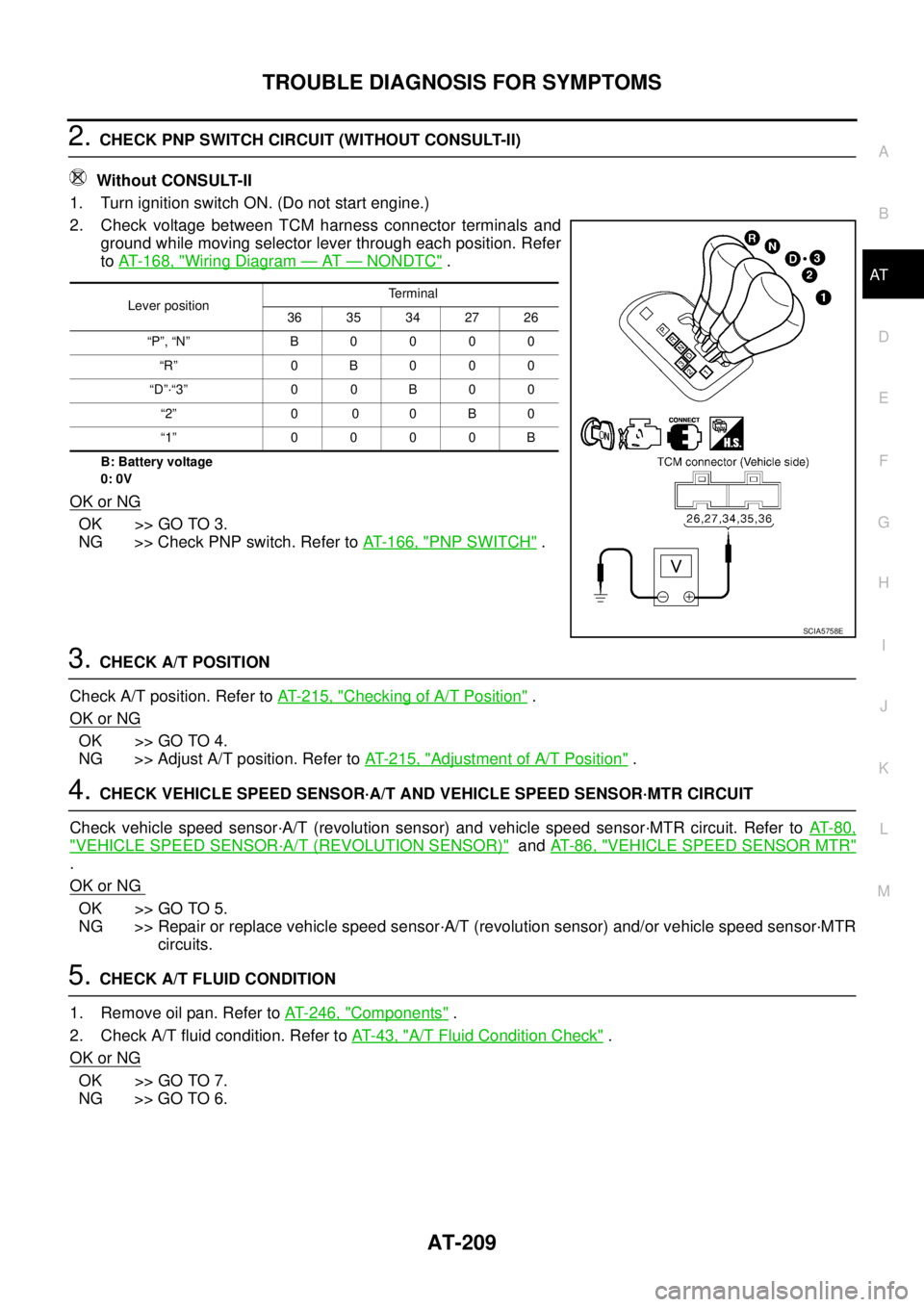
2. CHECK PNP SWITCH CIRCUIT (WITHOUT CONSULT-II)
Without CONSULT-II
1. Turn ignition switch ON. (Do not start engine.)
2. Check voltage between TCM harness connector terminals and
ground while moving selector lever through each position. Refer
to AT- 1 6 8 , "
Wiring Diagram — AT — NONDTC" .
B: Battery voltage
0: 0V
OK or NG
OK >> GO TO 3.
NG >> Check PNP switch. Refer to AT- 1 6 6 , "
PNP SWITCH" .
3. CHECK A/T POSITION
Check A/T position. Refer to AT- 2 1 5 , "
Checking of A/T Position" .
OK or NG
OK >> GO TO 4.
NG >> Adjust A/T position. Refer to AT- 2 1 5 , "
Adjustment of A/T Position" .
4. CHECK VEHICLE SPEED SENSOR·A/T AND VEHICLE SPEED SENSOR·MTR CIRCUIT
Check vehicle speed sensor·A/T (revolution sensor) and vehicle speed sensor·MTR circuit. Refer to AT- 8 0 ,
"VEHICLE SPEED SENSOR·A/T (REVOLUTION SENSOR)" and AT- 8 6 , "VEHICLE SPEED SENSOR MTR"
.
OK or NG
OK >> GO TO 5.
NG >> Repair or replace vehicle speed sensor·A/T (revolution sensor) and/or vehicle speed sensor·MTR
circuits.
5. CHECK A/T FLUID CONDITION
1. Remove oil pan. Refer to AT- 2 4 6 , "
Components" .
2. Check A/T fluid condition. Refer to AT- 4 3 , "
A/T Fluid Condition Check" .
OK or NG
OK >> GO TO 7.
NG >> GO TO 6.
Lever positionTerminal
36 35 34 27 26
“P”, “N” B 0 0 0 0
“R” 0 B 0 0 0
“D”·“3” 0 0 B 0 0
“2” 0 0 0 B 0
“1” 0 0 0 0 B
SCIA5758E
Page 225 of 3502
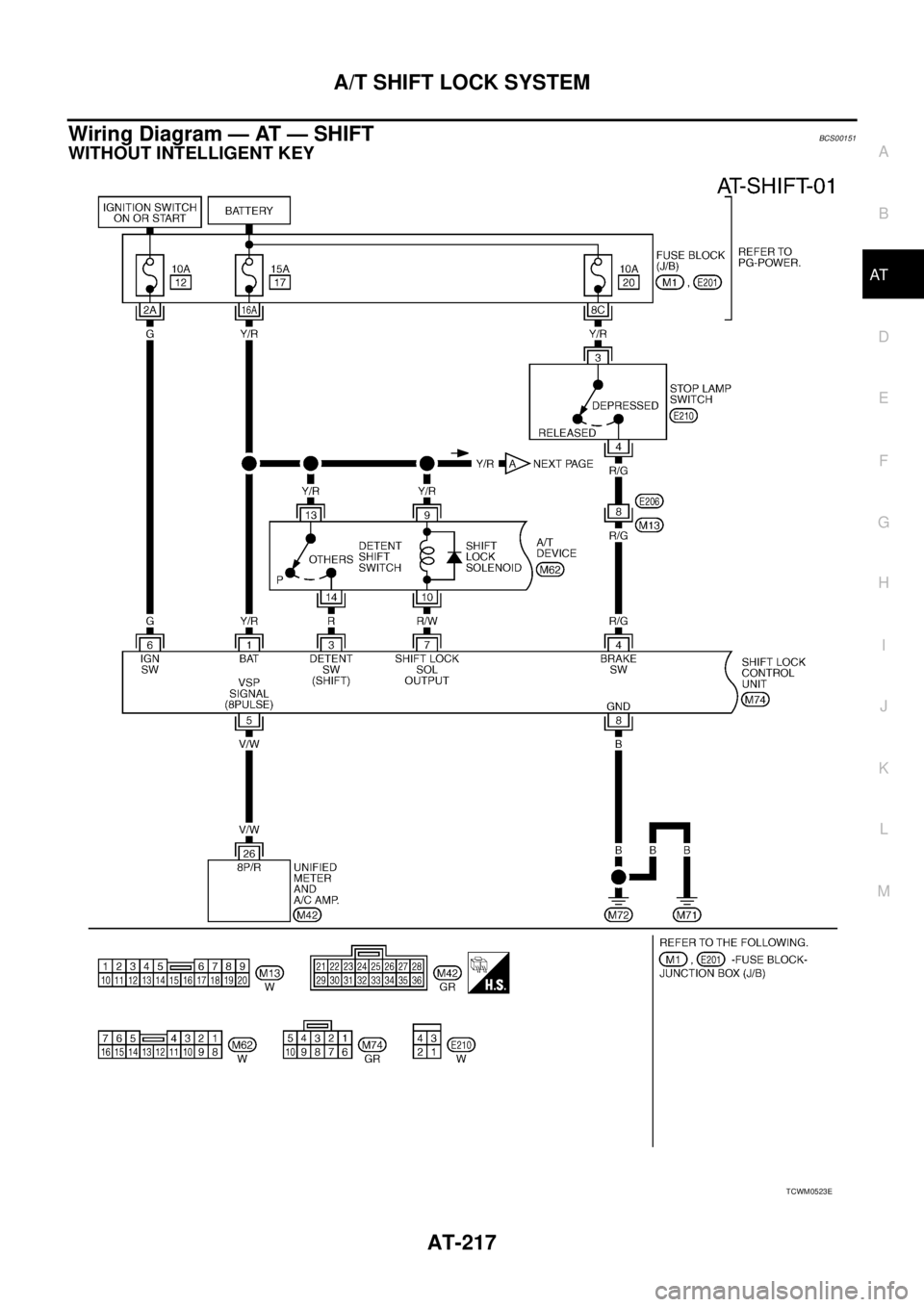
A/T SHIFT LOCK SYSTEM
AT-217
D
E
F
G
H
I
J
K
L
MA
B
AT
Wiring Diagram — AT — SHIFTBCS00151
WITHOUT INTELLIGENT KEY
TCWM0523E
Page 380 of 3502

ATC-2 Discharge Air Flow ................................................. 31
System Description ................................................. 32
SWITCHES AND THEIR CONTROL FUNCTION ... 32
CAN Communication System Description .............. 33
TROUBLE DIAGNOSIS ............................................ 34
CONSULT-II Function (BCM) .................................. 34
CONSULT-II BASIC OPERATION ....................... 34
DATA MONITOR .................................................. 34
How to Perform Trouble Diagnosis for Quick and
Accurate Repair ...................................................... 35
WORK FLOW ...................................................... 35
SYMPTOM TABLE .............................................. 35
Component Parts and Harness Connector Location ... 36
ENGINE COMPARTMENT .................................. 36
PASSENGER COMPARTMENT .......................... 37
Schematic ............................................................... 38
Wiring Diagram — A/C — ....................................... 39
Auto Amp. Terminals and Reference Value ............ 44
PIN CONNECTOR TERMINAL LAYOUT ............ 44
TERMINALS AND REFERENCE VALUE FOR
UNIFIED METER AND A/C AMP. ........................ 44
Self-diagnosis Function .......................................... 46
DESCRIPTION .................................................... 46
FUNCTION CONFIRMATION PROCEDURE ...... 47
AUXILIARY MECHANISM: TEMPERATURE
SETTING TRIMMER ........................................... 52
AUXILIARY MECHANISM: FOOT POSITION
SETTING TRIMMER ........................................... 53
AUXILIARY MECHANISM: INLET PORT MEM-
ORY FUNCTION ................................................. 53
Operational Check .................................................. 54
CHECKING MEMORY FUNCTION ..................... 54
CHECKING BLOWER ......................................... 54
CHECKING DISCHARGE AIR ............................ 54
CHECKING INTAKE AIR ..................................... 54
CHECKING TEMPERATURE DECREASE ......... 54
CHECKING TEMPERATURE INCREASE .......... 55
CHECKING A/C SWITCH ................................... 55
CHECKING AUTO MODE ................................... 55
Power Supply and Ground Circuit for Auto Amp. ... 56
INSPECTION FLOW ........................................... 56
COMPONENT DESCRIPTION ............................ 57
DIAGNOSIS PROCEDURE FOR A/C SYSTEM ... 57
LAN System Circuit ................................................ 59
DIAGNOSIS PROCEDURE FOR LAN CIRCUIT ... 59
Mode Door Motor Circuit ........................................ 63
INSPECTION FLOW ........................................... 63
SYSTEM DESCRIPTION .................................... 64
COMPONENT DESCRIPTION ............................ 65
DIAGNOSIS PROCEDURE FOR MODE DOOR
MOTOR ............................................................... 65
Air Mix Door Motor Circuit ...................................... 66
INSPECTION FLOW ........................................... 66
SYSTEM DESCRIPTION .................................... 67
COMPONENT DESCRIPTION ............................ 68
DIAGNOSIS PROCEDURE FOR AIR MIX DOOR
MOTOR ............................................................... 68
Air Mix Door Motor PBR Circuit .............................. 68DIAGNOSIS PROCEDURE FOR AIR MIX DOOR
MOTOR PBR ....................................................... 68
Intake Door Motor Circuit ........................................ 69
INSPECTION FLOW ............................................ 69
SYSTEM DESCRIPTION ..................................... 70
COMPONENT DESCRIPTION ............................ 71
DIAGNOSIS PROCEDURE FOR INTAKE DOOR
MOTOR ................................................................ 71
Blower Motor Circuit ................................................ 72
INSPECTION FLOW ............................................ 72
SYSTEM DESCRIPTION ..................................... 73
COMPONENT DESCRIPTION ............................ 74
DIAGNOSIS PROCEDURE FOR BLOWER
MOTOR ................................................................ 74
COMPONENT INSPECTION ............................... 77
Magnet Clutch Circuit .............................................. 78
INSPECTION FLOW ............................................ 78
SYSTEM DESCRIPTION ..................................... 79
DIAGNOSIS PROCEDURE FOR MAGNET
CLUTCH .............................................................. 79
COMPONENT INSPECTION ............................... 83
Insufficient Cooling .................................................. 84
INSPECTION FLOW ............................................ 84
PERFORMANCE TEST DIAGNOSIS .................. 85
PERFORMANCE CHART .................................... 87
TROUBLE DIAGNOSIS FOR UNUSUAL PRES-
SURE ................................................................... 88
Insufficient Heating ................................................. 91
INSPECTION FLOW ............................................ 91
Noise ....................................................................... 92
INSPECTION FLOW ............................................ 92
Self-diagnosis ......................................................... 94
INSPECTION FLOW ............................................ 94
Memory Function .................................................... 95
INSPECTION FLOW ............................................ 95
Ambient Sensor Circuit ........................................... 96
COMPONENT DESCRIPTION ............................ 96
AMBIENT TEMPERATURE INPUT PROCESS ... 96
DIAGNOSIS PROCEDURE FOR AMBIENT
SENSOR .............................................................. 96
COMPONENT INSPECTION ............................... 98
In-vehicle Sensor Circuit ......................................... 99
COMPONENT DESCRIPTION ............................ 99
DIAGNOSIS PROCEDURE FOR IN-VEHICLE
SENSOR ............................................................100
COMPONENT INSPECTION .............................101
Sunload Sensor Circuit .........................................102
COMPONENT DESCRIPTION ..........................102
SUNLOAD INPUT PROCESS ...........................102
DIAGNOSIS PROCEDURE FOR SUNLOAD
SENSOR ............................................................102
COMPONENT INSPECTION .............................104
Intake Sensor Circuit .............................................105
COMPONENT DESCRIPTION ..........................105
DIAGNOSIS PROCEDURE FOR INTAKE SEN-
SOR ...................................................................105
COMPONENT INSPECTION .............................106
Page 417 of 3502
TROUBLE DIAGNOSIS
ATC-39
C
D
E
F
G
H
I
K
L
MA
B
AT C
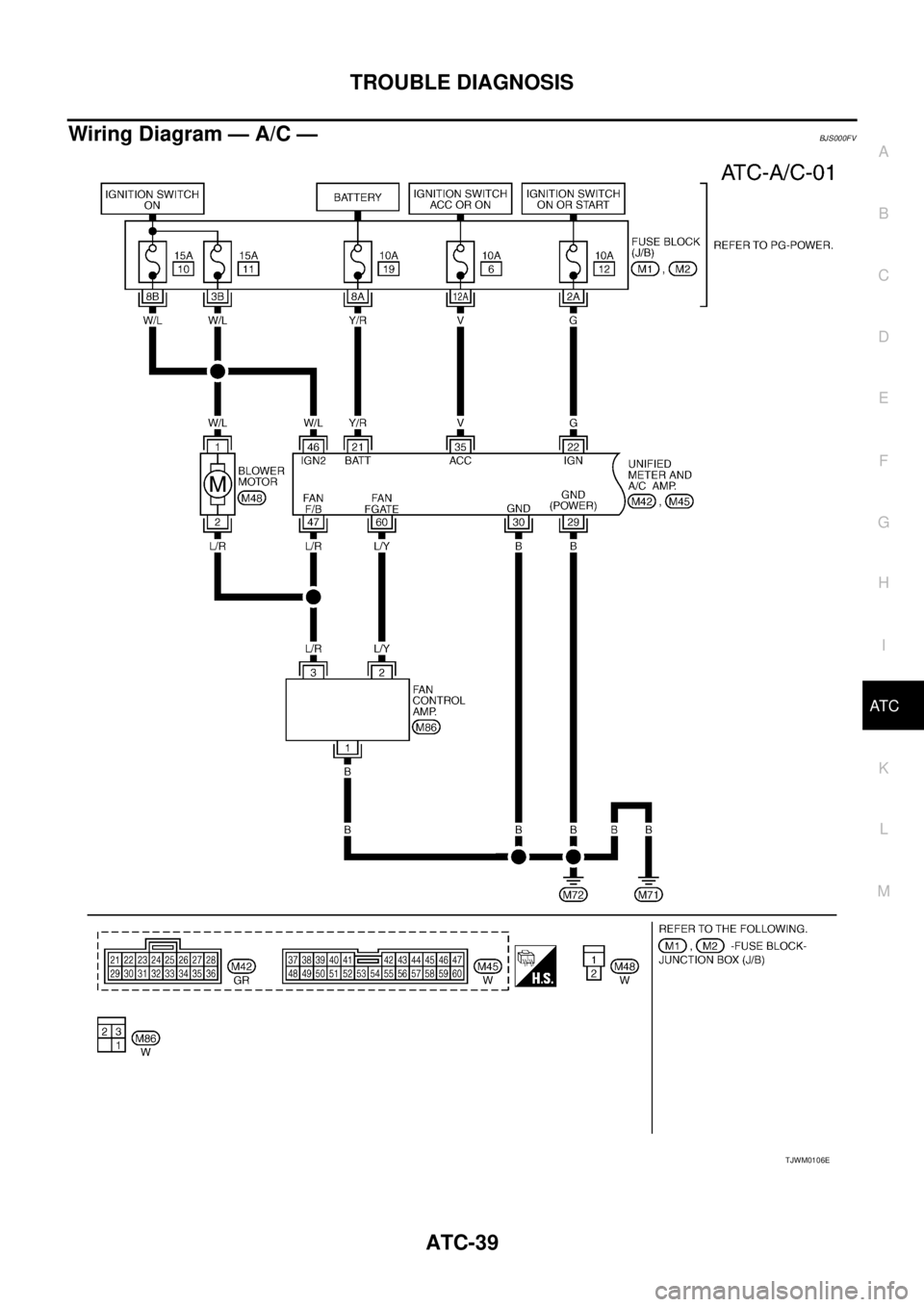
Wiring Diagram — A/C —BJS000FV
TJWM0106E
Page 529 of 3502

AV-1
AUDIO, VISUAL, NAVIGATION & TELEPHONE SYS-
TEM
K ELECTRICAL
CONTENTS
C
D
E
F
G
H
I
J
L
M
SECTION AV
A
B
AV
AUDIO, VISUAL, NAVIGATION & TELEPHONE SYSTEM
PRECAUTIONS .......................................................... 3
Precautions for Supplemental Restraint System
(SRS) “AIR BAG” and “SEAT BELT PRE-TEN-
SIONER” .................................................................. 3
AUDIO (WITH INTEGRATED DISPLAY SYSTEM) ..... 4
System Description .................................................. 4
AUDIO SYSTEM ................................................... 4
Component Parts Location ....................................... 5
Schematic ................................................................ 6
Wiring Diagram — AUDIO — ................................... 7
Terminals and Reference Value for Audio Unit ........ 11
Terminals and Reference Value for A/C and AV
Switch ..................................................................... 12
Terminals and Reference Value for Display Unit .... 12
A/C and AV Switch Self-Diagnosis Function .......... 13
STARTING THE SELF-DIAGNOSIS MODE ....... 13
DIAGNOSIS FUNCTION ..................................... 13
EXITING THE SELF-DIAGNOSIS MODE ........... 13
Symptom Chart ...................................................... 14
Removal and Installation of Audio Unit .................. 15
REMOVAL ........................................................... 15
INSTALLATION ................................................... 16
Removal and Installation of Front Door Speaker ... 16
REMOVAL ........................................................... 16
INSTALLATION ................................................... 16
Removal and Installation of Rear Door Speaker .... 17
REMOVAL ........................................................... 17
INSTALLATION ................................................... 17
Removal and Installation of Tweeter ...................... 17
REMOVAL ........................................................... 17
INSTALLATION ................................................... 17
AUDIO (WITH INTEGRATED COLOR DISPLAY
SYSTEM) .................................................................. 18
System Description ................................................ 18
AUDIO SYSTEM ................................................. 18
Component Parts Location ..................................... 19
Schematic .............................................................. 20
Wiring Diagram — AUDIO — ................................. 21
Terminals and Reference Value for Audio Unit ....... 28
Terminals and Reference Value for CD Auto Changer .................................................................. 30
Terminals and Reference Value for A/C and AV
Switch ..................................................................... 31
Terminals and Reference Value for Display Control
Unit ......................................................................... 31
A/C and AV Switch Self-Diagnosis Function .......... 32
STARTING THE SELF-DIAGNOSIS MODE ....... 32
DIAGNOSIS FUNCTION ..................................... 32
EXITING THE SELF-DIAGNOSIS MODE ........... 32
Symptom Chart ....................................................... 33
Removal and Installation of Audio Unit ................... 34
REMOVAL ........................................................... 34
INSTALLATION ................................................... 35
Removal and Installation of Rear Audio Control
Switch ..................................................................... 36
REMOVAL ........................................................... 36
INSTALLATION ................................................... 36
Removal and Installation of CD Auto Changer ....... 36
REMOVAL ........................................................... 36
INSTALLATION ................................................... 36
Removal and Installation of Front Door Speaker .... 37
REMOVAL ........................................................... 37
INSTALLATION ................................................... 37
Removal and Installation of Rear Door Speaker .... 37
REMOVAL ........................................................... 37
INSTALLATION ................................................... 37
Removal and Installation of Tweeter ...................... 37
REMOVAL ........................................................... 37
INSTALLATION ................................................... 37
AUDIO ANTENNA .................................................... 38
Wiring Diagram — W/ANT — ................................. 38
Location of Antenna ................................................ 39
Window Antenna Repair ......................................... 39
CHECK ELEMENT .............................................. 39
Removal and Installation of Antenna Amp. ............ 40
REMOVAL ........................................................... 40
INSTALLATION ................................................... 40
INTEGRATED DISPLAY SYSTEM ........................... 41
System Description ................................................. 41
INTEGRATED DISPLAY SYSTEM ...................... 41
Page 530 of 3502

AV-2 Component Description .......................................... 41
DISPLAY UNIT .................................................... 41
A/C AND AV SWITCH ......................................... 41
CAN Communication Unit ....................................... 41
Component Parts Location ..................................... 41
Schematic ............................................................... 42
Wiring Diagram — INF/D — ................................... 43
Schematic ............................................................... 48
Wiring Diagram — COMM — ................................. 49
Terminals and Reference Value for Display Unit .... 52
Terminals and Reference Value for A/C and AV
Switch ..................................................................... 53
A/C and AV Switch Self-Diagnosis Function ........... 54
STARTING THE SELF-DIAGNOSIS MODE ........ 54
DIAGNOSIS FUNCTION ..................................... 54
EXITING THE SELF-DIAGNOSIS MODE ........... 54
On Board Self-Diagnosis Function ......................... 55
DESCRIPTION .................................................... 55
DIAGNOSIS ITEM ............................................... 55
Self-Diagnosis Mode .............................................. 55
OPERATION PROCEDURES ............................. 55
EXITING THE SELF-DIAGNOSIS MODE ........... 56
Symptom Chart ....................................................... 57
Unable to Operate System with A/C and AV Switch ... 58
Removal and Installation of Display Unit ................ 60
REMOVAL ........................................................... 60
INSTALLATION .................................................... 60
Removal and Installation of A/C and AV Switch ..... 60
REMOVAL ........................................................... 60
INSTALLATION .................................................... 60
INTEGRATED COLOR DISPLAY SYSTEM .............. 61
System Description ................................................. 61
INTEGRATED COLOR DISPLAY SYSTEM ........ 61
REAR VIEW MONITOR ...................................... 61
Component Description .......................................... 62
DISPLAY CONTROL UNIT .................................. 62
DISPLAY .............................................................. 62
A/C AND AV SWITCH ......................................... 62
REAR VIEW CAMERA ........................................ 62
REAR VIEW CAMERA CONTROL UNIT ............ 63
CAN Communication Unit ....................................... 63
Component Parts Location ..................................... 63
Schematic — INF/D — ........................................... 64
Wiring Diagram — INF/D — ................................... 65
Schematic — COMM — ......................................... 72
Wiring Diagram — COMM — ................................. 73
Terminals and Reference Value for Display Control
Unit ......................................................................... 77
Terminals and Reference Value for Display ............ 80
Terminals and Reference Value for A/C and AV
Switch ..................................................................... 82
Terminals and Reference Value for Rear View Cam-
era Control Unit ...................................................... 83
Special Note for Trouble Diagnosis ........................ 84
A/C and AV Switch Self-Diagnosis Function ........... 84
STARTING THE SELF-DIAGNOSIS MODE ........ 84DIAGNOSIS FUNCTION ..................................... 84
EXITING THE SELF-DIAGNOSIS MODE ........... 84
On Board Self-Diagnosis Function .......................... 85
DESCRIPTION .................................................... 85
DIAGNOSIS ITEM ............................................... 85
OPERATION PROCEDURE ................................ 86
Self-Diagnosis Mode ............................................... 87
DIAGNOSIS PROCEDURE ................................. 87
SELF-DIAGNOSIS RESULT ................................ 88
Confirmation Mode .................................................. 89
DIAGNOSIS PROCEDURE ................................. 89
DCU ..................................................................... 89
HVAC ................................................................... 92
CAN DIAGNOSIS ................................................ 93
CONSULT-II Functions (REAR VIEW CAMERA) .... 94
CONSULT-II BASIC OPERATION PROCEDURE
... 94
WORK SUPPORT ............................................... 94
DATA MONITOR .................................................. 94
Vehicle Width and Distance Guiding Line Correction ... 95
DESCRIPTION .................................................... 95
VEHICLE WIDTH AND DISTANCE GUIDING
LINE CORRECTION PROCEDURE .................... 95
Unable to Operate System with A/C and AV Switch ... 97
All Images Are Not Displayed ................................. 99
Rear View Image Is Not Displayed (RGB Image Is
Displayed) .............................................................101
When Displaying Rear View Image, SETTING
Menu Is Not Displayed ..........................................106
Tint Is Strange for The RGB Image .......................107
RGB Image Is Rolling ...........................................109
Values for All Items in The TRIP Screen Do Not
Change .................................................................110
Values for Items, “Driving Distance” and “Average
Speed” Do Not Change .........................................110
Values for All Items in The FUEL ECONOMY Screen
Do Not Change .....................................................110
Example of Symptoms Possible No Malfunction .. 111
DISPLAY ............................................................ 111
REAR VIEW MONITOR ..................................... 111
Removal and Installation of A/C and AV Switch ....112
REMOVAL ..........................................................112
INSTALLATION ..................................................112
Removal and Installation of Display ......................112
REMOVAL ..........................................................112
INSTALLATION ..................................................112
Removal and Installation of Display Control Unit ..112
REMOVAL ..........................................................112
INSTALLATION ..................................................112
Removal and Installation of Rear View Camera ...113
REMOVAL ..........................................................113
INSTALLATION ..................................................113
Removal and Installation of Rear View Camera Con-
trol Unit ..................................................................113
REMOVAL ..........................................................113
INSTALLATION ..................................................113
Page 535 of 3502
AUDIO (WITH INTEGRATED DISPLAY SYSTEM)
AV-7
C
D
E
F
G
H
I
J
L
MA
B
AV
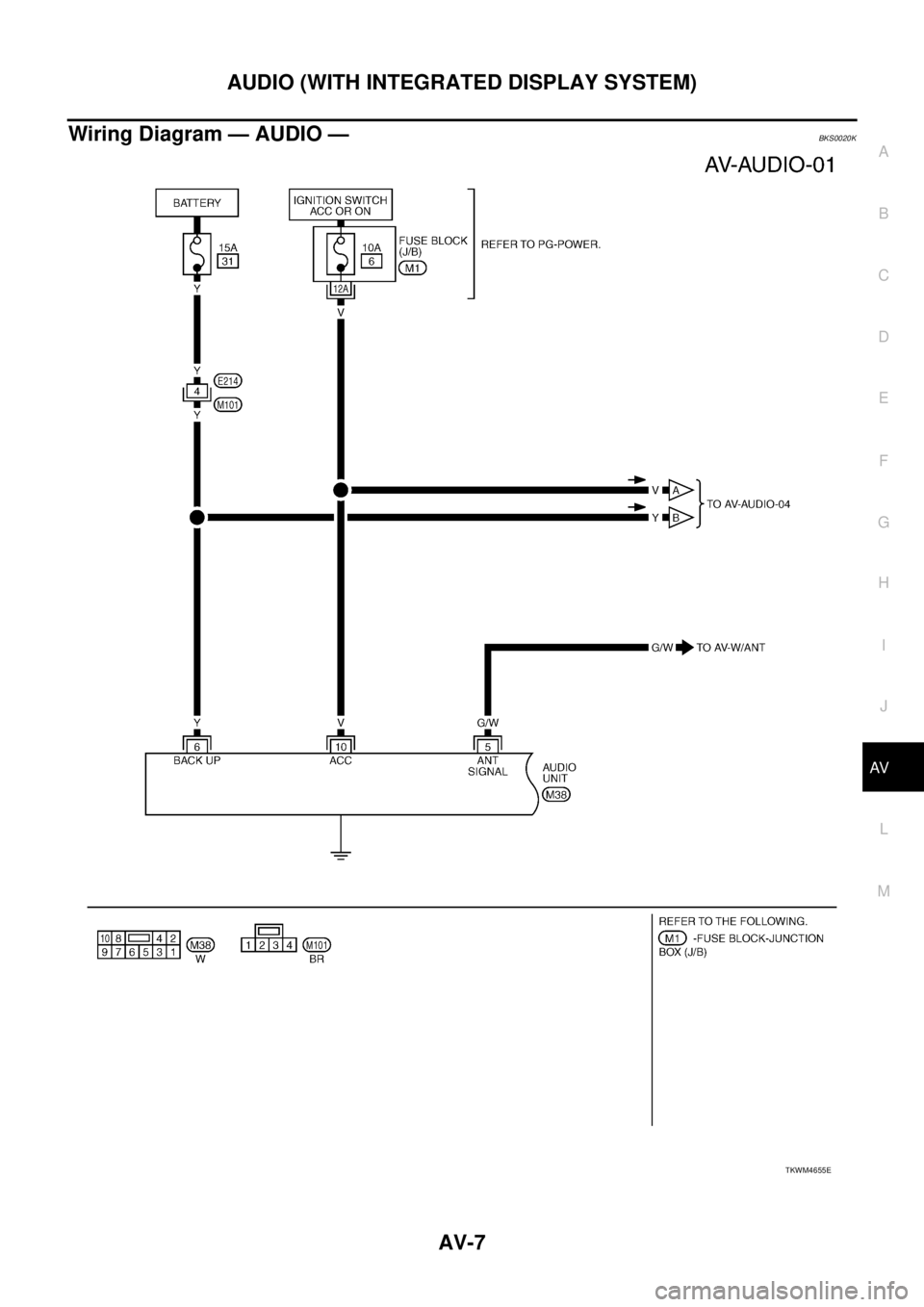
Wiring Diagram — AUDIO —BKS0020K
TKWM4655E