NISSAN TEANA 2003 Manual Online
TEANA 2003
NISSAN
NISSAN
https://www.carmanualsonline.info/img/5/57392/w960_57392-0.png
NISSAN TEANA 2003 Manual Online
Page 1037 of 3502
TROUBLE DIAGNOSIS
CVT-31
D
E
F
G
H
I
J
K
L
MA
B
CVT
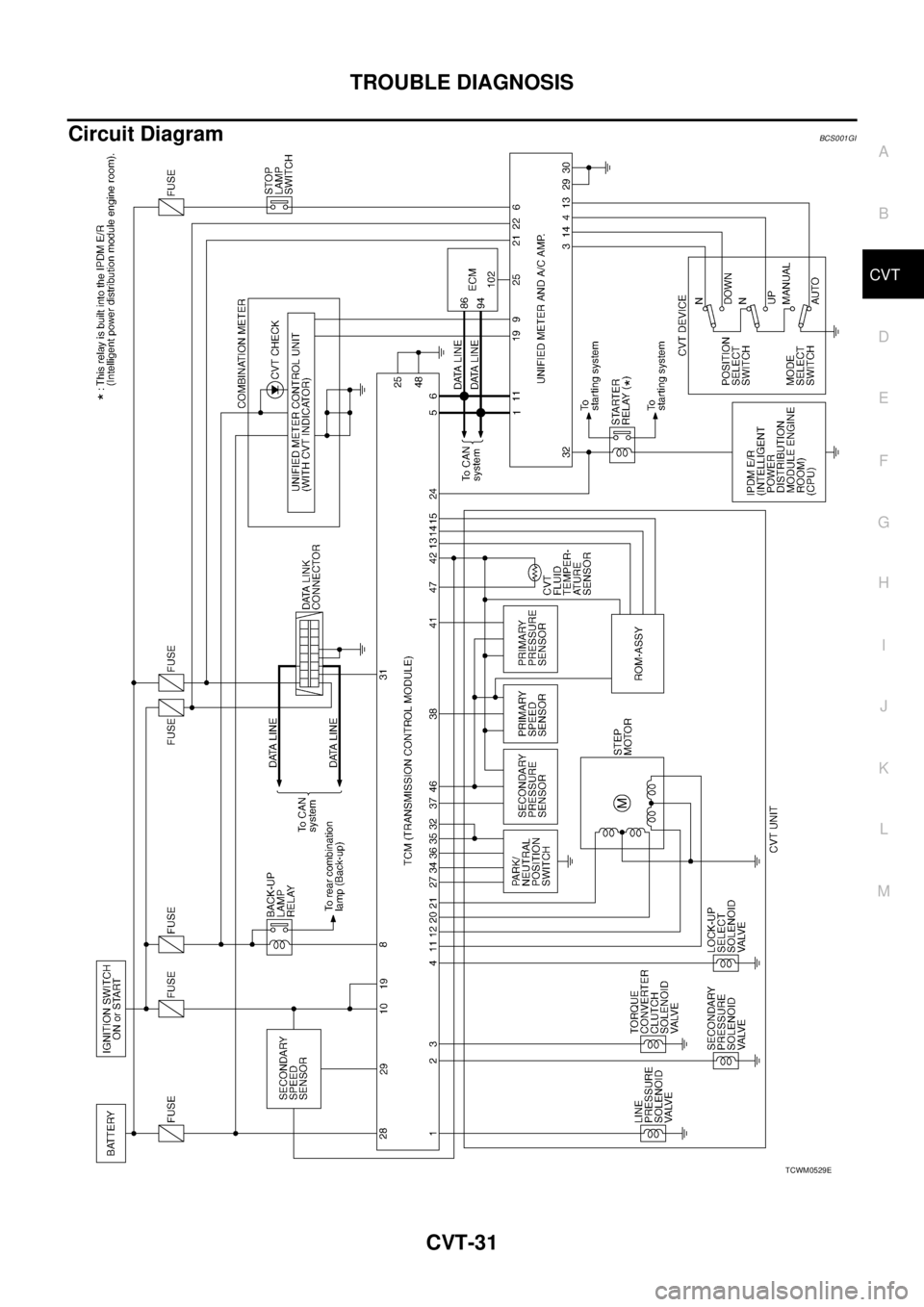
Circuit DiagramBCS001GI
TCWM0529E
Page 1060 of 3502
CVT-54
DTC U1000 CAN COMMUNICATION LINE
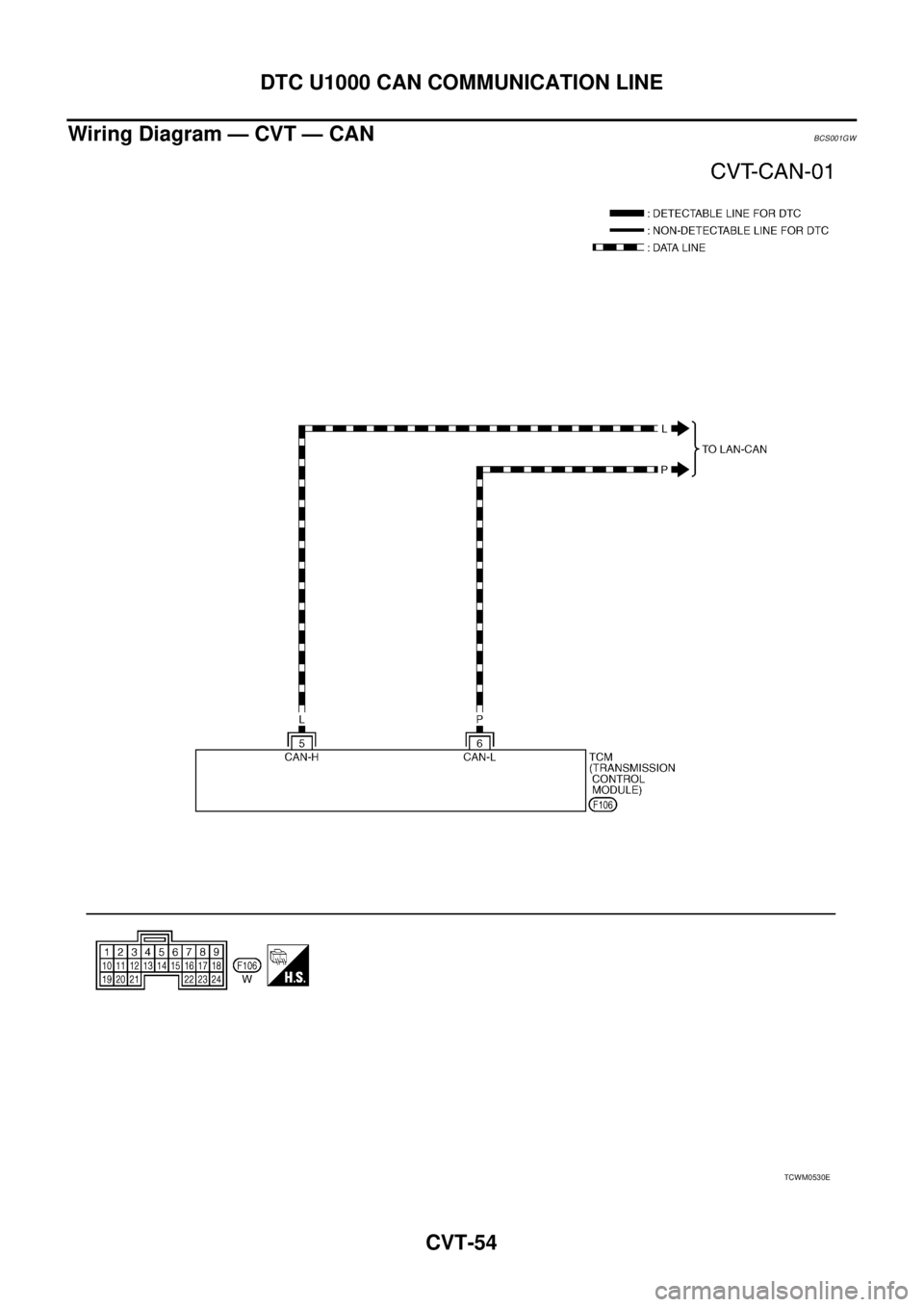
Wiring Diagram — CVT — CANBCS001GW
TCWM0530E
Page 1063 of 3502
DTC P0615 START SIGNAL CIRCUIT
CVT-57
D
E
F
G
H
I
J
K
L
MA
B
CVT
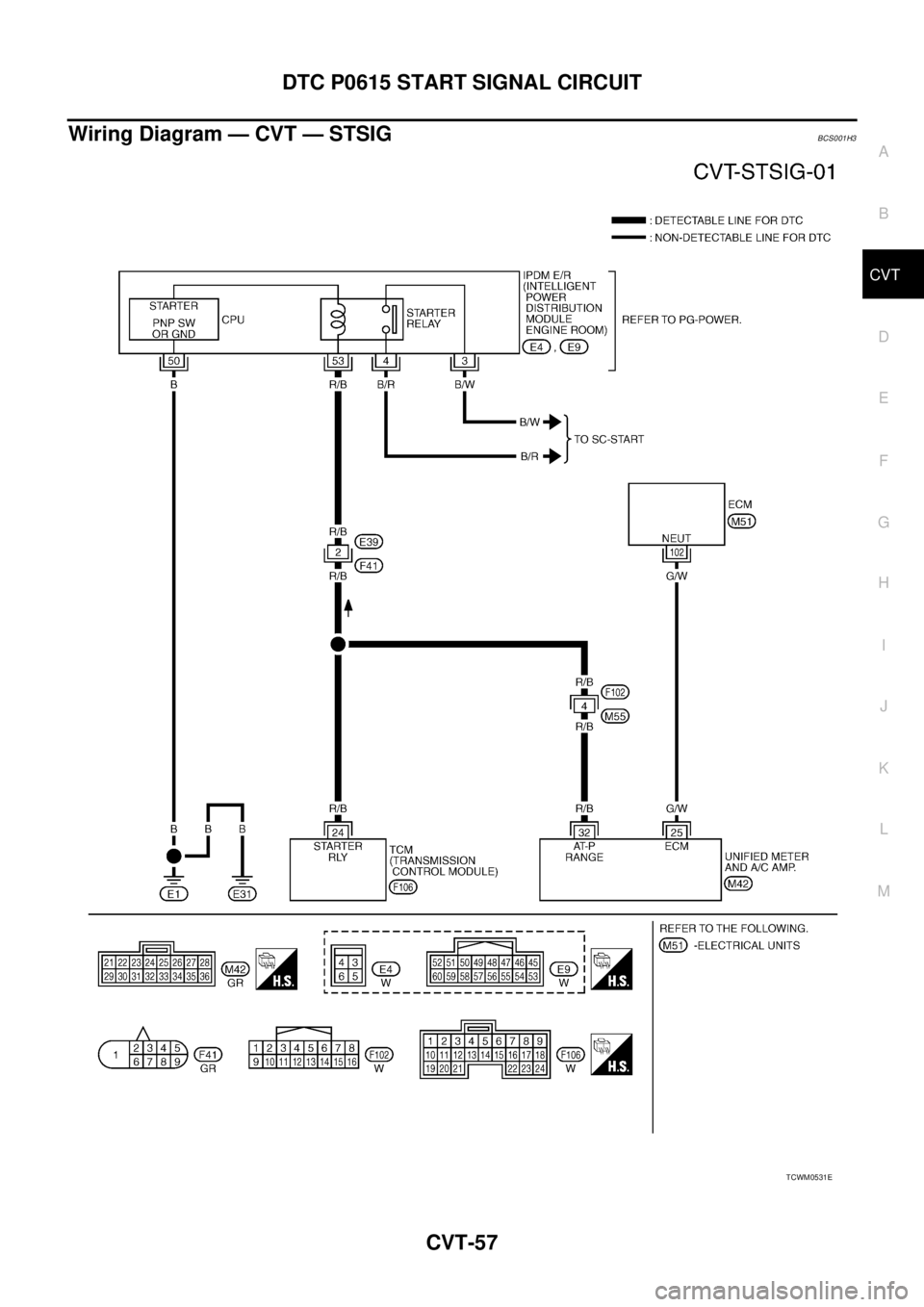
Wiring Diagram — CVT — STSIGBCS001H3
TCWM0531E
Page 1064 of 3502
CVT-58
DTC P0615 START SIGNAL CIRCUIT
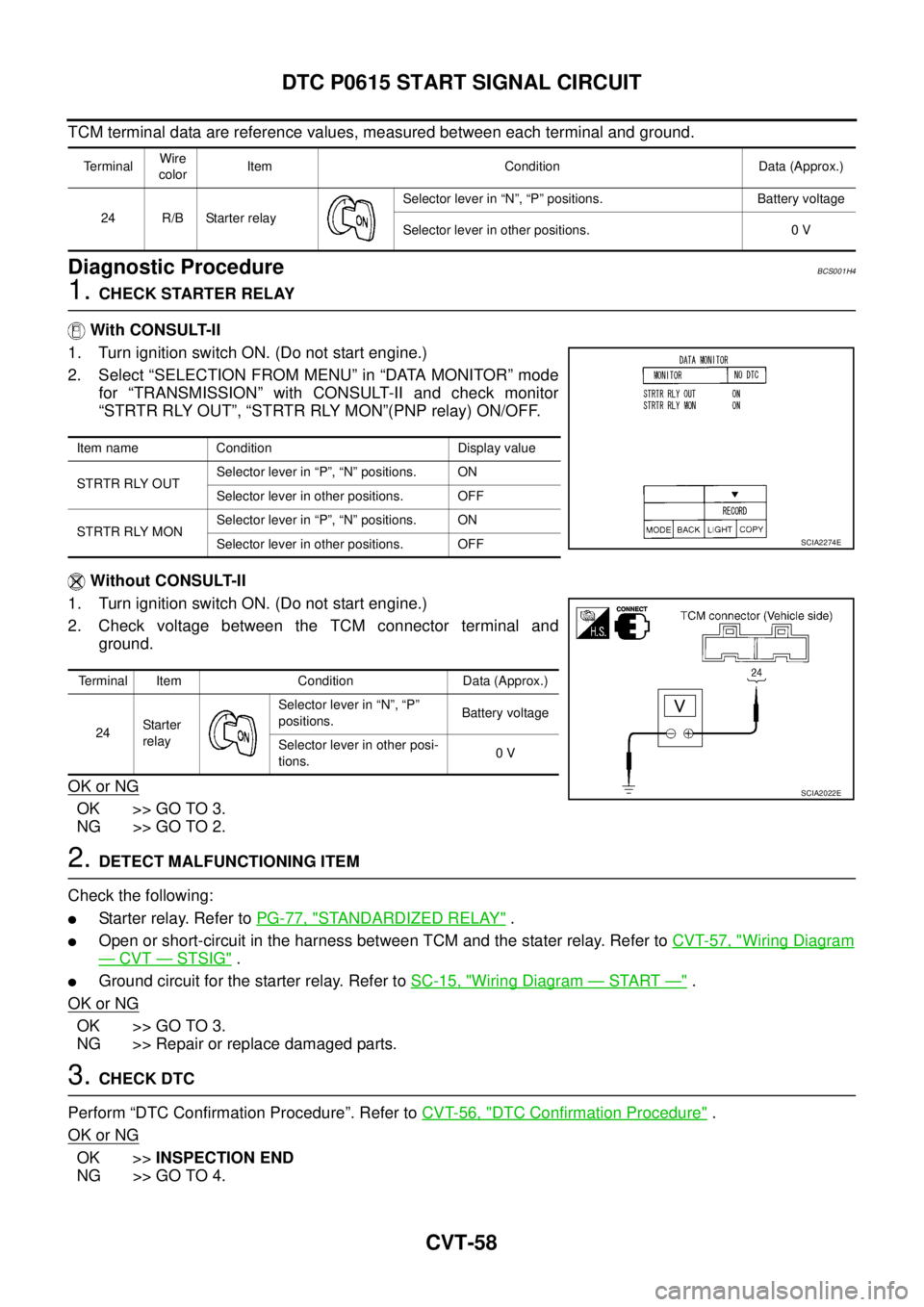
TCM terminal data are reference values, measured between each terminal and ground.
Diagnostic ProcedureBCS001H4
1. CHECK STARTER RELAY
With CONSULT-II
1. Turn ignition switch ON. (Do not start engine.)
2. Select “SELECTION FROM MENU” in “DATA MONITOR” mode
for “TRANSMISSION” with CONSULT-II and check monitor
“STRTR RLY OUT”, “STRTR RLY MON”(PNP relay) ON/OFF.
Without CONSULT-II
1. Turn ignition switch ON. (Do not start engine.)
2. Check voltage between the TCM connector terminal and
ground.
OK or NG
OK >> GO TO 3.
NG >> GO TO 2.
2. DETECT MALFUNCTIONING ITEM
Check the following:
�Starter relay. Refer to PG-77, "STANDARDIZED RELAY" .
�Open or short-circuit in the harness between TCM and the stater relay. Refer to CVT-57, "Wiring Diagram
— CVT — STSIG" .
�Ground circuit for the starter relay. Refer to SC-15, "Wiring Diagram — START —" .
OK or NG
OK >> GO TO 3.
NG >> Repair or replace damaged parts.
3. CHECK DTC
Perform “DTC Confirmation Procedure”. Refer to CVT-56, "
DTC Confirmation Procedure" .
OK or NG
OK >>INSPECTION END
NG >> GO TO 4.
TerminalWire
colorItem Condition Data (Approx.)
24 R/B Starter relaySelector lever in “N”, “P” positions. Battery voltage
Selector lever in other positions. 0 V
Item name Condition Display value
STRTR RLY OUTSelector lever in “P”, “N” positions. ON
Selector lever in other positions. OFF
STRTR RLY MONSelector lever in “P”, “N” positions. ON
Selector lever in other positions. OFF
Terminal Item Condition Data (Approx.)
24Starter
relaySelector lever in “N”, “P”
positions.Battery voltage
Selector lever in other posi-
tions.0 V
SCIA2274E
SCIA2022E
Page 1067 of 3502
DTC P0703 STOP LAMP SWITCH CIRCUIT
CVT-61
D
E
F
G
H
I
J
K
L
MA
B
CVT
Diagnostic ProcedureBCS001HA
1. CHECK CAN COMMUNICATION LINE
Perform the self-diagnosis check. Refer to CVT-47, "
SELF-DIAGNOSTIC RESULT MODE" .
Is any malfunction of the
“U1000 CAN COMM CIRCUIT” indicated?
YES >> Check CAN communication line. Refer to CVT-53, "DTC U1000 CAN COMMUNICATION LINE" .
NO >> GO TO 2.
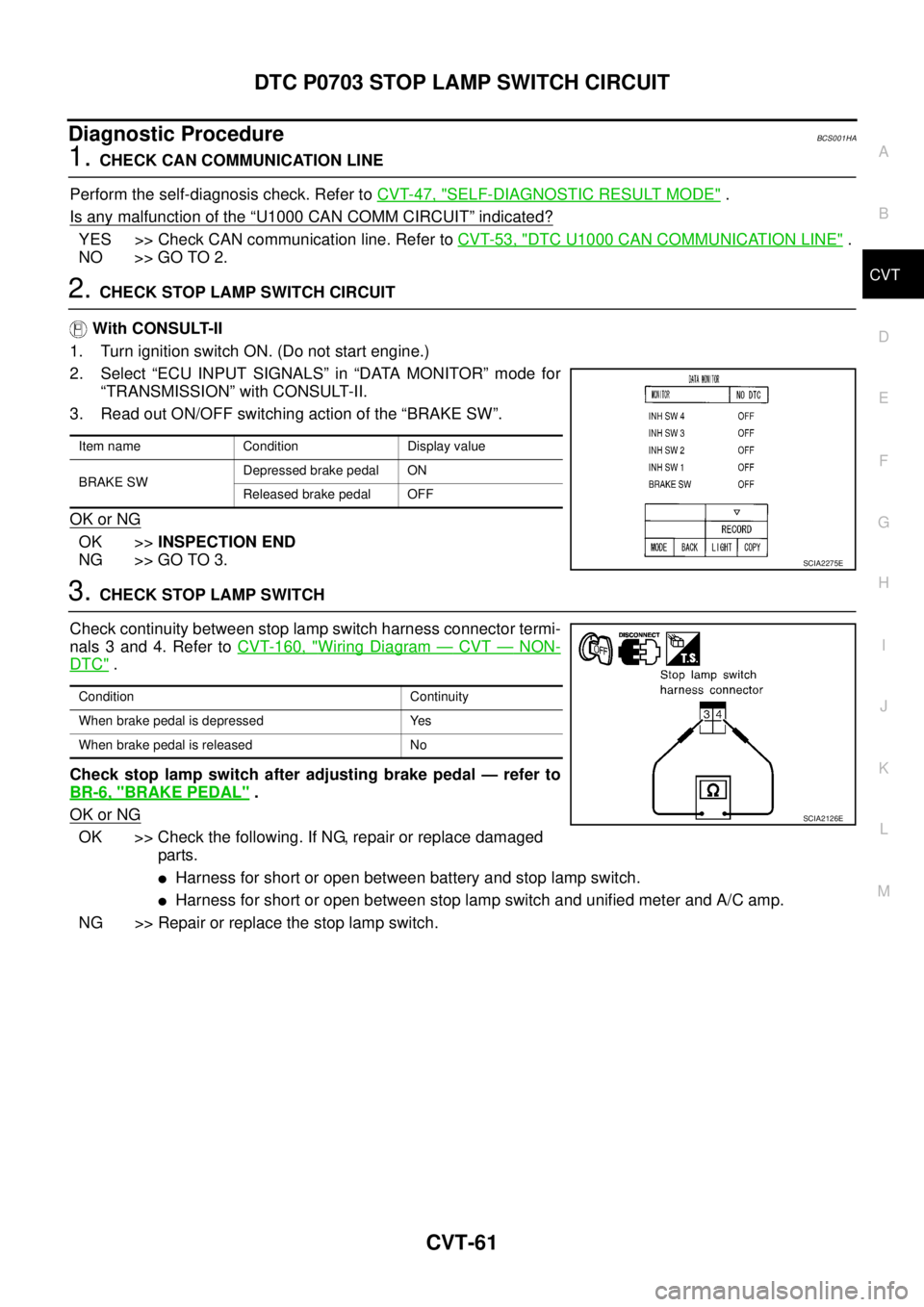
2. CHECK STOP LAMP SWITCH CIRCUIT
With CONSULT-II
1. Turn ignition switch ON. (Do not start engine.)
2. Select “ECU INPUT SIGNALS” in “DATA MONITOR” mode for
“TRANSMISSION” with CONSULT-II.
3. Read out ON/OFF switching action of the “BRAKE SW”.
OK or NG
OK >>INSPECTION END
NG >> GO TO 3.
3. CHECK STOP LAMP SWITCH
Check continuity between stop lamp switch harness connector termi-
nals 3 and 4. Refer to CVT-160, "
Wiring Diagram — CVT — NON-
DTC" .
Check stop lamp switch after adjusting brake pedal — refer to
BR-6, "
BRAKE PEDAL" .
OK or NG
OK >> Check the following. If NG, repair or replace damaged
parts.
�Harness for short or open between battery and stop lamp switch.
�Harness for short or open between stop lamp switch and unified meter and A/C amp.
NG >> Repair or replace the stop lamp switch.
Item name Condition Display value
BRAKE SWDepressed brake pedal ON
Released brake pedal OFF
SCIA2275E
Condition Continuity
When brake pedal is depressed Yes
When brake pedal is released No
SCIA2126E
Page 1070 of 3502
CVT-64
DTC P0705 PARK/NEUTRAL POSITION SWITCH
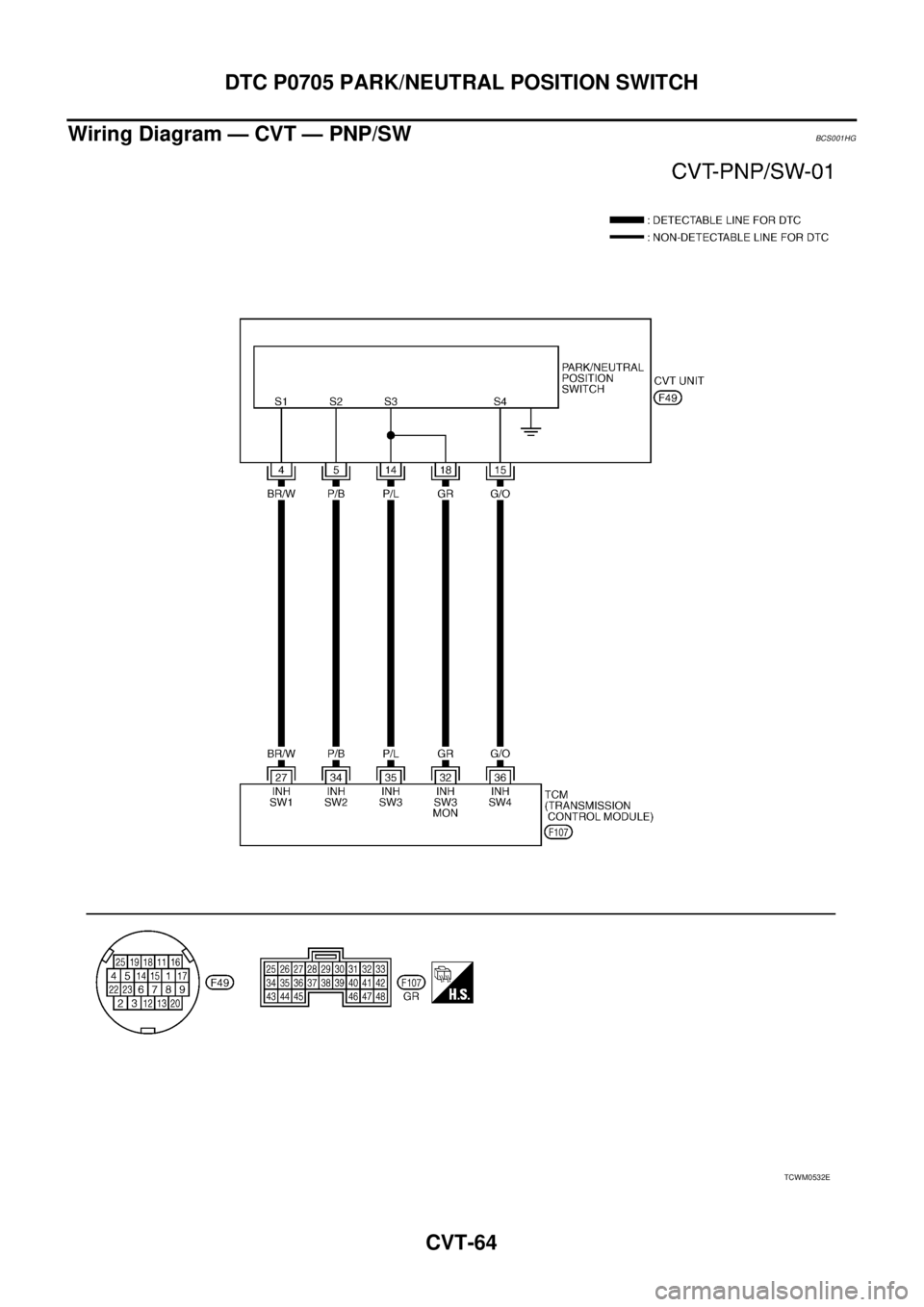
Wiring Diagram — CVT — PNP/SWBCS001HG
TCWM0532E
Page 1076 of 3502
CVT-70
DTC P0710 CVT FLUID TEMPERATURE SENSOR CIRCUIT
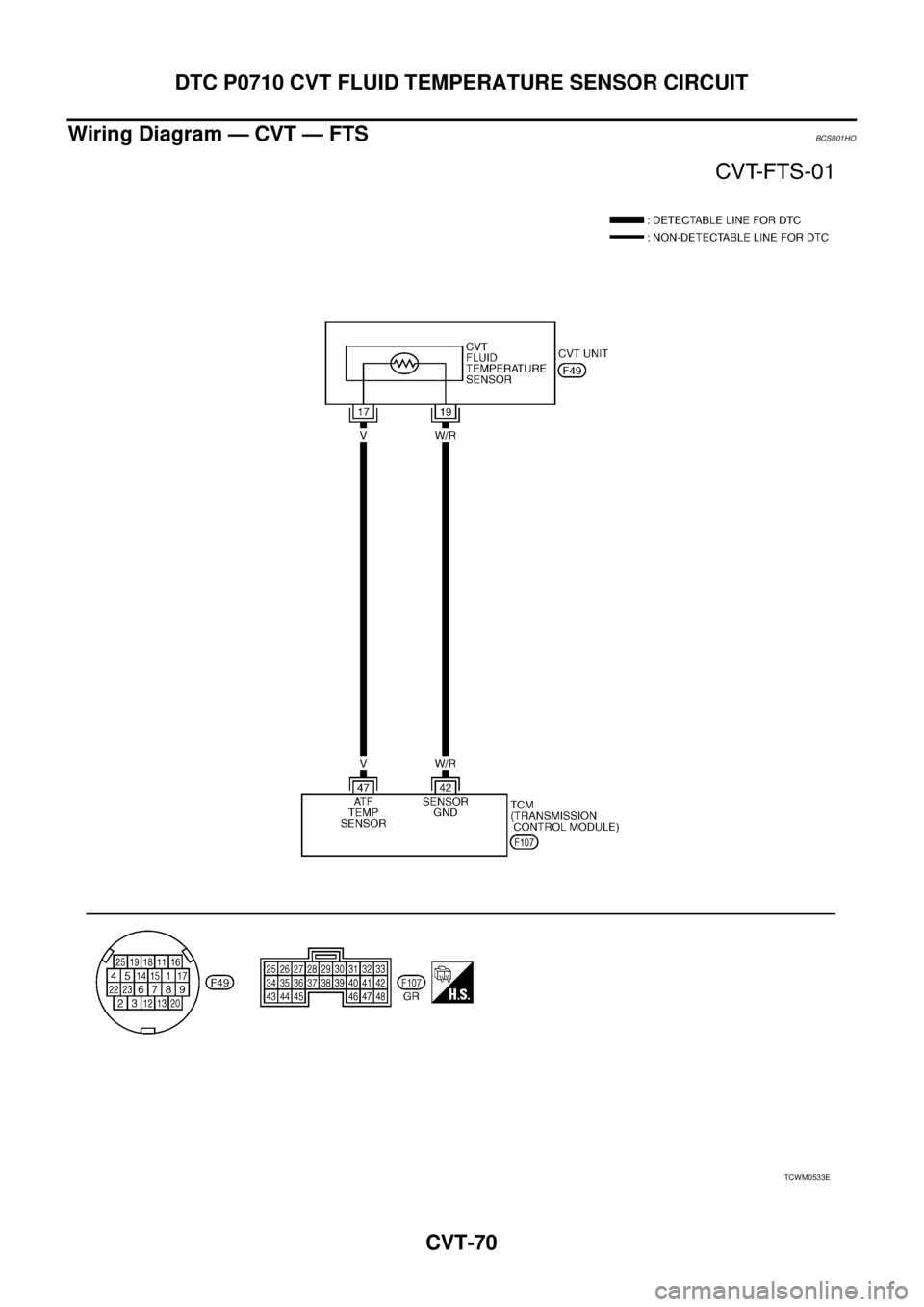
Wiring Diagram — CVT — FTSBCS001HO
TCWM0533E
Page 1081 of 3502
DTC P0715 INPUT SPEED SENSOR CIRCUIT (PRI SPEED SENSOR)
CVT-75
D
E
F
G
H
I
J
K
L
MA
B
CVT
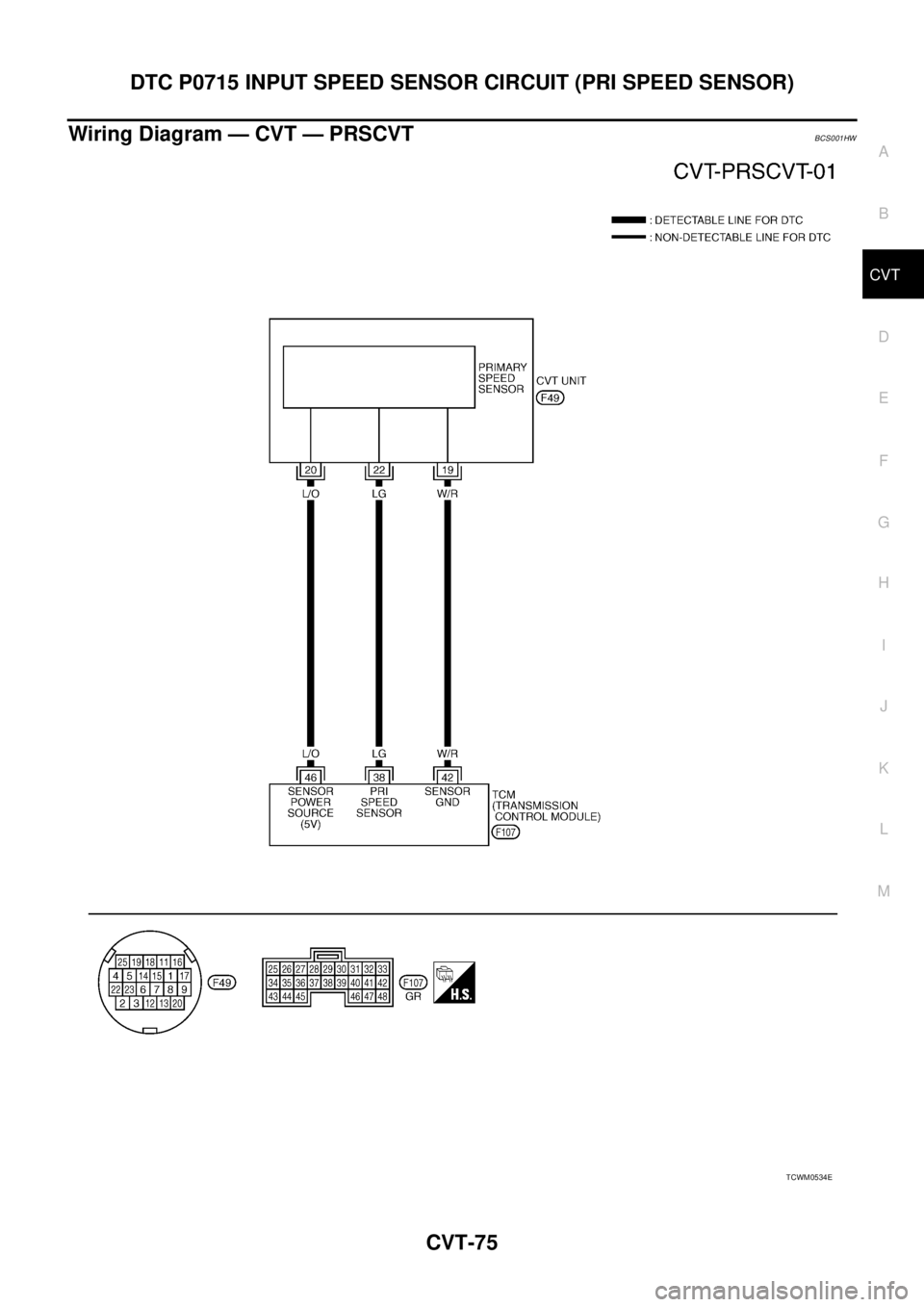
Wiring Diagram — CVT — PRSCVTBCS001HW
TCWM0534E
Page 1086 of 3502
CVT-80
DTC P0720 VEHICLE SPEED SENSOR CVT (SECONDARY SPEED SENSOR)
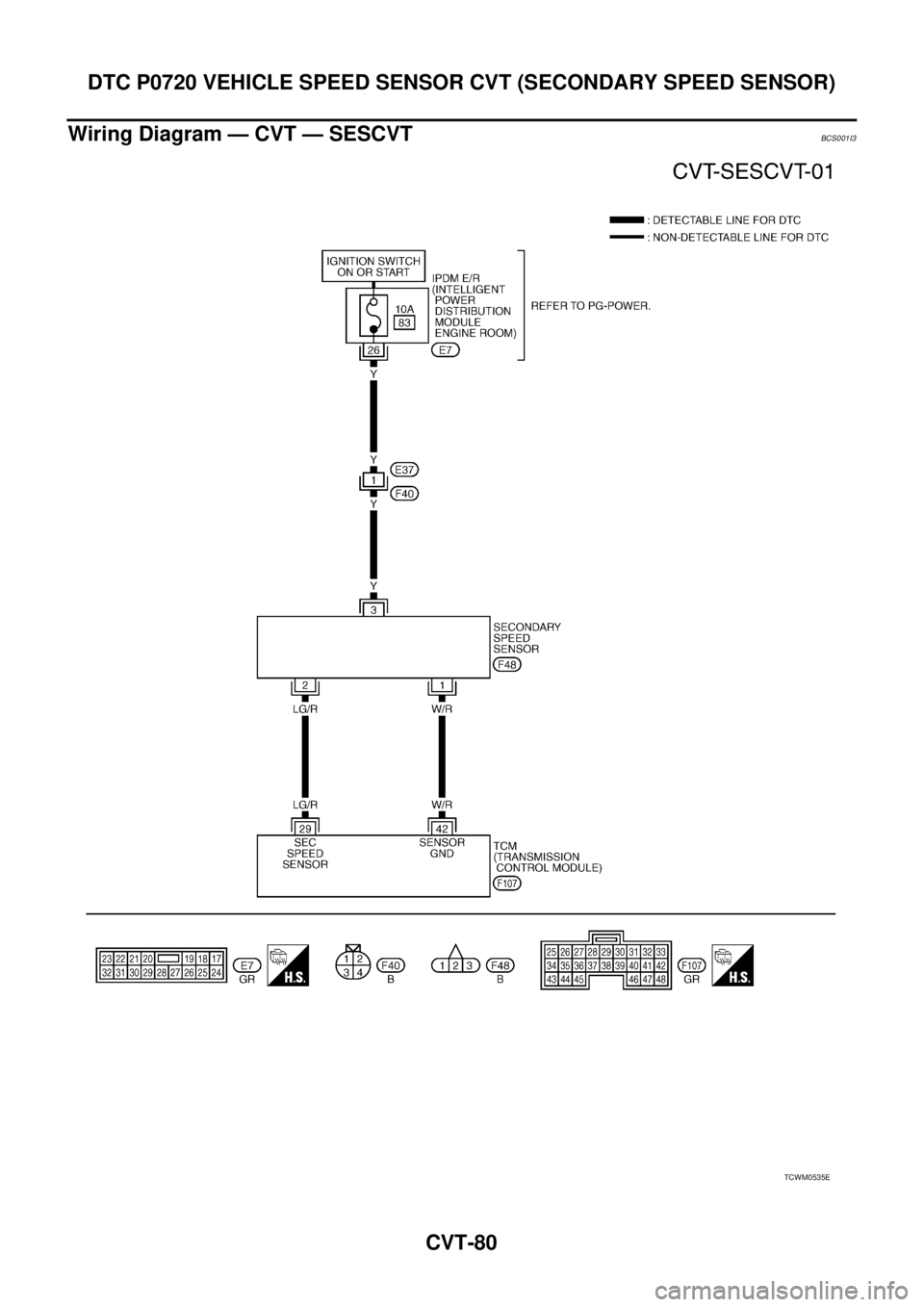
Wiring Diagram — CVT — SESCVTBCS001I3
TCWM0535E
Page 1087 of 3502
DTC P0720 VEHICLE SPEED SENSOR CVT (SECONDARY SPEED SENSOR)
CVT-81
D
E
F
G
H
I
J
K
L
MA
B
CVT
TCM terminal data are reference values, measured between each terminal and ground.
Diagnostic ProcedureBCS001I4
1. CHECK INPUT SIGNAL
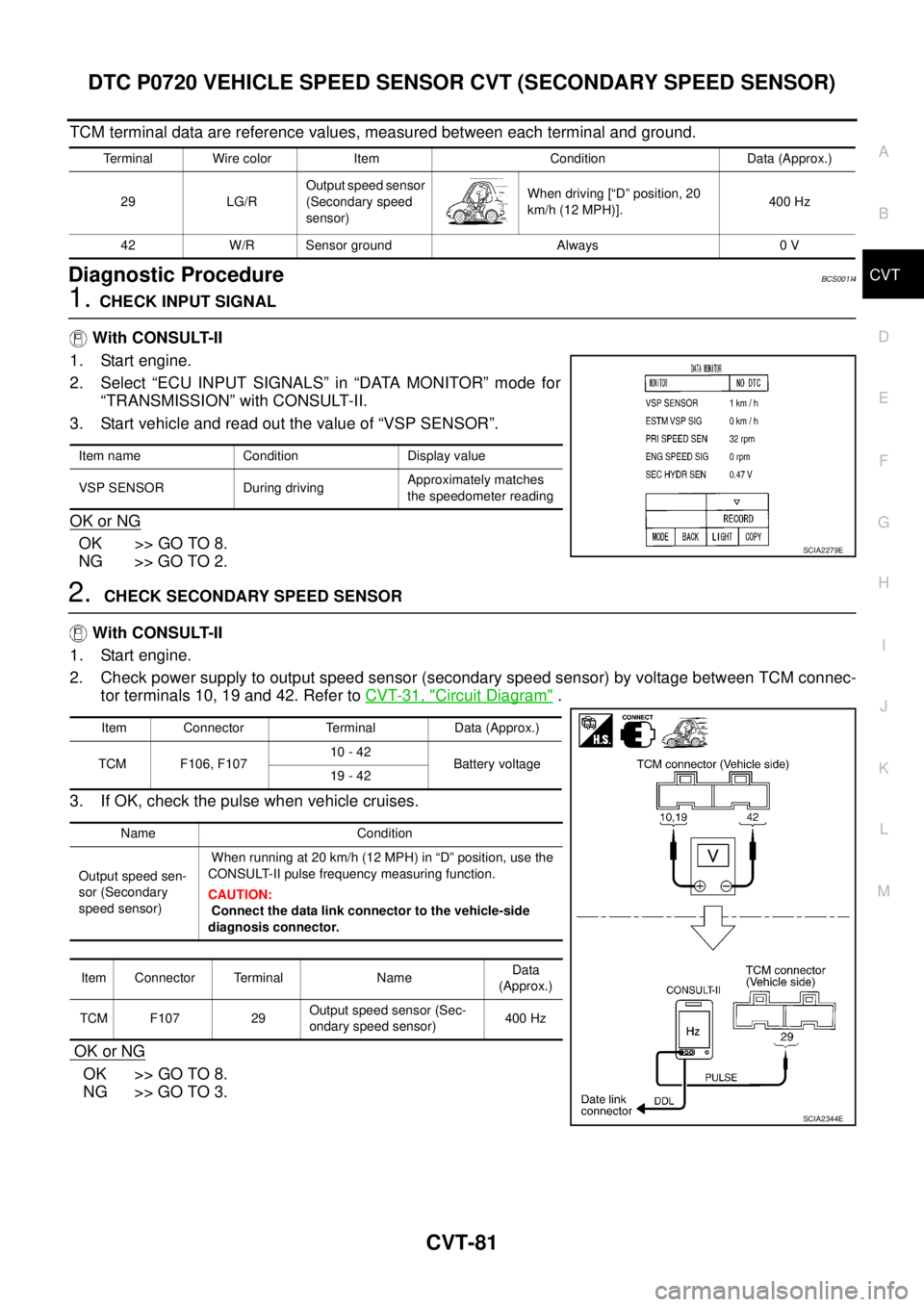
With CONSULT-II
1. Start engine.
2. Select “ECU INPUT SIGNALS” in “DATA MONITOR” mode for
“TRANSMISSION” with CONSULT-II.
3. Start vehicle and read out the value of “VSP SENSOR”.
OK or NG
OK >> GO TO 8.
NG >> GO TO 2.
2. CHECK SECONDARY SPEED SENSOR
With CONSULT-II
1. Start engine.
2. Check power supply to output speed sensor (secondary speed sensor) by voltage between TCM connec-
tor terminals 10, 19 and 42. Refer to CVT-31, "
Circuit Diagram" .
3. If OK, check the pulse when vehicle cruises.
OK or NG
OK >> GO TO 8.
NG >> GO TO 3.
Terminal Wire color Item Condition Data (Approx.)
29 LG/ROutput speed sensor
(Secondary speed
sensor)When driving [“D” position, 20
km/h (12 MPH)].400 Hz
42 W/R Sensor ground Always 0 V
Item name Condition Display value
VSP SENSOR During drivingApproximately matches
the speedometer reading
SCIA2279E
Item Connector Terminal Data (Approx.)
TCM F106, F10710 - 42
Battery voltage
19 - 42
Name Condition
Output speed sen-
sor (Secondary
speed sensor) When running at 20 km/h (12 MPH) in “D” position, use the
CONSULT-II pulse frequency measuring function.
CAUTION:
Connect the data link connector to the vehicle-side
diagnosis connector.
Item Connector Terminal NameData
(Approx.)
TCM F107 29Output speed sensor (Sec-
ondary speed sensor)400 Hz
SCIA2344E