sensor NISSAN TEANA 2008 Service Manual
[x] Cancel search | Manufacturer: NISSAN, Model Year: 2008, Model line: TEANA, Model: NISSAN TEANA 2008Pages: 5121, PDF Size: 69.03 MB
Page 4913 of 5121
![NISSAN TEANA 2008 Service Manual VTL-102
< ON-VEHICLE REPAIR >[WITH 7 INCH DISPLAY]
HEATER CORE
Removal and Installation
INFOID:0000000003894516
REMOVAL
1. Remove heater & cooling unit assembly. Refer to VTL-93, "Exploded View".
2. R](/img/5/57391/w960_57391-4912.png "NISSAN TEANA 2008 Service Manual VTL-102
< ON-VEHICLE REPAIR >[WITH 7 INCH DISPLAY]
HEATER CORE
Removal and Installation
INFOID:0000000003894516
REMOVAL
1. Remove heater & cooling unit assembly. Refer to VTL-93, \"Exploded View\".
2. R")
VTL-102
< ON-VEHICLE REPAIR >[WITH 7 INCH DISPLAY]
HEATER CORE
Removal and Installation
INFOID:0000000003894516
REMOVAL
1. Remove heater & cooling unit assembly. Refer to VTL-93, "Exploded View".
2. Remove mounting screws (A), and then remove foot duct (left)
(1).
3. Remove heater pipe grommet (1).
4. Remove mounting screw (A), and then remove heater pipe sup-
port (2).
5. Remove mounting screws (B), and then remove heater pipe
cover (3).
6. Slide heater core (1) to leftward (as shown in the figure).
INSTALLATION
Installation is basically the reverse order of removal.
CAUTION:
Replace O-rings with new ones. Then apply compressor oil to them when installing.
Check for refrigerant leakage when charging refrigerant.
NOTE:
Refer to CO-9, "
Refilling" when filling radiator with engine coolant.
Charge the refrigerant.
37. Defroster door link 38. Foot door link 39. Max. cool door lever
40. Foot door lever 41. Defroster door lever 42. Adapter case
43. Distributor lower case 44. Ventilator door 45. Intake sensor
46. Intake sensor bracket 47. Foot door 48. Max. cool door
49. Defroster door 50. Air mix door (Slide door)
Refer to GI-4, "
Components" for symbols in the figure.
JPIIA0925ZZ
JPIIA0926ZZ
JPIIA0927ZZ
Page 4929 of 5121
![NISSAN TEANA 2008 Service Manual VTL-118
< ON-VEHICLE REPAIR >[WITH 7 INCH DISPLAY]
DUCT AND GRILLE
FOOT DUCT : Removal and Installation
INFOID:0000000003894550
REMOVAL
Driver side
1. Remove instrument driver lower panel. Refer to IP](/img/5/57391/w960_57391-4928.png "NISSAN TEANA 2008 Service Manual VTL-118
< ON-VEHICLE REPAIR >[WITH 7 INCH DISPLAY]
DUCT AND GRILLE
FOOT DUCT : Removal and Installation
INFOID:0000000003894550
REMOVAL
Driver side
1. Remove instrument driver lower panel. Refer to IP")
VTL-118
< ON-VEHICLE REPAIR >[WITH 7 INCH DISPLAY]
DUCT AND GRILLE
FOOT DUCT : Removal and Installation
INFOID:0000000003894550
REMOVAL
Driver side
1. Remove instrument driver lower panel. Refer to IP-11, "Exploded View".
2. Remove mounting screws (A), and then remove foot duct (left)
(1).
Passenger side
1. Remove blower unit assembly. Refer to VTL-87, "Exploded View".
2. Remove mounting screws (A) and harness clip, and then
remove foot duct (right) (1).
INSTALLATION
Installation is basically the reverse order of removal.
1. Ventilator seal 2. Defroster seal 3. Distributor upper case
4. Center case 5. Heater & cooling unit case cover 6. Foot duct 1 (right)
7. Foot duct 2 (right) 8. Air mix door motor (passenger side) 9. Evaporator pipe assembly
10. Expansion valve 11. O-ring 12. Evaporator
13. Filter cover 14. Air conditioner filter 15. Case packing
16. Heater & cooling unit case (right) 17. Cooler pipe grommet 18. Grommet
19. Heater pipe grommet 20. Heater pipe support 21. Drain hose
22. Heater & cooling unit case (left) 23. Air mix door motor (driver side) 24. Heater core
25. Heater pipe cover 26. Foot duct 2 (left) 27. Foot duct 1 (left)
28. Aspirator hose 29. Aspirator 30. Mode door motor
31. Main link 32. Rod link 33. Ventilator door link
34. Mode door lever 35. Ventilator door lever 36. Max. cool door link
37. Defroster door link 38. Foot door link 39. Max. cool door lever
40. Foot door lever 41. Defroster door lever 42. Adapter case
43. Distributor lower case 44. Ventilator door 45. Intake sensor
46. Intake sensor bracket 47. Foot door 48. Max. cool door
49. Defroster door 50. Air mix door (Slide door)
Refer to GI-4, "
Components" for symbols in the figure.
JPIIA0944ZZ
JPIIA0945ZZ
Page 4944 of 5121

WCS-14
< FUNCTION DIAGNOSIS >
DIAGNOSIS SYSTEM (METER)
NOTE:
Some items are not available according to vehicle specification.
SPECIAL FUNCTION
Special menu
W/L ON HISTORY
Stores histories when warning/indicator lamp is turned on.
“W/L ON HISTORY” indicates the “TIME” when the warning/ indicator lamp is turned on.
The “TIME” above is :
SHIFT IND
[P, R, N, D, L]Status of shift position indicator detected from shift position signal and manual
mode indicator signal is received from TCM via CAN communication.
O/D OFF SW
[On/Off] Status of sport mode switch.
M RANGE SW
[On/Off]This item is displayed, but cannot be monitored.
NM RANGE SW
[On/Off]This item is displayed, but cannot be monitored.
AT SFT UP SW
[On/Off]This item is displayed, but cannot be monitored.
AT SFT DWN SW
[On/Off]This item is displayed, but cannot be monitored.
ST SFT UP SW
[On/Off]This item is displayed, but cannot be monitored.
ST SFT DWN SW
[On/Off]This item is displayed, but cannot be monitored.
PKB SW
[On/Off]Status of parking brake switch.
BUCKLE SW
[On/Off]Status of seat belt buckle switch.
BRAKE OIL SW
[On/Off]Status of brake fluid level switch.
DISTANCE
[km]Value of possible driving distance calculated by combination meter.
A/C AMP CONN
[On/Off]Input status of A/C auto amp. connection recognition signal.
ENTER SW
[On/Off]Status of (ENTER) switch.
SELECT SW
[On/Off]Status of (SELECT) switch.
OUTSIDE TEMP
[°C or °F]Ambient air temperature value converted from ambient sensor signal received
from ambient sensor.
NOTE:
This may not match with the temperature value indicated on the information dis-
play. (Because the information display value is a corrected value from the ambient
sensor input value.)
FUEL LOW SIG
[On/Off]Status of fuel level low warning signal to output to AV control unit via CAN com-
munication.
BUZZER
[On/Off]XBuzzer status (in the combination meter) is detected from the buzzer output signal
received from each unit via CAN communication and the warning output condition
of the combination meter. Display item [Unit]MAIN
SIGNALSDescription
Display item Description
W/L ON HISTORY Lighting history of warning lamp and indicator lamp can be checked.
Page 4948 of 5121
![NISSAN TEANA 2008 Service Manual WCS-18
< FUNCTION DIAGNOSIS >
DIAGNOSIS SYSTEM (BCM)
ACTIVE TEST
Display item
[Unit]Description
PUSH SW
[On/Off]Status of push button ignition switch judged by BCM.
UNLK SEN-DR
[On/Off]Status of unloc](/img/5/57391/w960_57391-4947.png "NISSAN TEANA 2008 Service Manual WCS-18
< FUNCTION DIAGNOSIS >
DIAGNOSIS SYSTEM (BCM)
ACTIVE TEST
Display item
[Unit]Description
PUSH SW
[On/Off]Status of push button ignition switch judged by BCM.
UNLK SEN-DR
[On/Off]Status of unloc")
WCS-18
< FUNCTION DIAGNOSIS >
DIAGNOSIS SYSTEM (BCM)
ACTIVE TEST
Display item
[Unit]Description
PUSH SW
[On/Off]Status of push button ignition switch judged by BCM.
UNLK SEN-DR
[On/Off]Status of unlock sensor judged by BCM.
VEH SPEED 1
[km/h]Value of vehicle speed signal received from ABS actuator and electric unit (control unit) with CAN
communication line.
KEY SW-SLOT
[On/Off]Status of key slot judged by BCM.
TA I L L A M P S W
[On/Off]Status of each switch judged by BCM using the combination switch readout function.
FR FOG SW
[On/Off]Status of front fog lamp switch judged by BCM.
DOOR SW-DR
[On/Off]Status of driver side door switch judged by BCM.
Display item
[Unit]Description
IGN KEY WARN ALM The key warning chime operation can be checked by operating the relevant function (On/Off).
LIGHT WARN ALM The light warning chime operation can be checked by operating the relevant function (On/Off).
RUN FLAT/T WARN BUZZER This item is displayed, but not function.
Page 4959 of 5121
WCS
COMBINATION METER
WCS-29
< ECU DIAGNOSIS >
C
D
E
F
G
H
I
J
K
L
MB A
O
P
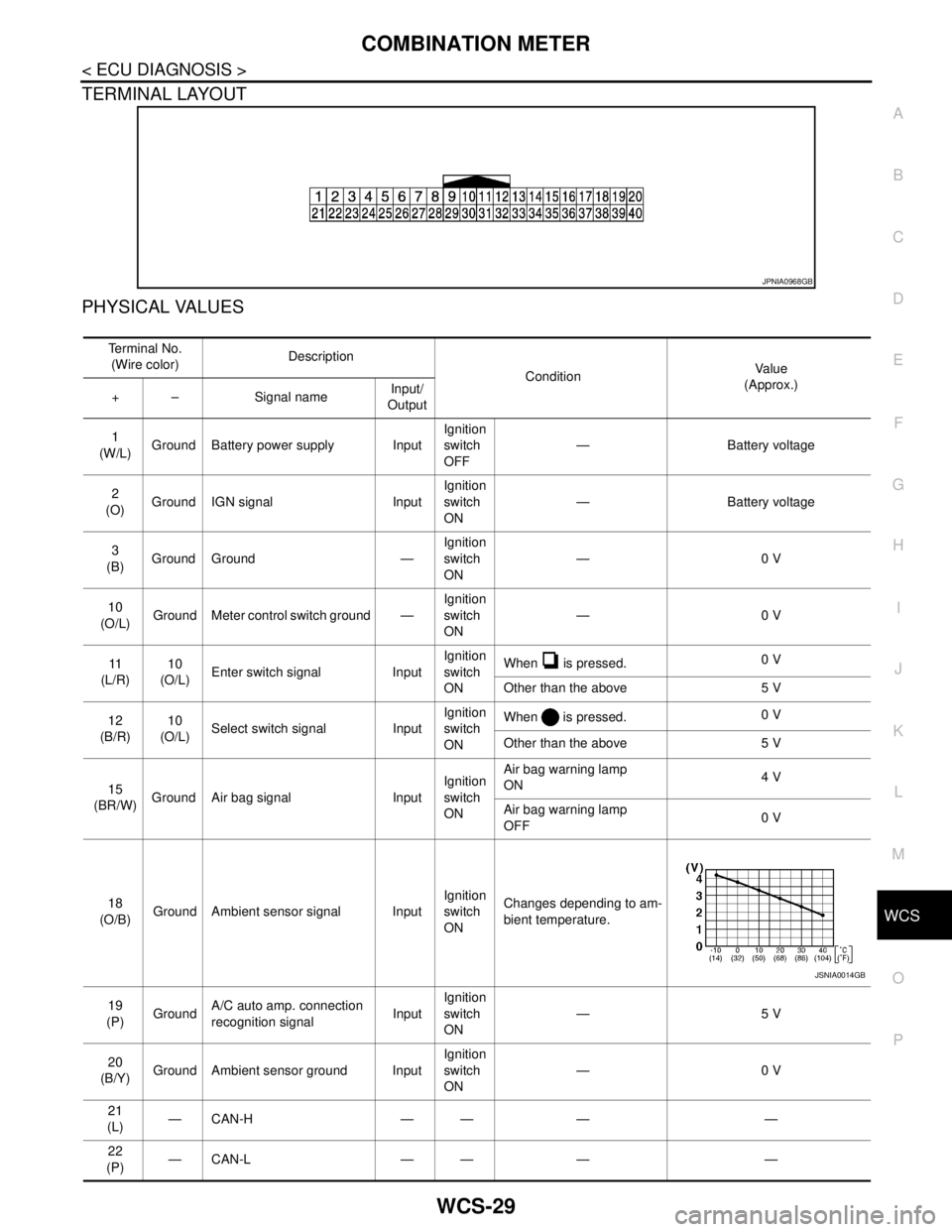
TERMINAL LAYOUT
PHYSICAL VALUES
JPNIA0968GB
Te r m i n a l N o .
(Wire color)Description
ConditionVa l u e
(Approx.)
+ – Signal nameInput/
Output
1
(W/L)Ground Battery power supply InputIgnition
switch
OFF— Battery voltage
2
(O)Ground IGN signal InputIgnition
switch
ON— Battery voltage
3
(B)Ground Ground —Ignition
switch
ON—0 V
10
(O/L)Ground Meter control switch ground —Ignition
switch
ON—0 V
11
(L/R)10
(O/L)Enter switch signal InputIgnition
switch
ONWhen is pressed.0 V
Other than the above 5 V
12
(B/R)10
(O/L)Select switch signal InputIgnition
switch
ONWhen is pressed.0 V
Other than the above 5 V
15
(BR/W)Ground Air bag signal InputIgnition
switch
ONAir bag warning lamp
ON4 V
Air bag warning lamp
OFF0 V
18
(O/B)Ground Ambient sensor signal InputIgnition
switch
ONChanges depending to am-
bient temperature.
19
(P)GroundA/C auto amp. connection
recognition signalInputIgnition
switch
ON—5 V
20
(B/Y)Ground Ambient sensor ground InputIgnition
switch
ON—0 V
21
(L)—CAN-H — — — —
22
(P)—CAN-L — — — —
JSNIA0014GB
Page 4960 of 5121
WCS-30
< ECU DIAGNOSIS >
COMBINATION METER
23
(B)Ground Ground —Ignition
switch
ON—0 V
24
(B/W)GroundFuel level sensor signal
ground—Ignition
switch
ON—0 V
25
(BR)Ground Alternator signal InputIgnition
switch
ONCharge warning lamp ON 2 V
Charge warning lamp OFF 12 V
26
(G/R)Ground Parking brake switch signal InputIgnition
switch
ONWhen parking brake is ap-
plied0 V
When parking brake is re-
leased5 V
27
(V)GroundBrake fluid level switch sig-
nalInputIgnition
switch
ONBrake fluid level is normal 12 V
Brake fluid level is less than
low level0 V
28
(L/O)Ground Security signal InputIgnition
switch
ONSecurity warning lamp OFF 12 V
Security warning lamp ON 0 V
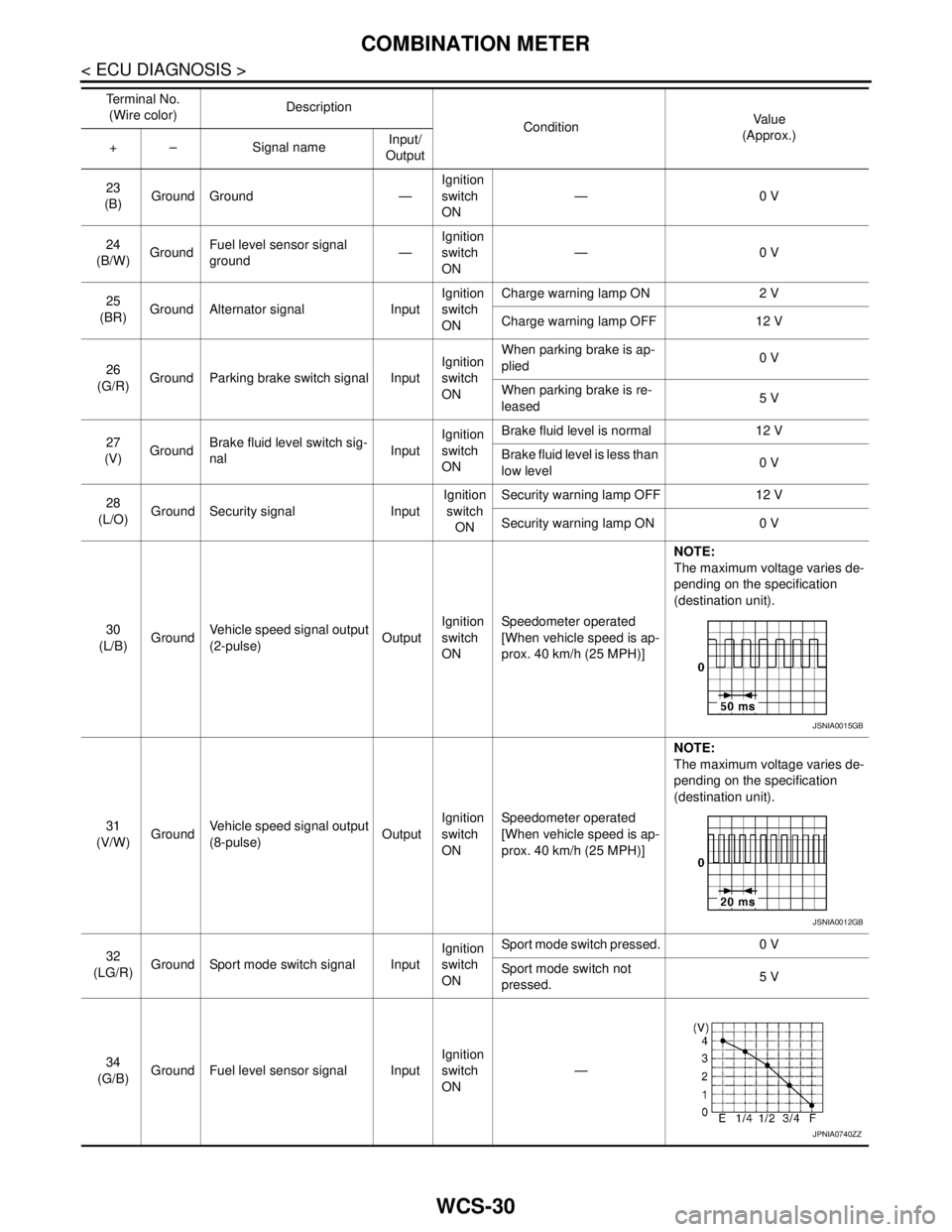
30
(L/B)GroundVehicle speed signal output
(2-pulse)OutputIgnition
switch
ONSpeedometer operated
[When vehicle speed is ap-
prox. 40 km/h (25 MPH)]NOTE:
The maximum voltage varies de-
pending on the specification
(destination unit).
31
(V/W)GroundVehicle speed signal output
(8-pulse)OutputIgnition
switch
ONSpeedometer operated
[When vehicle speed is ap-
prox. 40 km/h (25 MPH)]NOTE:
The maximum voltage varies de-
pending on the specification
(destination unit).
32
(LG/R)Ground Sport mode switch signal InputIgnition
switch
ONSport mode switch pressed. 0 V
Sport mode switch not
pressed.5 V
34
(G/B)Ground Fuel level sensor signal InputIgnition
switch
ON— Te r m i n a l N o .
(Wire color)Description
ConditionVa l u e
(Approx.)
+ – Signal nameInput/
Output
JSNIA0015GB
JSNIA0012GB
JPNIA0740ZZ
Page 4972 of 5121

WCS-42
< ECU DIAGNOSIS >
BCM (BODY CONTROL MODULE)
DOOR SW-BKNOTE:
The item is indicated, but not monitored. Off
CDL LOCK SWOther than power door lock switch LOCK Off
Power door lock switch LOCK On
CDL UNLOCK SWOther than power door lock switch UNLOCK Off
Power door lock switch UNLOCK On
KEY CYL LK-SWNOTE:
The item is indicated, but not monitored. Off
KEY CYL UN-SWNOTE:
The item is indicated, but not monitored. Off
KEY CYL SW-TRNOTE:
The item is indicated, but not monitored. Off
HAZARD SWHazard switch is OFF Off
Hazard switch is ON On
REAR DEF SW
NOTE:
At model with BOSE au-
dio system this item is in-
dicated, but is not
monitored.Rear window defogger switch is OFF Off
Rear window defogger switch is ON On
TR CANCEL SWNOTE:
The item is indicated, but not monitored. Off
TR/BD OPEN SWTrunk lid opener switch OFF Off
While the trunk lid opener switch is turned ON On
TRNK/HAT MNTRTrunk lid closed Off
Trunk lid opened On
RKE-LOCKLOCK button of the key is not pressed Off
LOCK button of the key is pressed On
RKE-UNLOCKUNLOCK button of the key is not pressed Off
UNLOCK button of the key is pressed On
RKE-TR/BDTRUNK OPEN button of the key is not pressed Off
TRUNK OPEN button of the key is pressed On
RKE-PANICNOTE:
The item is indicated, but not monitored. Off
RKE-P/W OPENNOTE:
The item is indicated, but not monitored. Off
RKE-MODE CHGLOCK/UNLOCK button of the key is not pressed and held simulta-
neouslyOff
LOCK/UNLOCK button of the key is pressed and held simulta-
neouslyOn
OPTICAL SENSORBright outside of the vehicle Close to 5 V
Dark outside of the vehicle Close to 0 V
REQ SW -DRDriver door request switch is not pressed Off
Driver door request switch is pressed On
REQ SW -ASPassenger door request switch is not pressed Off
Passenger door request switch is pressed On
REQ SW -RRNOTE:
The item is indicated, but not monitored. Off Monitor Item Condition Value/Status
Page 4990 of 5121
WCS-60
< ECU DIAGNOSIS >
BCM (BODY CONTROL MODULE)
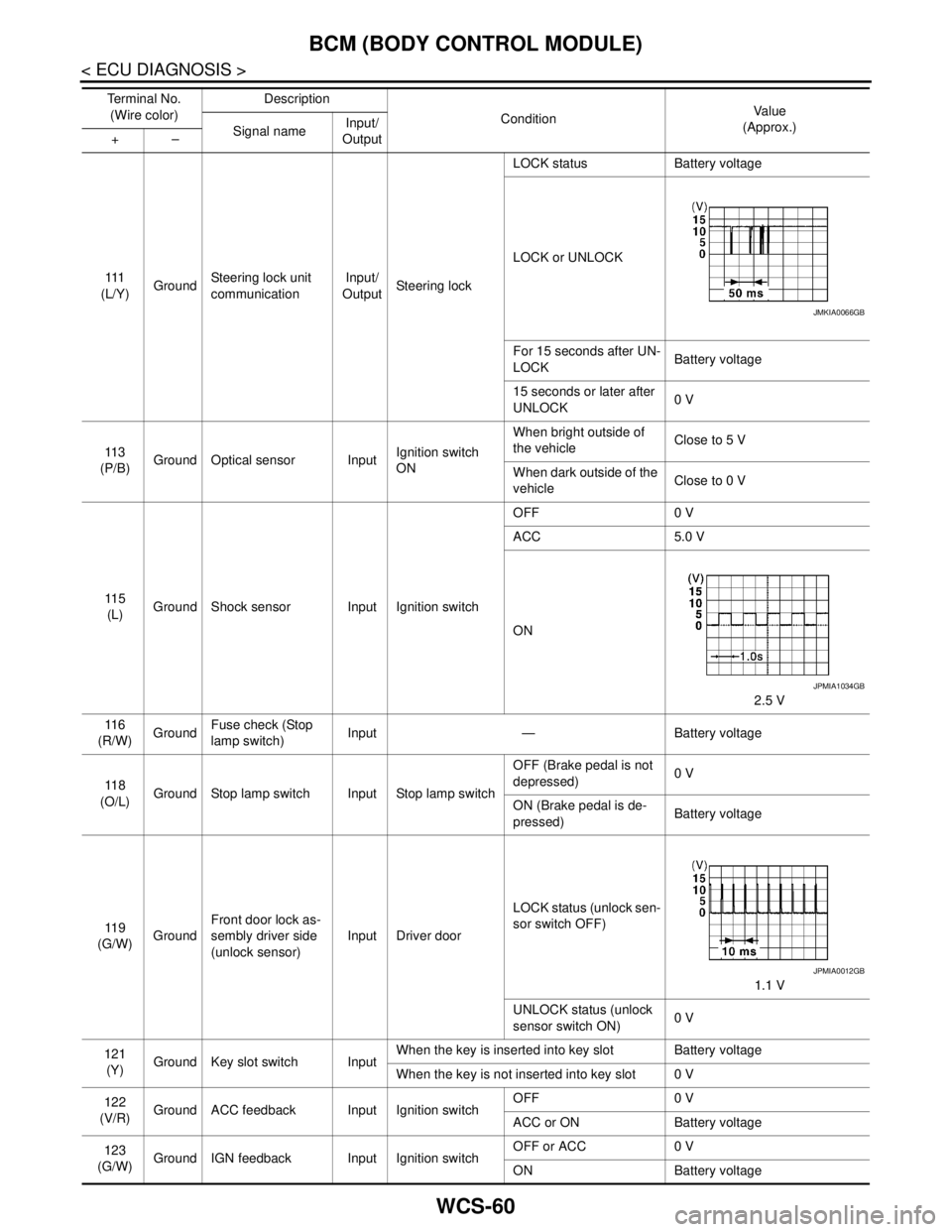
111
(L/Y)GroundSteering lock unit
communicationInput/
OutputSteering lockLOCK status Battery voltage
LOCK or UNLOCK
For 15 seconds after UN-
LOCKBattery voltage
15 seconds or later after
UNLOCK0 V
11 3
(P/B)Ground Optical sensor InputIgnition switch
ONWhen bright outside of
the vehicleClose to 5 V
When dark outside of the
vehicleClose to 0 V
11 5
(L)Ground Shock sensor Input Ignition switchOFF 0 V
ACC 5.0 V
ON
2.5 V
11 6
(R/W)GroundFuse check (Stop
lamp switch)Input — Battery voltage
11 8
(O/L)Ground Stop lamp switch Input Stop lamp switchOFF (Brake pedal is not
depressed)0 V
ON (Brake pedal is de-
pressed)Battery voltage
11 9
(G/W)GroundFront door lock as-
sembly driver side
(unlock sensor)Input Driver doorLOCK status (unlock sen-
sor switch OFF)
1.1 V
UNLOCK status (unlock
sensor switch ON)0 V
121
(Y)Ground Key slot switch InputWhen the key is inserted into key slot Battery voltage
When the key is not inserted into key slot 0 V
122
(V/R)Ground ACC feedback Input Ignition switchOFF 0 V
ACC or ON Battery voltage
123
(G/W)Ground IGN feedback Input Ignition switchOFF or ACC 0 V
ON Battery voltage Te r m i n a l N o .
(Wire color)Description
ConditionVa l u e
(Approx.)
Signal nameInput/
Output +–
JMKIA0066GB
JPMIA1034GB
JPMIA0012GB
Page 5055 of 5121

BCM (BODY CONTROL MODULE)
WW-43
< ECU DIAGNOSIS >
C
D
E
F
G
H
I
J
K
MA
B
WW
N
O
P
DOOR SW-RLRear LH door closed Off
Rear LH door opened On
DOOR SW-BKNOTE:
The item is indicated, but not monitored. Off
CDL LOCK SWOther than power door lock switch LOCK Off
Power door lock switch LOCK On
CDL UNLOCK SWOther than power door lock switch UNLOCK Off
Power door lock switch UNLOCK On
KEY CYL LK-SWNOTE:
The item is indicated, but not monitored. Off
KEY CYL UN-SWNOTE:
The item is indicated, but not monitored. Off
KEY CYL SW-TRNOTE:
The item is indicated, but not monitored. Off
HAZARD SWHazard switch is OFF Off
Hazard switch is ON On
REAR DEF SW
NOTE:
At model with BOSE au-
dio system this item is in-
dicated, but is not
monitored.Rear window defogger switch is OFF Off
Rear window defogger switch is ON On
TR CANCEL SWNOTE:
The item is indicated, but not monitored. Off
TR/BD OPEN SWTrunk lid opener switch OFF Off
While the trunk lid opener switch is turned ON On
TRNK/HAT MNTRTrunk lid closed Off
Trunk lid opened On
RKE-LOCKLOCK button of the key is not pressed Off
LOCK button of the key is pressed On
RKE-UNLOCKUNLOCK button of the key is not pressed Off
UNLOCK button of the key is pressed On
RKE-TR/BDTRUNK OPEN button of the key is not pressed Off
TRUNK OPEN button of the key is pressed On
RKE-PANICNOTE:
The item is indicated, but not monitored. Off
RKE-P/W OPENNOTE:
The item is indicated, but not monitored. Off
RKE-MODE CHGLOCK/UNLOCK button of the key is not pressed and held simulta-
neouslyOff
LOCK/UNLOCK button of the key is pressed and held simulta-
neouslyOn
OPTICAL SENSORBright outside of the vehicle Close to 5 V
Dark outside of the vehicle Close to 0 V
REQ SW -DRDriver door request switch is not pressed Off
Driver door request switch is pressed On
REQ SW -ASPassenger door request switch is not pressed Off
Passenger door request switch is pressed On Monitor Item Condition Value/Status
Page 5073 of 5121
BCM (BODY CONTROL MODULE)
WW-61
< ECU DIAGNOSIS >
C
D
E
F
G
H
I
J
K
MA
B
WW
N
O
P
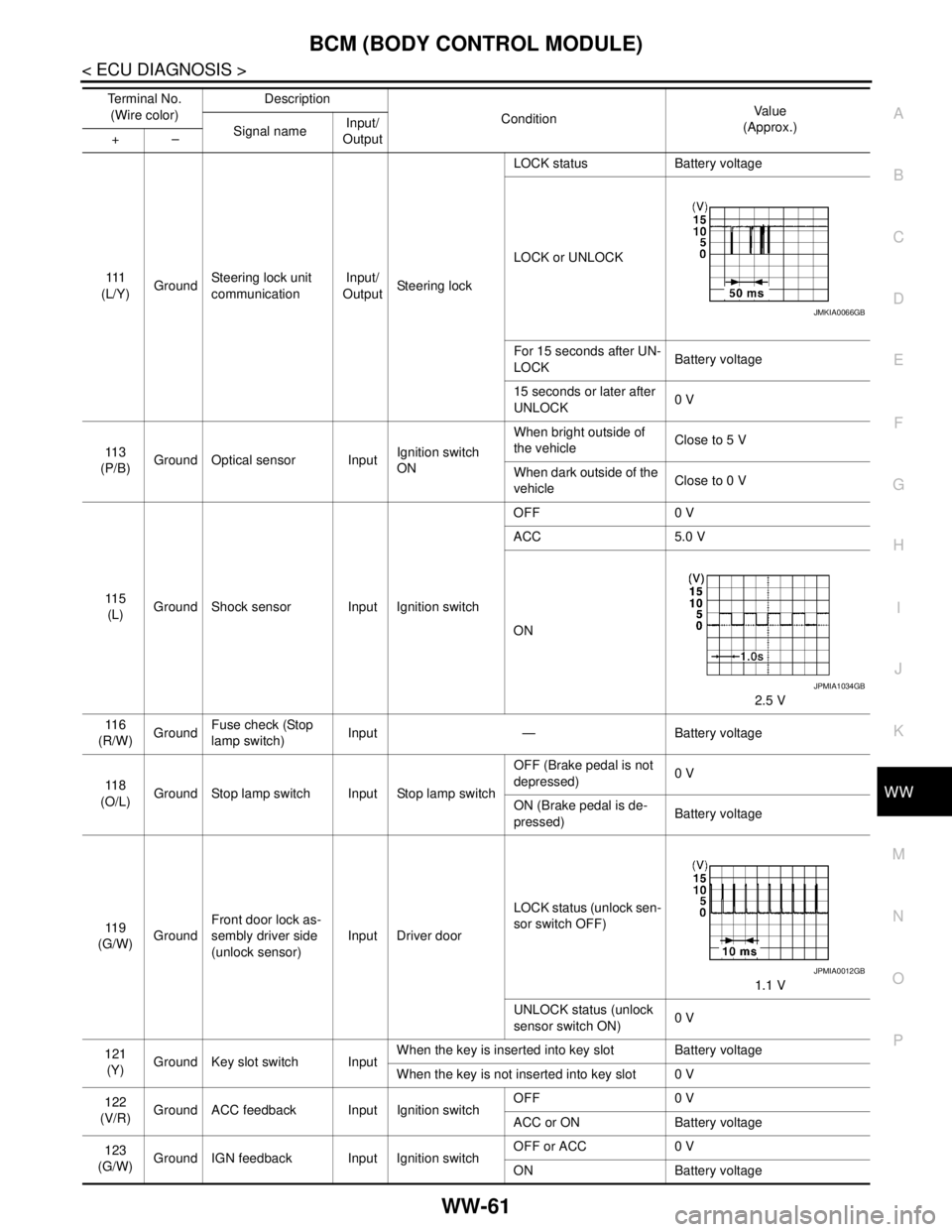
111
(L/Y)GroundSteering lock unit
communicationInput/
OutputSteering lockLOCK status Battery voltage
LOCK or UNLOCK
For 15 seconds after UN-
LOCKBattery voltage
15 seconds or later after
UNLOCK0 V
11 3
(P/B)Ground Optical sensor InputIgnition switch
ONWhen bright outside of
the vehicleClose to 5 V
When dark outside of the
vehicleClose to 0 V
11 5
(L)Ground Shock sensor Input Ignition switchOFF 0 V
ACC 5.0 V
ON
2.5 V
11 6
(R/W)GroundFuse check (Stop
lamp switch)Input — Battery voltage
11 8
(O/L)Ground Stop lamp switch Input Stop lamp switchOFF (Brake pedal is not
depressed)0 V
ON (Brake pedal is de-
pressed)Battery voltage
11 9
(G/W)GroundFront door lock as-
sembly driver side
(unlock sensor)Input Driver doorLOCK status (unlock sen-
sor switch OFF)
1.1 V
UNLOCK status (unlock
sensor switch ON)0 V
121
(Y)Ground Key slot switch InputWhen the key is inserted into key slot Battery voltage
When the key is not inserted into key slot 0 V
122
(V/R)Ground ACC feedback Input Ignition switchOFF 0 V
ACC or ON Battery voltage
123
(G/W)Ground IGN feedback Input Ignition switchOFF or ACC 0 V
ON Battery voltage Te r m i n a l N o .
(Wire color)Description
ConditionVa l u e
(Approx.)
Signal nameInput/
Output +–
JMKIA0066GB
JPMIA1034GB
JPMIA0012GB