reset NISSAN TEANA 2008 Service Manual
[x] Cancel search | Manufacturer: NISSAN, Model Year: 2008, Model line: TEANA, Model: NISSAN TEANA 2008Pages: 5121, PDF Size: 69.03 MB
Page 4231 of 5121
FRONT SIDE AIR BAG MODULE
SR-17
< ON-VEHICLE REPAIR >
C
D
E
F
G
I
J
K
L
MA
B
SR
N
O
P
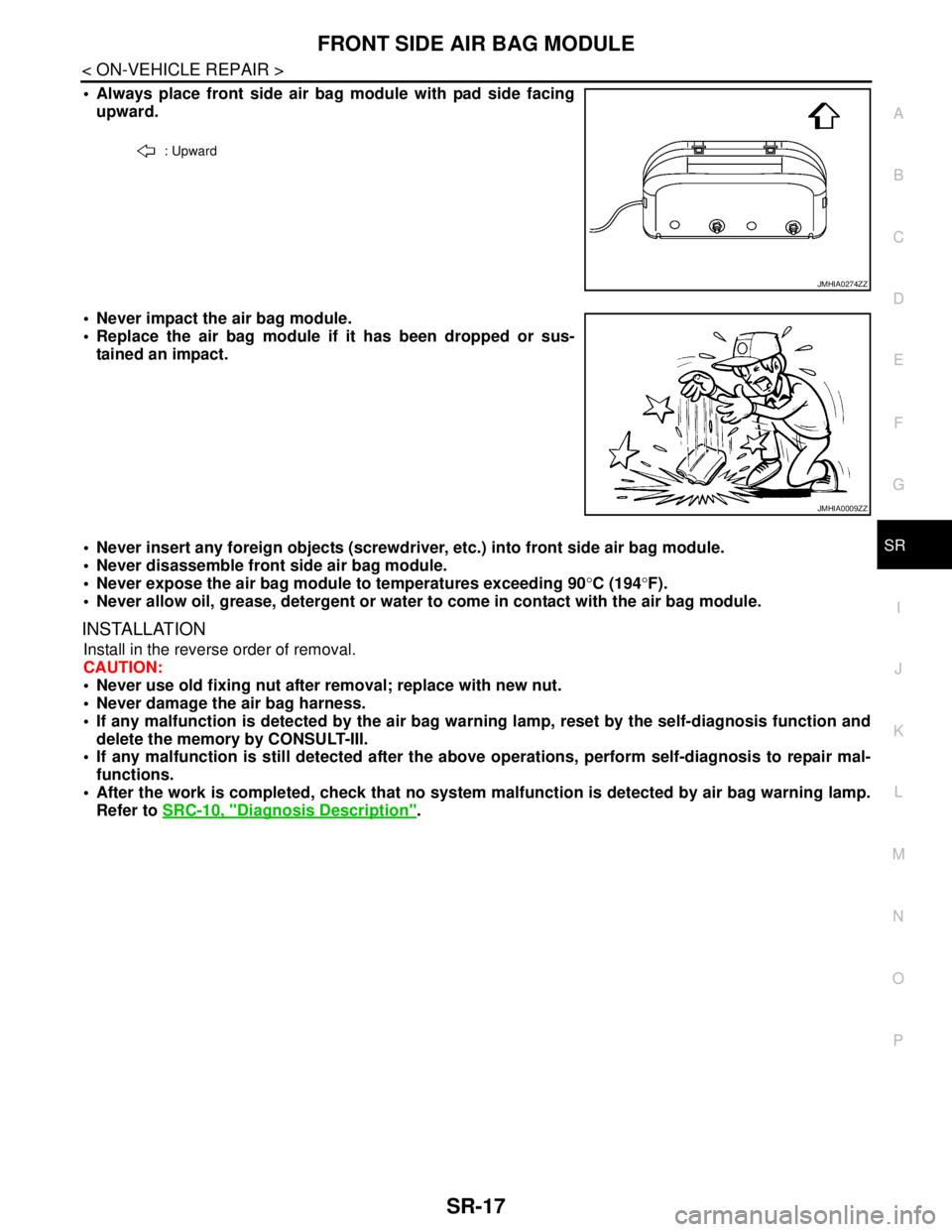
Always place front side air bag module with pad side facing
upward.
Never impact the air bag module.
Replace the air bag module if it has been dropped or sus-
tained an impact.
Never insert any foreign objects (screwdriver, etc.) into front side air bag module.
Never disassemble front side air bag module.
Never expose the air bag module to temperatures exceeding 90°C (194°F).
Never allow oil, grease, detergent or water to come in contact with the air bag module.
INSTALLATION
Install in the reverse order of removal.
CAUTION:
Never use old fixing nut after removal; replace with new nut.
Never damage the air bag harness.
If any malfunction is detected by the air bag warning lamp, reset by the self-diagnosis function and
delete the memory by CONSULT-III.
If any malfunction is still detected after the above operations, perform self-diagnosis to repair mal-
functions.
After the work is completed, check that no system malfunction is detected by air bag warning lamp.
Refer to SRC-10, "
Diagnosis Description".
: Upward
JMHIA0274ZZ
JMHIA0009ZZ
Page 4233 of 5121
CRASH ZONE SENSOR
SR-19
< ON-VEHICLE REPAIR >
C
D
E
F
G
I
J
K
L
MA
B
SR
N
O
P
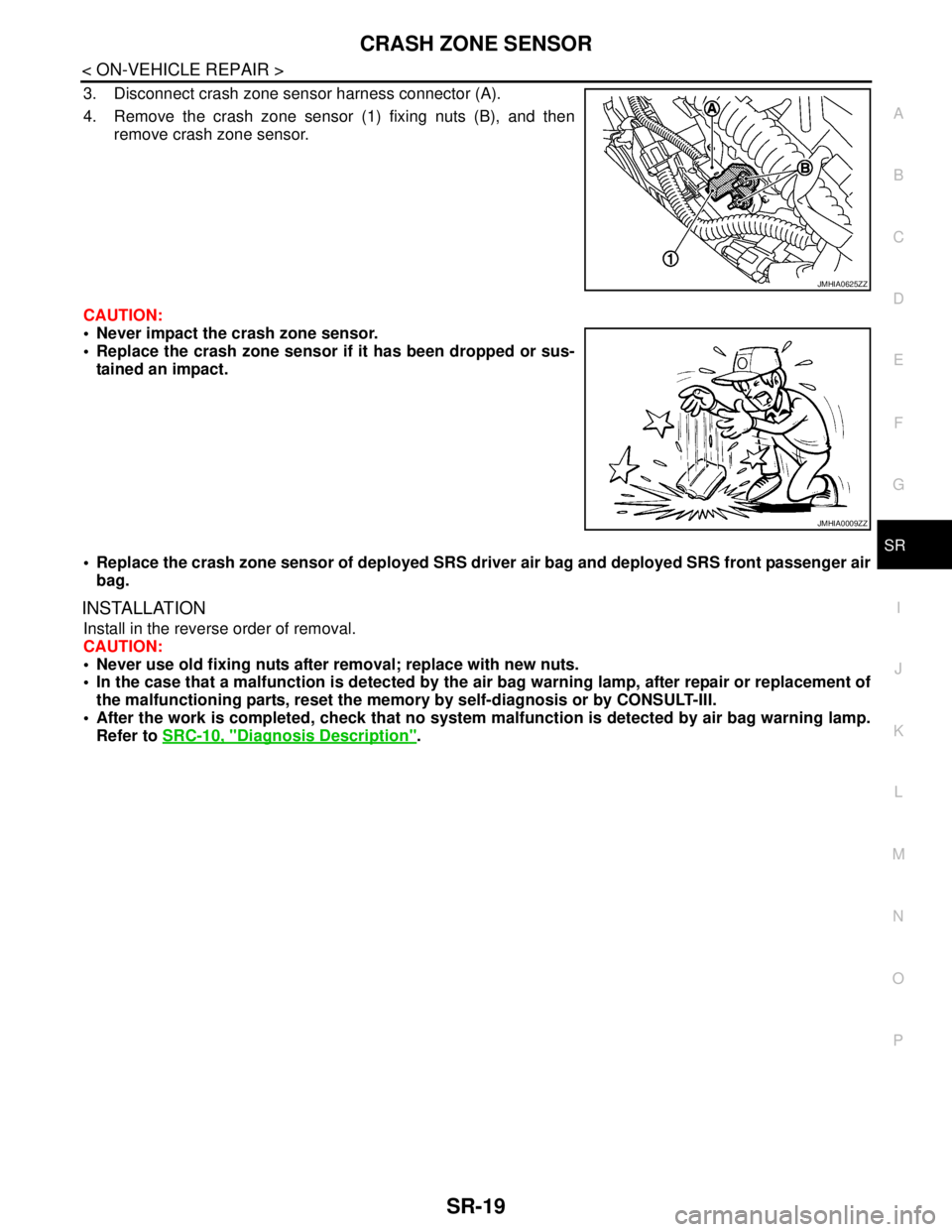
3. Disconnect crash zone sensor harness connector (A).
4. Remove the crash zone sensor (1) fixing nuts (B), and then
remove crash zone sensor.
CAUTION:
Never impact the crash zone sensor.
Replace the crash zone sensor if it has been dropped or sus-
tained an impact.
Replace the crash zone sensor of deployed SRS driver air bag and deployed SRS front passenger air
bag.
INSTALLATION
Install in the reverse order of removal.
CAUTION:
Never use old fixing nuts after removal; replace with new nuts.
In the case that a malfunction is detected by the air bag warning lamp, after repair or replacement of
the malfunctioning parts, reset the memory by self-diagnosis or by CONSULT-III.
After the work is completed, check that no system malfunction is detected by air bag warning lamp.
Refer to SRC-10, "
Diagnosis Description".
JMHIA0625ZZ
JMHIA0009ZZ
Page 4235 of 5121
SIDE AIR BAG (SATELLITE) SENSOR
SR-21
< ON-VEHICLE REPAIR >
C
D
E
F
G
I
J
K
L
MA
B
SR
N
O
P
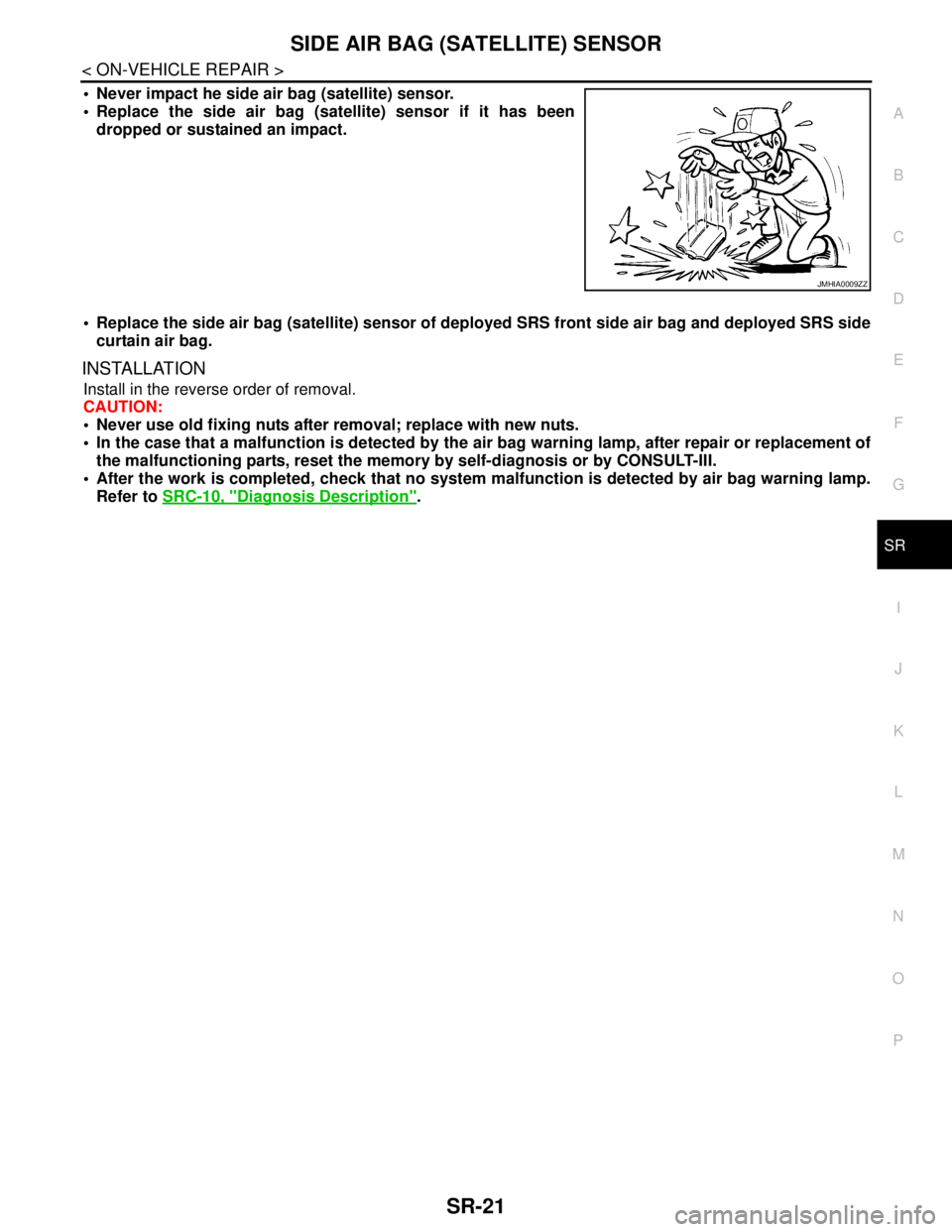
Never impact he side air bag (satellite) sensor.
Replace the side air bag (satellite) sensor if it has been
dropped or sustained an impact.
Replace the side air bag (satellite) sensor of deployed SRS front side air bag and deployed SRS side
curtain air bag.
INSTALLATION
Install in the reverse order of removal.
CAUTION:
Never use old fixing nuts after removal; replace with new nuts.
In the case that a malfunction is detected by the air bag warning lamp, after repair or replacement of
the malfunctioning parts, reset the memory by self-diagnosis or by CONSULT-III.
After the work is completed, check that no system malfunction is detected by air bag warning lamp.
Refer to SRC-10, "
Diagnosis Description".
JMHIA0009ZZ
Page 4237 of 5121
DIAGNOSIS SENSOR UNIT
SR-23
< ON-VEHICLE REPAIR >
C
D
E
F
G
I
J
K
L
MA
B
SR
N
O
P
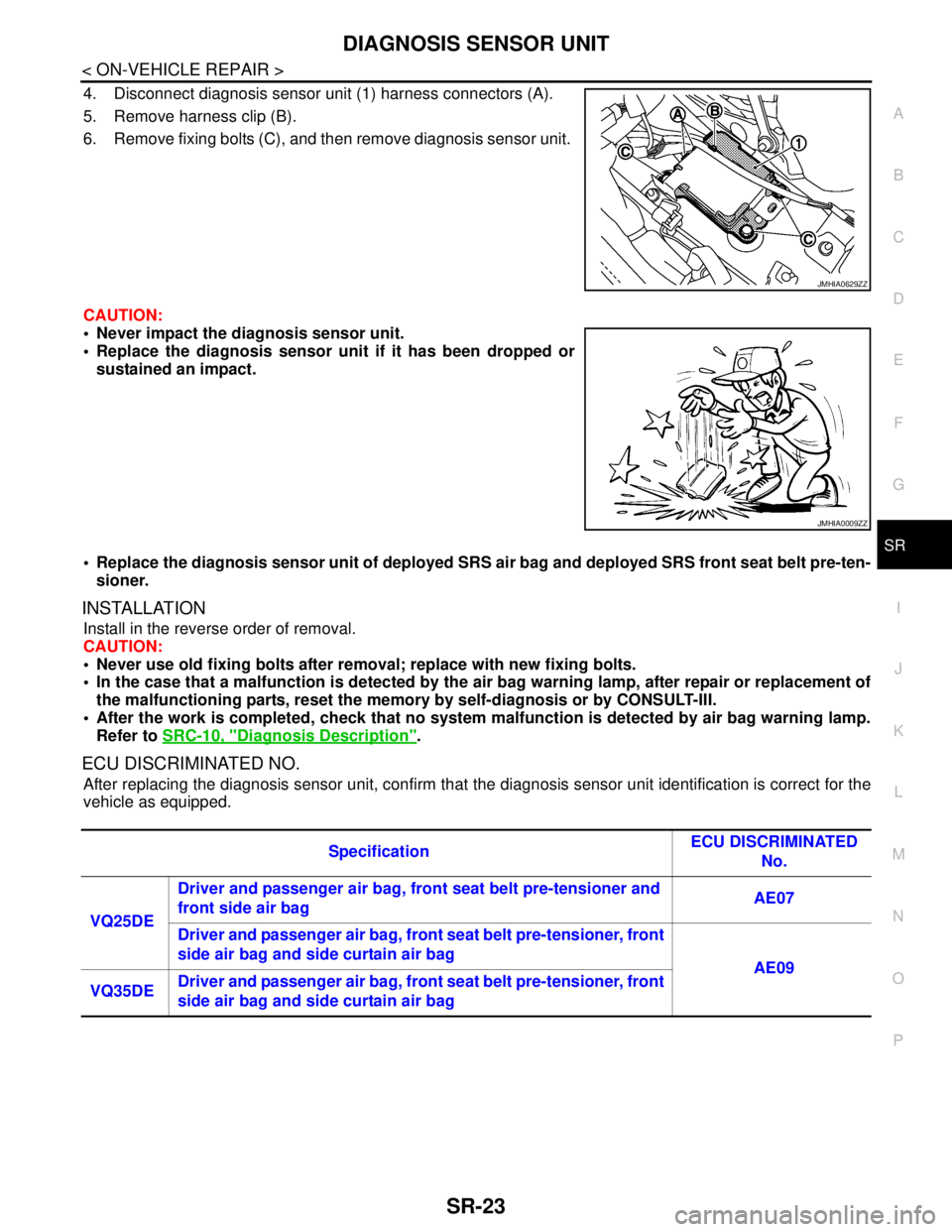
4. Disconnect diagnosis sensor unit (1) harness connectors (A).
5. Remove harness clip (B).
6. Remove fixing bolts (C), and then remove diagnosis sensor unit.
CAUTION:
Never impact the diagnosis sensor unit.
Replace the diagnosis sensor unit if it has been dropped or
sustained an impact.
Replace the diagnosis sensor unit of deployed SRS air bag and deployed SRS front seat belt pre-ten-
sioner.
INSTALLATION
Install in the reverse order of removal.
CAUTION:
Never use old fixing bolts after removal; replace with new fixing bolts.
In the case that a malfunction is detected by the air bag warning lamp, after repair or replacement of
the malfunctioning parts, reset the memory by self-diagnosis or by CONSULT-III.
After the work is completed, check that no system malfunction is detected by air bag warning lamp.
Refer to SRC-10, "
Diagnosis Description".
ECU DISCRIMINATED NO.
After replacing the diagnosis sensor unit, confirm that the diagnosis sensor unit identification is correct for the
vehicle as equipped.
JMHIA0629ZZ
JMHIA0009ZZ
SpecificationECU DISCRIMINATED
No.
VQ25DE Driver and passenger air bag, front seat belt pre-tensioner and
front side air bag AE07
Driver and passenger air bag, front seat belt pre-tensioner, front
side air bag and side curtain air bag
AE09
VQ35DEDriver and passenger air bag, front seat belt pre-tensioner, front
side air bag and side curtain air bag
Page 4258 of 5121
DIAGNOSIS SYSTEM (AIRBAG)
SRC-15
< FUNCTION DIAGNOSIS >
C
D
E
F
G
I
J
K
L
MA
B
SRC
N
O
P
After a malfunction is repaired, turn the ignition switch OFF for at least one second, then turn ignition switch
ON. Diagnosis mode returns to the user mode. At that time the self-diagnosis result is cleared.
CONSULT-III FunctionINFOID:0000000003813935
HOW TO CHANGE SELF-DIAGNOSIS MODE WITH CONSULT-III
From User Mode to Diagnosis Mode
After selecting “AIR BAG” on the “SELECT SYSTEM” screen, User mode automatically changes to Diagnosis
mode.
From Diagnosis Mode to User Mode
To return to User mode from Diagnosis mode, touch “BACK” key of CONSULT-III until “SELECT SYSTEM”
appears, then Diagnosis mode automatically changes to User mode.
DIAGNOSIS MODE FOR CONSULT-III
“SELF-DIAG [CURRENT]”
Current self-diagnosis results (also indicated with the number of air bag warning lamp blinks in Diagnosis
mode) are displayed on CONSULT-III screen in real time. This refers to a malfunctioning part requiring
repairs.
“SELF-DIAG [PAST]”
Diagnosis results previously stored in the memory are displayed on CONSULT-III screen. The stored results
are not erased until memory erasing is executed.
“TROUBLE DIAG RECORD”
With TROUBLE DIAG RECORD, diagnosis results previously erased by a reset operation can be displayed
on CONSULT-III screen.
“DISCRIMINATED NO.”
The air bag diagnosis sensor unit for each vehicle model has its own individual classification number. This
number is displayed on CONSULT-III screen. When replacing the air bag diagnosis sensor unit, refer to the
part number for the compatibility. After installation, replacement with a correct unit can be checked by con-
firming this classification number on CONSULT-III screen.
After repair, check that the discriminated number of air bag diagnosis sensor unit installed to vehicle is the
same. Refer to SR-22, "
Exploded View".
HOW TO ERASE SELF-DIAGNOSTIC RESULTS
“SELF-DIAG [CURRENT]”
A current self-diagnosis result is displayed on CONSULT-III screen in real time.
After the malfunction is repaired completely, no malfunction is detected on “SELF-DIAG [CURRENT]”.
“SELF-DIAG [PAST]”
Return to “SELF-DIAG [CURRENT]” CONSULT-III screen by touching “BACK” key of CONSULT-III and
select “SELF-DIAG [CURRENT]” in SELECT DIAG MODE. Touch “ERASE” in “SELF-DIAG [CURRENT]”
mode.
NOTE:
If the memory of the malfunction in “SELF-DIAG [PAST]” is not erased, the user mode shows the system
malfunction by illuminating the warning lamp even if the malfunction is repaired completely.
“TROUBLE DIAG RECORD”
The memory of “TROUBLE DIAG RECORD” cannot be erased.
Page 4814 of 5121

VTL-3
C
D
E
F
G
H
J
K
L
MA
B
VTL
N
O
P
ON-VEHICLE MAINTENANCE ....................77
AIR CONDITIONER FILTER ..............................77
Exploded View ........................................................77
Removal and Installation .........................................77
Replacement ...........................................................77
ON-VEHICLE REPAIR .................................78
PRESET SWITCH ..............................................78
Exploded View ........................................................78
Removal and Installation .........................................78
REAR CONTROL SWITCH ................................79
Exploded View ........................................................79
Removal and Installation .........................................79
A/C AUTO AMP. .................................................80
Exploded View ........................................................80
Removal and Installation .........................................80
AMBIENT SENSOR ...........................................81
Exploded View ........................................................81
Removal and Installation .........................................81
GAS SENSOR ....................................................82
WITH INTELLIGENT AIR CONDITIONER SYS-
TEM ............................................................................
82
WITH INTELLIGENT AIR CONDITIONER SYS-
TEM : Exploded View ..............................................
82
WITH INTELLIGENT AIR CONDITIONER SYS-
TEM : Removal and Installation ..............................
82
IN-VEHICLE SENSOR .......................................83
Exploded View ........................................................83
Removal and Installation .........................................83
SUNLOAD SENSOR ..........................................84
Exploded View ........................................................84
Removal and Installation .........................................84
INTAKE SENSOR ..............................................85
Exploded View ........................................................85
Removal and Installation .........................................86
BLOWER UNIT ...................................................87
Exploded View ........................................................87
Removal and Installation .........................................88
BLOWER MOTOR ..............................................90
Exploded View ........................................................90
Removal and Installation .........................................90
INTAKE DOOR MOTOR ....................................91
Exploded View ........................................................91
Removal and Installation .........................................91
HEATER & COOLING UNIT ASSEMBLY .........93
Exploded View ........................................................93
Removal and Installation .........................................95
MODE DOOR MOTOR .......................................98
Exploded View .........................................................98
Removal and Installation .........................................98
AIR MIX DOOR MOTOR ...................................99
Exploded View .........................................................99
Removal and Installation .........................................99
HEATER CORE ...............................................101
Exploded View .......................................................101
Removal and Installation .......................................102
DUCT AND GRILLE ........................................103
CENTER VENTILATOR GRILLE .............................103
CENTER VENTILATOR GRILLE : Exploded View ..103
CENTER VENTILATOR GRILLE : Removal and
Installation .............................................................
103
SIDE VENTILATOR GRILLE ...................................103
SIDE VENTILATOR GRILLE : Exploded View ......104
SIDE VENTILATOR GRILLE : Removal and In-
stallation ................................................................
104
SIDE DEFROSTER GRILLE ....................................104
SIDE DEFROSTER GRILLE : Exploded View ......105
SIDE DEFROSTER GRILLE : Removal and In-
stallation ................................................................
105
VENTILATOR DUCT ................................................105
VENTILATOR DUCT : Exploded View ..................106
VENTILATOR DUCT : Removal and Installation ...106
SIDE DEFROSTER NOZZLE ...................................107
SIDE DEFROSTER NOZZLE : Exploded View .....107
SIDE DEFROSTER NOZZLE : Removal and In-
stallation ................................................................
107
DEFROSTER NOZZLE ............................................108
DEFROSTER NOZZLE : Exploded View ..............108
DEFROSTER NOZZLE : Removal and Installation
..
109
REAR VENTILATOR GRILLE .................................109
REAR VENTILATOR GRILLE : Exploded View ....110
REAR VENTILATOR GRILLE : Removal and In-
stallation ................................................................
110
REAR VENTILATOR DUCT 1 .................................110
REAR VENTILATOR DUCT 1 : Exploded View ....111
REAR VENTILATOR DUCT 1 : Removal and In-
stallation ................................................................
111
REAR VENTILATOR DUCT 2 .................................111
REAR VENTILATOR DUCT 2 : Exploded View ....112
REAR VENTILATOR DUCT 2 : Removal and In-
stallation ................................................................
112
REAR FOOT DUCT 1 ..............................................112
REAR FOOT DUCT 1 : Exploded View .................113
REAR FOOT DUCT 1 : Removal and Installation ..113
REAR FOOT DUCT 2 ..............................................114
REAR FOOT DUCT 2 : Exploded View .................114
Page 4823 of 5121
![NISSAN TEANA 2008 Service Manual VTL-12
< PRECAUTION >[WITHOUT 7 INCH DISPLAY]
PRECAUTIONS
Be certain that the gauge face indicates HFC-134a or R-134a. Be
sure the gauge set has 1/2″-16 ACME threaded connections for ser-
vice hoses](/img/5/57391/w960_57391-4822.png "NISSAN TEANA 2008 Service Manual VTL-12
< PRECAUTION >[WITHOUT 7 INCH DISPLAY]
PRECAUTIONS
Be certain that the gauge face indicates HFC-134a or R-134a. Be
sure the gauge set has 1/2″-16 ACME threaded connections for ser-
vice hoses")
VTL-12
< PRECAUTION >[WITHOUT 7 INCH DISPLAY]
PRECAUTIONS
Be certain that the gauge face indicates HFC-134a or R-134a. Be
sure the gauge set has 1/2″-16 ACME threaded connections for ser-
vice hoses. Confirm the set has been used only with refrigerant
HFC-134a (R-134a) and specified lubricants.
SERVICE HOSES
Be certain that the service hoses display the markings described
(colored hose with black stripe). All hoses must equip positive shut-
off devices (either manual or automatic) near the end of the hoses
opposite to the manifold gauge.
SERVICE COUPLERS
Never attempt to connect HFC-134a (R-134a) service couplers to a
CFC-12 (R-12) A/C system. The HFC-134a (R-134a) couplers do
not properly connect to the CFC-12 (R-12) system. However, if an
improper connection is attempted, discharging and contamination
may occur.
REFRIGERANT WEIGHT SCALE
Verify that no refrigerant other than HFC-134a (R-134a) and speci-
fied lubricants have been used with the scale. The hose fitting must
be 1/2″-16 ACME if the scale controls refrigerant flow electronically.
CALIBRATING ACR4 WEIGHT SCALE
Calibrate the scale each three month.
To calibrate the weight scale on the ACR4:
1. Press “Shift/Reset” and “Enter” at the same time.
2. Press “8787”. “A1” is displayed.
3. Remove all weight from the scale.
4. Press “0”, then press “Enter”. “0.00” is displayed and change to “A2”.
SHA533D
RHA272D
Shut-off valve rotation A/C service valve
Clockwise Open
Counterclockwise Close
RHA273D
RHA274D
Page 4824 of 5121
![NISSAN TEANA 2008 Service Manual PRECAUTIONS
VTL-13
< PRECAUTION >[WITHOUT 7 INCH DISPLAY]
C
D
E
F
G
H
J
K
L
MA
B
VTL
N
O
P
5. Place a known weight (dumbbell or similar weight), between 4.5 and 8.6 kg (10 and 19 lb.) on the center
of](/img/5/57391/w960_57391-4823.png "NISSAN TEANA 2008 Service Manual PRECAUTIONS
VTL-13
< PRECAUTION >[WITHOUT 7 INCH DISPLAY]
C
D
E
F
G
H
J
K
L
MA
B
VTL
N
O
P
5. Place a known weight (dumbbell or similar weight), between 4.5 and 8.6 kg (10 and 19 lb.) on the center
of")
PRECAUTIONS
VTL-13
< PRECAUTION >[WITHOUT 7 INCH DISPLAY]
C
D
E
F
G
H
J
K
L
MA
B
VTL
N
O
P
5. Place a known weight (dumbbell or similar weight), between 4.5 and 8.6 kg (10 and 19 lb.) on the center
of the weight scale.
6. Enter the known weight using four digits. (Example 10 lb. = 10.00, 10.5 lb. = 10.50)
7. Press “Enter”— the display returns to the vacuum mode.
8. Press “Shift/Reset” and “Enter” at the same time.
9. Press “6”— the known weight on the scale is displayed.
10. Remove the known weight from the scale. “0.00” is displayed.
11. Press “Shift/Reset” to return the ACR4 to the program mode.
CHARGING CYLINDER
Using a charging cylinder is not recommended. Refrigerant may be vented into air from cylinder’s top valve
when filling the cylinder with refrigerant. Also, the accuracy of the cylinder is generally less than that of an
electronic scale or of quality recycle/recharge equipment.
Page 4880 of 5121
![NISSAN TEANA 2008 Service Manual PRECAUTIONS
VTL-69
< PRECAUTION >[WITH 7 INCH DISPLAY]
C
D
E
F
G
H
J
K
L
MA
B
VTL
N
O
P
Be certain that the gauge face indicates HFC-134a or R-134a. Be
sure the gauge set has 1/2″-16 ACME threaded c](/img/5/57391/w960_57391-4879.png "NISSAN TEANA 2008 Service Manual PRECAUTIONS
VTL-69
< PRECAUTION >[WITH 7 INCH DISPLAY]
C
D
E
F
G
H
J
K
L
MA
B
VTL
N
O
P
Be certain that the gauge face indicates HFC-134a or R-134a. Be
sure the gauge set has 1/2″-16 ACME threaded c")
PRECAUTIONS
VTL-69
< PRECAUTION >[WITH 7 INCH DISPLAY]
C
D
E
F
G
H
J
K
L
MA
B
VTL
N
O
P
Be certain that the gauge face indicates HFC-134a or R-134a. Be
sure the gauge set has 1/2″-16 ACME threaded connections for ser-
vice hoses. Confirm the set has been used only with refrigerant
HFC-134a (R-134a) and specified lubricants.
SERVICE HOSES
Be certain that the service hoses display the markings described
(colored hose with black stripe). All hoses must equip positive shut-
off devices (either manual or automatic) near the end of the hoses
opposite to the manifold gauge.
SERVICE COUPLERS
Never attempt to connect HFC-134a (R-134a) service couplers to a
CFC-12 (R-12) A/C system. The HFC-134a (R-134a) couplers do
not properly connect to the CFC-12 (R-12) system. However, if an
improper connection is attempted, discharging and contamination
may occur.
REFRIGERANT WEIGHT SCALE
Verify that no refrigerant other than HFC-134a (R-134a) and speci-
fied lubricants have been used with the scale. The hose fitting must
be 1/2″-16 ACME if the scale controls refrigerant flow electronically.
CALIBRATING ACR4 WEIGHT SCALE
Calibrate the scale each three month.
To calibrate the weight scale on the ACR4:
1. Press “Shift/Reset” and “Enter” at the same time.
2. Press “8787”. “A1” is displayed.
3. Remove all weight from the scale.
4. Press “0”, then press “Enter”. “0.00” is displayed and change to “A2”.
SHA533D
RHA272D
Shut-off valve rotation A/C service valve
Clockwise Open
Counterclockwise Close
RHA273D
RHA274D
Page 4881 of 5121
![NISSAN TEANA 2008 Service Manual VTL-70
< PRECAUTION >[WITH 7 INCH DISPLAY]
PRECAUTIONS
5. Place a known weight (dumbbell or similar weight), between 4.5 and 8.6 kg (10 and 19 lb.) on the center
of the weight scale.
6. Enter the know](/img/5/57391/w960_57391-4880.png "NISSAN TEANA 2008 Service Manual VTL-70
< PRECAUTION >[WITH 7 INCH DISPLAY]
PRECAUTIONS
5. Place a known weight (dumbbell or similar weight), between 4.5 and 8.6 kg (10 and 19 lb.) on the center
of the weight scale.
6. Enter the know")
VTL-70
< PRECAUTION >[WITH 7 INCH DISPLAY]
PRECAUTIONS
5. Place a known weight (dumbbell or similar weight), between 4.5 and 8.6 kg (10 and 19 lb.) on the center
of the weight scale.
6. Enter the known weight using four digits. (Example 10 lb. = 10.00, 10.5 lb. = 10.50)
7. Press “Enter”— the display returns to the vacuum mode.
8. Press “Shift/Reset” and “Enter” at the same time.
9. Press “6”— the known weight on the scale is displayed.
10. Remove the known weight from the scale. “0.00” is displayed.
11. Press “Shift/Reset” to return the ACR4 to the program mode.
CHARGING CYLINDER
Using a charging cylinder is not recommended. Refrigerant may be vented into air from cylinder’s top valve
when filling the cylinder with refrigerant. Also, the accuracy of the cylinder is generally less than that of an
electronic scale or of quality recycle/recharge equipment.