reset NISSAN TEANA 2008 Service Manual
[x] Cancel search | Manufacturer: NISSAN, Model Year: 2008, Model line: TEANA, Model: NISSAN TEANA 2008Pages: 5121, PDF Size: 69.03 MB
Page 4889 of 5121
![NISSAN TEANA 2008 Service Manual VTL-78
< ON-VEHICLE REPAIR >[WITH 7 INCH DISPLAY]
PRESET SWITCH
ON-VEHICLE REPAIR
PRESET SWITCH
Exploded ViewINFOID:0000000003894474
DISASSEMBLY
Removal and InstallationINFOID:0000000003894475
REMOVAL](/img/5/57391/w960_57391-4888.png "NISSAN TEANA 2008 Service Manual VTL-78
< ON-VEHICLE REPAIR >[WITH 7 INCH DISPLAY]
PRESET SWITCH
ON-VEHICLE REPAIR
PRESET SWITCH
Exploded ViewINFOID:0000000003894474
DISASSEMBLY
Removal and InstallationINFOID:0000000003894475
REMOVAL")
VTL-78
< ON-VEHICLE REPAIR >[WITH 7 INCH DISPLAY]
PRESET SWITCH
ON-VEHICLE REPAIR
PRESET SWITCH
Exploded ViewINFOID:0000000003894474
DISASSEMBLY
Removal and InstallationINFOID:0000000003894475
REMOVAL
Refer to AV-177, "Exploded View" (BASE AUDIO AND DISPLAY SYSTEM), AV-389, "Exploded View" (BOSE
AUDIO WITHOUT NAVIGATION) or AV-660, "
Exploded View" (BOSE AUDIO WITH NAVIGATION).
INSTALLATION
Installation is basically the reverse order of removal.
1. Preset switch 2. Cluster lid C
JPNIA1044ZZ
Page 4941 of 5121
WCS
DIAGNOSIS SYSTEM (METER)
WCS-11
< FUNCTION DIAGNOSIS >
C
D
E
F
G
H
I
J
K
L
MB A
O
P
DIAGNOSIS SYSTEM (METER)
Diagnosis DescriptionINFOID:0000000003838726
SELF-DIAGNOSIS MODE
Information display LCD segment operation can be checked in self-diagnosis mode.
Meters/gauges can be checked in self-diagnosis mode.
OPERATION PROCEDURE
1. Turn ignition switch ON, and switch the trip meter to “trip A” or “trip B”.
NOTE:
If the diagnosis function is activated with “trip A” displayed, the mileage on “trip A” is reset to “0000.0”.
(The same way for “trip B”.)
2. Turn ignition switch OFF.
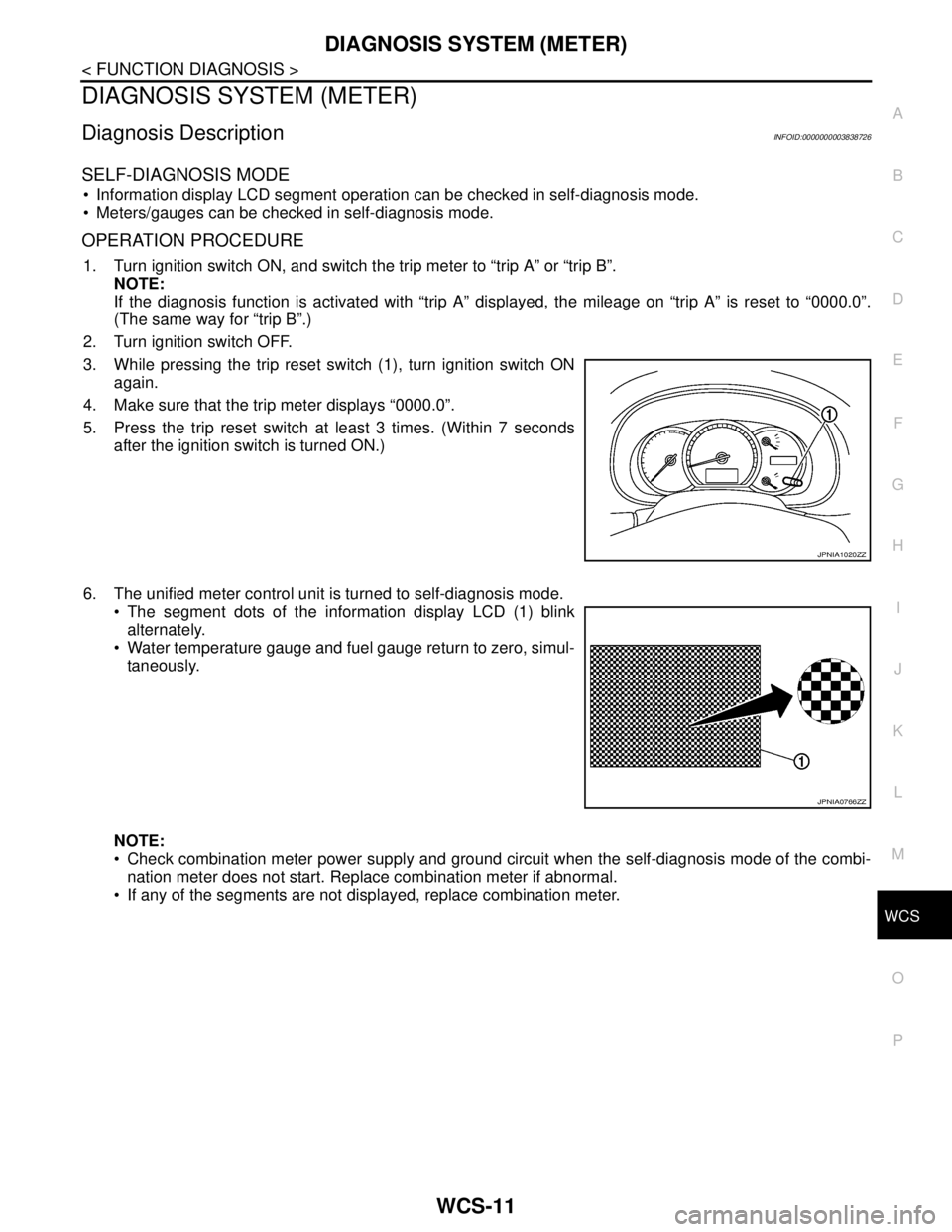
3. While pressing the trip reset switch (1), turn ignition switch ON
again.
4. Make sure that the trip meter displays “0000.0”.
5. Press the trip reset switch at least 3 times. (Within 7 seconds
after the ignition switch is turned ON.)
6. The unified meter control unit is turned to self-diagnosis mode.
The segment dots of the information display LCD (1) blink
alternately.
Water temperature gauge and fuel gauge return to zero, simul-
taneously.
NOTE:
Check combination meter power supply and ground circuit when the self-diagnosis mode of the combi-
nation meter does not start. Replace combination meter if abnormal.
If any of the segments are not displayed, replace combination meter.
JPNIA1020ZZ
JPNIA0766ZZ
Page 4942 of 5121
WCS-12
< FUNCTION DIAGNOSIS >
DIAGNOSIS SYSTEM (METER)
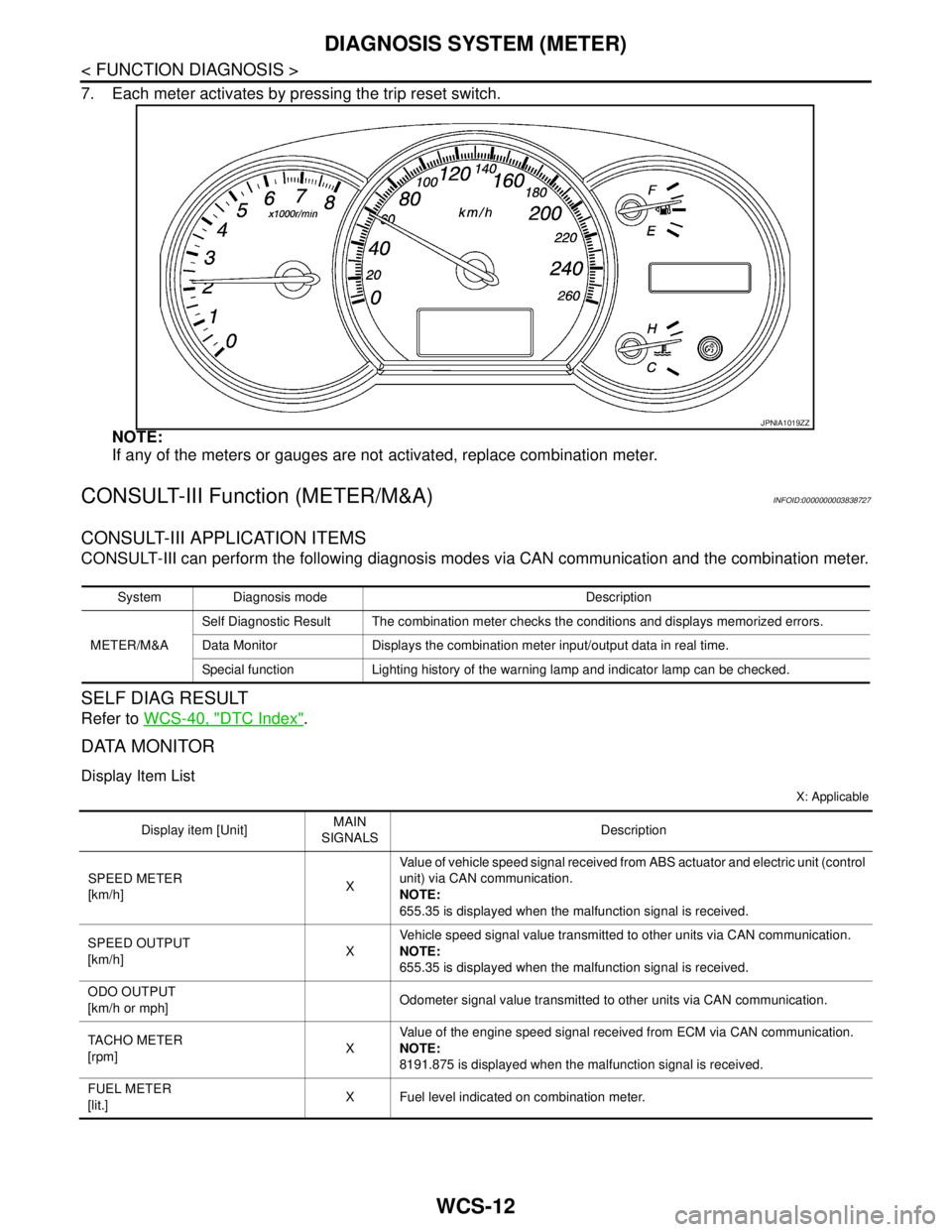
7. Each meter activates by pressing the trip reset switch.
NOTE:
If any of the meters or gauges are not activated, replace combination meter.
CONSULT-III Function (METER/M&A)INFOID:0000000003838727
CONSULT-III APPLICATION ITEMS
CONSULT-III can perform the following diagnosis modes via CAN communication and the combination meter.
SELF DIAG RESULT
Refer to WCS-40, "DTC Index".
DATA MONITOR
Display Item List
X: Applicable
JPNIA1019ZZ
System Diagnosis mode Description
METER/M&ASelf Diagnostic Result The combination meter checks the conditions and displays memorized errors.
Data Monitor Displays the combination meter input/output data in real time.
Special function Lighting history of the warning lamp and indicator lamp can be checked.
Display item [Unit]MAIN
SIGNALSDescription
SPEED METER
[km/h]XValue of vehicle speed signal received from ABS actuator and electric unit (control
unit) via CAN communication.
NOTE:
655.35 is displayed when the malfunction signal is received.
SPEED OUTPUT
[km/h]XVehicle speed signal value transmitted to other units via CAN communication.
NOTE:
655.35 is displayed when the malfunction signal is received.
ODO OUTPUT
[km/h or mph]Odometer signal value transmitted to other units via CAN communication.
TACHO METER
[rpm]XValue of the engine speed signal received from ECM via CAN communication.
NOTE:
8191.875 is displayed when the malfunction signal is received.
FUEL METER
[lit.]X Fuel level indicated on combination meter.
Page 4970 of 5121

WCS-40
< ECU DIAGNOSIS >
COMBINATION METER
DTC Index
INFOID:0000000003838733
Function Specifications
Speedometer
Reset to zero by suspending communication. Tachometer
Water temperature gauge
Illumination controlWhen suspending communication, changes to nighttime
mode.
Information displayDoor open warning
The display turns off by suspending communication. Trunk open warning
Parking brake release warning
Instantaneous fuel warning When reception time of an abnormal signal is 2 seconds or
less, the last received datum is used for calculation to indi-
cate the result.
When reception time of an abnormal signal is more than two
seconds, the last result calculated during normal condition
is indicated. Average fuel consumption
Average vehicle speed
Travel distance
Buzzer The buzzer turns off by suspending communication.
Warning lamp/indicator
lampABS warning lamp
The lamp turns on by suspending communication. VDC OFF indicator lamp
SLIP indicator lamp
Brake warning lamp
High beam indicator lamp
The lamp turns off by suspending communication. Front fog light indicator lamp
Rear fog light indicator lamp
Turn signal indicator lamp
Light indicator lamp
Oil pressure warning lamp
Malfunction indicator lamp
CRUISE indicator lamp
SPORT indicator lamp
Key warning lamp
Display contents of CONSULT-III Diagnostic item is detected when ... Refer to
CAN COMM CIRCUIT
[U1000]When combination meter is not transmitting or receiving CAN communication signal
for 2 seconds or more.MWI-37,
"Diagnosis
Procedure"
CONTROL UNIT (CAN)
[U1010]When detecting error during the initial diagnosis of the CAN controller of combina-
tion meter.MWI-38, "Diagnosis
Procedure"
VEHICLE SPEED
[B2205]The abnormal vehicle speed signal is input from the ABS actuator and electric unit
(control unit) for 2 seconds or more.MWI-39, "Diagnosis
Procedure"
ENGINE SPEED
[B2267]If ECM continuously transmits abnormal engine speed signals for 2 seconds or
more.MWI-40, "Diagnosis
Procedure"
WATER TEMP
[B2268]If ECM continuously transmits abnormal engine coolant temperature signals for 60
seconds or more.MWI-41, "Diagnosis
Procedure"
Page 4974 of 5121

WCS-44
< ECU DIAGNOSIS >
BCM (BODY CONTROL MODULE)
S/L RELAY-REQIgnition switch in OFF or ACC position Off
Ignition switch in ON position On
VEH SPEED 1 While driving Equivalent to speedometer reading
VEH SPEED 2 While driving Equivalent to speedometer reading
DOOR STAT-DRDriver door is locked LOCK
Wait with selective UNLOCK operation (5 seconds) READY
Driver door is unlocked UNLOCK
DOOR STAT-ASPassenger door is locked LOCK
Wait with selective UNLOCK operation (5 seconds) READY
Passenger door is unlocked UNLOCK
ID OK FLAGIgnition switch in ACC or ON position Reset
Ignition switch in OFF position Set
PRMT ENG STRTThe engine start is prohibited Reset
The engine start is permitted Set
PRMT RKE STRTNOTE:
The item is indicated, but not monitored. Reset
KEY SW -SLOTThe key is not inserted into key slot Off
The key is inserted into key slot On
RKE OPE COUN1 During the operation of the key Operation frequency of the key
RKE OPE COUN2NOTE:
The item is indicated, but not monitored. —
CONFRM ID ALLThe key ID that the key slot receives does not accord with any key
ID registered to BCM.Ye t
The key ID that the key slot receives accords with any key ID regis-
tered to BCM.Done
CONFIRM ID4The key ID that the key slot receives does not accord with the fourth
key ID registered to BCM.Ye t
The key ID that the key slot receives accords with the fourth key ID
registered to BCM.Done
CONFIRM ID3The key ID that the key slot receives does not accord with the third
key ID registered to BCM.Ye t
The key ID that the key slot receives accords with the third key ID
registered to BCM.Done
CONFIRM ID2The key ID that the key slot receives does not accord with the sec-
ond key ID registered to BCM.Ye t
The key ID that the key slot receives accords with the second key
ID registered to BCM.Done
CONFIRM ID1The key ID that the key slot receives does not accord with the first
key ID registered to BCM.Ye t
The key ID that the key slot receives accords with the first key ID
registered to BCM.Done
TP 4The ID of fourth key is not registered to BCM Yet
The ID of fourth key is registered to BCM Done
TP 3The ID of third key is not registered to BCM Yet
The ID of third key is registered to BCM Done
TP 2The ID of second key is not registered to BCM Yet
The ID of second key is registered to BCM Done Monitor Item Condition Value/Status
Page 5025 of 5121

DIAGNOSIS SYSTEM (BCM)
WW-13
< FUNCTION DIAGNOSIS >
C
D
E
F
G
H
I
J
K
MA
B
WW
N
O
P
The BCM records the following condition at the moment a particular DTC is detected.
Vehicle Speed
Odo/Trip Meter
Vehicle Condition (BCM detected condition)
IGN Counter
IGN counter indicates the number of times that ignition switch is turned ON after DTC is detected.
The number is 0 when a malfunction is detected now.
The number increases like 1 → 2 → 3...38 → 39 after returning to the normal condition whenever ignition
switch OFF → ON.
The number is fixed to 39 until the self-diagnosis results are erased if it is over 39.
WIPER
WIPER : CONSULT-III Function (BCM - WIPER)INFOID:0000000003761581
WORK SUPPORT
*:Factory setting
NOTE:
When performed “RESET SETTING VALUE” on “Work Support (BCM - BCM)”, set “WIPER SPEED SETTING” on “Work Support (BCM
-WIPER)” to “On”.CONSULT screen terms Description
SLEEP>LOCKWhile turning BCM status from low power consumption mode to normal mode (Power supply
position is “LOCK”.)
SLEEP>OFFWhile turning BCM status from low power consumption mode to normal mode (Power supply
position is “OFF”.)
LOCK>ACC While turning power supply position from “LOCK” to “ACC”
ACC>ON While turning power supply position from “ACC” to “IGN”
RUN>ACCWhile turning power supply position from “RUN” to “ACC” (Vehicle is stopping and selector
lever is except P position.)
CRANK>RUNWhile turning power supply position from “CRANKING” to “RUN” (From cranking up the en-
gine to run it)
RUN>URGENT While turning power supply position from “RUN“ to “ACC” (Emergency stop operation)
ACC>OFF While turning power supply position from “ACC” to “OFF”
OFF>LOCK While turning power supply position from “OFF” to “LOCK”
OFF>ACC While turning power supply position from “OFF” to “ACC”
ON>CRANK While turning power supply position from “IGN” to “CRANKING”
OFF>SLEEPWhile turning BCM status from normal mode (Power supply position is “OFF”.) to low power
consumption mode
LOCK>SLEEPWhile turning BCM status from normal mode (Power supply position is “LOCK”.) to low pow-
er consumption mode
LOCK Power supply position is “LOCK” (Ignition switch OFF with steering is locked.)
OFF Power supply position is “OFF” (Ignition switch OFF with steering is unlocked.)
ACC Power supply position is “ACC” (Ignition switch ACC)
ON Power supply position is “IGN” (Ignition switch ON with engine stopped)
ENGINE RUN Power supply position is “RUN” (Ignition switch ON with engine running)
CRANKING Power supply position is “CRANKING” (At engine cranking)
Service item Setting item Description
WIPER SPEED
SETTINGOn*With vehicle speed
(Front wiper intermittent time linked with the vehicle speed and wiper intermittent dial position)
OffWithout vehicle speed
(Front wiper intermittent time linked with the wiper intermittent dial position)
Page 5057 of 5121

BCM (BODY CONTROL MODULE)
WW-45
< ECU DIAGNOSIS >
C
D
E
F
G
H
I
J
K
MA
B
WW
N
O
P
S/L UNLK-IPDMSteering is unlocked Off
Steering is locked On
S/L RELAY-REQIgnition switch in OFF or ACC position Off
Ignition switch in ON position On
VEH SPEED 1 While driving Equivalent to speedometer reading
VEH SPEED 2 While driving Equivalent to speedometer reading
DOOR STAT-DRDriver door is locked LOCK
Wait with selective UNLOCK operation (5 seconds) READY
Driver door is unlocked UNLOCK
DOOR STAT-ASPassenger door is locked LOCK
Wait with selective UNLOCK operation (5 seconds) READY
Passenger door is unlocked UNLOCK
ID OK FLAGIgnition switch in ACC or ON position Reset
Ignition switch in OFF position Set
PRMT ENG STRTThe engine start is prohibited Reset
The engine start is permitted Set
PRMT RKE STRTNOTE:
The item is indicated, but not monitored. Reset
KEY SW -SLOTThe key is not inserted into key slot Off
The key is inserted into key slot On
RKE OPE COUN1 During the operation of the key Operation frequency of the key
RKE OPE COUN2NOTE:
The item is indicated, but not monitored. —
CONFRM ID ALLThe key ID that the key slot receives does not accord with any key
ID registered to BCM.Ye t
The key ID that the key slot receives accords with any key ID regis-
tered to BCM.Done
CONFIRM ID4The key ID that the key slot receives does not accord with the fourth
key ID registered to BCM.Ye t
The key ID that the key slot receives accords with the fourth key ID
registered to BCM.Done
CONFIRM ID3The key ID that the key slot receives does not accord with the third
key ID registered to BCM.Ye t
The key ID that the key slot receives accords with the third key ID
registered to BCM.Done
CONFIRM ID2The key ID that the key slot receives does not accord with the sec-
ond key ID registered to BCM.Ye t
The key ID that the key slot receives accords with the second key
ID registered to BCM.Done
CONFIRM ID1The key ID that the key slot receives does not accord with the first
key ID registered to BCM.Ye t
The key ID that the key slot receives accords with the first key ID
registered to BCM.Done
TP 4The ID of fourth key is not registered to BCM Yet
The ID of fourth key is registered to BCM Done
TP 3The ID of third key is not registered to BCM Yet
The ID of third key is registered to BCM Done Monitor Item Condition Value/Status