ECU NISSAN TEANA 2008 Service Manual
[x] Cancel search | Manufacturer: NISSAN, Model Year: 2008, Model line: TEANA, Model: NISSAN TEANA 2008Pages: 5121, PDF Size: 69.03 MB
Page 4209 of 5121
![NISSAN TEANA 2008 Service Manual SEC-200
< SYMPTOM DIAGNOSIS >[INTELLIGENT KEY SYSTEM]
VEHICLE SECURITY SYSTEM CAN NOT BE CANCELED
VEHICLE SECURITY SYSTEM CAN NOT BE CANCELED
INTELLIGENT KEY
INTELLIGENT KEY : DescriptionINFOID:000000](/img/5/57391/w960_57391-4208.png "NISSAN TEANA 2008 Service Manual SEC-200
< SYMPTOM DIAGNOSIS >[INTELLIGENT KEY SYSTEM]
VEHICLE SECURITY SYSTEM CAN NOT BE CANCELED
VEHICLE SECURITY SYSTEM CAN NOT BE CANCELED
INTELLIGENT KEY
INTELLIGENT KEY : DescriptionINFOID:000000")
SEC-200
< SYMPTOM DIAGNOSIS >[INTELLIGENT KEY SYSTEM]
VEHICLE SECURITY SYSTEM CAN NOT BE CANCELED
VEHICLE SECURITY SYSTEM CAN NOT BE CANCELED
INTELLIGENT KEY
INTELLIGENT KEY : DescriptionINFOID:0000000003815107
Before performing the diagnosis in the following table, check “Work Flow”. Refer to SEC-5, "Work Flow".
INTELLIGENT KEY : Diagnosis ProcedureINFOID:0000000003815108
1.CHECK INTELLIGENT KEY
Check Intelligent Key.
Refer to DLK-84, "
ComponentFunctionCheck".
Is the inspection result normal?
YES >> GO TO 2.
NO >> Repair or replace the malfunctioning parts.
2.CHECK INTELLIGENT KEY SYSTEM
Check Intelligent Key system.
Refer to SEC-9, "
System Description".
Is the inspection result normal?
YES >> GO TO 3.
NO >> Refer to SEC-5, "
Work Flow".
3.CONFIRM THE OPERATION
Confirm the operation again.
Is the result normal?
YES >> Check intermittent incident. Refer to GI-35, "Intermittent Incident".
NO >> GO TO 1.
DOOR REQUEST SWITCH
DOOR REQUEST SWITCH : DescriptionINFOID:0000000003815109
Before performing the diagnosis in the following table, check “Work Flow”. Refer to SEC-5, "Work Flow".
DOOR REQUEST SWITCH : Diagnosis ProcedureINFOID:0000000003815110
1.CHECK DOOR REQUEST SWITCH
Check door request switch.
Refer to DLK-72, "
ComponentFunctionCheck".
Is the inspection normal?
YES >> GO TO 2.
NO >> Repair or replace the malfunctioning parts.
2.CHECK INTELLIGENT KEY SYSTEM
Check Intelligent Key system.
Refer to DLK-14, "
INTELLIGENT KEY SYSTEM : System Description".
Is the inspection result normal?
YES >> GO TO 3.
NO >> Refer to DLK-7, "
Work Flow".
3.CONFIRM THE OPERATION
Confirm the operation again.
Is the result normal?
YES >> Check intermittent incident. Refer to GI-35, "Intermittent Incident".
NO >> GO TO 1.
Page 4221 of 5121
DRIVER AIR BAG MODULE
SR-7
< ON-VEHICLE REPAIR >
C
D
E
F
G
I
J
K
L
MA
B
SR
N
O
P
3. Pull out driver air bag module.
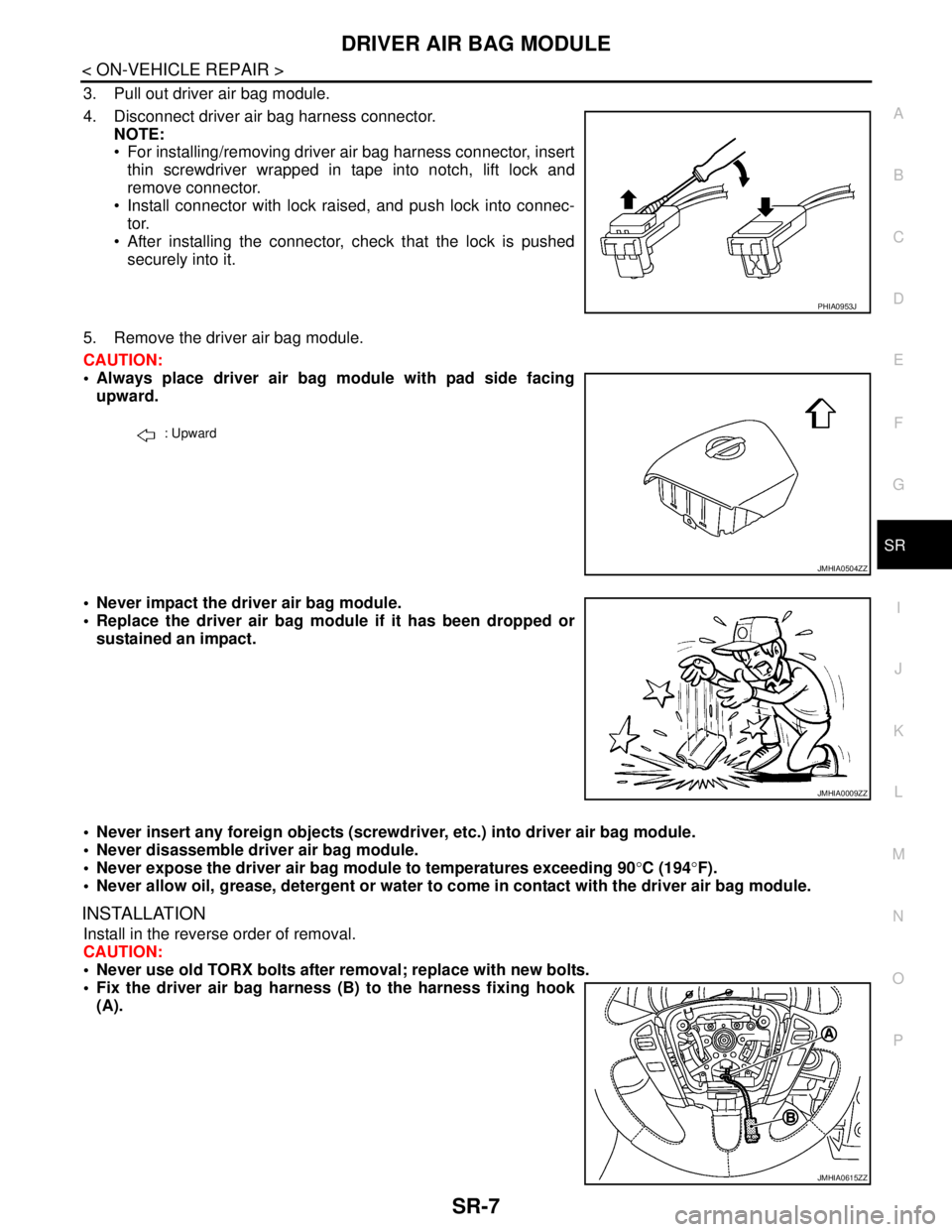
4. Disconnect driver air bag harness connector.
NOTE:
For installing/removing driver air bag harness connector, insert
thin screwdriver wrapped in tape into notch, lift lock and
remove connector.
Install connector with lock raised, and push lock into connec-
tor.
After installing the connector, check that the lock is pushed
securely into it.
5. Remove the driver air bag module.
CAUTION:
Always place driver air bag module with pad side facing
upward.
Never impact the driver air bag module.
Replace the driver air bag module if it has been dropped or
sustained an impact.
Never insert any foreign objects (screwdriver, etc.) into driver air bag module.
Never disassemble driver air bag module.
Never expose the driver air bag module to temperatures exceeding 90°C (194°F).
Never allow oil, grease, detergent or water to come in contact with the driver air bag module.
INSTALLATION
Install in the reverse order of removal.
CAUTION:
Never use old TORX bolts after removal; replace with new bolts.
Fix the driver air bag harness (B) to the harness fixing hook
(A).
PHIA0953J
: Upward
JMHIA0504ZZ
JMHIA0009ZZ
JMHIA0615ZZ
Page 4222 of 5121

SR-8
< ON-VEHICLE REPAIR >
DRIVER AIR BAG MODULE
Tighten the TORX bolts after completely adjusting the centers of fixing holes on the driver air bag
module side and the steering wheel side. If the holes are misaligned, the bolt threads are damaged
and the module is not installed securely.
In the case that a malfunction is detected by the air bag warning lamp, after repair or replacement of
the malfunctioning parts, reset the memory by self-diagnosis or by CONSULT-III.
After the work is completed, check that no system malfunction is detected by air bag warning lamp.
Refer to SRC-10, "
Diagnosis Description".
Page 4228 of 5121
SR-14
< ON-VEHICLE REPAIR >
SIDE CURTAIN AIR BAG MODULE
SIDE CURTAIN AIR BAG MODULE
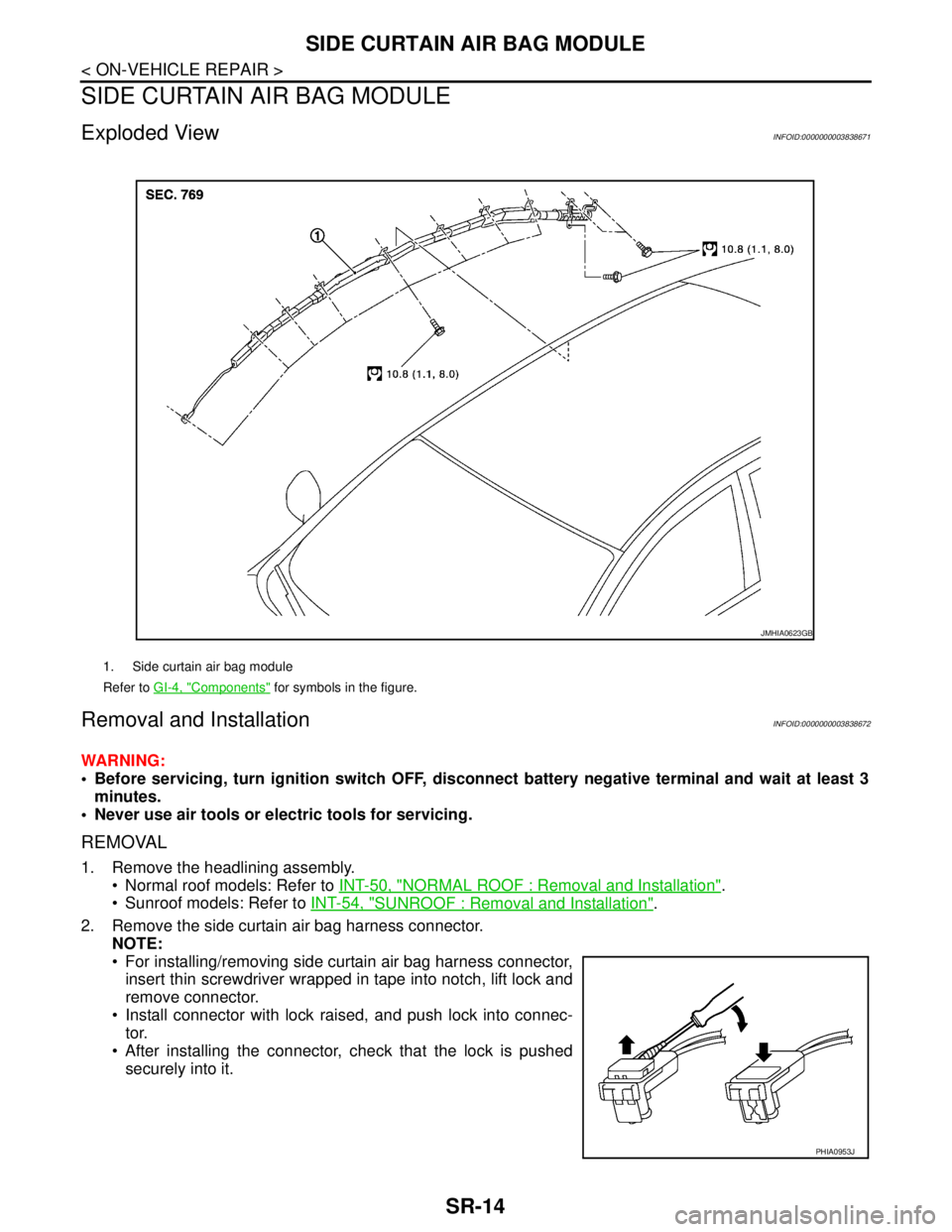
Exploded ViewINFOID:0000000003838671
Removal and InstallationINFOID:0000000003838672
WARNING:
Before servicing, turn ignition switch OFF, disconnect battery negative terminal and wait at least 3
minutes.
Never use air tools or electric tools for servicing.
REMOVAL
1. Remove the headlining assembly.
Normal roof models: Refer to INT-50, "
NORMAL ROOF : Removal and Installation".
Sunroof models: Refer to INT-54, "
SUNROOF : Removal and Installation".
2. Remove the side curtain air bag harness connector.
NOTE:
For installing/removing side curtain air bag harness connector,
insert thin screwdriver wrapped in tape into notch, lift lock and
remove connector.
Install connector with lock raised, and push lock into connec-
tor.
After installing the connector, check that the lock is pushed
securely into it.
1. Side curtain air bag module
Refer to GI-4, "
Components" for symbols in the figure.
JMHIA0623GB
PHIA0953J
Page 4237 of 5121
DIAGNOSIS SENSOR UNIT
SR-23
< ON-VEHICLE REPAIR >
C
D
E
F
G
I
J
K
L
MA
B
SR
N
O
P
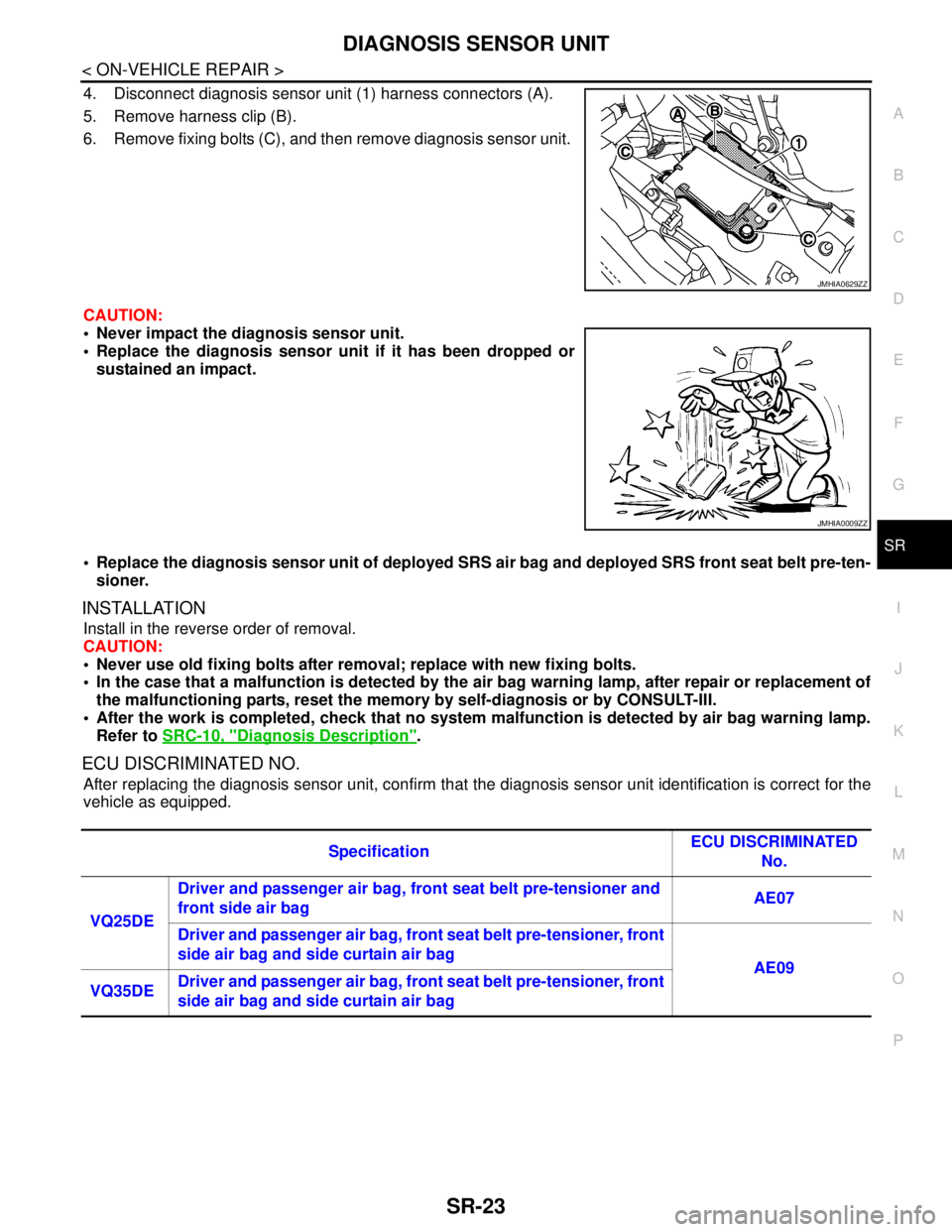
4. Disconnect diagnosis sensor unit (1) harness connectors (A).
5. Remove harness clip (B).
6. Remove fixing bolts (C), and then remove diagnosis sensor unit.
CAUTION:
Never impact the diagnosis sensor unit.
Replace the diagnosis sensor unit if it has been dropped or
sustained an impact.
Replace the diagnosis sensor unit of deployed SRS air bag and deployed SRS front seat belt pre-ten-
sioner.
INSTALLATION
Install in the reverse order of removal.
CAUTION:
Never use old fixing bolts after removal; replace with new fixing bolts.
In the case that a malfunction is detected by the air bag warning lamp, after repair or replacement of
the malfunctioning parts, reset the memory by self-diagnosis or by CONSULT-III.
After the work is completed, check that no system malfunction is detected by air bag warning lamp.
Refer to SRC-10, "
Diagnosis Description".
ECU DISCRIMINATED NO.
After replacing the diagnosis sensor unit, confirm that the diagnosis sensor unit identification is correct for the
vehicle as equipped.
JMHIA0629ZZ
JMHIA0009ZZ
SpecificationECU DISCRIMINATED
No.
VQ25DE Driver and passenger air bag, front seat belt pre-tensioner and
front side air bag AE07
Driver and passenger air bag, front seat belt pre-tensioner, front
side air bag and side curtain air bag
AE09
VQ35DEDriver and passenger air bag, front seat belt pre-tensioner, front
side air bag and side curtain air bag
Page 4240 of 5121
SR-26
< ON-VEHICLE REPAIR >
DISPOSAL OF AIR BAG MODULE AND SEAT BELT PRE-TENSIONER
*: If this lamp glows red, the tool is connected to the battery incorrectly. Reverse the connections and check the lamp glows green.
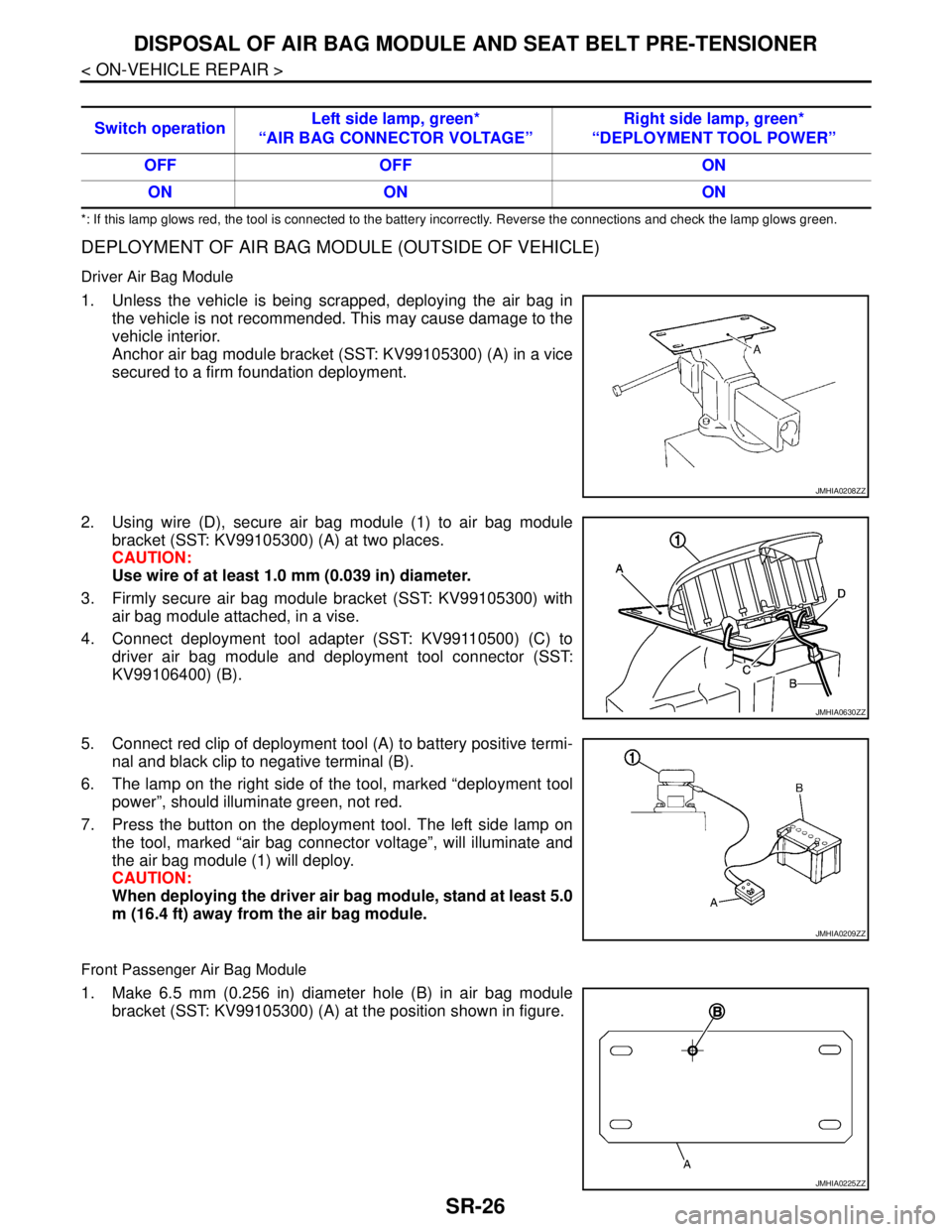
DEPLOYMENT OF AIR BAG MODULE (OUTSIDE OF VEHICLE)
Driver Air Bag Module
1. Unless the vehicle is being scrapped, deploying the air bag in
the vehicle is not recommended. This may cause damage to the
vehicle interior.
Anchor air bag module bracket (SST: KV99105300) (A) in a vice
secured to a firm foundation deployment.
2. Using wire (D), secure air bag module (1) to air bag module
bracket (SST: KV99105300) (A) at two places.
CAUTION:
Use wire of at least 1.0 mm (0.039 in) diameter.
3. Firmly secure air bag module bracket (SST: KV99105300) with
air bag module attached, in a vise.
4. Connect deployment tool adapter (SST: KV99110500) (C) to
driver air bag module and deployment tool connector (SST:
KV99106400) (B).
5. Connect red clip of deployment tool (A) to battery positive termi-
nal and black clip to negative terminal (B).
6. The lamp on the right side of the tool, marked “deployment tool
power”, should illuminate green, not red.
7. Press the button on the deployment tool. The left side lamp on
the tool, marked “air bag connector voltage”, will illuminate and
the air bag module (1) will deploy.
CAUTION:
When deploying the driver air bag module, stand at least 5.0
m (16.4 ft) away from the air bag module.
Front Passenger Air Bag Module
1. Make 6.5 mm (0.256 in) diameter hole (B) in air bag module
bracket (SST: KV99105300) (A) at the position shown in figure. Switch operationLeft side lamp, green*
“AIR BAG CONNECTOR VOLTAGE”Right side lamp, green*
“DEPLOYMENT TOOL POWER”
OFF OFF ON
ON ON ON
JMHIA0208ZZ
JMHIA0630ZZ
JMHIA0209ZZ
JMHIA0225ZZ
Page 4241 of 5121
DISPOSAL OF AIR BAG MODULE AND SEAT BELT PRE-TENSIONER
SR-27
< ON-VEHICLE REPAIR >
C
D
E
F
G
I
J
K
L
MA
B
SR
N
O
P
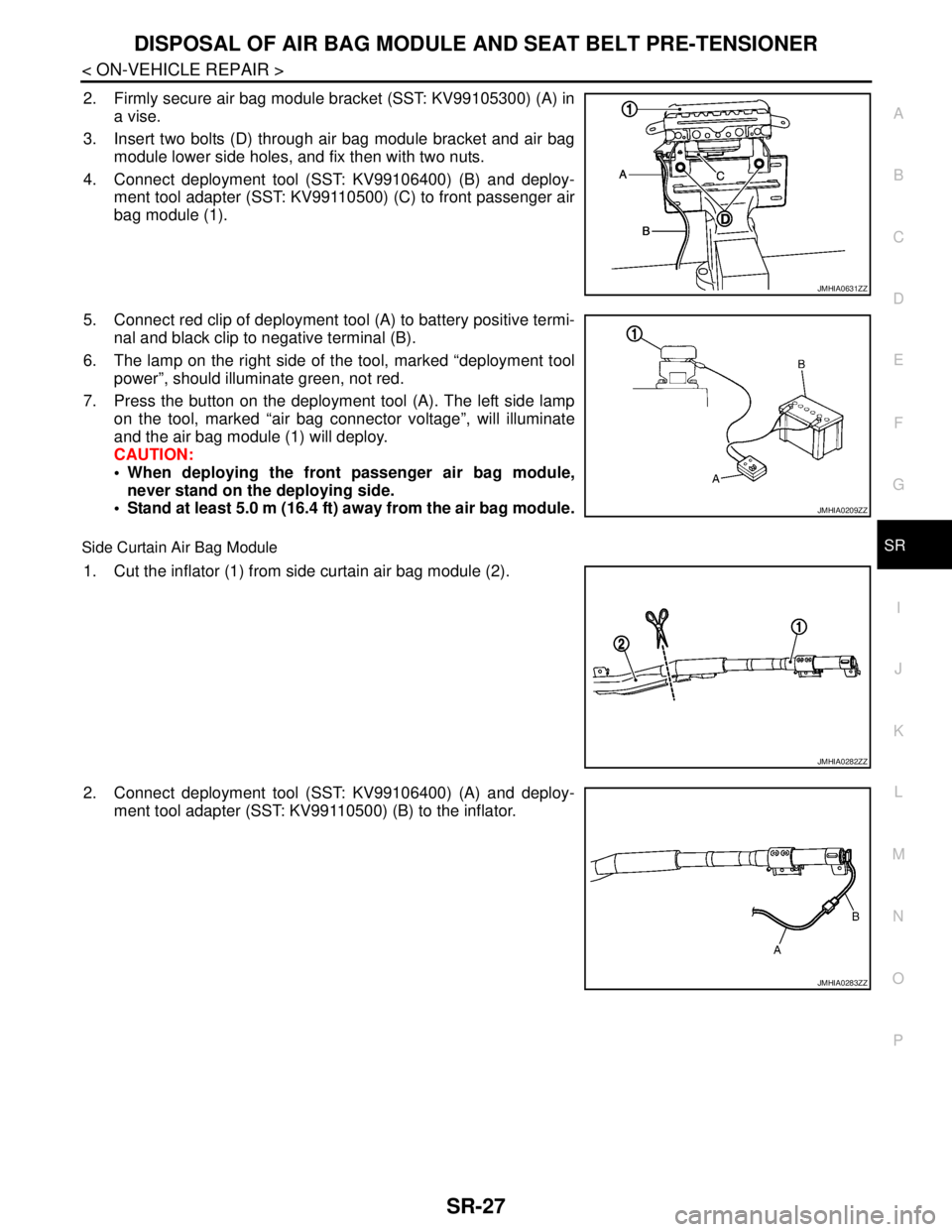
2. Firmly secure air bag module bracket (SST: KV99105300) (A) in
a vise.
3. Insert two bolts (D) through air bag module bracket and air bag
module lower side holes, and fix then with two nuts.
4. Connect deployment tool (SST: KV99106400) (B) and deploy-
ment tool adapter (SST: KV99110500) (C) to front passenger air
bag module (1).
5. Connect red clip of deployment tool (A) to battery positive termi-
nal and black clip to negative terminal (B).
6. The lamp on the right side of the tool, marked “deployment tool
power”, should illuminate green, not red.
7. Press the button on the deployment tool (A). The left side lamp
on the tool, marked “air bag connector voltage”, will illuminate
and the air bag module (1) will deploy.
CAUTION:
When deploying the front passenger air bag module,
never stand on the deploying side.
Stand at least 5.0 m (16.4 ft) away from the air bag module.
Side Curtain Air Bag Module
1. Cut the inflator (1) from side curtain air bag module (2).
2. Connect deployment tool (SST: KV99106400) (A) and deploy-
ment tool adapter (SST: KV99110500) (B) to the inflator.
JMHIA0631ZZ
JMHIA0209ZZ
JMHIA0282ZZ
JMHIA0283ZZ
Page 4242 of 5121
SR-28
< ON-VEHICLE REPAIR >
DISPOSAL OF AIR BAG MODULE AND SEAT BELT PRE-TENSIONER
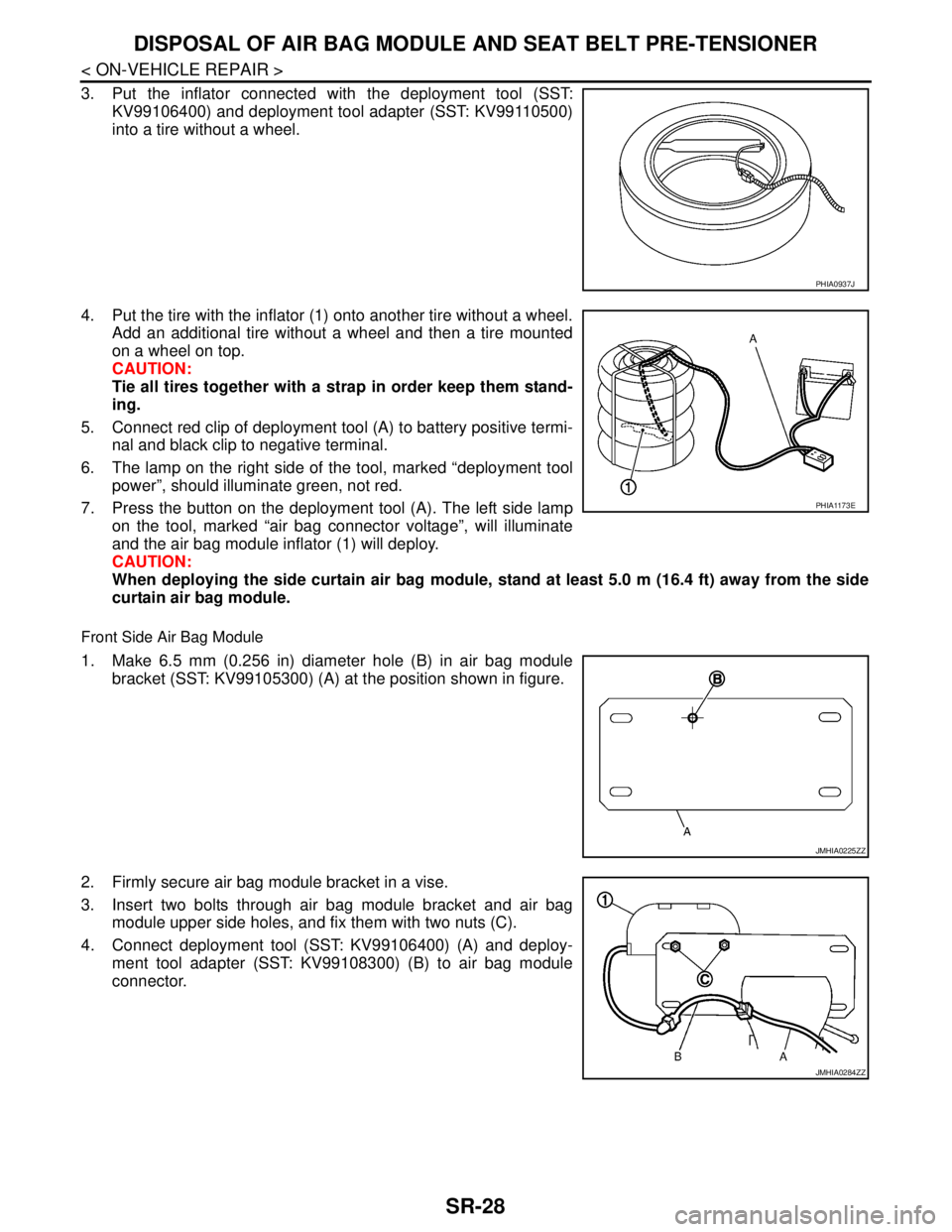
3. Put the inflator connected with the deployment tool (SST:
KV99106400) and deployment tool adapter (SST: KV99110500)
into a tire without a wheel.
4. Put the tire with the inflator (1) onto another tire without a wheel.
Add an additional tire without a wheel and then a tire mounted
on a wheel on top.
CAUTION:
Tie all tires together with a strap in order keep them stand-
ing.
5. Connect red clip of deployment tool (A) to battery positive termi-
nal and black clip to negative terminal.
6. The lamp on the right side of the tool, marked “deployment tool
power”, should illuminate green, not red.
7. Press the button on the deployment tool (A). The left side lamp
on the tool, marked “air bag connector voltage”, will illuminate
and the air bag module inflator (1) will deploy.
CAUTION:
When deploying the side curtain air bag module, stand at least 5.0 m (16.4 ft) away from the side
curtain air bag module.
Front Side Air Bag Module
1. Make 6.5 mm (0.256 in) diameter hole (B) in air bag module
bracket (SST: KV99105300) (A) at the position shown in figure.
2. Firmly secure air bag module bracket in a vise.
3. Insert two bolts through air bag module bracket and air bag
module upper side holes, and fix them with two nuts (C).
4. Connect deployment tool (SST: KV99106400) (A) and deploy-
ment tool adapter (SST: KV99108300) (B) to air bag module
connector.
PHIA0937J
PHIA1173E
JMHIA0225ZZ
JMHIA0284ZZ
Page 4246 of 5121

SRC-3
C
D
E
F
G
I
J
K
L
MA
B
SRC
N
O
P Diagnosis Procedure ...............................................
86
B1132 SIDE MODULE RH .................................88
Description ..............................................................88
DTC Logic ...............................................................88
Diagnosis Procedure ...............................................88
B1134 SIDE MODULE LH ..................................90
Description ..............................................................90
DTC Logic ...............................................................90
Diagnosis Procedure ...............................................90
B1135 SIDE MODULE LH ..................................92
Description ..............................................................92
DTC Logic ...............................................................92
Diagnosis Procedure ...............................................92
B1136 SIDE MODULE LH ..................................94
Description ..............................................................94
DTC Logic ...............................................................94
Diagnosis Procedure ...............................................94
B1137 SIDE MODULE LH ..................................96
Description ..............................................................96
DTC Logic ...............................................................96
Diagnosis Procedure ...............................................96
B1138, B1139, B1140, B1141, B1142, B1143
DIAGNOSIS SENSOR UNIT ..............................
98
Description ..............................................................98
DTC Logic ...............................................................98
Diagnosis Procedure ...............................................98
B1144 ACU .......................................................100
Description ............................................................100
DTC Logic .............................................................100
Diagnosis Procedure .............................................100
B1145 CURTAIN MODULE RH .......................102
Description ............................................................102
DTC Logic .............................................................102
Diagnosis Procedure .............................................102
B1146 CURTAIN MODULE RH .......................104
Description ............................................................104
DTC Logic .............................................................104
Diagnosis Procedure .............................................104
B1147 CURTAIN MODULE RH .......................106
Description ............................................................106
DTC Logic .............................................................106
Diagnosis Procedure .............................................106
B1148 CURTAIN MODULE RH .......................108
Description ............................................................108
DTC Logic .............................................................108
Diagnosis Procedure .............................................108
B1150 CURTAIN MODULE LH ........................110
Description ............................................................110
DTC Logic .............................................................110
Diagnosis Procedure .............................................110
B1151 CURTAIN MODULE LH .......................112
Description .............................................................112
DTC Logic ..............................................................112
Diagnosis Procedure .............................................112
B1152 CURTAIN MODULE LH .......................114
Description .............................................................114
DTC Logic ..............................................................114
Diagnosis Procedure .............................................114
B1153 CURTAIN MODULE LH .......................116
Description .............................................................116
DTC Logic ..............................................................116
Diagnosis Procedure .............................................116
B1154, B1157, B1170, B1171, B1172, B1173,
B1174, B1175 CONTROL UNIT .....................
118
Description .............................................................118
DTC Logic ..............................................................118
Diagnosis Procedure .............................................118
B1202, B1203, B1204, B1205, B1206, B1207
DIAGNOSIS SENSOR UNIT ...........................
120
Description .............................................................120
DTC Logic ..............................................................120
Diagnosis Procedure .............................................120
B1209 FRONTAL COLLISION DETECTION ..122
Description .............................................................122
DTC Logic ..............................................................122
Diagnosis Procedure .............................................122
B1210 SIDE COLLISION DETECTION ..........124
Description .............................................................124
DTC Logic ..............................................................124
Diagnosis Procedure .............................................124
B1212, B1213, B1214 RH1 SAT-SENS ..........126
Description .............................................................126
DTC Logic ..............................................................126
Diagnosis Procedure .............................................126
B1215, B1216, B1217 LH1 SAT-SENS ..........128
Description .............................................................128
DTC Logic ..............................................................128
Diagnosis Procedure .............................................128
B1218, B1219, B1220, B1221, B1222, B1223
CONTROL UNIT ..............................................
130
Description .............................................................130
DTC Logic ..............................................................130
Diagnosis Procedure .............................................130
ECU DIAGNOSIS .......................................132
DIAGNOSIS SENSOR UNIT ...........................132
DTC Index .............................................................132
Wiring Diagram - SRS AIR BAG CONTROL SYS-
TEM - .....................................................................
139
SYMPTOM DIAGNOSIS ............................145
Page 4258 of 5121
DIAGNOSIS SYSTEM (AIRBAG)
SRC-15
< FUNCTION DIAGNOSIS >
C
D
E
F
G
I
J
K
L
MA
B
SRC
N
O
P
After a malfunction is repaired, turn the ignition switch OFF for at least one second, then turn ignition switch
ON. Diagnosis mode returns to the user mode. At that time the self-diagnosis result is cleared.
CONSULT-III FunctionINFOID:0000000003813935
HOW TO CHANGE SELF-DIAGNOSIS MODE WITH CONSULT-III
From User Mode to Diagnosis Mode
After selecting “AIR BAG” on the “SELECT SYSTEM” screen, User mode automatically changes to Diagnosis
mode.
From Diagnosis Mode to User Mode
To return to User mode from Diagnosis mode, touch “BACK” key of CONSULT-III until “SELECT SYSTEM”
appears, then Diagnosis mode automatically changes to User mode.
DIAGNOSIS MODE FOR CONSULT-III
“SELF-DIAG [CURRENT]”
Current self-diagnosis results (also indicated with the number of air bag warning lamp blinks in Diagnosis
mode) are displayed on CONSULT-III screen in real time. This refers to a malfunctioning part requiring
repairs.
“SELF-DIAG [PAST]”
Diagnosis results previously stored in the memory are displayed on CONSULT-III screen. The stored results
are not erased until memory erasing is executed.
“TROUBLE DIAG RECORD”
With TROUBLE DIAG RECORD, diagnosis results previously erased by a reset operation can be displayed
on CONSULT-III screen.
“DISCRIMINATED NO.”
The air bag diagnosis sensor unit for each vehicle model has its own individual classification number. This
number is displayed on CONSULT-III screen. When replacing the air bag diagnosis sensor unit, refer to the
part number for the compatibility. After installation, replacement with a correct unit can be checked by con-
firming this classification number on CONSULT-III screen.
After repair, check that the discriminated number of air bag diagnosis sensor unit installed to vehicle is the
same. Refer to SR-22, "
Exploded View".
HOW TO ERASE SELF-DIAGNOSTIC RESULTS
“SELF-DIAG [CURRENT]”
A current self-diagnosis result is displayed on CONSULT-III screen in real time.
After the malfunction is repaired completely, no malfunction is detected on “SELF-DIAG [CURRENT]”.
“SELF-DIAG [PAST]”
Return to “SELF-DIAG [CURRENT]” CONSULT-III screen by touching “BACK” key of CONSULT-III and
select “SELF-DIAG [CURRENT]” in SELECT DIAG MODE. Touch “ERASE” in “SELF-DIAG [CURRENT]”
mode.
NOTE:
If the memory of the malfunction in “SELF-DIAG [PAST]” is not erased, the user mode shows the system
malfunction by illuminating the warning lamp even if the malfunction is repaired completely.
“TROUBLE DIAG RECORD”
The memory of “TROUBLE DIAG RECORD” cannot be erased.