ignition NISSAN TEANA 2008 Service Manual
[x] Cancel search | Manufacturer: NISSAN, Model Year: 2008, Model line: TEANA, Model: NISSAN TEANA 2008Pages: 5121, PDF Size: 69.03 MB
Page 3592 of 5121
![NISSAN TEANA 2008 Service Manual PG-74
< COMPONENT DIAGNOSIS >[POWER SUPPLY&GROUND CIRCUIT]
POWER SUPPLY ROUTING CIRCUIT
Wiring Diagram - IGNITION POWER SUPPLY FUSE No. 4 -
INFOID:0000000003792664
JCMWM1758GB](/img/5/57391/w960_57391-3591.png "NISSAN TEANA 2008 Service Manual PG-74
< COMPONENT DIAGNOSIS >[POWER SUPPLY&GROUND CIRCUIT]
POWER SUPPLY ROUTING CIRCUIT
Wiring Diagram - IGNITION POWER SUPPLY FUSE No. 4 -
INFOID:0000000003792664
JCMWM1758GB")
PG-74
< COMPONENT DIAGNOSIS >[POWER SUPPLY&GROUND CIRCUIT]
POWER SUPPLY ROUTING CIRCUIT
Wiring Diagram - IGNITION POWER SUPPLY FUSE No. 4 -
INFOID:0000000003792664
JCMWM1758GB
Page 3595 of 5121
![NISSAN TEANA 2008 Service Manual PG
POWER SUPPLY ROUTING CIRCUIT
PG-77
< COMPONENT DIAGNOSIS >[POWER SUPPLY&GROUND CIRCUIT]
C
D
E
F
G
H
I
J
K
L B A
O
P N
Wiring Diagram - IGNITION POWER SUPPLY FUSE No. 43 -INFOID:0000000003858721
JCM](/img/5/57391/w960_57391-3594.png "NISSAN TEANA 2008 Service Manual PG
POWER SUPPLY ROUTING CIRCUIT
PG-77
< COMPONENT DIAGNOSIS >[POWER SUPPLY&GROUND CIRCUIT]
C
D
E
F
G
H
I
J
K
L B A
O
P N
Wiring Diagram - IGNITION POWER SUPPLY FUSE No. 43 -INFOID:0000000003858721
JCM")
PG
POWER SUPPLY ROUTING CIRCUIT
PG-77
< COMPONENT DIAGNOSIS >[POWER SUPPLY&GROUND CIRCUIT]
C
D
E
F
G
H
I
J
K
L B A
O
P N
Wiring Diagram - IGNITION POWER SUPPLY FUSE No. 43 -INFOID:0000000003858721
JCMWM1761GB
Page 3597 of 5121
![NISSAN TEANA 2008 Service Manual PG
POWER SUPPLY ROUTING CIRCUIT
PG-79
< COMPONENT DIAGNOSIS >[POWER SUPPLY&GROUND CIRCUIT]
C
D
E
F
G
H
I
J
K
L B A
O
P N
Wiring Diagram - IGNITION POWER SUPPLY FUSE No. 44 -INFOID:0000000003792665
JCM](/img/5/57391/w960_57391-3596.png "NISSAN TEANA 2008 Service Manual PG
POWER SUPPLY ROUTING CIRCUIT
PG-79
< COMPONENT DIAGNOSIS >[POWER SUPPLY&GROUND CIRCUIT]
C
D
E
F
G
H
I
J
K
L B A
O
P N
Wiring Diagram - IGNITION POWER SUPPLY FUSE No. 44 -INFOID:0000000003792665
JCM")
PG
POWER SUPPLY ROUTING CIRCUIT
PG-79
< COMPONENT DIAGNOSIS >[POWER SUPPLY&GROUND CIRCUIT]
C
D
E
F
G
H
I
J
K
L B A
O
P N
Wiring Diagram - IGNITION POWER SUPPLY FUSE No. 44 -INFOID:0000000003792665
JCMWM1763GB
Page 3635 of 5121
INSPECTION AND ADJUSTMENT
PWC-5
< BASIC INSPECTION >
C
D
E
F
G
H
I
J
L
MA
B
PWC
N
O
P
INSPECTION AND ADJUSTMENT
ADDITIONAL SERVICE WHEN REMOVING BATTERY NEGATIVE TERMINAL
ADDITIONAL SERVICE WHEN REMOVING BATTERY NEGATIVE TERMINAL : De-
scription
INFOID:0000000003825989
When the negative terminal of battery is disconnected, the initialization is necessary.
If any of the following operations are performed, the initialization is necessary as well as when the negative
terminal of battery is disconnected.
Power supply to the power window main switch or power window motor is cut off by the removal
of battery terminal or if the battery fuse is blown.
Disconnection and connection of power window main switch harness connector.
Removal and installation of motor from regulator assembly.
Operation of regulator assembly as an independent unit.
Removal and installation of glass.
Removal and installation of door glass run.
The following specified operations can not be performed under the non-initialized condition.
Auto-up operation
Anti-pinch function
ADDITIONAL SERVICE WHEN REMOVING BATTERY NEGATIVE TERMINAL : Spe-
cial Repair Requirement
INFOID:0000000003825990
INITIALIZATION PROCEDURE
1. Disconnect battery negative terminal or power window main switch connector. Reconnect it after a minute
or more.
2. Turn ignition switch ON.
3. Operate power window switch to fully open the window. (This operation is unnecessary if the window is
already fully open)
4. Continue pulling the power window switch UP (AUTO-UP operation). Even after glass stops at the fully
closed position, keep pulling the switch for 2 seconds or more.
5. Initializing procedure is completed.
6. Inspect anti-pinch function.
CHECK ANTI-PINCH FUNCTION
1. Fully open the door window.
2. Place a piece of wood near fully closed position.
3. Close door glass completely with AUTO-UP.
Check that glass lowers for approximately 150 mm (5.9 in) or for 2 seconds without pinching piece of wood
and stops.
Check that glass does not rise when operating the power window main switch while lowering.
CAUTION:
• Perform initial setting when auto-up operation or anti-pinch function does not operate normally.
Check that AUTO-UP operates before inspection when system initialization is performed.
Never check with hands or other body parts because they may be pinched. Never get pinched.
It may switch to fail-safe mode if open/close operation is performed continuously without fully clos-
ing. Perform initial setting in that situation. Refer to PWC-72, "
Fail-safe"
Finish initial setting. Otherwise, next operation cannot be done.
1. Auto-up operation
2. Anti-pinch function
ADDITIONAL SERVICE WHEN REPLACING CONTROL UNIT
ADDITIONAL SERVICE WHEN REPLACING CONTROL UNIT : Description
INFOID:0000000003825991
When the control unit is replaced, the initialization is necessary.
If any of the following operations are performed, the initialization is necessary as well as when the control unit
is disconnected.
Power supply to the power window main switch or power window motor is cut off by the removal
of battery terminal or if the battery fuse is blown.
Page 3636 of 5121

PWC-6
< BASIC INSPECTION >
INSPECTION AND ADJUSTMENT
Disconnection and connection of power window main switch harness connector.
Removal and installation of motor from regulator assembly.
Disconnection and connection of battery negative terminal.
Removal and installation of glass.
Removal and installation of door glass run.
The following specified operations can not be performed under the non-initialized condition.
Auto-up operation
Anti-pinch function
ADDITIONAL SERVICE WHEN REPLACING CONTROL UNIT : Special Repair Re-
quirement
INFOID:0000000003825992
INITIALIZATION PROCEDURE
1. Disconnect battery negative terminal or power window main switch connector. Reconnect it after a minute
or more.
2. Turn ignition switch ON.
3. Operate power window switch to fully open the window. (This operation is unnecessary if the window is
already fully open)
4. Continue pulling the power window switch UP (AUTO-UP operation). Even after glass stops at the fully
closed position, keep pulling the switch for 2 seconds or more.
5. Initializing procedure is completed.
6. Inspect anti-pinch function.
CHECK ANTI-PINCH FUNCTION
1. Fully open the door window.
2. Place a piece of wood near fully closed position.
3. Close door glass completely with AUTO-UP.
Check that glass lowers for approximately 150 mm (5.9 in) or for 2 seconds without pinching piece of wood
and stops.
Check that glass does not rise when operating the power window main switch while lowering.
CAUTION:
Perform initial setting when auto-up operation or anti-pinch function does not operate normally.
Check that AUTO-UP operates before inspection when system initialization is performed.
Never check with hands or other body parts because they may be pinched. Never get pinched.
It may switch to fail-safe mode if open/close operation is performed continuously without fully clos-
ing. Perform initial setting in that situation. Refer to PWC-72, "
Fail-safe"
Finish initial setting. Otherwise, next operation cannot be done.
1. Auto-up operation
2. Anti-pinch function
Page 3637 of 5121
POWER WINDOW SYSTEM
PWC-7
< FUNCTION DIAGNOSIS >
C
D
E
F
G
H
I
J
L
MA
B
PWC
N
O
P
FUNCTION DIAGNOSIS
POWER WINDOW SYSTEM
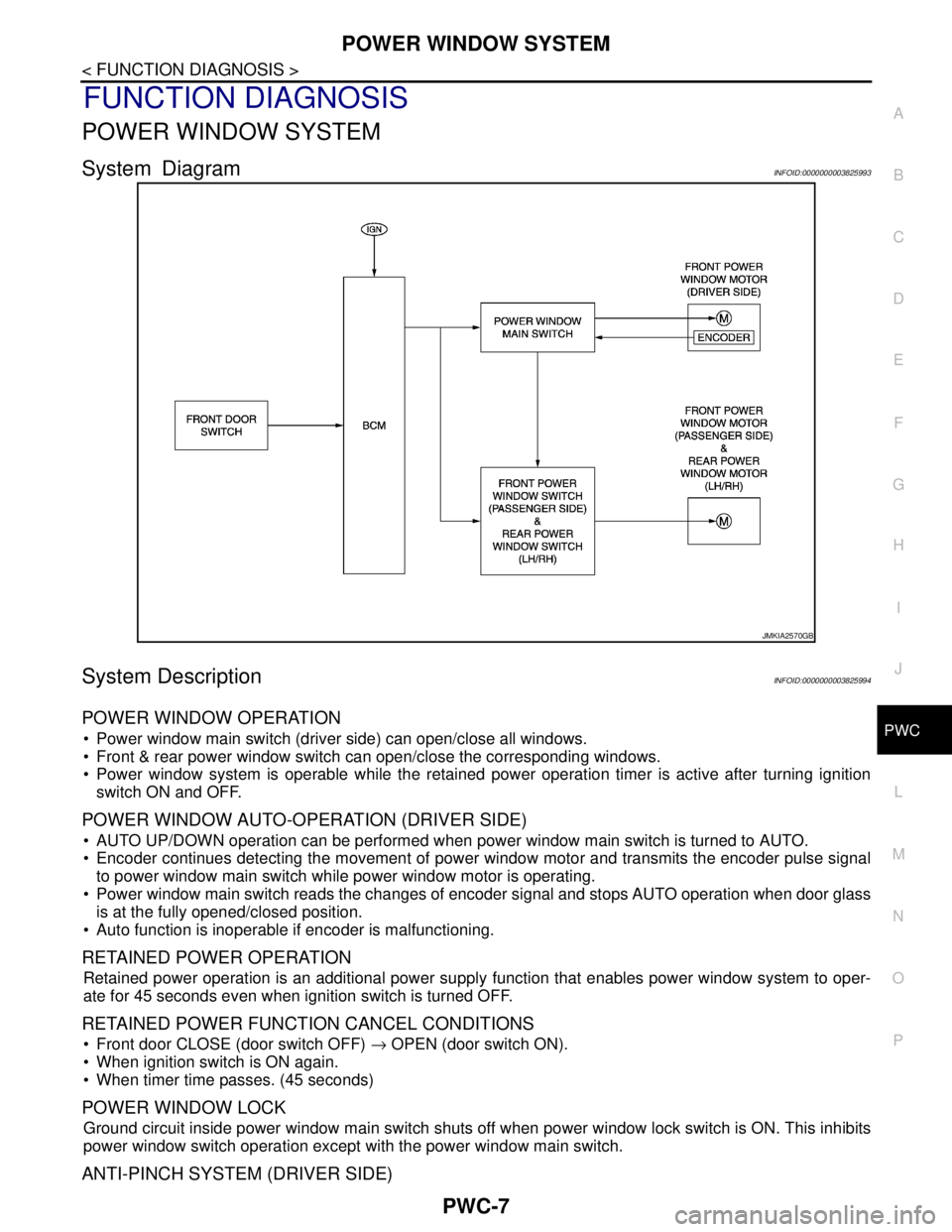
System DiagramINFOID:0000000003825993
System DescriptionINFOID:0000000003825994
POWER WINDOW OPERATION
Power window main switch (driver side) can open/close all windows.
Front & rear power window switch can open/close the corresponding windows.
Power window system is operable while the retained power operation timer is active after turning ignition
switch ON and OFF.
POWER WINDOW AUTO-OPERATION (DRIVER SIDE)
AUTO UP/DOWN operation can be performed when power window main switch is turned to AUTO.
Encoder continues detecting the movement of power window motor and transmits the encoder pulse signal
to power window main switch while power window motor is operating.
Power window main switch reads the changes of encoder signal and stops AUTO operation when door glass
is at the fully opened/closed position.
Auto function is inoperable if encoder is malfunctioning.
RETAINED POWER OPERATION
Retained power operation is an additional power supply function that enables power window system to oper-
ate for 45 seconds even when ignition switch is turned OFF.
RETAINED POWER FUNCTION CANCEL CONDITIONS
Front door CLOSE (door switch OFF) → OPEN (door switch ON).
When ignition switch is ON again.
When timer time passes. (45 seconds)
POWER WINDOW LOCK
Ground circuit inside power window main switch shuts off when power window lock switch is ON. This inhibits
power window switch operation except with the power window main switch.
ANTI-PINCH SYSTEM (DRIVER SIDE)
JMKIA2570GB
Page 3641 of 5121

DIAGNOSIS SYSTEM (BCM)
PWC-11
< FUNCTION DIAGNOSIS >
C
D
E
F
G
H
I
J
L
MA
B
PWC
N
O
P
The BCM records the following condition at the moment a particular DTC is detected.
Vehicle Speed
Odd Trip Meter
Vehicle Condition (BCM detected condition)
IGN Counter
IGN counter indicates the number of times that ignition switch is turned ON after DTC is detected.
The number is 0 when a malfunction is detected now.
The number increases like 1 → 2 → 3...38 → 39 after returning to the normal condition whenever ignition
switch OFF → ON.
The number is fixed to 39 until the self-diagnosis results are erased if it is over 39.
RETAINED PWR
RETAINED PWR : CONSULT-III Function (BCM - RETAINED PWR)INFOID:0000000003857783
Data monitor
CONSULT screen terms Description
SLEEP>LOCKWhile turning BCM status from low power consumption mode to normal mode (Power supply
position is “LOCK”)
SLEEP>OFFWhile turning BCM status from low power consumption mode to normal mode (Power supply
position is “OFF”.)
LOCK>ACC While turning power supply position from “LOCK” to “ACC”
ACC>ON While turning power supply position from “ACC” to “IGN”
RUN>ACCWhile turning power supply position from “RUN” to “ACC” (Vehicle is stopping and selector
lever is except P position.)
CRANK>RUNWhile turning power supply position from “CRANKING” to “RUN” (From cranking up the en-
gine to run it)
RUN>URGENT While turning power supply position from “RUN“ to “ACC” (Emergency stop operation)
ACC>OFF While turning power supply position from “ACC” to “OFF”
OFF>LOCK While turning power supply position from “OFF” to “LOCK”
OFF>ACC While turning power supply position from “OFF” to “ACC”
ON>CRANK While turning power supply position from “IGN” to “CRANKING”
OFF>SLEEPWhile turning BCM status from normal mode (Power supply position is “OFF”.) to low power
consumption mode
LOCK>SLEEPWhile turning BCM status from normal mode (Power supply position is “LOCK”.) to low pow-
er consumption mode
LOCK Power supply position is “LOCK” (Ignition switch OFF with steering is locked.)
OFF Power supply position is “OFF” (Ignition switch OFF with steering is unlocked.)
ACC Power supply position is “ACC” (Ignition switch ACC)
ON Power supply position is “IGN” (Ignition switch ON with engine stopped)
ENGINE RUN Power supply position is “RUN” (Ignition switch ON with engine running)
CRANKING Power supply position is “CRANKING” (At engine cranking)
Monitor Item Description
DOOR SW-DR Indicates [ON/OFF] condition of driver side door switch.
DOOR SW-AS Indicates [ON/OFF] condition of passenger side door switch.
Page 3642 of 5121
PWC-12
< COMPONENT DIAGNOSIS >
POWER SUPPLY AND GROUND CIRCUIT
COMPONENT DIAGNOSIS
POWER SUPPLY AND GROUND CIRCUIT
BCM
BCM : Diagnosis ProcedureINFOID:0000000003825998
1.CHECK FUSE AND FUSIBLE LINK
1.Turn ignition switch OFF.
2.Check that the following fuse and fusible link are not blown.
Is the fuse fusing?
YES >> Replace the blown fuse or fusible link after repairing the affected circuit if a fuse or fusible link is
blown.
NO >> GO TO 2.
2.CHECK POWER SUPPLY CIRCUIT
1. Disconnect BCM connectors.
2. Check voltage between BCM harness connector and ground.
Is the inspection result normal?
YES >> GO TO 3.
NO >> Repair or replace harness.
3.CHECK GROUND CIRCUIT
Check continuity between BCM harness connector and ground.
Is the inspection result normal?
YES >> INSPECTION END
NO >> Repair or replace harness.
POWER WINDOW MAIN SWITCH
POWER WINDOW MAIN SWITCH : Diagnosis ProcedureINFOID:0000000003825999
1.CHECK POWER SUPPLY CIRCUIT 1
1. Turn ignition OFF.
2. Disconnect power window main switch connector.
3. Turn ignition switch ON.
4. Check voltage between power window main switch harness connector and ground.
Terminal No. Signal name Fuse and fusible link No.
1
Battery power supplyI (40A)
1110 (10A)
(+)
(−)Vo l ta g e
(Approx.) BCM
Connector Terminal
M118 1
Ground Battery voltage
M119 11
BCM
GroundContinuity
Connector Terminal
M119 13 Existed
Page 3643 of 5121
POWER SUPPLY AND GROUND CIRCUIT
PWC-13
< COMPONENT DIAGNOSIS >
C
D
E
F
G
H
I
J
L
MA
B
PWC
N
O
P
Is the inspection result normal?
YES >> GO TO 2.
NO >> GO TO 3.
2.CHECK GROUND CIRCUIT
1. Turn ignition switch OFF.
2. Check continuity between power window main switch harness connector and ground.
Is the inspection result normal?
YES >> INSPECTION END
NO >> Repair or replace harness.
3.CHECK POWER SUPPLY CIRCUIT 2
1. Turn ignition switch OFF.
2. Disconnect BCM connector.
3. Check continuity between BCM harness connector and power window main switch harness connector.
4. Check continuity between BCM harness connector and ground.
Is the inspection result normal?
YES >> Replace BCM. Refer to BCS-78, "Removal and Installation".
NO >> Repair or replace harness.
FRONT POWER WINDOW SWITCH (PASSENGER SIDE)
FRONT POWER WINDOW SWITCH (PASSENGER SIDE) : Diagnosis Procedure
INFOID:0000000003826000
1.CHECK POWER SUPPLY CIRCUIT 1
1. Turn ignition switch OFF.
2. Disconnect front power window switch (passenger side) connector.
3. Turn ignition switch ON.
4. Check voltage between front power window switch (passenger side) harness connector and ground.
(+)
(–)Voltage (V)
(Approx.) Power window main switch
Connector Terminal
D5 10
Ground Battery voltage
D6 19
Power window main switch
GroundContinuity
Connector Terminal
D6 17 Existed
BCM Power window main switch
Continuity
Connector Terminal Connector Terminal
M1182D619
Existed
3D510
BCM
GroundContinuity
Connector Terminal
M1182
Not existed
3
Page 3644 of 5121

PWC-14
< COMPONENT DIAGNOSIS >
POWER SUPPLY AND GROUND CIRCUIT
Is the inspection result normal?
YES >> INSPECTION END.
NO >> GO TO 2.
2.CHECK POWER SUPPLY CIRCUIT 2
1. Turn ignition switch OFF.
2. Disconnect BCM connector.
3. Check continuity between BCM harness connector and front power window switch (passenger side) har-
ness connector.
4. Check continuity between BCM harness connector and ground.
Is the inspection result normal?
YES >> Replace BCM. Refer to BCS-78, "Removal and Installation".
NO >> Repair or replace harness.
REAR POWER WINDOW SWITCH
REAR POWER WINDOW SWITCH : Diagnosis ProcedureINFOID:0000000003826001
1.CHECK POWER SUPPLY CIRCUIT 1
1. Turn ignition switch OFF.
2. Disconnect rear power window switch connector.
3. Turn ignition switch ON.
4. Check voltage between rear power window switch harness connector and ground.
Is the inspection result normal?
YES >> INSPECTION END
NO >> GO TO 2.
2.CHECK POWER SUPPLY CIRCUIT 2
1. Turn ignition switch OFF.
2. Disconnect BCM connector.
3. Check continuity between BCM harness connector and rear power window switch harness connector.
(+)
(–)Voltage (V)
(Approx.) Front power window switch (passenger side)
Connector Terminal
D45 1 Ground Battery voltage
BCM Front power window switch (passenger side)
Continuity
Connector Terminal Connector Terminal
M118 3 D45 1 Existed
BCM
GroundContinuity
Connector Terminal
M118 3 Not existed
(+)
(–)Voltage (V)
(Approx.) Rear power window switch
Connector Terminal
LH D83
1 Ground Battery voltage
RH D103