ECU NISSAN TEANA 2008 Service Manual
[x] Cancel search | Manufacturer: NISSAN, Model Year: 2008, Model line: TEANA, Model: NISSAN TEANA 2008Pages: 5121, PDF Size: 69.03 MB
Page 4781 of 5121
![NISSAN TEANA 2008 Service Manual TM-308
< ON-VEHICLE MAINTENANCE >[CVT: RE0F10A]
LINE PRESSURE TEST
LINE PRESSURE TEST
Inspection and JudgmentINFOID:0000000003806507
INSPECTION
Line Pressure Test Procedure
1. Inspect the amount of en](/img/5/57391/w960_57391-4780.png "NISSAN TEANA 2008 Service Manual TM-308
< ON-VEHICLE MAINTENANCE >[CVT: RE0F10A]
LINE PRESSURE TEST
LINE PRESSURE TEST
Inspection and JudgmentINFOID:0000000003806507
INSPECTION
Line Pressure Test Procedure
1. Inspect the amount of en")
TM-308
< ON-VEHICLE MAINTENANCE >[CVT: RE0F10A]
LINE PRESSURE TEST
LINE PRESSURE TEST
Inspection and JudgmentINFOID:0000000003806507
INSPECTION
Line Pressure Test Procedure
1. Inspect the amount of engine oil and replenish if necessary.
2. Drive the car for about 10 minutes to warm it up so that the CVT fluid reaches in the range of 50 to 80°C
(122 to 176°F), then inspect the amount of CVT fluid and replenish if necessary.
NOTE:
The CVT fluid temperature rises in the range of 50 to 80°C (122 to 176°F) during 10 minutes of driv-
ing.
3. After warming up CVT, remove the oil pressure detection plug
and install the joint pipe adapter (SST: KV31103600), adapter
(SST: 25055000), oil pressure gauge set (commercial service
tool).
CAUTION:
When using the oil pressure gauge, be sure to use the O-
ring attached to the oil pressure detection plug.
4. Securely engage the parking brake so that the tires do not turn.
5. Start the engine, and then measure the line pressure at both idle
and the stall speed.
CAUTION:
Keep the brake pedal pressed all the way down during
measurement.
When measuring the line pressure at the stall speed, refer
to TM-306, "
Inspection and Judgment".
6. After the measurements are complete, install the oil pressure
detection plug and tighten to the specified torque below.
CAUTION:
Never reuse O-ring.
Apply CVT fluid to O-ring.
JUDGMENT
JPDIA0739GB
SCIA7463E
Line pressure : Refer to TM-337, "Line Pressure".
: 7.5 N·m (0.77 kg-m, 66 in-lb)
SAT493G
Page 4819 of 5121
![NISSAN TEANA 2008 Service Manual VTL-8
< PRECAUTION >[WITHOUT 7 INCH DISPLAY]
PRECAUTIONS
Precaution for Procedure without Cowl Top Cover
INFOID:0000000003802519
When performing the procedure after removing cowl top cover, cover
the](/img/5/57391/w960_57391-4818.png "NISSAN TEANA 2008 Service Manual VTL-8
< PRECAUTION >[WITHOUT 7 INCH DISPLAY]
PRECAUTIONS
Precaution for Procedure without Cowl Top Cover
INFOID:0000000003802519
When performing the procedure after removing cowl top cover, cover
the")
VTL-8
< PRECAUTION >[WITHOUT 7 INCH DISPLAY]
PRECAUTIONS
Precaution for Procedure without Cowl Top Cover
INFOID:0000000003802519
When performing the procedure after removing cowl top cover, cover
the lower end of windshield with urethane, etc.
Precautions For Xenon Headlamp ServiceINFOID:0000000003802520
WARNING:
Comply with the following warnings to prevent any serious accident.
Disconnect the battery cable (negative terminal) or the power supply fuse before installing, remov-
ing, or touching the xenon headlamp (bulb included). The xenon headlamp contains high-voltage
generated parts.
Never work with wet hands.
Check the xenon headlamp ON-OFF status after assembling it to the vehicle. Never turn the xenon
headlamp ON in other conditions. Connect the power supply to the vehicle-side connector.
(Turning it ON outside the lamp case may cause fire or visual impairments.)
Never touch the bulb glass immediately after turning it OFF. It is extremely hot.
CAUTION:
Comply with the following cautions to prevent any error and malfunction.
Install the xenon bulb securely. (Insufficient bulb socket installation may melt the bulb, the connec-
tor, the housing, etc. by high-voltage leakage or corona discharge.)
Never perform HID circuit inspection with a tester.
Never touch the xenon bulb glass with hands. Never put oil and grease on it.
Dispose of the used xenon bulb after packing it in thick vinyl without breaking it.
Never wipe out dirt and contamination with organic solvent (thinner, gasoline, etc.).
Working with HFC-134a (R-134a)INFOID:0000000003802521
CAUTION:
CFC-12 (R-12) refrigerant and HFC-134a (R-134a) refrigerant are not compatible. These refrigerants
must never be mixed, even in the smallest amounts. Compressor malfunction is likely occur if the
refrigerants are mixed.
Use only specified lubricant for the HFC-134a (R-134a) A/C system and HFC-134a (R-134a) compo-
nents. Compressor malfunction is likely to occur if lubricant other than that specified is used.
The specified HFC-134a (R-134a) lubricant rapidly absorbs moisture from the atmosphere. The fol-
lowing handling precautions must be observed:
- Cap (seal) immediately the component to minimize the entry of moisture from the atmosphere when
removing refrigerant components from a vehicle.
- Never remove the caps (unseal) until just before connecting the components when installing refrig-
erant components to a vehicle. Connect all refrigerant loop components as quickly as possible to
minimize the entry of moisture into system.
- Use only the specified lubricant from a sealed container. Reseal immediately containers of lubricant.
Lubricant becomes moisture saturated and should not be used without proper sealing.
- Never allow lubricant (NISSAN A/C System Oil Type S) to come in contact with styrene foam parts.
Damage may result.
General Refrigerant PrecautionINFOID:0000000003802522
WARNING:
Never breath A/C refrigerant and lubricant vapor or mist. Exposure may irritate eyes, nose and
throat. Use only approved recovery/recycling equipment to discharge HFC-134a (R-134a) refrigerant.
PIIB3706J
Page 4876 of 5121
![NISSAN TEANA 2008 Service Manual PRECAUTIONS
VTL-65
< PRECAUTION >[WITH 7 INCH DISPLAY]
C
D
E
F
G
H
J
K
L
MA
B
VTL
N
O
P
Precaution for Procedure without Cowl Top CoverINFOID:0000000003894447
When performing the procedure after remov](/img/5/57391/w960_57391-4875.png "NISSAN TEANA 2008 Service Manual PRECAUTIONS
VTL-65
< PRECAUTION >[WITH 7 INCH DISPLAY]
C
D
E
F
G
H
J
K
L
MA
B
VTL
N
O
P
Precaution for Procedure without Cowl Top CoverINFOID:0000000003894447
When performing the procedure after remov")
PRECAUTIONS
VTL-65
< PRECAUTION >[WITH 7 INCH DISPLAY]
C
D
E
F
G
H
J
K
L
MA
B
VTL
N
O
P
Precaution for Procedure without Cowl Top CoverINFOID:0000000003894447
When performing the procedure after removing cowl top cover, cover
the lower end of windshield with urethane, etc.
Precautions For Xenon Headlamp ServiceINFOID:0000000003894448
WARNING:
Comply with the following warnings to prevent any serious accident.
Disconnect the battery cable (negative terminal) or the power supply fuse before installing, remov-
ing, or touching the xenon headlamp (bulb included). The xenon headlamp contains high-voltage
generated parts.
Never work with wet hands.
Check the xenon headlamp ON-OFF status after assembling it to the vehicle. Never turn the xenon
headlamp ON in other conditions. Connect the power supply to the vehicle-side connector.
(Turning it ON outside the lamp case may cause fire or visual impairments.)
Never touch the bulb glass immediately after turning it OFF. It is extremely hot.
CAUTION:
Comply with the following cautions to prevent any error and malfunction.
Install the xenon bulb securely. (Insufficient bulb socket installation may melt the bulb, the connec-
tor, the housing, etc. by high-voltage leakage or corona discharge.)
Never perform HID circuit inspection with a tester.
Never touch the xenon bulb glass with hands. Never put oil and grease on it.
Dispose of the used xenon bulb after packing it in thick vinyl without breaking it.
Never wipe out dirt and contamination with organic solvent (thinner, gasoline, etc.).
Working with HFC-134a (R-134a)INFOID:0000000003894449
CAUTION:
CFC-12 (R-12) refrigerant and HFC-134a (R-134a) refrigerant are not compatible. These refrigerants
must never be mixed, even in the smallest amounts. Compressor malfunction is likely occur if the
refrigerants are mixed.
Use only specified lubricant for the HFC-134a (R-134a) A/C system and HFC-134a (R-134a) compo-
nents. Compressor malfunction is likely to occur if lubricant other than that specified is used.
The specified HFC-134a (R-134a) lubricant rapidly absorbs moisture from the atmosphere. The fol-
lowing handling precautions must be observed:
- Cap (seal) immediately the component to minimize the entry of moisture from the atmosphere when
removing refrigerant components from a vehicle.
- Never remove the caps (unseal) until just before connecting the components when installing refrig-
erant components to a vehicle. Connect all refrigerant loop components as quickly as possible to
minimize the entry of moisture into system.
- Use only the specified lubricant from a sealed container. Reseal immediately containers of lubricant.
Lubricant becomes moisture saturated and should not be used without proper sealing.
- Never allow lubricant (NISSAN A/C System Oil Type S) to come in contact with styrene foam parts.
Damage may result.
General Refrigerant PrecautionINFOID:0000000003894450
WARNING:
Never breath A/C refrigerant and lubricant vapor or mist. Exposure may irritate eyes, nose and
throat. Use only approved recovery/recycling equipment to discharge HFC-134a (R-134a) refrigerant.
PIIB3706J
Page 4931 of 5121

WCS
WCS-1
DRIVER INFORMATION & MULTIMEDIA
C
DE
F
G H
I
J
K L
M B
SECTION WCS
A
O P
CONTENTS
WARNING CHIME SYSTEM
BASIC INSPECTION ....... .............................3
DIAGNOSIS AND REPAIR WORKFLOW ..... .....3
Work Flow ........................................................... ......3
FUNCTION DIAGNOSIS ...............................5
WARNING CHIME SYSTEM .......................... .....5
WARNING CHIME SYSTEM .......................................5
WARNING CHIME SYSTEM : System Diagram . ......5
WARNING CHIME SYSTEM : System Description
......
5
WARNING CHIME SYSTEM : Component Parts
Location ............................................................... ......
6
WARNING CHIME SYSTEM : Component De-
scription .....................................................................
6
LIGHT REMINDER WARNING CHIME ................. ......6
LIGHT REMINDER WARNING CHIME : System
Diagram .....................................................................
7
LIGHT REMINDER WARNING CHIME : System
Description ................................................................
7
LIGHT REMINDER WARNING CHIME : Compo-
nent Parts Location ...................................................
8
LIGHT REMINDER WARNING CHIME : Compo-
nent Description ........................................................
8
PARKING BRAKE RELEASE WARNING CHIME ......8
PARKING BRAKE RELEASE WARNING CHIME
: System Diagram ......................................................
9
PARKING BRAKE RELEASE WARNING CHIME
: System Description .................................................
9
PARKING BRAKE RELEASE WARNING CHIME
: Component Parts Location ....................................
10
PARKING BRAKE RELEASE WARNING CHIME
: Component Description .........................................
10
DIAGNOSIS SYSTEM (METER) ........................11
Diagnosis Description ......................................... ....11
CONSULT-III Function (METER/M&A) ...................12
DIAGNOSIS SYSTEM (BCM) ...........................16
COMMON ITEM ..................................................... ....16
COMMON ITEM : CONSULT-III Function (BCM -
COMMON ITEM) .....................................................
16
BUZZER ................................................................. ....17
BUZZER : CONSULT-III Function (BCM - BUZZ-
ER) ..........................................................................
17
COMPONENT DIAGNOSIS .........................19
POWER SUPPLY AND GROUND CIRCUIT ....19
COMBINATION METER ........................................ ....19
COMBINATION METER : Diagnosis Procedure .....19
BCM (BODY CONTROL MODULE) ...................... ....19
BCM (BODY CONTROL MODULE) : Diagnosis
Procedure ............................................................ ....
19
METER BUZZER CIRCUIT ...............................21
Description ...............................................................21
Component Function Check ....................................21
Diagnosis Procedure ..............................................21
WARNING CHIME SYSTEM .............................22
Wiring Diagram - WARNING CHIME - ....................22
ECU DIAGNOSIS .........................................26
COMBINATION METER ...................................26
Reference Value .................................................. ....26
Wiring Diagram - METER - ......................................32
Fail-Safe ..................................................................39
DTC Index ...............................................................40
BCM (BODY CONTROL MODULE) .................41
Reference Value ......................................................41
Wiring Diagram - BCM - ..........................................64
Fail-safe ...................................................................70
DTC Inspection Priority Chart ...............................72
DTC Index ...............................................................73
Page 4946 of 5121

WCS-16
< FUNCTION DIAGNOSIS >
DIAGNOSIS SYSTEM (BCM)
DIAGNOSIS SYSTEM (BCM)
COMMON ITEM
COMMON ITEM : CONSULT-III Function (BCM - COMMON ITEM)INFOID:0000000003838704
APPLICATION ITEM
CONSULT-III performs the following functions via CAN communication with BCM.
SYSTEM APPLICATION
BCM can perform the following functions for each system.
NOTE:
It can perform the diagnosis modes except the following for all sub system selection items.
×: Applicable item
NOTE:
*1:At model with Intelligent Key system this item is displayed, but is not used.
*2: This item is displayed, but is not used. Diagnosis mode Function Description
Work Support Changes the setting for each system function.
Self Diagnostic Result Displays the diagnosis results judged by BCM.
CAN Diag Support MonitorMonitors the reception status of CAN communication viewed from BCM. Refer to CONSULT-III opera-
tion manual.
Data Monitor The BCM input/output signals are displayed.
Active Test The signals used to activate each device are forcibly supplied from BCM.
Ecu Identification The BCM part number is displayed.
Configuration Read and save the vehicle specification.
Write the vehicle specification when replacing BCM.
System Sub system selection itemDiagnosis mode
Work Support Data Monitor Active Test
Door lock DOOR LOCK×××
Rear window defogger REAR DEFOGGER××
Warning chime BUZZER××
Interior room lamp timer INT LAMP×××
Remote keyless entry system
MULTI REMOTE ENT*
1×××
Exterior lamp HEAD LAMP×××
Wiper and washer WIPER××
Turn signal and hazard warning lamps FLASHER×××
—
AIR CONDITONER*
2
Intelligent Key system
Engine start systemINTELLIGENT KEY×××
Combination switch COMB SW×
Body control system BCM×
NVIS - NATS IMMU××
Interior room lamp battery saver BATTERY SAVER×××
Back door opener system TRUNK××
Vehicle security system THEFT ALM×××
RAP system RETAINED PWR×
Signal buffer system SIGNAL BUFFER××
TPMS TPMS (AIR PRESSURE MONITOR)×××
Page 4956 of 5121
![NISSAN TEANA 2008 Service Manual WCS-26
< ECU DIAGNOSIS >
COMBINATION METER
ECU DIAGNOSIS
COMBINATION METER
Reference ValueINFOID:0000000003838730
VALUES ON THE DIAGNOSIS TOOL
Monitor Item Condition Value/Status
SPEED METER
[km/h]Ign](/img/5/57391/w960_57391-4955.png "NISSAN TEANA 2008 Service Manual WCS-26
< ECU DIAGNOSIS >
COMBINATION METER
ECU DIAGNOSIS
COMBINATION METER
Reference ValueINFOID:0000000003838730
VALUES ON THE DIAGNOSIS TOOL
Monitor Item Condition Value/Status
SPEED METER
[km/h]Ign")
WCS-26
< ECU DIAGNOSIS >
COMBINATION METER
ECU DIAGNOSIS
COMBINATION METER
Reference ValueINFOID:0000000003838730
VALUES ON THE DIAGNOSIS TOOL
Monitor Item Condition Value/Status
SPEED METER
[km/h]Ignition switch
ONWhile drivingEquivalent to speedometer reading
NOTE:
655.35 is displayed when the malfunc-
tion signal is received
SPEED OUTPUT
[km/h]Ignition switch
ONWhile drivingEquivalent to speedometer reading
NOTE:
655.35 is displayed when the malfunc-
tion signal is received
ODO OUTPUT
[km/h or mph]Ignition switch
ON—Equivalent to odometer reading in
combination meter
TACHO METER
[rpm]Ignition switch
ONWhile drivingEquivalent to tachometer reading
NOTE:
8191.875 is displayed when the mal-
function signal is received
FUEL METER
[lit]Ignition switch
ON— Values according to fuel level
W TEMP METER
[°C]Ignition switch
ON—Values according to engine coolant
temperature
NOTE:
215 is displayed when the malfunction
signal is input
ABS W/LIgnition switch
ONABS warning lamp ON On
ABS warning lamp OFF Off
VDC/TCS INDIgnition switch
ONVDC OFF indicator lamp ON On
VDC OFF indicator lamp OFF Off
SLIP INDIgnition switch
ONSLIP Indicator lamp ON On
SLIP indicator lamp OFF Off
BRAKE W/LIgnition switch
ONBrake warning lamp ON On
Brake warning lamp OFF Off
DOOR W/LIgnition switch
ONDoor warning ON On
Door warning OFF Off
TRUNK/GLAS-HIgnition switch
ONTrunk warning ON On
Trunk warning OFF Off
HI-BEAM INDIgnition switch
ONHigh-beam indicator lamp ON On
High-beam indicator lamp OFF Off
TURN INDIgnition switch
ONTurn signal indicator lamp ON On
Turn signal indicator lamp OFF Off
FR FOG INDIgnition switch
ONFront fog light indicator lamp ON On
Front fog light indicator lamp OFF Off
RR FOG INDIgnition switch
ONRear fog light indicator lamp ON On
Rear fog light indicator lamp OFF Off
LIGHT IND
Ignition switch
ONTail lamp indicator lamp ON On
Tail lamp indicator lamp OFF Off
Page 4957 of 5121

WCS
COMBINATION METER
WCS-27
< ECU DIAGNOSIS >
C
D
E
F
G
H
I
J
K
L
MB A
O
P
OIL W/L Ignition switch
ONOil pressure warning lamp ON On
Oil pressure warning lamp OFF Off
MILIgnition switch
ONMalfunction indicator lamp ON On
Malfunction indicator lamp OFF Off
CRUISE INDIgnition switch
ONCruise indicator lamp ON On
Cruise indicator lamp OFF Off
SPORT INDIgnition switch
ONSPORT indicator lamp ON On
SPORT indicator lamp OFF Off
4WD W/LIgnition switch
ONNOTE:
This item is displayed, but cannot be moni-
tored.Off
4WD LOCK INDIgnition switch
ONNOTE:
This item is displayed, but cannot be moni-
tored.Off
FUEL W/LIgnition switch
ONLow-fuel warning lamp ON On
Low-fuel warning lamp OFF Off
WASHER W/LIgnition switch
ONNOTE:
This item is displayed, but cannot be moni-
tored.Off
KEY G/Y W/L Ignition switch
ONKEY warning lamp (green/yellow) ON On
KEY warning lamp (green/yellow) OFF Off
LCDIgnition switch
ONEngine start information display B&P I
Ignition switch
ACCEngine start information display B&P N
Ignition switch
LOCKKey ID warning display ID NG
Ignition switch
LOCKSteering lock information display ROTAT
Ignition switch
LOCKP position warning display SFT P
Ignition switch
LOCKIntelligent Key insert information display INSRT
Ignition switch
LOCKIntelligent Key low battery warning display BATT
Ignition switch
ONTake away warning display NO KY
Ignition switch
LOCKKey warning display OUTKY
Ignition switch
ONACC warning display LK WN
SHIFT INDIgnition switch
ONShift position indicator P display P
Shift position indicator R display R
Shift position indicator N display N
Shift position indicator D display D
Shift position indicator L display L
O/D OFF SWIgnition switch
ONSport mode switch pressed On
Other than the above Off Monitor Item Condition Value/Status
Page 4958 of 5121

WCS-28
< ECU DIAGNOSIS >
COMBINATION METER
NOTE:
Some items are not available according to vehicle specification.M RANGE SWIgnition switch
ONNOTE:
This item is displayed, but cannot be moni-
tored.On
NM RANGE SWIgnition switch
ONNOTE:
This item is displayed, but cannot be moni-
tored.Off
AT SFT UP SWIgnition switch
ONNOTE:
This item is displayed, but cannot be moni-
tored.On
AT SFT DWN SWIgnition switch
ONNOTE:
This item is displayed, but cannot be moni-
tored.On
ST SFT UP SWIgnition switch
ONNOTE:
This item is displayed, but cannot be moni-
tored.Off
ST SFT DWN SWIgnition switch
ONNOTE:
This item is displayed, but cannot be moni-
tored.Off
PKB SWIgnition switch
ONParking brake switch ON On
Parking brake switch OFF Off
BUCKLE SWIgnition switch
ONSeat belt not fastened On
Seat belt fastened Off
BRAKE OIL SWIgnition switch
ONBrake fluid level switch ON On
Brake fluid level switch OFF Off
DISTANCE
[km]Ignition switch
ON—Possible driving distance calculated by
combination meter
A/C AMP CONNIgnition switch
ONReceives A/C auto amp. connection recog-
nition signalOn
Other than the above Off
ENTER SWIgnition switch
ONWhen is pressedOn
Other than the above Off
SELECT SWIgnition switch
ONWhen is pressedOn
Other than the above Off
OUTSIDE TEMP
[°C] or [°F]Ignition switch
ON—Equivalent to ambient temperature
NOTE:
This may not match the indicated value
on the information display.
FUEL LOW SIGIgnition switch
ONLow fuel warning signal output On
Low fuel warning signal not output Off
BUZZERIgnition switch
ONBuzzer ON On
Buzzer OFF Off Monitor Item Condition Value/Status
Page 4959 of 5121
WCS
COMBINATION METER
WCS-29
< ECU DIAGNOSIS >
C
D
E
F
G
H
I
J
K
L
MB A
O
P
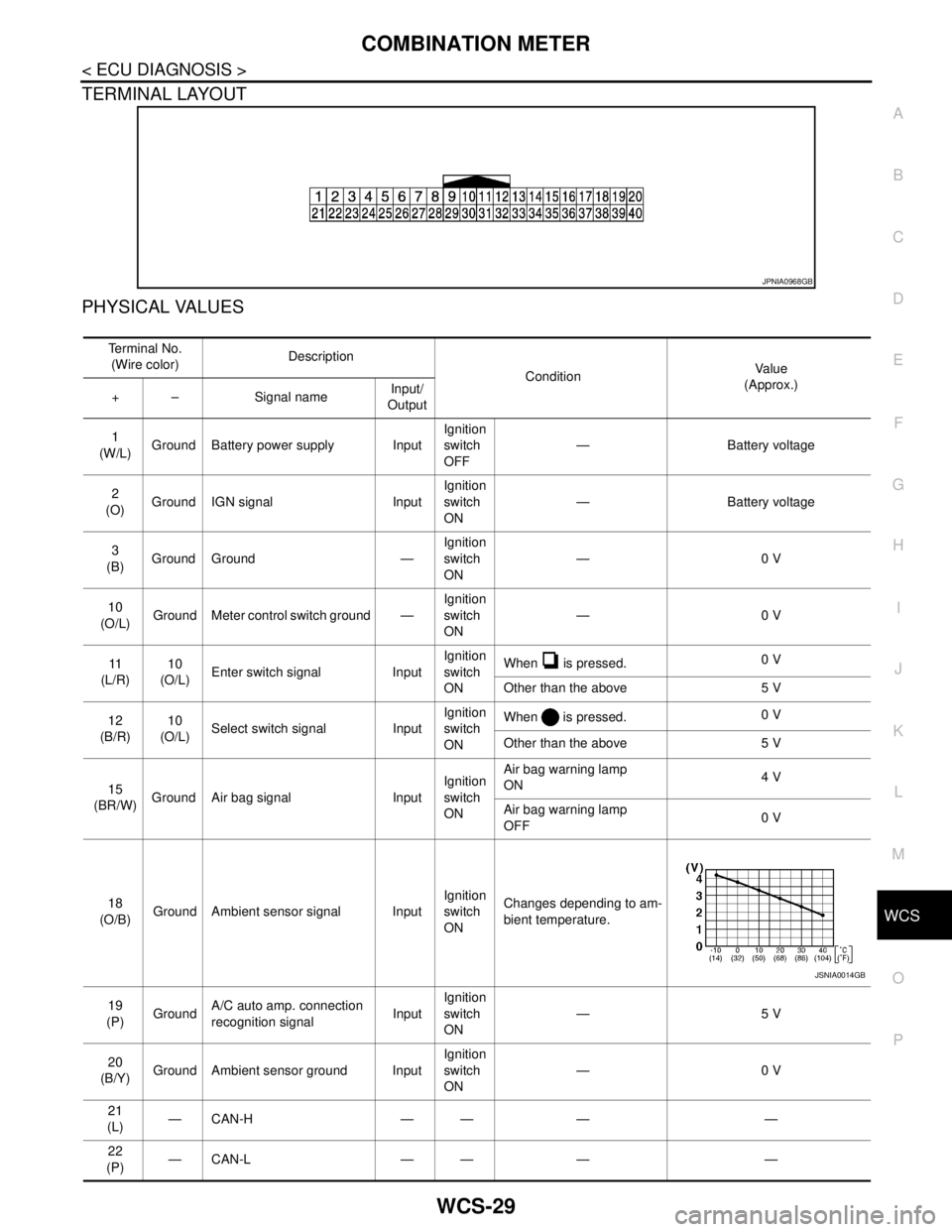
TERMINAL LAYOUT
PHYSICAL VALUES
JPNIA0968GB
Te r m i n a l N o .
(Wire color)Description
ConditionVa l u e
(Approx.)
+ – Signal nameInput/
Output
1
(W/L)Ground Battery power supply InputIgnition
switch
OFF— Battery voltage
2
(O)Ground IGN signal InputIgnition
switch
ON— Battery voltage
3
(B)Ground Ground —Ignition
switch
ON—0 V
10
(O/L)Ground Meter control switch ground —Ignition
switch
ON—0 V
11
(L/R)10
(O/L)Enter switch signal InputIgnition
switch
ONWhen is pressed.0 V
Other than the above 5 V
12
(B/R)10
(O/L)Select switch signal InputIgnition
switch
ONWhen is pressed.0 V
Other than the above 5 V
15
(BR/W)Ground Air bag signal InputIgnition
switch
ONAir bag warning lamp
ON4 V
Air bag warning lamp
OFF0 V
18
(O/B)Ground Ambient sensor signal InputIgnition
switch
ONChanges depending to am-
bient temperature.
19
(P)GroundA/C auto amp. connection
recognition signalInputIgnition
switch
ON—5 V
20
(B/Y)Ground Ambient sensor ground InputIgnition
switch
ON—0 V
21
(L)—CAN-H — — — —
22
(P)—CAN-L — — — —
JSNIA0014GB
Page 4960 of 5121
WCS-30
< ECU DIAGNOSIS >
COMBINATION METER
23
(B)Ground Ground —Ignition
switch
ON—0 V
24
(B/W)GroundFuel level sensor signal
ground—Ignition
switch
ON—0 V
25
(BR)Ground Alternator signal InputIgnition
switch
ONCharge warning lamp ON 2 V
Charge warning lamp OFF 12 V
26
(G/R)Ground Parking brake switch signal InputIgnition
switch
ONWhen parking brake is ap-
plied0 V
When parking brake is re-
leased5 V
27
(V)GroundBrake fluid level switch sig-
nalInputIgnition
switch
ONBrake fluid level is normal 12 V
Brake fluid level is less than
low level0 V
28
(L/O)Ground Security signal InputIgnition
switch
ONSecurity warning lamp OFF 12 V
Security warning lamp ON 0 V
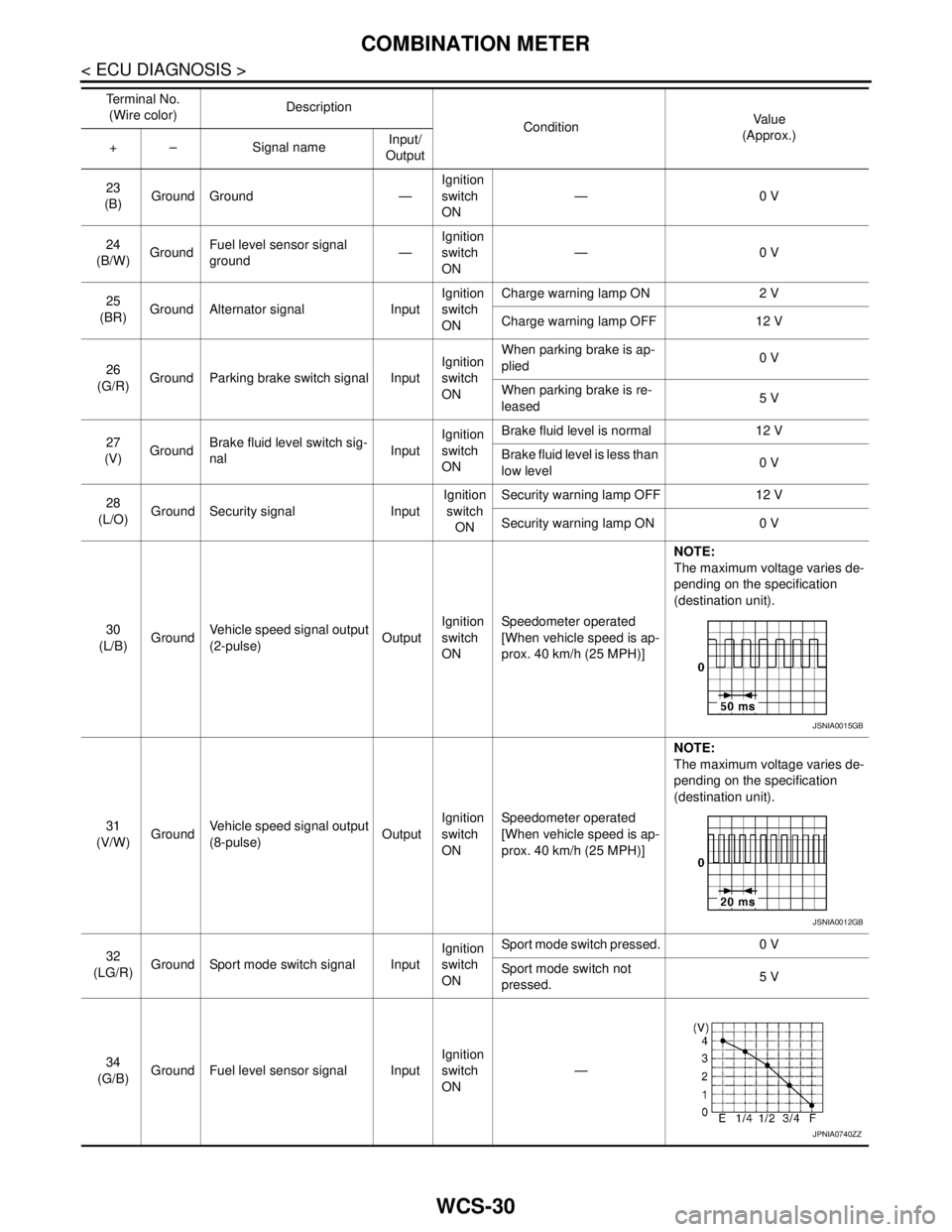
30
(L/B)GroundVehicle speed signal output
(2-pulse)OutputIgnition
switch
ONSpeedometer operated
[When vehicle speed is ap-
prox. 40 km/h (25 MPH)]NOTE:
The maximum voltage varies de-
pending on the specification
(destination unit).
31
(V/W)GroundVehicle speed signal output
(8-pulse)OutputIgnition
switch
ONSpeedometer operated
[When vehicle speed is ap-
prox. 40 km/h (25 MPH)]NOTE:
The maximum voltage varies de-
pending on the specification
(destination unit).
32
(LG/R)Ground Sport mode switch signal InputIgnition
switch
ONSport mode switch pressed. 0 V
Sport mode switch not
pressed.5 V
34
(G/B)Ground Fuel level sensor signal InputIgnition
switch
ON— Te r m i n a l N o .
(Wire color)Description
ConditionVa l u e
(Approx.)
+ – Signal nameInput/
Output
JSNIA0015GB
JSNIA0012GB
JPNIA0740ZZ