Int NISSAN TEANA 2008 Service Manual
[x] Cancel search | Manufacturer: NISSAN, Model Year: 2008, Model line: TEANA, Model: NISSAN TEANA 2008Pages: 5121, PDF Size: 69.03 MB
Page 814 of 5121
![NISSAN TEANA 2008 Service Manual AV-670
< ON-VEHICLE REPAIR >[BOSE AUDIO WITH NAVIGATION]
REAR VIEW CAMERA
REAR VIEW CAMERA
Exploded ViewINFOID:0000000003766021
DISASSEMBLY
Removal and InstallationINFOID:0000000003766022
REMOVAL
1. R](/img/5/57391/w960_57391-813.png "NISSAN TEANA 2008 Service Manual AV-670
< ON-VEHICLE REPAIR >[BOSE AUDIO WITH NAVIGATION]
REAR VIEW CAMERA
REAR VIEW CAMERA
Exploded ViewINFOID:0000000003766021
DISASSEMBLY
Removal and InstallationINFOID:0000000003766022
REMOVAL
1. R")
AV-670
< ON-VEHICLE REPAIR >[BOSE AUDIO WITH NAVIGATION]
REAR VIEW CAMERA
REAR VIEW CAMERA
Exploded ViewINFOID:0000000003766021
DISASSEMBLY
Removal and InstallationINFOID:0000000003766022
REMOVAL
1. Remove trunk lid finisher inner. Refer to INT-59, "Removal and Installation".
2. Remove trunk lid finisher. Refer to EXT-38, "
Removal and Installation".
3. Remove rear view camera mounting clip, disconnect the rear view camera connector.
4. Remove rear view camera.
INSTALLATION
1. Installation is the reverse order of removal.
AdjustmentINFOID:0000000003901754
Adjust the guide line position if the guide line position is shifted after installing the rear view camera.
1. Draw lines on rearward area of the vehicle passing through the
following points: 200 mm (7.87 in) from both sides of the vehicle,
and 0.5 m (1.64 ft), 1.0 m (3.28 ft) from the rear end of the
bumper.
2. Set into “Adjust offset of rear view camera” mode of Confirma-
tion / Adjustment mode.
JPNIA1050ZZ
1. Rear view camera
2. Seal
Refer to GI-4, "
Components" for symbols in the figure.
SKIB3691E
Page 818 of 5121

BCS
BCS-1
ELECTRICAL & POWER CONTROL
C
D
E
F
G
H
I
J
K
L B
SECTION BCS
A
O
P N
CONTENTS
BODY CONTROL SYSTEM
BASIC INSPECTION ....................................3
INSPECTION AND ADJUSTMENT .....................3
ADDITIONAL SERVICE WHEN REPLACING
CONTROL UNIT (BCM) ...............................................
3
ADDITIONAL SERVICE WHEN REPLACING
CONTROL UNIT (BCM) : Description .......................
3
ADDITIONAL SERVICE WHEN REPLACING
CONTROL UNIT (BCM) : Special Repair Require-
ment ..........................................................................
3
CONFIGURATION (BCM) ...........................................3
CONFIGURATION (BCM) : Description ....................3
CONFIGURATION (BCM) : Special Repair Re-
quirement ..................................................................
4
CONFIGURATION (BCM) : Configuration list ...........5
FUNCTION DIAGNOSIS ...............................6
BODY CONTROL SYSTEM ................................6
System Description ...................................................6
Component Parts Location ........................................7
COMBINATION SWITCH READING SYSTEM
.....
8
System Diagram ........................................................8
System Description ...................................................8
Component Parts Location ......................................11
SIGNAL BUFFER SYSTEM ...............................12
System Diagram ......................................................12
System Description .................................................12
POWER CONSUMPTION CONTROL SYS-
TEM ....................................................................
13
System Diagram ......................................................13
System Description .................................................13
Component Parts Location ......................................15
DIAGNOSIS SYSTEM (BCM) ............................16
COMMON ITEM .........................................................16
COMMON ITEM : CONSULT-III Function (BCM -
COMMON ITEM) .....................................................
16
DOOR LOCK ..............................................................17
DOOR LOCK : CONSULT-III Function (BCM -
DOOR LOCK) ..........................................................
17
REAR WINDOW DEFOGGER ...................................18
REAR WINDOW DEFOGGER : CONSULT-III
Function (BCM - REAR DEFOGGER) .....................
18
BUZZER .....................................................................18
BUZZER : CONSULT-III Function (BCM - BUZZ-
ER) ..........................................................................
19
INT LAMP ...................................................................19
INT LAMP : CONSULT-III Function (BCM - INT
LAMP) ......................................................................
19
HEADLAMP ...............................................................21
HEADLAMP : CONSULT-III Function (BCM -
HEAD LAMP) ...........................................................
21
WIPER ........................................................................23
WIPER : CONSULT-III Function (BCM - WIPER) ....23
FLASHER ...................................................................24
FLASHER : CONSULT-III Function (BCM -
FLASHER) ...............................................................
24
INTELLIGENT KEY ....................................................25
INTELLIGENT KEY : CONSULT-III Function
(BCM - INTELLIGENT KEY) ....................................
25
COMB SW ..................................................................28
COMB SW : CONSULT-III Function (BCM -
COMB SW) ..............................................................
28
BCM ...........................................................................28
BCM : CONSULT-III Function (BCM - BCM) ...........28
IMMU ..........................................................................29
IMMU : CONSULT-III Function (BCM - IMMU) ........29
Page 819 of 5121

BCS-2
BATTERY SAVER ....................................................29
BATTERY SAVER : CONSULT-III Function (BCM
- BATTERY SAVER) ..............................................
29
TRUNK ......................................................................30
TRUNK : CONSULT-III Function (BCM - TRUNK) ...30
THEFT ALM ..............................................................31
THEFT ALM : CONSULT-III Function (BCM -
THEFT) ...................................................................
31
SIGNAL BUFFER ......................................................32
SIGNAL BUFFER : CONSULT-III Function (BCM
- SIGNAL BUFFER) ................................................
32
COMPONENT DIAGNOSIS ........................33
U1000 CAN COMM CIRCUIT ............................33
Description ..............................................................33
DTC Logic ...............................................................33
Diagnosis Procedure ..............................................33
U1010 CONTROL UNIT (CAN) .........................34
DTC Logic ...............................................................34
Diagnosis Procedure ..............................................34
U0415 VEHICLE SPEED SIG ............................35
Description ..............................................................35
DTC Logic ...............................................................35
Diagnosis Procedure ..............................................35
B2562 LOW VOLTAGE .....................................36
DTC Logic ...............................................................36
Diagnosis Procedure ..............................................36
POWER SUPPLY AND GROUND CIRCUIT .....37
Diagnosis Procedure ..............................................37
COMBINATION SWITCH INPUT CIRCUIT .......38
Diagnosis Procedure ...............................................38
COMBINATION SWITCH OUTPUT CIRCUIT ...40
Diagnosis Procedure ...............................................40
ECU DIAGNOSIS .......................................42
BCM (BODY CONTROL MODULE) ..................42
Reference Value .....................................................42
Wiring Diagram - BCM - ..........................................65
Fail-safe ..................................................................71
DTC Inspection Priority Chart ...............................73
DTC Index ..............................................................74
SYMPTOM DIAGNOSIS ............................76
COMBINATION SWITCH SYSTEM SYMP-
TOMS .................................................................
76
Symptom Table .......................................................76
PRECAUTION ............................................77
PRECAUTIONS .................................................77
Precaution for Supplemental Restraint System
(SRS) "AIR BAG" and "SEAT BELT PRE-TEN-
SIONER" .................................................................
77
ON-VEHICLE REPAIR ...............................78
BCM (BODY CONTROL MODULE) ..................78
Exploded View ........................................................78
Removal and Installation .........................................78
COMBINATION SWITCH ..................................79
Exploded View ........................................................79
Removal and Installation .........................................79
Page 820 of 5121
BCS
INSPECTION AND ADJUSTMENT
BCS-3
< BASIC INSPECTION >
C
D
E
F
G
H
I
J
K
L B A
O
P N
BASIC INSPECTION
INSPECTION AND ADJUSTMENT
ADDITIONAL SERVICE WHEN REPLACING CONTROL UNIT (BCM)
ADDITIONAL SERVICE WHEN REPLACING CONTROL UNIT (BCM) : Description
INFOID:0000000003809644
BEFORE REPLACEMENT
When replacing BCM, save or print current vehicle specification with CONSULT-III configuration before
replacement.
NOTE:
If “READ CONFIGURATION” can not be used, use the “WRITE CONFIGURATION - Manual selection” after
replacing BCM.
AFTER REPLACEMENT
CAUTION:
• When replacing BCM, you must perform “WRITE CONFIGURATION” with CONSULT-III.
- Complete the procedure of “WRITE CONFIGURATION” in order.
- If you set incorrect “WRITE CONFIGURATION”, incidents might occur.
- Configuration is different for each vehicle model. Confirm configuration of each vehicle model.
When replacing BCM, perform the system initialization (NATS).
ADDITIONAL SERVICE WHEN REPLACING CONTROL UNIT (BCM) : Special Repair
Requirement
INFOID:0000000003809645
1.SAVING VEHICLE SPECIFICATION
CONSULT-III Configuration
Perform “READ CONFIGURATION” to save or print current vehicle specification. Refer to BCS-3, "
CONFIGU-
RATION (BCM) : Description".
NOTE:
If “READ CONFIGURATION” can not be used, use the “WRITE CONFIGURATION - Manual selection” after
replacing BCM.
>> GO TO 2.
2.REPLACE BCM
Replace BCM. Refer to BCS-78, "
Exploded View".
>> GO TO 3.
3.WRITING VEHICLE SPECIFICATION
CONSULT-III Configuration
Perform “WRITE CONFIGURATION - Config file” or “WRITE CONFIGURATION - Manual selection” to write
vehicle specification. Refer to BCS-4, "
CONFIGURATION (BCM) : Special Repair Requirement".
>> GO TO 4.
4.INITIALIZE BCM (NATS)
Perform BCM initialization. (NATS)
>> WORK END
CONFIGURATION (BCM)
CONFIGURATION (BCM) : DescriptionINFOID:0000000003809646
Vehicle specification needs to be written with CONSULT-III because it is not written after replacing BCM.
Page 823 of 5121
BCS-6
< FUNCTION DIAGNOSIS >
BODY CONTROL SYSTEM
FUNCTION DIAGNOSIS
BODY CONTROL SYSTEM
System DescriptionINFOID:0000000003809584
OUTLINE
BCM (Body Control Module) controls the various electrical components. It inputs the information required to
the control from CAN communication and the signal received from each switch and sensor.
BCM has combination switch reading function for reading the operation status of combination switches (light,
turn signal, wiper and washer) in addition to a function for controlling the operation of various electrical com-
ponents. It also has the signal transmission function as the passed point of signal and the power saving con-
trol function that reduces the power consumption with the ignition switch OFF.
BCM is equipped with the diagnosis function that performs the diagnosis with CONSULT-III and various set-
tings.
BCM CONTROL FUNCTION LIST
System Reference
Combination switch reading systemBCS-8, "
System Diagram"
Signal buffer systemBCS-12, "System Diagram"
Power consumption control systemBCS-13, "System Diagram"
Auto light systemEXL-13, "System Diagram" (Xenon type headlamp)
EXL-202, "
System Diagram" (Halogen type headlamp)
Turn signal and hazard warning lamp systemEXL-19, "
System Diagram" (Xenon type headlamp)
EXL-206, "
System Diagram" (Halogen type headlamp)
Headlamp systemEXL-11, "
System Diagram" (Xenon type headlamp)
EXL-200, "
System Diagram" (Halogen type headlamp)
Parking, license plate and tail lamps systemEXL-21, "
System Diagram" (Xenon type headlamp)
EXL-208, "
System Diagram" (Halogen type headlamp)
Front fog lamp systemEXL-17, "
System Diagram" (Xenon type headlamp)
EXL-204, "
System Diagram" (Halogen type headlamp)
Rear fog lamp systemEXL-23, "
System Diagram" (Xenon type headlamp)
EXL-210, "
System Diagram" (Halogen type headlamp)
Exterior lamp battery saver systemEXL-25, "
System Diagram" (Xenon type headlamp)
EXL-212, "
System Diagram" (Halogen type headlamp)
Interior room lamp control system
INL-5, "
System Diagram"Step lamp system
Trunk room lamp system
Interior room lamp battery saver systemINL-9, "
System Diagram"
Front wiper and washer systemWW-5, "System Diagram"
Headlamp washer systemWW-10, "System Diagram"
Warning chime systemWCS-5, "WARNING CHIME SYSTEM : System Diagram"
Door lock systemDLK-11, "System Diagram"
Trunk open systemDLK-38, "System Diagram"
Automatic drive positioner systemADP-12, "AUTOMATIC DRIVE POSITIONER SYSTEM : System
Diagram"
Nissan Vehicle Immobilizer System (NVIS) - NATSSEC-14, "System Diagram"
Vehicle security systemSEC-17, "System Diagram"
Rear window defogger systemDEF-4, "
WITH AV CONTROL UNIT : System Diagram" (With
AV control unit)
DEF-6, "
WITHOUT AV CONTROL UNIT : System Diagram"
(Without AV control unit)
Page 824 of 5121

BCS
BODY CONTROL SYSTEM
BCS-7
< FUNCTION DIAGNOSIS >
C
D
E
F
G
H
I
J
K
L B A
O
P N
Component Parts LocationINFOID:0000000003809585
Intelligent Key system/engine start systemDoor lock function
DLK-14, "INTELLIGENT KEY SYSTEM : System Diagram"
Trunk open function
Remote keyless entry
function
Key reminder function
Warning function
Engine start function
Power window systemPWC-7, "
SystemDiagram"
System Reference
1. BCM
A. Behind of combination meter
JPMIA1040ZZ
Page 825 of 5121
BCS-8
< FUNCTION DIAGNOSIS >
COMBINATION SWITCH READING SYSTEM
COMBINATION SWITCH READING SYSTEM
System DiagramINFOID:0000000003809586
System DescriptionINFOID:0000000003809587
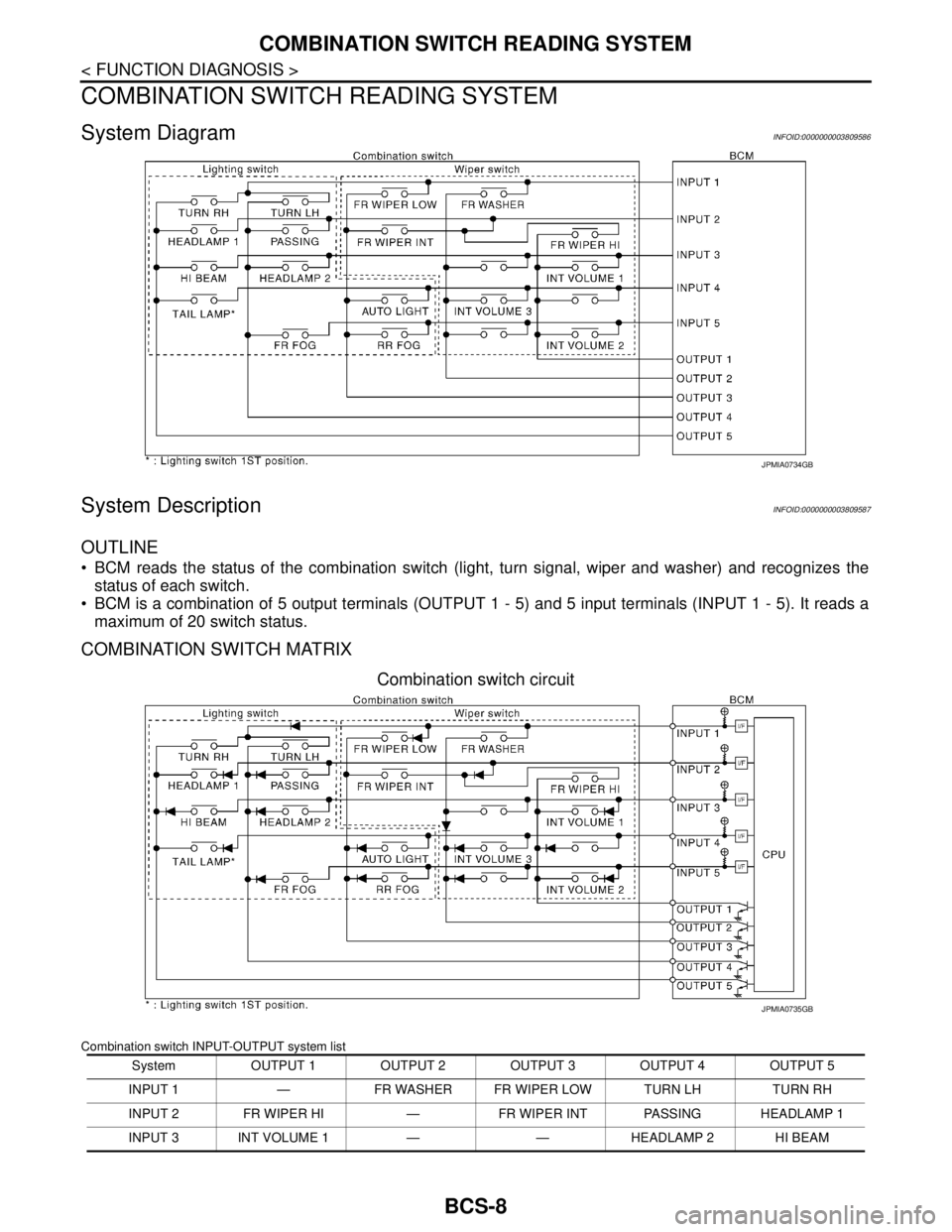
OUTLINE
BCM reads the status of the combination switch (light, turn signal, wiper and washer) and recognizes the
status of each switch.
BCM is a combination of 5 output terminals (OUTPUT 1 - 5) and 5 input terminals (INPUT 1 - 5). It reads a
maximum of 20 switch status.
COMBINATION SWITCH MATRIX
Combination switch circuit
Combination switch INPUT-OUTPUT system list
JPMIA0734GB
System OUTPUT 1 OUTPUT 2 OUTPUT 3 OUTPUT 4 OUTPUT 5
INPUT 1 — FR WASHER FR WIPER LOW TURN LH TURN RH
INPUT 2 FR WIPER HI — FR WIPER INT PASSING HEADLAMP 1
INPUT 3 INT VOLUME 1 — — HEADLAMP 2 HI BEAM
JPMIA0735GB
Page 826 of 5121
BCS
COMBINATION SWITCH READING SYSTEM
BCS-9
< FUNCTION DIAGNOSIS >
C
D
E
F
G
H
I
J
K
L B A
O
P N
NOTE:
Headlamp has a dual system switch.
COMBINATION SWITCH READING FUNCTION
Description
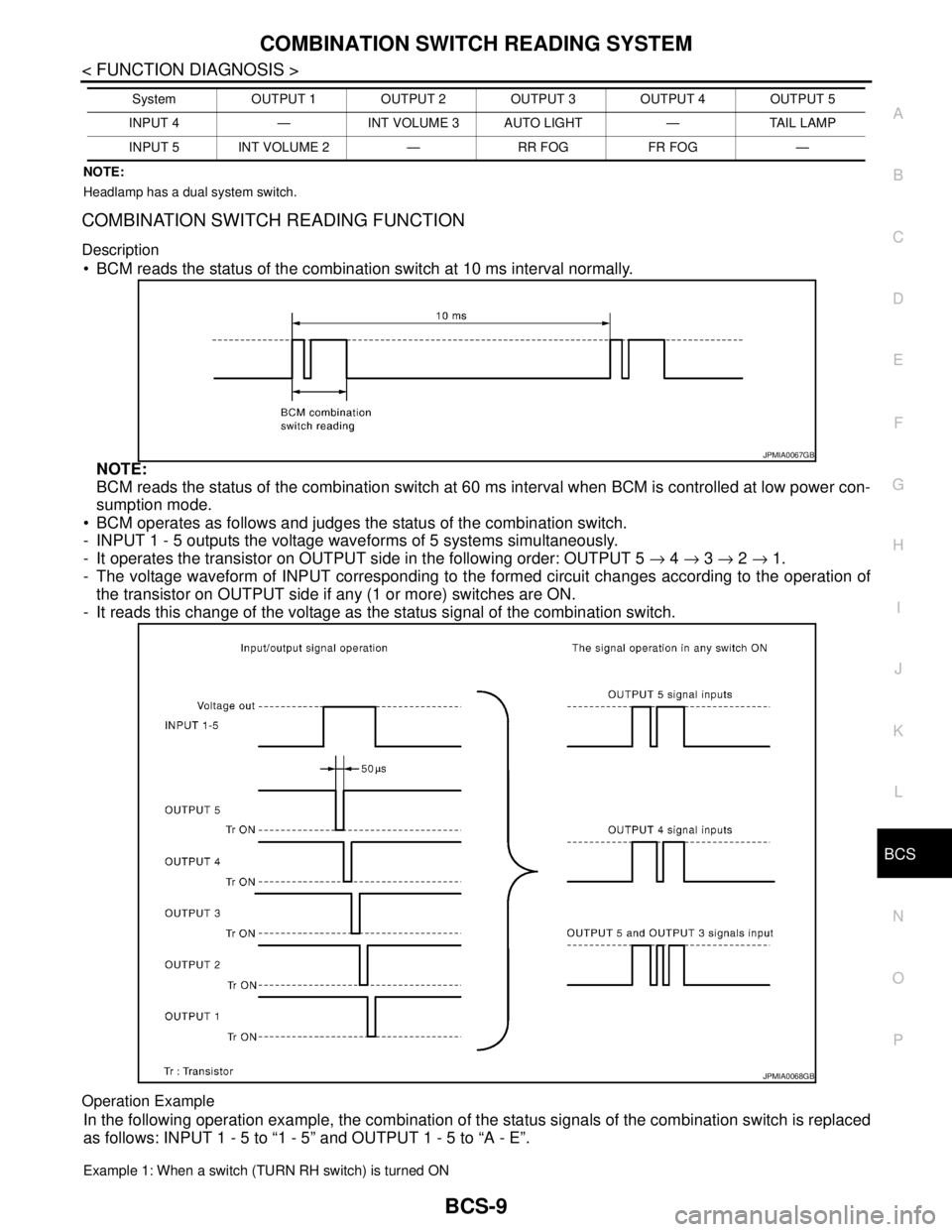
BCM reads the status of the combination switch at 10 ms interval normally.
NOTE:
BCM reads the status of the combination switch at 60 ms interval when BCM is controlled at low power con-
sumption mode.
BCM operates as follows and judges the status of the combination switch.
- INPUT 1 - 5 outputs the voltage waveforms of 5 systems simultaneously.
- It operates the transistor on OUTPUT side in the following order: OUTPUT 5 → 4 → 3 → 2 → 1.
- The voltage waveform of INPUT corresponding to the formed circuit changes according to the operation of
the transistor on OUTPUT side if any (1 or more) switches are ON.
- It reads this change of the voltage as the status signal of the combination switch.
Operation Example
In the following operation example, the combination of the status signals of the combination switch is replaced
as follows: INPUT 1 - 5 to “1 - 5” and OUTPUT 1 - 5 to “A - E”.
Example 1: When a switch (TURN RH switch) is turned ON
INPUT 4 — INT VOLUME 3 AUTO LIGHT — TAIL LAMP
INPUT 5 INT VOLUME 2 — RR FOG FR FOG —System OUTPUT 1 OUTPUT 2 OUTPUT 3 OUTPUT 4 OUTPUT 5
JPMIA0067GB
JPMIA0068GB
Page 827 of 5121

BCS-10
< FUNCTION DIAGNOSIS >
COMBINATION SWITCH READING SYSTEM
The circuit between INPUT 1 and OUTPUT 5 is formed when the TURN RH switch is turned ON.
BCM detects the combination switch status signal “1E” when the signal of OUTPUT 5 is input to INPUT 1.
BCM judges that the TURN RH switch is ON when the signal “1E” is detected.
Example 2: When some switches (turn RH switch, front wiper LO switch) are turned ON
The circuits between INPUT 1 and OUTPUT 5 and between INPUT 1 and OUTPUT 3 are formed when the
TURN RH switch and FR WIPER LOW switch are turned ON.
BCM detects the combination switch status signal “1CE” when the signals of OUTPUT 3 and OUTPUT 5 are
input to INPUT 1.
BCM judges that the TURN RH switch and FR WIPER LOW switch are ON when the signal “1CE” is
detected.
WIPER INTERMITTENT DIAL POSITION SETTING (FRONT WIPER INTERMITTENT OPERATION)
BCM judges the wiper intermittent dial 1 - 7 by the status of INT VOLUME 1, 2 and 3 switches.
JPMIA0736GB
JPMIA0737GB
Page 828 of 5121

BCS
COMBINATION SWITCH READING SYSTEM
BCS-11
< FUNCTION DIAGNOSIS >
C
D
E
F
G
H
I
J
K
L B A
O
P N
Component Parts LocationINFOID:0000000003809588
Wiper intermittent
dial positionIntermittent
operation delay
intervalINT VOLUME switch ON/OFF status
INT VOLUME 1 switch INT VOLUME 2 switch INT VOLUME 3 switch
1
Short
↑
↓
LongON ON ON
2ONONOFF
3ONOFFOFF
4 OFF OFF OFF
5OFFOFFON
6OFFONON
7OFFONOFF
1. Combination switch 2. BCM
A. Behind of combination meter
JPMIA1041ZZ