Trans NISSAN TEANA 2008 User Guide
[x] Cancel search | Manufacturer: NISSAN, Model Year: 2008, Model line: TEANA, Model: NISSAN TEANA 2008Pages: 5121, PDF Size: 69.03 MB
Page 45 of 5121
U1010 CONTROL UNIT (CAN)
ADP-39
< COMPONENT DIAGNOSIS >
C
D
E
F
G
H
I
K
L
MA
B
ADP
N
O
P
U1010 CONTROL UNIT (CAN)
DescriptionINFOID:0000000003759098
CAN (Controller Area Network) is a serial communication line for real time applications. It is an on-vehicle mul-
tiplex communication line with high data communication speed and excellent error detection ability. Modern
vehicle is equipped with many electronic control unit, and each control unit shares information and links with
other control units during operation (not independent). In CAN communication, control units are connected
with 2 communication lines (CAN-H line, CAN-L line) allowing a high rate of information transmission with less
wiring. Each control unit transmits/receives data but selectively reads required data only.
CAN Communication Signal Chart, refer to LAN-22, "
CAN Communication Signal Chart".
DTC LogicINFOID:0000000003759099
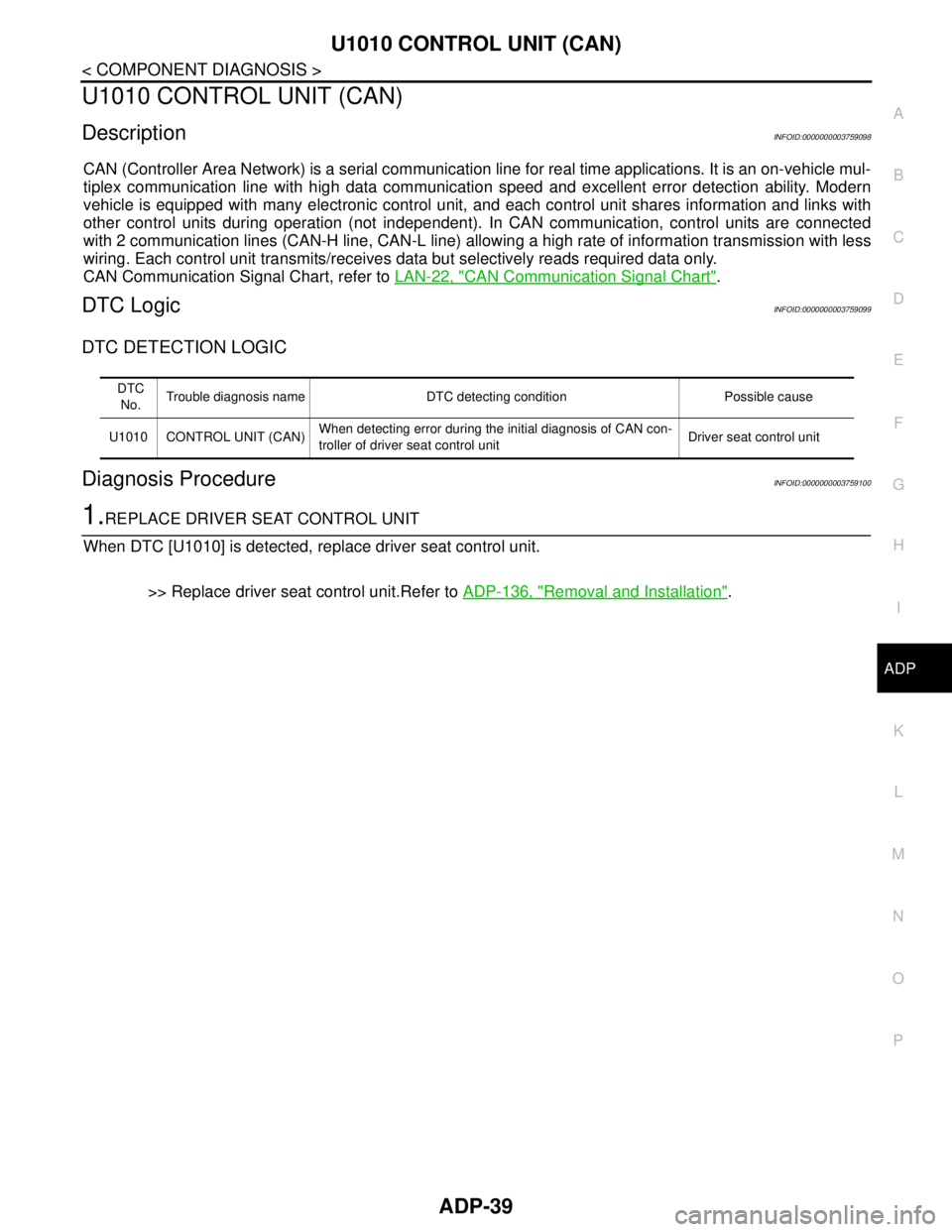
DTC DETECTION LOGIC
Diagnosis ProcedureINFOID:0000000003759100
1.REPLACE DRIVER SEAT CONTROL UNIT
When DTC [U1010] is detected, replace driver seat control unit.
>> Replace driver seat control unit.Refer to ADP-136, "
Removal and Installation".
DTC
No.Trouble diagnosis name DTC detecting condition Possible cause
U1010 CONTROL UNIT (CAN)When detecting error during the initial diagnosis of CAN con-
troller of driver seat control unitDriver seat control unit
Page 115 of 5121

BCM (BODY CONTROL MODULE)
ADP-109
< COMPONENT DIAGNOSIS >
C
D
E
F
G
H
I
K
L
MA
B
ADP
N
O
P
HIGH FLASHER OPERATION
BCM detects the turn signal lamp circuit status by the current value.
BCM increases the turn signal lamp blinking speed if the bulb or harness open is detected with the turn signal
lamp operating.
NOTE:
The blinking speed is normal while activating the hazard warning lamp.
DTC Inspection Priority ChartINFOID:0000000003940048
If some DTCs are displayed at the same time, perform inspections one by one based on the following priority
chart.
B2608: STARTER RELAY Inhibit engine cranking500 ms after the following signal communication status becomes
consistent
Starter motor relay control signal
Starter relay status signal (CAN)
B2609: S/L STATUS Inhibit engine cranking
Inhibit steering lockWhen the following steering lock conditions agree
BCM steering lock control status
Steering lock condition No. 1 signal status
Steering lock condition No. 2 signal status
B260A: IGNITION RELAY Inhibit engine cranking500 ms after the following conditions are fulfilled
IGN relay (IPDM E/R) control signal: OFF (Battery voltage)
Ignition ON signal (CAN to IPDM E/R): OFF (Request signal)
Ignition ON signal (CAN from IPDM E/R): OFF (Condition signal)
B260F: ENG STATE SIG LOSTMaintains the power supply
position attained at the time
of DTC detectionWhen any of the following conditions is fulfilled
Power position changes to ACC
Receives engine status signal (CAN)
B2612: S/L STATUS Inhibit engine cranking
Inhibit steering lockWhen any of the following conditions is fulfilled
Steering lock unit status signal (CAN) is received normally
The BCM steering lock control status matches the steering lock
status recognized by the steering lock unit status signal (CAN
from IPDM E/R)
B2617: STARTER RELAY CIRC Inhibit engine cranking1 second after the starter motor relay control inside BCM becomes
normal
B2618: BCM Inhibit engine cranking1 second after the ignition relay (IPDM E/R) control inside BCM be-
comes normal
B2619: BCM Inhibit engine cranking1 second after the steering lock unit power supply output control in-
side BCM becomes normal
B261E: VEHICLE TYPE Inhibit engine cranking BCM initialization
B26E1: ENG STATE NO RES Inhibit engine crankingWhen any of the following conditions is fulfilled
Power position changes to ACC
Receives engine status signal (CAN)
B26E9: S/L STATUS Inhibit engine cranking
Inhibit steering lockWhen BCM transmits the LOCK request signal to steering lock unit,
and receives LOCK response signal from steering lock unit, the fol-
lowing conditions is fulfilled
Steering condition No. 1 signal: LOCK (0 V)
Steering condition No. 2 signal: LOCK (Battery voltage) Display contents of CONSULT Fail-safe Cancellation
Priority DTC
1 B2562: LOW VOLTAGE
2 U1000: CAN COMM CIRCUIT
U1010: CONTROL UNIT (CAN)
3 B2190: NATS ANTENNA AMP
B2191: DIFFERENCE OF KEY
B2192: ID DISCORD BCM-ECM
B2193: CHAIN OF BCM-ECM
Page 119 of 5121
DRIVER SEAT CONTROL UNIT
ADP-113
< ECU DIAGNOSIS >
C
D
E
F
G
H
I
K
L
MA
B
ADP
N
O
P
*: The value at the position attained when the battery is connected is regarded as 32768.
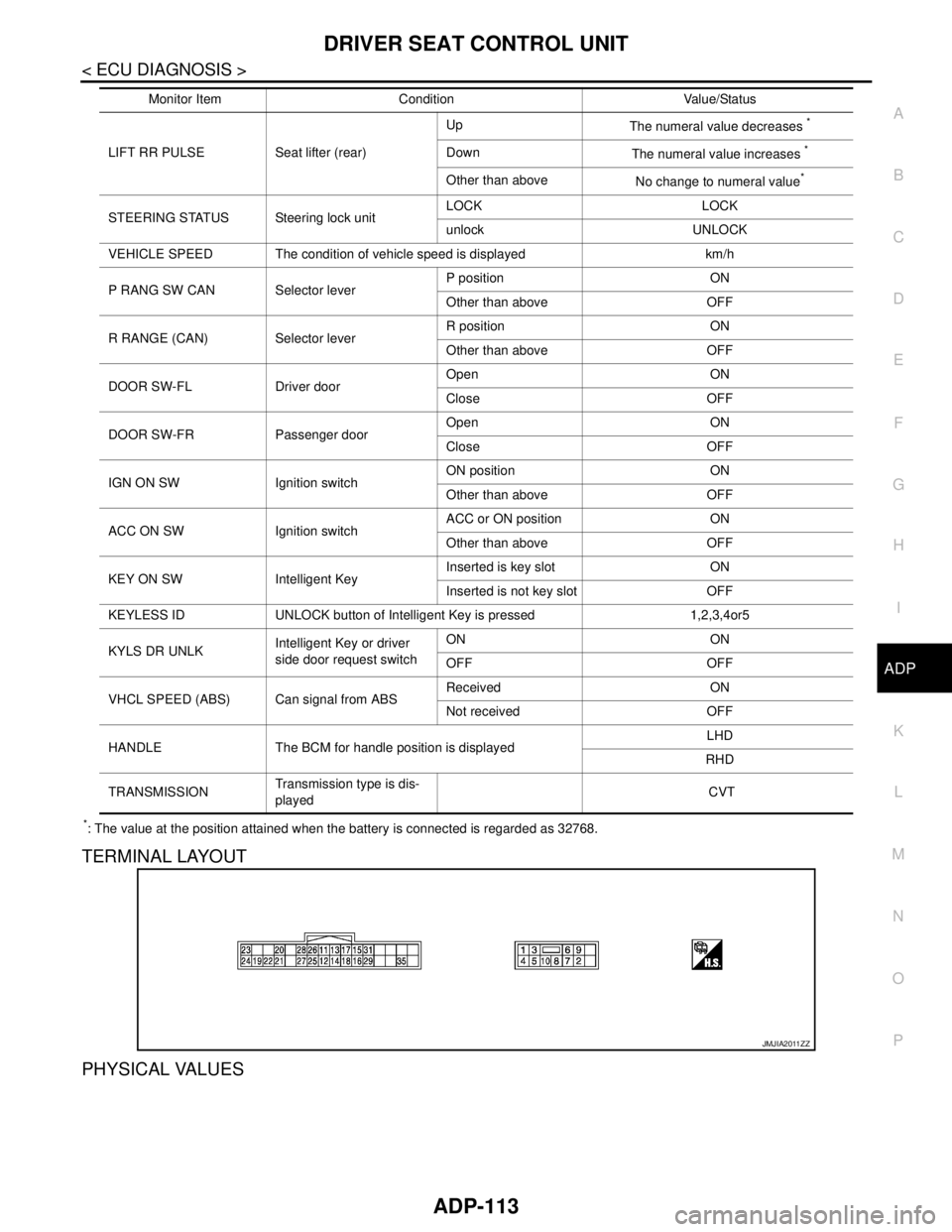
TERMINAL LAYOUT
PHYSICAL VALUES
LIFT RR PULSE Seat lifter (rear)Up
The numeral value decreases
*
Down
The numeral value increases *
Other than above
No change to numeral value*
STEERING STATUS Steering lock unitLOCK LOCK
unlock UNLOCK
VEHICLE SPEED The condition of vehicle speed is displayed km/h
P RANG SW CAN Selector leverP position ON
Other than above OFF
R RANGE (CAN) Selector leverR position ON
Other than above OFF
DOOR SW-FL Driver doorOpen ON
Close OFF
DOOR SW-FR Passenger doorOpen ON
Close OFF
IGN ON SW Ignition switchON position ON
Other than above OFF
ACC ON SW Ignition switchACC or ON position ON
Other than above OFF
KEY ON SW Intelligent KeyInserted is key slot ON
Inserted is not key slot OFF
KEYLESS ID UNLOCK button of Intelligent Key is pressed 1,2,3,4or5
KYLS DR UNLKIntelligent Key or driver
side door request switchON ON
OFF OFF
VHCL SPEED (ABS) Can signal from ABSReceived ON
Not received OFF
HANDLE The BCM for handle position is displayedLHD
RHD
TRANSMISSIONTransmission type is dis-
played CVT Monitor Item Condition Value/Status
JMJIA2011ZZ
Page 158 of 5121
![NISSAN TEANA 2008 User Guide AV-14
< FUNCTION DIAGNOSIS >[AUDIO SYSTEM]
AUDIO SYSTEM
Component Parts Location
INFOID:0000000003765590
Component DescriptionINFOID:0000000003765591
1. Front squawker RH 2. Front squawker LH 3. Front](/img/5/57391/w960_57391-157.png "NISSAN TEANA 2008 User Guide AV-14
< FUNCTION DIAGNOSIS >[AUDIO SYSTEM]
AUDIO SYSTEM
Component Parts Location
INFOID:0000000003765590
Component DescriptionINFOID:0000000003765591
1. Front squawker RH 2. Front squawker LH 3. Front")
AV-14
< FUNCTION DIAGNOSIS >[AUDIO SYSTEM]
AUDIO SYSTEM
Component Parts Location
INFOID:0000000003765590
Component DescriptionINFOID:0000000003765591
1. Front squawker RH 2. Front squawker LH 3. Front door speaker LH
4. Rear door speaker LH 5. Antenna amp. 6. Rear door speaker RH
7. Front door speaker RH 8. Steering switch 9. Audio unit
10. Audio display unit
A. Within rear pillar finisher RH
JPNIA1057ZZ
Part name Description
AUDIO UNIT Has radio function and CD playing function.
Sound signals are output to each speaker.
AUDIO DISPLAY UNIT Display images are controlled by AV communication from audio unit.
FRONT DOOR SPEAKER Outputs sound signals from audio unit.
Outputs sound (mid and low range).
REAR DOOR SPEAKER Outputs sound signals from audio unit.
Outputs sound (mid and low range).
FRONT SQUAWKER Outputs sound signals from audio unit.
Outputs sound (high and mid range).
STEERING SWITCH Steering switch signals (operation signals) are output to audio unit.
ANTENNA AMP. Radio signal received by glass antenna is amplified and transmitted to audio
unit.
Power (antenna amp. ON signal) is supplied from audio unit.
Page 162 of 5121
![NISSAN TEANA 2008 User Guide AV-18
< FUNCTION DIAGNOSIS >[AUDIO SYSTEM]
DIAGNOSIS SYSTEM (AUDIO UNIT)
5. Pressing the AUDIO switch briefly displays the AV communication diagnosis mode. Pressing the AUDIO
switch briefly again swit](/img/5/57391/w960_57391-161.png "NISSAN TEANA 2008 User Guide AV-18
< FUNCTION DIAGNOSIS >[AUDIO SYSTEM]
DIAGNOSIS SYSTEM (AUDIO UNIT)
5. Pressing the AUDIO switch briefly displays the AV communication diagnosis mode. Pressing the AUDIO
switch briefly again swit")
AV-18
< FUNCTION DIAGNOSIS >[AUDIO SYSTEM]
DIAGNOSIS SYSTEM (AUDIO UNIT)
5. Pressing the AUDIO switch briefly displays the AV communication diagnosis mode. Pressing the AUDIO
switch briefly again switches to each AV communication display.
AV communication diagnosis item
6. Pressing the TRACK switch displays the confirmation screen of “delete error record”. Press the SEEK
switch if returning from RECORD DEL YES? to RECORD DEL NO?
The item is automatically determined approximately 6 seconds after it is displayed. Then the display
returns to AV TROUBLE DEL display item.
7. Self-diagnosis mode is canceled when the ignition switch is turned OFF.
Display item
Description
AV communication item Current Past
TRANSMIT OK / UN OK / 0 –39The communication condition and error counter from the audio unit to
the audio display unit are displayed.
DISP OK / UN OK / 0 –39
The communication condition and error counter from the audio display
unit to the audio unit.
DISP MPDT OK / UN OK / 0 –39
NO HISTORY BTHF — — Not used.
AV TROUBLE DEL — — The error record can be deleted.
Display item Description
RECORD DEL NO? Does not delete error record.
RECORD DEL YES? Deletes error record.
Page 164 of 5121
![NISSAN TEANA 2008 User Guide AV-20
< COMPONENT DIAGNOSIS >[AUDIO SYSTEM]
STEERING SWITCH SIGNAL A CIRCUIT
STEERING SWITCH SIGNAL A CIRCUIT
DescriptionINFOID:0000000003765594
Transmits the steering switch signal to audio unit.
Dia](/img/5/57391/w960_57391-163.png "NISSAN TEANA 2008 User Guide AV-20
< COMPONENT DIAGNOSIS >[AUDIO SYSTEM]
STEERING SWITCH SIGNAL A CIRCUIT
STEERING SWITCH SIGNAL A CIRCUIT
DescriptionINFOID:0000000003765594
Transmits the steering switch signal to audio unit.
Dia")
AV-20
< COMPONENT DIAGNOSIS >[AUDIO SYSTEM]
STEERING SWITCH SIGNAL A CIRCUIT
STEERING SWITCH SIGNAL A CIRCUIT
DescriptionINFOID:0000000003765594
Transmits the steering switch signal to audio unit.
Diagnosis ProcedureINFOID:0000000003765595
1.CHECK STEERING SWITCH SIGNAL A CIRCUIT
1. Disconnect audio unit connector and spiral cable connector.
2. Check continuity between audio unit harness connector and spiral cable harness connector.
3. Check continuity between audio unit harness connector and ground.
Is the inspection result normal?
YES >> GO TO 2.
NO >> Repair harness or connector.
2.CHECK SPIRAL CABLE
Check spiral cable.
Is the inspection result normal?
YES >> GO TO 3.
NO >> Replace spiral cable.
3.CHECK AUDIO UNIT VOLTAGE
1. Connect audio unit connector and spiral cable connector.
2. Turn ignition switch ON.
3. Check voltage between audio unit harness connector terminals.
Is the inspection result normal?
YES >> GO TO 4.
NO >> Replace audio unit.
4.CHECK STEERING SWITCH
1. Turn ignition switch OFF.
2. Check steering switch. Refer to AV-21, "
Component Inspection".
Is the inspection result normal?
YES >> INSPECTION END
NO >> Replace steering switch.
Audio unit Spiral cable
Continuity
Connector Terminal Connector Terminal
M46 6 M33 24 Existed
Audio unit
—Continuity
Connector Terminal
M46 6 Ground Not existed
(+) (−)
Vo l ta g e Audio unit
Connector Terminal Connector Terminal
M46 6 M46 15 Approx. 5.0 V
Page 166 of 5121
![NISSAN TEANA 2008 User Guide AV-22
< COMPONENT DIAGNOSIS >[AUDIO SYSTEM]
STEERING SWITCH SIGNAL B CIRCUIT
STEERING SWITCH SIGNAL B CIRCUIT
DescriptionINFOID:0000000003765597
Transmits the steering switch signal to audio unit.
Dia](/img/5/57391/w960_57391-165.png "NISSAN TEANA 2008 User Guide AV-22
< COMPONENT DIAGNOSIS >[AUDIO SYSTEM]
STEERING SWITCH SIGNAL B CIRCUIT
STEERING SWITCH SIGNAL B CIRCUIT
DescriptionINFOID:0000000003765597
Transmits the steering switch signal to audio unit.
Dia")
AV-22
< COMPONENT DIAGNOSIS >[AUDIO SYSTEM]
STEERING SWITCH SIGNAL B CIRCUIT
STEERING SWITCH SIGNAL B CIRCUIT
DescriptionINFOID:0000000003765597
Transmits the steering switch signal to audio unit.
Diagnosis ProcedureINFOID:0000000003765598
1.CHECK STEERING SWITCH SIGNAL B CIRCUIT
1. Disconnect audio unit connector and spiral cable connector.
2. Check continuity between audio unit harness connector and spiral cable harness connector.
3. Check continuity between audio unit harness connector and ground.
Is the inspection result normal?
YES >> GO TO 2.
NO >> Repair harness or connector.
2.CHECK SPIRAL CABLE
Check spiral cable.
Is the inspection result normal?
YES >> GO TO 3.
NO >> Replace spiral cable.
3.CHECK AUDIO UNIT VOLTAGE
1. Connect audio unit connector and spiral cable connector.
2. Turn ignition switch ON.
3. Check voltage between audio unit harness connector terminals.
Is the inspection result normal?
YES >> GO TO 4.
NO >> Replace audio unit.
4.CHECK STEERING SWITCH
1. Turn ignition switch OFF.
2. Check steering switch. Refer to AV-23, "
Component Inspection".
Is the inspection result normal?
YES >> INSPECTION END
NO >> Replace steering switch.
Audio unit Spiral cable
Continuity
Connector Terminal Connector Terminal
M46 16 M33 31 Existed
Audio unit
—Continuity
Connector Terminal
M46 16 Ground Not existed
(+) (−)
Vo l ta g e Audio unit
Connector Terminal Connector Terminal
M46 16 M46 15 Approx. 5.0 V
Page 168 of 5121
![NISSAN TEANA 2008 User Guide AV-24
< COMPONENT DIAGNOSIS >[AUDIO SYSTEM]
STEERING SWITCH SIGNAL GND CIRCUIT
STEERING SWITCH SIGNAL GND CIRCUIT
DescriptionINFOID:0000000003765600
Transmits the steering switch signal to audio unit.](/img/5/57391/w960_57391-167.png "NISSAN TEANA 2008 User Guide AV-24
< COMPONENT DIAGNOSIS >[AUDIO SYSTEM]
STEERING SWITCH SIGNAL GND CIRCUIT
STEERING SWITCH SIGNAL GND CIRCUIT
DescriptionINFOID:0000000003765600
Transmits the steering switch signal to audio unit.")
AV-24
< COMPONENT DIAGNOSIS >[AUDIO SYSTEM]
STEERING SWITCH SIGNAL GND CIRCUIT
STEERING SWITCH SIGNAL GND CIRCUIT
DescriptionINFOID:0000000003765600
Transmits the steering switch signal to audio unit.
Diagnosis ProcedureINFOID:0000000003765601
1.CHECK STEERING SWITCH SIGNAL GND CIRCUIT
1. Turn ignition switch OFF.
2. Disconnect audio unit connector and spiral cable connector.
3. Check continuity between audio unit harness connector and spiral cable harness connector.
Is the inspection result normal?
YES >> GO TO 2.
NO >> Repair harness or connector.
2.CHECK SPIRAL CABLE
Check spiral cable.
Is the inspection result normal?
YES >> GO TO 3.
NO >> Replace spiral cable.
3.CHECK GROUND CIRCUIT
1. Connect audio unit connector.
2. Check continuity between audio unit harness connector and ground.
Is the inspection result normal?
YES >> GO TO 4.
NO >> Replace audio unit.
4.CHECK STEERING SWITCH
1. Turn ignition switch OFF.
2. Check steering switch. Refer to AV-25, "
Component Inspection".
Is the inspection result normal?
YES >> INSPECTION END
NO >> Replace steering switch.
Audio unit Spiral cable
Continuity
Connector Terminal Connector Terminal
M46 15 M33 33 Existed
Audio unit
—Continuity
Connector Terminal
M46 15 Ground Existed
Page 192 of 5121
![NISSAN TEANA 2008 User Guide AV-48
< FUNCTION DIAGNOSIS >[BASE AUDIO AND DISPLAY SYSTEM]
MULTI AV SYSTEM
FUNCTION DIAGNOSIS
MULTI AV SYSTEM
System DiagramINFOID:0000000003882699
NOTE:
The name MULTIFUNCTION SWITCH indicates the](/img/5/57391/w960_57391-191.png "NISSAN TEANA 2008 User Guide AV-48
< FUNCTION DIAGNOSIS >[BASE AUDIO AND DISPLAY SYSTEM]
MULTI AV SYSTEM
FUNCTION DIAGNOSIS
MULTI AV SYSTEM
System DiagramINFOID:0000000003882699
NOTE:
The name MULTIFUNCTION SWITCH indicates the")
AV-48
< FUNCTION DIAGNOSIS >[BASE AUDIO AND DISPLAY SYSTEM]
MULTI AV SYSTEM
FUNCTION DIAGNOSIS
MULTI AV SYSTEM
System DiagramINFOID:0000000003882699
NOTE:
The name MULTIFUNCTION SWITCH indicates the integration of PRESET SWITCH and MULTIFUNCTION
SWITCH virtually.
A radio antenna base integrated with radio antenna amp. is adopted.
Woofer illustrated in the above figure, integrates two woofers and a woofer amp.
System DescriptionINFOID:0000000003882700
Multi AV system means that the following systems are integrated.
AV control unit controls by transmitting/receiving data one by one with each unit (slave unit) that configures
them completely as a master unit by connecting between units that configure MULTI AV system with two AV
communication lines (H, L).
Two AV communication lines (H, L) adopt a twisted pair line that is resistant to noise.
AV control unit is connected by CAN communication, and it receives data signal from ECM, combination
meter. It computes and displays fuel economy information value with the obtained information. Transmitting/
receiving of data signal is performed by BCM. Also, it transmits the required signal of vehicle setting and
receives the response signal.
JSNIA1431GB
System name System explanation
AUDIO SYSTEMAV- 5 3 , "
System Diagram"
REAR VIEW MONITOR SYSTEMAV- 5 6 , "System Description"
VEHICLE INFORMATION SYSTEM Status of audio, climate control system, fuel economy, mainte-
nance and navigation is displayed.
AV control unit displays the fuel consumption status while re-
ceiving data signal through CAN communication from ECM and
combination meter.
AV control unit is connected to BCM via CAN communication
transmitting/receiving for the vehicle settings function.
AUXILIARY INPUT SYSTEM Refer to “AUXILIARY INPUT SYSTEM” shown below.
Page 193 of 5121
![NISSAN TEANA 2008 User Guide AV
MULTI AV SYSTEM
AV-49
< FUNCTION DIAGNOSIS >[BASE AUDIO AND DISPLAY SYSTEM]
C
D
E
F
G
H
I
J
K
L
MB A
O
P
AV control unit is connected with display unit and serial communication, and it transmits](/img/5/57391/w960_57391-192.png "NISSAN TEANA 2008 User Guide AV
MULTI AV SYSTEM
AV-49
< FUNCTION DIAGNOSIS >[BASE AUDIO AND DISPLAY SYSTEM]
C
D
E
F
G
H
I
J
K
L
MB A
O
P
AV control unit is connected with display unit and serial communication, and it transmits")
AV
MULTI AV SYSTEM
AV-49
< FUNCTION DIAGNOSIS >[BASE AUDIO AND DISPLAY SYSTEM]
C
D
E
F
G
H
I
J
K
L
MB A
O
P
AV control unit is connected with display unit and serial communication, and it transmits the required signal
of display and display control and receives the response signal from display unit.
NOTE:
AV control unit can perform CONSULT-III self-operating function and on board self-diagnosis.
CONSULT-III self diagnosis: Refer to AV-68, "
CONSULT-III Function (MULTI AV)".
On board self diagnosis: Refer to AV-60, "
Diagnosis Description".
AUXILIARY INPUT SYSTEM
Image and sound can be output from an external device by connecting a device with auxiliary input jacks.
Operation can be performed with multifunction switch, steering switch and rear control switch. Multifunction
switch and rear control switch transmits operation signal to AV control unit by AV communication.
JSNIA1432GB