clock NISSAN TEANA 2008 User Guide
[x] Cancel search | Manufacturer: NISSAN, Model Year: 2008, Model line: TEANA, Model: NISSAN TEANA 2008Pages: 5121, PDF Size: 69.03 MB
Page 1398 of 5121
![NISSAN TEANA 2008 User Guide DLK-182
< SYMPTOM DIAGNOSIS >[WITH INTELLIGENT KEY SYSTEM]
SQUEAK AND RATTLE TROUBLE DIAGNOSES
SQUEAK AND RATTLE TROUBLE DIAGNOSES
Work FlowINFOID:0000000003941377
CUSTOMER INTERVIEW
Interview the cus](/img/5/57391/w960_57391-1397.png "NISSAN TEANA 2008 User Guide DLK-182
< SYMPTOM DIAGNOSIS >[WITH INTELLIGENT KEY SYSTEM]
SQUEAK AND RATTLE TROUBLE DIAGNOSES
SQUEAK AND RATTLE TROUBLE DIAGNOSES
Work FlowINFOID:0000000003941377
CUSTOMER INTERVIEW
Interview the cus")
DLK-182
< SYMPTOM DIAGNOSIS >[WITH INTELLIGENT KEY SYSTEM]
SQUEAK AND RATTLE TROUBLE DIAGNOSES
SQUEAK AND RATTLE TROUBLE DIAGNOSES
Work FlowINFOID:0000000003941377
CUSTOMER INTERVIEW
Interview the customer if possible, to determine the conditions that exist when the noise occurs. Use the Diag-
nostic Worksheet during the interview to document the facts and conditions when the noise occurs and any of
the customer's comments; refer to DLK-186, "
Diagnostic Worksheet". This information is necessary to dupli-
cate the conditions that exist when the noise occurs.
The customer may not be able to provide a detailed description or the location of the noise. Attempt to obtain
all the facts and conditions that exist when the noise occurs (or does not occur).
If there is more than one noise in the vehicle, be sure to diagnose and repair the noise that the customer is
concerned about. This can be accomplished by a test drive with the customer.
After identifying the type of noise, isolate the noise in terms of its characteristics. The noise characteristics
are provided so the customer, service adviser and technician are all speaking the same language when
defining the noise.
Squeak – (Like tennis shoes on a clean floor)
Squeak characteristics include the light contact/fast movement/brought on by road conditions/hard surfaces
= higher pitch noise/softer surfaces = lower pitch noises/edge to surface = chirping
Creak – (Like walking on an old wooden floor)
Creak characteristics include firm contact/slow movement/twisting with a rotational movement/pitch depen-
dent on materials/often brought on by activity.
Rattle – (Like shaking a baby rattle)
Rattle characteristics include the fast repeated contact/vibration or similar movement/loose parts/missing
clip or fastener/incorrect clearance.
Knock – (Like a knock on a door)
Knock characteristics include hollow sounding/sometimes repeating/often brought on by driver action.
Tick – (Like a clock second hand)
Tick characteristics include gentle contacting of light materials/loose components/can be caused by driver
action or road conditions.
Thump – (Heavy, muffled knock noise)
Thump characteristics include softer knock/dead sound often brought on by activity.
Buzz – (Like a bumble bee)
Buzz characteristics include high frequency rattle/firm contact.
Often the degree of acceptable noise level will vary depending upon the person. A noise that a technician
may judge as acceptable may be very irritating to the customer.
Weather conditions, especially humidity and temperature, may have a great effect on noise level.
DUPLICATE THE NOISE AND TEST DRIVE
If possible, drive the vehicle with the customer until the noise is duplicated. Note any additional information on
the Diagnostic Worksheet regarding the conditions or location of the noise. This information can be used to
duplicate the same conditions when the repair is reconfirmed.
SBT842
Page 1448 of 5121
![NISSAN TEANA 2008 User Guide DLK-232
< ON-VEHICLE REPAIR >[WITH INTELLIGENT KEY SYSTEM]
FUEL FILLER LID OPENER
FUEL FILLER LID OPENER
Exploded ViewINFOID:0000000003813440
Removal and InstallationINFOID:0000000003813441
NOTE:
When](/img/5/57391/w960_57391-1447.png "NISSAN TEANA 2008 User Guide DLK-232
< ON-VEHICLE REPAIR >[WITH INTELLIGENT KEY SYSTEM]
FUEL FILLER LID OPENER
FUEL FILLER LID OPENER
Exploded ViewINFOID:0000000003813440
Removal and InstallationINFOID:0000000003813441
NOTE:
When")
DLK-232
< ON-VEHICLE REPAIR >[WITH INTELLIGENT KEY SYSTEM]
FUEL FILLER LID OPENER
FUEL FILLER LID OPENER
Exploded ViewINFOID:0000000003813440
Removal and InstallationINFOID:0000000003813441
NOTE:
When fuel filler lid opener actuator (1) is malfunctioning, pull the rod
to open fuel filler lid.
REMOVAL
1. Remove mounting screws, and then remove fuel filler lid.
2. Rotate lock nut counterclockwise, and then remove lock nut.
3. Push fuel filler lid opener actuator behind the vehicle, while pushing the pawl.
4. Remove rear wheel house finisher (LH). Refer to INT-57, "
Removal and Installation".
5. Disconnect harness connector and remove fuel filler lid opener actuator.
INSTALLATION
Install in the reverse order of removal.
CAUTION:
1. Fuel filler lid assembly 2. Bumper rubber 3. Lock nut
4. Fuel filler lid opener actuator
JMKIA2390ZZ
JMKIA1960ZZ
Page 1478 of 5121
![NISSAN TEANA 2008 User Guide INSPECTION AND ADJUSTMENT
EC-17
< BASIC INSPECTION >[VQ25DE, VQ35DE]
C
D
E
F
G
H
I
J
K
L
MA
EC
N
P O
Is “CMPLT” displayed on CONSULT-III screen?
YES >> GO TO 4.
NO >> GO TO 5.
3.PERFORM IDLE AIR V](/img/5/57391/w960_57391-1477.png "NISSAN TEANA 2008 User Guide INSPECTION AND ADJUSTMENT
EC-17
< BASIC INSPECTION >[VQ25DE, VQ35DE]
C
D
E
F
G
H
I
J
K
L
MA
EC
N
P O
Is “CMPLT” displayed on CONSULT-III screen?
YES >> GO TO 4.
NO >> GO TO 5.
3.PERFORM IDLE AIR V")
INSPECTION AND ADJUSTMENT
EC-17
< BASIC INSPECTION >[VQ25DE, VQ35DE]
C
D
E
F
G
H
I
J
K
L
MA
EC
N
P O
Is “CMPLT” displayed on CONSULT-III screen?
YES >> GO TO 4.
NO >> GO TO 5.
3.PERFORM IDLE AIR VOLUME LEARNING
Without CONSULT-III
NOTE:
It is better to count the time accurately with a clock.
It is impossible to switch the diagnostic mode when an accelerator pedal position sensor circuit has
a malfunction.
1. Perform EC-15, "
ACCELERATOR PEDAL RELEASED POSITION LEARNING : Special Repair Require-
ment".
2. Perform EC-16, "
THROTTLE VALVE CLOSED POSITION LEARNING : Special Repair Requirement".
3. Start engine and warm it up to normal operating temperature.
4. Turn ignition switch OFF and wait at least 10 seconds.
5. Confirm that accelerator pedal is fully released, turn ignition switch ON and wait 3 seconds.
6. Repeat the following procedure quickly 5 times within 5 seconds.
- Fully depress the accelerator pedal.
- Fully release the accelerator pedal.
7. Wait 7 seconds, fully depress the accelerator pedal for approx. 20 seconds until the MI stops blinking and
turns ON.
8. Fully release the accelerator pedal within 3 seconds after the MI turns ON.
9. Start engine and let it idle.
10. Wait 20 seconds.
>> GO TO 4.
4.CHECK IDLE SPEED AND IGNITION TIMING
Rev up the engine 2 or 3 times and check that idle speed and ignition timing are within the specifications.
For procedure, refer to EC-14, "
IDLE SPEED : Special Repair Requirement" and EC-15, "IGNITION TIMING :
Special Repair Requirement".
For specifications, refer to EC-414, "
Idle Speed" and EC-414, "Ignition Timing".
Is the inspection result normal?
YES >> INSPECTION END
NO >> GO TO 5.
5.DETECT MALFUNCTIONING PART-I
Check the following
Check that throttle valve is fully closed.
Check PCV valve operation.
Check that downstream of throttle valve is free from air leakage.
Is the inspection result normal?
YES >> GO TO 6.
NO >> Repair or replace malfunctioning part.
6.DETECT MALFUNCTIONING PART-II
When the above three items check out OK, engine component parts and their installation condition are ques-
tionable. Check and eliminate the cause of the incident.
It is useful to perform “TROUBLE DIAGNOSIS - SPECIFICATION VALUE”. Refer to EC-124, "
Description".
PBIB0665E
Page 1569 of 5121
![NISSAN TEANA 2008 User Guide EC-108
< FUNCTION DIAGNOSIS >[VQ25DE, VQ35DE]
ON BOARD DIAGNOSTIC (OBD) SYSTEM
This DTC number is clarified in Diagnostic Test Mode II (SELF-DIAGNOSTIC RESULTS)
Diagnostic Test Mode II — Self-diagno](/img/5/57391/w960_57391-1568.png "NISSAN TEANA 2008 User Guide EC-108
< FUNCTION DIAGNOSIS >[VQ25DE, VQ35DE]
ON BOARD DIAGNOSTIC (OBD) SYSTEM
This DTC number is clarified in Diagnostic Test Mode II (SELF-DIAGNOSTIC RESULTS)
Diagnostic Test Mode II — Self-diagno")
EC-108
< FUNCTION DIAGNOSIS >[VQ25DE, VQ35DE]
ON BOARD DIAGNOSTIC (OBD) SYSTEM
This DTC number is clarified in Diagnostic Test Mode II (SELF-DIAGNOSTIC RESULTS)
Diagnostic Test Mode II — Self-diagnostic Results
In this mode, the DTC and 1st trip DTC are indicated by the number of blinks of the MI as shown below.
The DTC and 1st trip DTC are displayed at the same time. If the MI does not illuminate in diagnostic test mode
I (Malfunction warning), all displayed items are 1st trip DTCs. If only one code is displayed when the MI illumi-
nates in diagnostic test mode II (SELF-DIAGNOSTIC RESULTS), it is a DTC; if two or more codes are dis-
played, they may be either DTCs or 1st trip DTCs. DTC No. is same as that of 1st trip DTC. These unidentified
codes can be identified by using the CONSULT-III or GST. A DTC will be used as an example for how to read
a code.
A particular trouble code can be identified by the number of four-digit numeral flashes as per the following.
The length of time the 1,000th-digit numeral flashes on and off is 1.2 seconds consisting of an ON (0.6-sec-
onds) - OFF (0.6-seconds) cycle.
The 100th-digit numeral and lower digit numerals consist of a 0.3-seconds ON and 0.3-seconds OFF cycle.
A change from one digit numeral to another occurs at an interval of 1.0-second OFF. In other words, the later
numeral appears on the display 1.3 seconds after the former numeral has disappeared.
A change from one trouble code to another occurs at an interval of 1.8-seconds OFF.
In this way, all the detected malfunctions are classified by their DTC numbers. The DTC 0000 refers to no mal-
function. (See EC-389, "
DTCIndex")
How to Switch Diagnostic Test Mode
NOTE:
It is better to count the time accurately with a clock.
MI Condition
ON When the malfunction is detected.
OFF No malfunction.
JMBIA1140GB
Number 0123456789ABCDEF
Flashes 10123456789111213141516
Page 1888 of 5121
DRIVE BELT
EM-13
< ON-VEHICLE MAINTENANCE >
C
D
E
F
G
H
I
J
K
L
MA
EM
N
P O
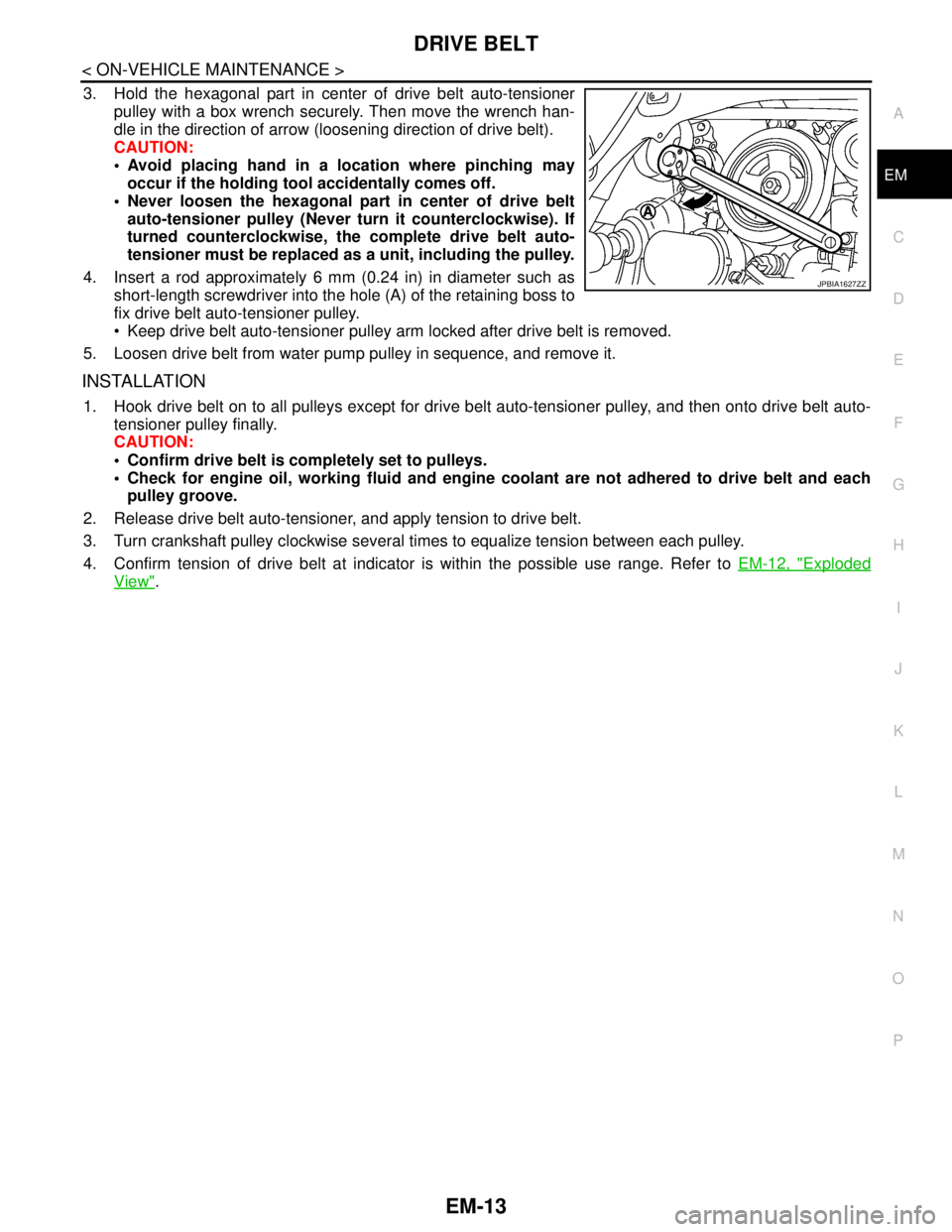
3. Hold the hexagonal part in center of drive belt auto-tensioner
pulley with a box wrench securely. Then move the wrench han-
dle in the direction of arrow (loosening direction of drive belt).
CAUTION:
Avoid placing hand in a location where pinching may
occur if the holding tool accidentally comes off.
Never loosen the hexagonal part in center of drive belt
auto-tensioner pulley (Never turn it counterclockwise). If
turned counterclockwise, the complete drive belt auto-
tensioner must be replaced as a unit, including the pulley.
4. Insert a rod approximately 6 mm (0.24 in) in diameter such as
short-length screwdriver into the hole (A) of the retaining boss to
fix drive belt auto-tensioner pulley.
Keep drive belt auto-tensioner pulley arm locked after drive belt is removed.
5. Loosen drive belt from water pump pulley in sequence, and remove it.
INSTALLATION
1. Hook drive belt on to all pulleys except for drive belt auto-tensioner pulley, and then onto drive belt auto-
tensioner pulley finally.
CAUTION:
Confirm drive belt is completely set to pulleys.
Check for engine oil, working fluid and engine coolant are not adhered to drive belt and each
pulley groove.
2. Release drive belt auto-tensioner, and apply tension to drive belt.
3. Turn crankshaft pulley clockwise several times to equalize tension between each pulley.
4. Confirm tension of drive belt at indicator is within the possible use range. Refer to EM-12, "
Exploded
View".
JPBIA1627ZZ
Page 1892 of 5121
CAMSHAFT VALVE CLEARANCE
EM-17
< ON-VEHICLE MAINTENANCE >
C
D
E
F
G
H
I
J
K
L
MA
EM
N
P O
CAMSHAFT VALVE CLEARANCE
Inspection and AdjustmentINFOID:0000000003802244
INSPECTION
Perform inspection as follows after removal, installation or replacement of camshaft or valve-related parts, or if
there is unusual engine conditions regarding valve clearance.
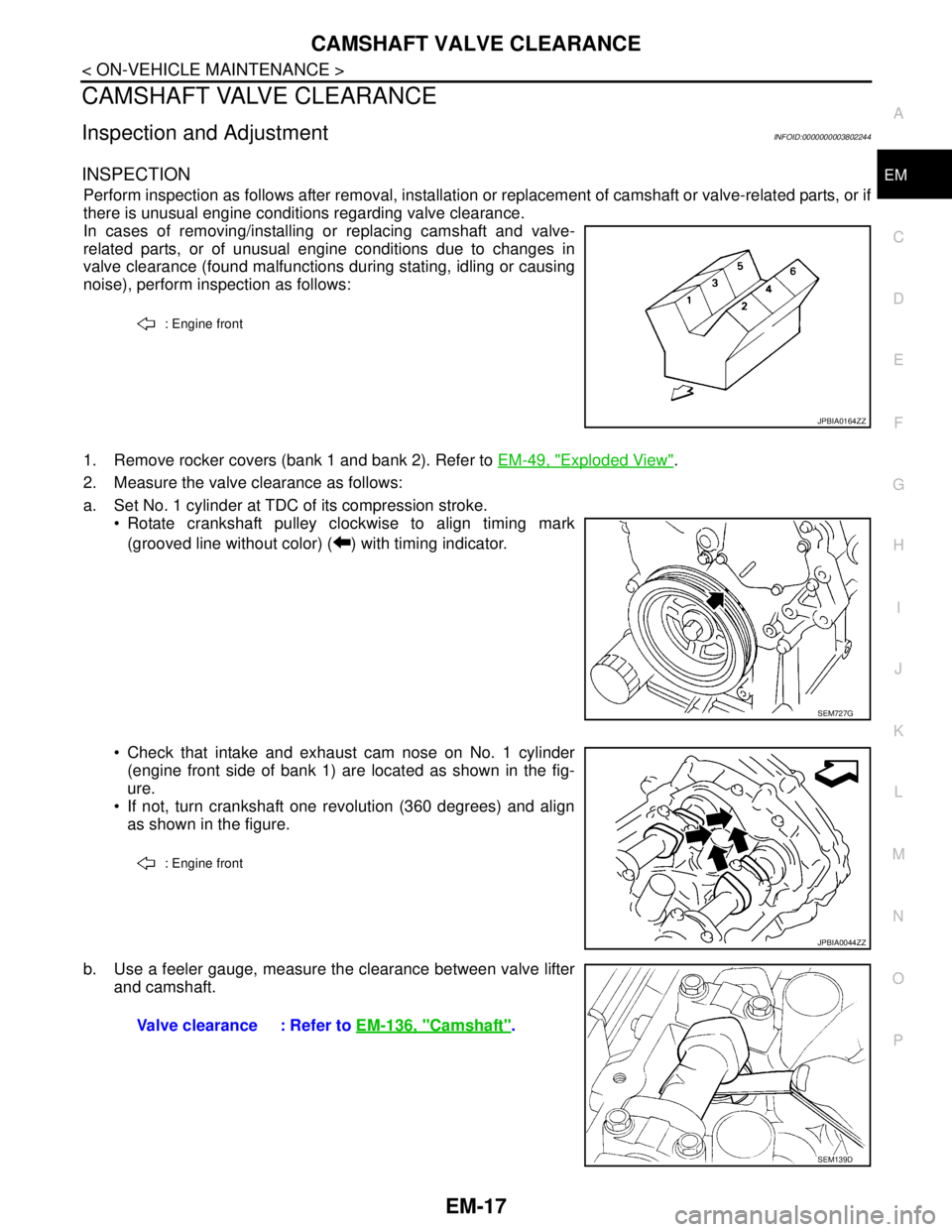
In cases of removing/installing or replacing camshaft and valve-
related parts, or of unusual engine conditions due to changes in
valve clearance (found malfunctions during stating, idling or causing
noise), perform inspection as follows:
1. Remove rocker covers (bank 1 and bank 2). Refer to EM-49, "
Exploded View".
2. Measure the valve clearance as follows:
a. Set No. 1 cylinder at TDC of its compression stroke.
Rotate crankshaft pulley clockwise to align timing mark
(grooved line without color) ( ) with timing indicator.
Check that intake and exhaust cam nose on No. 1 cylinder
(engine front side of bank 1) are located as shown in the fig-
ure.
If not, turn crankshaft one revolution (360 degrees) and align
as shown in the figure.
b. Use a feeler gauge, measure the clearance between valve lifter
and camshaft.
: Engine front
JPBIA0164ZZ
SEM727G
: Engine front
JPBIA0044ZZ
Valve clearance : Refer to EM-136, "Camshaft".
SEM139D
Page 1893 of 5121
EM-18
< ON-VEHICLE MAINTENANCE >
CAMSHAFT VALVE CLEARANCE
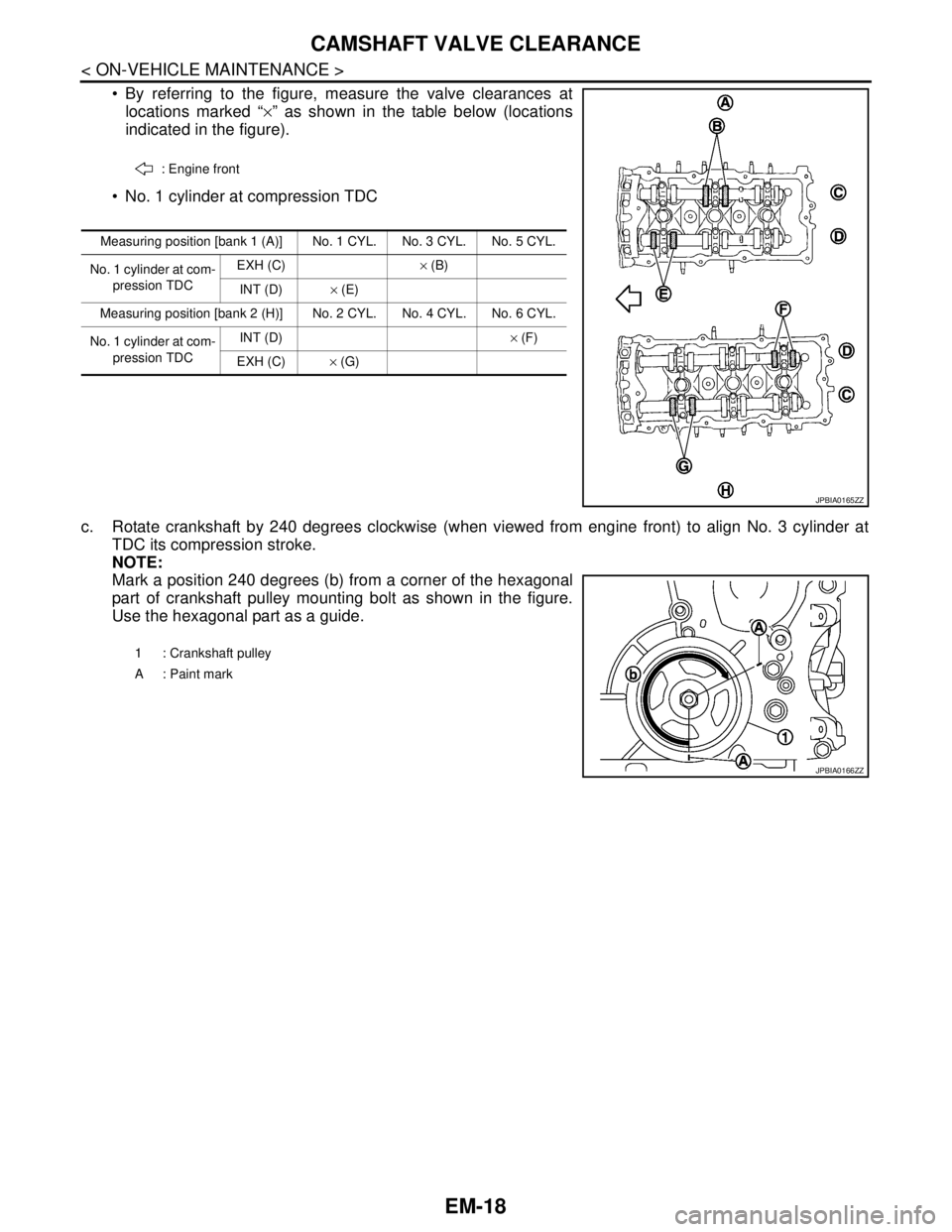
By referring to the figure, measure the valve clearances at
locations marked “×” as shown in the table below (locations
indicated in the figure).
No. 1 cylinder at compression TDC
c. Rotate crankshaft by 240 degrees clockwise (when viewed from engine front) to align No. 3 cylinder at
TDC its compression stroke.
NOTE:
Mark a position 240 degrees (b) from a corner of the hexagonal
part of crankshaft pulley mounting bolt as shown in the figure.
Use the hexagonal part as a guide.
: Engine front
Measuring position [bank 1 (A)] No. 1 CYL. No. 3 CYL. No. 5 CYL.
No. 1 cylinder at com-
pression TDCEXH (C)× (B)
INT (D)× (E)
Measuring position [bank 2 (H)] No. 2 CYL. No. 4 CYL. No. 6 CYL.
No. 1 cylinder at com-
pression TDCINT (D)× (F)
EXH (C)× (G)
JPBIA0165ZZ
1 : Crankshaft pulley
A : Paint mark
JPBIA0166ZZ
Page 1894 of 5121
CAMSHAFT VALVE CLEARANCE
EM-19
< ON-VEHICLE MAINTENANCE >
C
D
E
F
G
H
I
J
K
L
MA
EM
N
P O
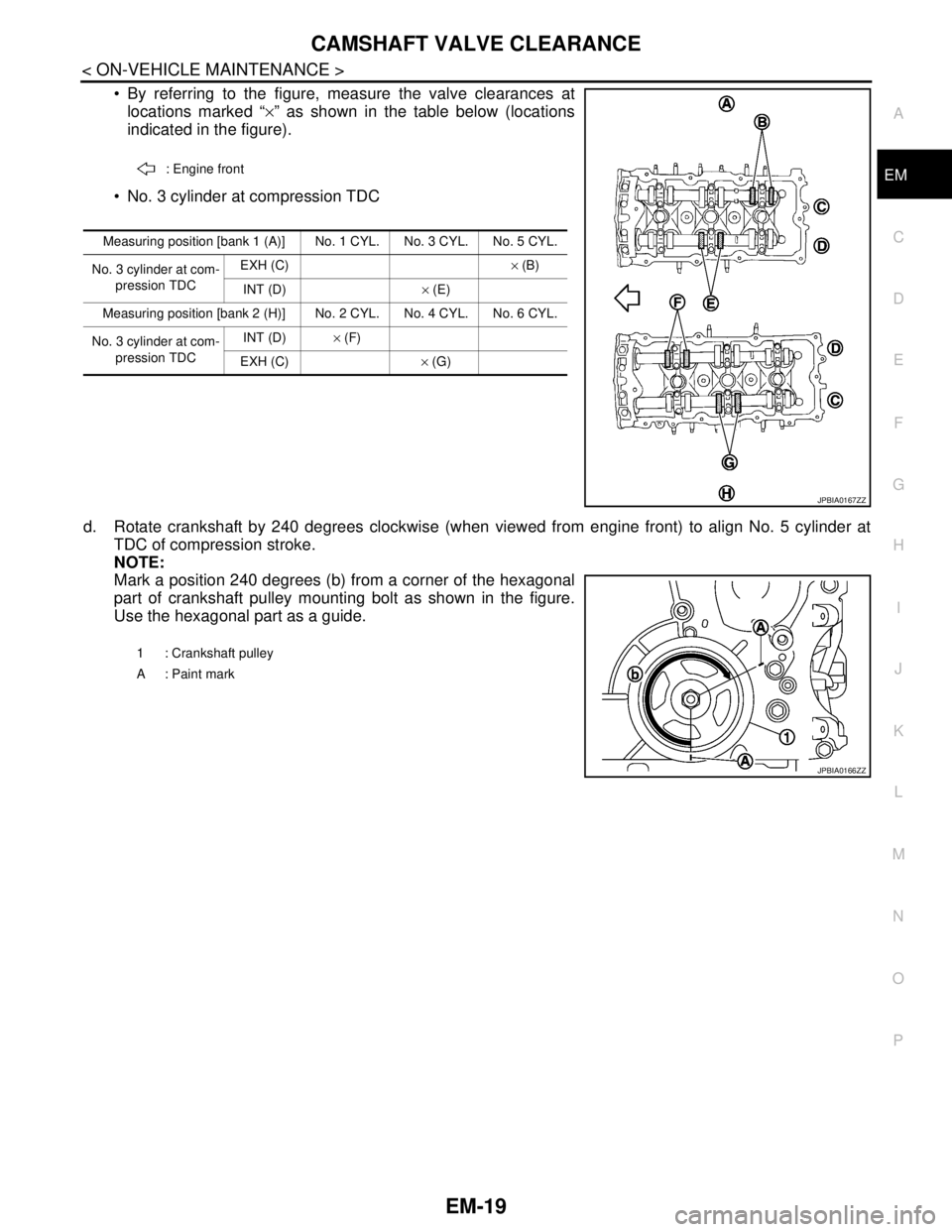
By referring to the figure, measure the valve clearances at
locations marked “×” as shown in the table below (locations
indicated in the figure).
No. 3 cylinder at compression TDC
d. Rotate crankshaft by 240 degrees clockwise (when viewed from engine front) to align No. 5 cylinder at
TDC of compression stroke.
NOTE:
Mark a position 240 degrees (b) from a corner of the hexagonal
part of crankshaft pulley mounting bolt as shown in the figure.
Use the hexagonal part as a guide.
: Engine front
Measuring position [bank 1 (A)] No. 1 CYL. No. 3 CYL. No. 5 CYL.
No. 3 cylinder at com-
pression TDCEXH (C)× (B)
INT (D)× (E)
Measuring position [bank 2 (H)] No. 2 CYL. No. 4 CYL. No. 6 CYL.
No. 3 cylinder at com-
pression TDCINT (D)× (F)
EXH (C)× (G)
JPBIA0167ZZ
1 : Crankshaft pulley
A : Paint mark
JPBIA0166ZZ
Page 1928 of 5121
TIMING CHAIN
EM-53
< ON-VEHICLE REPAIR >
C
D
E
F
G
H
I
J
K
L
MA
EM
N
P O
Removal and InstallationINFOID:0000000003802270
REMOVAL
1. Drain engine oil. Refer to LU-8, "Draining".
2. Drain engine coolant from inside engine. Refer to EM-76, "
Setting".
3. Remove intake manifold collector. Refer to EM-28, "
Exploded View".
4. Remove rocker covers (bank 1 and bank 2). Refer to EM-49, "
Exploded View".
5. Remove oil pans (lower and upper) and oil strainer. Refer to EM-38, "
Exploded View".
6. Remove drive belt, idler pulleys and bracket. Refer to EM-12, "
Removal and Installation" and EM-25,
"Exploded View".
7. Separate engine harness removing their brackets from front timing chain case.
8. Remove valve timing control covers.
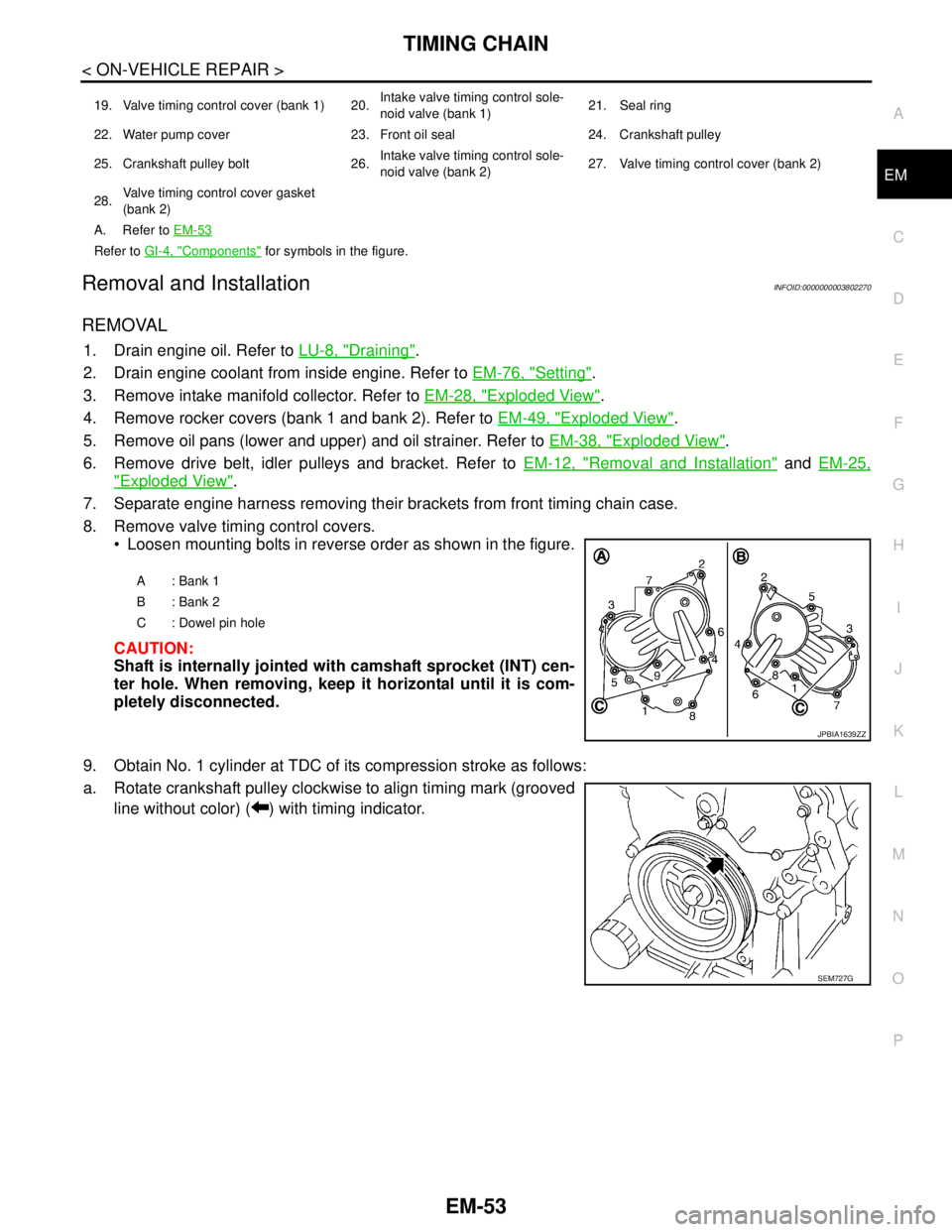
Loosen mounting bolts in reverse order as shown in the figure.
CAUTION:
Shaft is internally jointed with camshaft sprocket (INT) cen-
ter hole. When removing, keep it horizontal until it is com-
pletely disconnected.
9. Obtain No. 1 cylinder at TDC of its compression stroke as follows:
a. Rotate crankshaft pulley clockwise to align timing mark (grooved
line without color) ( ) with timing indicator.
19. Valve timing control cover (bank 1) 20.Intake valve timing control sole-
noid valve (bank 1)21. Seal ring
22. Water pump cover 23. Front oil seal 24. Crankshaft pulley
25. Crankshaft pulley bolt 26.Intake valve timing control sole-
noid valve (bank 2)27. Valve timing control cover (bank 2)
28.Valve timing control cover gasket
(bank 2)
A. Refer to EM-53
Refer to GI-4, "Components" for symbols in the figure.
A: Bank 1
B: Bank 2
C : Dowel pin hole
JPBIA1639ZZ
SEM727G
Page 1940 of 5121
TIMING CHAIN
EM-65
< ON-VEHICLE REPAIR >
C
D
E
F
G
H
I
J
K
L
MA
EM
N
P O
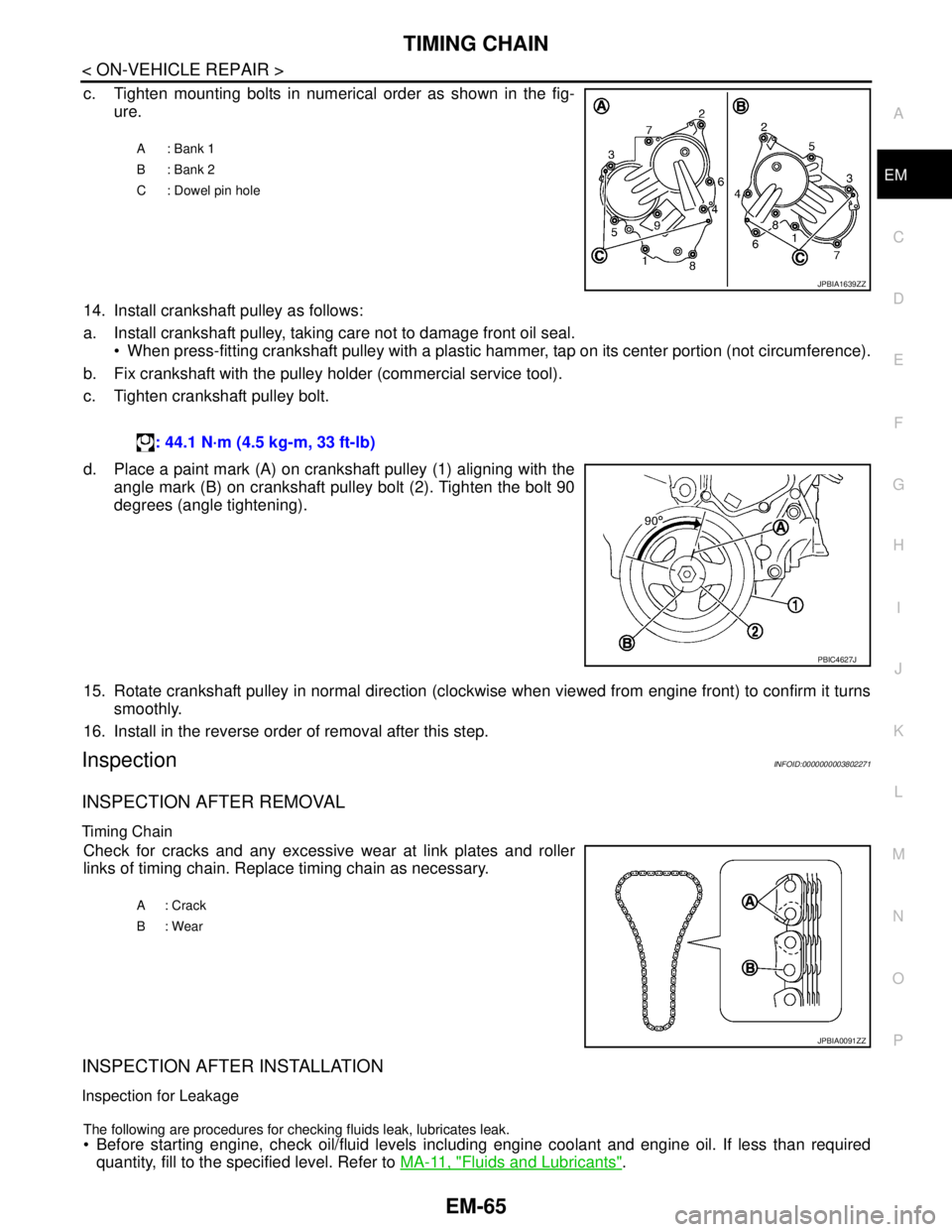
c. Tighten mounting bolts in numerical order as shown in the fig-
ure.
14. Install crankshaft pulley as follows:
a. Install crankshaft pulley, taking care not to damage front oil seal.
When press-fitting crankshaft pulley with a plastic hammer, tap on its center portion (not circumference).
b. Fix crankshaft with the pulley holder (commercial service tool).
c. Tighten crankshaft pulley bolt.
d. Place a paint mark (A) on crankshaft pulley (1) aligning with the
angle mark (B) on crankshaft pulley bolt (2). Tighten the bolt 90
degrees (angle tightening).
15. Rotate crankshaft pulley in normal direction (clockwise when viewed from engine front) to confirm it turns
smoothly.
16. Install in the reverse order of removal after this step.
InspectionINFOID:0000000003802271
INSPECTION AFTER REMOVAL
Timing Chain
Check for cracks and any excessive wear at link plates and roller
links of timing chain. Replace timing chain as necessary.
INSPECTION AFTER INSTALLATION
Inspection for Leakage
The following are procedures for checking fluids leak, lubricates leak.
Before starting engine, check oil/fluid levels including engine coolant and engine oil. If less than required
quantity, fill to the specified level. Refer to MA-11, "
Fluids and Lubricants".
A: Bank 1
B: Bank 2
C : Dowel pin hole
JPBIA1639ZZ
: 44.1 N·m (4.5 kg-m, 33 ft-lb)
PBIC4627J
A: Crack
B: Wear
JPBIA0091ZZ