transmission NISSAN TEANA 2008 User Guide
[x] Cancel search | Manufacturer: NISSAN, Model Year: 2008, Model line: TEANA, Model: NISSAN TEANA 2008Pages: 5121, PDF Size: 69.03 MB
Page 119 of 5121
DRIVER SEAT CONTROL UNIT
ADP-113
< ECU DIAGNOSIS >
C
D
E
F
G
H
I
K
L
MA
B
ADP
N
O
P
*: The value at the position attained when the battery is connected is regarded as 32768.
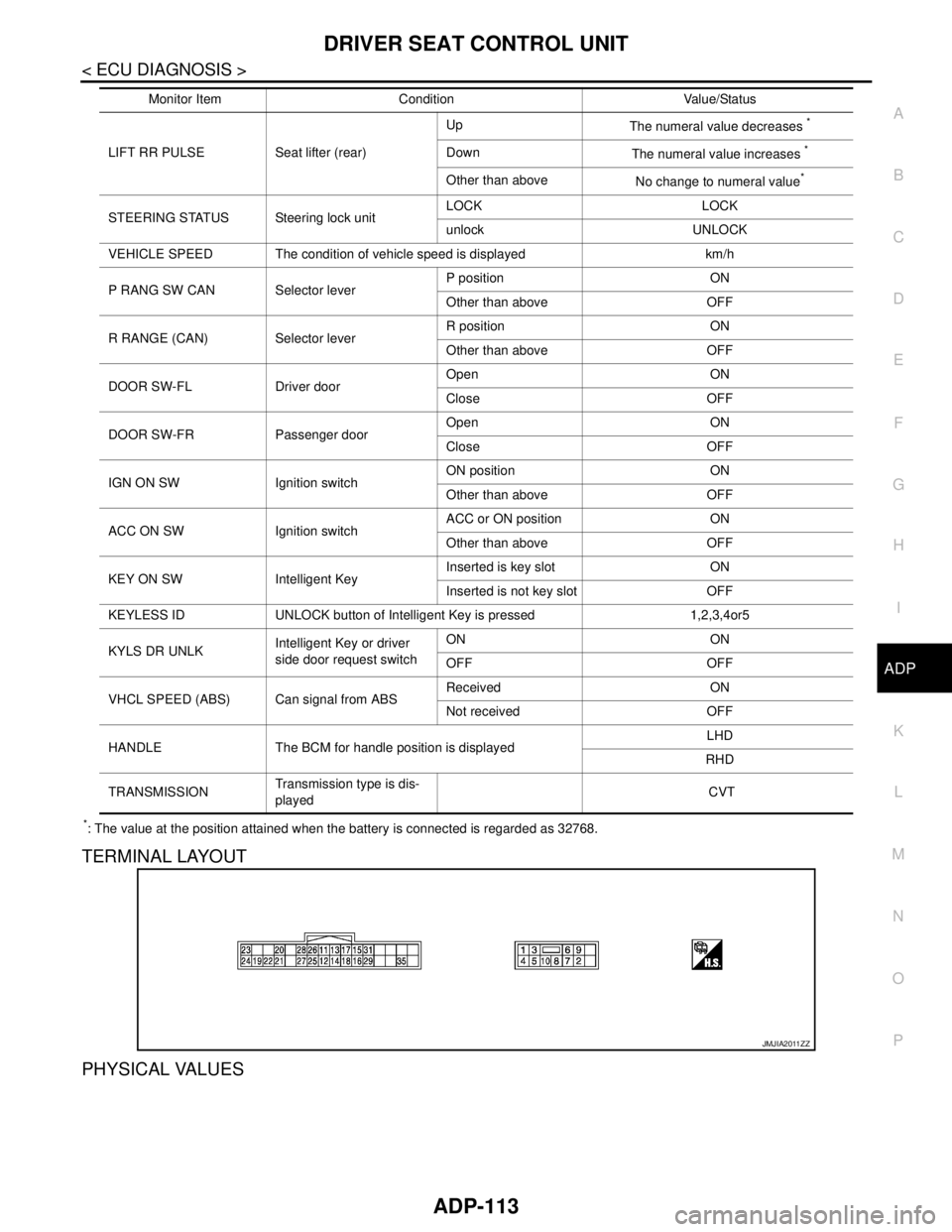
TERMINAL LAYOUT
PHYSICAL VALUES
LIFT RR PULSE Seat lifter (rear)Up
The numeral value decreases
*
Down
The numeral value increases *
Other than above
No change to numeral value*
STEERING STATUS Steering lock unitLOCK LOCK
unlock UNLOCK
VEHICLE SPEED The condition of vehicle speed is displayed km/h
P RANG SW CAN Selector leverP position ON
Other than above OFF
R RANGE (CAN) Selector leverR position ON
Other than above OFF
DOOR SW-FL Driver doorOpen ON
Close OFF
DOOR SW-FR Passenger doorOpen ON
Close OFF
IGN ON SW Ignition switchON position ON
Other than above OFF
ACC ON SW Ignition switchACC or ON position ON
Other than above OFF
KEY ON SW Intelligent KeyInserted is key slot ON
Inserted is not key slot OFF
KEYLESS ID UNLOCK button of Intelligent Key is pressed 1,2,3,4or5
KYLS DR UNLKIntelligent Key or driver
side door request switchON ON
OFF OFF
VHCL SPEED (ABS) Can signal from ABSReceived ON
Not received OFF
HANDLE The BCM for handle position is displayedLHD
RHD
TRANSMISSIONTransmission type is dis-
played CVT Monitor Item Condition Value/Status
JMJIA2011ZZ
Page 216 of 5121
![NISSAN TEANA 2008 User Guide AV-72
< COMPONENT DIAGNOSIS >[BASE AUDIO AND DISPLAY SYSTEM]
U1000 CAN COMM CIRCUIT
COMPONENT DIAGNOSIS
U1000 CAN COMM CIRCUIT
DescriptionINFOID:0000000003882713
CAN (Controller Area Network) is a ser](/img/5/57391/w960_57391-215.png "NISSAN TEANA 2008 User Guide AV-72
< COMPONENT DIAGNOSIS >[BASE AUDIO AND DISPLAY SYSTEM]
U1000 CAN COMM CIRCUIT
COMPONENT DIAGNOSIS
U1000 CAN COMM CIRCUIT
DescriptionINFOID:0000000003882713
CAN (Controller Area Network) is a ser")
AV-72
< COMPONENT DIAGNOSIS >[BASE AUDIO AND DISPLAY SYSTEM]
U1000 CAN COMM CIRCUIT
COMPONENT DIAGNOSIS
U1000 CAN COMM CIRCUIT
DescriptionINFOID:0000000003882713
CAN (Controller Area Network) is a serial communication line for real time application. It is an on-vehicle mul-
tiplex communication line with high data communication speed and excellent error detection ability. Many elec-
tronic control units are equipped onto a vehicle, and each control unit shares information and links with other
control units during operation (not independent). In CAN communication, control units are connected with 2
communication lines (CAN-H, CAN-L) allowing a high rate of information transmission with less wiring. Each
control unit transmits/receives data but selectively reads required data only.
CAN Communication Signal Chart. Refer to LAN-22, "
CAN Communication Signal Chart".
DTC LogicINFOID:0000000003882714
DTC DETECTION LOGIC
Diagnosis ProcedureINFOID:0000000003882715
1.PERFORM SELF DIAGNOSTIC
1. Turn ignition switch ON and wait for 2 seconds or more.
2. Check “Self Diagnostic Result” of “MULTI AV”.
Is
“CAN COMM CIRCUIT” displayed?
YES >> Refer to “LAN system”. Refer to LAN-14, "Trouble Diagnosis Flow Chart".
NO >> Refer to GI section. Refer to GI-35, "
Intermittent Incident".
DTCDisplay contents of CON-
SULT-IIIDiagnostic item is detected when... Probable malfunction location
U1000 CAN COMM CIRCUITWhen AV control unit is not transmitting or re-
ceiving CAN communication signal for 2 sec-
onds or more.CAN communication system
Page 360 of 5121
![NISSAN TEANA 2008 User Guide AV-216
< COMPONENT DIAGNOSIS >[BOSE AUDIO WITHOUT NAVIGATION]
U1000 CAN COMM CIRCUIT
COMPONENT DIAGNOSIS
U1000 CAN COMM CIRCUIT
DescriptionINFOID:0000000003765661
CAN (Controller Area Network) is a se](/img/5/57391/w960_57391-359.png "NISSAN TEANA 2008 User Guide AV-216
< COMPONENT DIAGNOSIS >[BOSE AUDIO WITHOUT NAVIGATION]
U1000 CAN COMM CIRCUIT
COMPONENT DIAGNOSIS
U1000 CAN COMM CIRCUIT
DescriptionINFOID:0000000003765661
CAN (Controller Area Network) is a se")
AV-216
< COMPONENT DIAGNOSIS >[BOSE AUDIO WITHOUT NAVIGATION]
U1000 CAN COMM CIRCUIT
COMPONENT DIAGNOSIS
U1000 CAN COMM CIRCUIT
DescriptionINFOID:0000000003765661
CAN (Controller Area Network) is a serial communication line for real time application. It is an on-vehicle mul-
tiplex communication line with high data communication speed and excellent error detection ability. Many elec-
tronic control units are equipped onto a vehicle, and each control unit shares information and links with other
control units during operation (not independent). In CAN communication, control units are connected with 2
communication lines (CAN-H, CAN-L) allowing a high rate of information transmission with less wiring. Each
control unit transmits/receives data but selectively reads required data only.
CAN Communication Signal Chart. Refer to LAN-22, "
CAN Communication Signal Chart".
DTC LogicINFOID:0000000003765662
DTC DETECTION LOGIC
Diagnosis ProcedureINFOID:0000000003765663
1.PERFORM SELF DIAGNOSTIC
1. Turn ignition switch ON and wait for 2 seconds or more.
2. Check “Self Diagnostic Result” of “MULTI AV”.
Is
“CAN COMM CIRCUIT” displayed?
YES >> Refer to “LAN system”. Refer to LAN-14, "Trouble Diagnosis Flow Chart".
NO >> Refer to GI section. Refer to GI-35, "
Intermittent Incident".
DTCDisplay contents of CON-
SULT-IIIDiagnostic item is detected when... Probable malfunction location
U1000 CAN COMM CIRCUITWhen AV control unit is not transmitting or re-
ceiving CAN communication signal for 2 sec-
onds or more.CAN communication system
Page 584 of 5121
![NISSAN TEANA 2008 User Guide AV-440
< COMPONENT DIAGNOSIS >[BOSE AUDIO WITH NAVIGATION]
U1000 CAN COMM CIRCUIT
COMPONENT DIAGNOSIS
U1000 CAN COMM CIRCUIT
DescriptionINFOID:0000000003765851
CAN (Controller Area Network) is a seria](/img/5/57391/w960_57391-583.png "NISSAN TEANA 2008 User Guide AV-440
< COMPONENT DIAGNOSIS >[BOSE AUDIO WITH NAVIGATION]
U1000 CAN COMM CIRCUIT
COMPONENT DIAGNOSIS
U1000 CAN COMM CIRCUIT
DescriptionINFOID:0000000003765851
CAN (Controller Area Network) is a seria")
AV-440
< COMPONENT DIAGNOSIS >[BOSE AUDIO WITH NAVIGATION]
U1000 CAN COMM CIRCUIT
COMPONENT DIAGNOSIS
U1000 CAN COMM CIRCUIT
DescriptionINFOID:0000000003765851
CAN (Controller Area Network) is a serial communication line for real time application. It is an on-vehicle mul-
tiplex communication line with high data communication speed and excellent error detection ability. Many elec-
tronic control units are equipped onto a vehicle, and each control unit shares information and links with other
control units during operation (not independent). In CAN communication, control units are connected with 2
communication lines (CAN-H, CAN-L) allowing a high rate of information transmission with less wiring. Each
control unit transmits/receives data but selectively reads required data only.
CAN Communication Signal Chart. Refer to LAN-22, "
CAN Communication Signal Chart".
DTC LogicINFOID:0000000003765852
DTC DETECTION LOGIC
Diagnosis ProcedureINFOID:0000000003765853
1.PERFORM SELF DIAGNOSTIC
1. Turn ignition switch ON and wait for 2 seconds or more.
2. Check “Self Diagnostic Result” of “MULTI AV”.
Is
“CAN COMM CIRCUIT” displayed?
YES >> Refer to “LAN system”. Refer to LAN-14, "Trouble Diagnosis Flow Chart".
NO >> Refer to GI section. Refer to GI-35, "
Intermittent Incident".
DTCDisplay contents of CON-
SULT-IIIDiagnostic item is detected when... Probable malfunction location
U1000 CAN COMM CIRCUITWhen AV control unit is not transmitting or re-
ceiving CAN communication signal for 2 sec-
onds or more.CAN communication system
Page 822 of 5121

BCS
INSPECTION AND ADJUSTMENT
BCS-5
< BASIC INSPECTION >
C
D
E
F
G
H
I
J
K
L B A
O
P N
CONFIGURATION (BCM) : Configuration listINFOID:0000000003809648
⇔: Items which confirm vehicle specificationsMANUAL SETTING ITEM
NOTE
Items Setting value
AUTO LIGHT WITH —
RR FOG LAMP WITH —
AV C/U WITH ⇔ WITHOUT WITH: With BOSE audio system
WITHOUT: Without BOSE audio system
THEFT ALM AREA MODE3 —
H/L WASHER TIME 1 WITH —
H/L WASHER TIME 2 WITH —
I-KEY WITH —
Key Fob Type MODE10 —
HANDLE LHD —
AUTO SETTING ITEM
NOTE
Items Setting value
H/L BULB DEFAULT —
FR FOG LAMP WITH —
TRANSMISSION AT with ABS —
TR CANCL SW WITHOUT —
TPMS WITHOUT —
AUTO BACK DOOR WITHOUT —
FOG LAMP BULB SINGLE BULB —
D I L M P VA R I AT M O D E 4 —
LIGHT RECOG MODE4 —
FR FOG LOGIC MODE2 —
PANIC ALM TYPE MODE2 —
HAZARD SW TYPE MODE1 —
BCM AC CONTROL MODE1 —
RAIN SENSOR WITHOUT —
FOG ON WITH AUTO LIGHT WITHOUT —
AUTO LOCK&UNLOCK FUNC WITHOUT —
DROP WIP FUNCTION WITHOUT —
SELECTIVE UNLOCK SETTING WITHOUT —
SEAT BLT WARN WITHOUT —
SPEED SNS WIP WITH —
Page 823 of 5121
BCS-6
< FUNCTION DIAGNOSIS >
BODY CONTROL SYSTEM
FUNCTION DIAGNOSIS
BODY CONTROL SYSTEM
System DescriptionINFOID:0000000003809584
OUTLINE
BCM (Body Control Module) controls the various electrical components. It inputs the information required to
the control from CAN communication and the signal received from each switch and sensor.
BCM has combination switch reading function for reading the operation status of combination switches (light,
turn signal, wiper and washer) in addition to a function for controlling the operation of various electrical com-
ponents. It also has the signal transmission function as the passed point of signal and the power saving con-
trol function that reduces the power consumption with the ignition switch OFF.
BCM is equipped with the diagnosis function that performs the diagnosis with CONSULT-III and various set-
tings.
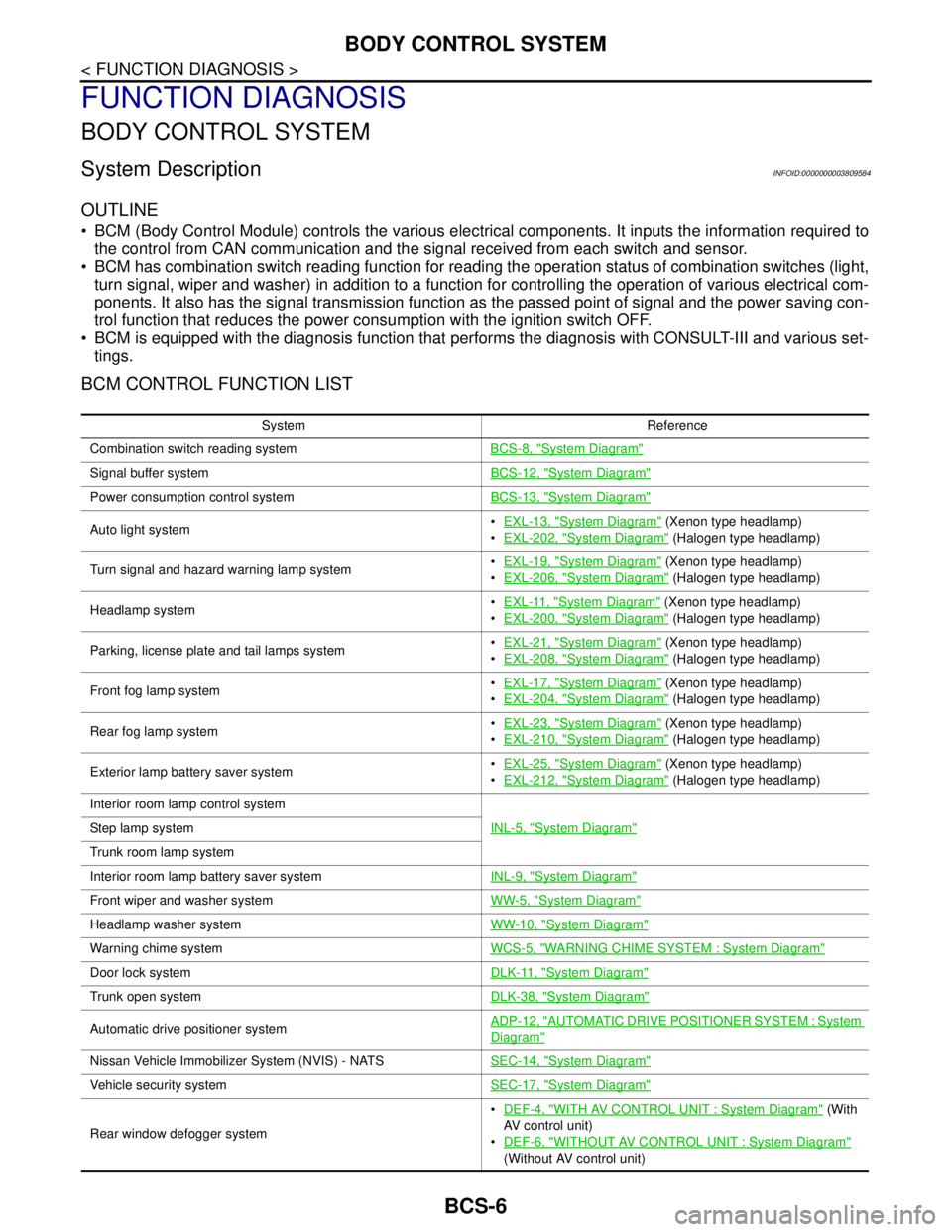
BCM CONTROL FUNCTION LIST
System Reference
Combination switch reading systemBCS-8, "
System Diagram"
Signal buffer systemBCS-12, "System Diagram"
Power consumption control systemBCS-13, "System Diagram"
Auto light systemEXL-13, "System Diagram" (Xenon type headlamp)
EXL-202, "
System Diagram" (Halogen type headlamp)
Turn signal and hazard warning lamp systemEXL-19, "
System Diagram" (Xenon type headlamp)
EXL-206, "
System Diagram" (Halogen type headlamp)
Headlamp systemEXL-11, "
System Diagram" (Xenon type headlamp)
EXL-200, "
System Diagram" (Halogen type headlamp)
Parking, license plate and tail lamps systemEXL-21, "
System Diagram" (Xenon type headlamp)
EXL-208, "
System Diagram" (Halogen type headlamp)
Front fog lamp systemEXL-17, "
System Diagram" (Xenon type headlamp)
EXL-204, "
System Diagram" (Halogen type headlamp)
Rear fog lamp systemEXL-23, "
System Diagram" (Xenon type headlamp)
EXL-210, "
System Diagram" (Halogen type headlamp)
Exterior lamp battery saver systemEXL-25, "
System Diagram" (Xenon type headlamp)
EXL-212, "
System Diagram" (Halogen type headlamp)
Interior room lamp control system
INL-5, "
System Diagram"Step lamp system
Trunk room lamp system
Interior room lamp battery saver systemINL-9, "
System Diagram"
Front wiper and washer systemWW-5, "System Diagram"
Headlamp washer systemWW-10, "System Diagram"
Warning chime systemWCS-5, "WARNING CHIME SYSTEM : System Diagram"
Door lock systemDLK-11, "System Diagram"
Trunk open systemDLK-38, "System Diagram"
Automatic drive positioner systemADP-12, "AUTOMATIC DRIVE POSITIONER SYSTEM : System
Diagram"
Nissan Vehicle Immobilizer System (NVIS) - NATSSEC-14, "System Diagram"
Vehicle security systemSEC-17, "System Diagram"
Rear window defogger systemDEF-4, "
WITH AV CONTROL UNIT : System Diagram" (With
AV control unit)
DEF-6, "
WITHOUT AV CONTROL UNIT : System Diagram"
(Without AV control unit)
Page 829 of 5121
BCS-12
< FUNCTION DIAGNOSIS >
SIGNAL BUFFER SYSTEM
SIGNAL BUFFER SYSTEM
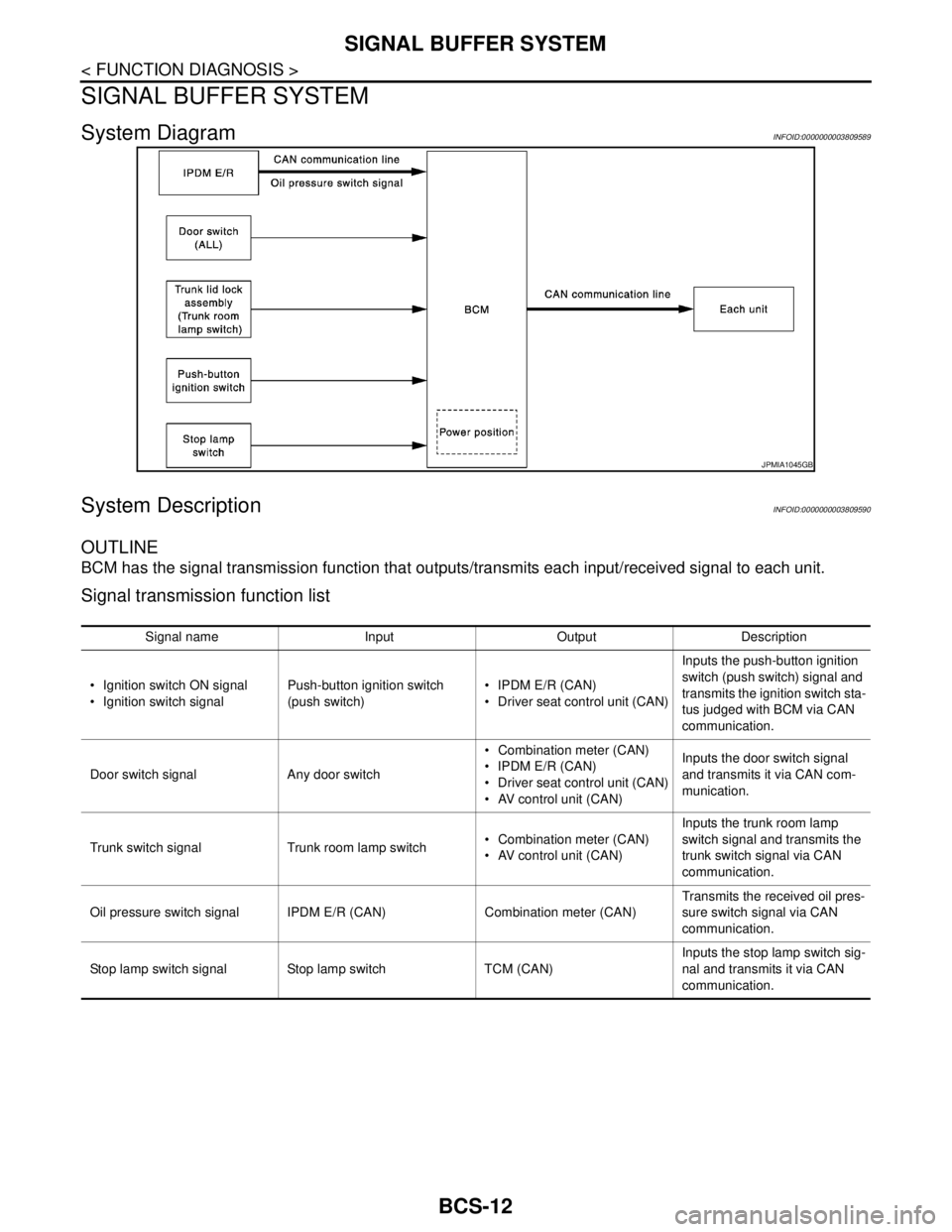
System DiagramINFOID:0000000003809589
System DescriptionINFOID:0000000003809590
OUTLINE
BCM has the signal transmission function that outputs/transmits each input/received signal to each unit.
Signal transmission function list
JPMIA1045GB
Signal name Input Output Description
Ignition switch ON signal
Ignition switch signalPush-button ignition switch
(push switch) IPDM E/R (CAN)
Driver seat control unit (CAN)Inputs the push-button ignition
switch (push switch) signal and
transmits the ignition switch sta-
tus judged with BCM via CAN
communication.
Door switch signal Any door switch Combination meter (CAN)
IPDM E/R (CAN)
Driver seat control unit (CAN)
AV control unit (CAN)Inputs the door switch signal
and transmits it via CAN com-
munication.
Trunk switch signal Trunk room lamp switch Combination meter (CAN)
AV control unit (CAN)Inputs the trunk room lamp
switch signal and transmits the
trunk switch signal via CAN
communication.
Oil pressure switch signal IPDM E/R (CAN) Combination meter (CAN)Transmits the received oil pres-
sure switch signal via CAN
communication.
Stop lamp switch signal Stop lamp switch TCM (CAN)Inputs the stop lamp switch sig-
nal and transmits it via CAN
communication.
Page 830 of 5121

BCS
POWER CONSUMPTION CONTROL SYSTEM
BCS-13
< FUNCTION DIAGNOSIS >
C
D
E
F
G
H
I
J
K
L B A
O
P N
POWER CONSUMPTION CONTROL SYSTEM
System DiagramINFOID:0000000003809591
System DescriptionINFOID:0000000003809592
OUTLINE
BCM incorporates a power saving control function that reduces the power consumption according to the
vehicle status.
BCM switches the status (control mode) by itself with the power saving control function. It performs the sleep
request to each unit (IPDM E/R, combination meter, driver seat control unit and automatic back door control
unit) that operates with the ignition switch OFF.
Normal mode (wake-up)- CAN communication is normally performed with other units
- Each control with BCM is operating properly
CAN communication sleep mode (CAN sleep)- CAN transmission is stopped
- Control with BCM only is operating
Low power consumption mode (BCM sleep)- Low power consumption control is active
- CAN transmission is stopped
LOW POWER CONSUMPTION CONTROL WITH BCM
BCM reduces the power consumption with the following operation in the low power consumption mode.
The reading interval of the each switches changes from 10 ms interval to 60 ms interval.
Sleep mode activation
BCM receives the sleep-ready signal (ready) from IPDM E/R and combination meter via CAN communica-
tion.
BCM transmits the sleep wake up signal (sleep) to each unit when all of the CAN sleep conditions are ful-
filled.
Each unit stops the transmission of CAN communication with the sleep wake up signal. BCM is in CAN com-
munication sleep mode.
BCM is in the low power consumption mode and perform the low power consumption control when all of the
BCM sleep conditions are fulfilled with CAN sleep condition.
JPMIA1046GB
Page 831 of 5121

BCS-14
< FUNCTION DIAGNOSIS >
POWER CONSUMPTION CONTROL SYSTEM
Sleep condition
Wake-up operation
BCM changes from the low power consumption mode to the CAN communication sleep mode when the any
of the BCM wake-up conditions is fulfilled. Only the control with BCM is activated.
BCM transmits the sleep wake up signal (wake up) to each unit when any of the CAN wake-up conditions is
fulfilled. It changes from the low power consumption mode or the CAN communication sleep mode to the
normal mode.
Each unit starts the transmission of CAN communication with the sleep wake up signal. In addition, the com-
bination meter transmits the wake up signal to BCM via CAN communication to report the CAN communica-
tion start.
Wake-up condition
CAN sleep condition BCM sleep condition
Receiving the sleep-ready signal (ready) from all units
Ignition switch: OFF
Vehicle security system: Not operation
Warning chime: Not operation
Intelligent Key system buzzer: Not operation
Trunk room lamp switch status: No change
Stop lamp switch: OFF
Key slot (card switch) status: No change
Turn signal indicator lamp: Not operation
Exterior lamp: OFF
Door lock status: No change
CONSULT-III communication status: Not communication
Meter display signal: Non-transmission
Door switch status: No change
Rear window defogger: OFF Interior room lamp battery saver: Time out
Push-button ignition switch illumination: OFF
Nissan Vehicle Immobilizer System (NVIS) - NATS: Not opera-
tion
Remote keyless entry receiver communication status: No com-
munication
ACC indicator lamp: Not operation
ON indicator lamp: Not operation
BCM wake-up condition CAN wake-up condition
Trunk lid opener switch: OFF → ON
Remote keyless entry receiver: Receiving
Door lock and unlock switch:
NEUTRAL → LOCK, NEUTRAL → UNLOCK
Front door lock assembly driver side (unlock sensor):
OFF → ON, ON → OFF Receiving the sleep-ready signal (Not-ready) from any units
Key slot (key switch): OFF → ON, ON → OFF
Push-button ignition switch (push switch): OFF→ ON
Hazard switch: OFF → ON
PASSING switch: OFF → ON, ON → OFF
TAIL LAMP switch: OFF → ON
Driver door switch: OFF → ON, ON → OFF
Passenger door switch: OFF → ON, ON → OFF
Rear RH door switch: OFF → ON, ON → OFF
Rear LH door switch: OFF → ON, ON → OFF
Trunk room lamp switch: OFF → ON, ON → OFF
Driver door request switch: OFF → ON
Passenger door request switch: OFF → ON
Trunk lid request switch: OFF → ON
Stop lamp switch: ON
Page 839 of 5121
![NISSAN TEANA 2008 User Guide BCS-22
< FUNCTION DIAGNOSIS >
DIAGNOSIS SYSTEM (BCM)
ACTIVE TEST
VEH SPEED 1
[km/h]The value of the vehicle speed received from combination meter with CAN commu-
nication
KEY SW-SLOT
[On/Off]Key switc](/img/5/57391/w960_57391-838.png "NISSAN TEANA 2008 User Guide BCS-22
< FUNCTION DIAGNOSIS >
DIAGNOSIS SYSTEM (BCM)
ACTIVE TEST
VEH SPEED 1
[km/h]The value of the vehicle speed received from combination meter with CAN commu-
nication
KEY SW-SLOT
[On/Off]Key switc")
BCS-22
< FUNCTION DIAGNOSIS >
DIAGNOSIS SYSTEM (BCM)
ACTIVE TEST
VEH SPEED 1
[km/h]The value of the vehicle speed received from combination meter with CAN commu-
nication
KEY SW-SLOT
[On/Off]Key switch status input from key slot
TURN SIGNAL R
[On/Off]
Each switch status that BCM detects from the combination switch reading function TURN SIGNAL L
[On/Off]
TA I L L A M P S W
[On/Off]
HI BEAM SW
[On/Off]
HEAD LAMP SW1
[On/Off]
HEAD LAMP SW2
[On/Off]
PASSING SW
[On/Off]
AUTO LIGHT SW
[On/Off]
FR FOG SW
[On/Off]
RR FOG SW
[On/Off]
DOOR SW-DR
[On/Off]The switch status input from front door switch (driver side)
DOOR SW-AS
[On/Off]The switch status input from front door switch (passenger side)
DOOR SW-RR
[On/Off]The switch status input from rear door switch RH
DOOR SW- RL
[On/Off]The switch status input from rear door switch LH
DOOR SW-BK
[On/Off]NOTE:
The item is indicated, but not monitored.
OPTICAL SENSOR
[V]The value of exterior brightness voltage input from the optical sensor Monitor item
[Unit]Description
Test item Operation Description
TA I L L A M POnTransmits the position light request signal to IPDM E/R with CAN com-
munication to turn the tail lamp ON.
Off Stops the position light request signal transmission.
HEAD LAMPHiTransmits the high beam request signal with CAN communication to turn
the headlamp (HI).
LowTransmits the low beam request signal with CAN communication to turn
the headlamp (LO).
Off Stops the high & low beam request signal transmission.
FR FOG LAMPOnTransmits the front fog lights request signal to IPDM E/R with CAN com-
munication to turn the front fog lamp ON.
Off Stops the front fog lights request signal transmission.