transmission NISSAN TEANA 2008 Owner's Manual
[x] Cancel search | Manufacturer: NISSAN, Model Year: 2008, Model line: TEANA, Model: NISSAN TEANA 2008Pages: 5121, PDF Size: 69.03 MB
Page 840 of 5121

BCS
DIAGNOSIS SYSTEM (BCM)
BCS-23
< FUNCTION DIAGNOSIS >
C
D
E
F
G
H
I
J
K
L B A
O
P N
WIPER
WIPER : CONSULT-III Function (BCM - WIPER)INFOID:0000000003897063
WORK SUPPORT
*:Factory setting
NOTE:
When performed “RESET SETTING VALUE” on “Work Support (BCM - BCM)”, set “WIPER SPEED SETTING” on “Work Support (BCM
-WIPER)” to “On”.
DATA MONITOR
ACTIVE TEST
RR FOG LAMPOn Outputs the voltage to turn the rear fog lamp ON.
Transmits the rear fog lamp status signal to the combination meter with
CAN communication to turn the rear fog lamp indicator lamp ON.
Off Stops the voltage to turn the rear fog lamp OFF.
Stops the rear fog lamp status signal transmission.
DAYTIME RUNNING LIGHTOn
NOTE:
The item is indicated, but cannot be tested.
Off
CORNERING LAMPRH
NOTE:
The item is indicated, but cannot be tested. LH
Off
ILL DIM SIGNALOn
NOTE:
The item is indicated, but cannot be tested.
Off Test item Operation Description
Service item Setting item Description
WIPER SPEED
SETTINGOn*With vehicle speed
(Front wiper intermittent time linked with the vehicle speed and wiper intermittent dial position)
OffWithout vehicle speed
(Front wiper intermittent time linked with the wiper intermittent dial position)
Monitor Item
[Unit]Description
PUSH SW
[Off/On]The switch status input from push-button ignition switch.
VEH SPEED 1
[km/h]Displays the value of the vehicle speed signal received from combination meter with CAN communication.
FR WIPER HI
[Off/On]
Status of each switch judged by BCM using the combination switch reading function FR WIPER LOW
[Off/On]
FR WASHER SW
[Off/On]
FR WIPER INT
[Off/On]
FR WIPER STOP
[Off/On]Displays the status of the front wiper stop position signal received from IPDM E/R with CAN communication.
INT VOLUME
[1 − 7] Status of each switch judged by BCM using the combination switch reading function
H/L WASH SW
[Off/On]Status of the switch input from headlamp washer switch
Page 850 of 5121

BCS
U1000 CAN COMM CIRCUIT
BCS-33
< COMPONENT DIAGNOSIS >
C
D
E
F
G
H
I
J
K
L B A
O
P N
COMPONENT DIAGNOSIS
U1000 CAN COMM CIRCUIT
DescriptionINFOID:0000000003809614
CAN (Controller Area Network) is a serial communication line for real time applications. It is an on-vehicle mul-
tiplex communication line with high data communication speed and excellent error detection ability. Modern
vehicle is equipped with many electronic control unit, and each control unit shares information and links with
other control units during operation (not independent). In CAN communication, control units are connected
with 2 communication lines (CAN H-line, CAN L-line) allowing a high rate of information transmission with less
wiring. Each control unit transmits/receives data but selectively reads required data only.
CAN Communication Signal Chart. Refer to LAN-22, "
CAN Communication Signal Chart".
DTC LogicINFOID:0000000003809615
DTC DETECTION LOGIC
Diagnosis ProcedureINFOID:0000000003809616
1.PERFORM SELF DIAGNOSTIC
1. Turn ignition switch ON and wait for 2 seconds or more.
2. Check “Self Diagnostic Result”.
Is
“U1000: CAN COMM CIRCUIT” displayed?
YES >> Refer to LAN-14, "Trouble Diagnosis Flow Chart".
NO >> Refer to GI-35, "
Intermittent Incident".
DTCCONSULT-III display
descriptionDTC Detection Condition Possible cause
U1000 CAN COMM CIRCUITWhen BCM cannot communicate CAN com-
munication signal continuously for 2 seconds
or more.CAN communication system
Page 979 of 5121
![NISSAN TEANA 2008 Owners Manual BRC-38
< COMPONENT DIAGNOSIS >[ABS]
U1000, U1002 CAN COMM CIRCUIT
U1000, U1002 CAN COMM CIRCUIT
DescriptionINFOID:0000000003766819
CAN (Controller Area Network) is a serial communication line for real](/img/5/57391/w960_57391-978.png "NISSAN TEANA 2008 Owners Manual BRC-38
< COMPONENT DIAGNOSIS >[ABS]
U1000, U1002 CAN COMM CIRCUIT
U1000, U1002 CAN COMM CIRCUIT
DescriptionINFOID:0000000003766819
CAN (Controller Area Network) is a serial communication line for real")
BRC-38
< COMPONENT DIAGNOSIS >[ABS]
U1000, U1002 CAN COMM CIRCUIT
U1000, U1002 CAN COMM CIRCUIT
DescriptionINFOID:0000000003766819
CAN (Controller Area Network) is a serial communication line for real time application. It is an on-vehicle mul-
tiplex communication line with high data communication speed and excellent error detection ability. Many elec-
tronic control units are equipped onto a vehicle, and each control unit shares information and links with other
control units during operation (not independent). In CAN communication, control units are connected with 2
communication lines (CAN-H line, CAN-L line) allowing a high rate of information transmission with less wiring.
Each control unit transmits/receives data but selectively reads required data only.
DTC LogicINFOID:0000000003766820
DTC DETECTION LOGIC
DTC CONFIRMATION PROCEDURE
1.DTC REPRODUCTION PROCEDURE
1. Turn the ignition switch ON.
2. Perform ABS actuator and electric unit (control unit) self-diagnosis.
Is DTC
“U1000” or “U1002” detected?
YES >> Proceed to diagnosis procedure. Refer to BRC-38, "Diagnosis Procedure".
NO >> INSPECTION END
Diagnosis ProcedureINFOID:0000000003766821
1.PERFORM ABS ACTUATOR AND ELECTRIC UNIT (CONTROL UNIT)
Perform ABS actuator and electric unit (control unit) self-diagnosis.
Is DTC
“U1000” or “U1002” detected?
YES >> Proceed to diagnosis procedure. Refer to LAN-14, "Trouble Diagnosis Flow Chart".
NO >> INSPECTION END
DTC Display item Malfunction detected condition Possible cause
U1000 CAN COMM CIRCUITWhen ABS actuator and electric unit (control unit) is not
transmitting or receiving CAN communication signal for 2
seconds or more. CAN communication line
ABS actuator and electric unit
(control unit)
U1002 SYSTEM COMM (CAN)When ABS actuator and electric unit (control unit) is not
transmitting or receiving CAN communication signal for 2
seconds or less.
Page 1063 of 5121
![NISSAN TEANA 2008 Owners Manual BRC-122
< COMPONENT DIAGNOSIS >[VDC/TCS/ABS]
U1000, U1002 CAN COMM CIRCUIT
U1000, U1002 CAN COMM CIRCUIT
DescriptionINFOID:0000000003766990
CAN (Controller Area Network) is a serial communication line](/img/5/57391/w960_57391-1062.png "NISSAN TEANA 2008 Owners Manual BRC-122
< COMPONENT DIAGNOSIS >[VDC/TCS/ABS]
U1000, U1002 CAN COMM CIRCUIT
U1000, U1002 CAN COMM CIRCUIT
DescriptionINFOID:0000000003766990
CAN (Controller Area Network) is a serial communication line")
BRC-122
< COMPONENT DIAGNOSIS >[VDC/TCS/ABS]
U1000, U1002 CAN COMM CIRCUIT
U1000, U1002 CAN COMM CIRCUIT
DescriptionINFOID:0000000003766990
CAN (Controller Area Network) is a serial communication line for real time application. It is an on-vehicle mul-
tiplex communication line with high data communication speed and excellent error detection ability. Many elec-
tronic control units are equipped onto a vehicle, and each control unit shares information and links with other
control units during operation (not independent). In CAN communication, control units are connected with 2
communication lines (CAN-H line, CAN-L line) allowing a high rate of information transmission with less wiring.
Each control unit transmits/receives data but selectively reads required data only.
DTC LogicINFOID:0000000003766991
DTC DETECTION LOGIC
DTC CONFIRMATION PROCEDURE
1.DTC REPRODUCTION PROCEDURE
1. Turn the ignition switch ON.
2. Perform ABS actuator and electric unit (control unit) self-diagnosis.
Is DTC
“U1000” or “U1002” detected?
YES >> Proceed to diagnosis procedure. Refer to BRC-122, "Diagnosis Procedure".
NO >> INSPECTION END
Diagnosis ProcedureINFOID:0000000003766992
1.PERFORM ABS ACTUATOR AND ELECTRIC UNIT (CONTROL UNIT)
Perform ABS actuator and electric unit (control unit) self-diagnosis.
Is DTC
“U1000” or “U1002” detected?
YES >> Proceed to diagnosis procedure. Refer to LAN-14, "Trouble Diagnosis Flow Chart".
NO >> INSPECTION END
Special Repair RequirementINFOID:0000000003767351
1.ADJUSTMENT OF STEERING ANGLE SENSOR NEUTRAL POSITION
Always perform the neutral position adjustment for the steering angle sensor, when replacing the ABS actua-
tor and electric unit (control unit). Refer to BRC-66, "
ADJUSTMENT OF STEERING ANGLE SENSOR NEU-
TRAL POSITION : Description".
>> END
DTC Display item Malfunction detected condition Possible cause
U1000 CAN COMM CIRCUITWhen ABS actuator and electric unit (control unit) is not
transmitting or receiving CAN communication signal for 2
seconds or more. CAN communication line
ABS actuator and electric unit
(control unit)
U1002 SYSTEM COMM (CAN)When ABS actuator and electric unit (control unit) is not
transmitting or receiving CAN communication signal for 2
seconds or less.
Page 1141 of 5121
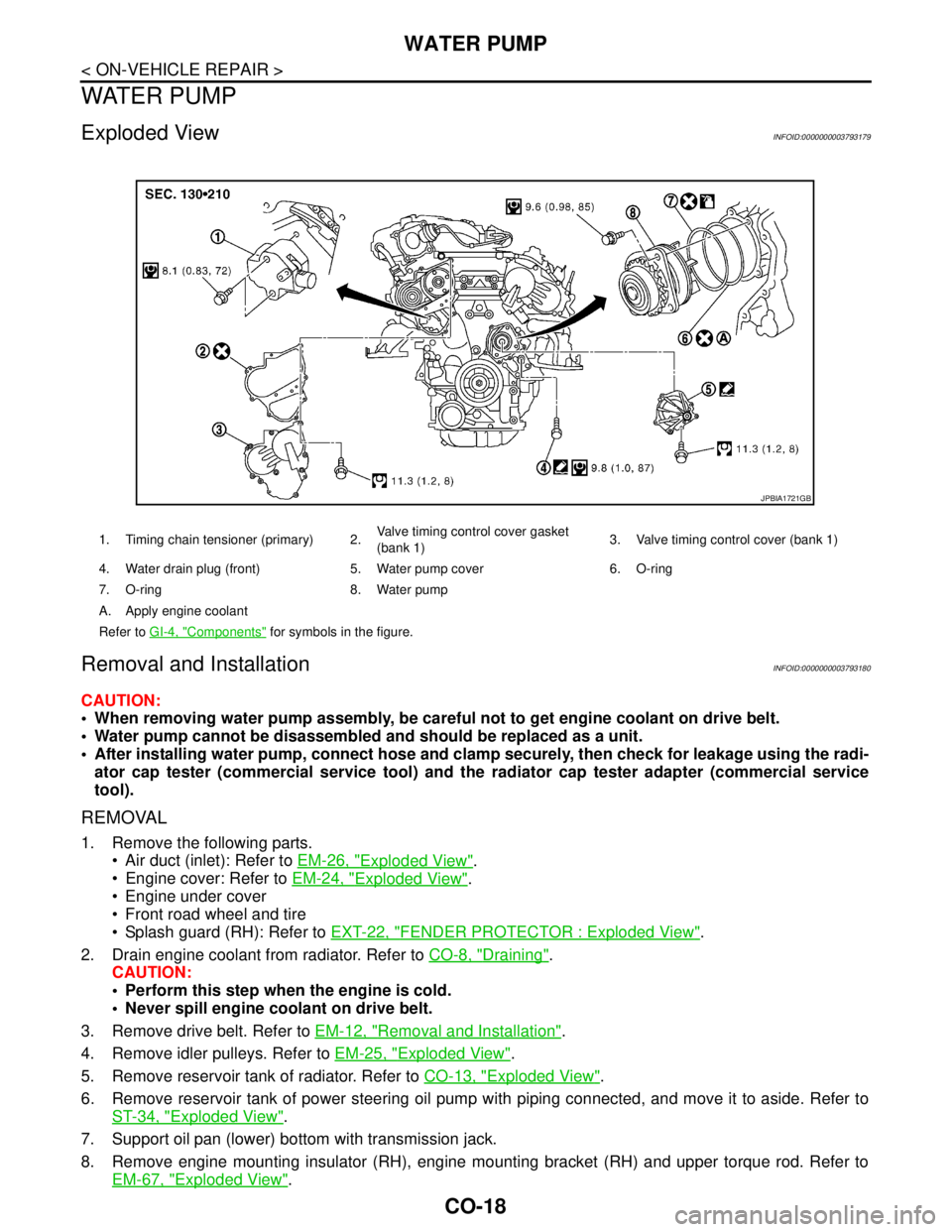
CO-18
< ON-VEHICLE REPAIR >
WATER PUMP
WATER PUMP
Exploded ViewINFOID:0000000003793179
Removal and InstallationINFOID:0000000003793180
CAUTION:
When removing water pump assembly, be careful not to get engine coolant on drive belt.
Water pump cannot be disassembled and should be replaced as a unit.
After installing water pump, connect hose and clamp securely, then check for leakage using the radi-
ator cap tester (commercial service tool) and the radiator cap tester adapter (commercial service
tool).
REMOVAL
1. Remove the following parts.
Air duct (inlet): Refer to EM-26, "
Exploded View".
Engine cover: Refer to EM-24, "
Exploded View".
Engine under cover
Front road wheel and tire
Splash guard (RH): Refer to EXT-22, "
FENDER PROTECTOR : Exploded View".
2. Drain engine coolant from radiator. Refer to CO-8, "
Draining".
CAUTION:
Perform this step when the engine is cold.
Never spill engine coolant on drive belt.
3. Remove drive belt. Refer to EM-12, "
Removal and Installation".
4. Remove idler pulleys. Refer to EM-25, "
Exploded View".
5. Remove reservoir tank of radiator. Refer to CO-13, "
Exploded View".
6. Remove reservoir tank of power steering oil pump with piping connected, and move it to aside. Refer to
ST-34, "
Exploded View".
7. Support oil pan (lower) bottom with transmission jack.
8. Remove engine mounting insulator (RH), engine mounting bracket (RH) and upper torque rod. Refer to
EM-67, "
Exploded View".
1. Timing chain tensioner (primary) 2.Valve timing control cover gasket
(bank 1)3. Valve timing control cover (bank 1)
4. Water drain plug (front) 5. Water pump cover 6. O-ring
7. O-ring 8. Water pump
A. Apply engine coolant
Refer to GI-4, "
Components" for symbols in the figure.
JPBIA1721GB
Page 1264 of 5121
![NISSAN TEANA 2008 Owners Manual DLK-48
< COMPONENT DIAGNOSIS >[WITH INTELLIGENT KEY SYSTEM]
U1000 CAN COMM CIRCUIT
COMPONENT DIAGNOSIS
U1000 CAN COMM CIRCUIT
BCM
BCM : DescriptionINFOID:0000000003794769
CAN (Controller Area Network)](/img/5/57391/w960_57391-1263.png "NISSAN TEANA 2008 Owners Manual DLK-48
< COMPONENT DIAGNOSIS >[WITH INTELLIGENT KEY SYSTEM]
U1000 CAN COMM CIRCUIT
COMPONENT DIAGNOSIS
U1000 CAN COMM CIRCUIT
BCM
BCM : DescriptionINFOID:0000000003794769
CAN (Controller Area Network)")
DLK-48
< COMPONENT DIAGNOSIS >[WITH INTELLIGENT KEY SYSTEM]
U1000 CAN COMM CIRCUIT
COMPONENT DIAGNOSIS
U1000 CAN COMM CIRCUIT
BCM
BCM : DescriptionINFOID:0000000003794769
CAN (Controller Area Network) is a serial communication line for real time applications. It is an on-vehicle mul-
tiplex communication line with high data communication speed and excellent error detectability. Modern vehi-
cles are equipped with many electronic control units, and each control unit shares information and links with
other control units during operation (not independent). In CAN communication, control units are connected
with 2 communication lines (CAN H-line, CAN L-line) allowing a high rate of information transmission with less
wiring. Each control unit transmits/receives data but selectively reads required data only.
CAN Communication Signal Chart. Refer to LAN-22, "
CAN Communication Signal Chart".
BCM : DTC LogicINFOID:0000000003794770
DTC DETECTION LOGIC
BCM : Diagnosis ProcedureINFOID:0000000003794771
1.PERFORM SELF DIAGNOSTIC
1. Turn ignition switch ON and wait for 3 seconds or more.
2. Check “Self Diagnostic Result”.
Is
“CAN COMM CIRCUIT” displayed?
YES >> Refer to LAN-14, "Trouble Diagnosis Flow Chart".
NO >> Refer to GI-35, "
Intermittent Incident".
DTC
No.Trouble diagnosis
nameDTC detecting condition Possible cause
U1000 CAN COMM CIRCUITWhen BCM cannot communicate CAN com-
munication signal continuously for 2 seconds
or more.CAN communication system
Page 1470 of 5121
![NISSAN TEANA 2008 Owners Manual DIAGNOSIS AND REPAIR WORKFLOW
EC-9
< BASIC INSPECTION >[VQ25DE, VQ35DE]
C
D
E
F
G
H
I
J
K
L
MA
EC
N
P O
YES >> GO TO 7.
NO >> GO TO 9.
7.PERFORM “SPEC” OF “DATA MONITOR” MODE
With CONSULT-III](/img/5/57391/w960_57391-1469.png "NISSAN TEANA 2008 Owners Manual DIAGNOSIS AND REPAIR WORKFLOW
EC-9
< BASIC INSPECTION >[VQ25DE, VQ35DE]
C
D
E
F
G
H
I
J
K
L
MA
EC
N
P O
YES >> GO TO 7.
NO >> GO TO 9.
7.PERFORM “SPEC” OF “DATA MONITOR” MODE
With CONSULT-III")
DIAGNOSIS AND REPAIR WORKFLOW
EC-9
< BASIC INSPECTION >[VQ25DE, VQ35DE]
C
D
E
F
G
H
I
J
K
L
MA
EC
N
P O
YES >> GO TO 7.
NO >> GO TO 9.
7.PERFORM “SPEC” OF “DATA MONITOR” MODE
With CONSULT-III
Check that “MAS A/F SE-B1”, “B/FUEL SCHDL”, “A/F ALPHA-B1” and “A/F ALPHA-B2” are within the SP
value using CONSULT-III in “SPEC” of “DATA MONITOR” mode. Refer to EC-124, "
Component Function
Check".
Are they within the SP value?
YES >> GO TO 9.
NO >> GO TO 8.
8.DETECT MALFUNCTIONING PART BY TROUBLE DIAGNOSIS - SPECIFICATION VALUE
Detect malfunctioning part according to EC-125, "
Diagnosis Procedure".
Is a malfunctioning part detected?
YES >> GO TO 11.
NO >> GO TO 9.
9.DETECT MALFUNCTIONING SYSTEM BY SYMPTOM TABLE
Detect malfunctioning system according to EC-400, "
Symptom Table" based on the confirmed symptom in
step 4, and determine the trouble diagnosis order based on possible causes and symptoms.
>> GO TO 10.
10.DETECT MALFUNCTIONING PART BY DIAGNOSTIC PROCEDURE
Inspect according to Diagnostic Procedure of the system.
NOTE:
The Diagnostic Procedure in EC section described based on open circuit inspection. A short circuit inspection
is also required for the circuit check in the Diagnostic Procedure. For details, refer to “Circuit Inspection” in GI-
37, "Circuit Inspection".
Is a malfunctioning part detected?
YES >> GO TO 11.
NO >> Monitor input data from related sensors or check voltage of related ECM terminals using CON-
SULT-III. Refer to EC-357, "
Reference Value".
11 .REPAIR OR REPLACE THE MALFUNCTIONING PART
1. Repair or replace the malfunctioning part.
2. Reconnect parts or connectors disconnected during Diagnostic Procedure again after repair and replace-
ment.
3. Check DTC. If DTC is displayed, erase it, refer to EC-102, "
Diagnosis Description".
>> GO TO 12.
12.FINAL CHECK
When DTC was detected in step 2, perform DTC Confirmation Procedure or Overall Function Check again,
and then check that the malfunction have been completely repaired.
When symptom was described from the customer, refer to confirmed symptom in step 3 or 4, and check that
the symptom is not detected.
Is DTC detected and does symptom remain?
YES-1 >> DTC is detected: GO TO 10.
YES-2 >> Symptom remains: GO TO 6.
NO >> Before returning the vehicle to the customer, always erase unnecessary DTC in ECM and TCM
(Transmission Control Module). (Refer to EC-102, "
Diagnosis Description".) If the completion of
SRT is needed, drive vehicle under the specific DRIVING PATTERN in EC-392,
"HowtoSetSRTCode".
Page 1477 of 5121
![NISSAN TEANA 2008 Owners Manual EC-16
< BASIC INSPECTION >[VQ25DE, VQ35DE]
INSPECTION AND ADJUSTMENT
THROTTLE VALVE CLOSED POSITION LEARNING
THROTTLE VALVE CLOSED POSITION LEARNING : DescriptionINFOID:0000000003856455
Throttle Valve](/img/5/57391/w960_57391-1476.png "NISSAN TEANA 2008 Owners Manual EC-16
< BASIC INSPECTION >[VQ25DE, VQ35DE]
INSPECTION AND ADJUSTMENT
THROTTLE VALVE CLOSED POSITION LEARNING
THROTTLE VALVE CLOSED POSITION LEARNING : DescriptionINFOID:0000000003856455
Throttle Valve")
EC-16
< BASIC INSPECTION >[VQ25DE, VQ35DE]
INSPECTION AND ADJUSTMENT
THROTTLE VALVE CLOSED POSITION LEARNING
THROTTLE VALVE CLOSED POSITION LEARNING : DescriptionINFOID:0000000003856455
Throttle Valve Closed Position Learning is an operation to learn the fully closed position of the throttle valve by
monitoring the throttle position sensor output signal. It must be performed each time harness connector of
electric throttle control actuator or ECM is disconnected.
THROTTLE VALVE CLOSED POSITION LEARNING : Special Repair Requirement
INFOID:0000000003856456
1.START
1. Check that accelerator pedal is fully released.
2. Turn ignition switch ON.
3. Turn ignition switch OFF and wait at least 10 seconds.
Check that throttle valve moves during above 10 seconds by confirming the operating sound.
>> END
IDLE AIR VOLUME LEARNING
IDLE AIR VOLUME LEARNING : DescriptionINFOID:0000000003856457
Idle Air Volume Learning is a function of ECM to learn the idle air volume that keeps engine idle speed within
the specific range. It must be performed under the following conditions:
Each time electric throttle control actuator or ECM is replaced.
Idle speed or ignition timing is out of specification.
IDLE AIR VOLUME LEARNING : Special Repair RequirementINFOID:0000000003856458
1.PRECONDITIONING
Before performing Idle Air Volume Learning, check that all of the following conditions are satisfied.
Learning will be cancelled if any of the following conditions are missed for even a moment.
Battery voltage: More than 12.9 V (At idle)
Engine coolant temperature: 70 - 100°C (158 - 212°F)
Selector lever: P or N
Electric load switch: OFF
(Air conditioner, head lamp, rear window defogger)
-For vehicle equipped with daytime light systems, perform one of the following procedures before
starting engine not to illuminate headlamps.
Apply parking brake
Set lighting switch to the 1st position
Steering wheel: Neutral (Straight-ahead position)
Vehicle speed: Stopped
Transmission: Warmed-up
- With CONSULT-III: Drive vehicle until “ATF TEMP SEN” in “DATA MONITOR” mode of “CVT” system indi-
cates less than 0.9 V.
- Without CONSULT-III: Drive vehicle for 10 minutes.
Will CONSULT-III be used?
YES >> GO TO 2.
NO >> GO TO 3.
2.PERFORM IDLE AIR VOLUME LEARNING
With CONSULT-III
1. Perform EC-15, "
ACCELERATOR PEDAL RELEASED POSITION LEARNING : Special Repair Require-
ment".
2. Perform EC-16, "
THROTTLE VALVE CLOSED POSITION LEARNING : Special Repair Requirement".
3. Start engine and warm it up to normal operating temperature.
4. Select “IDLE AIR VOL LEARN” in “WORK SUPPORT” mode.
5. Touch “START” and wait 20 seconds.
Page 1520 of 5121
![NISSAN TEANA 2008 Owners Manual CAN COMMUNICATION
EC-59
< FUNCTION DIAGNOSIS >[VQ25DE, VQ35DE]
C
D
E
F
G
H
I
J
K
L
MA
EC
N
P O
CAN COMMUNICATION
System DescriptionINFOID:0000000003856481
CAN (Controller Area Network) is a serial com](/img/5/57391/w960_57391-1519.png "NISSAN TEANA 2008 Owners Manual CAN COMMUNICATION
EC-59
< FUNCTION DIAGNOSIS >[VQ25DE, VQ35DE]
C
D
E
F
G
H
I
J
K
L
MA
EC
N
P O
CAN COMMUNICATION
System DescriptionINFOID:0000000003856481
CAN (Controller Area Network) is a serial com")
CAN COMMUNICATION
EC-59
< FUNCTION DIAGNOSIS >[VQ25DE, VQ35DE]
C
D
E
F
G
H
I
J
K
L
MA
EC
N
P O
CAN COMMUNICATION
System DescriptionINFOID:0000000003856481
CAN (Controller Area Network) is a serial communication line for real time application. It is an on-vehicle mul-
tiplex communication line with high data communication speed and excellent error detection ability. Many elec-
tronic control units are equipped onto a vehicle, and each control unit shares information and links with other
control units during operation (not independent). In CAN communication, control units are connected with 2
communication lines (CAN H line, CAN L line) allowing a high rate of information transmission with less wiring.
Each control unit transmits/receives data but selectively reads required data only.
Refer to LAN-22, "
CAN System Specification Chart", about CAN communication for detail.
Page 1585 of 5121
![NISSAN TEANA 2008 Owners Manual EC-124
< COMPONENT DIAGNOSIS >[VQ25DE, VQ35DE]
TROUBLE DIAGNOSIS - SPECIFICATION VALUE
COMPONENT DIAGNOSIS
TROUBLE DIAGNOSIS - SPECIFICATION VALUE
DescriptionINFOID:0000000003856505
The specification](/img/5/57391/w960_57391-1584.png "NISSAN TEANA 2008 Owners Manual EC-124
< COMPONENT DIAGNOSIS >[VQ25DE, VQ35DE]
TROUBLE DIAGNOSIS - SPECIFICATION VALUE
COMPONENT DIAGNOSIS
TROUBLE DIAGNOSIS - SPECIFICATION VALUE
DescriptionINFOID:0000000003856505
The specification")
EC-124
< COMPONENT DIAGNOSIS >[VQ25DE, VQ35DE]
TROUBLE DIAGNOSIS - SPECIFICATION VALUE
COMPONENT DIAGNOSIS
TROUBLE DIAGNOSIS - SPECIFICATION VALUE
DescriptionINFOID:0000000003856505
The specification (SP) value indicates the tolerance of the value that is displayed in “SPEC” of “DATA MONI-
TOR” mode of CONSULT-III during normal operation of the Engine Control System. When the value in “SPEC”
in “DATA MONITOR” mode is NOT within the SP value, the Engine Control System may have one or more
malfunctions.
The SP value is used to detect malfunctions that may affect the Engine Control System, but will not illuminate
the MI.
The SP value will be displayed for the following three items:
B/FUEL SCHDL (The fuel injection pulse width programmed into ECM prior to any learned on board correc-
tion)
A/F ALPHA-B1/B2 (The mean value of air-fuel ratio feedback correction factor per cycle)
MAS A/F SE-B1 (The signal voltage of the mass air flow sensor)
Component Function CheckINFOID:0000000003856506
1.START
Check that all of the following conditions are satisfied.
Vehicle driven distance: More than 5,000 km (3,107 miles)
Barometric pressure: 98.3 - 104.3 kPa (0.983 - 1.043 bar, 1.003 - 1.064 kg/cm
2, 14.25 - 15.12 psi)
Atmospheric temperature: 20 - 30°C (68 - 86°F)
Engine coolant temperature: 75 - 95°C (167 - 203°F)
Transmission: Warmed-up
- After the engine is warmed up to normal operating temperature, drive vehicle until “FLUID TEMP SE” (CVT
fluid temperature sensor signal) indicates more than 60°C (140°F).
Electrical load: Not applied
- Rear window defogger switch, air conditioner switch, lighting switch are OFF. Steering wheel is straight
ahead.
Engine speed: Idle
>> GO TO 2.
2.PERFORM “SPEC” OF “DATA MONITOR” MODE
With CONSULT-III
NOTE:
Perform “SPEC” in “DATA MONITOR” mode in maximum scale display.
1. Perform “EC-11, "
BASIC INSPECTION : Special Repair Requirement".
2. Select “B/FUEL SCHDL”, “A/F ALPHA-B1”, “A/F ALPHA-B2” and “MAS A/F SE-B1” in “SPEC” of “DATA
MONITOR” mode with CONSULT-III.
3. Check that monitor items are within the SP value.
Is the measurement value within the SP value?
YES >> INSPECTION END
NO >> Go to EC-125, "
Diagnosis Procedure".