ECO mode NISSAN TEANA 2008 Service Manual
[x] Cancel search | Manufacturer: NISSAN, Model Year: 2008, Model line: TEANA, Model: NISSAN TEANA 2008Pages: 5121, PDF Size: 69.03 MB
Page 4757 of 5121
![NISSAN TEANA 2008 Service Manual TM-284
< ECU DIAGNOSIS >[CVT: RE0F10A]
TCM
Output Speed Sensor (Secondary Speed Sensor)
The shift pattern is changed in accordance with throttle position when an unexpected signal is sent from the
out](/img/5/57391/w960_57391-4756.png "NISSAN TEANA 2008 Service Manual TM-284
< ECU DIAGNOSIS >[CVT: RE0F10A]
TCM
Output Speed Sensor (Secondary Speed Sensor)
The shift pattern is changed in accordance with throttle position when an unexpected signal is sent from the
out")
TM-284
< ECU DIAGNOSIS >[CVT: RE0F10A]
TCM
Output Speed Sensor (Secondary Speed Sensor)
The shift pattern is changed in accordance with throttle position when an unexpected signal is sent from the
output speed sensor (secondary speed sensor) to the TCM. The manual mode is inhibited, and the transaxle
is put in “D”.
Input Speed Sensor (Primary Speed Sensor)
The shift pattern is changed in accordance with throttle position and secondary speed (vehicle speed) when
an unexpected signal is sent from the input speed sensor (primary speed sensor) to the TCM. The manual
mode is inhibited, and the transaxle is put in “D”.
PNP Switch
If an unexpected signal is sent from the PNP switch to the TCM, the transaxle is put in “D”.
CVT Fluid Temperature Sensor
If an unexpected signal is sent from the CVT fluid temperature sensor to the TCM, the gear ratio in use before
receiving the unexpected signal is maintained or the gear ratio is controlled to keep engine speed under 5000
rpm.
Transmission Fluid Pressure Sensor A (Secondary Pressure Sensor)
If an unexpected signal is sent from the transmission fluid pressure sensor A (secondary pressure sensor) to
the TCM, the secondary pressure feedback control is stopped and the offset value obtained before the non-
standard condition occurs is used to control line pressure.
If transmission fluid pressure sensor A (secondary pressure sensor) error signal is input to TCM, secondary
pressure feedback control stops, but line pressure is controlled normally.
Pressure Control Solenoid A (Line Pressure Solenoid valve)
If an unexpected signal is sent from the solenoid to the TCM, the pressure control solenoid A (line pressure
solenoid valve) is turned OFF to achieve the maximum fluid pressure.
Pressure Control Solenoid B (Secondary Pressure Solenoid valve)
If an unexpected signal is sent from the solenoid to the TCM, the pressure control solenoid B (secondary pres-
sure solenoid valve) is turned OFF to achieve the maximum fluid pressure.
Torque Converter Clutch Solenoid valve
If an unexpected signal is sent from the solenoid to the TCM, the torque converter clutch solenoid valve is
turned OFF to cancel the lock-up.
Step Motor
If an unexpected signal is sent from the step motor to the TCM, the step motor coil phases “A” through “D” are
all turned OFF to hold the gear ratio used just before the non-standard condition occurred.
CVT Lock-up Select Solenoid valve
If an unexpected signal is sent from the solenoid to the TCM, the CVT lock-up select solenoid valve is turned
OFF to cancel the lock-up.
TCM Power Supply (Memory Back-up)
Transaxle assembly is protected by limiting the engine torque when the memory back-up power supply (for
controlling) from the battery is not supplied to TCM. Normal status is restored when turning the ignition switch
OFF to ON after the normal power supply.
DTC Inspection Priority ChartINFOID:0000000003806490
If some DTCs are displayed at the same time, perform inspections one by one based on the following priority
chart.
NOTE:
If DTC “U1000 CAN COMM CIRCUIT” is displayed with other DTCs, first perform the trouble diagnosis
for “DTC U1000 CAN COMMUNICATION LINE”. Refer to TM-208
.
DTC IndexINFOID:0000000003806491
NOTE:
Priority Detected items (DTC)
1 U1000 CAN communication line
2 Except above
Page 4783 of 5121
![NISSAN TEANA 2008 Service Manual TM-310
< ON-VEHICLE MAINTENANCE >[CVT: RE0F10A]
ROAD TEST
ROAD TEST
DescriptionINFOID:0000000003806508
DESCRIPTION
The purpose of the test is to determine the overall performance of
CVT and analyze](/img/5/57391/w960_57391-4782.png "NISSAN TEANA 2008 Service Manual TM-310
< ON-VEHICLE MAINTENANCE >[CVT: RE0F10A]
ROAD TEST
ROAD TEST
DescriptionINFOID:0000000003806508
DESCRIPTION
The purpose of the test is to determine the overall performance of
CVT and analyze")
TM-310
< ON-VEHICLE MAINTENANCE >[CVT: RE0F10A]
ROAD TEST
ROAD TEST
DescriptionINFOID:0000000003806508
DESCRIPTION
The purpose of the test is to determine the overall performance of
CVT and analyze causes of problems.
The road test consists of the following three parts:
1. “Check Before Engine Is Started” TM-310
.
2. “Check at Idle” TM-311
.
3. “Cruise Test” TM-312
.
Before the road test, familiarize yourself with all test procedures
and items to check.
Perform tests for all the check items until a malfunction phenome-
non is detected. Perform diagnosis for NG items after the comple-
tion of road tests.
CONSULT-III SETTING PROCEDURE
Using CONSULT-III, perform a cruise test and record the result.
Print the result and ensure that shifts and lock-ups take place as per Shift Schedule.
1. Touch “Data Monitor” on “Direct Diagnostic Mode” screen.
2. Touch “MAIN SIGNALS” to set recording condition.
3. See “Numerical Display”, “Barchart Display” or “Line Graph Display”.
4. Touch “START”.
5. When performing cruise test. Refer to TM-312, "
Cruise Test".
6. After finishing cruise test part, touch “RECORD”.
7. Touch “STORE”.
8. Touch “BACK”.
9. Touch “DISPLAY”.
10. Touch “PRINT”.
11. Check the monitor data printed out.
Check before Engine Is StartedINFOID:0000000003806509
1.CHECK SHIFT POSITION INDICATOR
1. Park vehicle on flat surface.
2. Move selector lever to “P” position.
3. Turn ignition switch OFF. Wait at least 5 seconds.
4. Turn ignition switch ON. (Never start engine.)
Has shift position indicator been turned ON for about 2 seconds?
YES >> 1. Turn ignition switch OFF.
2. Perform self-diagnosis and note NG items.
Refer to TM-204, "
CONSULT-III Function (TRANSMISSION)".
3. Go to TM-311, "
Check at Idle".
SAT786A
SAT496G
Page 4810 of 5121
![NISSAN TEANA 2008 Service Manual SERVICE DATA AND SPECIFICATIONS (SDS)
TM-337
< SERVICE DATA AND SPECIFICATIONS (SDS) [CVT: RE0F10A]
C
E
F
G
H
I
J
K
L
MA
B
TM
N
O
P
SERVICE DATA AND SPECIFICATIONS (SDS)
SERVICE DATA AND SPECIFICATION](/img/5/57391/w960_57391-4809.png "NISSAN TEANA 2008 Service Manual SERVICE DATA AND SPECIFICATIONS (SDS)
TM-337
< SERVICE DATA AND SPECIFICATIONS (SDS) [CVT: RE0F10A]
C
E
F
G
H
I
J
K
L
MA
B
TM
N
O
P
SERVICE DATA AND SPECIFICATIONS (SDS)
SERVICE DATA AND SPECIFICATION")
SERVICE DATA AND SPECIFICATIONS (SDS)
TM-337
< SERVICE DATA AND SPECIFICATIONS (SDS) [CVT: RE0F10A]
C
E
F
G
H
I
J
K
L
MA
B
TM
N
O
P
SERVICE DATA AND SPECIFICATIONS (SDS)
SERVICE DATA AND SPECIFICATIONS (SDS)
General SpecificationINFOID:0000000003806561
*: Refer to MA-11, "Fluids and Lubricants".
Vehicle Speed When Shifting GearsINFOID:0000000003806562
Numerical value data are reference values.
(rpm)
CAUTION:
Lock-up clutch is engaged when vehicle speed is approximately 18 km/h (11 MPH) to 90 km/h (56 MPH).
Stall SpeedINFOID:0000000003806563
Line PressureINFOID:0000000003806564
kPa (bar, kg/cm2, psi)
*: Reference valuesApplied modelVQ25DE
CVT modelRE0F10A
CVT assembly Model code number 1XF8E
Transmission gear ratioD range 2.349 – 0.394
Reverse 1.750
Final drive 6.120
Recommended fluid NISSAN CVT Fluid NS-2*
Fluid capacity8.3 liter (7-1/4 Imp qt)
CAUTION:
Use only Genuine NISSAN CVT Fluid NS-2. Never mix with other fluid.
Using CVT fluid other than Genuine NISSAN CVT Fluid NS-2 will deteriorate in driveability and CVT durability, and may dam-
age the CVT, which is not covered by the warranty.
Throttle position Shift patternEngine speed
At 40 km/h (25 MPH) At 60 km/h (37 MPH)
8/8“D” position 3,500 – 4,400 4,700 – 5,600
Sport mode 3,500 – 4,400 4,700 – 5,600
“L” position 3,500 – 4,400 4,700 – 5,600
2/8“D” position 1,300 – 3,100 1,400 – 3,400
Sport mode 2,200 – 3,000 2,800 – 3,600
“L” position 3,300 – 4,200 4,200 – 5,000
Stall speed 2,500 – 2,970 rpm
Engine speed Line pressure
“R”, “D” positions
At idle 750 (7.50, 7.65, 108.8)
At stall
5,700 (57.00, 58.14, 826.5)
*
Page 4824 of 5121
![NISSAN TEANA 2008 Service Manual PRECAUTIONS
VTL-13
< PRECAUTION >[WITHOUT 7 INCH DISPLAY]
C
D
E
F
G
H
J
K
L
MA
B
VTL
N
O
P
5. Place a known weight (dumbbell or similar weight), between 4.5 and 8.6 kg (10 and 19 lb.) on the center
of](/img/5/57391/w960_57391-4823.png "NISSAN TEANA 2008 Service Manual PRECAUTIONS
VTL-13
< PRECAUTION >[WITHOUT 7 INCH DISPLAY]
C
D
E
F
G
H
J
K
L
MA
B
VTL
N
O
P
5. Place a known weight (dumbbell or similar weight), between 4.5 and 8.6 kg (10 and 19 lb.) on the center
of")
PRECAUTIONS
VTL-13
< PRECAUTION >[WITHOUT 7 INCH DISPLAY]
C
D
E
F
G
H
J
K
L
MA
B
VTL
N
O
P
5. Place a known weight (dumbbell or similar weight), between 4.5 and 8.6 kg (10 and 19 lb.) on the center
of the weight scale.
6. Enter the known weight using four digits. (Example 10 lb. = 10.00, 10.5 lb. = 10.50)
7. Press “Enter”— the display returns to the vacuum mode.
8. Press “Shift/Reset” and “Enter” at the same time.
9. Press “6”— the known weight on the scale is displayed.
10. Remove the known weight from the scale. “0.00” is displayed.
11. Press “Shift/Reset” to return the ACR4 to the program mode.
CHARGING CYLINDER
Using a charging cylinder is not recommended. Refrigerant may be vented into air from cylinder’s top valve
when filling the cylinder with refrigerant. Also, the accuracy of the cylinder is generally less than that of an
electronic scale or of quality recycle/recharge equipment.
Page 4881 of 5121
![NISSAN TEANA 2008 Service Manual VTL-70
< PRECAUTION >[WITH 7 INCH DISPLAY]
PRECAUTIONS
5. Place a known weight (dumbbell or similar weight), between 4.5 and 8.6 kg (10 and 19 lb.) on the center
of the weight scale.
6. Enter the know](/img/5/57391/w960_57391-4880.png "NISSAN TEANA 2008 Service Manual VTL-70
< PRECAUTION >[WITH 7 INCH DISPLAY]
PRECAUTIONS
5. Place a known weight (dumbbell or similar weight), between 4.5 and 8.6 kg (10 and 19 lb.) on the center
of the weight scale.
6. Enter the know")
VTL-70
< PRECAUTION >[WITH 7 INCH DISPLAY]
PRECAUTIONS
5. Place a known weight (dumbbell or similar weight), between 4.5 and 8.6 kg (10 and 19 lb.) on the center
of the weight scale.
6. Enter the known weight using four digits. (Example 10 lb. = 10.00, 10.5 lb. = 10.50)
7. Press “Enter”— the display returns to the vacuum mode.
8. Press “Shift/Reset” and “Enter” at the same time.
9. Press “6”— the known weight on the scale is displayed.
10. Remove the known weight from the scale. “0.00” is displayed.
11. Press “Shift/Reset” to return the ACR4 to the program mode.
CHARGING CYLINDER
Using a charging cylinder is not recommended. Refrigerant may be vented into air from cylinder’s top valve
when filling the cylinder with refrigerant. Also, the accuracy of the cylinder is generally less than that of an
electronic scale or of quality recycle/recharge equipment.
Page 4941 of 5121
WCS
DIAGNOSIS SYSTEM (METER)
WCS-11
< FUNCTION DIAGNOSIS >
C
D
E
F
G
H
I
J
K
L
MB A
O
P
DIAGNOSIS SYSTEM (METER)
Diagnosis DescriptionINFOID:0000000003838726
SELF-DIAGNOSIS MODE
Information display LCD segment operation can be checked in self-diagnosis mode.
Meters/gauges can be checked in self-diagnosis mode.
OPERATION PROCEDURE
1. Turn ignition switch ON, and switch the trip meter to “trip A” or “trip B”.
NOTE:
If the diagnosis function is activated with “trip A” displayed, the mileage on “trip A” is reset to “0000.0”.
(The same way for “trip B”.)
2. Turn ignition switch OFF.
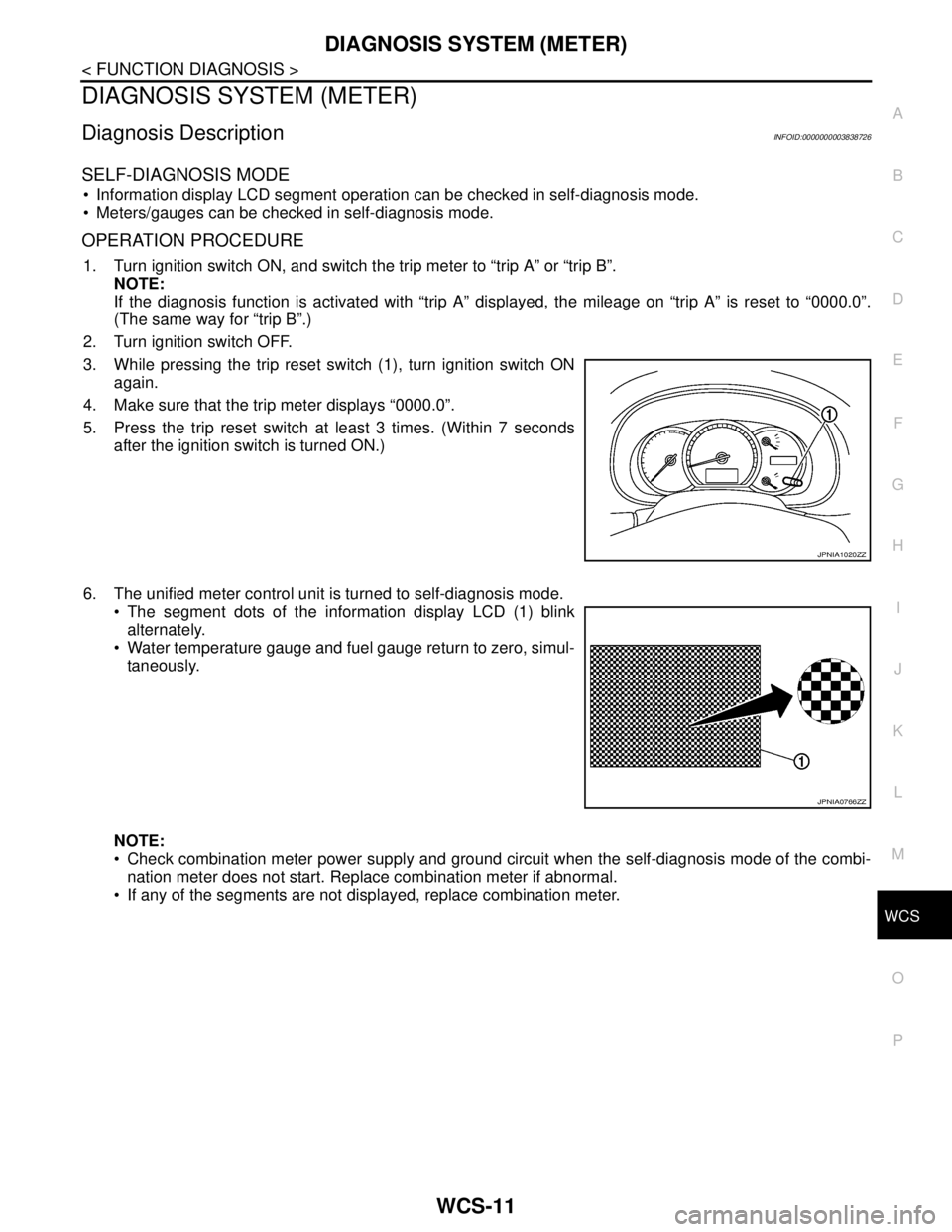
3. While pressing the trip reset switch (1), turn ignition switch ON
again.
4. Make sure that the trip meter displays “0000.0”.
5. Press the trip reset switch at least 3 times. (Within 7 seconds
after the ignition switch is turned ON.)
6. The unified meter control unit is turned to self-diagnosis mode.
The segment dots of the information display LCD (1) blink
alternately.
Water temperature gauge and fuel gauge return to zero, simul-
taneously.
NOTE:
Check combination meter power supply and ground circuit when the self-diagnosis mode of the combi-
nation meter does not start. Replace combination meter if abnormal.
If any of the segments are not displayed, replace combination meter.
JPNIA1020ZZ
JPNIA0766ZZ
Page 4944 of 5121

WCS-14
< FUNCTION DIAGNOSIS >
DIAGNOSIS SYSTEM (METER)
NOTE:
Some items are not available according to vehicle specification.
SPECIAL FUNCTION
Special menu
W/L ON HISTORY
Stores histories when warning/indicator lamp is turned on.
“W/L ON HISTORY” indicates the “TIME” when the warning/ indicator lamp is turned on.
The “TIME” above is :
SHIFT IND
[P, R, N, D, L]Status of shift position indicator detected from shift position signal and manual
mode indicator signal is received from TCM via CAN communication.
O/D OFF SW
[On/Off] Status of sport mode switch.
M RANGE SW
[On/Off]This item is displayed, but cannot be monitored.
NM RANGE SW
[On/Off]This item is displayed, but cannot be monitored.
AT SFT UP SW
[On/Off]This item is displayed, but cannot be monitored.
AT SFT DWN SW
[On/Off]This item is displayed, but cannot be monitored.
ST SFT UP SW
[On/Off]This item is displayed, but cannot be monitored.
ST SFT DWN SW
[On/Off]This item is displayed, but cannot be monitored.
PKB SW
[On/Off]Status of parking brake switch.
BUCKLE SW
[On/Off]Status of seat belt buckle switch.
BRAKE OIL SW
[On/Off]Status of brake fluid level switch.
DISTANCE
[km]Value of possible driving distance calculated by combination meter.
A/C AMP CONN
[On/Off]Input status of A/C auto amp. connection recognition signal.
ENTER SW
[On/Off]Status of (ENTER) switch.
SELECT SW
[On/Off]Status of (SELECT) switch.
OUTSIDE TEMP
[°C or °F]Ambient air temperature value converted from ambient sensor signal received
from ambient sensor.
NOTE:
This may not match with the temperature value indicated on the information dis-
play. (Because the information display value is a corrected value from the ambient
sensor input value.)
FUEL LOW SIG
[On/Off]Status of fuel level low warning signal to output to AV control unit via CAN com-
munication.
BUZZER
[On/Off]XBuzzer status (in the combination meter) is detected from the buzzer output signal
received from each unit via CAN communication and the warning output condition
of the combination meter. Display item [Unit]MAIN
SIGNALSDescription
Display item Description
W/L ON HISTORY Lighting history of warning lamp and indicator lamp can be checked.
Page 4947 of 5121

WCS
DIAGNOSIS SYSTEM (BCM)
WCS-17
< FUNCTION DIAGNOSIS >
C
D
E
F
G
H
I
J
K
L
MB A
O
P
FREEZE FRAME DATA (FFD) AND IGN COUNTER
Freeze Frame Data
The BCM records the following condition at the moment a particular DTC is detected.
Vehicle Speed
Odo/Trip Meter
Vehicle Condition (BCM detected condition)
IGN Counter
IGN counter indicates the number of times that ignition switch is turned ON after DTC is detected.
The number is 0 when a malfunction is detected now.
The number increases like 1 → 2 → 3...38 → 39 after returning to the normal condition whenever ignition
switch OFF → ON.
The number is fixed to 39 until the self-diagnosis results are erased if it is over 39.
BUZZER
BUZZER : CONSULT-III Function (BCM - BUZZER)INFOID:0000000003838705
CONSULT-III APPLICATION ITEMS
DATA MONITOR
CONSULT screen terms Description
SLEEP>LOCKWhile turning BCM status from low power consumption mode to normal mode (Power supply
position is “LOCK”)
SLEEP>OFFWhile turning BCM status from low power consumption mode to normal mode (Power supply
position is “OFF”.)
LOCK>ACC While turning power supply position from “LOCK” to “ACC”
ACC>ON While turning power supply position from “ACC” to “IGN”
RUN>ACCWhile turning power supply position from “RUN” to “ACC” (Vehicle is stopping and selector
lever is except P position.)
CRANK>RUNWhile turning power supply position from “CRANKING” to “RUN” (From cranking up the en-
gine to run it)
RUN>URGENT While turning power supply position from “RUN“ to “ACC” (Emergency stop operation)
ACC>OFF While turning power supply position from “ACC” to “OFF”
OFF>LOCK While turning power supply position from “OFF” to “LOCK”
OFF>ACC While turning power supply position from “OFF” to “ACC”
ON>CRANK While turning power supply position from “IGN” to “CRANKING”
OFF>SLEEPWhile turning BCM status from normal mode (Power supply position is “OFF”.) to low power
consumption mode
LOCK>SLEEPWhile turning BCM status from normal mode (Power supply position is “LOCK”.) to low pow-
er consumption mode
LOCK Power supply position is “LOCK” (Ignition switch OFF with steering is locked.)
OFF Power supply position is “OFF” (Ignition switch OFF with steering is unlocked.)
ACC Power supply position is “ACC” (Ignition switch ACC)
ON Power supply position is “IGN” (Ignition switch ON with engine stopped)
ENGINE RUN Power supply position is “RUN” (Ignition switch ON with engine running)
CRANKING Power supply position is “CRANKING” (At engine cranking)
Test item Diagnosis mode Description
BUZZERData Monitor Displays BCM input data in real time.
Active Test Operation of electrical loads can be checked by sending driving signal to them.
Page 4970 of 5121

WCS-40
< ECU DIAGNOSIS >
COMBINATION METER
DTC Index
INFOID:0000000003838733
Function Specifications
Speedometer
Reset to zero by suspending communication. Tachometer
Water temperature gauge
Illumination controlWhen suspending communication, changes to nighttime
mode.
Information displayDoor open warning
The display turns off by suspending communication. Trunk open warning
Parking brake release warning
Instantaneous fuel warning When reception time of an abnormal signal is 2 seconds or
less, the last received datum is used for calculation to indi-
cate the result.
When reception time of an abnormal signal is more than two
seconds, the last result calculated during normal condition
is indicated. Average fuel consumption
Average vehicle speed
Travel distance
Buzzer The buzzer turns off by suspending communication.
Warning lamp/indicator
lampABS warning lamp
The lamp turns on by suspending communication. VDC OFF indicator lamp
SLIP indicator lamp
Brake warning lamp
High beam indicator lamp
The lamp turns off by suspending communication. Front fog light indicator lamp
Rear fog light indicator lamp
Turn signal indicator lamp
Light indicator lamp
Oil pressure warning lamp
Malfunction indicator lamp
CRUISE indicator lamp
SPORT indicator lamp
Key warning lamp
Display contents of CONSULT-III Diagnostic item is detected when ... Refer to
CAN COMM CIRCUIT
[U1000]When combination meter is not transmitting or receiving CAN communication signal
for 2 seconds or more.MWI-37,
"Diagnosis
Procedure"
CONTROL UNIT (CAN)
[U1010]When detecting error during the initial diagnosis of the CAN controller of combina-
tion meter.MWI-38, "Diagnosis
Procedure"
VEHICLE SPEED
[B2205]The abnormal vehicle speed signal is input from the ABS actuator and electric unit
(control unit) for 2 seconds or more.MWI-39, "Diagnosis
Procedure"
ENGINE SPEED
[B2267]If ECM continuously transmits abnormal engine speed signals for 2 seconds or
more.MWI-40, "Diagnosis
Procedure"
WATER TEMP
[B2268]If ECM continuously transmits abnormal engine coolant temperature signals for 60
seconds or more.MWI-41, "Diagnosis
Procedure"
Page 5025 of 5121

DIAGNOSIS SYSTEM (BCM)
WW-13
< FUNCTION DIAGNOSIS >
C
D
E
F
G
H
I
J
K
MA
B
WW
N
O
P
The BCM records the following condition at the moment a particular DTC is detected.
Vehicle Speed
Odo/Trip Meter
Vehicle Condition (BCM detected condition)
IGN Counter
IGN counter indicates the number of times that ignition switch is turned ON after DTC is detected.
The number is 0 when a malfunction is detected now.
The number increases like 1 → 2 → 3...38 → 39 after returning to the normal condition whenever ignition
switch OFF → ON.
The number is fixed to 39 until the self-diagnosis results are erased if it is over 39.
WIPER
WIPER : CONSULT-III Function (BCM - WIPER)INFOID:0000000003761581
WORK SUPPORT
*:Factory setting
NOTE:
When performed “RESET SETTING VALUE” on “Work Support (BCM - BCM)”, set “WIPER SPEED SETTING” on “Work Support (BCM
-WIPER)” to “On”.CONSULT screen terms Description
SLEEP>LOCKWhile turning BCM status from low power consumption mode to normal mode (Power supply
position is “LOCK”.)
SLEEP>OFFWhile turning BCM status from low power consumption mode to normal mode (Power supply
position is “OFF”.)
LOCK>ACC While turning power supply position from “LOCK” to “ACC”
ACC>ON While turning power supply position from “ACC” to “IGN”
RUN>ACCWhile turning power supply position from “RUN” to “ACC” (Vehicle is stopping and selector
lever is except P position.)
CRANK>RUNWhile turning power supply position from “CRANKING” to “RUN” (From cranking up the en-
gine to run it)
RUN>URGENT While turning power supply position from “RUN“ to “ACC” (Emergency stop operation)
ACC>OFF While turning power supply position from “ACC” to “OFF”
OFF>LOCK While turning power supply position from “OFF” to “LOCK”
OFF>ACC While turning power supply position from “OFF” to “ACC”
ON>CRANK While turning power supply position from “IGN” to “CRANKING”
OFF>SLEEPWhile turning BCM status from normal mode (Power supply position is “OFF”.) to low power
consumption mode
LOCK>SLEEPWhile turning BCM status from normal mode (Power supply position is “LOCK”.) to low pow-
er consumption mode
LOCK Power supply position is “LOCK” (Ignition switch OFF with steering is locked.)
OFF Power supply position is “OFF” (Ignition switch OFF with steering is unlocked.)
ACC Power supply position is “ACC” (Ignition switch ACC)
ON Power supply position is “IGN” (Ignition switch ON with engine stopped)
ENGINE RUN Power supply position is “RUN” (Ignition switch ON with engine running)
CRANKING Power supply position is “CRANKING” (At engine cranking)
Service item Setting item Description
WIPER SPEED
SETTINGOn*With vehicle speed
(Front wiper intermittent time linked with the vehicle speed and wiper intermittent dial position)
OffWithout vehicle speed
(Front wiper intermittent time linked with the wiper intermittent dial position)