trunk NISSAN TEANA 2008 Owner's Manual
[x] Cancel search | Manufacturer: NISSAN, Model Year: 2008, Model line: TEANA, Model: NISSAN TEANA 2008Pages: 5121, PDF Size: 69.03 MB
Page 812 of 5121
![NISSAN TEANA 2008 Owners Manual AV-668
< ON-VEHICLE REPAIR >[BOSE AUDIO WITH NAVIGATION]
TEL ANTENNA
Exploded View
INFOID:0000000003766015
Removal and InstallationINFOID:0000000003766016
REMOVAL
1. Remove rear parcel shelf finisher.](/img/5/57391/w960_57391-811.png "NISSAN TEANA 2008 Owners Manual AV-668
< ON-VEHICLE REPAIR >[BOSE AUDIO WITH NAVIGATION]
TEL ANTENNA
Exploded View
INFOID:0000000003766015
Removal and InstallationINFOID:0000000003766016
REMOVAL
1. Remove rear parcel shelf finisher.")
AV-668
< ON-VEHICLE REPAIR >[BOSE AUDIO WITH NAVIGATION]
TEL ANTENNA
Exploded View
INFOID:0000000003766015
Removal and InstallationINFOID:0000000003766016
REMOVAL
1. Remove rear parcel shelf finisher. Refer to INT-43, "Removal and Installation".
2. Remove trunk front finisher. Refer toINT-57, "
Removal and Installation".
3. Remove TEL antenna mounting nit, disconnect the TEL antenna connector.
4. Remove TEL antenna.
INSTALLATION
Install in the reverse order of removal.
JPNIA1053ZZ
1. TEL antenna
Page 814 of 5121
![NISSAN TEANA 2008 Owners Manual AV-670
< ON-VEHICLE REPAIR >[BOSE AUDIO WITH NAVIGATION]
REAR VIEW CAMERA
REAR VIEW CAMERA
Exploded ViewINFOID:0000000003766021
DISASSEMBLY
Removal and InstallationINFOID:0000000003766022
REMOVAL
1. R](/img/5/57391/w960_57391-813.png "NISSAN TEANA 2008 Owners Manual AV-670
< ON-VEHICLE REPAIR >[BOSE AUDIO WITH NAVIGATION]
REAR VIEW CAMERA
REAR VIEW CAMERA
Exploded ViewINFOID:0000000003766021
DISASSEMBLY
Removal and InstallationINFOID:0000000003766022
REMOVAL
1. R")
AV-670
< ON-VEHICLE REPAIR >[BOSE AUDIO WITH NAVIGATION]
REAR VIEW CAMERA
REAR VIEW CAMERA
Exploded ViewINFOID:0000000003766021
DISASSEMBLY
Removal and InstallationINFOID:0000000003766022
REMOVAL
1. Remove trunk lid finisher inner. Refer to INT-59, "Removal and Installation".
2. Remove trunk lid finisher. Refer to EXT-38, "
Removal and Installation".
3. Remove rear view camera mounting clip, disconnect the rear view camera connector.
4. Remove rear view camera.
INSTALLATION
1. Installation is the reverse order of removal.
AdjustmentINFOID:0000000003901754
Adjust the guide line position if the guide line position is shifted after installing the rear view camera.
1. Draw lines on rearward area of the vehicle passing through the
following points: 200 mm (7.87 in) from both sides of the vehicle,
and 0.5 m (1.64 ft), 1.0 m (3.28 ft) from the rear end of the
bumper.
2. Set into “Adjust offset of rear view camera” mode of Confirma-
tion / Adjustment mode.
JPNIA1050ZZ
1. Rear view camera
2. Seal
Refer to GI-4, "
Components" for symbols in the figure.
SKIB3691E
Page 819 of 5121

BCS-2
BATTERY SAVER ....................................................29
BATTERY SAVER : CONSULT-III Function (BCM
- BATTERY SAVER) ..............................................
29
TRUNK ......................................................................30
TRUNK : CONSULT-III Function (BCM - TRUNK) ...30
THEFT ALM ..............................................................31
THEFT ALM : CONSULT-III Function (BCM -
THEFT) ...................................................................
31
SIGNAL BUFFER ......................................................32
SIGNAL BUFFER : CONSULT-III Function (BCM
- SIGNAL BUFFER) ................................................
32
COMPONENT DIAGNOSIS ........................33
U1000 CAN COMM CIRCUIT ............................33
Description ..............................................................33
DTC Logic ...............................................................33
Diagnosis Procedure ..............................................33
U1010 CONTROL UNIT (CAN) .........................34
DTC Logic ...............................................................34
Diagnosis Procedure ..............................................34
U0415 VEHICLE SPEED SIG ............................35
Description ..............................................................35
DTC Logic ...............................................................35
Diagnosis Procedure ..............................................35
B2562 LOW VOLTAGE .....................................36
DTC Logic ...............................................................36
Diagnosis Procedure ..............................................36
POWER SUPPLY AND GROUND CIRCUIT .....37
Diagnosis Procedure ..............................................37
COMBINATION SWITCH INPUT CIRCUIT .......38
Diagnosis Procedure ...............................................38
COMBINATION SWITCH OUTPUT CIRCUIT ...40
Diagnosis Procedure ...............................................40
ECU DIAGNOSIS .......................................42
BCM (BODY CONTROL MODULE) ..................42
Reference Value .....................................................42
Wiring Diagram - BCM - ..........................................65
Fail-safe ..................................................................71
DTC Inspection Priority Chart ...............................73
DTC Index ..............................................................74
SYMPTOM DIAGNOSIS ............................76
COMBINATION SWITCH SYSTEM SYMP-
TOMS .................................................................
76
Symptom Table .......................................................76
PRECAUTION ............................................77
PRECAUTIONS .................................................77
Precaution for Supplemental Restraint System
(SRS) "AIR BAG" and "SEAT BELT PRE-TEN-
SIONER" .................................................................
77
ON-VEHICLE REPAIR ...............................78
BCM (BODY CONTROL MODULE) ..................78
Exploded View ........................................................78
Removal and Installation .........................................78
COMBINATION SWITCH ..................................79
Exploded View ........................................................79
Removal and Installation .........................................79
Page 823 of 5121
BCS-6
< FUNCTION DIAGNOSIS >
BODY CONTROL SYSTEM
FUNCTION DIAGNOSIS
BODY CONTROL SYSTEM
System DescriptionINFOID:0000000003809584
OUTLINE
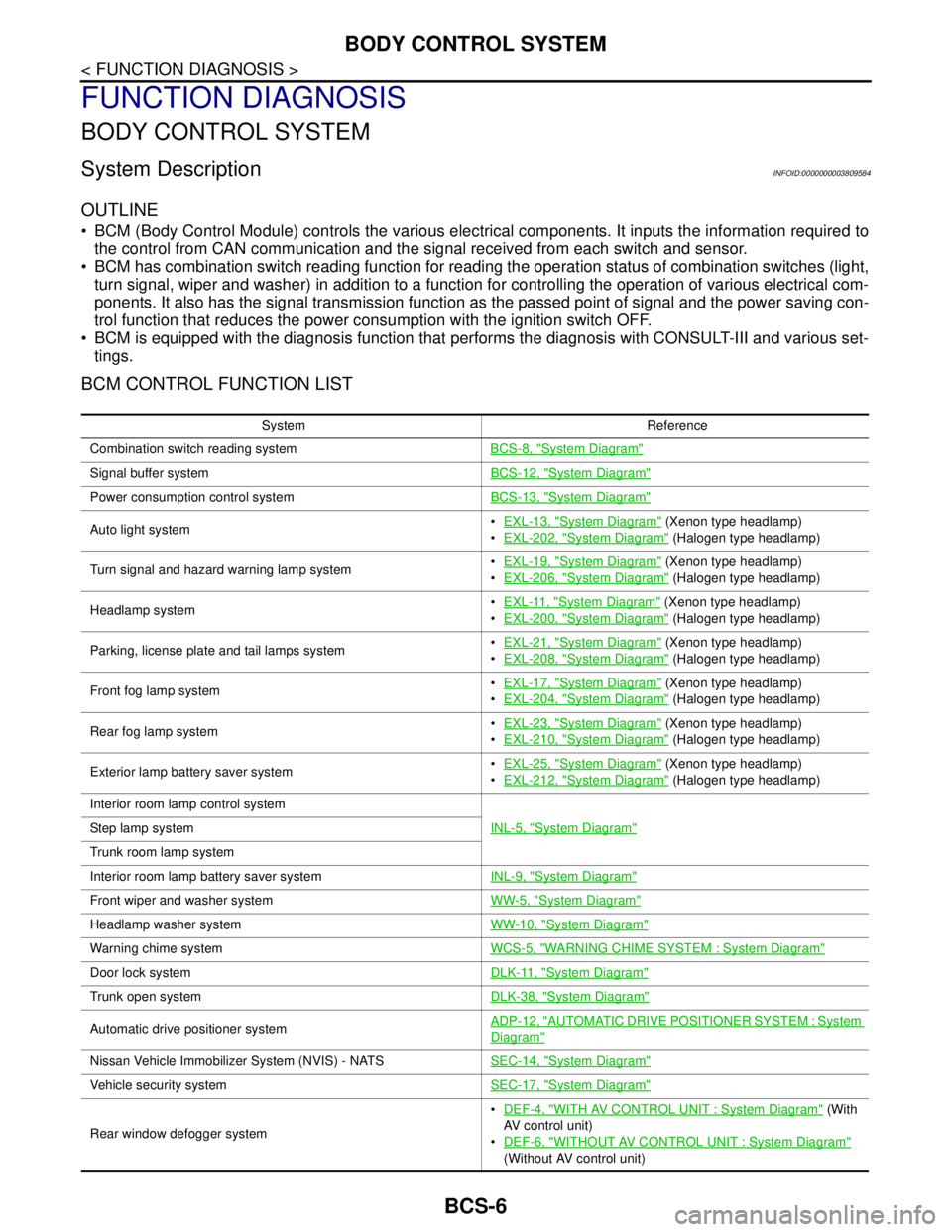
BCM (Body Control Module) controls the various electrical components. It inputs the information required to
the control from CAN communication and the signal received from each switch and sensor.
BCM has combination switch reading function for reading the operation status of combination switches (light,
turn signal, wiper and washer) in addition to a function for controlling the operation of various electrical com-
ponents. It also has the signal transmission function as the passed point of signal and the power saving con-
trol function that reduces the power consumption with the ignition switch OFF.
BCM is equipped with the diagnosis function that performs the diagnosis with CONSULT-III and various set-
tings.
BCM CONTROL FUNCTION LIST
System Reference
Combination switch reading systemBCS-8, "
System Diagram"
Signal buffer systemBCS-12, "System Diagram"
Power consumption control systemBCS-13, "System Diagram"
Auto light systemEXL-13, "System Diagram" (Xenon type headlamp)
EXL-202, "
System Diagram" (Halogen type headlamp)
Turn signal and hazard warning lamp systemEXL-19, "
System Diagram" (Xenon type headlamp)
EXL-206, "
System Diagram" (Halogen type headlamp)
Headlamp systemEXL-11, "
System Diagram" (Xenon type headlamp)
EXL-200, "
System Diagram" (Halogen type headlamp)
Parking, license plate and tail lamps systemEXL-21, "
System Diagram" (Xenon type headlamp)
EXL-208, "
System Diagram" (Halogen type headlamp)
Front fog lamp systemEXL-17, "
System Diagram" (Xenon type headlamp)
EXL-204, "
System Diagram" (Halogen type headlamp)
Rear fog lamp systemEXL-23, "
System Diagram" (Xenon type headlamp)
EXL-210, "
System Diagram" (Halogen type headlamp)
Exterior lamp battery saver systemEXL-25, "
System Diagram" (Xenon type headlamp)
EXL-212, "
System Diagram" (Halogen type headlamp)
Interior room lamp control system
INL-5, "
System Diagram"Step lamp system
Trunk room lamp system
Interior room lamp battery saver systemINL-9, "
System Diagram"
Front wiper and washer systemWW-5, "System Diagram"
Headlamp washer systemWW-10, "System Diagram"
Warning chime systemWCS-5, "WARNING CHIME SYSTEM : System Diagram"
Door lock systemDLK-11, "System Diagram"
Trunk open systemDLK-38, "System Diagram"
Automatic drive positioner systemADP-12, "AUTOMATIC DRIVE POSITIONER SYSTEM : System
Diagram"
Nissan Vehicle Immobilizer System (NVIS) - NATSSEC-14, "System Diagram"
Vehicle security systemSEC-17, "System Diagram"
Rear window defogger systemDEF-4, "
WITH AV CONTROL UNIT : System Diagram" (With
AV control unit)
DEF-6, "
WITHOUT AV CONTROL UNIT : System Diagram"
(Without AV control unit)
Page 824 of 5121

BCS
BODY CONTROL SYSTEM
BCS-7
< FUNCTION DIAGNOSIS >
C
D
E
F
G
H
I
J
K
L B A
O
P N
Component Parts LocationINFOID:0000000003809585
Intelligent Key system/engine start systemDoor lock function
DLK-14, "INTELLIGENT KEY SYSTEM : System Diagram"
Trunk open function
Remote keyless entry
function
Key reminder function
Warning function
Engine start function
Power window systemPWC-7, "
SystemDiagram"
System Reference
1. BCM
A. Behind of combination meter
JPMIA1040ZZ
Page 829 of 5121
BCS-12
< FUNCTION DIAGNOSIS >
SIGNAL BUFFER SYSTEM
SIGNAL BUFFER SYSTEM
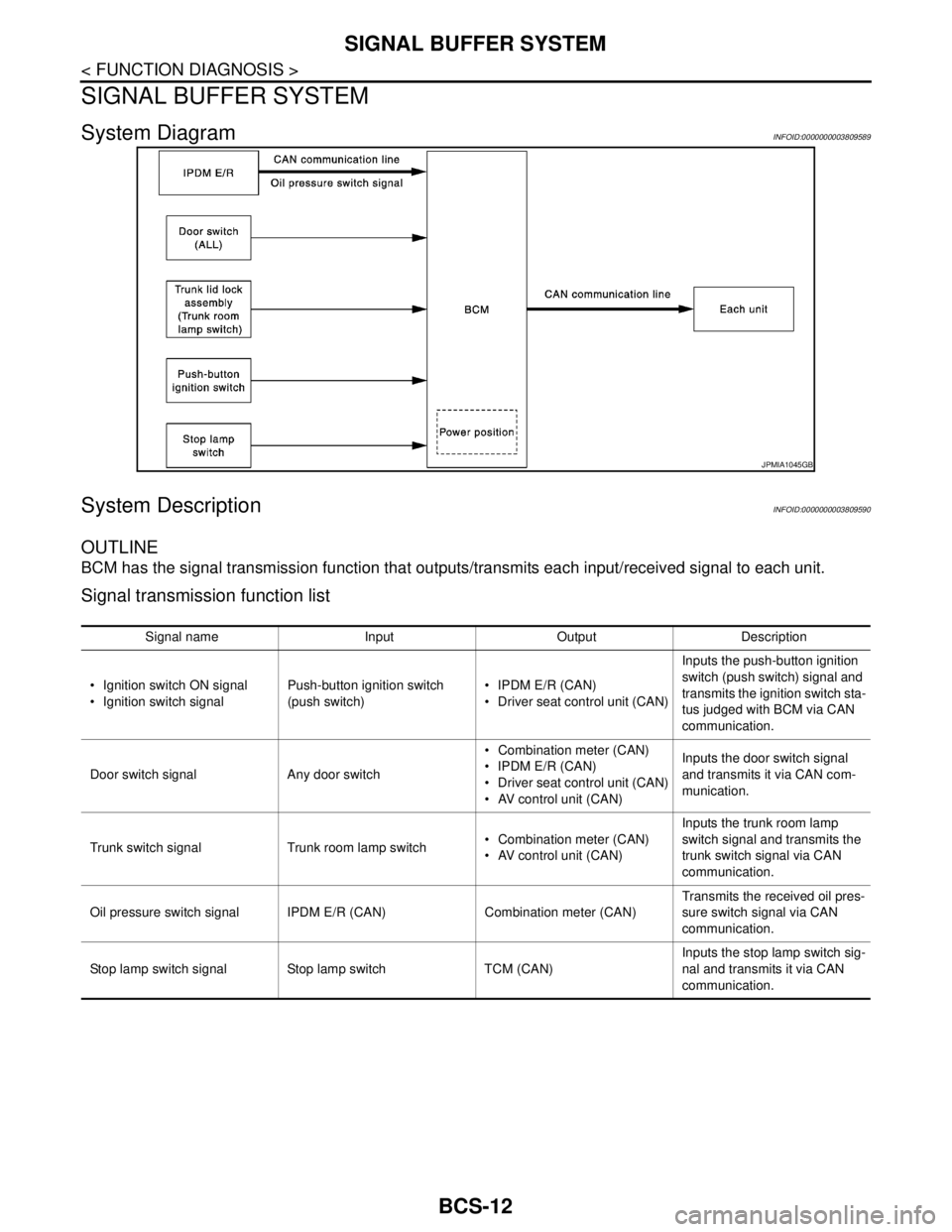
System DiagramINFOID:0000000003809589
System DescriptionINFOID:0000000003809590
OUTLINE
BCM has the signal transmission function that outputs/transmits each input/received signal to each unit.
Signal transmission function list
JPMIA1045GB
Signal name Input Output Description
Ignition switch ON signal
Ignition switch signalPush-button ignition switch
(push switch) IPDM E/R (CAN)
Driver seat control unit (CAN)Inputs the push-button ignition
switch (push switch) signal and
transmits the ignition switch sta-
tus judged with BCM via CAN
communication.
Door switch signal Any door switch Combination meter (CAN)
IPDM E/R (CAN)
Driver seat control unit (CAN)
AV control unit (CAN)Inputs the door switch signal
and transmits it via CAN com-
munication.
Trunk switch signal Trunk room lamp switch Combination meter (CAN)
AV control unit (CAN)Inputs the trunk room lamp
switch signal and transmits the
trunk switch signal via CAN
communication.
Oil pressure switch signal IPDM E/R (CAN) Combination meter (CAN)Transmits the received oil pres-
sure switch signal via CAN
communication.
Stop lamp switch signal Stop lamp switch TCM (CAN)Inputs the stop lamp switch sig-
nal and transmits it via CAN
communication.
Page 831 of 5121

BCS-14
< FUNCTION DIAGNOSIS >
POWER CONSUMPTION CONTROL SYSTEM
Sleep condition
Wake-up operation
BCM changes from the low power consumption mode to the CAN communication sleep mode when the any
of the BCM wake-up conditions is fulfilled. Only the control with BCM is activated.
BCM transmits the sleep wake up signal (wake up) to each unit when any of the CAN wake-up conditions is
fulfilled. It changes from the low power consumption mode or the CAN communication sleep mode to the
normal mode.
Each unit starts the transmission of CAN communication with the sleep wake up signal. In addition, the com-
bination meter transmits the wake up signal to BCM via CAN communication to report the CAN communica-
tion start.
Wake-up condition
CAN sleep condition BCM sleep condition
Receiving the sleep-ready signal (ready) from all units
Ignition switch: OFF
Vehicle security system: Not operation
Warning chime: Not operation
Intelligent Key system buzzer: Not operation
Trunk room lamp switch status: No change
Stop lamp switch: OFF
Key slot (card switch) status: No change
Turn signal indicator lamp: Not operation
Exterior lamp: OFF
Door lock status: No change
CONSULT-III communication status: Not communication
Meter display signal: Non-transmission
Door switch status: No change
Rear window defogger: OFF Interior room lamp battery saver: Time out
Push-button ignition switch illumination: OFF
Nissan Vehicle Immobilizer System (NVIS) - NATS: Not opera-
tion
Remote keyless entry receiver communication status: No com-
munication
ACC indicator lamp: Not operation
ON indicator lamp: Not operation
BCM wake-up condition CAN wake-up condition
Trunk lid opener switch: OFF → ON
Remote keyless entry receiver: Receiving
Door lock and unlock switch:
NEUTRAL → LOCK, NEUTRAL → UNLOCK
Front door lock assembly driver side (unlock sensor):
OFF → ON, ON → OFF Receiving the sleep-ready signal (Not-ready) from any units
Key slot (key switch): OFF → ON, ON → OFF
Push-button ignition switch (push switch): OFF→ ON
Hazard switch: OFF → ON
PASSING switch: OFF → ON, ON → OFF
TAIL LAMP switch: OFF → ON
Driver door switch: OFF → ON, ON → OFF
Passenger door switch: OFF → ON, ON → OFF
Rear RH door switch: OFF → ON, ON → OFF
Rear LH door switch: OFF → ON, ON → OFF
Trunk room lamp switch: OFF → ON, ON → OFF
Driver door request switch: OFF → ON
Passenger door request switch: OFF → ON
Trunk lid request switch: OFF → ON
Stop lamp switch: ON
Page 833 of 5121

BCS-16
< FUNCTION DIAGNOSIS >
DIAGNOSIS SYSTEM (BCM)
DIAGNOSIS SYSTEM (BCM)
COMMON ITEM
COMMON ITEM : CONSULT-III Function (BCM - COMMON ITEM)INFOID:0000000003809594
APPLICATION ITEM
CONSULT-III performs the following functions via CAN communication with BCM.
SYSTEM APPLICATION
BCM can perform the following functions for each system.
NOTE:
It can perform the diagnosis modes except the following for all sub system selection items.
×: Applicable item
NOTE:
*: This item is displayed, but is not used.
FREEZE FRAME DATA (FFD) AND IGN COUNTER
Freeze Frame Data
Diagnosis mode Function Description
Work Support Changes the setting for each system function.
Self Diagnostic Result Displays the diagnosis results judged by BCM.
CAN Diag Support MonitorMonitors the reception status of CAN communication viewed from BCM. Refer to CONSULT-III opera-
tion manual.
Data Monitor The BCM input/output signals are displayed.
Active Test The signals used to activate each device are forcibly supplied from BCM.
Ecu Identification The BCM part number is displayed.
Configuration Read and save the vehicle specification.
Write the vehicle specification when replacing BCM.
System Sub system selection itemDiagnosis mode
Work Support Data Monitor Active Test
Door lock DOOR LOCK×××
Rear window defogger REAR DEFOGGER××
Warning chime BUZZER××
Interior room lamp timer INT LAMP×××
Exterior lamp HEAD LAMP×××
Wiper and washer WIPER×××
Turn signal and hazard warning lamps FLASHER×××
— AIR CONDITONER*
Intelligent Key system
Engine start systemINTELLIGENT KEY×××
Combination switch COMB SW×
Body control system BCM×
NVIS - NATS IMMU××
Interior room lamp battery saver BATTERY SAVER×××
Trunk lid opener system TRUNK××
Vehicle security system THEFT ALM×××
— RETAINED PWR*×
Signal buffer system SIGNAL BUFFER××
— TPMS (AIR PRESSURE MONITOR)*×××
Page 835 of 5121

BCS-18
< FUNCTION DIAGNOSIS >
DIAGNOSIS SYSTEM (BCM)
DATA MONITOR
ACTIVE TEST
REAR WINDOW DEFOGGER
REAR WINDOW DEFOGGER : CONSULT-III Function (BCM - REAR DEFOGGER)
INFOID:0000000003897058
Data monitor
ACTIVE TEST
BUZZER
Monitor item Description
DOOR LOCK-UNLOCK SETSelective unlock function mode can be changed to operate (WITH) or not operate (WITHOUT) with
this mode.
Monitor Item Contents
REQ SW-DR Indicates [ON/OFF] condition of door request switch (driver side).
REQ SW-AS Indicates [ON/OFF] condition of door request switch (passenger side).
REQ SW-BD/TR Indicates [ON/OFF] condition of trunk lid opener request switch.
DOOR SW-DR Indicates [ON/OFF] condition of front door switch (driver side).
DOOR SW-AS Indicates [ON/OFF] condition of front door switch (passenger side).
DOOR SW-RR Indicates [ON/OFF] condition of rear door switch RH.
DOOR SW-RL Indicates [ON/OFF] condition of rear door switch LH.
DOOR SW-BKNOTE:
This item is displayed, but cannot be monitored.
CDL LOCK SW Indicates [ON/OFF] condition of lock signal from door lock unlock switch.
CDL UNLOCK SW Indicates [ON/OFF] condition of unlock signal from door lock unlock switch.
KEY CYL LK-SW Indicates [ON/OFF] condition of lock signal from door key cylinder.
KEY CYL UN-SW Indicates [ON/OFF] condition of unlock signal from door key cylinder.
Te s t i t e m D e s c r i p t i o n
DOOR LOCKThis test is able to check door lock/unlock operation.
The all door lock actuators are locked when “ALL LCK” on CONSULT-III screen is touched.
The all door lock actuators are unlocked when “ALL UNLK” on CONSULT-III screen is touched.
The door lock actuator (driver side) is unlocked when “DR UNLK” on CONSULT-III screen is
touched.
The door lock actuator (passenger side) is unlocked when “AS UNLK” on CONSULT- III screen
is touched.
The door lock actuator (rear LH and RH) is unlocked when “OTR ULK” on CONSULT-III screen
is touched.
Monitor Item Description
REAR DEF SW Without AV control unit: Displays “Press (ON)/other (OFF)” status determined with the rear win-
dow defogger switch
With AV control unit: This is displayed even when it is not equipped
PUSH SW Indicates [ON/OFF] condition of push switch
Test Item Description
REAR DEFOGGERThis test is able to check rear window defogger operation. Rear window defogger operates when
“ON” on CONSULT-III screen is touched
Page 838 of 5121

BCS
DIAGNOSIS SYSTEM (BCM)
BCS-21
< FUNCTION DIAGNOSIS >
C
D
E
F
G
H
I
J
K
L B A
O
P N
ACTIVE TEST
HEADLAMP
HEADLAMP : CONSULT-III Function (BCM - HEAD LAMP)INFOID:0000000003897061
WORK SUPPORT
*: Factory setting
DATA MONITOR
TRNK/HAT MNTR
[On/Off]The switch status input from trunk room lamp switch
RKE-LOCK
[On/Off]Lock signal status received from remote keyless entry receiver
RKE-UNLOCK
[On/Off]Unlock signal status received from remote keyless entry receiver Monitor item
[Unit]Description
Test item Operation Description
INT LAMPOnOutputs the interior room lamp control signal to turn map lamp and personal lamp ON
(Map lamp switch is in DOOR position).
Off Stops the interior room lamp control signal to turn map lamp and personal lamp OFF.
STEP LAMP TESTOn Outputs the step lamp control signal to turn step lamp ON.
Off Stops the step lamp control signal to turn step lamp OFF.
LUGGAGE LAMP TESTOn Outputs the trunk room lamp control signal to turn trunk room lamp ON.
Off Stops the trunk room lamp control signal to turn trunk room lamp OFF.
Service item Setting item Setting
BATTERY SAVER SETOn* With the exterior lamp battery saver function
Off Without the exterior lamp battery saver function
ILL DELAY SETMODE 1* 45 sec.
Sets delay timer function timer operation time.
(All doors closed) MODE 2Without the func-
tion
MODE 3 30 sec.
MODE 4 60 sec.
MODE 5 90 sec.
MODE 6 120 sec.
MODE 7 150 sec.
MODE 8 180 sec.
CUSTOM A/LIGHT SET-
TINGMODE 1* Normal
MODE 2 More sensitive setting than normal setting (Turns ON earlier than normal operation.)
MODE 3 More sensitive setting than MODE 2 (Turns ON earlier than MODE 2.)
MODE 4 Less sensitive setting than normal setting (Turns ON later than normal operation.)
Monitor item
[Unit]Description
PUSH SW
[On/Off]The switch status input from push-button ignition switch
ENGINE STATE
[Stop/Stall/Crank/Run]The engine status received from ECM with CAN communication