washer NISSAN TEANA 2008 Owner's Manual
[x] Cancel search | Manufacturer: NISSAN, Model Year: 2008, Model line: TEANA, Model: NISSAN TEANA 2008Pages: 5121, PDF Size: 69.03 MB
Page 932 of 5121
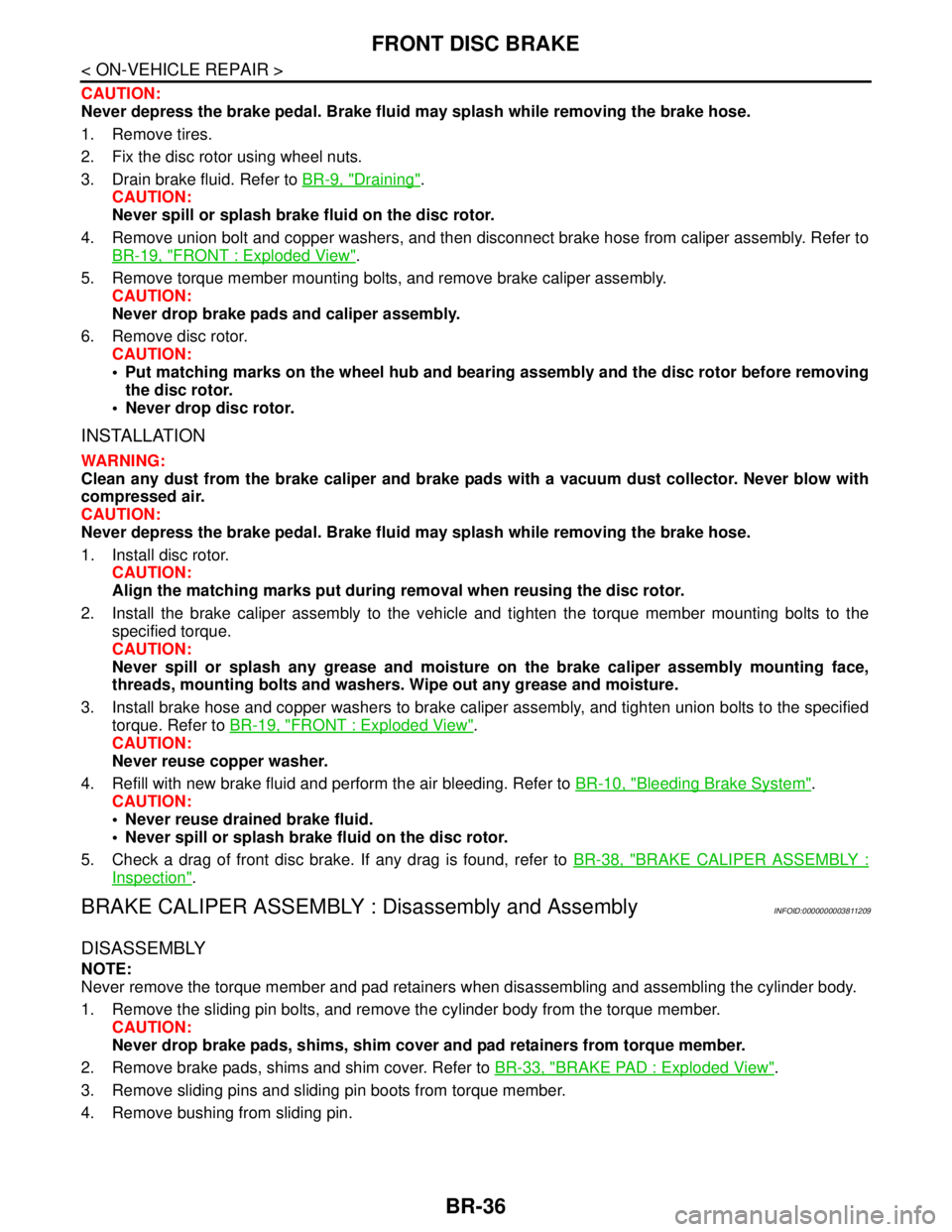
BR-36
< ON-VEHICLE REPAIR >
FRONT DISC BRAKE
CAUTION:
Never depress the brake pedal. Brake fluid may splash while removing the brake hose.
1. Remove tires.
2. Fix the disc rotor using wheel nuts.
3. Drain brake fluid. Refer to BR-9, "
Draining".
CAUTION:
Never spill or splash brake fluid on the disc rotor.
4. Remove union bolt and copper washers, and then disconnect brake hose from caliper assembly. Refer to
BR-19, "
FRONT : Exploded View".
5. Remove torque member mounting bolts, and remove brake caliper assembly.
CAUTION:
Never drop brake pads and caliper assembly.
6. Remove disc rotor.
CAUTION:
Put matching marks on the wheel hub and bearing assembly and the disc rotor before removing
the disc rotor.
Never drop disc rotor.
INSTALLATION
WARNING:
Clean any dust from the brake caliper and brake pads with a vacuum dust collector. Never blow with
compressed air.
CAUTION:
Never depress the brake pedal. Brake fluid may splash while removing the brake hose.
1. Install disc rotor.
CAUTION:
Align the matching marks put during removal when reusing the disc rotor.
2. Install the brake caliper assembly to the vehicle and tighten the torque member mounting bolts to the
specified torque.
CAUTION:
Never spill or splash any grease and moisture on the brake caliper assembly mounting face,
threads, mounting bolts and washers. Wipe out any grease and moisture.
3. Install brake hose and copper washers to brake caliper assembly, and tighten union bolts to the specified
torque. Refer to BR-19, "
FRONT : Exploded View".
CAUTION:
Never reuse copper washer.
4. Refill with new brake fluid and perform the air bleeding. Refer to BR-10, "
Bleeding Brake System".
CAUTION:
Never reuse drained brake fluid.
Never spill or splash brake fluid on the disc rotor.
5. Check a drag of front disc brake. If any drag is found, refer to BR-38, "
BRAKE CALIPER ASSEMBLY :
Inspection".
BRAKE CALIPER ASSEMBLY : Disassembly and AssemblyINFOID:0000000003811209
DISASSEMBLY
NOTE:
Never remove the torque member and pad retainers when disassembling and assembling the cylinder body.
1. Remove the sliding pin bolts, and remove the cylinder body from the torque member.
CAUTION:
Never drop brake pads, shims, shim cover and pad retainers from torque member.
2. Remove brake pads, shims and shim cover. Refer to BR-33, "
BRAKE PAD : Exploded View".
3. Remove sliding pins and sliding pin boots from torque member.
4. Remove bushing from sliding pin.
Page 938 of 5121
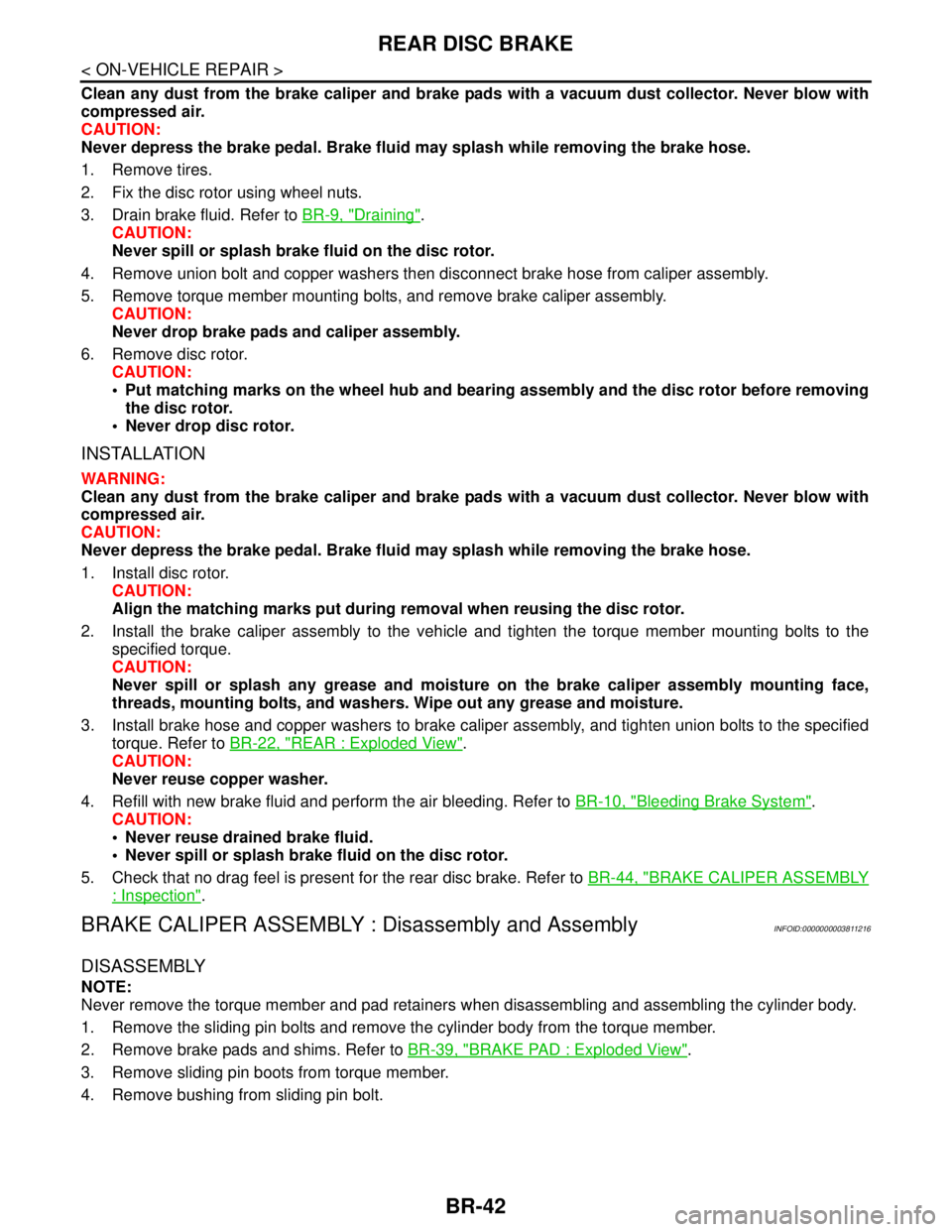
BR-42
< ON-VEHICLE REPAIR >
REAR DISC BRAKE
Clean any dust from the brake caliper and brake pads with a vacuum dust collector. Never blow with
compressed air.
CAUTION:
Never depress the brake pedal. Brake fluid may splash while removing the brake hose.
1. Remove tires.
2. Fix the disc rotor using wheel nuts.
3. Drain brake fluid. Refer to BR-9, "
Draining".
CAUTION:
Never spill or splash brake fluid on the disc rotor.
4. Remove union bolt and copper washers then disconnect brake hose from caliper assembly.
5. Remove torque member mounting bolts, and remove brake caliper assembly.
CAUTION:
Never drop brake pads and caliper assembly.
6. Remove disc rotor.
CAUTION:
Put matching marks on the wheel hub and bearing assembly and the disc rotor before removing
the disc rotor.
Never drop disc rotor.
INSTALLATION
WARNING:
Clean any dust from the brake caliper and brake pads with a vacuum dust collector. Never blow with
compressed air.
CAUTION:
Never depress the brake pedal. Brake fluid may splash while removing the brake hose.
1. Install disc rotor.
CAUTION:
Align the matching marks put during removal when reusing the disc rotor.
2. Install the brake caliper assembly to the vehicle and tighten the torque member mounting bolts to the
specified torque.
CAUTION:
Never spill or splash any grease and moisture on the brake caliper assembly mounting face,
threads, mounting bolts, and washers. Wipe out any grease and moisture.
3. Install brake hose and copper washers to brake caliper assembly, and tighten union bolts to the specified
torque. Refer to BR-22, "
REAR : Exploded View".
CAUTION:
Never reuse copper washer.
4. Refill with new brake fluid and perform the air bleeding. Refer to BR-10, "
Bleeding Brake System".
CAUTION:
Never reuse drained brake fluid.
Never spill or splash brake fluid on the disc rotor.
5. Check that no drag feel is present for the rear disc brake. Refer to BR-44, "
BRAKE CALIPER ASSEMBLY
: Inspection".
BRAKE CALIPER ASSEMBLY : Disassembly and AssemblyINFOID:0000000003811216
DISASSEMBLY
NOTE:
Never remove the torque member and pad retainers when disassembling and assembling the cylinder body.
1. Remove the sliding pin bolts and remove the cylinder body from the torque member.
2. Remove brake pads and shims. Refer to BR-39, "
BRAKE PAD : Exploded View".
3. Remove sliding pin boots from torque member.
4. Remove bushing from sliding pin bolt.
Page 1158 of 5121

DEF-8
< FUNCTION DIAGNOSIS >
DIAGNOSIS SYSTEM (BCM)
DIAGNOSIS SYSTEM (BCM)
COMMON ITEM
COMMON ITEM : CONSULT-III Function (BCM - COMMON ITEM)INFOID:0000000003940040
APPLICATION ITEM
CONSULT-III performs the following functions via CAN communication with BCM.
SYSTEM APPLICATION
BCM can perform the following functions for each system.
NOTE:
It can perform the diagnosis modes except the following for all sub system selection items.
×: Applicable item
NOTE:
*: This item is displayed, but is not used.
FREEZE FRAME DATA (FFD) AND IGN COUNTER
Freeze Frame Data
Diagnosis mode Function Description
Work Support Changes the setting for each system function.
Self Diagnostic Result Displays the diagnosis results judged by BCM.
CAN Diag Support MonitorMonitors the reception status of CAN communication viewed from BCM. Refer to CONSULT-III opera-
tion manual.
Data Monitor The BCM input/output signals are displayed.
Active Test The signals used to activate each device are forcibly supplied from BCM.
Ecu Identification The BCM part number is displayed.
Configuration Read and save the vehicle specification.
Write the vehicle specification when replacing BCM.
System Sub system selection itemDiagnosis mode
Work Support Data Monitor Active Test
Door lock DOOR LOCK×××
Rear window defogger REAR DEFOGGER××
Warning chime BUZZER××
Interior room lamp timer INT LAMP×××
Exterior lamp HEAD LAMP×××
Wiper and washer WIPER×××
Turn signal and hazard warning lamps FLASHER×××
— AIR CONDITONER*
Intelligent Key system
Engine start systemINTELLIGENT KEY×××
Combination switch COMB SW×
Body control system BCM×
NVIS - NATS IMMU××
Interior room lamp battery saver BATTERY SAVER×××
Trunk lid opener system TRUNK××
Vehicle security system THEFT ALM×××
— RETAINED PWR*×
Signal buffer system SIGNAL BUFFER××
— TPMS (AIR PRESSURE MONITOR)*×××
Page 1176 of 5121

DEF-26
< ECU DIAGNOSIS >
BCM (BODY CONTROL MODULE)
ECU DIAGNOSIS
BCM (BODY CONTROL MODULE)
Reference ValueINFOID:0000000003940041
VALUES ON THE DIAGNOSIS TOOL
CONSULT-III MONITOR ITEM
Monitor Item Condition Value/Status
FR WIPER HIOther than front wiper switch HI Off
Front wiper switch HI On
FR WIPER LOWOther than front wiper switch LO Off
Front wiper switch LO On
FR WASHER SWFront washer switch OFF Off
Front washer switch ON On
FR WIPER INTOther than front wiper switch INT Off
Front wiper switch INT On
FR WIPER STOPFront wiper is not in STOP position Off
Front wiper is in STOP position On
INT VOLUME Wiper intermittent dial is in a dial position 1 - 7 Wiper intermittent dial position
TURN SIGNAL ROther than turn signal switch RH Off
Turn signal switch RH On
TURN SIGNAL LOther than turn signal switch LH Off
Turn signal switch LH On
TAIL LAMP SWOther than lighting switch 1ST and 2ND Off
Lighting switch 1ST or 2ND On
HI BEAM SWOther than lighting switch HI Off
Lighting switch HI On
HEAD LAMP SW 1Other than lighting switch 2ND Off
Lighting switch 2ND On
HEAD LAMP SW 2Other than lighting switch 2ND Off
Lighting switch 2ND On
PASSING SWOther than lighting switch PASS Off
Lighting switch PASS On
AUTO LIGHT SWOther than lighting switch AUTO Off
Lighting switch AUTO On
FR FOG SWFront fog lamp switch OFF Off
Front fog lamp switch ON On
RR FOG SWRear fog lamp switch OFF Off
Rear fog lamp switch ON On
DOOR SW-DRDriver door closed Off
Driver door opened On
DOOR SW-ASPassenger door closed Off
Passenger door opened On
DOOR SW-RRRear RH door closed Off
Rear RH door opened On
Page 1192 of 5121
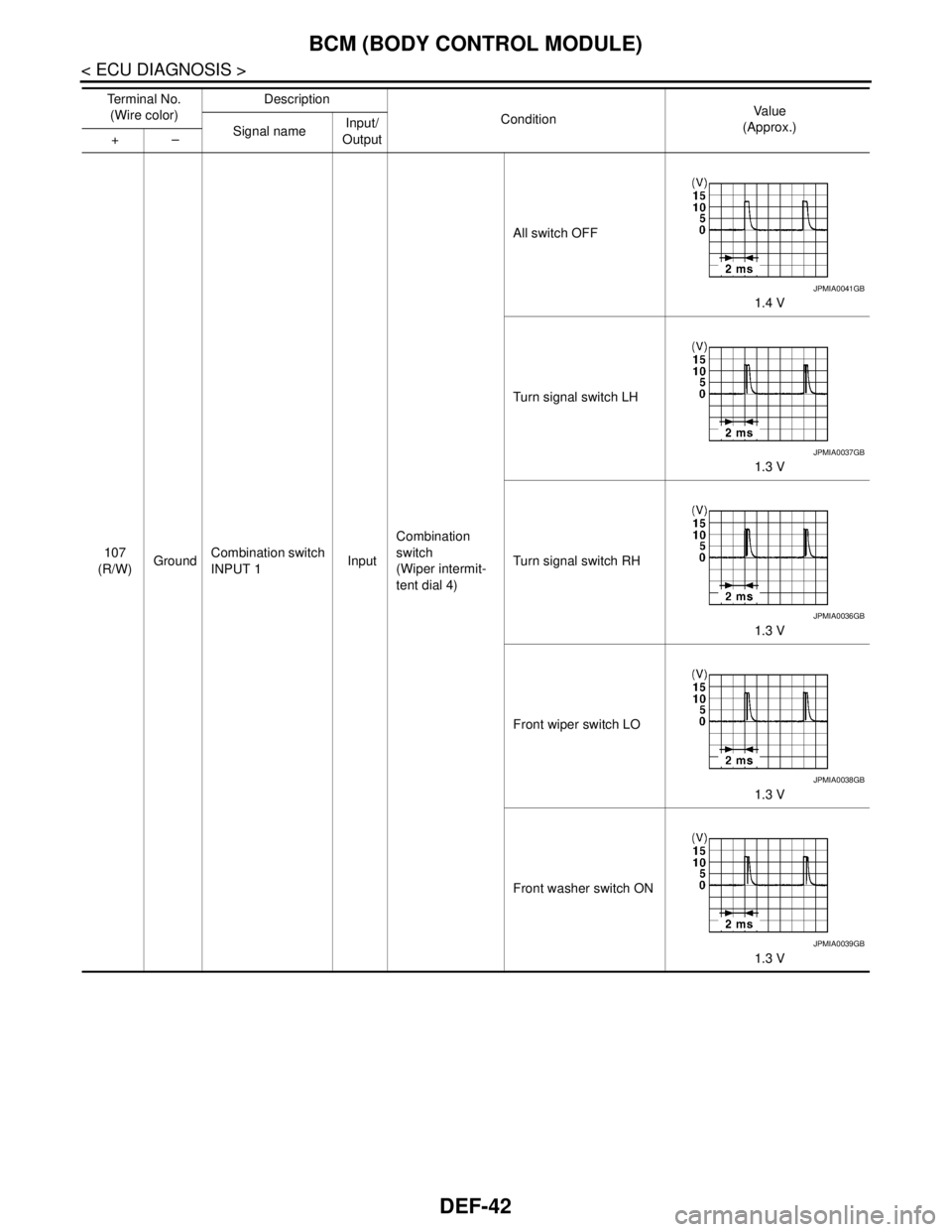
DEF-42
< ECU DIAGNOSIS >
BCM (BODY CONTROL MODULE)
107
(R/W)GroundCombination switch
INPUT 1InputCombination
switch
(Wiper intermit-
tent dial 4)All switch OFF
1.4 V
Turn signal switch LH
1.3 V
Turn signal switch RH
1.3 V
Front wiper switch LO
1.3 V
Front washer switch ON
1.3 V Te r m i n a l N o .
(Wire color)Description
ConditionVa l u e
(Approx.)
Signal nameInput/
Output +–
JPMIA0041GB
JPMIA0037GB
JPMIA0036GB
JPMIA0038GB
JPMIA0039GB
Page 1197 of 5121
BCM (BODY CONTROL MODULE)
DEF-47
< ECU DIAGNOSIS >
C
D
E
F
G
H
I
J
K
MA
B
DEF
N
O
P
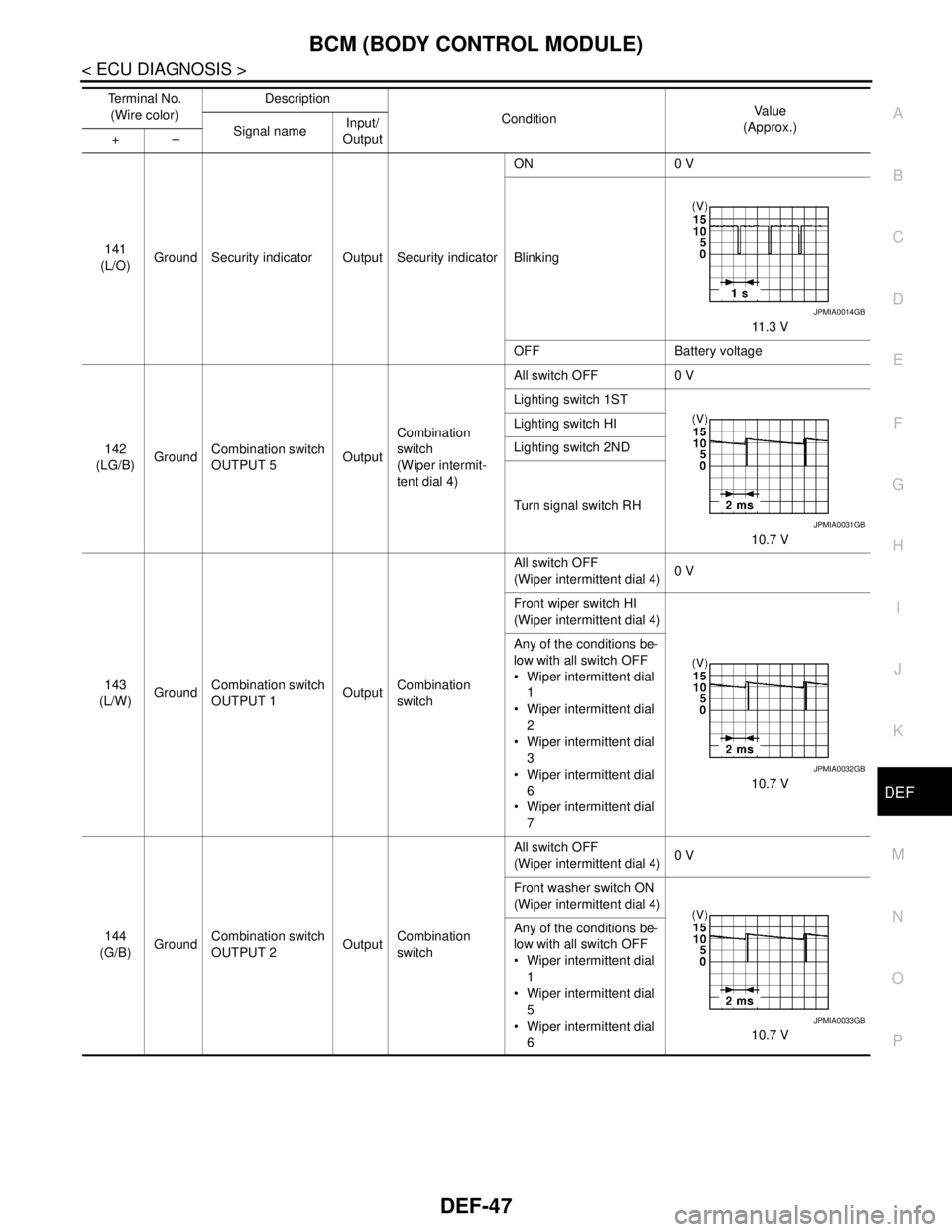
141
(L/O)Ground Security indicator Output Security indicatorON 0 V
Blinking
11.3 V
OFF Battery voltage
142
(LG/B)GroundCombination switch
OUTPUT 5OutputCombination
switch
(Wiper intermit-
tent dial 4)All switch OFF 0 V
Lighting switch 1ST
10.7 V Lighting switch HI
Lighting switch 2ND
Turn signal switch RH
143
(L/W)GroundCombination switch
OUTPUT 1OutputCombination
switchAll switch OFF
(Wiper intermittent dial 4)0 V
Front wiper switch HI
(Wiper intermittent dial 4)
10.7 V Any of the conditions be-
low with all switch OFF
Wiper intermittent dial
1
Wiper intermittent dial
2
Wiper intermittent dial
3
Wiper intermittent dial
6
Wiper intermittent dial
7
144
(G/B)GroundCombination switch
OUTPUT 2OutputCombination
switchAll switch OFF
(Wiper intermittent dial 4)0 V
Front washer switch ON
(Wiper intermittent dial 4)
10.7 V Any of the conditions be-
low with all switch OFF
Wiper intermittent dial
1
Wiper intermittent dial
5
Wiper intermittent dial
6 Te r m i n a l N o .
(Wire color)Description
ConditionVa l u e
(Approx.)
Signal nameInput/
Output +–
JPMIA0014GB
JPMIA0031GB
JPMIA0032GB
JPMIA0033GB
Page 1257 of 5121
![NISSAN TEANA 2008 Owners Manual DIAGNOSIS SYSTEM (BCM)
DLK-41
< FUNCTION DIAGNOSIS >[WITH INTELLIGENT KEY SYSTEM]
C
D
E
F
G
H
I
J
L
MA
B
DLK
N
O
P
DIAGNOSIS SYSTEM (BCM)
COMMON ITEM
COMMON ITEM : CONSULT-III Function (BCM - COMMON I](/img/5/57391/w960_57391-1256.png "NISSAN TEANA 2008 Owners Manual DIAGNOSIS SYSTEM (BCM)
DLK-41
< FUNCTION DIAGNOSIS >[WITH INTELLIGENT KEY SYSTEM]
C
D
E
F
G
H
I
J
L
MA
B
DLK
N
O
P
DIAGNOSIS SYSTEM (BCM)
COMMON ITEM
COMMON ITEM : CONSULT-III Function (BCM - COMMON I")
DIAGNOSIS SYSTEM (BCM)
DLK-41
< FUNCTION DIAGNOSIS >[WITH INTELLIGENT KEY SYSTEM]
C
D
E
F
G
H
I
J
L
MA
B
DLK
N
O
P
DIAGNOSIS SYSTEM (BCM)
COMMON ITEM
COMMON ITEM : CONSULT-III Function (BCM - COMMON ITEM)INFOID:0000000003941328
APPLICATION ITEM
CONSULT-III performs the following functions via CAN communication with BCM.
SYSTEM APPLICATION
BCM can perform the following functions for each system.
NOTE:
It can perform the diagnosis modes except the following for all sub system selection items.
×: Applicable item
NOTE:
*: This item is displayed, but is not used.
FREEZE FRAME DATA (FFD) AND IGN COUNTER
Freeze Frame Data
Diagnosis mode Function Description
Work Support Changes the setting for each system function.
Self Diagnostic Result Displays the diagnosis results judged by BCM.
CAN Diag Support MonitorMonitors the reception status of CAN communication viewed from BCM. Refer to CONSULT-III opera-
tion manual.
Data Monitor The BCM input/output signals are displayed.
Active Test The signals used to activate each device are forcibly supplied from BCM.
Ecu Identification The BCM part number is displayed.
Configuration Read and save the vehicle specification.
Write the vehicle specification when replacing BCM.
System Sub system selection itemDiagnosis mode
Work Support Data Monitor Active Test
Door lock DOOR LOCK×××
Rear window defogger REAR DEFOGGER××
Warning chime BUZZER××
Interior room lamp timer INT LAMP×××
Exterior lamp HEAD LAMP×××
Wiper and washer WIPER×××
Turn signal and hazard warning lamps FLASHER×××
— AIR CONDITONER*
Intelligent Key system
Engine start systemINTELLIGENT KEY×××
Combination switch COMB SW×
Body control system BCM×
NVIS - NATS IMMU××
Interior room lamp battery saver BATTERY SAVER×××
Trunk lid opener system TRUNK××
Vehicle security system THEFT ALM×××
— RETAINED PWR*×
Signal buffer system SIGNAL BUFFER××
— TPMS (AIR PRESSURE MONITOR)*×××
Page 1337 of 5121
![NISSAN TEANA 2008 Owners Manual BCM (BODY CONTROL MODULE)
DLK-121
< ECU DIAGNOSIS >[WITH INTELLIGENT KEY SYSTEM]
C
D
E
F
G
H
I
J
L
MA
B
DLK
N
O
P
ECU DIAGNOSIS
BCM (BODY CONTROL MODULE)
Reference ValueINFOID:0000000003904112
VALUES](/img/5/57391/w960_57391-1336.png "NISSAN TEANA 2008 Owners Manual BCM (BODY CONTROL MODULE)
DLK-121
< ECU DIAGNOSIS >[WITH INTELLIGENT KEY SYSTEM]
C
D
E
F
G
H
I
J
L
MA
B
DLK
N
O
P
ECU DIAGNOSIS
BCM (BODY CONTROL MODULE)
Reference ValueINFOID:0000000003904112
VALUES")
BCM (BODY CONTROL MODULE)
DLK-121
< ECU DIAGNOSIS >[WITH INTELLIGENT KEY SYSTEM]
C
D
E
F
G
H
I
J
L
MA
B
DLK
N
O
P
ECU DIAGNOSIS
BCM (BODY CONTROL MODULE)
Reference ValueINFOID:0000000003904112
VALUES ON THE DIAGNOSIS TOOL
CONSULT-III MONITOR ITEM
Monitor Item Condition Value/Status
FR WIPER HIOther than front wiper switch HI Off
Front wiper switch HI On
FR WIPER LOWOther than front wiper switch LO Off
Front wiper switch LO On
FR WASHER SWFront washer switch OFF Off
Front washer switch ON On
FR WIPER INTOther than front wiper switch INT Off
Front wiper switch INT On
FR WIPER STOPFront wiper is not in STOP position Off
Front wiper is in STOP position On
INT VOLUME Wiper intermittent dial is in a dial position 1 - 7 Wiper intermittent dial position
TURN SIGNAL ROther than turn signal switch RH Off
Turn signal switch RH On
TURN SIGNAL LOther than turn signal switch LH Off
Turn signal switch LH On
TAIL LAMP SWOther than lighting switch 1ST and 2ND Off
Lighting switch 1ST or 2ND On
HI BEAM SWOther than lighting switch HI Off
Lighting switch HI On
HEAD LAMP SW 1Other than lighting switch 2ND Off
Lighting switch 2ND On
HEAD LAMP SW 2Other than lighting switch 2ND Off
Lighting switch 2ND On
PA S S I N G S WOther than lighting switch PASS Off
Lighting switch PASS On
AUTO LIGHT SWOther than lighting switch AUTO Off
Lighting switch AUTO On
FR FOG SWFront fog lamp switch OFF Off
Front fog lamp switch ON On
RR FOG SWRear fog lamp switch OFF Off
Rear fog lamp switch ON On
DOOR SW-DRDriver door closed Off
Driver door opened On
DOOR SW-ASPassenger door closed Off
Passenger door opened On
DOOR SW-RRRear RH door closed Off
Rear RH door opened On
Page 1353 of 5121
![NISSAN TEANA 2008 Owners Manual BCM (BODY CONTROL MODULE)
DLK-137
< ECU DIAGNOSIS >[WITH INTELLIGENT KEY SYSTEM]
C
D
E
F
G
H
I
J
L
MA
B
DLK
N
O
P
107
(R/W)GroundCombination switch
INPUT 1InputCombination
switch
(Wiper intermit-
te](/img/5/57391/w960_57391-1352.png "NISSAN TEANA 2008 Owners Manual BCM (BODY CONTROL MODULE)
DLK-137
< ECU DIAGNOSIS >[WITH INTELLIGENT KEY SYSTEM]
C
D
E
F
G
H
I
J
L
MA
B
DLK
N
O
P
107
(R/W)GroundCombination switch
INPUT 1InputCombination
switch
(Wiper intermit-
te")
BCM (BODY CONTROL MODULE)
DLK-137
< ECU DIAGNOSIS >[WITH INTELLIGENT KEY SYSTEM]
C
D
E
F
G
H
I
J
L
MA
B
DLK
N
O
P
107
(R/W)GroundCombination switch
INPUT 1InputCombination
switch
(Wiper intermit-
tent dial 4)All switch OFF
1.4 V
Turn signal switch LH
1.3 V
Turn signal switch RH
1.3 V
Front wiper switch LO
1.3 V
Front washer switch ON
1.3 V Te r m i n a l N o .
(Wire color)Description
ConditionVa l u e
(Approx.)
Signal nameInput/
Output +–
JPMIA0041GB
JPMIA0037GB
JPMIA0036GB
JPMIA0038GB
JPMIA0039GB
Page 1358 of 5121
![NISSAN TEANA 2008 Owners Manual DLK-142
< ECU DIAGNOSIS >[WITH INTELLIGENT KEY SYSTEM]
BCM (BODY CONTROL MODULE)
141
(L/O)Ground Security indicator Output Security indicatorON 0 V
Blinking
11 . 3 V
OFF Battery voltage
142
(LG/B)Gro](/img/5/57391/w960_57391-1357.png "NISSAN TEANA 2008 Owners Manual DLK-142
< ECU DIAGNOSIS >[WITH INTELLIGENT KEY SYSTEM]
BCM (BODY CONTROL MODULE)
141
(L/O)Ground Security indicator Output Security indicatorON 0 V
Blinking
11 . 3 V
OFF Battery voltage
142
(LG/B)Gro")
DLK-142
< ECU DIAGNOSIS >[WITH INTELLIGENT KEY SYSTEM]
BCM (BODY CONTROL MODULE)
141
(L/O)Ground Security indicator Output Security indicatorON 0 V
Blinking
11 . 3 V
OFF Battery voltage
142
(LG/B)GroundCombination switch
OUTPUT 5OutputCombination
switch
(Wiper intermit-
tent dial 4)All switch OFF 0 V
Lighting switch 1ST
10.7 V Lighting switch HI
Lighting switch 2ND
Turn signal switch RH
143
(L/W)GroundCombination switch
OUTPUT 1OutputCombination
switchAll switch OFF
(Wiper intermittent dial 4)0 V
Front wiper switch HI
(Wiper intermittent dial 4)
10.7 V Any of the conditions be-
low with all switch OFF
Wiper intermittent dial
1
Wiper intermittent dial
2
Wiper intermittent dial
3
Wiper intermittent dial
6
Wiper intermittent dial
7
144
(G/B)GroundCombination switch
OUTPUT 2OutputCombination
switchAll switch OFF
(Wiper intermittent dial 4)0 V
Front washer switch ON
(Wiper intermittent dial 4)
10.7 V Any of the conditions be-
low with all switch OFF
Wiper intermittent dial
1
Wiper intermittent dial
5
Wiper intermittent dial
6 Te r m i n a l N o .
(Wire color)Description
ConditionVa l u e
(Approx.)
Signal nameInput/
Output +–
JPMIA0014GB
JPMIA0031GB
JPMIA0032GB
JPMIA0033GB