steering NISSAN TEANA 2008 Service Manual
[x] Cancel search | Manufacturer: NISSAN, Model Year: 2008, Model line: TEANA, Model: NISSAN TEANA 2008Pages: 5121, PDF Size: 69.03 MB
Page 2436 of 5121
FAX-8
< ON-VEHICLE REPAIR >
FRONT WHEEL HUB AND KNUCKLE
ON-VEHICLE REPAIR
FRONT WHEEL HUB AND KNUCKLE
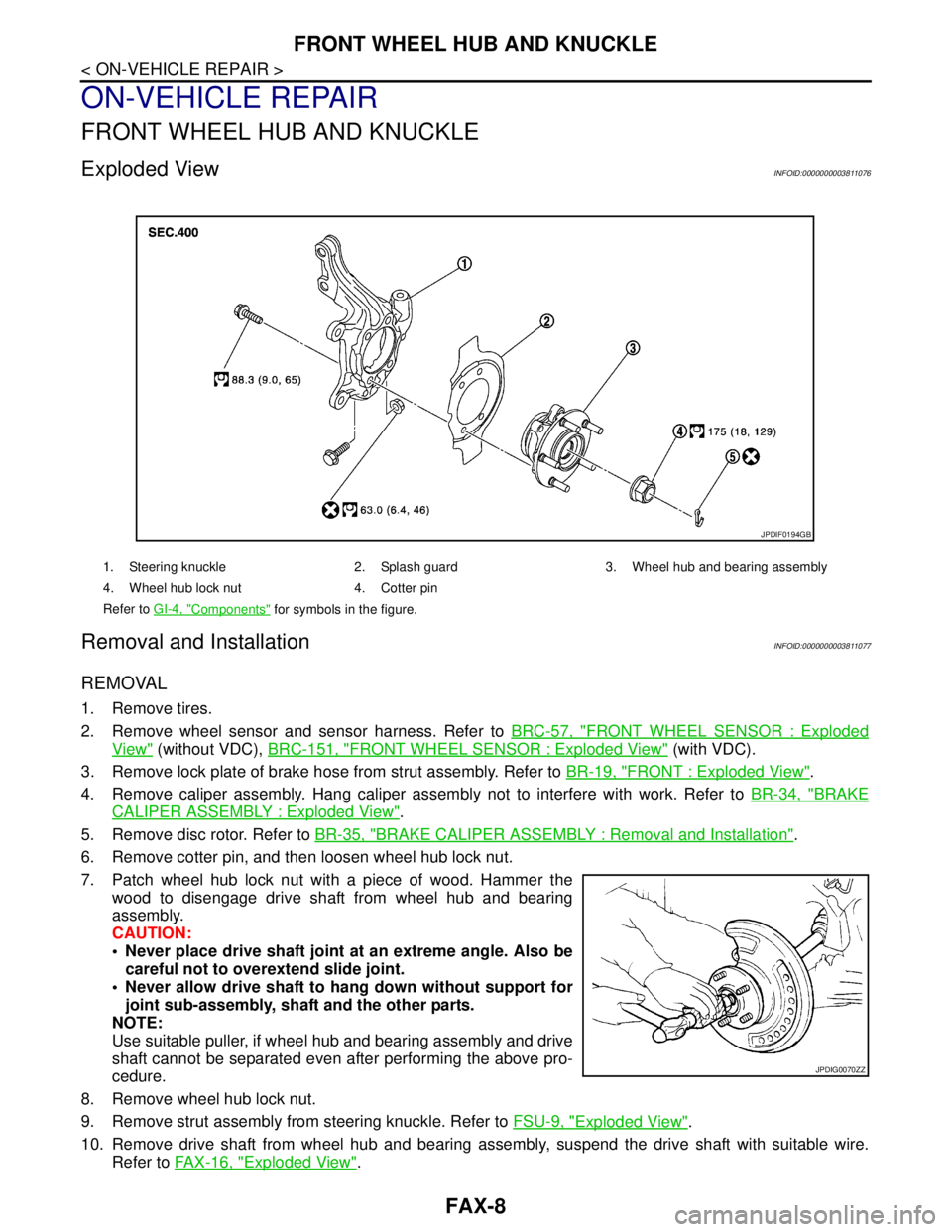
Exploded ViewINFOID:0000000003811076
Removal and InstallationINFOID:0000000003811077
REMOVAL
1. Remove tires.
2. Remove wheel sensor and sensor harness. Refer to BRC-57, "
FRONT WHEEL SENSOR : Exploded
View" (without VDC), BRC-151, "FRONT WHEEL SENSOR : Exploded View" (with VDC).
3. Remove lock plate of brake hose from strut assembly. Refer to BR-19, "
FRONT : Exploded View".
4. Remove caliper assembly. Hang caliper assembly not to interfere with work. Refer to BR-34, "
BRAKE
CALIPER ASSEMBLY : Exploded View".
5. Remove disc rotor. Refer to BR-35, "
BRAKE CALIPER ASSEMBLY : Removal and Installation".
6. Remove cotter pin, and then loosen wheel hub lock nut.
7. Patch wheel hub lock nut with a piece of wood. Hammer the
wood to disengage drive shaft from wheel hub and bearing
assembly.
CAUTION:
Never place drive shaft joint at an extreme angle. Also be
careful not to overextend slide joint.
Never allow drive shaft to hang down without support for
joint sub-assembly, shaft and the other parts.
NOTE:
Use suitable puller, if wheel hub and bearing assembly and drive
shaft cannot be separated even after performing the above pro-
cedure.
8. Remove wheel hub lock nut.
9. Remove strut assembly from steering knuckle. Refer to FSU-9, "
Exploded View".
10. Remove drive shaft from wheel hub and bearing assembly, suspend the drive shaft with suitable wire.
Refer to FAX-16, "
Exploded View".
1. Steering knuckle 2. Splash guard 3. Wheel hub and bearing assembly
4. Wheel hub lock nut 4. Cotter pin
Refer to GI-4, "
Components" for symbols in the figure.
JPDIF0194GB
JPDIG0070ZZ
Page 2437 of 5121
FRONT WHEEL HUB AND KNUCKLE
FAX-9
< ON-VEHICLE REPAIR >
C
E
F
G
H
I
J
K
L
MA
B
FA X
N
O
P
11. Temporarily tighten strut assembly and steering knuckle.
12. Remove wheel hub and bearing assembly, and then remove splash guard.
13. Remove steering outer socket from steering knuckle. Refer to ST-18, "
Exploded View".
14. Remove steering knuckle from transverse link and strut assembly.
INSTALLATION
Note the following, and install in the reverse order of the removal.
Install removed wheel hub and bearing assembly and steering knuckle and perform the final tightening of
each part under unladen conditions on the level surface.
Never reuse cotter pin.
InspectionINFOID:0000000003811078
INSPECTION AFTER REMOVAL
Check components for deformation, cracks, and other damage. Replace if necessary.
Ball Joint Inspection
Check boots of transverse link and steering outer socket ball joint for breakage, axial play, and torque. Refer to
FSU-12, "
Inspection" and ST-26, "Inspection".
INSPECTION AFTER INSTALLATION
1. Check wheel sensor harness for proper connection. Refer to BRC-57, "FRONT WHEEL SENSOR :
Exploded View" (without VDC), BRC-151, "FRONT WHEEL SENSOR : Exploded View". (with VDC).
2. Check the wheel alignment. Refer to FSU-7, "
Wheel Alignment Inspection".
3. Adjust neutral position of steering angle sensor (with VDC). Refer to BRC-66, "
ADJUSTMENT OF
STEERING ANGLE SENSOR NEUTRAL POSITION : Special Repair Requirement".
Page 2440 of 5121
FAX-12
< ON-VEHICLE REPAIR >
FRONT DRIVE SHAFT BOOT
WHEEL SIDE
WHEEL SIDE : Removal and InstallationINFOID:0000000003811080
REMOVAL
1. Remove tires.
2. Remove wheel sensor and sensor harness. Refer to BRC-57, "
FRONT WHEEL SENSOR : Exploded
View" (without VDC), BRC-151, "FRONT WHEEL SENSOR : Exploded View" (with VDC).
3. Remove lock plate of brake hose from strut assembly. Refer to BR-19, "
FRONT : Exploded View".
4. Remove caliper assembly. Hang caliper assembly not to interfere with work. Refer to BR-34, "
BRAKE
CALIPER ASSEMBLY : Exploded View".
5. Remove disc rotor. Refer to BR-35, "
BRAKE CALIPER ASSEMBLY : Removal and Installation".
6. Remove cotter pin, and then loosen wheel hub lock nut. Refer to FA X - 8 , "
Exploded View".
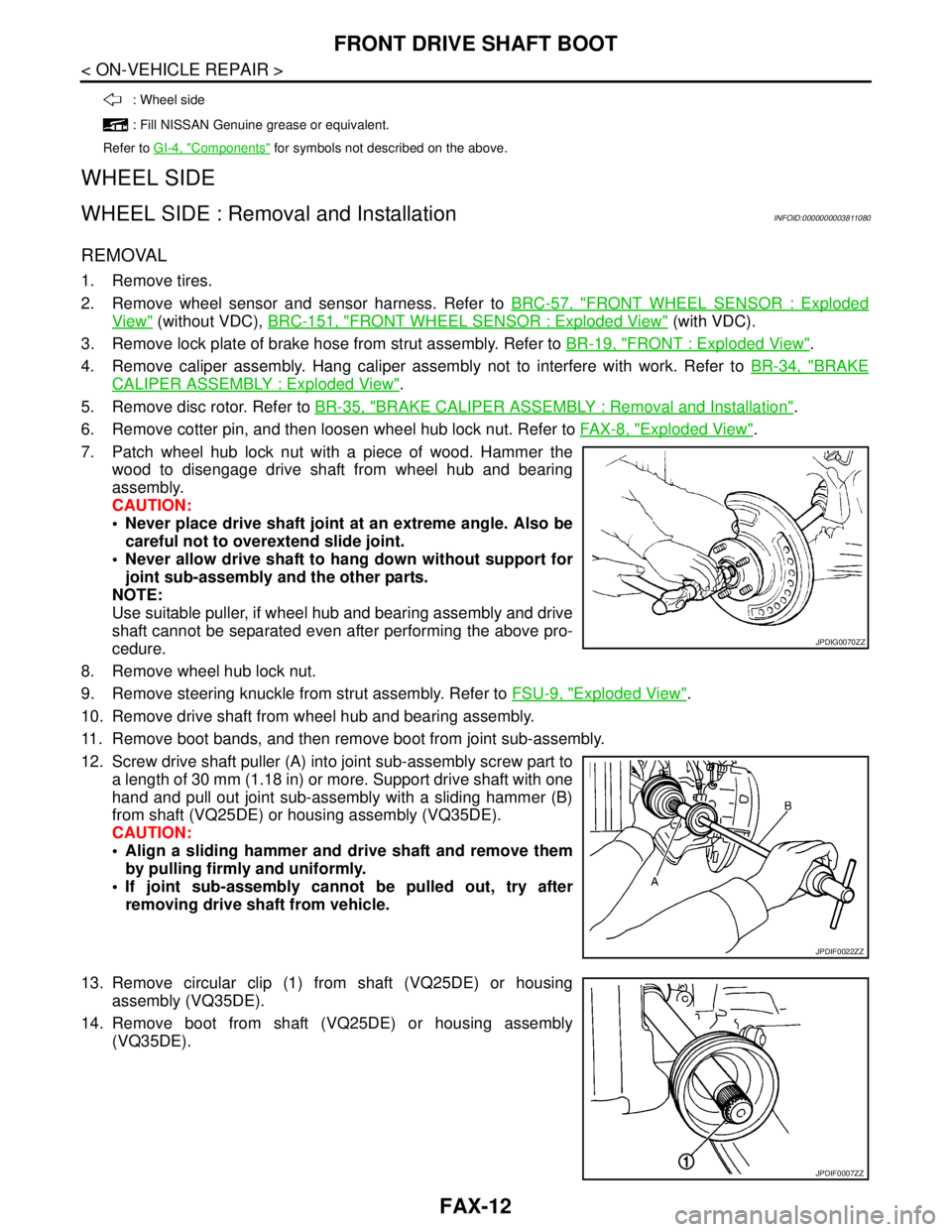
7. Patch wheel hub lock nut with a piece of wood. Hammer the
wood to disengage drive shaft from wheel hub and bearing
assembly.
CAUTION:
Never place drive shaft joint at an extreme angle. Also be
careful not to overextend slide joint.
Never allow drive shaft to hang down without support for
joint sub-assembly and the other parts.
NOTE:
Use suitable puller, if wheel hub and bearing assembly and drive
shaft cannot be separated even after performing the above pro-
cedure.
8. Remove wheel hub lock nut.
9. Remove steering knuckle from strut assembly. Refer to FSU-9, "
Exploded View".
10. Remove drive shaft from wheel hub and bearing assembly.
11. Remove boot bands, and then remove boot from joint sub-assembly.
12. Screw drive shaft puller (A) into joint sub-assembly screw part to
a length of 30 mm (1.18 in) or more. Support drive shaft with one
hand and pull out joint sub-assembly with a sliding hammer (B)
from shaft (VQ25DE) or housing assembly (VQ35DE).
CAUTION:
Align a sliding hammer and drive shaft and remove them
by pulling firmly and uniformly.
If joint sub-assembly cannot be pulled out, try after
removing drive shaft from vehicle.
13. Remove circular clip (1) from shaft (VQ25DE) or housing
assembly (VQ35DE).
14. Remove boot from shaft (VQ25DE) or housing assembly
(VQ35DE).
: Wheel side
: Fill NISSAN Genuine grease or equivalent.
Refer to GI-4, "
Components" for symbols not described on the above.
JPDIG0070ZZ
JPDIF0022ZZ
JPDIF0007ZZ
Page 2442 of 5121
FAX-14
< ON-VEHICLE REPAIR >
FRONT DRIVE SHAFT BOOT
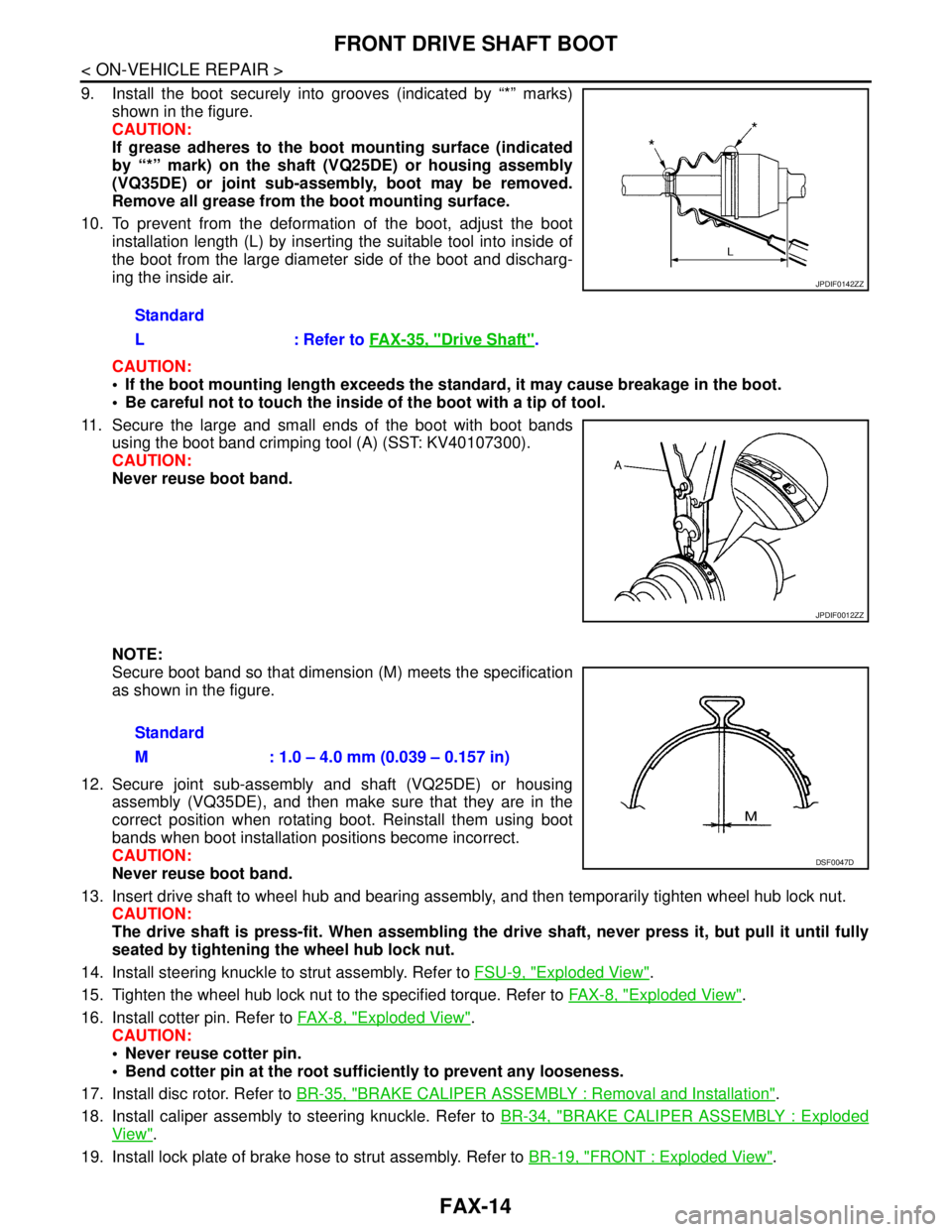
9. Install the boot securely into grooves (indicated by “*” marks)
shown in the figure.
CAUTION:
If grease adheres to the boot mounting surface (indicated
by “*” mark) on the shaft (VQ25DE) or housing assembly
(VQ35DE) or joint sub-assembly, boot may be removed.
Remove all grease from the boot mounting surface.
10. To prevent from the deformation of the boot, adjust the boot
installation length (L) by inserting the suitable tool into inside of
the boot from the large diameter side of the boot and discharg-
ing the inside air.
CAUTION:
If the boot mounting length exceeds the standard, it may cause breakage in the boot.
Be careful not to touch the inside of the boot with a tip of tool.
11. Secure the large and small ends of the boot with boot bands
using the boot band crimping tool (A) (SST: KV40107300).
CAUTION:
Never reuse boot band.
NOTE:
Secure boot band so that dimension (M) meets the specification
as shown in the figure.
12. Secure joint sub-assembly and shaft (VQ25DE) or housing
assembly (VQ35DE), and then make sure that they are in the
correct position when rotating boot. Reinstall them using boot
bands when boot installation positions become incorrect.
CAUTION:
Never reuse boot band.
13. Insert drive shaft to wheel hub and bearing assembly, and then temporarily tighten wheel hub lock nut.
CAUTION:
The drive shaft is press-fit. When assembling the drive shaft, never press it, but pull it until fully
seated by tightening the wheel hub lock nut.
14. Install steering knuckle to strut assembly. Refer to FSU-9, "
Exploded View".
15. Tighten the wheel hub lock nut to the specified torque. Refer to FA X - 8 , "
Exploded View".
16. Install cotter pin. Refer to FA X - 8 , "
Exploded View".
CAUTION:
Never reuse cotter pin.
Bend cotter pin at the root sufficiently to prevent any looseness.
17. Install disc rotor. Refer to BR-35, "
BRAKE CALIPER ASSEMBLY : Removal and Installation".
18. Install caliper assembly to steering knuckle. Refer to BR-34, "
BRAKE CALIPER ASSEMBLY : Exploded
View".
19. Install lock plate of brake hose to strut assembly. Refer to BR-19, "
FRONT : Exploded View". Standard
L : Refer to FAX-35, "
Drive Shaft".
JPDIF0142ZZ
JPDIF0012ZZ
Standard
M : 1.0 – 4.0 mm (0.039 – 0.157 in)
DSF0047D
Page 2443 of 5121
FRONT DRIVE SHAFT BOOT
FAX-15
< ON-VEHICLE REPAIR >
C
E
F
G
H
I
J
K
L
MA
B
FA X
N
O
P
20. Install wheel sensor and sensor harness to steering knuckle. Refer to BRC-57, "FRONT WHEEL SEN-
SOR : Exploded View" (without VDC), BRC-151, "FRONT WHEEL SENSOR : Exploded View" (with
VDC).
TRANSAXLE SIDE
TRANSAXLE SIDE : Removal and InstallationINFOID:0000000003811081
Remove boot after removing drive shaft.
Remove: refer to FAX-18, "
LEFT SIDE : Removal and Installation" (left side), FAX-19, "RIGHT SIDE :
Removal and Installation" (right side).
Disassembly: refer to FAX-22, "
TRANSAXLE SIDE : Disassembly and Assembly".
InspectionINFOID:0000000003811082
INSPECTION AFTER REMOVAL
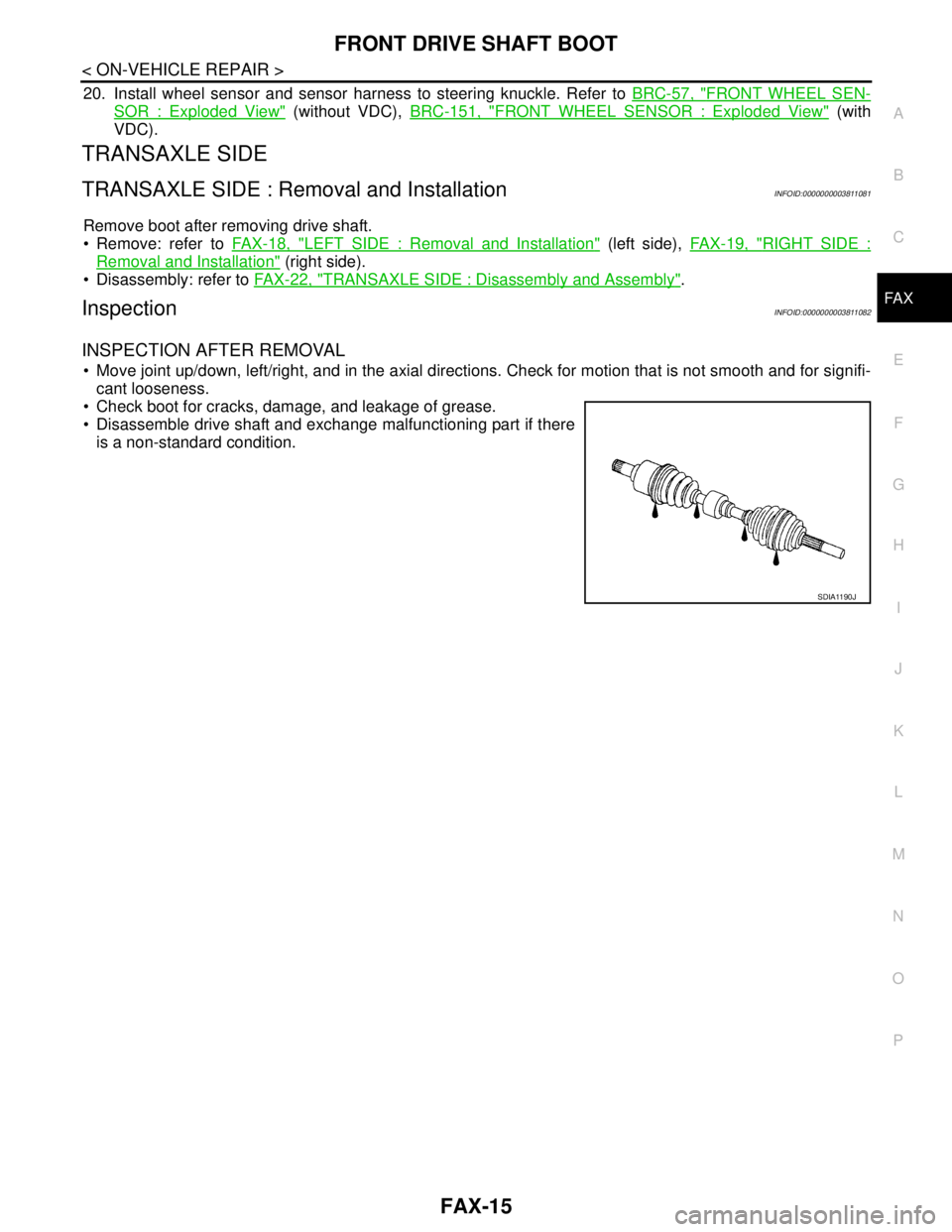
Move joint up/down, left/right, and in the axial directions. Check for motion that is not smooth and for signifi-
cant looseness.
Check boot for cracks, damage, and leakage of grease.
Disassemble drive shaft and exchange malfunctioning part if there
is a non-standard condition.
SDIA1190J
Page 2446 of 5121
FAX-18
< ON-VEHICLE REPAIR >
FRONT DRIVE SHAFT
LEFT SIDE
LEFT SIDE : Removal and InstallationINFOID:0000000003811084
REMOVAL
1. Remove tires.
2. Remove wheel sensor and sensor harness. Refer to BRC-57, "
FRONT WHEEL SENSOR : Exploded
View" (without VDC), BRC-151, "FRONT WHEEL SENSOR : Exploded View" (with VDC).
3. Remove lock plate of brake hose from strut assembly. Refer to BR-19, "
FRONT : Exploded View".
4. Remove caliper assembly. Hang caliper assembly not to interfere with work. Refer to BR-34, "
BRAKE
CALIPER ASSEMBLY : Exploded View".
5. Remove disc rotor. Refer to BR-35, "
BRAKE CALIPER ASSEMBLY : Removal and Installation".
6. Remove cotter pin, and then loosen wheel hub lock nut. Refer to FA X - 8 , "
Exploded View".
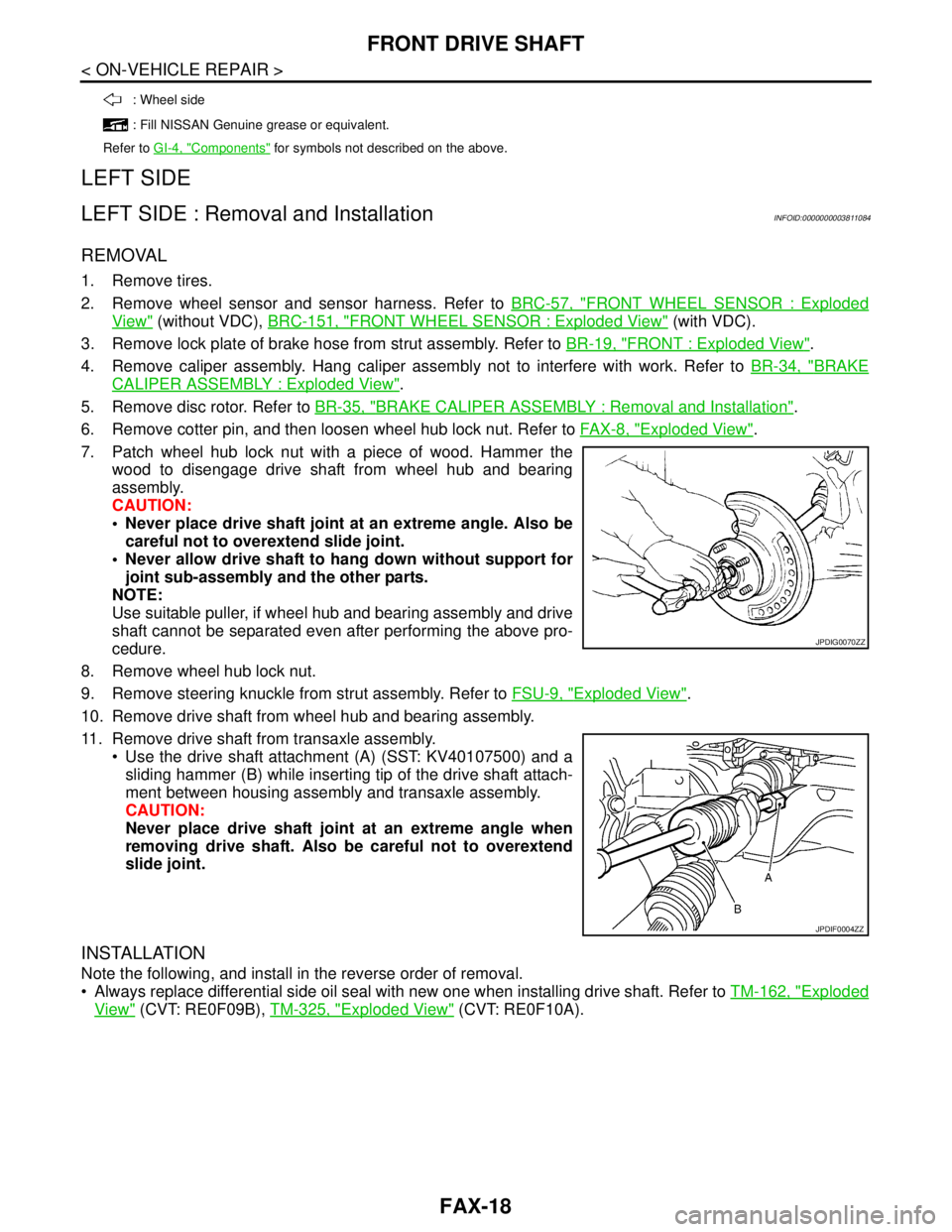
7. Patch wheel hub lock nut with a piece of wood. Hammer the
wood to disengage drive shaft from wheel hub and bearing
assembly.
CAUTION:
Never place drive shaft joint at an extreme angle. Also be
careful not to overextend slide joint.
Never allow drive shaft to hang down without support for
joint sub-assembly and the other parts.
NOTE:
Use suitable puller, if wheel hub and bearing assembly and drive
shaft cannot be separated even after performing the above pro-
cedure.
8. Remove wheel hub lock nut.
9. Remove steering knuckle from strut assembly. Refer to FSU-9, "
Exploded View".
10. Remove drive shaft from wheel hub and bearing assembly.
11. Remove drive shaft from transaxle assembly.
Use the drive shaft attachment (A) (SST: KV40107500) and a
sliding hammer (B) while inserting tip of the drive shaft attach-
ment between housing assembly and transaxle assembly.
CAUTION:
Never place drive shaft joint at an extreme angle when
removing drive shaft. Also be careful not to overextend
slide joint.
INSTALLATION
Note the following, and install in the reverse order of removal.
Always replace differential side oil seal with new one when installing drive shaft. Refer to TM-162, "
Exploded
View" (CVT: RE0F09B), TM-325, "Exploded View" (CVT: RE0F10A).
: Wheel side
: Fill NISSAN Genuine grease or equivalent.
Refer to GI-4, "
Components" for symbols not described on the above.
JPDIG0070ZZ
JPDIF0004ZZ
Page 2447 of 5121
FRONT DRIVE SHAFT
FAX-19
< ON-VEHICLE REPAIR >
C
E
F
G
H
I
J
K
L
MA
B
FA X
N
O
P
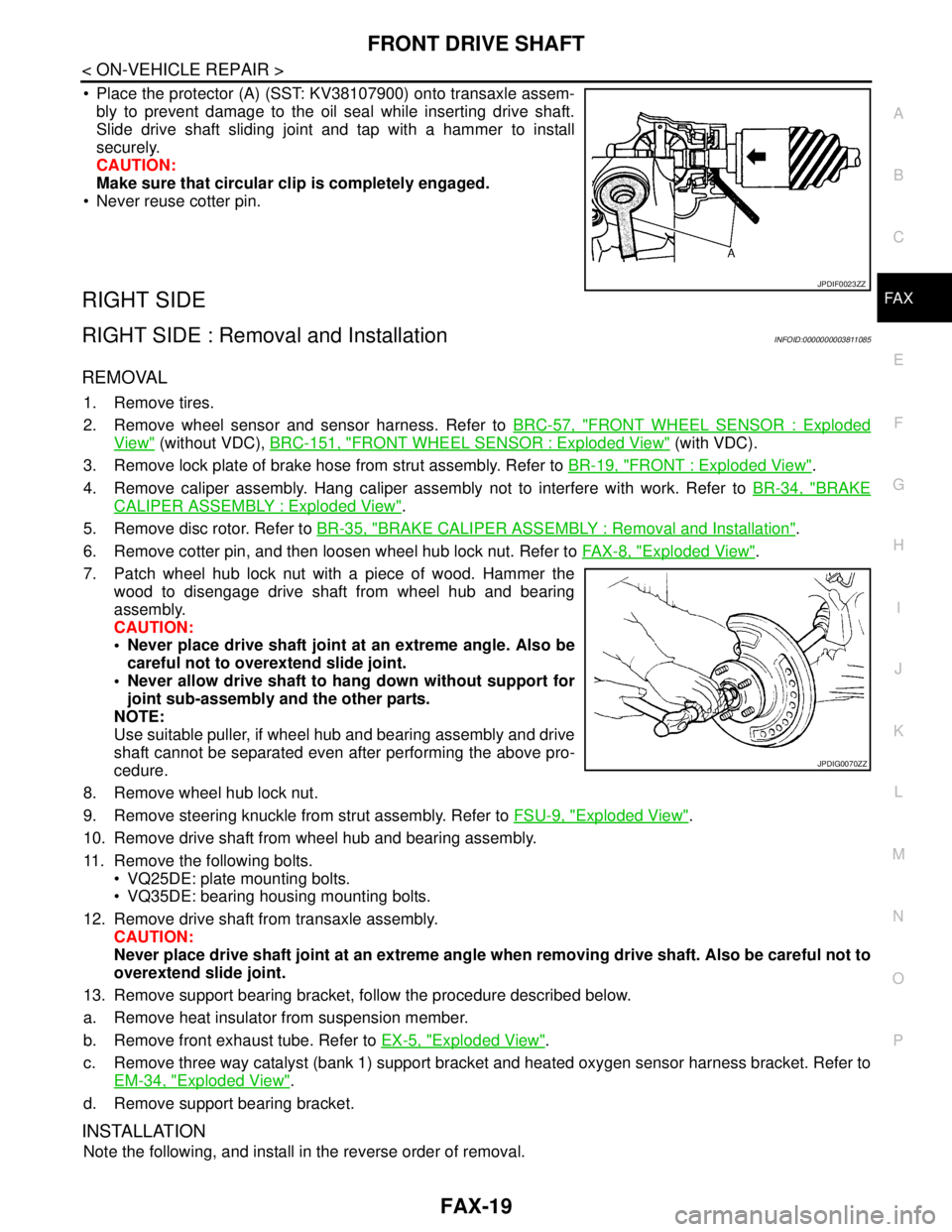
Place the protector (A) (SST: KV38107900) onto transaxle assem-
bly to prevent damage to the oil seal while inserting drive shaft.
Slide drive shaft sliding joint and tap with a hammer to install
securely.
CAUTION:
Make sure that circular clip is completely engaged.
Never reuse cotter pin.
RIGHT SIDE
RIGHT SIDE : Removal and InstallationINFOID:0000000003811085
REMOVAL
1. Remove tires.
2. Remove wheel sensor and sensor harness. Refer to BRC-57, "
FRONT WHEEL SENSOR : Exploded
View" (without VDC), BRC-151, "FRONT WHEEL SENSOR : Exploded View" (with VDC).
3. Remove lock plate of brake hose from strut assembly. Refer to BR-19, "
FRONT : Exploded View".
4. Remove caliper assembly. Hang caliper assembly not to interfere with work. Refer to BR-34, "
BRAKE
CALIPER ASSEMBLY : Exploded View".
5. Remove disc rotor. Refer to BR-35, "
BRAKE CALIPER ASSEMBLY : Removal and Installation".
6. Remove cotter pin, and then loosen wheel hub lock nut. Refer to FA X - 8 , "
Exploded View".
7. Patch wheel hub lock nut with a piece of wood. Hammer the
wood to disengage drive shaft from wheel hub and bearing
assembly.
CAUTION:
Never place drive shaft joint at an extreme angle. Also be
careful not to overextend slide joint.
Never allow drive shaft to hang down without support for
joint sub-assembly and the other parts.
NOTE:
Use suitable puller, if wheel hub and bearing assembly and drive
shaft cannot be separated even after performing the above pro-
cedure.
8. Remove wheel hub lock nut.
9. Remove steering knuckle from strut assembly. Refer to FSU-9, "
Exploded View".
10. Remove drive shaft from wheel hub and bearing assembly.
11. Remove the following bolts.
VQ25DE: plate mounting bolts.
VQ35DE: bearing housing mounting bolts.
12. Remove drive shaft from transaxle assembly.
CAUTION:
Never place drive shaft joint at an extreme angle when removing drive shaft. Also be careful not to
overextend slide joint.
13. Remove support bearing bracket, follow the procedure described below.
a. Remove heat insulator from suspension member.
b. Remove front exhaust tube. Refer to EX-5, "
Exploded View".
c. Remove three way catalyst (bank 1) support bracket and heated oxygen sensor harness bracket. Refer to
EM-34, "
Exploded View".
d. Remove support bearing bracket.
INSTALLATION
Note the following, and install in the reverse order of removal.
JPDIF0023ZZ
JPDIG0070ZZ
Page 2475 of 5121

FSU-1
SUSPENSION
C
DF
G H
I
J
K L
M
SECTION FSU
A
B
FSU
N
O PCONTENTS
FRONT SUSPENSION
SYMPTOM DIAGNOSIS ..... ..........................2
NOISE, VIBRATION AND HARSHNESS
(NVH) TROUBLESHOOTING ........................ .....
2
NVH Troubleshooting Chart ................................ ......2
PRECAUTION ...............................................3
PRECAUTIONS .............................................. .....3
Precaution for Supplemental Restraint System
(SRS) "AIR BAG" and "SEAT BELT PRE-TEN-
SIONER" ............................................................. ......
3
Precaution Necessary for Steering Wheel Rota-
tion after Battery Disconnect .....................................
3
Precaution for Procedure without Cowl Top Cover ......4
Precautions for Suspension ......................................4
PREPARATION ............................................5
PREPARATION .............................................. .....5
Special Service Tool ........................................... ......5
Commercial Service Tool ..........................................5
ON-VEHICLE MAINTENANCE .....................6
FRONT SUSPENSION ASSEMBLY .............. .....6
Inspection ............................................................ ......6
WHEEL ALIGNMENT ..........................................7
Wheel Alignment Inspection ................................ ......7
ON-VEHICLE REPAIR ..................................9
FRONT COIL SPRING AND STRUT .................9
Exploded View ..................................................... .....9
Removal and Installation ..........................................9
Disassembly and Assembly .....................................10
Inspection ................................................................11
TRANSVERSE LINK .........................................12
Exploded View ..................................................... ....12
Removal and Installation .........................................12
Inspection ................................................................12
FRONT STABILIZER ........................................14
Exploded View .........................................................14
Removal and Installation .........................................14
Inspection ................................................................15
REMOVAL AND INSTALLATION ...............16
FRONT SUSPENSION MEMBER .....................16
Exploded View ..................................................... ....16
Removal and Installation .........................................16
Inspection ................................................................17
SERVICE DATA AND SPECIFICATIONS
(SDS) ............... .............................................
18
SERVICE DATA AND SPECIFICATIONS
(SDS) .................................................................
18
Wheel Alignment ................................................. ....18
Ball Joint ..................................................................18
Wheel Height ...........................................................18
Page 2476 of 5121
FSU-2
< SYMPTOM DIAGNOSIS >
NOISE, VIBRATION AND HARSHNESS (NVH) TROUBLESHOOTING
SYMPTOM DIAGNOSIS
NOISE, VIBRATION AND HARSHNESS (NVH) TROUBLESHOOTING
NVH Troubleshooting ChartINFOID:0000000003811107
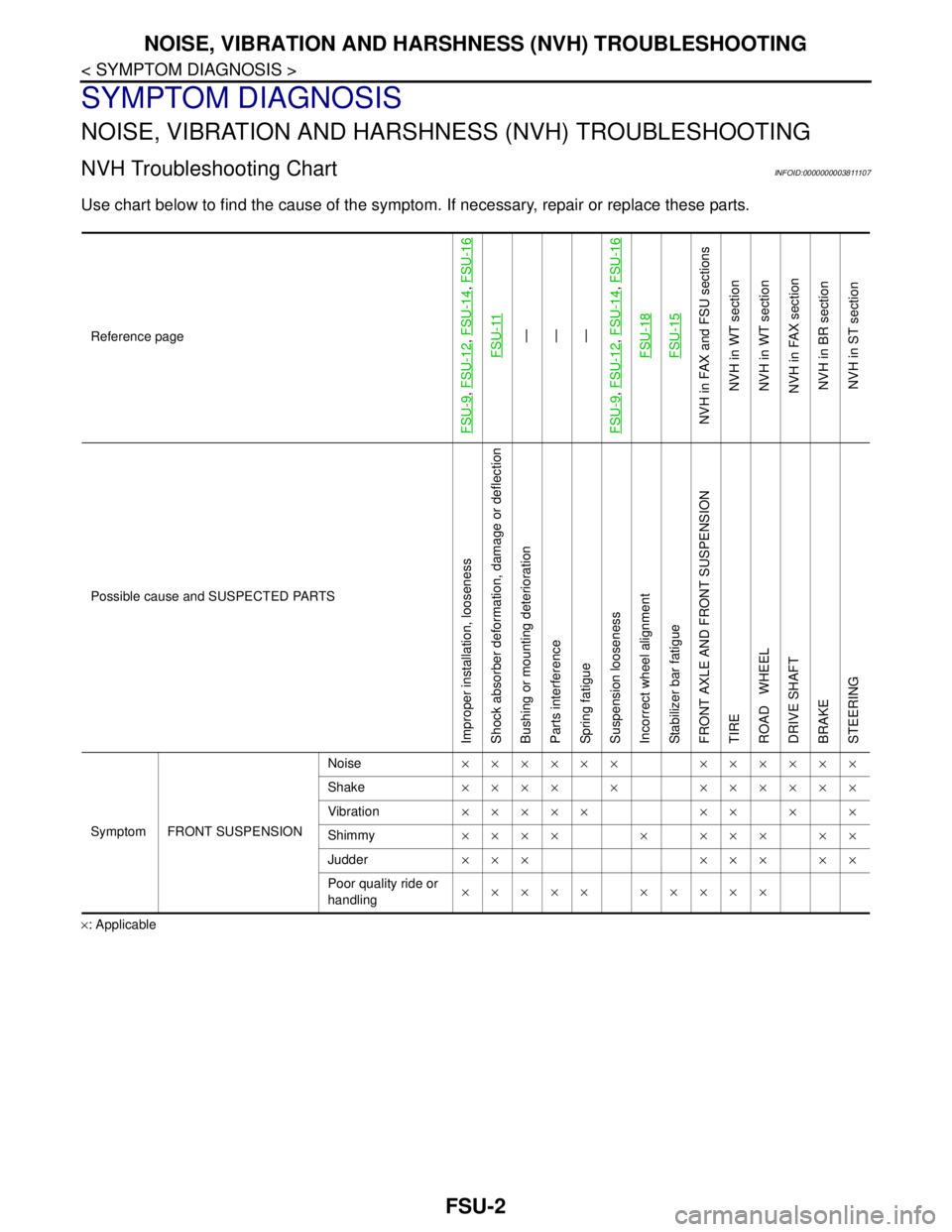
Use chart below to find the cause of the symptom. If necessary, repair or replace these parts.
×: ApplicableReference page
FSU-9
, FSU-12
, FSU-14
, FSU-16
FSU-11
—
—
—
FSU-9
, FSU-12
, FSU-14
, FSU-16
FSU-18FSU-15
NVH in FAX and FSU sections
NVH in WT section
NVH in WT section
NVH in FAX section
NVH in BR section
NVH in ST section
Possible cause and SUSPECTED PARTS
Improper installation, looseness
Shock absorber deformation, damage or deflection
Bushing or mounting deterioration
Parts interference
Spring fatigue
Suspension looseness
Incorrect wheel alignment
Stabilizer bar fatigue
FRONT AXLE AND FRONT SUSPENSION
TIRE
ROAD WHEEL
DRIVE SHAFT
BRAKE
STEERING
Symptom FRONT SUSPENSIONNoise×××××× ××××××
Shake×××× × ××××××
Vibration××××× ×× × ×
Shimmy×××× × ××× ××
Judder ××× ××× ××
Poor quality ride or
handling××××× ×××××
Page 2477 of 5121
PRECAUTIONS
FSU-3
< PRECAUTION >
C
D
F
G
H
I
J
K
L
MA
B
FSU
N
O
P
PRECAUTION
PRECAUTIONS
Precaution for Supplemental Restraint System (SRS) "AIR BAG" and "SEAT BELT
PRE-TENSIONER"
INFOID:0000000003890155
The Supplemental Restraint System such as “AIR BAG” and “SEAT BELT PRE-TENSIONER”, used along
with a front seat belt, helps to reduce the risk or severity of injury to the driver and front passenger for certain
types of collision. Information necessary to service the system safely is included in the “SRS AIRBAG” and
“SEAT BELT” of this Service Manual.
WARNING:
• To avoid rendering the SRS inoperative, which could increase the risk of personal injury or death in
the event of a collision which would result in air bag inflation, all maintenance must be performed by
an authorized NISSAN/INFINITI dealer.
Improper maintenance, including incorrect removal and installation of the SRS, can lead to personal
injury caused by unintentional activation of the system. For removal of Spiral Cable and Air Bag
Module, see the “SRS AIRBAG”.
Never use electrical test equipment on any circuit related to the SRS unless instructed to in this Ser-
vice Manual. SRS wiring harnesses can be identified by yellow and/or orange harnesses or harness
connectors.
Precaution Necessary for Steering Wheel Rotation after Battery Disconnect
INFOID:0000000003890156
NOTE:
Before removing and installing any control units, first turn the push-button ignition switch to the LOCK posi-
tion, then disconnect both battery cables.
After finishing work, confirm that all control unit connectors are connected properly, then re-connect both
battery cables.
Always use CONSULT-III to perform self-diagnosis as a part of each function inspection after finishing work.
If a DTC is detected, perform trouble diagnosis according to self-diagnosis results.
This vehicle is equipped with a push-button ignition switch and a steering lock unit.
If the battery is disconnected or discharged, the steering wheel will lock and cannot be turned.
If turning the steering wheel is required with the battery disconnected or discharged, follow the procedure
below before starting the repair operation.
OPERATION PROCEDURE
1. Connect both battery cables.
NOTE:
Supply power using jumper cables if battery is discharged.
2. Turn the push-button ignition switch to ACC position.
(At this time, the steering lock will be released.)
3. Disconnect both battery cables. The steering lock will remain released with both battery cables discon-
nected and the steering wheel can be turned.
4. Perform the necessary repair operation.
5. When the repair work is completed, re-connect both battery cables. With the brake pedal released, turn
the push-button ignition switch from ACC position to ON position, then to LOCK position. (The steering
wheel will lock when the push-button ignition switch is turned to LOCK position.)
6. Perform self-diagnosis check of all control units using CONSULT-III.