key NISSAN TEANA 2008 Workshop Manual
[x] Cancel search | Manufacturer: NISSAN, Model Year: 2008, Model line: TEANA, Model: NISSAN TEANA 2008Pages: 5121, PDF Size: 69.03 MB
Page 138 of 5121
ADP-132
< SYMPTOM DIAGNOSIS >
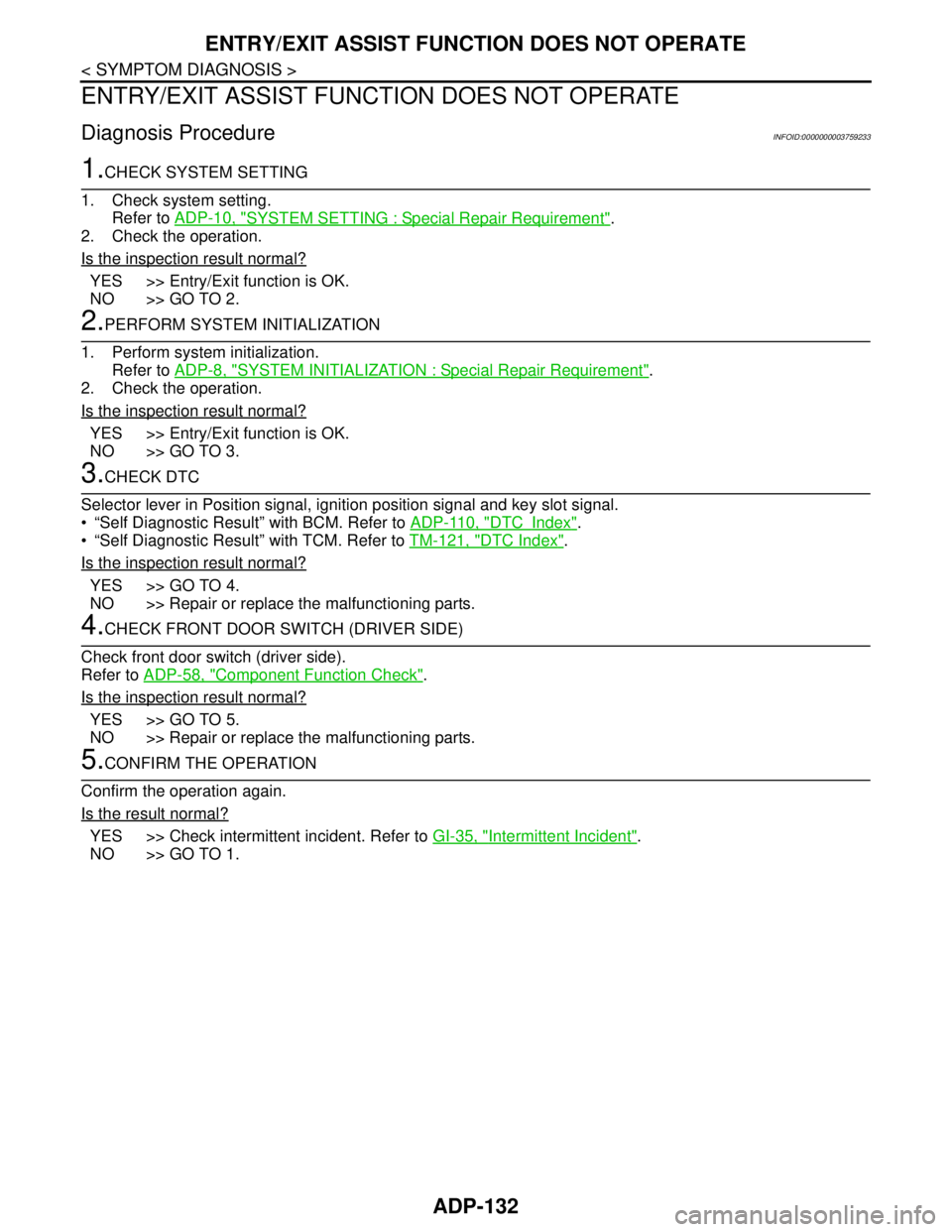
ENTRY/EXIT ASSIST FUNCTION DOES NOT OPERATE
ENTRY/EXIT ASSIST FUNCTION DOES NOT OPERATE
Diagnosis ProcedureINFOID:0000000003759233
1.CHECK SYSTEM SETTING
1. Check system setting.
Refer to ADP-10, "
SYSTEM SETTING : Special Repair Requirement".
2. Check the operation.
Is the inspection result normal?
YES >> Entry/Exit function is OK.
NO >> GO TO 2.
2.PERFORM SYSTEM INITIALIZATION
1. Perform system initialization.
Refer to ADP-8, "
SYSTEM INITIALIZATION : Special Repair Requirement".
2. Check the operation.
Is the inspection result normal?
YES >> Entry/Exit function is OK.
NO >> GO TO 3.
3.CHECK DTC
Selector lever in Position signal, ignition position signal and key slot signal.
“Self Diagnostic Result” with BCM. Refer to ADP-110, "
DTCIndex".
“Self Diagnostic Result” with TCM. Refer to TM-121, "
DTC Index".
Is the inspection result normal?
YES >> GO TO 4.
NO >> Repair or replace the malfunctioning parts.
4.CHECK FRONT DOOR SWITCH (DRIVER SIDE)
Check front door switch (driver side).
Refer to ADP-58, "
Component Function Check".
Is the inspection result normal?
YES >> GO TO 5.
NO >> Repair or replace the malfunctioning parts.
5.CONFIRM THE OPERATION
Confirm the operation again.
Is the result normal?
YES >> Check intermittent incident. Refer to GI-35, "Intermittent Incident".
NO >> GO TO 1.
Page 139 of 5121
INTELLIGENT KEY INTERLOCK FUNCTION DOES NOT OPERATE
ADP-133
< SYMPTOM DIAGNOSIS >
C
D
E
F
G
H
I
K
L
MA
B
ADP
N
O
P
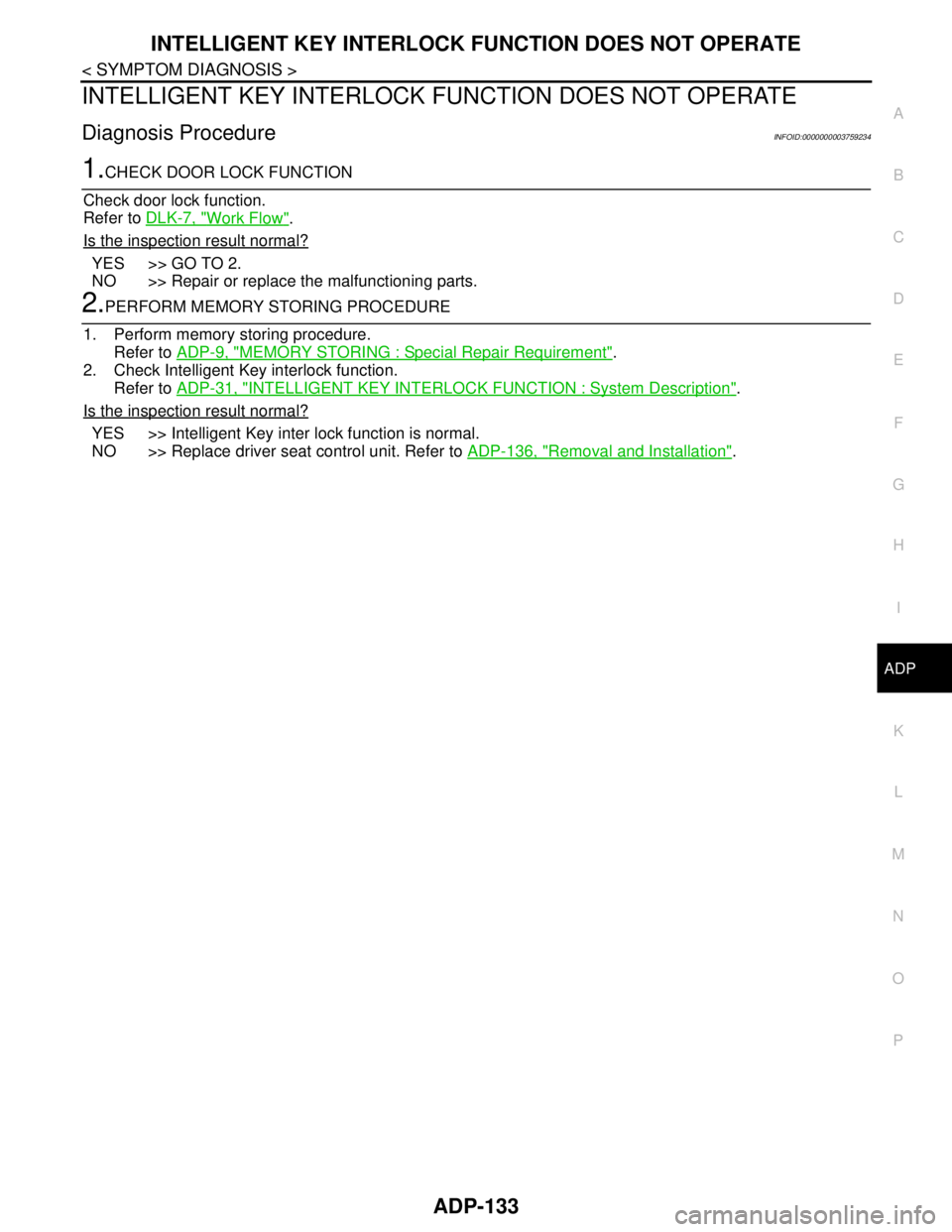
INTELLIGENT KEY INTERLOCK FUNCTION DOES NOT OPERATE
Diagnosis ProcedureINFOID:0000000003759234
1.CHECK DOOR LOCK FUNCTION
Check door lock function.
Refer to DLK-7, "
Work Flow".
Is the inspection result normal?
YES >> GO TO 2.
NO >> Repair or replace the malfunctioning parts.
2.PERFORM MEMORY STORING PROCEDURE
1. Perform memory storing procedure.
Refer to ADP-9, "
MEMORY STORING : Special Repair Requirement".
2. Check Intelligent Key interlock function.
Refer to ADP-31, "
INTELLIGENT KEY INTERLOCK FUNCTION : System Description".
Is the inspection result normal?
YES >> Intelligent Key inter lock function is normal.
NO >> Replace driver seat control unit. Refer to ADP-136, "
Removal and Installation".
Page 140 of 5121
ADP-134
< SYMPTOM DIAGNOSIS >
NORMAL OPERATING CONDITION
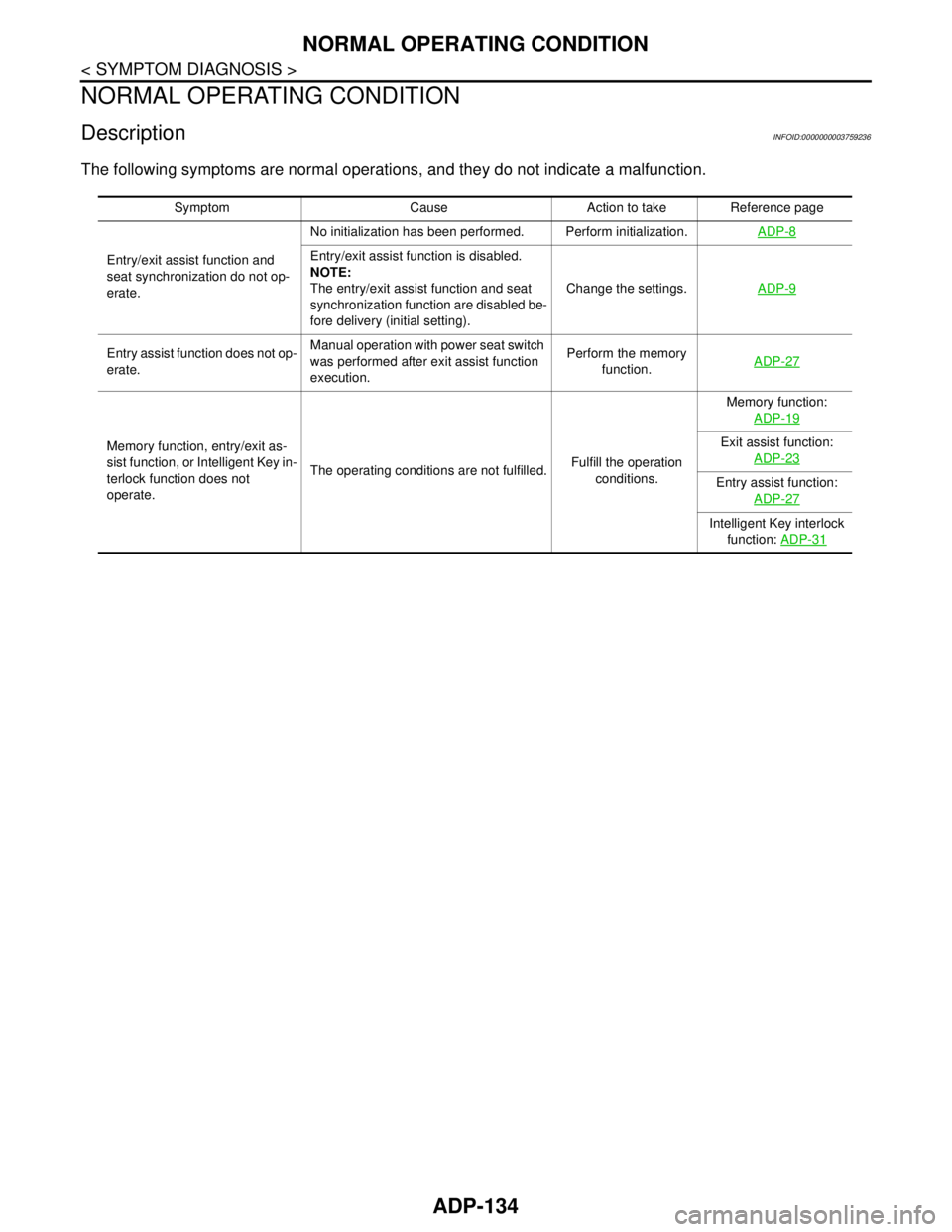
NORMAL OPERATING CONDITION
DescriptionINFOID:0000000003759236
The following symptoms are normal operations, and they do not indicate a malfunction.
Symptom Cause Action to take Reference page
Entry/exit assist function and
seat synchronization do not op-
erate. No initialization has been performed. Perform initialization.ADP-8
Entry/exit assist function is disabled.
NOTE:
The entry/exit assist function and seat
synchronization function are disabled be-
fore delivery (initial setting).Change the settings.ADP-9
Entry assist function does not op-
erate.Manual operation with power seat switch
was performed after exit assist function
execution.Perform the memory
function.ADP-27
Memory function, entry/exit as-
sist function, or Intelligent Key in-
terlock function does not
operate.The operating conditions are not fulfilled.Fulfill the operation
conditions.Memory function:
ADP-19Exit assist function:
ADP-23
Entry assist function:
ADP-27
Intelligent Key interlock
function: ADP-31
Page 159 of 5121
![NISSAN TEANA 2008 Workshop Manual AV
DIAGNOSIS SYSTEM (AUDIO UNIT)
AV-15
< FUNCTION DIAGNOSIS >[AUDIO SYSTEM]
C
D
E
F
G
H
I
J
K
L
MB A
O
P
DIAGNOSIS SYSTEM (AUDIO UNIT)
Diagnosis DescriptionINFOID:0000000003765592
Self-diagnosis mode](/img/5/57391/w960_57391-158.png "NISSAN TEANA 2008 Workshop Manual AV
DIAGNOSIS SYSTEM (AUDIO UNIT)
AV-15
< FUNCTION DIAGNOSIS >[AUDIO SYSTEM]
C
D
E
F
G
H
I
J
K
L
MB A
O
P
DIAGNOSIS SYSTEM (AUDIO UNIT)
Diagnosis DescriptionINFOID:0000000003765592
Self-diagnosis mode")
AV
DIAGNOSIS SYSTEM (AUDIO UNIT)
AV-15
< FUNCTION DIAGNOSIS >[AUDIO SYSTEM]
C
D
E
F
G
H
I
J
K
L
MB A
O
P
DIAGNOSIS SYSTEM (AUDIO UNIT)
Diagnosis DescriptionINFOID:0000000003765592
Self-diagnosis mode can perform the following items.
Versions display
Channel check diagnosis
Key check diagnosis
AV communication diagnosis
VERSIONS DISPLAY FUNCTION
1. Turn ignition switch ON.
2. Turn the audio unit off.
3. While pressing “1” button, turn volume control dial clockwise or
counterclockwise for 30 clicks or more.
4. Diagnosis default screen of audio display unit is displayed.
NOTE:
Diagnosis default screen = All icons and segments of the audio display unit are turned on.
5. Pressing the AUDIO switch briefly displays the version display mode. Pressing the AUDIO switch briefly
switches to each version display. Pressing and holding the AUDIO switch when displaying each software
version returns to the diagnosis default screen.
Version display item
6. Self-diagnosis mode is canceled when the ignition switch is turned OFF.
CHANNEL CHECK DIAGNOSIS FUNCTION
1. Turn ignition switch ON.
2. Turn the audio unit off.
3. While pressing the “1” button, turn the volume control dial clock-
wise or counterclockwise for 30 clicks or more.
JSNIA1334GB
Mode Description
Ve r s i o n s d i s p l a ySoftware V###### Audio unit software version is displayed.
Hardware V###### Audio unit hardware version is displayed.
Disp HW V###### Display unit hardware version is displayed.
CD Mech V###### Audio unit CD mechanism version is displayed.
EEPROM V###### Audio unit EEPROM version is displayed.
Disp SW V###### Display unit software version is displayed.
JSNIA1334GB
Page 160 of 5121
![NISSAN TEANA 2008 Workshop Manual AV-16
< FUNCTION DIAGNOSIS >[AUDIO SYSTEM]
DIAGNOSIS SYSTEM (AUDIO UNIT)
4. The diagnosis default screen of audio display unit is displayed.
NOTE:
Diagnosis default screen = All icons and segments of](/img/5/57391/w960_57391-159.png "NISSAN TEANA 2008 Workshop Manual AV-16
< FUNCTION DIAGNOSIS >[AUDIO SYSTEM]
DIAGNOSIS SYSTEM (AUDIO UNIT)
4. The diagnosis default screen of audio display unit is displayed.
NOTE:
Diagnosis default screen = All icons and segments of")
AV-16
< FUNCTION DIAGNOSIS >[AUDIO SYSTEM]
DIAGNOSIS SYSTEM (AUDIO UNIT)
4. The diagnosis default screen of audio display unit is displayed.
NOTE:
Diagnosis default screen = All icons and segments of the audio display unit are turned on.
5. Turning the TUNE/FOLDER dial clockwise displays the channel check mode. Pressing and holding the
AUDIO switch during each channel check or waiting approximately 1 second after finishing all channel
checks returns to the diagnosis default screen.
Channel check item
6. Self-diagnosis mode is canceled when the ignition switch is turned OFF.
KEY CHECK DIAGNOSIS FUNCTION
1. Turn ignition switch ON.
2. Turn the audio unit off.
3. While pressing the “1” button, turn the volume control dial clock-
wise or counterclockwise for 30 clicks or more.
4. The diagnosis default screen of audio display unit is displayed.
NOTE:
Diagnosis default screen = All icons and segments of the audio display unit are turned on.
5. Turning the TUNE/FOLDER dial counterclockwise displays the key check mode, and the pressed switch
name is shown. Pressing and holding the AUDIO switch during the key check returns to the diagnosis
default screen.
Mode Description
Channel checkChannel Check
Front Left
Connection of a speaker can be confirmed by test tone. Channel Check
Rear Left
Channel Check
Rear Right
Channel Check
Front Right
JSNIA1334GB
Page 161 of 5121
![NISSAN TEANA 2008 Workshop Manual AV
DIAGNOSIS SYSTEM (AUDIO UNIT)
AV-17
< FUNCTION DIAGNOSIS >[AUDIO SYSTEM]
C
D
E
F
G
H
I
J
K
L
MB A
O
P
Key check item (audio)
Key check item (steering switch)
6. Self-diagnosis mode is canceled when](/img/5/57391/w960_57391-160.png "NISSAN TEANA 2008 Workshop Manual AV
DIAGNOSIS SYSTEM (AUDIO UNIT)
AV-17
< FUNCTION DIAGNOSIS >[AUDIO SYSTEM]
C
D
E
F
G
H
I
J
K
L
MB A
O
P
Key check item (audio)
Key check item (steering switch)
6. Self-diagnosis mode is canceled when")
AV
DIAGNOSIS SYSTEM (AUDIO UNIT)
AV-17
< FUNCTION DIAGNOSIS >[AUDIO SYSTEM]
C
D
E
F
G
H
I
J
K
L
MB A
O
P
Key check item (audio)
Key check item (steering switch)
6. Self-diagnosis mode is canceled when the ignition switch is turned OFF.
AV COMMUNICATION DIAGNOSIS FUNCTION
1. Turn ignition switch ON.
2. Turn the audio unit off.
3. While pressing the “6” button, turn the volume control dial clock-
wise or counterclockwise for 30 clicks or more.
4. Returns to diagnosis default screen and displays “AV DIAGNOSIS”.
Mode Display item Switch name
Key checkEJECT “EJECT” switch
LOAD “LOAD” switch
POWER “ON·OFF” switch
VOLUME up “VOL up” switch
VOLUME down “VOL down” switch
1 Preset button “1” switch
2 Preset button “2” switch
3 Preset button “3” switch
4 Preset button “4” switch
5 Preset button “5” switch
6 Preset button “6” switch
AM·FM “AM·FM” switch
DISC “DISC” switch
AUX “AUX” switch
AUDIO “AUDIO” switch
TUNE/FOLDER up “TUNE/FOLDER up” switch
TUNE/FOLDER down “TUNE/FOLDER up” switch
DISP CLOCK “DISP CLOCK” switch
AUTO.P “AUTO.P”” switch
SCAN/RPT “SCAN RPT” switch
SEEK/TRACK down “SEEK” switch
SEEK/TRACK up “TRACK” switch
Mode Display item Switch name
Key checkSTR SOURCE “SOURCE” switch
STR VOL UP “VOL up” switch
STR VOL DOWN “VOL down” switch
STR UP “SEEK up” switch
STR DOWN “SEEK down” switch
JSNIA1335GB
Page 564 of 5121
![NISSAN TEANA 2008 Workshop Manual AV-420
< FUNCTION DIAGNOSIS >[BOSE AUDIO WITH NAVIGATION]
DIAGNOSIS SYSTEM (AV CONTROL UNIT)
NOTE:
*: On-board self-diagnosis is not supported. Only CONSULT-III is supported.
STARTING PROCEDURE
1. Sta](/img/5/57391/w960_57391-563.png "NISSAN TEANA 2008 Workshop Manual AV-420
< FUNCTION DIAGNOSIS >[BOSE AUDIO WITH NAVIGATION]
DIAGNOSIS SYSTEM (AV CONTROL UNIT)
NOTE:
*: On-board self-diagnosis is not supported. Only CONSULT-III is supported.
STARTING PROCEDURE
1. Sta")
AV-420
< FUNCTION DIAGNOSIS >[BOSE AUDIO WITH NAVIGATION]
DIAGNOSIS SYSTEM (AV CONTROL UNIT)
NOTE:
*: On-board self-diagnosis is not supported. Only CONSULT-III is supported.
STARTING PROCEDURE
1. Start the engine.
2. Turn the audio system OFF.
3. While pressing the “SETTING” button, turn the volume control
dial clockwise or counterclockwise for 40 clicks or more. (When
the self-diagnosis mode is started, a short beep will be heard.)
Shifting from current screen to previous screen is performed
by pressing “BACK” button.
Confirmation/
AdjustmentDisplay DiagnosisThe confirmations of the tint with the color spectrum bar display and
shading of color with the gradation bar display can be performed.
Vehicle SignalsDiagnosis of signals can be performed for vehicle speed, parking brake,
lights, ignition switch, and reverse.
Navigation/PhoneHandsfree Voice Mi-
crophone TestMicrophone speaker check can be performed.
Color Spectrum Bar A color tone can be checked by the color bar display.
Gradation Bar A light and shade can be checked by the gray scale display.
Touch Panel Touch panel response check can be performed.
Vehicle SignalsDiagnosis of signals can be performed for vehicle speed, parking brake,
lights, and reverse.
Confirm/Change
Bluetooth PasskeyThe passkey can be checked and changed.
Confirm/Change
Bluetooth Device
NameThe device name can be checked and changed.
Handsfree Sound
Quality SetNot available.
Speaker Test The connection of a speaker can be confirmed by test tone.
Climate Control
*Not used.
Error HistoryThe system malfunction and the frequency when occurred in the past are
displayed. When the malfunctioning item is selected, the time and place
that the selected malfunction last occurred are displayed.
Camera Cont.The signal connected to camera control unit can be checked and the
guiding line position that overlaps rear view camera image can be adjust-
ed.
Vehicle CAN Diagnosis The transmitting/receiving of CAN communication can be monitored.
AV COMM DiagnosisThe communication condition of each unit of Multi AV system can be
monitored.
Delete Unit Connection Log Erase the connection history of unit and error history.
Initialize Settings Initializes the AV control unit memory.Mode Description
JSNIA1290GB
Page 572 of 5121
![NISSAN TEANA 2008 Workshop Manual AV-428
< FUNCTION DIAGNOSIS >[BOSE AUDIO WITH NAVIGATION]
DIAGNOSIS SYSTEM (AV CONTROL UNIT)
Confirm/Change Bluetooth Passkey
The passkey of Bluetooth can be confirmed and changed.
The passkey can](/img/5/57391/w960_57391-571.png "NISSAN TEANA 2008 Workshop Manual AV-428
< FUNCTION DIAGNOSIS >[BOSE AUDIO WITH NAVIGATION]
DIAGNOSIS SYSTEM (AV CONTROL UNIT)
Confirm/Change Bluetooth Passkey
The passkey of Bluetooth can be confirmed and changed.
The passkey can")
AV-428
< FUNCTION DIAGNOSIS >[BOSE AUDIO WITH NAVIGATION]
DIAGNOSIS SYSTEM (AV CONTROL UNIT)
Confirm/Change Bluetooth Passkey
The passkey of Bluetooth can be confirmed and changed.
The passkey can be changed by four to eight digits within the num-
ber of 0 to 9.
Confirm/Change Bluetooth Device Name
The device name of Bluetooth can be confirmed and changed.
The device name can be changed within the range of twenty digits
of alphabets and codes.
Speaker Test
Select “SPEAKER TEST” to display the Speaker Diagnosis screen.
Press “START and NEXT” to generate a test tone in a speaker.
Press “Start” to generate a test tone in the next speaker. Press “End”
to stop the test tones.
NOTE:
The frequency of test tone emitted from each speaker is as follows.
Climate Control
On-board self-diagnosis is not supported. Only CONSULT-III is supported.
Refer to HAC-159, "
WITH INTELLIGENT AIR CONDITIONER SYSTEM : CONSULT-III Function" for details.
Error History
The self-diagnosis results are judged depending on whether any error occurs from when “Self-diagnosis” is
selected until the self-diagnosis results are displayed.
However, the diagnosis results are judged normal if an error has occurred before the ignition switch is turned
ON and then no error has occurred until the self-diagnosis start. Check the “Error Record” to detect any error
that may have occurred before the self-diagnosis start because of this situation.
The frequency of occurrence in error history is displayed in a count up manner. The actual count up method
differs depending on the error item.
Count up method A
LightsON Light switch ON.
—
OFF Light switch OFF.
ReverseON Selector lever in R position.
Changes in indication may be delayed. This is normal.
OFFSelector lever in any position other
than R. Diagnosis item Display Vehicle status Remarks
JSNIA0086GB
JSNIA0517GB
Tweeter : 3 kHz
Front door speaker : 300 Hz
Rear door speaker : 1 kHz
JSNIA0150GB
Page 818 of 5121

BCS
BCS-1
ELECTRICAL & POWER CONTROL
C
D
E
F
G
H
I
J
K
L B
SECTION BCS
A
O
P N
CONTENTS
BODY CONTROL SYSTEM
BASIC INSPECTION ....................................3
INSPECTION AND ADJUSTMENT .....................3
ADDITIONAL SERVICE WHEN REPLACING
CONTROL UNIT (BCM) ...............................................
3
ADDITIONAL SERVICE WHEN REPLACING
CONTROL UNIT (BCM) : Description .......................
3
ADDITIONAL SERVICE WHEN REPLACING
CONTROL UNIT (BCM) : Special Repair Require-
ment ..........................................................................
3
CONFIGURATION (BCM) ...........................................3
CONFIGURATION (BCM) : Description ....................3
CONFIGURATION (BCM) : Special Repair Re-
quirement ..................................................................
4
CONFIGURATION (BCM) : Configuration list ...........5
FUNCTION DIAGNOSIS ...............................6
BODY CONTROL SYSTEM ................................6
System Description ...................................................6
Component Parts Location ........................................7
COMBINATION SWITCH READING SYSTEM
.....
8
System Diagram ........................................................8
System Description ...................................................8
Component Parts Location ......................................11
SIGNAL BUFFER SYSTEM ...............................12
System Diagram ......................................................12
System Description .................................................12
POWER CONSUMPTION CONTROL SYS-
TEM ....................................................................
13
System Diagram ......................................................13
System Description .................................................13
Component Parts Location ......................................15
DIAGNOSIS SYSTEM (BCM) ............................16
COMMON ITEM .........................................................16
COMMON ITEM : CONSULT-III Function (BCM -
COMMON ITEM) .....................................................
16
DOOR LOCK ..............................................................17
DOOR LOCK : CONSULT-III Function (BCM -
DOOR LOCK) ..........................................................
17
REAR WINDOW DEFOGGER ...................................18
REAR WINDOW DEFOGGER : CONSULT-III
Function (BCM - REAR DEFOGGER) .....................
18
BUZZER .....................................................................18
BUZZER : CONSULT-III Function (BCM - BUZZ-
ER) ..........................................................................
19
INT LAMP ...................................................................19
INT LAMP : CONSULT-III Function (BCM - INT
LAMP) ......................................................................
19
HEADLAMP ...............................................................21
HEADLAMP : CONSULT-III Function (BCM -
HEAD LAMP) ...........................................................
21
WIPER ........................................................................23
WIPER : CONSULT-III Function (BCM - WIPER) ....23
FLASHER ...................................................................24
FLASHER : CONSULT-III Function (BCM -
FLASHER) ...............................................................
24
INTELLIGENT KEY ....................................................25
INTELLIGENT KEY : CONSULT-III Function
(BCM - INTELLIGENT KEY) ....................................
25
COMB SW ..................................................................28
COMB SW : CONSULT-III Function (BCM -
COMB SW) ..............................................................
28
BCM ...........................................................................28
BCM : CONSULT-III Function (BCM - BCM) ...........28
IMMU ..........................................................................29
IMMU : CONSULT-III Function (BCM - IMMU) ........29
Page 822 of 5121

BCS
INSPECTION AND ADJUSTMENT
BCS-5
< BASIC INSPECTION >
C
D
E
F
G
H
I
J
K
L B A
O
P N
CONFIGURATION (BCM) : Configuration listINFOID:0000000003809648
⇔: Items which confirm vehicle specificationsMANUAL SETTING ITEM
NOTE
Items Setting value
AUTO LIGHT WITH —
RR FOG LAMP WITH —
AV C/U WITH ⇔ WITHOUT WITH: With BOSE audio system
WITHOUT: Without BOSE audio system
THEFT ALM AREA MODE3 —
H/L WASHER TIME 1 WITH —
H/L WASHER TIME 2 WITH —
I-KEY WITH —
Key Fob Type MODE10 —
HANDLE LHD —
AUTO SETTING ITEM
NOTE
Items Setting value
H/L BULB DEFAULT —
FR FOG LAMP WITH —
TRANSMISSION AT with ABS —
TR CANCL SW WITHOUT —
TPMS WITHOUT —
AUTO BACK DOOR WITHOUT —
FOG LAMP BULB SINGLE BULB —
D I L M P VA R I AT M O D E 4 —
LIGHT RECOG MODE4 —
FR FOG LOGIC MODE2 —
PANIC ALM TYPE MODE2 —
HAZARD SW TYPE MODE1 —
BCM AC CONTROL MODE1 —
RAIN SENSOR WITHOUT —
FOG ON WITH AUTO LIGHT WITHOUT —
AUTO LOCK&UNLOCK FUNC WITHOUT —
DROP WIP FUNCTION WITHOUT —
SELECTIVE UNLOCK SETTING WITHOUT —
SEAT BLT WARN WITHOUT —
SPEED SNS WIP WITH —