audio NISSAN TEANA 2008 Service Manual
[x] Cancel search | Manufacturer: NISSAN, Model Year: 2008, Model line: TEANA, Model: NISSAN TEANA 2008Pages: 5121, PDF Size: 69.03 MB
Page 2543 of 5121
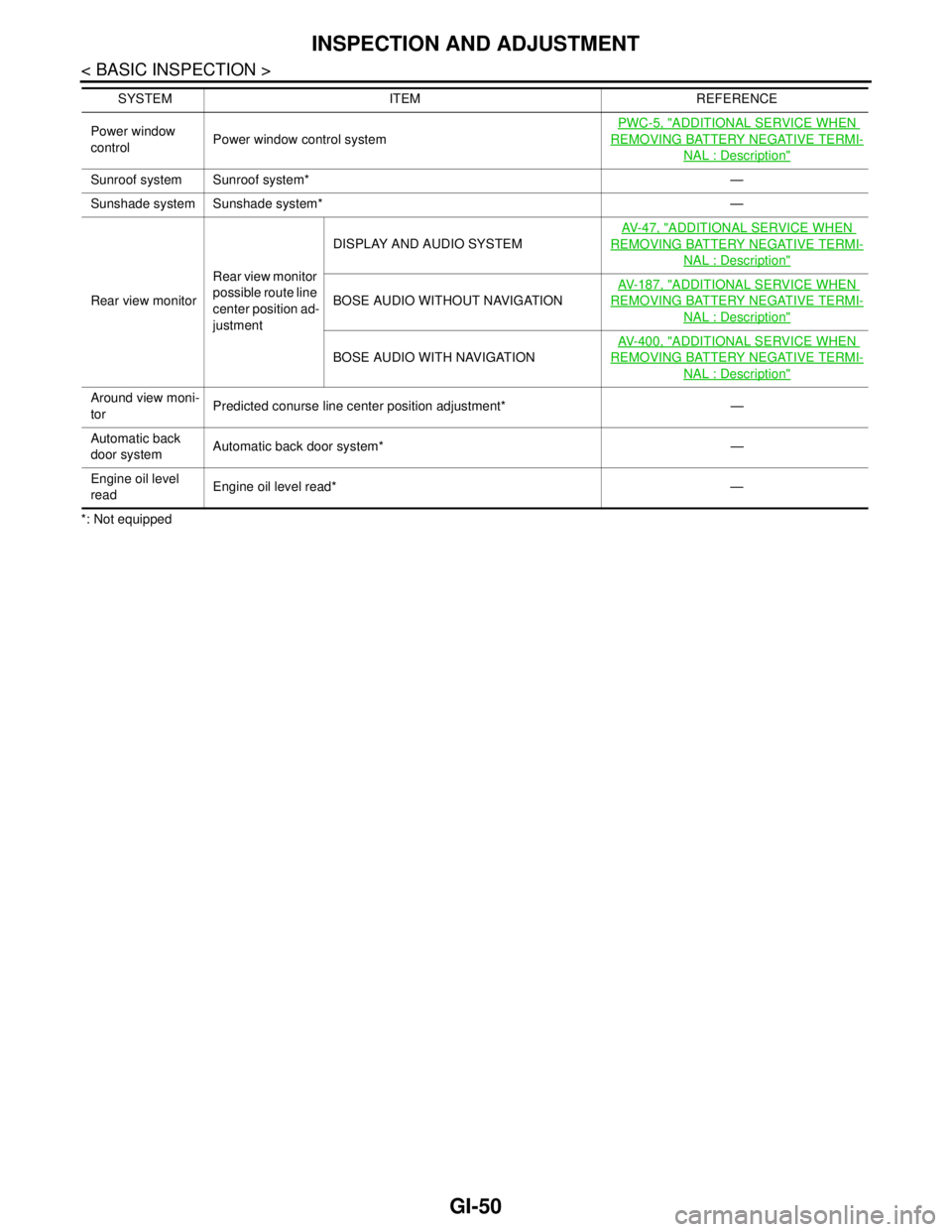
GI-50
< BASIC INSPECTION >
INSPECTION AND ADJUSTMENT
*: Not equippedPower window
controlPower window control systemPWC-5, "
ADDITIONAL SERVICE WHEN
REMOVING BATTERY NEGATIVE TERMI-
NAL : Description"
Sunroof system Sunroof system* —
Sunshade system Sunshade system* —
Rear view monitorRear view monitor
possible route line
center position ad-
justmentDISPLAY AND AUDIO SYSTEMAV- 4 7 , "
ADDITIONAL SERVICE WHEN
REMOVING BATTERY NEGATIVE TERMI-
NAL : Description"
BOSE AUDIO WITHOUT NAVIGATIONAV- 1 8 7 , "
ADDITIONAL SERVICE WHEN
REMOVING BATTERY NEGATIVE TERMI-
NAL : Description"
BOSE AUDIO WITH NAVIGATIONAV- 4 0 0 , "
ADDITIONAL SERVICE WHEN
REMOVING BATTERY NEGATIVE TERMI-
NAL : Description"
Around view moni-
torPredicted conurse line center position adjustment* —
Automatic back
door systemAutomatic back door system* —
Engine oil level
readEngine oil level read* — SYSTEM ITEM REFERENCE
Page 2547 of 5121

GW-4
< SYMPTOM DIAGNOSIS >
SQUEAK AND RATTLE TROUBLE DIAGNOSES
Confirm that the cause of a noise is repaired by test driving the vehicle. Operate the vehicle under the same
conditions as when the noise originally occurred. Refer to the notes on the Diagnostic Worksheet.
Inspection ProcedureINFOID:0000000003943093
Refer to Table of Contents for specific component removal and installation information.
INSTRUMENT PANEL
Most incidents are caused by contact and movement between:
1. Cluster lid A and instrument panel
2. Acrylic lens and combination meter housing
3. Instrument panel to front pillar garnish
4. Instrument panel to windshield
5. Instrument panel mounting pins
6. Wiring harnesses behind the combination meter
7. A/C defroster duct and duct joint
These incidents can usually be located by tapping or moving the components to duplicate the noise or by
pressing on the components while driving to stop the noise. Most of these incidents can be repaired by apply-
ing felt cloth tape or silicon spray (in hard to reach areas). Urethane pads can be used to insulate wiring har-
ness.
CAUTION:
Never use silicone spray to isolate a squeak or rattle. If the area is saturated with silicone, the recheck
of repair becomes impossible.
CENTER CONSOLE
Components to pay attention to include:
1. Shifter assembly cover to finisher
2. A/C control unit and cluster lid C
3. Wiring harnesses behind audio and A/C control unit
The instrument panel repair and isolation procedures also apply to the center console.
DOORS
Pay attention to the following:
1. Finisher and inner panel making a slapping noise
2. Inside handle escutcheon to door finisher
3. Wiring harnesses tapping
4. Door striker out of alignment causing a popping noise on starts and stops
Tapping or moving the components or pressing on them while driving to duplicate the conditions can isolate
many of these incidents. The areas can usually be insulated with felt cloth tape or insulator foam blocks to
repair the noise.
TRUNK
Trunk noises are often caused by a loose jack or loose items put into the trunk by the customer.
In addition look for the following:
1. Trunk lid dumpers out of adjustment
2. Trunk lid striker out of adjustment
3. Trunk lid torsion bars knocking together
4. A loose license plate or bracket
Most of these incidents can be repaired by adjusting, securing or insulating the item(s) or component(s) caus-
ing the noise.
SUNROOF/HEADLINING
Noises in the sunroof/headlining area can often be traced to one of the following:
1. Sunroof lid, rail, linkage or seals making a rattle or light knocking noise
2. Sunvisor shaft shaking in the holder
3. Front or rear windshield touching headlining and squeaking
Page 2820 of 5121
![NISSAN TEANA 2008 Service Manual HAC-192
< COMPONENT DIAGNOSIS >[WITH 7 INCH DISPLAY]
A/C AUTO AMP.
A/C AUTO AMP.
DescriptionINFOID:0000000003941321
COMPONENT DESCRIPTION
A/C Auto Amp. (Air Conditioner Automatic Amplifier)
The A/C au](/img/5/57391/w960_57391-2819.png "NISSAN TEANA 2008 Service Manual HAC-192
< COMPONENT DIAGNOSIS >[WITH 7 INCH DISPLAY]
A/C AUTO AMP.
A/C AUTO AMP.
DescriptionINFOID:0000000003941321
COMPONENT DESCRIPTION
A/C Auto Amp. (Air Conditioner Automatic Amplifier)
The A/C au")
HAC-192
< COMPONENT DIAGNOSIS >[WITH 7 INCH DISPLAY]
A/C AUTO AMP.
A/C AUTO AMP.
DescriptionINFOID:0000000003941321
COMPONENT DESCRIPTION
A/C Auto Amp. (Air Conditioner Automatic Amplifier)
The A/C auto amp. (1) has a built-in microcomputer that processes
information sent from various sensors needed for air conditioner
operation. The air mix door motors, the mode door motor, the intake
door motor, the blower motor and the compressor are then con-
trolled.
When the various switches and temperature control dial are oper-
ated, data is input to the A/C auto amp. from the A/C control.
Component Function CheckINFOID:0000000003940728
1.CHECK OPERATION
1. Press the AUTO switch, and then check that “AUTO” is shown on the display.
2. Operate the temperature control dial (driver side). Check that the fan speed or outlet changes. (The dis-
charge air temperature or fan speed varies depending on the ambient temperature, in-vehicle tempera-
ture, and temperature setting.)
Does it operate normally?
YES >> INSPECTION END
NO >> Perform trouble diagnosis for the A/C system. Refer to HAC-192, "
Diagnosis Procedure".
Diagnosis ProcedureINFOID:0000000003940729
1.INSPECTION BY FAIL-SAFE FUNCTION
1. Turn the ignition switch ON.
2. After approximately 30 seconds, check that the air conditioner is operated by the fail-safe function (the
operation display of air conditioner is not performed). Refer to HAC-211, "
WITHOUT INTELLIGENT AIR
CONDITIONER SYSTEM : Fail-Safe" (WITHOUT INTELLIGENT AIR CONDITIONER SYSTEM) or HAC-
223, "WITH INTELLIGENT AIR CONDITIONER SYSTEM : Fail-Safe" (WITH INTELLIGENT AIR CONDI-
TIONER SYSTEM).
Is the fail-safe function operated?
YES >> GO TO 3.
NO >> GO TO 2.
2.CHECK A/C AUTO AMP. POWER SUPPLY CIRCUIT AND GROUND
Check A/C auto amp. power supply circuit and ground circuit. Refer to HAC-192, "
Diagnosis Procedure".
Is the inspection result normal?
YES >> GO TO 3.
NO >> Repair or replace parts according to the inspection results.
3.CHECK PRESET SWITCH
Check the preset switch. Refer to AV-164, "
Symptom Table" (BASE AUDIO AND DISPLAY SYSTEM), AV-372,
"Symptom Table" (BOSE AUDIO WITHOUT NAVIGATION) or AV-640, "Symptom Table" (BOSE AUDIO WITH
NAVIGATION).
Is the inspection result normal?
YES >> Replace the A/C auto amp.
NO >> Repair or replace parts according to the inspection results.
JPIIA0894ZZ
Page 2854 of 5121
![NISSAN TEANA 2008 Service Manual HAC-226
< SYMPTOM DIAGNOSIS >[WITH 7 INCH DISPLAY]
AIR CONDITIONER CONTROL
SYMPTOM DIAGNOSIS
AIR CONDITIONER CONTROL
Diagnosis Chart By SymptomINFOID:0000000003884798
*:WITH INTELLIGENT AIR CONDITIONE](/img/5/57391/w960_57391-2853.png "NISSAN TEANA 2008 Service Manual HAC-226
< SYMPTOM DIAGNOSIS >[WITH 7 INCH DISPLAY]
AIR CONDITIONER CONTROL
SYMPTOM DIAGNOSIS
AIR CONDITIONER CONTROL
Diagnosis Chart By SymptomINFOID:0000000003884798
*:WITH INTELLIGENT AIR CONDITIONE")
HAC-226
< SYMPTOM DIAGNOSIS >[WITH 7 INCH DISPLAY]
AIR CONDITIONER CONTROL
SYMPTOM DIAGNOSIS
AIR CONDITIONER CONTROL
Diagnosis Chart By SymptomINFOID:0000000003884798
*:WITH INTELLIGENT AIR CONDITIONER SYSTEM
Symptom Reference
A/C system does not activate.Go to Trouble Diagnosis Procedure for Power Supply And
Ground Circuit.HAC-191, "
A/C AUTO AMP. :
Diagnosis Procedure"
A/C system cannot be controlled.Go to Trouble Diagnosis Procedure for Preset Switch Sys-
tem.AV- 1 6 4 , "
Symptom Table"
(DISPLAY AND AUDIO SYS-
TEM), AV- 3 7 2 , "
Symptom Ta-
ble" (BOSE AUDIO WITHOUT
NAVIGATION) or AV-640,
"Symptom Table" (BOSE AU-
DIO WITH NAVIGATION).
Air outlet does not change.
Go to Trouble Diagnosis Procedure for Mode Door Motor.
(LAN)HAC-186, "
Diagnosis Proce-
dure"Mode door motor does not operate
normally.
Discharge air temperature does not
change.
Go to Trouble Diagnosis Procedure for Air Mix Door Motor.
(LAN)HAC-182, "
Diagnosis Proce-
dure" (driver side) or HAC-184,
"Diagnosis Procedure" (pas-
senger side) Air mix door motor does not operate
normally.
Intake door does not change.
Go to Trouble Diagnosis Procedure for Intake Door Motor.
(LAN)HAC-189, "
Diagnosis Proce-
dure"Intake door motor does not operate
normally.
Blower motor operation is malfunc-
tioning.Go to Trouble Diagnosis Procedure for Blower Motor.HAC-193, "
Diagnosis Proce-
dure"
Magnet clutch does not engage. Go to Trouble Diagnosis Procedure for Magnet Clutch.HAC-197, "Diagnosis Proce-
dure"
Insufficient cooling
Go to Trouble Diagnosis Procedure for Insufficient Cooling.HAC-228, "Inspection proce-
dure"No cool air comes out.
(Air flow volume is normal.)
Insufficient heating
Go to Trouble Diagnosis Procedure for Insufficient Heating.HAC-231, "
Inspection proce-
dure"No warm air comes out.
(Air flow volume is normal.)
Noise Go to Trouble Diagnosis Procedure for Noise.HAC-234, "
Inspection proce-
dure"
Memory function does not operate. Go to Trouble Diagnosis Procedure for Memory Function.HAC-236, "Inspection proce-
dure"
Plasmacluster system does not op-
erate.*Go to Trouble Diagnosis Procedure for Plasmacluster sys-
tem.HAC-227, "
WITH INTELLI-
GENT AIR CONDITIONER
SYSTEM : Inspection proce-
dure"
Page 2954 of 5121
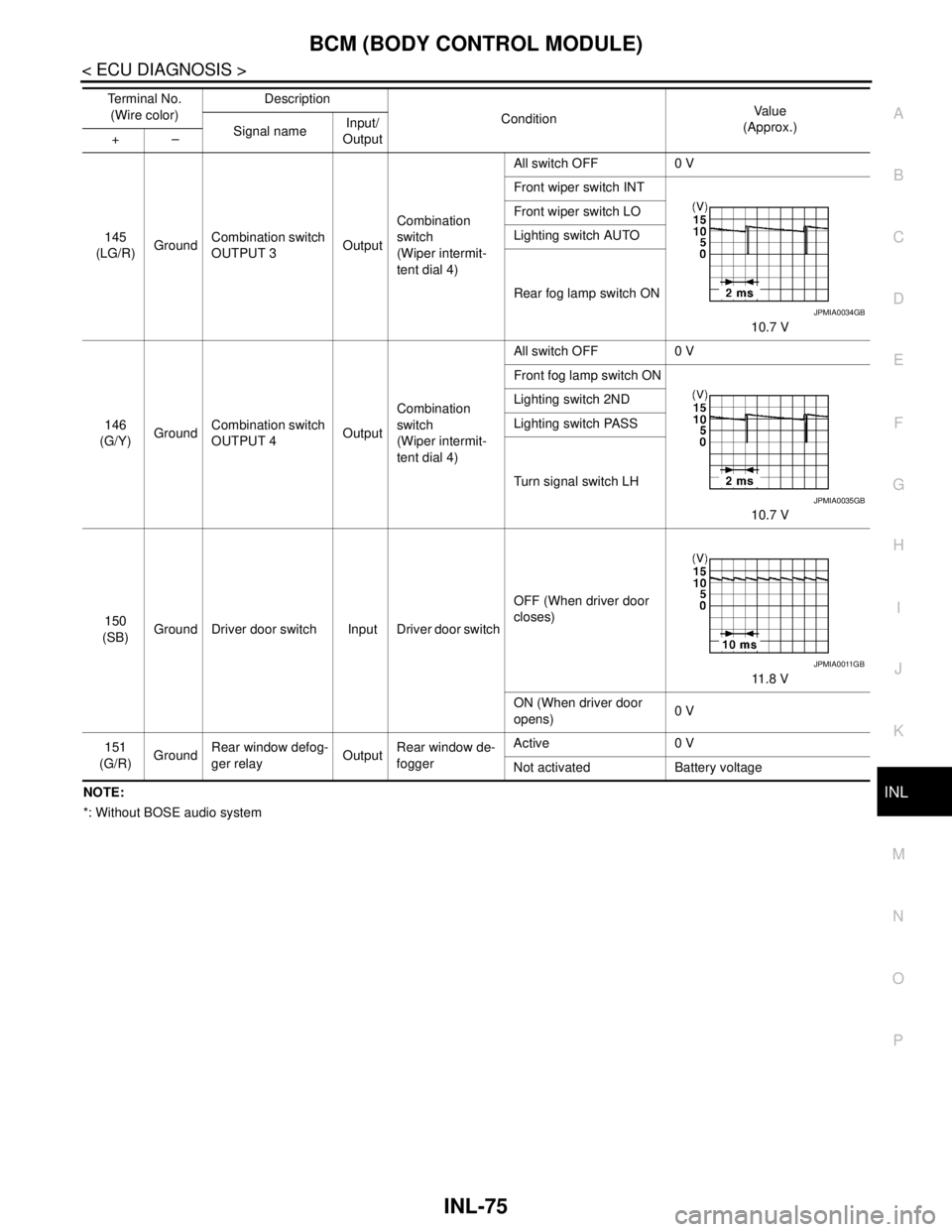
BCM (BODY CONTROL MODULE)
INL-75
< ECU DIAGNOSIS >
C
D
E
F
G
H
I
J
K
MA
B
INL
N
O
PNOTE:
*: Without BOSE audio system145
(LG/R)GroundCombination switch
OUTPUT 3OutputCombination
switch
(Wiper intermit-
tent dial 4)All switch OFF 0 V
Front wiper switch INT
10.7 V Front wiper switch LO
Lighting switch AUTO
Rear fog lamp switch ON
146
(G/Y)GroundCombination switch
OUTPUT 4OutputCombination
switch
(Wiper intermit-
tent dial 4)All switch OFF 0 V
Front fog lamp switch ON
10.7 V Lighting switch 2ND
Lighting switch PASS
Turn signal switch LH
150
(SB)Ground Driver door switch Input Driver door switchOFF (When driver door
closes)
11.8 V
ON (When driver door
opens)0 V
151
(G/R)GroundRear window defog-
ger relayOutputRear window de-
foggerActive 0 V
Not activated Battery voltage Te r m i n a l N o .
(Wire color)Description
ConditionVa l u e
(Approx.)
Signal nameInput/
Output +–
JPMIA0034GB
JPMIA0035GB
JPMIA0011GB
Page 3000 of 5121

SQUEAK AND RATTLE TROUBLE DIAGNOSES
INT-23
< SYMPTOM DIAGNOSIS >
C
D
E
F
G
H
I
K
L
MA
B
INT
N
O
P
Inspection ProcedureINFOID:0000000003887244
Refer to Table of Contents for specific component removal and installation information.
INSTRUMENT PANEL
Most incidents are caused by contact and movement between:
1. Cluster lid A and instrument panel
2. Acrylic lens and combination meter housing
3. Instrument panel to front pillar garnish
4. Instrument panel to windshield
5. Instrument panel mounting pins
6. Wiring harnesses behind the combination meter
7. A/C defroster duct and duct joint
These incidents can usually be located by tapping or moving the components to duplicate the noise or by
pressing on the components while driving to stop the noise. Most of these incidents can be repaired by apply-
ing felt cloth tape or silicon spray (in hard to reach areas). Urethane pads can be used to insulate wiring har-
ness.
CAUTION:
Never use silicone spray to isolate a squeak or rattle. If the area is saturated with silicone, the recheck
of repair becomes impossible.
CENTER CONSOLE
Components to pay attention to include:
1. Shifter assembly cover to finisher
2. A/C control unit and cluster lid C
3. Wiring harnesses behind audio and A/C control unit
The instrument panel repair and isolation procedures also apply to the center console.
DOORS
Pay attention to the following:
1. Finisher and inner panel making a slapping noise
2. Inside handle escutcheon to door finisher
3. Wiring harnesses tapping
4. Door striker out of alignment causing a popping noise on starts and stops
Tapping or moving the components or pressing on them while driving to duplicate the conditions can isolate
many of these incidents. The areas can usually be insulated with felt cloth tape or insulator foam blocks to
repair the noise.
TRUNK
Trunk noises are often caused by a loose jack or loose items put into the trunk by the customer.
In addition look for the following:
1. Trunk lid dumpers out of adjustment
2. Trunk lid striker out of adjustment
3. Trunk lid torsion bars knocking together
4. A loose license plate or bracket
Most of these incidents can be repaired by adjusting, securing or insulating the item(s) or component(s) caus-
ing the noise.
SUNROOF/HEADLINING
Noises in the sunroof/headlining area can often be traced to one of the following:
1. Sunroof lid, rail, linkage or seals making a rattle or light knocking noise
2. Sunvisor shaft shaking in the holder
3. Front or rear windshield touching headlining and squeaking
Again, pressing on the components to stop the noise while duplicating the conditions can isolate most of these
incidents. Repairs usually consist of insulating with felt cloth tape.
Page 3044 of 5121

IP-4
< SYMPTOM DIAGNOSIS >
SQUEAK AND RATTLE TROUBLE DIAGNOSES
Confirm that the cause of a noise is repaired by test driving the vehicle. Operate the vehicle under the same
conditions as when the noise originally occurred. Refer to the notes on the Diagnostic Worksheet.
Inspection ProcedureINFOID:0000000003939974
Refer to Table of Contents for specific component removal and installation information.
INSTRUMENT PANEL
Most incidents are caused by contact and movement between:
1. Cluster lid A and instrument panel
2. Acrylic lens and combination meter housing
3. Instrument panel to front pillar garnish
4. Instrument panel to windshield
5. Instrument panel mounting pins
6. Wiring harnesses behind the combination meter
7. A/C defroster duct and duct joint
These incidents can usually be located by tapping or moving the components to duplicate the noise or by
pressing on the components while driving to stop the noise. Most of these incidents can be repaired by apply-
ing felt cloth tape or silicon spray (in hard to reach areas). Urethane pads can be used to insulate wiring har-
ness.
CAUTION:
Never use silicone spray to isolate a squeak or rattle. If the area is saturated with silicone, the recheck
of repair becomes impossible.
CENTER CONSOLE
Components to pay attention to include:
1. Shifter assembly cover to finisher
2. A/C control unit and cluster lid C
3. Wiring harnesses behind audio and A/C control unit
The instrument panel repair and isolation procedures also apply to the center console.
DOORS
Pay attention to the following:
1. Finisher and inner panel making a slapping noise
2. Inside handle escutcheon to door finisher
3. Wiring harnesses tapping
4. Door striker out of alignment causing a popping noise on starts and stops
Tapping or moving the components or pressing on them while driving to duplicate the conditions can isolate
many of these incidents. The areas can usually be insulated with felt cloth tape or insulator foam blocks to
repair the noise.
TRUNK
Trunk noises are often caused by a loose jack or loose items put into the trunk by the customer.
In addition look for the following:
1. Trunk lid dumpers out of adjustment
2. Trunk lid striker out of adjustment
3. Trunk lid torsion bars knocking together
4. A loose license plate or bracket
Most of these incidents can be repaired by adjusting, securing or insulating the item(s) or component(s) caus-
ing the noise.
SUNROOF/HEADLINING
Noises in the sunroof/headlining area can often be traced to one of the following:
1. Sunroof lid, rail, linkage or seals making a rattle or light knocking noise
2. Sunvisor shaft shaking in the holder
3. Front or rear windshield touching headlining and squeaking
Page 3052 of 5121

IP-12
< ON-VEHICLE REPAIR >
INSTRUMENT PANEL ASSEMBLY
Removal and Installation
INFOID:0000000003816778
WORK STEP
When removing instrument panel assembly, combination meter, instrument finisher A, instrument finisher B,
AV C/U (audio unit) or center console assembly take steps in the order shown by the number below.
1. Optical sensor 2. Center speaker grille 3. Sunload sensor
4. Speaker grille LH 5. Front squawker LH 6. Instrument side finisher LH
7. Side ventilator grille LH 8. Combination meter 9. Cluster lid A
10. Instrument lower panel LH 11. Fuse block lid 12. Instrument finisher A
13. Steering column upper cover 14. Steering column lower cover 15. Instrument finisher D
16. Instrument finisher E 17. Glove box lid 18. Glove box assembly
19. Glove box damper 20. Illumination lamp 21. Front passenger air bag module
22. Side ventilator grille RH 23. Instrument side finisher RH 24. Instrument panel assembly
25. Front squawker RH 26. Speaker grille RH 27. Center speaker
28. Display unit 29. Cluster lid D 30. Cluster lid upper finisher
31. AV C/U (audio unit) 32. Instrument finisher B 33. Push button ignition switch
34. Cluster lid C 35. Cluster lid lower finisher 36. Socket and bulb
37. DVD player 38. Instrument side panel RH 39. Glove box mask
Refer to GI-4, "
Components" for symbols in the figure.
PA R T SINSTRUMENT
PA N E L
ASSEMBLYCOMBINATION
METERINSTRUMENT
FINISHER AINSTRUMENT
FINISHER BAV C / U
(audio unit)CENTER
CONSOLE
ASSEMBLY
Instrument finisher D [1] [1] [1] [1]
Instrument finisher E [2] [2] [2]
Front body side welt LH [3] [2] [1] [1] [3]
Front pillar garnish LH [4]
Speaker grille LH [5]
Front squawker LH [6]
Instrument side finisher LH [7] [3] [2] [2] [4]
Fuse block lid [8] [4] [3] [3] [5]
Instrument lower panel LH [9] [5] [4] [4] [6]
Instrument lower cover LH [10][7]
Front body side welt RH [11] [5] [8]
Front pillar garnish RH [12]
Speaker grille RH [13]
Front squawker RH [14]
Instrument side finisher RH [15] [6] [9]
Glove box assembly [16] [7] [10]
DVD player [17]
Instrument side panel RH [18] [8] [11]
Instrument lower cover RH [19][12]
Selector lever knob [20][13]
Console switch panel [21][14]
Console finisher assembly [22][15]
Position indicator plate [23][16]
Console rear finisher [24][17]
Center console assembly [25][18]
Page 3053 of 5121
![NISSAN TEANA 2008 Service Manual INSTRUMENT PANEL ASSEMBLY
IP-13
< ON-VEHICLE REPAIR >
C
D
E
F
G
H
I
K
L
MA
B
IP
N
O
P
[ ]: Number indicates step in removal procedures.
REMOVAL
1. Remove instrument finisher D.
Remove instrument fi](/img/5/57391/w960_57391-3052.png "NISSAN TEANA 2008 Service Manual INSTRUMENT PANEL ASSEMBLY
IP-13
< ON-VEHICLE REPAIR >
C
D
E
F
G
H
I
K
L
MA
B
IP
N
O
P
[ ]: Number indicates step in removal procedures.
REMOVAL
1. Remove instrument finisher D.
Remove instrument fi")
INSTRUMENT PANEL ASSEMBLY
IP-13
< ON-VEHICLE REPAIR >
C
D
E
F
G
H
I
K
L
MA
B
IP
N
O
P
[ ]: Number indicates step in removal procedures.
REMOVAL
1. Remove instrument finisher D.
Remove instrument finisher D (1) fixing clips with remover tool
(A).
Pull back instrument finisher D, and then remove instrument
finisher D.
2. Remove instrument finisher E.
Remove instrument finisher E (1) fixing clips with remover tool
(A).
Pull back instrument finisher E, and then remove instrument
finisher E.
3. Remove front body side welt LH. Refer to INT-39, "
Removal and Installation".
4. Remove front pillar garnish LH. Refer to INT-39, "
Removal and Installation".
Steering wheel [26]
Steering column cover [27] [6] [9]
Combination switch [28] [7] [10]
Spiral cable [29]
Instrument finisher A [30] [8] [5] [11]
Cluster lid A [31] [9] [12]
Combination meter [32] [10]
Cluster lid D [33]
Push button ignition switch [34] [13]
Cluster lid lower finisher [35] [14]
Cluster lid C [36] [15]
Instrument finisher B [16]
AV C/U (audio unit) [37] [3]
Display unit [38]
Center speaker grille [39]
Center speaker [40]
Instrument panel assembly [41]
: Clip
JMJIA1892ZZ
: Clip
JMJIA1893ZZ
Page 3060 of 5121
IP-20
< ON-VEHICLE REPAIR >
INSTRUMENT PANEL ASSEMBLY
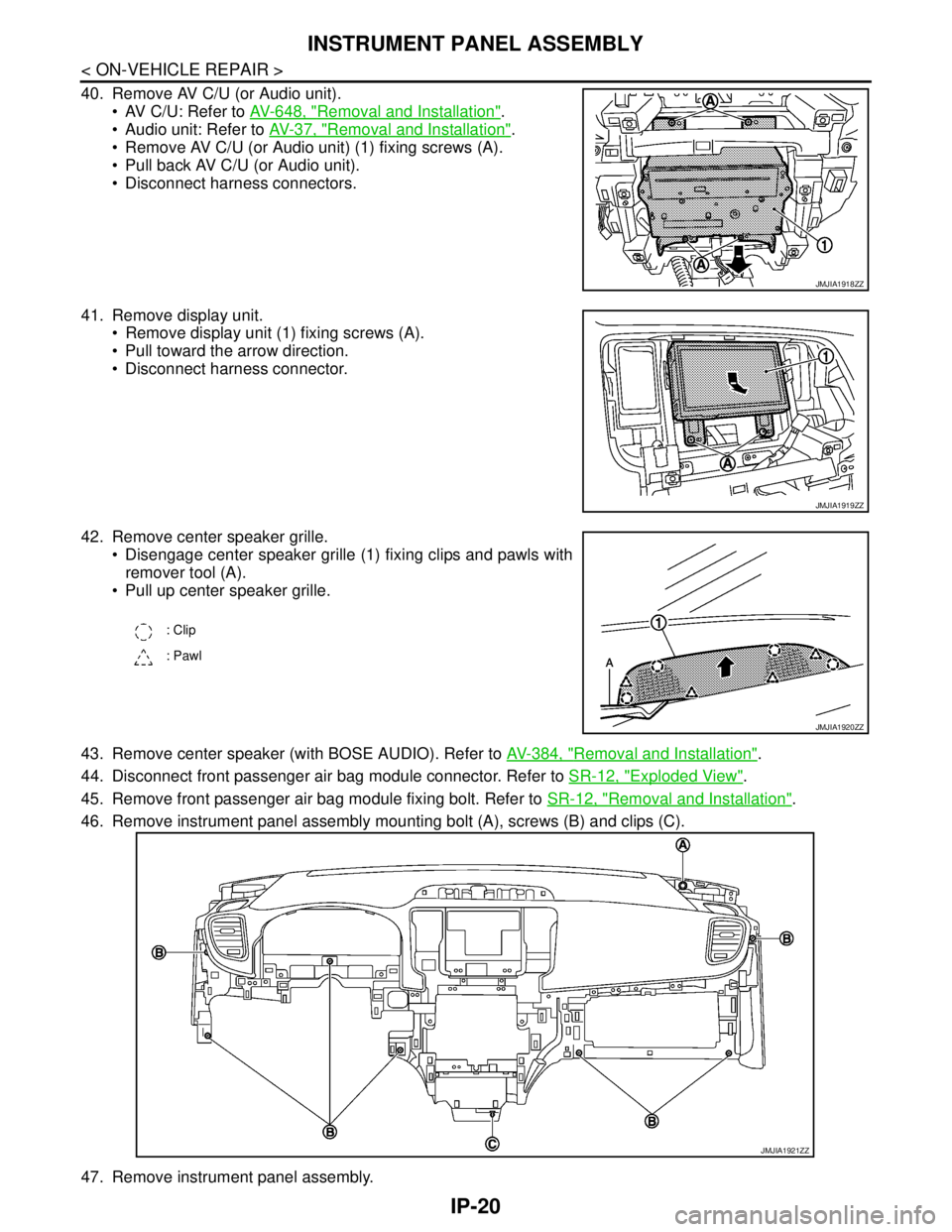
40. Remove AV C/U (or Audio unit).
AV C/U: Refer to AV-648, "
Removal and Installation".
Audio unit: Refer to AV-37, "
Removal and Installation".
Remove AV C/U (or Audio unit) (1) fixing screws (A).
Pull back AV C/U (or Audio unit).
Disconnect harness connectors.
41. Remove display unit.
Remove display unit (1) fixing screws (A).
Pull toward the arrow direction.
Disconnect harness connector.
42. Remove center speaker grille.
Disengage center speaker grille (1) fixing clips and pawls with
remover tool (A).
Pull up center speaker grille.
43. Remove center speaker (with BOSE AUDIO). Refer to AV-384, "
Removal and Installation".
44. Disconnect front passenger air bag module connector. Refer to SR-12, "
Exploded View".
45. Remove front passenger air bag module fixing bolt. Refer to SR-12, "
Removal and Installation".
46. Remove instrument panel assembly mounting bolt (A), screws (B) and clips (C).
47. Remove instrument panel assembly.
JMJIA1918ZZ
JMJIA1919ZZ
: Clip
: Pawl
JMJIA1920ZZ
JMJIA1921ZZ